
Kleenscan command line application and API wrapper library.

Project description
Kleenscan
Kleenscan is a Python library and command-line tool for scanning files and URLs using various antivirus engines provided by Kleenscan.
Installation
Install Kleenscan using pip3 or pip:
pip install kleenscan
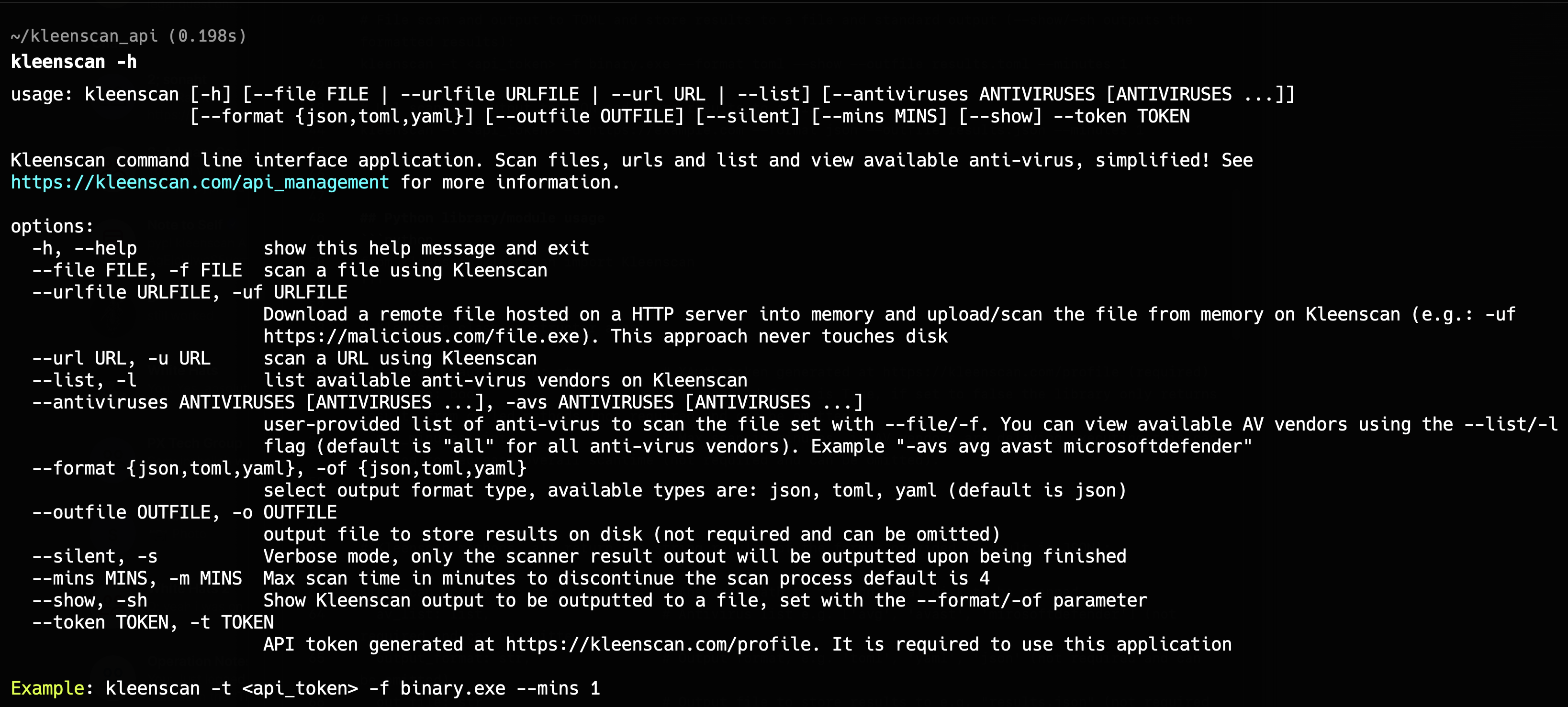
Command Line Usage
# Display help
kleenscan -h

# Scan a local file with a maximum wait time of 1 minute
kleenscan -t <api_token> -f binary.exe --minutes 1

# Scan a remote file with a maximum wait time of 1 minute
kleenscan -t <api_token> --urlfile https://example.com/binary.exe --minutes 1

# Scan a URL with a maximum wait time of 1 minute
kleenscan -t <api_token> -u https://example.com --minutes 1

# List available antivirus engines
kleenscan --token <api_token> -l

# Scan a local file using specified antivirus engines
kleenscan -t <api_token> -f binary.exe --minutes 1 --antiviruses avg microsoftdefender avast

# Scan a URL using specified antivirus engines
kleenscan -t <api_token> -u https://google.com --minutes 1 --antiviruses avg microsoftdefender avast

# Scan a file and output results in YAML format, suppressing real-time output
kleenscan -t <api_token> -f binary.exe --format yaml --silent --minutes 1

# Scan a file and output results in TOML format, storing results in a file and displaying them
kleenscan -t <api_token> -f binary.exe --format toml --show --outfile results.toml --minutes 1

# Scan a URL and output results in JSON format, storing results in a file
kleenscan -t <api_token> -u https://example.com --format json --outfile results.json --minutes 1
Python Library
Importing Kleenscan and errors
from kleenscan import Kleenscan
from kleenscan.lib.errors import *
Listing anti-virus engines, scanning URLs, local & remote files
# Initialize Kleenscan with API token, default verbose is True for outputting scan progress, and arbitary API objects retrieved.
ks = Kleenscan('<api_token>', verbose=False)

# Scan a local file
result = ks.scan('binary.exe')
print(result)

# Scan a remote file
result = ks.scan_urlfile('https://example.com/binary.exe')
print(result)

# Scan a URL
result = ks.scan_url('http://example.com')
print(result)

# List available antivirus engines
result = ks.av_list()
print(result)

# Scan a local file with specified antivirus engines
result = ks.scan('binary.exe', av_list=['avg', 'avast'])
print(result)

# Scan a local file and output in YAML format
result = ks.scan('binary.exe', output_format='yaml')
print(result)

# Scan a local file and store results in a YAML file
result = ks.scan('binary.exe', out_file='result.yaml', output_format='yaml')
print(result)

# Scan a URL and output in YAML format
result = ks.scan_url('http://example.com', output_format='yaml')
print(result)

# Scan a URL and store results in a YAML file
result = ks.scan_url('http://example.com', out_file='result.yaml', output_format='yaml')
print(result)

# List available antivirus engines and output in YAML format
result = ks.av_list(output_format='yaml')
print(result)

# List available antivirus engines and store results in a YAML file
result = ks.av_list(out_file='result.yaml', output_format='yaml')
print(result)
Catching low level API errors and parsing the JSON result
import json

# Initialize Kleenscan with API token, default verbose is True for outputting scan progress, and arbitary API objects retrieved.
ks = Kleenscan('<api_token>', verbose=False)

try:
  ks.scan('binary.exe', av_list=['non_existent_av_engine_to_invoke_error'])
except KsApiError as e:
  # Error example: {"success":false,"httpResponseCode":500,"message":"Antivirus strj does not exist.","data":null}
  api_data = json.loads(e.message)
  print(api_data['message']) # Outputs: "Antivirus non_existent_av_engine_to_invoke_error does not exist."
Putting things together
import json

TOKEN = '<insert_api_token_here>'

def get_av(api_data, av_quey):
    av_query = av_query.lower()
    for av_name, av_desc in api_data.items():
        if av_query in av_name or av_query in av_desc.lower():
            return av_name
    raise ValueError(f'{av_query} not found')

# Target AV query.
av_query = 'defender'

# Silent mode (useful for applications which don't want excessive output).
ks = Kleenscan(TOKEN, max_minutes=1, verbose=False)

# List available antivirus engines..
result = ks.av_list()
api_data = json.loads(result)

# Get AV engines for file scanning.
file_avs = api_data['data']['file']

# Get target antivirus name ID for file scanning.
av_name = get_av(file_avs, av_query)

# Scan file with target antivirus engine.
result = ks.scan('malware.ps1', av_list=[av_name])
print(result)

# Scan remote file with target antivirus engine and store result to YAML file.
result = ks.scan_urlfile('https://example.com/binary.exe', av_list=[av_name], out_file='out.yaml', output_format='yaml')
print(result)

# Get all url avs.
url_avs = api_data['data']['url']

# Get target antivirus name ID.
av_name = get_av(url_avs, av_query)

# Scan URL and output to a TOML string.
result = ks.scan_url('https://example.com', av_list=[av_name], output_format='toml')
print(result)
Documentation
Kleenscan Class Constructor
Kleenscan(x_auth_token: str,   # API token from https://kleenscan.com/profile (required)
 verbose: bool,                # Enable verbose output (not required and can be omitted, default is True)
 max_minutes: int              # Maximum scan duration in minutes (not required and can be omitted, must be a positive integer)
)
Raises:
KsInvalidTokenError: Invalidx_auth_tokenKsApiError: Low-level API request errorValueError: Rose when a invalid value is provided to any argument, even though it's the correct type (e.g.:max_minutes=-1)TypeError: Rose when a value of an invalid type is provided to any argument (e.g.:max_minutes='10')
Kleenscan Methods
scan_file: Scan a file locally on disk
Kleenscan.scan(file: str,            # Absolute path to file on local disk to be scanned.
 av_list: list,                      # Antivirus list e.g. ['avg', 'avast', 'mirosoftdefender'] (not required and can be omitted).
 output_format: str,                 # Output format, e.g. 'toml', 'yaml', 'json' (not required and can be omitted).
 out_file: str                       # Output file to store results to e.g. "results.json" (not required and can be omitted).
) -> str
Raises:
KsFileTooLargeError:fileexceeds size limitsKsFileEmptyError: Emptyfilecannot be scannedKsApiError: Low-level API request errorValueError: Rose when a invalid value is provided to any argument, even though it's the correct type (e.g.:av_list=[1,2,3]orout_file='')TypeError: Rose when a value of an invalid type is provided to any argument (e.g.:output_format=1)
scan_urlfile: Scan a file hosted on a URL
Kleenscan.scan_urlfile(url: str,     # URL/server hosting file to be scanned, include scheme, domain and port number if any (required).
 av_list: list,                      # Antivirus list e.g. ['avg', 'avast', 'mirosoftdefender'] (not required and can be omitted).
 output_format: str,                 # Output format, e.g. 'toml', 'yaml', 'json' (not required and can be omitted).
 out_file: str                       # Output file to store results to e.g. "results.json" (not required and can be omitted).
) -> str
Raises:
KsRemoteFileTooLargeError: Remote file exceeds size limitsKsGetFileInfoFailedError: Failed to get information on remote fileKsNoFileHostedError: No file hosted on the providedurlKsFileDownloadFailedError: Remote file cannot be downloadedKsDeadLinkError: Cannot connect to the providedurlKsApiError: Low-level API request errorValueError: Rose when a invalid value is provided to any argument, even though it's the correct type (e.g.:av_list=[1,2,3]orout_file='')TypeError: Rose when a value of an invalid type is provided to any argument (e.g.:output_format=1)
scan_url: Scan a URL
Kleenscan.scan_url(url: str,         # URL to be scanned, include scheme, domain and port number if any (required).
 av_list: list,                      # Antivirus list e.g. ['avg', 'avast', 'mirosoftdefender'] (not required and can be omitted).
 output_format: str,                 # Output format, e.g. 'toml', 'yaml', 'json' (not required and can be omitted).
 out_file: str                       # Output file to store results to e.g. "results.json" (not required and can be omitted).
) -> str
Raises:
KsApiError: Low-level API request error.ValueError: Rose when a invalid value is provided to any argument, even though it's the correct type (e.g.:av_list=[1,2,3]orout_file='')TypeError: Rose when a value of an invalid type is provided to any argument (e.g.:output_format=1)
av_list: List available antivirus engines
Kleenscan.av_list(output_format: str # Output format, e.g. 'toml', 'yaml', 'json' (not required and can be omitted).
 out_file: str                       # Output file to store results to e.g. "results.json" (not required and can be omitted).
) -> str
Raises:
KsApiError: Low-level API request errorValueError: Rose when a invalid value is provided to any argument, even though it's the correct type (e.g.:output_format=''orout_file='')TypeError: Rose when a value of an invalid type is provided to any argument (e.g.:output_format=1)
Release history Release notifications | RSS feed


Download files
Download the file for your platform. If you're not sure which to choose, learn more about installing packages.
Source Distribution
Built Distribution
Filter files by name, interpreter, ABI, and platform.
If you're not sure about the file name format, learn more about wheel file names.
Copy a direct link to the current filters
File details
Details for the file kleenscan-0.4.9.tar.gz.
File metadata
- Download URL: kleenscan-0.4.9.tar.gz
- Upload date:
- Size: 12.8 kB
- Tags: Source
- Uploaded using Trusted Publishing? No
- Uploaded via: twine/5.1.1 CPython/3.11.3
File hashes
| Algorithm | Hash digest | |
|---|---|---|
| SHA256 |
b109b18161cacd46111ca03a41ec9a2432cab08b12c5afccc2799e05d046755c
|
|
| MD5 |
bcd8a9b4c2bd2749e881e9849d64bc5e
|
|
| BLAKE2b-256 |
347e1d953d07bc408fa82f5cbf7ad6fa0ba35150b2a8b560312d0aef4bb67fa6
|
File details
Details for the file kleenscan-0.4.9-py3-none-any.whl.
File metadata
- Download URL: kleenscan-0.4.9-py3-none-any.whl
- Upload date:
- Size: 13.4 kB
- Tags: Python 3
- Uploaded using Trusted Publishing? No
- Uploaded via: twine/5.1.1 CPython/3.11.3
File hashes
| Algorithm | Hash digest | |
|---|---|---|
| SHA256 |
dcad2d1f6f1be0c4c07a7487569f55eeb265a7e62ad7e4da423b1c6257bf4b4e
|
|
| MD5 |
308f5527d95aa06288947dbbb2ea3fdf
|
|
| BLAKE2b-256 |
208d6d0537542b1d8f148b82e163291325bed74cecaef85648b85659876ca668
|






