
Kling CLI
A command-line tool for Kling AI Video Generation via AceDataCloud.
Get your Ace Data Cloud API key
- Open Ace Data Cloud → Applications. Sign in, or register an account first.
- Find General application. If it has not been created, choose Initialize General Application. A general key can use the services available to your account; a dedicated application's key is limited to its service. Check the required service/model access and current pricing.
- Copy the API Key from the application card, or open Keys / Manage Keys → Create to create a separate key for this integration. Give it a recognizable name so you can revoke or rotate it independently.
- When creating a key, review Expiration Time, Set Usage Limitation, and Allowed APIs. Enable only the restrictions you need, allow the operations you will call, then click Create and copy the token from the key list. Task lookup does not grant permission to submit a generation. Confirm the application's balance can cover your first request; any trial allowance is whatever your account currently displays.
- Copy only the token value, without quotation marks, spaces, or
Bearer. An API Key / API Token field expects this raw value; only a manually configured HTTPAuthorizationheader needs theBearerprefix. Aplatform-...account-management token cannot replace a generation API key.
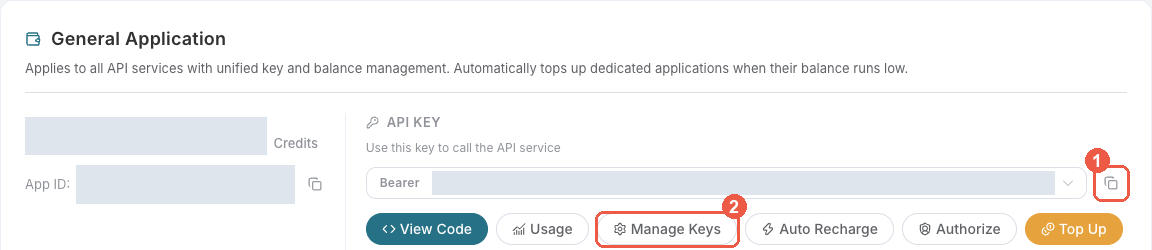
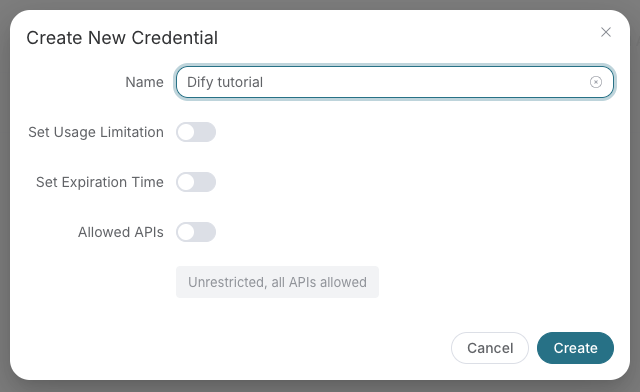
Save the key in the client's credential store or the environment variable shown below. Never put it in a prompt, shared workflow, screenshot, or Git commit. If authentication fails, check the full copied value, application/service access, expiration, usage limit, and balance before creating another key.
Installation
pip install kling-pro-cli
Usage
# Set your API token
export ACEDATACLOUD_API_TOKEN=your_token

# Generate a video from a text prompt
kling generate "A cinematic scene of a sunset over the ocean"

# Generate a video from a reference image
kling image-to-video "Animate this scene" --start-image-url https://example.com/photo.jpg

# Extend an existing video
kling extend --video-id abc123

# Generate a motion video from image + reference video
kling motion --image-url https://example.com/img.jpg --video-url https://example.com/ref.mp4

# Check task status
kling task abc123-def456

# Wait for a task to complete
kling wait abc123 --interval 5

# List available models
kling models

# Show configuration
kling config
Options
--token/ACEDATACLOUD_API_TOKEN— API token--json— Output raw JSON
Models
| Model | Notes |
|---|---|
| kling-v1 | Default model |
| kling-v1-6 | Version 1.6 |
| kling-v2-5-turbo | Version 2.5 Turbo |
| kling-v2-6 | Version 2.6 |
| kling-v3 | Version 3 (supports 4K mode) |
| kling-v3-omni | Version 3 Omni (supports 4K mode) |
| kling-o1 | Video O1 |
| kling-v2-master | Version 2 Master |
| kling-v2-1-master | Version 2.1 Master |
License
MIT
Native video and commerce
kling turbo --request-file request.json accepts {"prompt":"Waves at sunset","duration":7}. V3 Turbo supports std 720p/pro 1080p and integer durations 3–15 seconds; native audio is included and cannot be disabled.
kling storyboard --request-file request.json supports V3/V3 Omni automatic or custom multishot generation. For custom shots use shot_type="customize", total duration, and multi_prompt with 1–6 consecutive indices and durations summing to the total.
Use apparel, goods-studio, video-commerce and virtual-try-on with --request-file for structured contents/settings. Product studio requires ref_image and goods_title, an aspect ratio and duration 15/30/60. Try-on requires product_image and person_image URLs. Creator video needs one avatar and a speech_script. Commands output JSON and submit asynchronously by default; use existing task/wait commands for final delivery, or set async=false in the request. Billing follows the selected tier and actual output duration or image count.
Reference inputs
Use element_list and voice_list only with already valid platform references and the supported model combinations in the current backend guide. Standalone asset creation and management are not published.
O1 and Omni reference-video billing
For generate or image-to-video with kling-o1 or kling-v3-omni, pass at most one reference video through --video-list and use --no-generate-audio. Reference videos use a separate billing tier: 1.202 Credits per billed second in std, or 1.602 Credits per billed second in pro. Reference images (--image-list, start/end frames) alone do not trigger this tier.
For a 5-second kling-o1 output:
| Mode | Without reference video | With reference video (5 billed seconds) |
|---|---|---|
| std | 4.005 Credits | 6.010 Credits |
| pro | 5.340 Credits | 8.010 Credits |
With refer_type=base (the default), editing may follow the reference video's length, and billing uses actual output duration rounded to whole seconds (5.708 seconds bills as 6; 5.041 bills as 5). With refer_type=feature, billing uses the requested --duration. Use --json to inspect usage.reference_video_seconds for final billed seconds; an estimate at submission can differ from the final charge. Do not submit this response field as a request parameter.
kling generate 'Restyle <<<video_1>>> as a watercolor animation' \
  --model kling-o1 --mode std --no-generate-audio \
  --video-list '[{"video_url":"https://example.com/ref.mp4","refer_type":"base"}]' --json
Reference videos cannot be combined with audio generation. base references also cannot be combined with start/end frames; use feature for compatible frame-based requests.
1 maintainer

Metadata
1 maintainer
Release files for kling-pro-cli 2026.10.24.0
For a detailed explanation of source distributions (sdists) and built distributions (wheels), please see the package formats documentation.
Source distribution (sdist)
| File | Size | Uploaded | Provenance | Actions |
|---|---|---|---|---|
| kling_pro_cli-2026.10.24.0.tar.gz | 22.3 kB | Without provenance | Details for kling_pro_cli-2026.10.24.0.tar.gz |
Built distribution (wheel)
| File | Interpreter | ABI | Platform | Actions Reset |
|---|---|---|---|---|
| kling_pro_cli-2026.10.24.0-py3-none-any.whl | Python 3 | none | any | Details for kling_pro_cli-2026.10.24.0-py3-none-any.whl |
Total release size: 46.6 kB
Release files / kling_pro_cli-2026.10.24.0.tar.gz
| Download URL | kling_pro_cli-2026.10.24.0.tar.gz |
|---|---|
| Size | 22.3 kB |
| Tags | Source |
|
SHA-256 checksum How to use checksums |
06c05a681a68b9419987992bf3c456c9992ac82db67ce1fc334428a3a801fd3a
|
|
BLAKE2b-256 checksum How to use checksums |
4f0e5698f5bb667e5c1787c091b6e1a97b285c48290efb12412aa2a3cfb7a38c
|
| Upload date | |
|
Uploaded using Trusted Publishing? What is trusted publishing? |
No |
| Uploaded via |
twine/7.0.0 CPython/3.12.3
|
Release files / kling_pro_cli-2026.10.24.0-py3-none-any.whl
| Download URL | kling_pro_cli-2026.10.24.0-py3-none-any.whl |
|---|---|
| Size | 24.2 kB |
| Tags | Python 3 |
|
SHA-256 checksum How to use checksums |
70d1f3bca49f5a6fe80687c7e7ef29aa0ea3502c1871f9bfd8d5c5fc3d0cba2c
|
|
BLAKE2b-256 checksum How to use checksums |
eaab45c9596de90fbea6e620e194fbfa16fc5894b9dddd14e3bab3a3d5bee3f4
|
| Upload date | |
|
Uploaded using Trusted Publishing? What is trusted publishing? |
No |
| Uploaded via |
twine/7.0.0 CPython/3.12.3
|
Security for kling-pro-cli 2026.10.24.0
Provenance
Provenance describes where a file came from. On PyPI, provenance is shared via attestations, which provide a verifiable record of the build or publishing details. View details, limitations and caveats.
No provenance found
None of the files in this release were uploaded with provenance metadata.
A note on package security
PyPI is a repository for distributing packages, not a service for auditing them. While third-party security researchers and our staff do their best to detect and remove malicious packages, PyPI cannot guarantee the quality, security or suitability of any given package.
To learn more about protecting yourself from malicious actors, visit our package security documentation.














