

KMLB
Plain Python KML Builder.


KMLB is a dependency-free Python library for writing Google Earth KML files. Easily create points, lines, polygons, styles, and folders.
Full documentation at kmlb.dev.
Installation
pip install kmlb
Requires Python 3.9+. No third-party dependencies.
Quick example
import kmlb

# Define a reusable style and a styled point
style = kmlb.point_style("city", color=("#ff8800", 100), scale=1.4)
boston = kmlb.point([-71.0589, 42.3601], "Boston", style_to_use="city")

# Assemble a document and write it to disk
kmlb.kml("My Places", [boston], styles=[style], path="my_places.kml")
Open my_places.kml in Google Earth to view it.
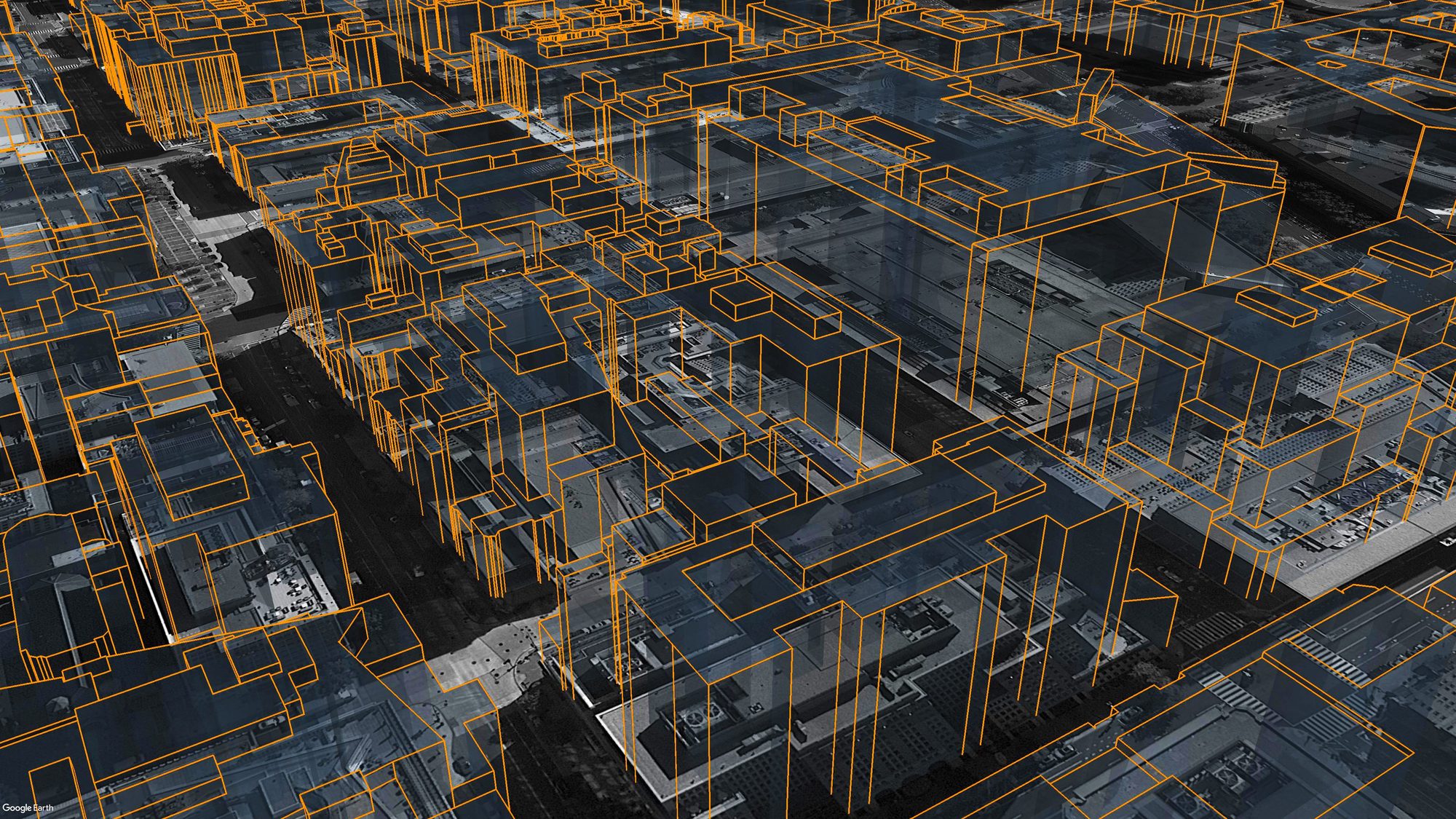
Building footprints extruded into 3D and viewed in Google Earth, built with kmlb polygons.
Modules
| Module | Description |
|---|---|
kmlb |
Build points, POI/address searches, lines, polygons (with holes), point/line/polygon styles, folders, camera angles, and KML documents; geodesic distance, bearing, and destination |
kmlb.shapes |
Composite geometry: 2D shapes (circle, ellipse, rectangle, ngon, annulus, arc, wedge, corridor, concentric_rings, grid), 3D solids (cylinder, cone, dome, sphere), and fresnel_zone (RF link) |
kmlb.colors / kmlb.icons |
Named color presets and built-in marker shorthands for styling, so color="red" and icon="triangle" instead of hex tuples and full icon URLs |
The core builders are re-exported at the top level, so kmlb.point(...),
kmlb.kml(...), and friends work directly. See the
reference for every function.
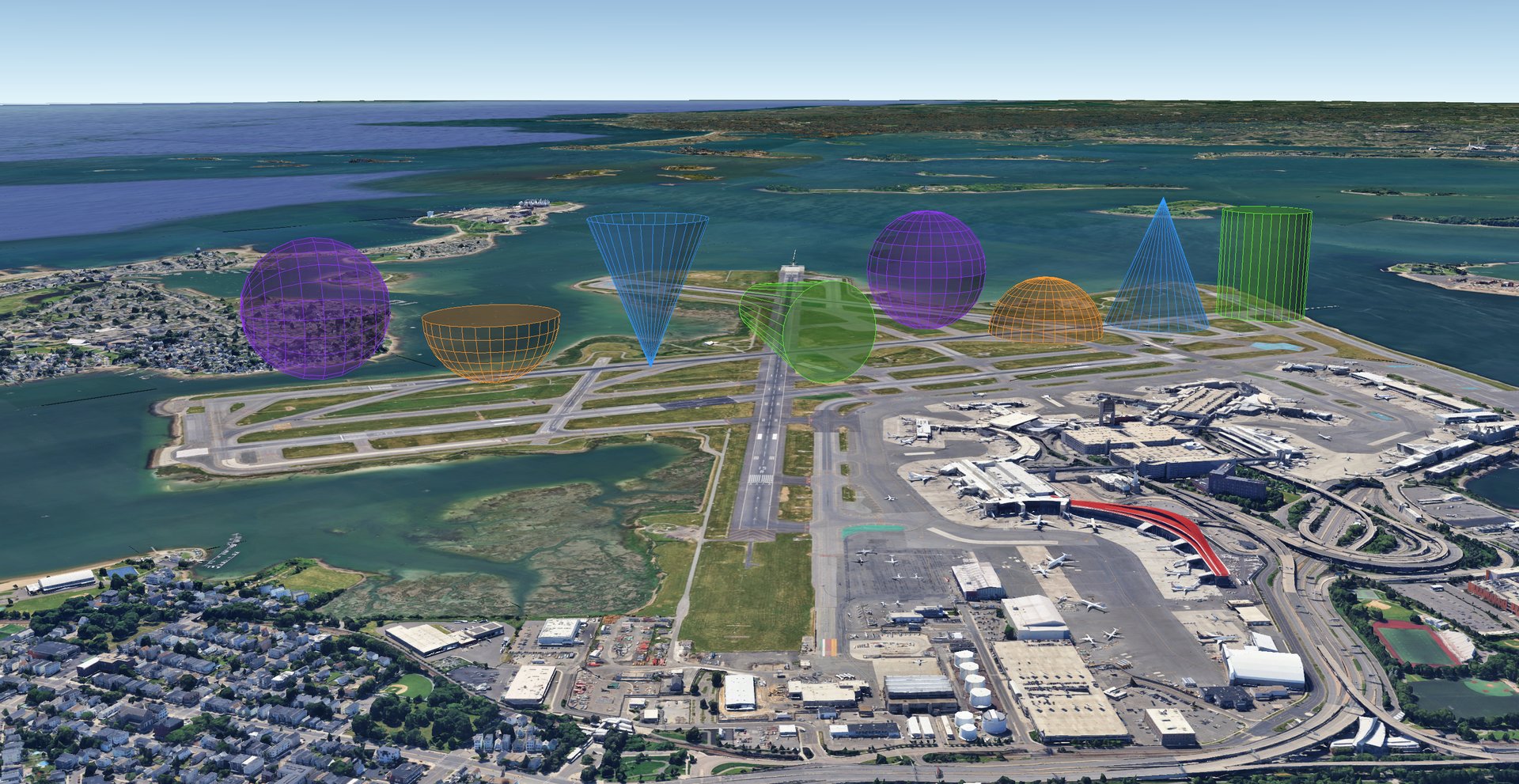
3D solids (cylinder, cone, dome, sphere) placed over Boston, built with kmlb.shapes.
Example use
Writing a basic KML file
import kmlb

# CREATE A POINT
fountain = kmlb.point([-71.051904, 42.358988, 0], "Rings Fountain")

# WRITE KML FILE
kmlb.kml(
    "Boston Fountain",          # KML name
    [fountain],                 # Features
    path="folder/boston_fountain.kml"  # Export path
)
Mapping a POI or an address
import kmlb

# CREATE A POINT FROM A POI
bos_common = kmlb.search_poi("Boston Common, Boston, MA")

# CREATE A POINT FROM AN ADDRESS
ss = kmlb.search_poi("700 Atlantic Avenue, Boston, MA", name="South Station")

# WRITE KML FILE
kmlb.kml(
    "Boston Landmarks",          # KML name
    [bos_common, ss],            # Features
    path="folder/boston_landmarks.kml"  # Export path
)
Creating a customized KML file
import kmlb

# DEFINE A STYLE
pt_style = kmlb.point_style(
    "Red Triangle",                # Point style name
    icon="triangle",               # Icon (built-in shorthand)
    color=("#ff0000", 100),        # Icon color (hex, opacity)
    scale=1.0,                     # Icon scale
    label_color=("#ffffff", 100),  # Label color (hex, opacity)
    label_size=1.0,                # Label size
)

# CREATE A POINT
clock_tower = kmlb.point(
    [-71.053568, 42.359053, 151],                   # Coordinates
    "Custom House Tower",                           # Name
    headers=["City", "Building", "Height (M)"],     # Attribute titles
    attrs=["Boston", "Custom House Tower", "151"],  # Attributes
    z_mode="RTG",                                   # Relative To Ground
    style_to_use="Red Triangle",                    # Name of point style defined earlier
)

# WRITE KML FILE
kmlb.kml(
    "Boston Clock Tower",                     # KML name
    [clock_tower],                            # Features to include
    path="folder/boston_clock_tower.kml",     # Export path
    desc="Created with KMLB Python Package",  # KML description
    styles=[pt_style],                        # Styles to include
)
Functions
| Function | What it does |
|---|---|
| Features | |
point |
Point placemark from a [lon, lat] (or [lon, lat, elev]) coordinate. |
search_poi |
Placemark located by an address or search string, geocoded by Google Earth. |
street_view |
Point placemark built from a Google Maps Street View URL that opens that panorama. |
line |
Line or polyline from an ordered list of coordinates. |
polygon |
Polygon from one or more rings (first ring outer, the rest holes). |
| Styles | |
point_style |
Reusable point style: icon, color, scale, and label. |
line_style |
Reusable line style: color and width. |
polygon_style |
Reusable polygon style: fill and outline. |
| Geodesy (WGS-84) | |
distance |
Distance in meters between two coordinates. |
bearing |
Initial bearing in degrees between two coordinates. |
destination |
Coordinate reached from an origin along a bearing and distance. |
| Shapes | |
shapes.circle |
Circle polygon of a given radius around a point. |
shapes.ellipse |
Ellipse polygon from two semi-axes and an orientation. |
shapes.rectangle |
Rectangle polygon centered on a point, rotatable. |
shapes.ngon |
Regular polygon (triangle, pentagon, hexagon, ...) around a point. |
shapes.annulus |
Filled ring polygon (an outer circle with a hole). |
shapes.arc |
Range-of-reach arc drawn as a line. |
shapes.wedge |
Pie-wedge (circular sector) polygon, useful for cellular coverage sectors. |
shapes.corridor |
Even-width buffered polygon around a path. |
shapes.concentric_rings |
Folder of range-ring outlines from a list or a start/interval/count series. |
shapes.grid |
Folder of square or hexagonal grid cells. |
shapes.fresnel_zone |
3D Fresnel-zone tube plus line-of-sight path for a point-to-point radio link. |
shapes.cylinder |
3D cylinder volume; orientable along any axis. |
shapes.cone |
3D cone/beam; apex or base anchored, orientable along any axis. |
shapes.dome |
3D hemisphere dome (or bowl when inverted). |
shapes.sphere |
3D sphere; anchor by center or a pole. |
| Views, documents, and links | |
look_at |
Camera angle and view for a feature or document. |
camera |
Camera viewpoint (eye position and aim) for a feature or document. |
folder |
Group features and other folders together. |
kml |
Assemble features and styles into a KML document and write it to disk. |
networklink_kml |
Network-link KML that refreshes from a hosted URL. |
| Color and icon helpers | |
colors |
Named color palette (colors.RED, or color="red"). |
icons |
Built-in marker shorthands (icon="triangle", "red-paddle"). |
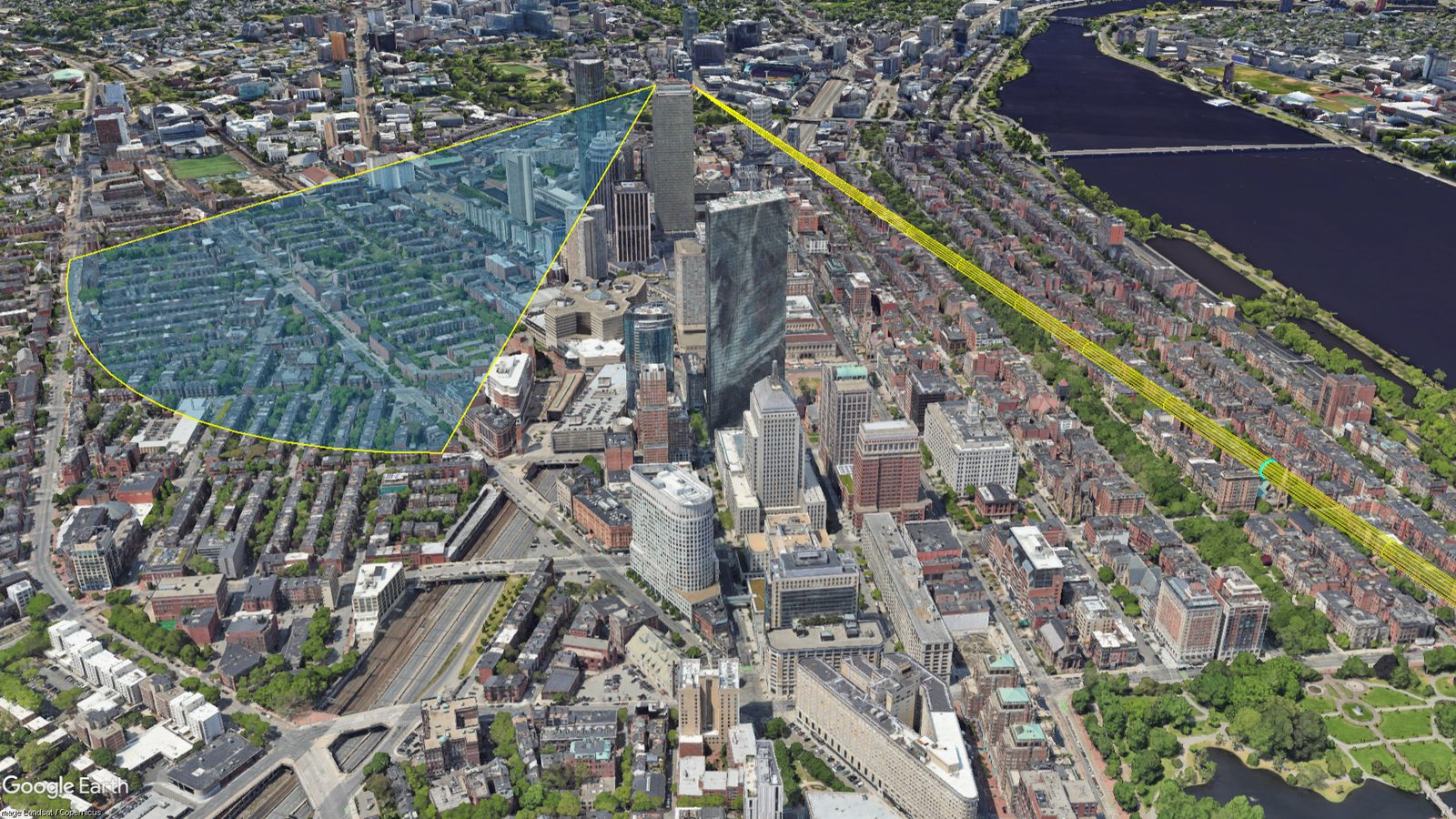
A Fresnel-zone link tube and antenna coverage wedges, built with kmlb.shapes.
Citing KMLB
Using KMLB in research or published work? Citing is never required, but it's always appreciated. Even a quick mention helps others discover KMLB and shows where it's making a difference. APA, Chicago, and BibTeX formats, kept current with each release, are at kmlb.dev/docs/cite.
@software{KMLB,
  author  = {Mros, III, Henry F.},
  title   = {KMLB: KML Builder},
  year    = {2026},
  version = {0.3.0},
  url     = {https://pypi.org/project/kmlb/}
}
License
MIT. Free to use, modify, and redistribute, including in commercial or proprietary tools, as long as the copyright notice and license text are retained.
1 maintainer

Download files
Download the file for your platform. If you're not sure which to choose, learn more about installing packages.
Source Distribution
Built Distribution
Filter files by name, interpreter, ABI, and platform.
If you're not sure about the file name format, learn more about wheel file names.
Copy a direct link to the current filters
File details
Details for the file kmlb-0.3.0.post1.tar.gz.
File metadata
- Download URL: kmlb-0.3.0.post1.tar.gz
- Upload date:
- Size: 52.2 kB
- Tags: Source
- Uploaded using Trusted Publishing? No
- Uploaded via:
Hatch/1.17.0 {"ci":null,"cpu":"AMD64","implementation":{"name":"CPython","version":"3.14.5"},"installer":{"name":"hatch","version":"1.17.0"},"openssl_version":"OpenSSL 3.0.20 7 Apr 2026","python":"3.14.5","system":{"name":"Windows","release":"11"}} HTTPX2/2.4.0
File hashes
| Algorithm | Hash digest | |
|---|---|---|
| SHA256 |
fa920f87c8e6e456697ebaec1eb7dae5f5997ee5154a9057059c51d2f2c09fdb
|
|
| MD5 |
f66400162e65908454ea9a86b853e092
|
|
| BLAKE2b-256 |
8fd41524211a777b525c7774d6920afac10865546b54d288777f43d6e9dc8487
|
File details
Details for the file kmlb-0.3.0.post1-py3-none-any.whl.
File metadata
- Download URL: kmlb-0.3.0.post1-py3-none-any.whl
- Upload date:
- Size: 37.2 kB
- Tags: Python 3
- Uploaded using Trusted Publishing? No
- Uploaded via:
Hatch/1.17.0 {"ci":null,"cpu":"AMD64","implementation":{"name":"CPython","version":"3.14.5"},"installer":{"name":"hatch","version":"1.17.0"},"openssl_version":"OpenSSL 3.0.20 7 Apr 2026","python":"3.14.5","system":{"name":"Windows","release":"11"}} HTTPX2/2.4.0
File hashes
| Algorithm | Hash digest | |
|---|---|---|
| SHA256 |
3f6ce3902cfae5d25e80a0687896146986ca22b3bb995ae09bbdb3b070313b7c
|
|
| MD5 |
bfc57139dec62942b8e516b432d84244
|
|
| BLAKE2b-256 |
4d9216b8fc804e80f9ffc50cfdbd6ae33e195b780bfd3a0a20dd6082d15a2e32
|







