
Google Colab Tutorial
Please follow the tutorial on using KnAC in text-clustering and fil in the survey at the end: Colab Notebook
Knowledge Augmented Clustering (KnAC)
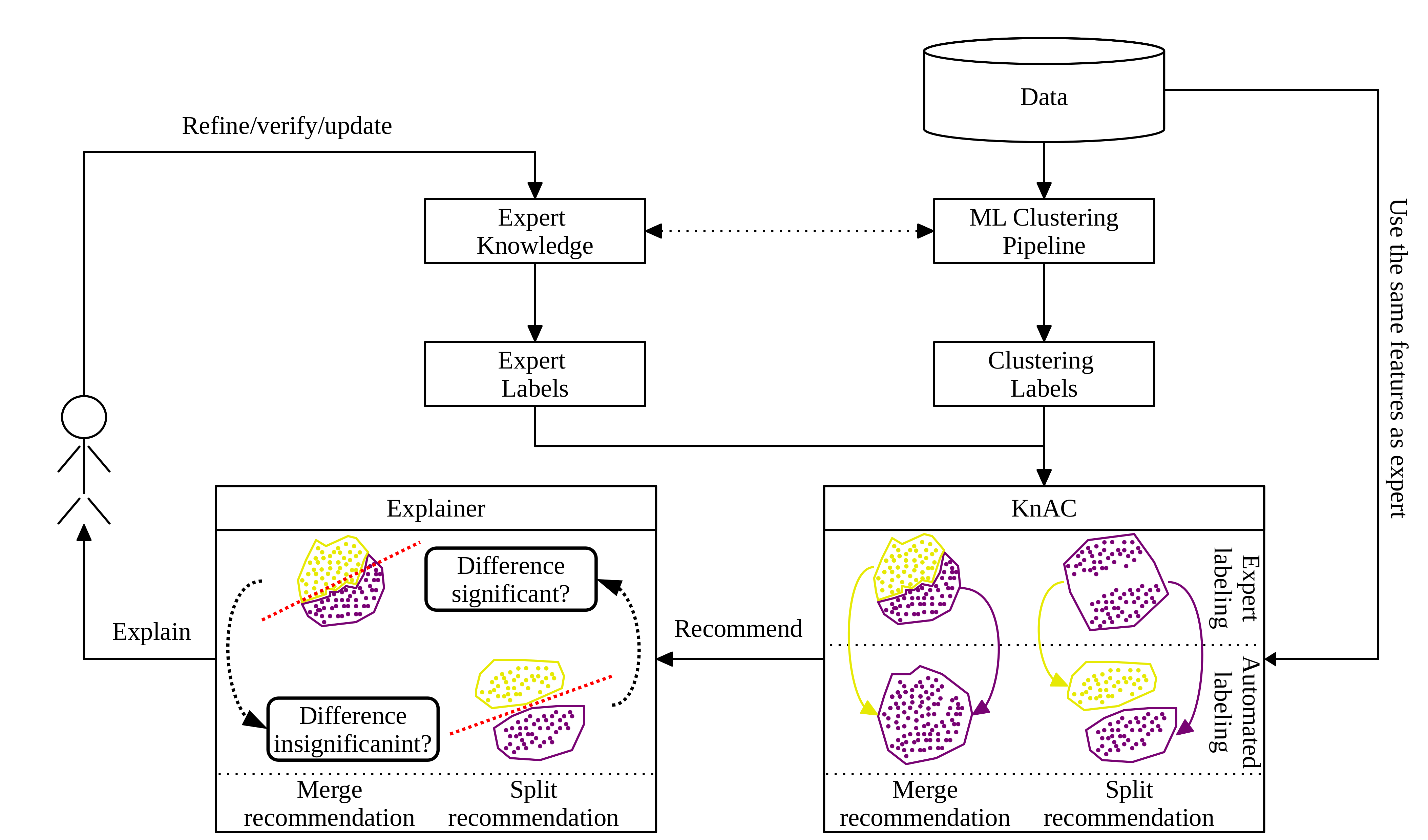
KnAC is a toolk for expert knowledge extension with a usage of automatic clustering algorithms. It allows to refine expert-based labeling with splits and merges recommendations of expert labeling augmented with explanations. The explanations were formulated as rules and therefore can be easily interpreted incorporated with expert knowledge.
Possible integration witth CLAMP and LUX is currently under development.
The overall workflow for KnAC is presented in Figure below:
Install
KnAC can be installed from either PyPI or directly from source code GitHub
To install form PyPI:
pip install knac-toolkit
To install from source:
git clone  https://github.com/sbobek/knac
cd knac
pip install .
After that you can install and run jupyter lab and anvigate to examples direcotry to run notebooks.
Splitting example
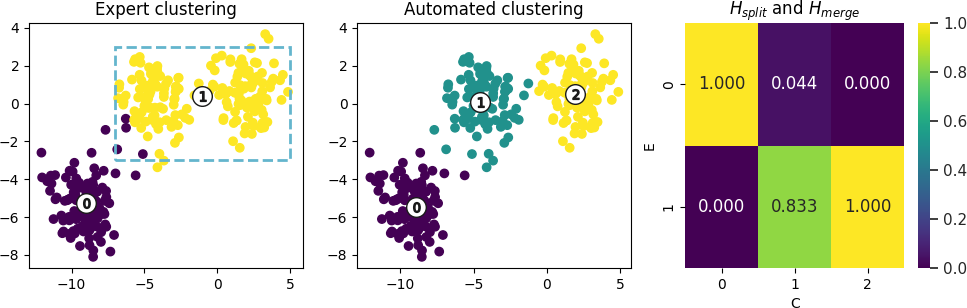
Synthetic datasets with clusters to split is presented below. Columns in the figure represent clustering performed with expert knowledge, automated clustering, and $H^{split}$ matrix. In this example it is visible that expert knowledge clustering defined cluster 1 which should in fact be merged according to wht is seen in the data.
For such a cese we will get following KnAC recommendations:
knac_splits = KnacSplits(confidence_threshold=0.9,silhouette_weight=0.2)
knac_splits_recoms = knac_splits.fit_transform(confusion_matrix,
                                              y=None, data=data,
                                              labels_automatic=data['Automatic_Clusters'].astype(str),
                                              labels_expert=XX2['Expert_Clusters'])

Expert_Clusters
1    [(1, 2), 0.8332849823568992]
Which should be read as: Split expert cluster 1 into clusters 1 and 2 with confidence 0.83
For this recommendation, following justifications describing differences between expert clusters to split, showing that the most important difference between the clusters is in the x1 variable and its value around 0.9, which is consisten with what we can see in the plot above.
justify_splits_tree(expert_to_split=expert_to_split,
               split_recoms=split_recoms,
               data=data,
               features=features,
               target_automatic='Automatic_Clusters')

['if (x1 > -0.903) then class: 2 (proba: 100.0%) | based on 100 samples',
 'if (x1 <= -0.903) then class: 1 (proba: 100.0%) | based on 100 samples']
Merging example
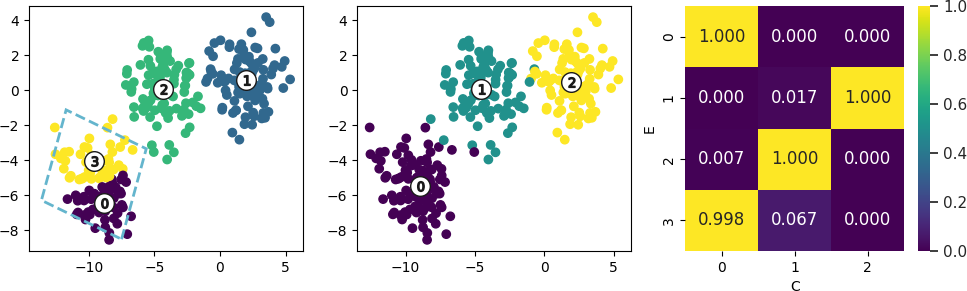
Synthetic datasets with clusters to merge is presented below. Columns in the figure represent clustering performed with expert knowledge, automated clustering, and $H^{merge}$ matrix. In this example it is visible that expert knowledge clustering defined cluster 0 and 3 which should in fact be merged according to wht is seen in the data.
For such a cese we will get following KnAC recommendations:
knac1_merges = KnacMerges(confidence_threshold=0.9,
                    metric='centroids_link',
                    metric_weight=0.2)
knac_merges_recoms=knac1_merges.fit_transform(confusion_matrix,data=data[['x1','x2']].values,labels_expert=data['Expert_Clusters'])

C1	C2	similarity
0	3	0.958983
Which should be read as: automatically discovered clusters C1 and C2 should be merged, as the similiarity (begin combinantion of link metric choosen and similarity indistribution between expret clusters) is equal to 0.93.
For this recommendation, following justifications describing differences between expert clusters to merge, showing that the most important difference between the clusters to merge is in the x2 variable and its value around -5. It is the xpert role to decide if this difference is significant taking into account the domain knowledge (in this case one can assume that the difference describe by the rule sis not relevant for distinguising two separate clusters based on such condition).
justify_merges_tree(merge_recoms=merge_recoms, data=data, features=features, target_expert='Expert_Clusters')

['if (x2 <= -5.065) then class: 0 (proba: 98.21%) | based on 56 samples',
 'if (x2 > -5.065) then class: 3 (proba: 97.78%) | based on 45 samples']
Cite this work
@Article{bobek2022knac,
  author="Bobek, Szymon
  and Kuk, Micha{\l}
  and Brzegowski, Jakub
  and Brzychczy, Edyta
  and Nalepa, Grzegorz J.",
  title="KnAC: an approach for enhancing cluster analysis with background knowledge and explanations",
  journal="Applied Intelligence",
  year="2022",
  month="Nov",
  day="23",
  issn="1573-7497",
  doi="10.1007/s10489-022-04310-9",
  url="https://doi.org/10.1007/s10489-022-04310-9"
}
1 maintainer

Metadata
1 maintainer
Release files for knac-toolkit 1.0.2
For a detailed explanation of source distributions (sdists) and built distributions (wheels), please see the package formats documentation.
Source distribution (sdist)
| File | Size | Uploaded | Provenance | Actions |
|---|---|---|---|---|
| knac-toolkit-1.0.2.tar.gz | 10.7 kB | Without provenance | Details for knac-toolkit-1.0.2.tar.gz |
Built distribution (wheel)
| File | Interpreter | ABI | Platform | Actions Reset |
|---|---|---|---|---|
| knac_toolkit-1.0.2-py3-none-any.whl | Python 3 | none | any | Details for knac_toolkit-1.0.2-py3-none-any.whl |
Total release size: 19.6 kB
Release files / knac-toolkit-1.0.2.tar.gz
| Download URL | knac-toolkit-1.0.2.tar.gz |
|---|---|
| Size | 10.7 kB |
| Tags | Source |
|
SHA-256 checksum How to use checksums |
e9475ff21ab756321da573cdfc4bfc17f48f141812785dec1d6ea9eff6ea758a
|
|
BLAKE2b-256 checksum How to use checksums |
f88d0f3c9bc364747fab481e61e4c5679a8b3f51775bd1873e536ccdd5bd8050
|
| Upload date | |
|
Uploaded using Trusted Publishing? What is trusted publishing? |
No |
| Uploaded via |
twine/5.0.0 CPython/3.11.8
|
Release files / knac_toolkit-1.0.2-py3-none-any.whl
| Download URL | knac_toolkit-1.0.2-py3-none-any.whl |
|---|---|
| Size | 8.9 kB |
| Tags | Python 3 |
|
SHA-256 checksum How to use checksums |
ae154d5ceb7a8173ba3db49e6b166949e9c0b69a379037cbe8d62b2f014b9266
|
|
BLAKE2b-256 checksum How to use checksums |
d7ae028d91cdad8f64d96311a335d2d23d0d8e86aaf16a8eae0584b052d65fe9
|
| Upload date | |
|
Uploaded using Trusted Publishing? What is trusted publishing? |
No |
| Uploaded via |
twine/5.0.0 CPython/3.11.8
|
Security for knac-toolkit 1.0.2
Provenance
Provenance describes where a file came from. On PyPI, provenance is shared via attestations, which provide a verifiable record of the build or publishing details. View details, limitations and caveats.
No provenance found
None of the files in this release were uploaded with provenance metadata.
A note on package security
PyPI is a repository for distributing packages, not a service for auditing them. While third-party security researchers and our staff do their best to detect and remove malicious packages, PyPI cannot guarantee the quality, security or suitability of any given package.
To learn more about protecting yourself from malicious actors, visit our package security documentation.














