
knbn
Kanban, but terminal-native and CSV/Markdown-based.
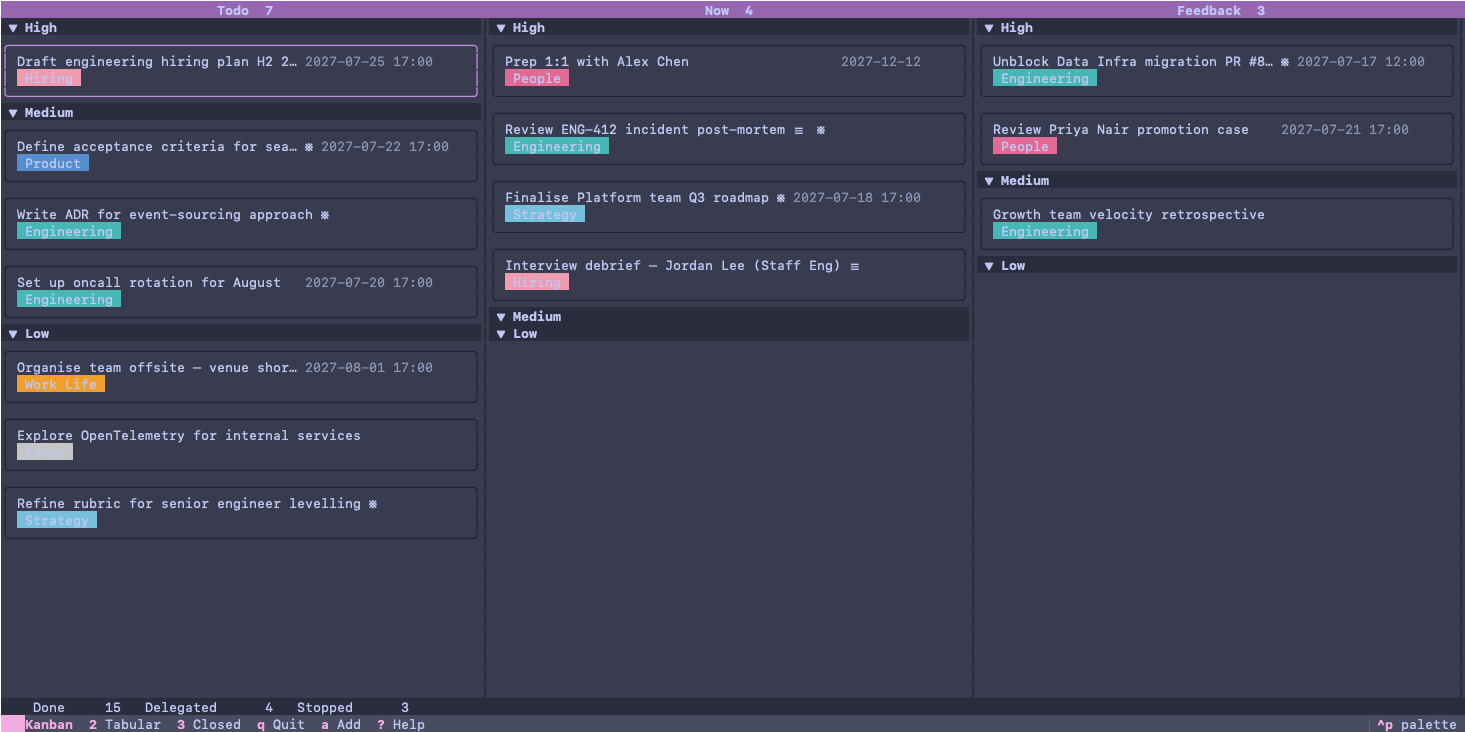
Features
- Terminal-native Kanban board — full task lifecycle (capture, triage, close) without leaving the terminal; no browser required
- Flat-file CSV and Markdown storage — tasks live in a single
~/.knbn/folder; human- and agent-readable, version-control friendly, no database - Agent-support natively — use it as a task tracker for your agents; point agents to your storage folder, which is self-explanatory via its
AGENTS.md - Markdown notes per task — attach a freeform note to any task, opened in your
$EDITOR - Rich TUI powered by Textual — interactive board with keyboard navigation, modal forms, and live filtering
- Three views in one tool — Kanban board (3×3 grid), tabular active-task list, and a "Done this week" archive view
- Configurable statuses and priorities — define your own workflow stages and priority levels to match how you actually work
- Configurable categories — tag tasks with custom categories and add new ones on the fly
- Fast CLI capture —
knbn add --fast --title "..."adds a task without opening the TUI; pipe-friendly for scripting - Zero external services — no account, no sync server, no cloud dependency; your data stays local and offline
- Pure Python, uv-managed — install with a single uv command; typed, linted, and tested; easy to fork or extend
Installation
Requires Python 3.10+.
The default data directory is ~/.knbn. Override with the KNBN_DATA_DIR environment variable.
From PyPI
pip install knbn
# or
uv tool install knbn
Then launch the board:
knbn
From source
Requires uv.
git clone https://github.com/BastiTee/knbn.git
cd knbn
make
uv run knbn
To create a short alias, add this to your shell rc:
source /path/to/cloned/folder/knbn-rc.sh
Then k launches the board. See knbn-rc.sh for details.
Data storage
Everything lives in one directory (default ~/.knbn):
| File / Dir | Description |
|---|---|
tasks.csv |
All tasks. Canonical 12-column CSV — use the CLI, do not edit manually. |
settings.json |
Board configuration (statuses, priorities, categories) and app settings. |
notes/<id>.md |
Freeform Markdown notes attached to a task, keyed by task ID. |
AGENTS.md |
Agent orientation file written on first init — edit freely to add project context. |
You don't edit tasks.csv directly — always go through the CLI. The CSV is the canonical store but the CLI owns writes to it.
Using a non-default data directory
To use a different directory — for example a project-embedded board like __knbn__/ — set the KNBN_DATA_DIR environment variable before any command:
export KNBN_DATA_DIR=/path/to/your/board

knbn list --json      # operates on that directory
knbn add --fast --title "My task" --json
Verify the active directory at any time:
knbn config # output includes "data_dir"
When working as an agent, always confirm data_dir in knbn config output matches the folder containing tasks.csv before issuing write commands.
Task fields
Every task has exactly 12 fields:
| Field | CSV column | Description |
|---|---|---|
id |
ID |
Unique 8-character hex identifier (e.g. a1b2c3d4). Assigned automatically. Use to reference tasks in edit and delete. |
title |
Name |
Short task label (free text). |
status |
Status |
Workflow state. See knbn config for configured values. Defaults: Todo, Now, Feedback, Done, Delegated, Stopped. |
priority |
Priority |
Urgency level. See knbn config for configured values. Defaults: High, Medium, Low. |
category |
Category |
Topic or area. See knbn config for configured values and colors. |
due |
DateTimeDue |
Optional due date — YYYY-MM-DD or YYYY-MM-DD HH:MM. Empty when not set. |
key_resource |
KeyResource |
Optional URL for the primary reference (ticket, doc, thread). |
free_text_1 |
FreeText1 |
Optional free-text field. Label configured in settings.json (default: Feedback From). |
free_text_2 |
FreeText2 |
Optional free-text field. Label configured in settings.json (default: Delegated To). |
free_text_3 |
FreeText3 |
Optional free-text field. Label configured in settings.json (not set by default). |
date_created |
DateTimeCreated |
ISO datetime of creation (YYYY-MM-DD HH:MM). Set automatically; never edited. |
date_modified |
DateTimeEdited |
ISO datetime of last update (YYYY-MM-DD HH:MM). Updated automatically on every save. |
CLI reference
All commands support --help.
knbn / knbn board
Launch the interactive Kanban board (TUI).
knbn
knbn board
knbn init
Initialise the data directory. Creates tasks.csv, notes/, settings.json, and AGENTS.md if they don't exist. Runs a setup wizard on a blank slate.
knbn init
knbn init /path/to/custom/dir
knbn add
Add a new task. Interactive by default; use flags for scripting.
# Fully interactive
knbn add

# Non-interactive with all defaults — returns confirmation
knbn add --fast --title "My task"

# Non-interactive — returns created task as JSON (includes assigned ID)
knbn add --fast --title "My task" --json
| Flag | Description |
|---|---|
--title TEXT / -t |
Task title (skips title prompt) |
--fast / -f |
Use all defaults; skip all optional prompts |
--status-default |
Use the first configured active status |
--priority-default |
Use the middle priority |
--category-default |
Use the last configured category |
--no-resource |
Skip key resource prompt |
--no-free-text |
Skip free-text field prompts |
--json |
Print created task as JSON instead of confirmation text |
knbn list
List tasks. Defaults to active tasks only; combine filters freely.
# Human-readable table of active tasks
knbn list

# Include Done / Delegated / Stopped
knbn list --all

# Filter — multiple values for the same flag are OR-ed; different flags are AND-ed
knbn list --status Now
knbn list --status Now --status Feedback
knbn list --status Now --priority High
knbn list --category Engineering

# Date filter — tasks modified on or after DATE (inclusive)
knbn list --after 2026-09-01
knbn list --after "2026-09-01 14:00"

# JSON output (includes task IDs — required for edit / delete)
knbn list --json
knbn list --all --after 2026-09-01 --json
| Flag | Description |
|---|---|
--status TEXT / -s |
Filter by status (repeatable) |
--priority TEXT / -p |
Filter by priority (repeatable) |
--category TEXT / -c |
Filter by category (repeatable) |
--all |
Include terminal-status tasks (Done, Delegated, Stopped) |
--after DATE |
Show only tasks modified on or after DATE (YYYY-MM-DD or YYYY-MM-DD HH:MM) |
--json |
Output as JSON array |
knbn edit <id>
Update fields on an existing task non-interactively. Provide at least one field flag; fields not mentioned are left unchanged. date_modified is refreshed automatically.
knbn edit a1b2c3d4 --status Done
knbn edit a1b2c3d4 --title "Revised title" --priority High
knbn edit a1b2c3d4 --due 2026-12-31
knbn edit a1b2c3d4 --status Done --json
| Flag | Description |
|---|---|
--title TEXT |
New title |
--status TEXT |
New status (must be a configured value) |
--priority TEXT |
New priority (must be a configured value) |
--category TEXT |
New category (must be a configured value) |
--due TEXT |
New due date (YYYY-MM-DD or YYYY-MM-DD HH:MM); pass "" to clear |
--key-resource TEXT |
New key resource URL; pass "" to clear |
--free-text-1 TEXT |
New value for free-text field 1 |
--free-text-2 TEXT |
New value for free-text field 2 |
--free-text-3 TEXT |
New value for free-text field 3 |
--json |
Print updated task as JSON |
knbn delete <id>
Delete a task and its notes file.
# Prompts for confirmation
knbn delete a1b2c3d4

# Skip confirmation (for scripts and agents)
knbn delete a1b2c3d4 --yes
knbn config
Print the resolved board configuration as JSON. Use this to discover valid values for --status, --priority, and --category before calling knbn edit.
knbn config
Output includes: active_statuses, default_active_status, terminal_statuses, default_terminal_status, priorities, categories (with hex colors), free_text_fields (labels), data_dir.
Board configuration
settings.json controls the board layout. Edit it directly or run knbn init to use the setup wizard. Changes take effect the next time the board is opened or a CLI command runs.
Key fields under the board key:
{
  "board": {
    "active_statuses": ["Todo", "Now", "Feedback"],
    "default_active_status": "Todo",
    "terminal_statuses": ["Done", "Delegated", "Stopped"],
    "default_terminal_status": "Done",
    "priorities": ["High", "Medium", "Low"],
    "categories": [
      { "name": "Engineering", "color": "#7ec8e3" }
    ],
    "free_text_fields": ["Feedback From", "Delegated To", ""]
  }
}
Run knbn config to read the current configuration as JSON at any time.
Agent workflow
knbn is designed to be used by agents as a task store. The data directory is self-documenting via its AGENTS.md file, which is written on first init and points here for full documentation.
# 1. Discover valid field values
knbn config

# 2. Add a task and capture its ID
TASK_ID=$(knbn add --fast --title "Investigate slow query" --json | jq -r .id)

# 3. Update status as work progresses
knbn edit "$TASK_ID" --status Now

# 4. List only recent tasks to keep context small
knbn list --after 2026-09-01 --json

# 5. Mark complete
knbn edit "$TASK_ID" --status Done
License
1 maintainer

Metadata
1 maintainer
Release files for knbn 0.3.1
For a detailed explanation of source distributions (sdists) and built distributions (wheels), please see the package formats documentation.
Source distribution (sdist)
| File | Size | Uploaded | |
|---|---|---|---|
| knbn-0.3.1.tar.gz | 44.5 kB | Details |
Built distribution (wheel)
| File | Interpreter | ABI | Platform | Reset |
|---|---|---|---|---|
| knbn-0.3.1-py3-none-any.whl | Python 3 | none | any | Details |
Total release size: 98.9 kB
Release files / knbn-0.3.1.tar.gz
| Download URL | knbn-0.3.1.tar.gz |
|---|---|
| Size | 44.5 kB |
| Tags | Source |
|
SHA-256 checksum How to use checksums |
f5f6503208cc524010e20360e2d909c09e8f84047454d6dd09c41d952a844714
|
|
BLAKE2b-256 checksum How to use checksums |
24371e5ea3cf2bbe711216b566dc86b1437cb6fc0f82c3d0995ea10a31d16b16
|
| Upload date | |
|
Uploaded using Trusted Publishing? What is trusted publishing? |
No |
| Uploaded via |
uv/0.8.22
|
Release files / knbn-0.3.1-py3-none-any.whl
| Download URL | knbn-0.3.1-py3-none-any.whl |
|---|---|
| Size | 54.3 kB |
| Tags | Python 3 |
|
SHA-256 checksum How to use checksums |
a3cba3d150015d453e15678bdc542ff8dfc14847480f019d711f2ae1cd5bfe41
|
|
BLAKE2b-256 checksum How to use checksums |
dd22572ec67dfb334d77e804501a7a790b3b12c17ee625d5c66e00209a715531
|
| Upload date | |
|
Uploaded using Trusted Publishing? What is trusted publishing? |
No |
| Uploaded via |
uv/0.8.22
|














