
A label property graph on an RDBMS (SQLite): nodes, typed edges, an append-only event log, and an optional MCP server.
Verified details
These details have been verified by PyPIProject links
GitHub Statistics
Maintainers

Project description
knowledge-graph-rdbms






A knowledge graph for modeling meaning — entities, the kinds of things they are, and the relationships between them — in a single SQLite file.
No graph database. No Cypher. No server, no JVM, no Docker. Five tables, a small
Python API, and — when you want them — an MCP
server and a kg command line. The core library has zero third-party
dependencies.
Python 3.10+ · MIT · zero-dependency core · library + CLI + MCP
The world isn't rows in a table — it's things, the kinds of things they are, and how they relate. A label property graph captures exactly that, and not much more: nodes (entities), typed edges (relationships), labels (sets), and JSON properties (everything else). There's no schema to design up front; meaning accretes as facts, and the shape stays as flexible as the domain it describes.
That flexibility is what makes it a natural substrate for AI agents. Hand an agent an MCP connection to this graph and it can do what agents are uniquely good at: read a domain, model what it learns, connect ideas, and reason over structure instead of prose. Every write is gated, attributed, and appended to an event log — so an agent can reshape the graph freely while you keep the receipts: audit it, replay it to any point in time, or roll a change back with one command. A memory that records why, not just what — in one embeddable file that travels wherever the agent runs: a laptop, a CI job, a serverless function, a Pi.
Small enough to hold in your head. Flexible enough to model anything.
Contents
- Where it fits
- The idea in 30 seconds
- Design philosophy
- The data model
- Architecture: three front doors, one engine
- Many ontologies: one control plane
- Event sourcing: the graph is a projection
- The safety gate: invariants vs. policy
- Install
- Quickstart
- Performance
- Command reference
- Project layout
- Development
- License
Where it fits
It's built for graphs you want to own completely — small enough to inspect, fast enough to embed, transparent enough to trust:
- Embedded ontologies — a knowledge graph that ships inside a single app or service, in one file you can copy and version.
- Agent & assistant memory — facts an AI can read and write over MCP, with a full audit trail and one-command rollback.
- Declarative datasets — describe your base graph as YAML/JSON facts and replay them into a queryable graph, deterministically.
- "SQLite, but my data is a graph" — the moment relational rows start describing relationships, this is their natural home.
The design center is read-heavy, single-writer, up to low millions of nodes — the same sweet spot as SQLite itself: one file, in-process, no server to run. That covers a surprising amount of real work. For workloads past that center, Performance maps out exactly where the curve bends and a purpose-built graph engine starts to earn its extra moving parts.
The idea in 30 seconds
A label property graph needs only four primitives:
| Primitive | What it is |
|---|---|
| Node | a stable id, a kind, a display name |
| Edge | a typed, directed relationship between two nodes |
| Label | set memberships on a node (many per node) |
| Property | a JSON-valued key/value bag on a node or an edge |
Store those in SQLite, add a few indexes, and you have a knowledge graph. Everything else in this project — traversal, an append-only history, a safety gate, the CLI, the MCP server — is built on top of those four facts.
from kgrdbms import Graph

with Graph(path="demo.db") as g:
    g.add_node("person:ada", kind="Person", name="Ada Lovelace",
               labels={"Person"}, properties={"born": 1815})
    g.add_node("field:cs", kind="Field", name="Computer Science")
    g.add_edge("person:ada", "field:cs", "FOUNDED", properties={"year": 1843})

    print(g.shortest_path("person:ada", "field:cs"))
flowchart LR
    ada(["person:ada<br/>:Person<br/>born=1815"])
    cs(["field:cs<br/>:Field"])
    ada -->|"FOUNDED (year=1843)"| cs
Design philosophy
1. Boring storage is a feature. SQLite already solved durability, transactions, indexes, and recursive queries. We don't reinvent any of it. One file, copy it to back it up, open it with any SQLite tool to inspect it.
2. The schema fits on a screen. Five tables, no surprises. You can read the entire storage layer and know exactly where every fact lives. Legibility beats cleverness.
3. The state is a pure function of data. What you query is a projection.
The source of truth is an append-only log of facts plus an optional declared
seed. Your whole graph is reproducible: state = replay(seed + log). That one
property buys audit, undo, and time-travel for free.
4. Mutation is gated, and the gate has two layers. When you let an agent rewrite your graph over a wire, you need rules. Some rules are configurable (policy); some must be un-negotiable (compiled-in invariants). We separate mechanism from policy on purpose.
5. One engine, many doors. A library call, a kg command, and an MCP tool
all flow through the same gated, logged write path into the same file. There is
no "CLI version" of the truth and "MCP version" of the truth — there's one.
6. Pay for speed only when you ask. Every single write commits on its own
(safe by default). Bulk paths (batch(), add_nodes, add_edges) let you opt
into ~10× throughput when you mean to.
The data model
The graph is five tables. That's the whole storage layer.
erDiagram
    nodes ||--o{ node_labels : "is labeled"
    nodes ||--o{ node_properties : "has"
    nodes ||--o{ edges : "from / to"
    edges ||--o{ edge_properties : "has"

    nodes {
        text id PK
        text kind
        text name
        text created_at
    }
    node_labels {
        text node_id FK
        text label
    }
    node_properties {
        text node_id FK
        text key
        text value_json
    }
    edges {
        text id PK
        text from_node FK
        text to_node FK
        text type
    }
    edge_properties {
        text edge_id FK
        text key
        text value_json
    }
Design notes that matter:
- Edges are unique on
(from_node, type, to_node). Re-adding the same triple updates its properties instead of duplicating it. Idempotent by construction. - Properties are JSON. Values round-trip as whatever JSON type you store — ints, bools, lists, nested objects.
- Foreign keys cascade. Delete a node and its labels, properties, and incident edges go with it, enforced by SQLite.
slug()deduplicates natural-language ids. Two strings that slugify the same become the same node — the load-bearing trick for turning prose concepts into stable ids.- Ids are CURIEs.
person:ada-lovelace,company:apple— a compact URI:prefix:reference, where the prefix is a short stable type token and the reference is slugged (slug(name, prefix="person")mints them). It stays a plain string today and expands to a full IRI only the day you publish to the linked-data world, so interop is a cheap, additive option rather than a tax paid up front. The id is an address, not a record: identity goes in the id, changeable facts go in properties.
A sixth table, graph_events, holds the append-only history (see below). It
shares the same file and connection.
Architecture: three front doors, one engine
flowchart TD
    subgraph doors["front doors"]
        CLI["kg<br/>(command line)"]
        MCP["kgrdbms-mcp<br/>(MCP server)"]
        LIB["import kgrdbms<br/>(library)"]
    end

    SVC["service.py — gated + logged write path"]
    GATE{"invariants.enforce<br/>then policy.mutation_check"}
    GRAPH[("SQLite file<br/>nodes · edges · labels · properties")]
    LOG[["graph_events<br/>(append-only log)"]]

    CLI -->|writes| SVC
    MCP -->|writes| SVC
    LIB -->|writes| SVC
    SVC --> GATE
    GATE -->|"pass"| GRAPH
    GATE -->|"record fact"| LOG

    CLI -.->|reads| GRAPH
    MCP -.->|reads| GRAPH
    LIB -.->|reads / fast bulk writes| GRAPH
The CLI, the MCP server, and your own Python code all mutate through
service.py, so the safety gate and the event-log bookkeeping exist in exactly
one place and can't drift between front doors.
The gate resolves invariants.enforce and policy.mutation_check through
their modules at call time — so editing your policy (or monkeypatching it in a
test) takes effect across every door at once.
The library also has a direct, fast, unlogged path (
g.add_node(...),g.add_nodes(...)). It's the right tool for bulk loading, but those writes are not in the event log — see the warning under Event sourcing.
Many ontologies: one control plane
One graph is the engine. The control plane lets all three front doors
address many named ontologies through that one engine — each its own SQLite
file (and, when a workload earns it, its own engine entirely). You name an
ontology; the resolver routes. Nothing else changes — the gate, the log, and the
service.py write path are exactly the same; only which graph + log they act
on is chosen by name.
flowchart TD
    subgraph doors["front doors, now ontology-aware"]
        CLI["kg --ontology coffee …"]
        MCP["kg_node_get(ontology='coffee')"]
        LIB["resolve('coffee')"]
    end
    RES["resolver.py<br/>name → (backend, events, entry)"]
    IDX[["index.db<br/>the registry — itself a kg"]]
    REG{"backend registry"}
    SQ[("sqlite · live")]
    PG[("postgres · live")]
    NEO[("neo4j · stub")]

    CLI --> RES
    MCP --> RES
    LIB --> RES
    RES -->|"look up the name"| IDX
    RES -->|"open the engine"| REG
    REG --> SQ
    REG -.-> PG
    REG -.-> NEO
- The registry is itself a kg. Ontologies are nodes in an index graph
(
<root>/index.db), so listing them is a query and registering one is an upsert — no new storage machinery. A database of databases. - The default ontology is the legacy file. Omit the name and you hit
<root>/graph.db, exactly as before. Multi-ontology is purely additive; nothing moves, and every existing command behaves identically. - Isolation is filesystem-shaped. Each ontology is its own file with its own event log. "Coffee doesn't know Ada" because they are different files — no tenant ids, no row filtering, no leak surface.
- The engine is pluggable. A backend is a factory registered under a name.
sqliteandpostgresare live;neo4jis a stub that routes and fails loudly until built. Most ontologies stay embedded SQLite — the zero-dependency default — while a specific heavy one can be escalated to a purpose-built engine when its workload (not its row count) turns deep. Philosophy #6, "pay for speed only when you ask," generalized from batching to whole engines. - History is owned by the control plane, not the engine. A non-sqlite
ontology keeps its append-only event log in a control-plane SQLite store
(
<root>/ontologies/<slug>/events.db); the engine is just the projection that replay and undo apply to. So a Postgres-backed ontology still gets the full audit / time-travel / one-command-revert story — graph data in Postgres, history in SQLite.
pip install "knowledge-graph-rdbms[postgres]"     # the psycopg-backed engine
kg ontology create big --backend postgres \
   --location "postgresql://user:pass@host:5432/db" --stance inferential
kg --ontology big node add company:acme --kind Company --name Acme   # writes to Postgres
kg ontology create coffee --stance inferential       # register (lands in index.db)
kg ontology list                                     # the database of databases
kg --ontology coffee node add drink:latte --kind Drink --name Latte
kg --ontology coffee out drink:latte                 # scoped to that ontology
Two ways to target a graph, mirroring the MCP ontology argument: --ontology NAME routes through the resolver (named, registered, multi-engine), while
--db PATH stays the raw escape hatch onto one exact file, registry untouched.
Event sourcing: the graph is a projection
The graph you query is a cache. The append-only event log is the source of truth. Every gated mutation records a reversible fact.
flowchart LR
    SEED["genesis seed<br/>(optional, declarative)"] -->|"seed once"| PROJ
    LOG[["event log<br/>append-only, never deletes a row"]] -->|"replay in order"| PROJ[("graph projection<br/>what you query")]
    PROJ -->|"every gated mutation appends a fact"| LOG
Because the log never loses a row, you get three things at once:
- Audit is archaeology. Every change is timestamped and attributed to an
actor.
kg eventstails the history. - Undo is an event, not a delete.
compensate()(CLI:kg revert <id>) emits the inverse event. The original row stays; you can see that it was reverted and by what. - Time travel.
replay(upto_ts=...)rebuilds the projection as of any past instant.
sequenceDiagram
    participant U as you
    participant L as event log
    participant G as graph projection
    U->>L: NODE_UPSERT person:ada
    L->>G: apply → ada exists
    U->>L: revert(that event)
    L->>L: append NODE_DELETE (compensates)
    L->>G: apply → ada gone
    Note over L: both rows remain — history is intact
Two write paths, by design
You choose how each write relates to history:
- Logged path — the CLI, the MCP server, and
service.*. Every mutation is gated and appended to the log, so it's audited, reversible, and reproduced exactly byreplay(). This is the path you want when the timeline is the truth. - Direct path —
g.add_node,g.add_nodes,g.batch(). Writes go straight to the projection: the fastest way to bulk-load or stage data. They aren't in the log, soreplay()(which rebuilds from the log) won't include them.
Pick per workload: direct for raw loading speed, logged when you need the
history. And you can have both — kg import runs the logged path inside a
single batch(), so a bulk load is fast and fully recorded.
The replay seed is just a callable, so you can declare your base graph in YAML/JSON and re-seed deterministically before the logged deltas are applied:
from kgrdbms import Graph, EventLog, replay

def genesis(g):
    # re-create your declared base facts (e.g. parsed from YAML)
    g.add_node("root", kind="Root", name="root")

replay(graph, events, genesis=genesis)              # rebuild from seed + log
replay(graph, events, genesis=genesis, upto_ts=ts)  # ...as of an instant
The safety gate: invariants vs. policy
When you expose the graph for live mutation — especially to an AI agent over MCP — "who is allowed to change what" becomes a real question. The answer here is two layers, and the order matters.
flowchart LR
    REQ(["mutation request"]) --> INV{"invariants.enforce<br/>compiled-in rule violated?"}
    INV -->|yes| E1[/"InvariantViolation<br/>(cannot be configured away)"/]
    INV -->|no| POL{"policy.mutation_check<br/>configured rule denies?"}
    POL -->|yes| E2[/"PermissionError"/]
    POL -->|no| APPLY["apply to graph"]
    APPLY --> REC[("record reversible event")]
invariants.pyis mechanism. Rules here are enforced in code, ahead of policy, and cannot be turned off by configuration or talked around over the wire. Changing one is a code change and a redeploy. The default enforces nothing — invariants are inherently domain-specific.policy.pyis configuration. A singlemutation_check(ctx) -> Decisionfunction. The default is permissive (everything allowed). Edit it to seal the parts that must not change. Five to ten lines is usually enough.
Invariants run first, so a permissive (or compromised) policy can never re-open something an invariant has sealed. That's the whole reason to separate them.
# policy.py — append-only example: callers may add, never delete or modify
def mutation_check(ctx):
    if ctx.operation in {"node_delete", "edge_remove", "graph_clear"}:
        return Decision.deny("policy is append-only; no deletions")
    return Decision.allow()
Install
pip install knowledge-graph-rdbms            # core library + the kg CLI
pip install "knowledge-graph-rdbms[mcp]"     # + the MCP server
Or, to get the kg / kgrdbms-mcp commands on your PATH globally
(uv or pipx):
uv tool install "knowledge-graph-rdbms[mcp]"
# or, from a local checkout, editable:
uv tool install --editable "/path/to/knowledge-graph-rdbms[mcp]"
Storage defaults to ~/.kgrdbms/graph.db. Override with the KGRDBMS_HOME
environment variable, or per-command with kg --db PATH, or in code with
Graph(path=...).
Quickstart
As a library
from kgrdbms import Graph

with Graph(path="demo.db") as g:
    g.add_node("person:ada", kind="Person", name="Ada Lovelace", labels={"Person"})
    g.add_node("field:cs", kind="Field", name="Computer Science")
    g.add_edge("person:ada", "field:cs", "FOUNDED", properties={"year": 1843})

    for edge, target in g.out("person:ada"):
        print(edge.type, "->", target.name)
    print(g.shortest_path("person:ada", "field:cs"))
Bulk loading — every single write commits on its own (one fsync each), so for bulk work opt into one transaction and go ~10× faster:
# fastest: executemany under a single commit
g.add_nodes([
    {"id": "person:ada", "kind": "Person", "name": "Ada", "labels": ["Person"]},
    {"id": "field:cs", "kind": "Field", "name": "Computer Science"},
])
g.add_edges([("person:ada", "field:cs", "FOUNDED")])  # dicts / Edge objects work too

# or batch() — defer commits for any mix of writes, atomic rollback on error
with g.batch():
    for spec in many_specs:
        g.add_node(**spec)
As a CLI
The kg command ships with the core install (stdlib argparse, no extra
deps). Reads hit the graph directly; writes go through the same gate + event
log as the MCP server, so kg replay / kg revert work and a custom policy
is honored at the console too.
kg node add person:ada --kind Person --name "Ada Lovelace" \
    --label Person --prop born=1815 --prop fields='["math","cs"]'
kg node add field:cs --kind Field --name "Computer Science"
kg edge add person:ada field:cs FOUNDED --prop year=1843

kg out person:ada                 # outbound edges
kg path person:ada field:cs       # shortest path
kg nodes-by-kind Person
kg stats
kg --json node get person:ada     # machine-readable output for piping

kg events -n 10                   # tail the event log
kg revert <event-id>              # undo a mutation (compensating event)
kg replay                         # rebuild the projection from the log

kg import graph.json              # bulk {nodes, edges} import (gated + logged)

kg ontology create coffee --stance inferential   # register a named ontology
kg ontology list                  # the registry (database of databases)
kg --ontology coffee node add drink:latte --kind Drink   # route to it
kg serve                          # launch the MCP server (needs [mcp])
--prop key=value values are parsed as JSON when possible (born=1815 → int,
ok=true → bool, tags='["a"]' → list) and kept as a plain string otherwise.
Target a named ontology with --ontology NAME (routed through the resolver, default:
the default ontology); --db PATH is the raw escape hatch onto one exact file.
Exit codes: 0 ok · 1 not found / bad input · 2 policy denial · 3
invariant violation.
As an MCP server
pip install "knowledge-graph-rdbms[mcp]"
claude mcp add kgrdbms -- kgrdbms-mcp          # register with Claude Code
Or hand-edit a client config (e.g. Claude Desktop):
{ "mcpServers": { "kgrdbms": { "command": "kgrdbms-mcp" } } }
It exposes kg_-prefixed tools for reads (kg_node_get, kg_nodes_by_kind,
kg_neighborhood, kg_shortest_path, kg_descendants, …), gated writes
(kg_node_upsert, kg_edge_add, kg_node_delete, …), bulk composition
(kg_import — a whole {nodes, edges} batch in one call, so an agent populates
an ontology in a single tool call instead of dozens), and the event log
(kg_events_tail, kg_event_revert, kg_replay). Every write passes through
the invariants + policy gate and is recorded — same engine, same file as the
CLI. Every tool also takes an optional ontology name (omit for the default),
and kg_ontologies_list / kg_ontology_create manage the registry — so an
agent can discover, create, and route between ontologies entirely over MCP.
Performance
All figures come from bench/benchmark.py, which reports full distributions
(p50–p99), not single shots — and the charts below are rendered straight from
that data by bench/charts.py. Run both on your own machine in one command.
(Shown: Apple Silicon, CPython 3.14, SQLite 3.50 — illustrative, not a promise.)
| Operation | Throughput |
|---|---|
node(id) point lookup |
~120,000 / s |
add_node (per-call, durable) |
~17,000 / s |
add_node inside batch() |
~157,000 / s |
add_nodes([...]) bulk |
~189,000 / s |
replay() (events/sec) |
~26,000 / s |
Writes — the batching lever
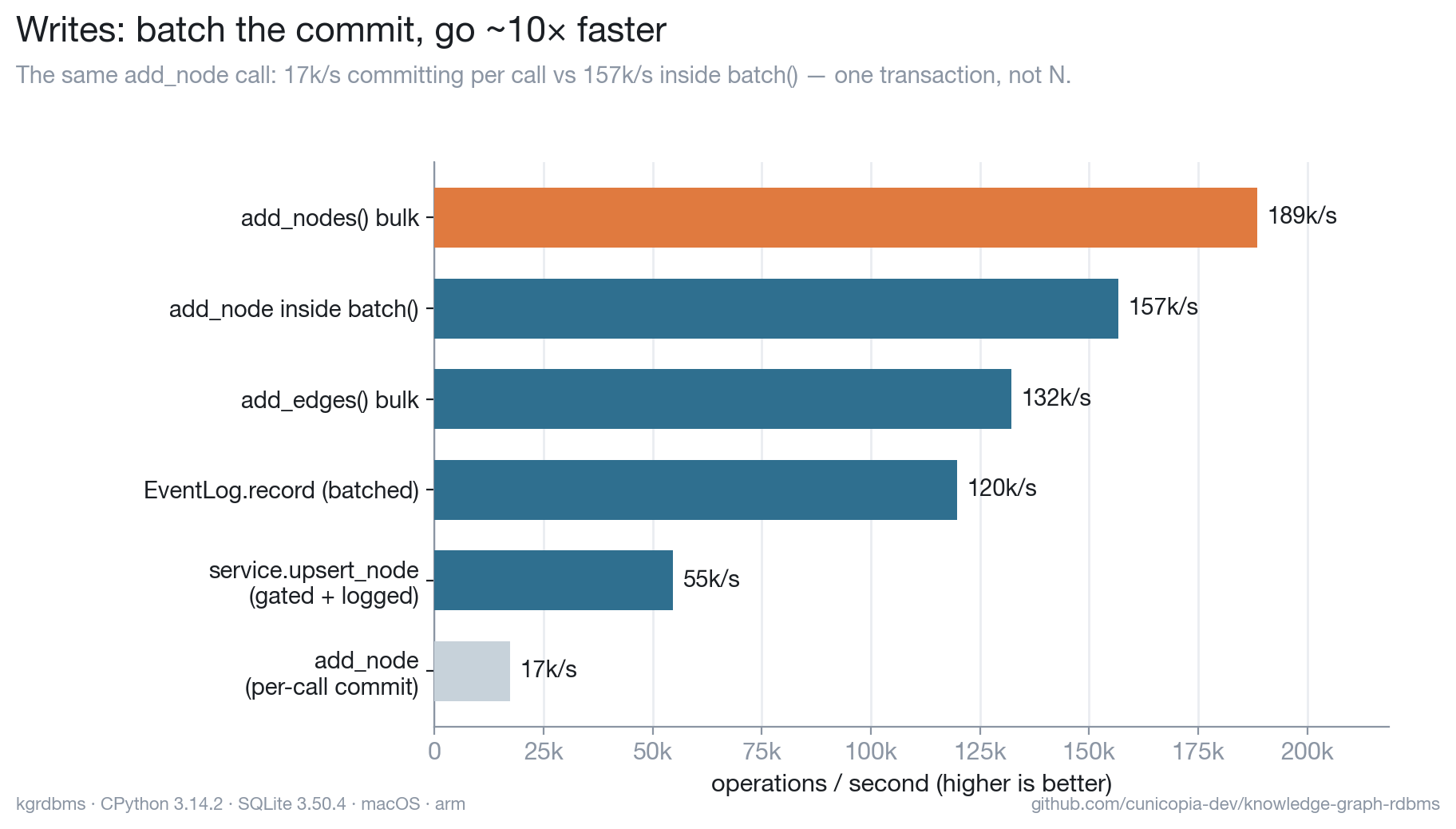
Each single write commits on its own for durability. Wrapping a bulk load in
batch() / add_nodes / add_edges collapses those per-call commits into one
transaction for an ~10× jump — same engine, you just tell it a batch is coming.
The gated + logged path (what the CLI and MCP server use) adds the
invariants+policy check and an event record per write, and still clears tens of
thousands per second.
Reads — fast, with an honest tail
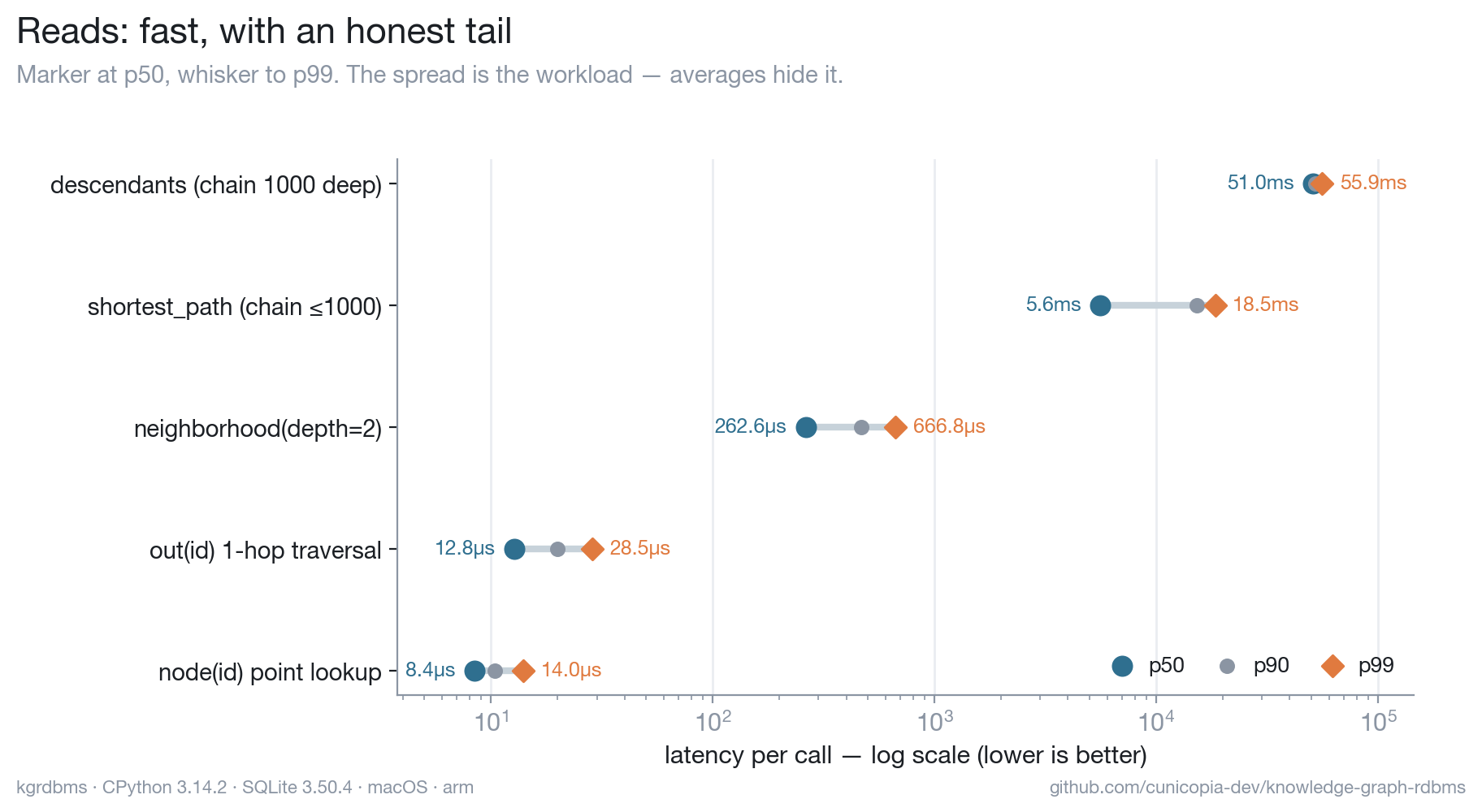
Point lookups land in single-digit microseconds, and multi-node reads hydrate
the whole result set in a constant number of queries (no N+1 fan-out). The chart
plots p50 → p99 on purpose: randomized shortest_path endpoints make some walks
short and some span the whole chain, and an average would bury that tail.
A note on the runtime
kgrdbms is Python, and for performance that's a deliberate non-issue: the same SQLite engine runs under CPython, Node, and Bun, so the gap between them is pure binding overhead — under 2×, and it doesn't even favor one runtime across operations.
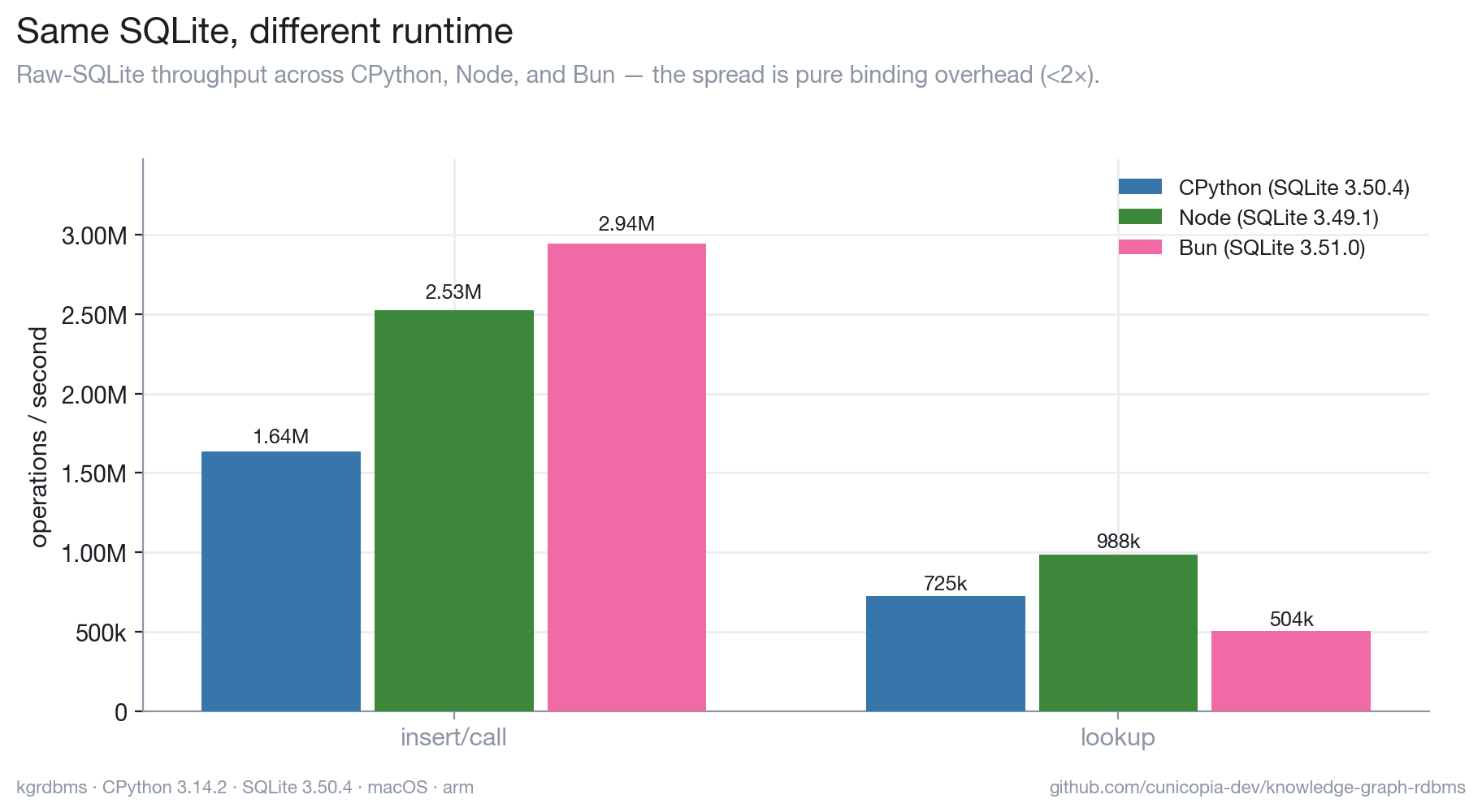
The lever that actually moved the needle was transaction batching (~10×, above),
not the language. Reproduce it with python bench/runtimes/compare.py.
Where the curve bends
We measured it against Neo4j — same graph, same queries, identical methodology
(full harness and reproduction in bench/neo4j/):
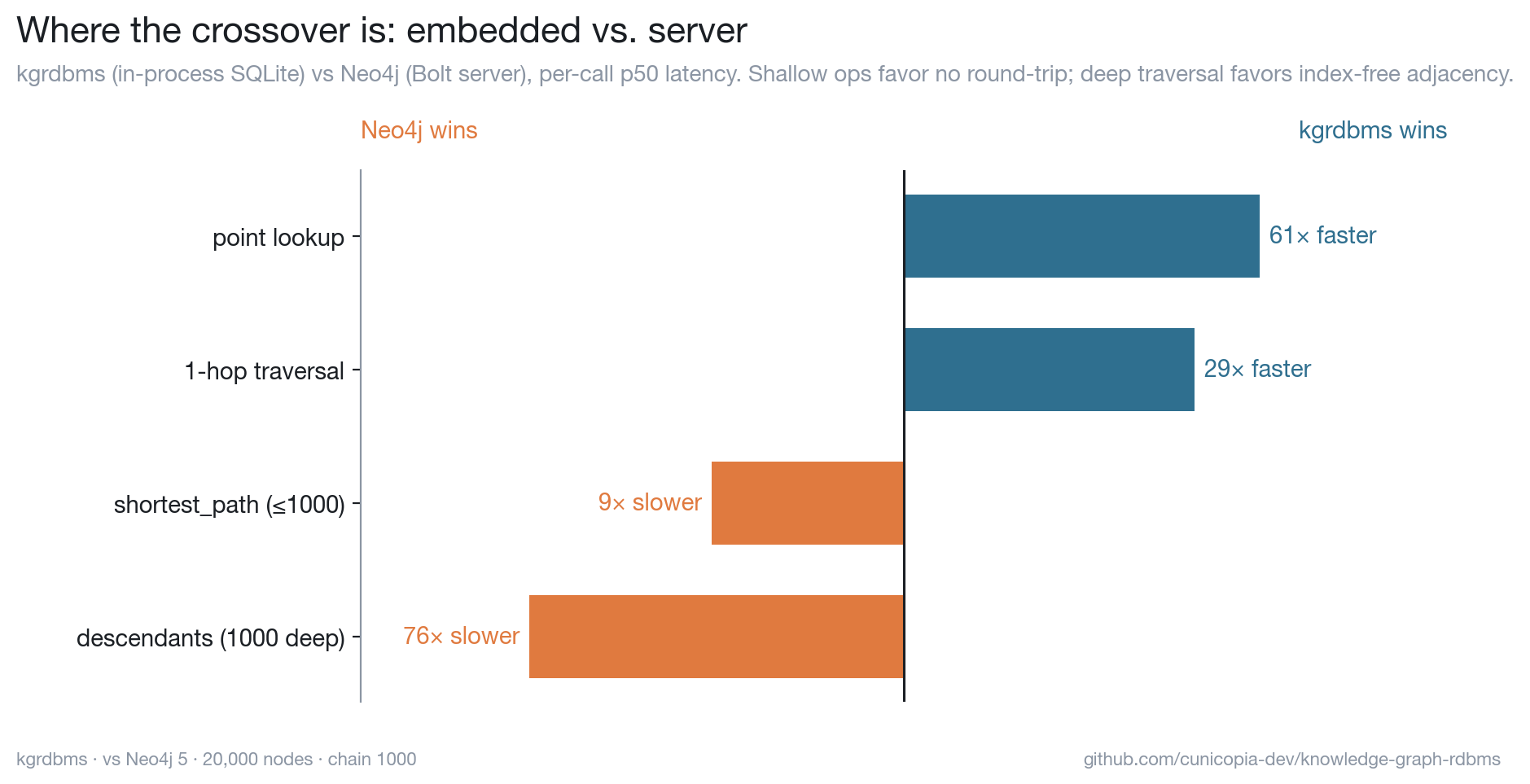
Queries compile to SQL over B-tree indexes, so each traversal hop is an index lookup — wonderfully cheap for point reads and shallow traversals. An in-process lookup here is ~7µs, while the same query to Neo4j pays a Bolt round-trip (~0.4ms) before it even touches data. So for the small, frequent operations that are the bread and butter of agent memory, the embedded graph wins by 30–60×.
A purpose-built engine pulls ahead exactly where the workload — not the row count — turns deep:
- Deep, high-fan-out traversal. Index-free adjacency follows direct pointers between nodes. A 1,000-deep walk costs kgrdbms ~52ms (recursive CTE + row hydration) but ~0.7ms for Neo4j, which pointer-chases under its own round-trip budget — a 76× swing the other way.
- Complex pattern matching. A Cypher planner optimizes multi-pattern queries in ways a fixed traversal API doesn't attempt.
- Concurrent writers and scale-out. Single-file SQLite is one writer at a time; clustered engines aren't.
Rule of thumb: read-heavy and shallow up to low millions of nodes is firmly home turf; deep-traversal or pattern-heavy work is where a dedicated engine earns its complexity. The crossover is workload-shaped, not a single magic number — so we measured ours, and you can measure yours.
SQLite vs the live Postgres engine
Because postgres is a live backend, you can run the same op suite against
both engines and watch the round-trip tax directly
(bench/postgres/). Embedded SQLite wins the small,
frequent ops by 30–60× — a point lookup is in-process, the Postgres one pays a
localhost round-trip. The exception is the one deep traversal that runs as a
single server-side query: the recursive-CTE descendants is where Postgres pulls
ahead (~0.5×), while the per-hop-BFS shortest_path over the same chain is 67×
slower — identical traversal, opposite verdict, decided entirely by how many
times the work crosses the wire. Postgres earns its place on concurrency and
scale, not single-thread latency; the control plane lets you escalate one
ontology to it while the hot, shallow ones stay embedded.
Command reference
| Command | What it does |
|---|---|
kg stats |
node/edge counts and db path |
kg node add ID --kind K … |
create or update a node (gated + logged) |
kg node get ID |
fetch a node |
kg node del ID |
delete a node (cascades edges) |
kg node set-prop ID KEY VAL |
set one property |
kg node add-label ID LABEL |
add a label |
kg edge add FROM TO TYPE |
add an edge |
kg edge rm FROM TO TYPE |
remove an edge |
kg nodes-by-kind KIND |
list nodes of a kind |
kg nodes-by-label LABEL |
list nodes with a label |
kg out ID [--type T] |
outbound edges |
kg in ID [--type T] |
inbound edges |
kg path FROM TO |
shortest undirected path |
kg neighbors ID [--depth N] |
nodes within N hops |
kg descendants ID TYPE |
nodes reachable along one edge type |
kg events [-n N] |
tail the event log |
kg revert EVENT_ID |
undo an event (compensating event) |
kg replay [--upto TS] |
rebuild the projection from the log |
kg import FILE |
bulk {nodes, edges} import (gated + logged) |
kg ontology list |
list registered ontologies (the registry) |
kg ontology create NAME … |
register an ontology (--backend, --stance) |
kg serve [--transport T] |
run the MCP server |
Add --json to any command for machine-readable output. Target a graph with
--ontology NAME (routed through the resolver; default: the default ontology)
or --db PATH (the raw escape hatch onto one exact file, registry bypassed).
Project layout
kgrdbms/
├── graph.py        # the label property graph over SQLite (no internal deps)
├── events.py       # append-only event log: record, compensate, replay
├── policy.py       # configurable mutation policy (permissive by default)
├── invariants.py   # compiled-in invariants, checked before policy (no-op default)
├── service.py      # the shared gated + logged write path
├── resolver.py     # control plane: ontology name → (backend, events, entry) + the index
├── backends/       # pluggable engine registry
│   ├── base.py     #   GraphBackend protocol + raising stub skeleton
│   ├── sqlite.py   #   live engine (adapter over Graph)
│   ├── postgres.py #   live engine (psycopg; jsonb + recursive CTEs); [postgres] extra
│   └── neo4j.py    #   stub (deep-traversal escalation)
├── cli.py          # the `kg` command (stdlib argparse)
└── mcp_server.py   # the MCP server (optional [mcp] extra)
graph.py imports nothing internal — it's a usable, dependency-free LPG on its
own. Everything else layers on top; service.py depends only on the
GraphBackend protocol, never a concrete engine.
Development
git clone <repo> && cd knowledge-graph-rdbms
uv venv && uv pip install -e ".[dev]"
pytest                       # 62 tests
python bench/benchmark.py    # benchmark with p50–p99 (see bench/README.md)
License
MIT.
Project details
Verified details
These details have been verified by PyPIProject links
GitHub Statistics
Maintainers


Download files
Download the file for your platform. If you're not sure which to choose, learn more about installing packages.
Source Distribution
Built Distribution
Filter files by name, interpreter, ABI, and platform.
If you're not sure about the file name format, learn more about wheel file names.
Copy a direct link to the current filters
File details
Details for the file knowledge_graph_rdbms-0.1.1.tar.gz.
File metadata
- Download URL: knowledge_graph_rdbms-0.1.1.tar.gz
- Upload date:
- Size: 557.9 kB
- Tags: Source
- Uploaded using Trusted Publishing? Yes
- Uploaded via: twine/6.1.0 CPython/3.13.12
File hashes
| Algorithm | Hash digest | |
|---|---|---|
| SHA256 |
db2ad29d415ca226ee21a4339991689d1bf57a6ac09fde920b1678e91aef7885
|
|
| MD5 |
5e16349048cd18c20dc9f509c0fd0089
|
|
| BLAKE2b-256 |
cc6e82594698d375870ea9f9e79ea85b9077de0aa36869f4525e234d7e3c72ad
|
Provenance
The following attestation bundles were made for knowledge_graph_rdbms-0.1.1.tar.gz:
Publisher:
publish.yml on cunicopia-dev/knowledge-graph-rdbms
-
Statement:
-
Statement type:
https://in-toto.io/Statement/v1 -
Predicate type:
https://docs.pypi.org/attestations/publish/v1 -
Subject name:
knowledge_graph_rdbms-0.1.1.tar.gz -
Subject digest:
db2ad29d415ca226ee21a4339991689d1bf57a6ac09fde920b1678e91aef7885 - Sigstore transparency entry: 1712721693
- Sigstore integration time:
-
Permalink:
cunicopia-dev/knowledge-graph-rdbms@466ea95e17f2e910c9b62d2405394d0ec4b25a74 -
Branch / Tag:
refs/tags/v0.1.1 - Owner: https://github.com/cunicopia-dev
-
Access:
public
-
Token Issuer:
https://token.actions.githubusercontent.com -
Runner Environment:
github-hosted -
Publication workflow:
publish.yml@466ea95e17f2e910c9b62d2405394d0ec4b25a74 -
Trigger Event:
push
-
Statement type:
File details
Details for the file knowledge_graph_rdbms-0.1.1-py3-none-any.whl.
File metadata
- Download URL: knowledge_graph_rdbms-0.1.1-py3-none-any.whl
- Upload date:
- Size: 55.4 kB
- Tags: Python 3
- Uploaded using Trusted Publishing? Yes
- Uploaded via: twine/6.1.0 CPython/3.13.12
File hashes
| Algorithm | Hash digest | |
|---|---|---|
| SHA256 |
b0ab40b46e9c8abb010c7c3d7b776f2d256095ddc38622aeb0da31dbdc877622
|
|
| MD5 |
e98b6b4470e4815f2e80bfa313910298
|
|
| BLAKE2b-256 |
6a0cda208745f2faf473df2bd26f3c540cf7f8e6f9f130c0c8fbd23e1e177ba5
|
Provenance
The following attestation bundles were made for knowledge_graph_rdbms-0.1.1-py3-none-any.whl:
Publisher:
publish.yml on cunicopia-dev/knowledge-graph-rdbms
-
Statement:
-
Statement type:
https://in-toto.io/Statement/v1 -
Predicate type:
https://docs.pypi.org/attestations/publish/v1 -
Subject name:
knowledge_graph_rdbms-0.1.1-py3-none-any.whl -
Subject digest:
b0ab40b46e9c8abb010c7c3d7b776f2d256095ddc38622aeb0da31dbdc877622 - Sigstore transparency entry: 1712721757
- Sigstore integration time:
-
Permalink:
cunicopia-dev/knowledge-graph-rdbms@466ea95e17f2e910c9b62d2405394d0ec4b25a74 -
Branch / Tag:
refs/tags/v0.1.1 - Owner: https://github.com/cunicopia-dev
-
Access:
public
-
Token Issuer:
https://token.actions.githubusercontent.com -
Runner Environment:
github-hosted -
Publication workflow:
publish.yml@466ea95e17f2e910c9b62d2405394d0ec4b25a74 -
Trigger Event:
push
-
Statement type:






