
Converter for spreadsheets to KNX ETS group address configurations in CSV format.

Project description




KNX GroupAddress Exporter for ETS
Introduction
A simple converter for spreadsheets to KNX ETS group address configurations in CSV format.
Converter allows to use all possible features of the spreadsheet tools like Excel, LibreOffice etc to plan, duplicate and maintain your KNX group addresses. No more unhandy group address duplication or management in the KNX ETS software.
Leveraging the powerful jsonargparse library, this tool supports configuration and control via command-line parameters or a JSON configuration file.
Features
- Parse and convert Excel sheets to KNX ETS readable CSV files containing group address configuration.
- Different KNX ETS CSV formats supported.
- Configurable Excel sheet layout
Changelog
Changes can be followed at CHANGELOG.md.
Requirements
- Python 3.9
- pip or pipx
For development:
Setup
With pip / pipx
pip install knx-ga-exporter
pipx install knx-ga-exporter
Setup directly from github repo / clone
git clone https://github.com/waldbaer/knx-ga-exporter.git
cd knx-ga-exporter

python -m venv .venv
source ./.venv/bin/activate
pip install .
Usage
Step1: Convert spreadsheet to ETS readable CSV file.
Create / design all needed KNX group addresses in an spreadsheet using Excel / LibreOffice XLSX document:
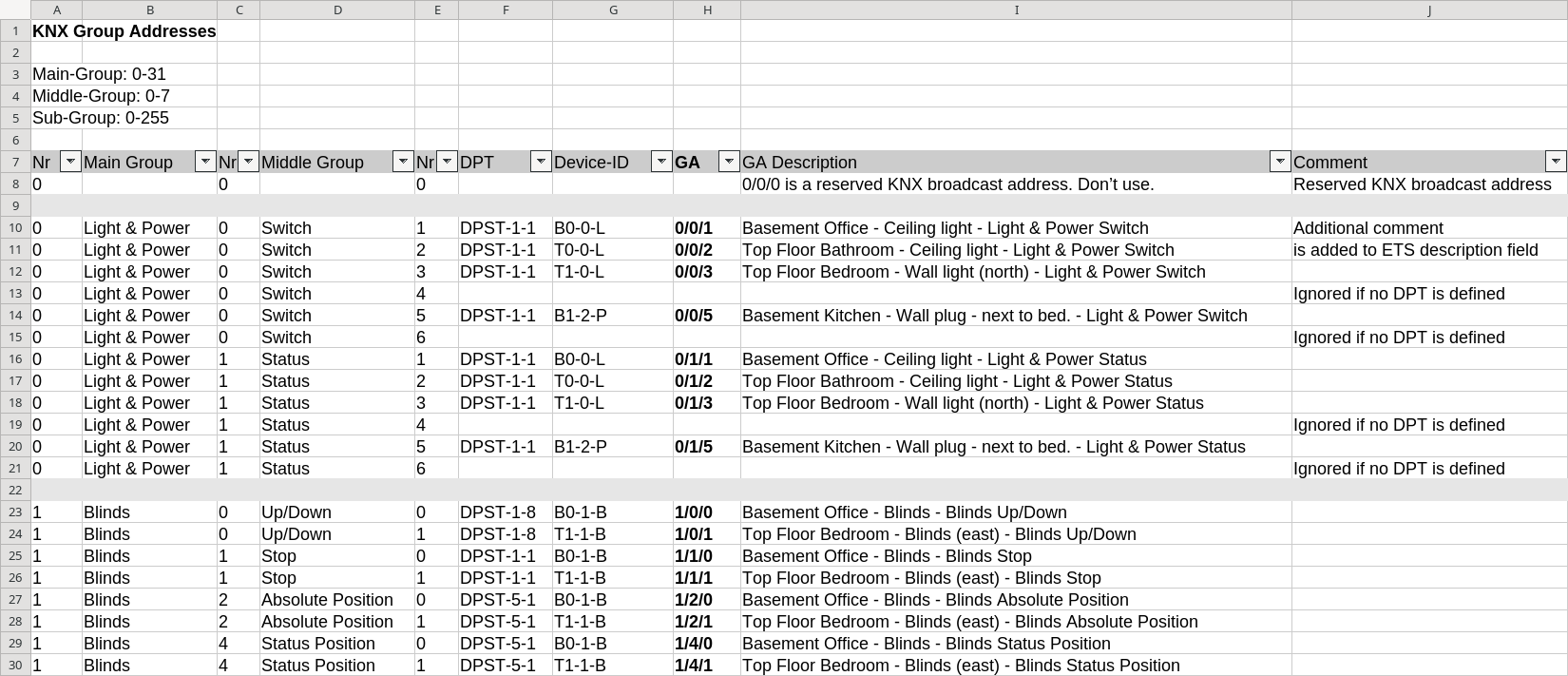
Export the spreadsheet contents as CSV file:
knx-ga-exporter -i docs/Examples/01-SmallExampleWithRoomBook/KNX-planning-example.xlsx -vv

2025-02-02 11:48:23 INFO: Loading XLSX input file 'docs/Examples/01-SmallExampleWithRoomBook/KNX-planning-example.xlsx'
2025-02-02 11:48:23 DEBUG: Parsed GA: 0/0/1    | Light & Power | Switch | DPST-1-1 | B0-0-L - Basement Office - Ceiling light - Light & Power Switch
2025-02-02 11:48:23 DEBUG: Parsed GA: 0/0/2    | Light & Power | Switch | DPST-1-1 | T0-0-L - Top Floor Bathroom - Ceiling light - Light & Power Switch
2025-02-02 11:48:23 DEBUG: Parsed GA: 0/0/3    | Light & Power | Switch | DPST-1-1 | T1-0-L - Top Floor Bedroom - Wall light (north) - Light & Power Switch
2025-02-02 11:48:23 DEBUG: Parsed GA: 0/0/5    | Light & Power | Switch | DPST-1-1 | B1-2-P - Basement Kitchen - Wall plug - next to bed. - Light & Power Switch
...
2025-02-02 11:48:23 INFO: Exporting group addresses into CSV file 'knx-ga-addresses.csv'. format: 1/1, separator: '[TAB]', encoding: iso-8859-1
2025-02-02 11:48:23 DEBUG: Exporting main group     0        | Light & Power |
2025-02-02 11:48:23 DEBUG: Exporting   middle group 0/0      |               | Switch |
2025-02-02 11:48:23 DEBUG: Exporting     sub group: 0/0/1    | Light & Power | Switch | DPST-1-1 | B0-0-L - Basement Office - Ceiling light - Light & Power Switch
2025-02-02 11:48:23 DEBUG: Exporting     sub group: 0/0/2    | Light & Power | Switch | DPST-1-1 | T0-0-L - Top Floor Bathroom - Ceiling light - Light & Power Switch
2025-02-02 11:48:23 DEBUG: Exporting     sub group: 0/0/3    | Light & Power | Switch | DPST-1-1 | T1-0-L - Top Floor Bedroom - Wall light (north) - Light & Power Switch
2025-02-02 11:48:23 DEBUG: Exporting     sub group: 0/0/5    | Light & Power | Switch | DPST-1-1 | B1-2-P - Basement Kitchen - Wall plug - next to bed. - Light &
...
2025-02-02 11:48:23 DEBUG: Statistics: #GA: 16
2025-02-02 11:48:23 INFO: Conversion successfully finished.
The exported CSV can be found in knx-group-addresses.csv:
"Group name"	"Address"	"Central"	"Unfiltered"	"Description"	"DatapointType"	"Security"
"Light & Power"	"0/-/-"	""	""	""	""	"Auto"
"Switch"	"0/0/-"	""	""	""	""	"Auto"
"B0-0-L - Basement Office - Ceiling light - Light & Power Switch"	"0/0/0"	""	""	"Additional comment"	"DPST-1-1"	"Auto"
"T0-0-L - Top Floor Bathroom - Ceiling light - Light & Power Switch"	"0/0/1"	""	""	"is added to ETS description field"	"DPST-1-1"	"Auto"
"T1-0-L - Top Floor Bedroom - Wall light (north) - Light & Power Switch"	"0/0/2"	""	""	""	"DPST-1-1"	"Auto"
"B1-2-P - Basement Kitchen - Wall plug - next to bed. - Light & Power Switch"	"0/0/4"	""	""	""	"DPST-1-1"	"Auto"
...
Step2: Load CSV into KNX ETS application
-
Open the KNX ETS application and the project.
-
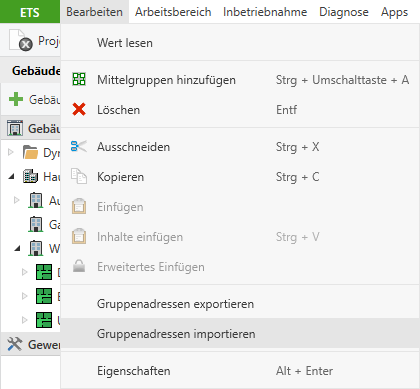
Edit -> Import Group Addresses -> Select the generated CSV file.
-
Voila! New group addresses are added or existing addresses got renamed.
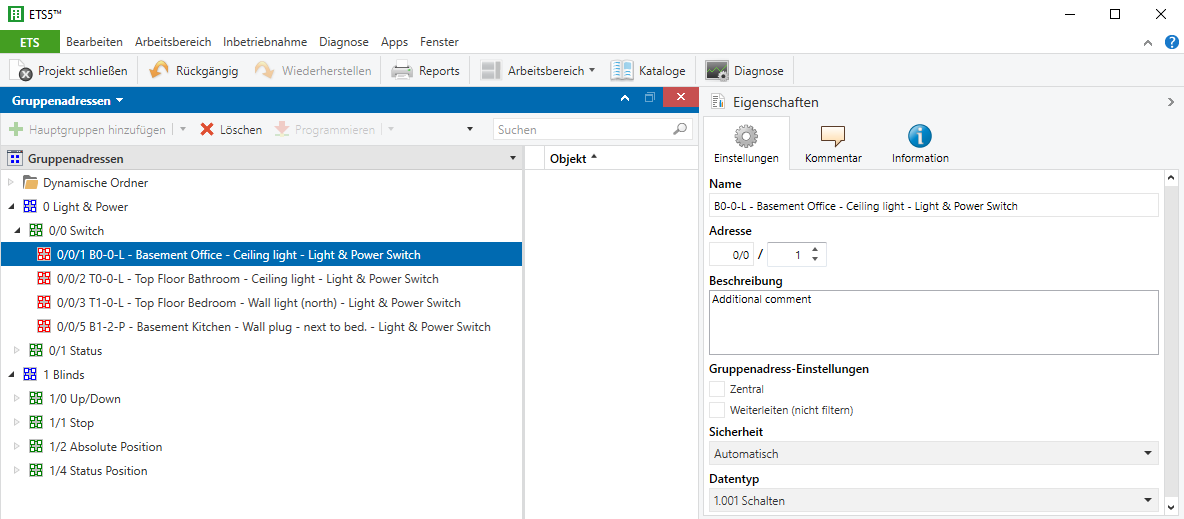
Hint: The KNX ETS application will not automatically delete group addresses not contained in the CSV file anymore. A cleanup must be done manually.
Examples
Examples including the standard spreadsheet format can be found in folder docs/Examples
All Available Parameters and Configuration Options
Details about all available options:
Usage: knx-ga-exporter [-h] [--version] [-c CONFIG] [-v] [-i FILE] [-o FILE] [--output.encoding ENCODING] [--output.format {1/1,3/3}]
                       [--output.separator {tabulator,comma,semicolon}] [--layout.sheet-name SHEET_NAME]
                       [--layout.first-row FIRST_ROW] [--layout.last-column LAST_COLUMN] [--layout.main-ID-column MAIN_ID_COLUMN]
                       [--layout.middle-ID-column MIDDLE_ID_COLUMN] [--layout.sub-ID-column SUB_ID_COLUMN]
                       [--layout.main-name-column MAIN_NAME_COLUMN] [--layout.middle-name-column MIDDLE_NAME_COLUMN]
                       [--layout.sub-name-column SUB_NAME_COLUMN] [--layout.dpt-column DPT_COLUMN]
                       [--layout.target-ID-column TARGET_ID_COLUMN] [--layout.comment-column COMMENT_COLUMN]

Converter for spreadsheets to KNX ETS group address configurations in CSV format. | Version 2.0.1 | Copyright 2019-2025

Default Config File Locations:
  ['./config.json'], Note: no existing default config file found.

Options:
  -h, --help            Show this help message and exit.
  --version             Print version and exit.
  -c, --config CONFIG   Path to JSON configuration file.
  -v, --verbose         Increase log-level. -v: INFO, -vv DEBUG. Default: WARN/ERROR (default: 0)
  -i, --input.file FILE
                        Path to XSLX file to be parsed. (required)
  -o, --output.file FILE
                        Path of exported CSV file. (default: knx-ga-addresses.csv)
  --output.encoding ENCODING
                        Output file encoding (default: iso-8859-1)
  --output.format {1/1,3/3}
                        CSV output format.

                        Possible formats:
                        1/1: Name / Address
                        3/3: Main- Middle- Sub- Name/Main- Middle- Sub-Address
                         (default: 1/1)
  --output.separator {tabulator,comma,semicolon}
                        CSV separator.

                        Possible separators:
                        tabulator: [TAB]
                        comma:     ,
                        semicolon: ;
                         (type: None, default: tabulator)
  --layout.sheet-name SHEET_NAME
                        Name of XLSX sheet containing the KNX group addresses (default: KNX Group Addresses)
  --layout.first-row FIRST_ROW
                        First row containing GAs (default: 8)
  --layout.last-column LAST_COLUMN
                        Last column (default: 10)
  --layout.main-ID-column MAIN_ID_COLUMN
                        Column containing main ID of KNX GA (default: 0)
  --layout.middle-ID-column MIDDLE_ID_COLUMN
                        Column containing middle ID of KNX GA (default: 2)
  --layout.sub-ID-column SUB_ID_COLUMN
                        Column containing sub ID of KNX GA (default: 4)
  --layout.main-name-column MAIN_NAME_COLUMN
                        Column containing main name of KNX GA (default: 1)
  --layout.middle-name-column MIDDLE_NAME_COLUMN
                        Column containing middle name of KNX GA (default: 3)
  --layout.sub-name-column SUB_NAME_COLUMN
                        Column containing sub name of KNX GA (default: 8)
  --layout.dpt-column DPT_COLUMN
                        Column containing datapoint type of KNX GA (default: 5)
  --layout.target-ID-column TARGET_ID_COLUMN
                        Column containing target ID KNX GA (default: 6)
  --layout.comment-column COMMENT_COLUMN
                        Column containing GA comment (default: 9)
Development
Setup environment
pdm install --dev
Format / Linter / Tests
# Check code style
pdm run format

# Check linter
pdm run lint

# Run tests
pdm run tests
Publish
# API token will be requested interactively as password
pdm publish -u __token__

# or to test.pypi.org
pdm publish --repository testpypi -u __token__


Download files
Download the file for your platform. If you're not sure which to choose, learn more about installing packages.
Source Distribution
Built Distribution
Filter files by name, interpreter, ABI, and platform.
If you're not sure about the file name format, learn more about wheel file names.
Copy a direct link to the current filters
File details
Details for the file knx_ga_exporter-2.0.1.tar.gz.
File metadata
- Download URL: knx_ga_exporter-2.0.1.tar.gz
- Upload date:
- Size: 61.1 kB
- Tags: Source
- Uploaded using Trusted Publishing? No
- Uploaded via: pdm/2.22.4 CPython/3.13.2 Linux/6.13.7-arch1-1
File hashes
| Algorithm | Hash digest | |
|---|---|---|
| SHA256 |
5d570f5e06b9a6332fdfe42846634660ecc5134678a475f78ef75cc3bb57feef
|
|
| MD5 |
8cac7f968d091697e482391768105700
|
|
| BLAKE2b-256 |
ec914c2c9cdeede131e61cee03d779057ba2d470ff5dd1ed201df7b14723761c
|
File details
Details for the file knx_ga_exporter-2.0.1-py3-none-any.whl.
File metadata
- Download URL: knx_ga_exporter-2.0.1-py3-none-any.whl
- Upload date:
- Size: 12.5 kB
- Tags: Python 3
- Uploaded using Trusted Publishing? No
- Uploaded via: pdm/2.22.4 CPython/3.13.2 Linux/6.13.7-arch1-1
File hashes
| Algorithm | Hash digest | |
|---|---|---|
| SHA256 |
1d5cc183ac7340233611d8dfeb4003bca787d66ccaccdb13e4733a55b79ac9ee
|
|
| MD5 |
9bab4a77faa91e738ebb7376d5de3b50
|
|
| BLAKE2b-256 |
362ce624c7e7dfc750d65ddce157c99f19e288534f567f1e25cba209be178c7d
|






