
Koala is a DSL and SVG compiler for structured concept diagrams.

Project description
Koala
Koala is a DSL for generating diagrams from structured text.
Write once, render as trees, radial maps, synoptic layouts, or formal comparison matrices.
Quick Example
Write this:
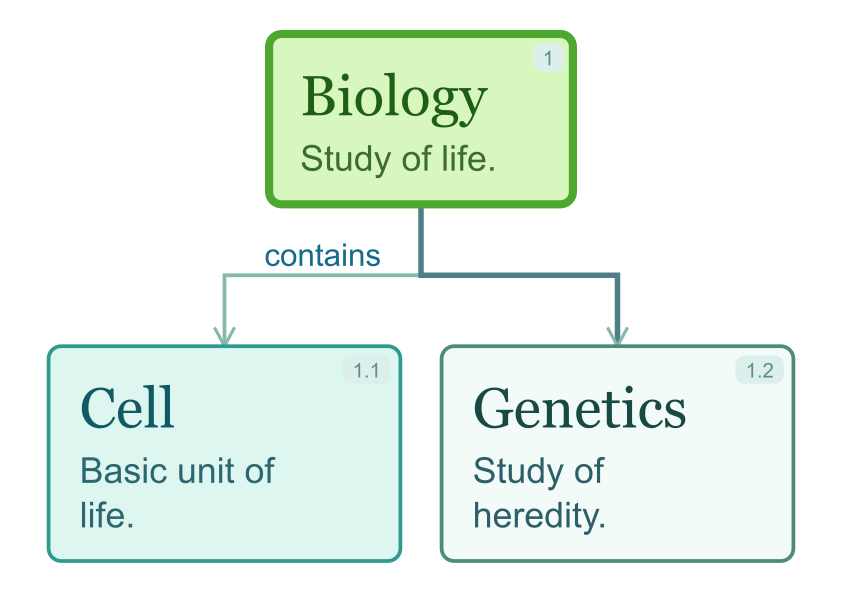
@theme jungle

main:: 1 Biology
Study of life.

hl:: contains -> 1.1 Cell
Basic unit of life.

1.2 Genetics
Study of heredity.
Then run:
koala compile example.txt --layout tree
Result
Installation
Install from PyPI:
pip install koala-diagrams
Or with pipx:
pipx install koala-diagrams
Usage
CLI
koala types
koala typographies
koala typographies --type tree
koala typographies --type matrix
koala typographies --type flowchart
koala compile docs/examples/tree.txt --type tree --layout tree
koala compile docs/examples/radial.txt --type tree --layout radial --theme jungle --size square
koala compile comparison.txt --type matrix --layout matrix --typography formal
koala compile process.txt --type flowchart --layout flowchart --theme ocean
koala export docs/examples/tree.txt --format png --quality high
koala export comparison.txt --type matrix --layout matrix --format png --quality medium
koala export process.txt --type flowchart --layout flowchart --format pdf --quality high
koala export docs/examples/tree.txt --format pdf --quality high
koala inspect docs/examples/tree.txt
koala validate docs/examples/radial.txt --strict
Python
import koala

file_result = koala.compile(
    "docs/examples/radial.txt",
    type="tree",
    layout="radial",
    theme="academic",
    size="square",
)

svg_result = koala.render_text(
    """
    1 Central Topic
    Main explanation.

    1.1 First Branch
    Supporting detail.
    """,
    type="tree",
    layout="tree",
    theme="frutal",
)

source_path = koala.save_text(
    "1 Root\nBody.\n",
    "docs/examples/inline_demo",
)

print(file_result.output_svg)
print(svg_result.svg)
print(source_path)

png_result = koala.export_text(
    "main:: 1 Central Topic\nMain explanation.\n",
    type="tree",
    format="png",
    quality="high",
    layout="tree",
    theme="frutal",
)

pdf_result = koala.export_text(
    "main:: 1 Central Topic\nMain explanation.\n",
    type="tree",
    format="pdf",
    quality="high",
    layout="tree",
    theme="frutal",
)

print(png_result.media_type, len(png_result.content))
print(pdf_result.media_type, len(pdf_result.content))
Typography presets can be inspected from Python too:
import koala

print(koala.available_typographies())
print(koala.available_typographies(type="tree"))
print(koala.available_typographies(type="matrix"))
print(koala.available_typographies(type="flowchart"))
Matrix documents use an explicit comparative-table syntax:
matrix:: Format Comparison
columns:: Criterion | Tree | Matrix
row:: Best for | Hierarchical concept maps | Side-by-side evaluation
row:: Reading path | From parent to children | Across consistent criteria
footer:: Recommendation | Use matrix when the decision depends on comparing options.
Render it with:
koala compile comparison.txt --type matrix --layout matrix --theme academic --typography formal
koala export comparison.txt --type matrix --layout matrix --format pdf --quality high
Library API summary:
koala.compile(path, **config)orkoala.compile_file(path, **config): source file to.svgkoala.render_text(text, **config): Koala DSL text to in-memory SVG viaresult.svgkoala.safe_render_text(text, **config): in-memory SVG with defensive limits for server/LLM inputkoala.export_text(text, format="svg"|"png"|"pdf", **config): Koala DSL text to in-memory export bytes viaresult.contentkoala.safe_export_text(text, format="svg"|"png"|"pdf", **config): in-memory export with defensive limits and no file writeskoala.export_file(path, format="svg"|"png"|"pdf", **config): source file to in-memory export byteskoala.save_text(text, output, **config): raw Koala DSL text to.txtkoala.compile_text(text, **config): legacy helper that still writes.svgto disk
RenderResult now always includes the serialized SVG in result.svg. result.output_svg is only populated when the operation writes a file.
ExportResult includes final bytes in result.content, the HTTP media type in result.media_type, and result.output_path when an explicit output is written.
PNG export uses direct SVG conversion at medium or high quality. PDF export is vector-based and adds a professional frame with margins, a title resolved from the first main:: node, and theme-aware colors.
All render/export APIs accept type="tree", type="matrix", or type="flowchart"; it defaults to tree. Tree layouts are tree, radial, synoptic, and synoptic_boxes. Matrix uses layout="matrix". Flowchart uses layout="flowchart". If DSL syntax does not match the requested type, Koala raises DocumentTypeMismatchError.
For untrusted or LLM-generated source, prefer safe_render_text(...) or safe_export_text(...). The safe APIs currently accept only tree and matrix, enforce default limits, reject parser warnings by default, and raise KoalaInputError subclasses that can be mapped to HTTP 422 responses.
In general, avoid embedding @show-node-numbers in document metadata. Prefer CLI flags, library arguments, or user config defaults unless a file really needs to be self-descriptive about numbering.
Typographies
Koala ships typography presets for different tones:
default: general-purpose readable diagramsacademic: more editorial and academic, with serif body textformal: sober report-style output, especially useful for PDFs and matricescasual: softer and more approachable diagramsradial: compact typography tuned for radial tree layouts
Run the end-to-end gallery to compare typography behavior in SVG, PNG, and PDF:
.venv/bin/python -m unittest tests.end_to_end.code.test_render_e2e.RenderEndToEndTest.test_render_gallery
The focused typography outputs are written under:
tests/end_to_end/output/typography/tree/<typography>/
tests/end_to_end/output/typography/matrix/<typography>/
DSL Syntax
Koala uses a simple line-based DSL:
[kind::] [relation ->] number title
Example:
1 Main Concept
contains -> 1.1 Child Node
hl:: 1.2 Highlighted Node
Features
- Simple hierarchical DSL
- Multiple tree layouts (
tree,radial,synoptic,synoptic_boxes) - Formal comparative matrices with
type="matrix" - Theme system
- CLI and Python API
- SVG output to disk or in memory
- In-memory SVG, PNG, and decorated PDF export
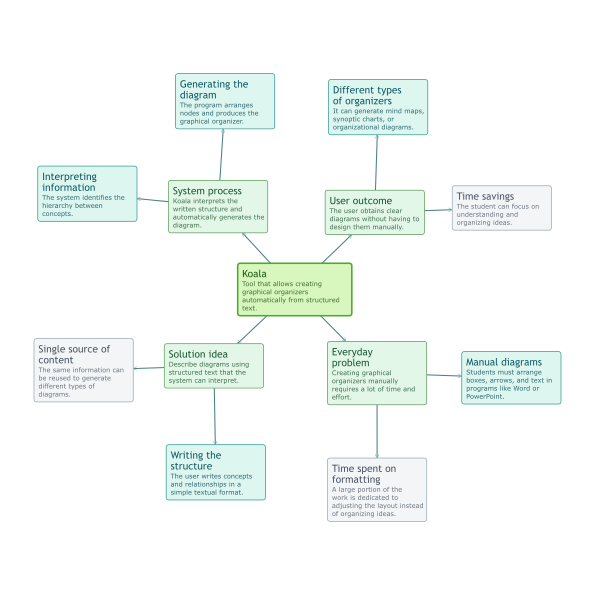
Multiple Layouts
Tree, radial, and synoptic layouts from the same hierarchical source. Matrix documents use a separate table-oriented source and the same theme/export system.
Philosophy
Koala is built around a simple idea:
The same source file should be able to drive multiple layouts and visual styles without rewriting the content.
License
MIT
Release history Release notifications | RSS feed


Download files
Download the file for your platform. If you're not sure which to choose, learn more about installing packages.
Source Distribution
Built Distribution
Filter files by name, interpreter, ABI, and platform.
If you're not sure about the file name format, learn more about wheel file names.
Copy a direct link to the current filters
File details
Details for the file koala_diagrams-1.3.13.tar.gz.
File metadata
- Download URL: koala_diagrams-1.3.13.tar.gz
- Upload date:
- Size: 78.1 kB
- Tags: Source
- Uploaded using Trusted Publishing? No
- Uploaded via: twine/6.2.0 CPython/3.14.4
File hashes
| Algorithm | Hash digest | |
|---|---|---|
| SHA256 |
885000225c1f3071e7a9cc4fb146b5e42b4cf88a7a9b5823af1068fe13c40467
|
|
| MD5 |
b4c62825d4cea2975ecaf97a889718c4
|
|
| BLAKE2b-256 |
8ba7097a2f78dda02496bb579c5e6f7e1333b8c2a528b26177f97c717e73284f
|
File details
Details for the file koala_diagrams-1.3.13-py3-none-any.whl.
File metadata
- Download URL: koala_diagrams-1.3.13-py3-none-any.whl
- Upload date:
- Size: 102.9 kB
- Tags: Python 3
- Uploaded using Trusted Publishing? No
- Uploaded via: twine/6.2.0 CPython/3.14.4
File hashes
| Algorithm | Hash digest | |
|---|---|---|
| SHA256 |
bd83683b81c769f61dd847b9277863abf4ab12b03d19c983d37ab80d7727c8b9
|
|
| MD5 |
fdf3d667a9000a3dbe5c5e1907f28db8
|
|
| BLAKE2b-256 |
b7deeee0359a7534fdc2fffff642841ea029c913ee51035e9132c3b5cb6bf23e
|






