
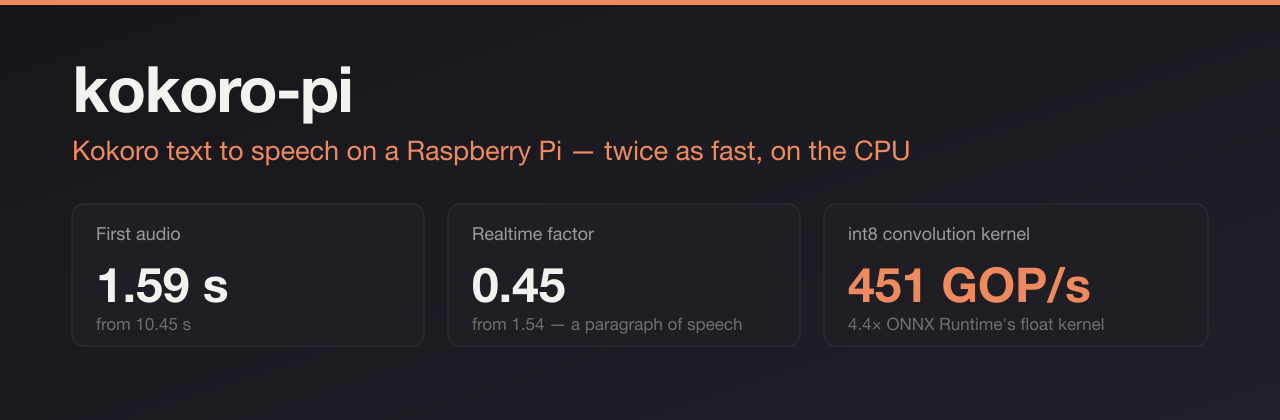







Same model, same voice, ~2× faster synthesis and speech that starts 6× sooner — because the vocoder's convolutions run through a hand-written int8 ARM kernel and long text is streamed clause by clause.
▶ Hear it — the published export against this one, same Pi, same voice
Quickstart · Benchmarks · Configuration · How it works · Roadmap · Quality · API
Why this exists
Installing Kokoro on a Pi and calling it directly works, but it synthesises slower than real time, and you wait for the whole passage before hearing a word. That is fine for generating files and frustrating for anything interactive.
This is the speech engine from a personal assistant that runs on a Pi 5, packaged to install in one command. Nothing is retrained, no accelerator is involved, and the audio is meant to be indistinguishable from what upstream Kokoro produces.
On a Raspberry Pi 5, one paragraph of speech (12 s of audio):
Raw Kokoro install kokoro-pi First audio 10.45 s 1.59 s Full passage 20.13 s 5.90 s Realtime factor 1.54 0.51
Quickstart
curl -fsSL https://raw.githubusercontent.com/zreecespieces/kokoro-pi/main/install.sh | bash
That creates a virtual environment under ~/.kokoro-pi, downloads the upstream Kokoro
model (177 MB, checksum verified), compiles the native operators for your CPU,
derives the optimised models, checks them against the upstream audio, and installs a
user systemd service on port 8080.
Budget 15–25 minutes on a Pi 5, most of it the download and the calibration pass, and about 2.6 GB of free memory — calibration is the peak, and a Pi with much else resident will be killed by the kernel rather than finish. Then:
# speak, straight to the speaker, starting on the first clause
curl -sS -N -X POST http://127.0.0.1:8080/v1/tts \
  -H 'Content-Type: application/json' \
  -d '{"text":"Hello from my Raspberry Pi."}' \
  | aplay -q -r 24000 -f S16_LE -c 1 -

# or save a file
curl -s "http://127.0.0.1:8080/v1/tts?text=Hello&format=wav" -o hello.wav
From pip, into your own environment
pip install kokoro-pi
kokoro-pi build          # 177 MB download, then a few minutes of calibration
kokoro-pi serve
Two commands rather than one, because the models are derived rather than redistributed — the build downloads the upstream export, rewrites the graph, calibrates the int8 convolutions and checks the result against the original.
On a 64-bit ARM or x86 Linux machine, pip install brings a pre-compiled kernel
built in a manylinux container, so nothing needs a compiler. Anywhere else pip falls
back to the source distribution and kokoro-pi build compiles the operators itself,
which needs g++.
No systemd service from this path — install.sh is what installs one.
Prefer to do it by hand?
git clone https://github.com/zreecespieces/kokoro-pi.git && cd kokoro-pi
python3 -m venv .venv && .venv/bin/pip install -r requirements.txt
PYTHONPATH=src .venv/bin/python -m kokoro_pi build --models ~/.kokoro-pi/models
PYTHONPATH=src .venv/bin/python -m kokoro_pi serve --models ~/.kokoro-pi/models
make help lists the same steps as targets.
Requirements
| Hardware | Raspberry Pi 5, or any ARM64 CPU with the dot-product extension (grep asimddp /proc/cpuinfo) |
| OS | 64-bit Linux. Debian 13 / Raspberry Pi OS tested |
| Python | 3.11 or newer |
| Build tools | g++ (sudo apt install build-essential) |
| Disk | ~2.5 GB during the build, ~855 MB after (545 MB models, 305 MB virtual environment) |
| Memory | ~900 MB resident |
Pi 4 works, but its Cortex-A72 has no dot-product instruction, so build with
--skip-int8 and take the 1.35× from the float path. x86_64 compiles and runs, but the
int8 kernel has no vector path there.
Benchmarks
Raspberry Pi 5, 4 threads, af_heart, median of three runs. "First audio" is the wait
before a listener hears anything, which is what interactivity actually depends on.
Four configurations, each measured through the same HTTP endpoint with
tools/bench_http.py, so the numbers include everything a client
actually waits for — phonemisation, synthesis and transfer.
One paragraph, ~12 s of speech
| Setup | First audio | Full passage | Realtime factor |
|---|---|---|---|
Kokoro on PyTorch (what a plain pip install gives you) |
10.45 s | 20.13 s | 1.54 |
| Kokoro + ONNX Runtime (upstream export) | 12.02 s | 12.02 s | 0.98 |
| + graph rewrites and the Snake kernel | 10.41 s | 10.41 s | 0.85 |
| + the fused int8 kernel | 5.47 s | 5.47 s | 0.45 |
| + clause streaming — the default | 1.59 s | 5.90 s | 0.51 |
One sentence, ~4 s of speech
| Setup | First audio | Full passage | Realtime factor |
|---|---|---|---|
| Kokoro on PyTorch | 6.66 s | 6.66 s | 1.46 |
| Kokoro + ONNX Runtime | 4.15 s | 4.15 s | 1.04 |
| + graph rewrites and the Snake kernel | 3.78 s | 3.78 s | 0.95 |
| + the fused int8 kernel | 2.13 s | 2.13 s | 0.53 |
| + clause streaming — the default | 0.93 s | 2.27 s | 0.58 |
A short phrase, ~1.1 s of speech
| Setup | First audio | Full passage | Realtime factor |
|---|---|---|---|
| Kokoro on PyTorch | 2.68 s | 2.68 s | 1.62 |
| Kokoro + ONNX Runtime | 1.41 s | 1.41 s | 1.27 |
| + graph rewrites and the Snake kernel | 1.27 s | 1.27 s | 1.15 |
| + the fused int8 kernel | 0.66 s | 0.66 s | 0.60 |
| + clause streaming | 0.72 s | 0.72 s | 0.65 |
Reading these honestly:
- Throughput: the kernels give 2.0–2.2× over the ONNX export and about 3× over a PyTorch install. Realtime factor goes from 1.5 (slower than speech) to 0.45 (twice as fast as speech), which is the difference between unusable and comfortable.
- Latency: streaming is what you feel. For a paragraph it cuts the wait from 5.47 s to 1.59 s, and against a raw install, from 10.45 s to 1.59 s — 6.6× sooner.
- Streaming costs throughput. Synthesising clause by clause adds roughly 8% to the
total (5.47 s → 5.90 s) and slightly changes phrasing, because the model sees clause
boundaries instead of choosing its own pauses. For a short phrase there is no first
clause to win, so it is pure overhead — send
"stream": falsewhen you are generating files rather than talking to someone. - PyTorch's audio is a little longer for the same text (13.05 s against 12.27 s), so compare its realtime factor rather than its seconds.
The graph rewrites look modest here (1.10–1.15×) because these totals include the text front end, which they do not touch. On model inference alone they are worth 1.35×.
Against the alternatives
Same Pi, same afternoon, every engine resident. Realtime factor, because these engines produce different amounts of audio for the same words:
| Engine | Phrase | Sentence | Paragraph |
|---|---|---|---|
| kokoro-pi | 0.49 | 0.48 | 0.37 |
| Kokoro-FastAPI — the same model, PyTorch | 1.86 | 1.38 | 1.39 |
Piper, en_US-lessac-medium |
0.12 | 0.13 | 0.14 |
3.4–3.8× faster than the popular Kokoro server on this hardware, which is the difference between not keeping up with speech and running at three times speech. And 2.6–3× slower than Piper, which is a smaller model doing a cheaper job and is excellent at it — if realtime factor is all you care about, use Piper.
The point is that both are now comfortably faster than speech, so on a Pi 5 the choice stops being about speed and starts being about how the voice sounds. Listen, then pick. Piper has also been archived since October 2025.
Where the next speedup is, what it is worth, and the measured dead ends: roadmap.
Reproduce on your own hardware:
kokoro-pi validate --models ~/.kokoro-pi/models --variants upstream float int8
python3 tools/bench_http.py --url http://127.0.0.1:8080/v1/tts
What makes it faster
Four things, in the order they were found. The full story is here.
| Change | Gain | Cost | |
|---|---|---|---|
| 1 | Graph rewrites — 42 normalisation chains fused, 37 convolutions expressed as height-one 2-D, 50 squares simplified | part of 1.35× on inference | none, 115 dB identical |
| 2 | Native Snake kernel — the 5-node x + (1/α)sin(αx)² chain becomes one pass instead of five whole-tensor round trips, at 48 sites |
part of 1.35× on inference | none, 115 dB identical |
| 3 | Fused int8 convolution kernel — quantise per channel, accumulate with ARM SDOT, dequantise to float, all in one pass at 451 GOP/s |
1.8–2.0× | ~2.2 dB log-spectral, judged indistinguishable |
| 4 | Clause streaming — audio is written to the socket as each clause finishes | first audio 3–4× sooner | ~10–20% more total time |
The interesting part is step 3. int8 is 4.4× faster than float on these shapes, but the
standard ways of getting there do not work: ONNX Runtime's QLinearConv is fast and must
write int8 every layer, which costs 4.8 dB, while ConvInteger has the right accuracy and
spends its winnings on a 12 MB intermediate. The kernel here keeps int32 accumulation,
returns float, and folds per-channel activation scales into the weights so the reduction
still has a single scale. It beats ONNX Runtime's own int8 path (336 GOP/s) by 34%.
HTTP API
Loopback only by default. Set api_key to require a key, and allow_origin to let a
browser page call it — see configuration.
POST /v1/tts
{
  "text": "Required. Up to 4000 characters by default.",
  "voice": "af_heart",   // optional, see GET /v1/voices
  "lang": "en-us",       // optional; the voice's own language by default
  "speed": 1.0,          // optional, 0.5 to 2.0
  "format": "s16le",     // s16le (default) | l16 | wav
  "stream": true         // optional; false synthesises everything before responding
}
Returns 24 kHz mono 16-bit audio, chunked as each clause completes.
| Format | Content-Type | Use it for |
|---|---|---|
s16le |
application/octet-stream |
piping to aplay/ffplay, lowest latency |
l16 |
audio/L16; rate=24000 |
clients expecting RFC 2586 big-endian |
wav |
audio/wav |
saving a file; buffered, so no streaming |
Response headers carry X-Kokoro-Backend, X-Audio-Rate, X-Audio-Format and
X-Stream-Pieces.
GET /v1/tts?text=...&format=wav does the same thing and is friendlier in a browser.
The voice pack ships 54 voices (af_heart, am_adam, bf_emma, …). Pass any of
them as voice; GET /v1/voices lists the ones this service offers. Set voices to
narrow that to the handful you actually use, so the list is an honest menu and a typo is
a 400 rather than a surprise accent.
A voice's name says what language it was trained to speak, and lang = "auto" — the
default — reads it from there, so bf_emma gets British phonemes rather than American
ones. Only en-us and en-gb are tested; the Japanese and Chinese voices need a
phonemiser this does not ship. The detail, and the table.
Only the default voice is calibrated for the int8 build — other voices work and sound
right, but their activation ranges have not been checked, so if one ever sounds off,
serve it with --variant float.
Other endpoints
| Endpoint | Returns |
|---|---|
GET /readyz |
{"ready": true, "variant": "int8", "backend": "int8-fused", "voices": 54, "lang": "auto", "busy": false} |
GET /healthz |
{"ready": true} — always open, so a monitor needs no key |
GET /v1/voices |
the voices this service offers, the default, and each one's language |
Errors are JSON: 400 for a bad request, 413 for text that is too long, and 429 with
Retry-After if the engine is still busy after --wait-seconds (it synthesises one
request at a time). --wait-seconds 0 fails fast with 429 instead of waiting, which
suits callers that do their own queueing.
Two settings matter when fitting this to an existing client: default_format = "l16"
makes big-endian the default for clients that do not send a format, and wait_seconds = 0 fails fast for clients that queue themselves. Both, and everything else, can come
from a flag, the environment or a config file — configuration.
Use it with what you already run
Two protocols besides this project's own, because the point of a speech service is that the thing that needs speech can reach it.
OpenAI compatible
POST /v1/audio/speech, the endpoint Open WebUI, LibreChat, SillyTavern and the OpenAI
SDKs already speak. Point them at this service and change nothing else:
curl http://127.0.0.1:8080/v1/audio/speech \
  -H 'Content-Type: application/json' \
  -d '{"model":"tts-1","input":"It just works.","voice":"nova","response_format":"mp3"}' \
  -o hello.mp3
from openai import OpenAI

client = OpenAI(base_url="http://127.0.0.1:8080/v1", api_key="unused")
client.audio.speech.create(model="tts-1", voice="nova", input="It just works.") \
      .stream_to_file("hello.mp3")
OpenAI's six voice names map onto Kokoro's (nova → af_nova, fable → bm_fable,
and so on), or pass a Kokoro name directly. GET /v1/models answers, because some
clients ask before they will show you a voice list.
Two honest caveats. mp3, opus, aac and flac need ffmpeg — without it the
reply is a WAV, with a header saying so, on the grounds that playable audio you did not
ask for beats a 400. And speed is clamped to 0.5–2.0, Kokoro's sensible range,
rather than OpenAI's 0.25–4.0.
As a library, in place of kokoro-onnx
If you are already calling Kokoro from Python, two lines change and nothing else does:
-from kokoro_onnx import Kokoro
-kokoro = Kokoro("kokoro-v1.0.onnx", "voices-v1.0.bin")
+from kokoro_pi import Kokoro
+kokoro = Kokoro()

 samples, rate = kokoro.create("Hello.", voice="af_heart")
create, create_stream and get_voices take the arguments they always took and
return what they always returned — they are delegated to kokoro-onnx itself, running
over the optimised graph with the native operators registered, so nothing about
phonemisation or voice handling is reimplemented here and none of it can drift.
The constructor is the part that cannot match, and the reason is worth knowing: these
models are derived, not downloaded — an int8 build with per-channel scales folded into
the weights, plus an operator library beside it. So it takes the directory holding the
manifest kokoro-pi build wrote, and finds it the way the service does: the models
setting from a config file, the environment, or ~/.kokoro-pi/models.
One behavioural difference on purpose: lang follows the voice unless you name one, so
bf_emma gets British phonemes rather than American. Pass lang="en-us" for the old
behaviour.
Home Assistant
The Wyoming protocol, which is how Home Assistant talks to a voice service. Turn it on:
# ~/.config/kokoro-pi/config.toml
wyoming = true          # listens on 10200, the port the integration offers by default
host = "0.0.0.0"        # so Home Assistant on another machine can reach it
Then Settings → Devices & Services → Add integration → Wyoming Protocol, and give it this machine's address and port 10200. Every voice this service offers appears as a Home Assistant voice, tagged with the language it was trained to speak.
It advertises supports_synthesize_streaming, so a sentence arriving a chunk at a time
from a conversation agent starts playing as soon as its first clause exists rather than
after the whole reply — which is the case clause streaming was written for.
This matters now because Piper was archived in October 2025: it still works, but it is frozen, and Kokoro is a considerably better-sounding model. See the benchmarks for what each costs on the same Pi.
Choosing a variant
Three builds live side by side, so you can switch without rebuilding:
kokoro-pi serve --models ~/.kokoro-pi/models --variant int8      # default, fastest
kokoro-pi serve --models ~/.kokoro-pi/models --variant float     # 1.35x, bit-identical audio
kokoro-pi serve --models ~/.kokoro-pi/models --variant upstream  # the published export
To change the default the service starts with, set "variant" in
~/.kokoro-pi/models/models.json and restart: systemctl --user restart kokoro-pi.
If you want int8 speed but at the measured noise floor, leave the sensitive groups in
float — one group (resblocks.4) causes most of the quality cost on its own:
kokoro-pi build --models ~/.kokoro-pi/models \
  --families resblocks.0 resblocks.2 resblocks.3 resblocks.5
| Build | Inference speedup | Log-spectral vs upstream |
|---|---|---|
| Everything eligible (default) | 1.83× | 2.17 dB |
Without resblocks.4 |
1.57× | 1.20 dB |
Without resblocks.4 and resblocks.1 |
1.43× | 1.07 dB |
Float only (--skip-int8) |
1.35× | 0.00 dB |
For scale: any change at all to this vocoder's harmonic path — including a single float32 rounding difference — already measures 0.5–1.3 dB. Why that is, and why waveform SNR is the wrong tool here.
Does it need a Hailo or other accelerator?
No. This is CPU-only and the Pi AI HAT is not involved.
It was tested, properly, and rejected on the numbers: the hottest vocoder convolution did run 1.70× faster on a Hailo-8 than on the CPU, but that layer is only ~2.2% of run time, so the end-to-end gain was 0.9% — while 8-bit on that path cost 20 dB SNR at the layer, and a single 128×128×11 convolution already fills all eight of the chip's clusters. The CPU kernel in this repo is both faster end to end and higher quality.
Command line
kokoro-pi build      derive the optimised models from the upstream export
kokoro-pi serve      run the resident HTTP speech service
kokoro-pi validate   measure quality and speed across the built variants
kokoro-pi say        speak some text through a running service
kokoro-pi config     print the configuration in force, and where each value came from
kokoro-pi say "Good morning" streams to your speakers; --out morning.wav writes a
file instead. It reads the same configuration the service does, so it finds a service
that was moved to another port without being told twice.
Service management
systemctl --user status kokoro-pi
systemctl --user restart kokoro-pi
journalctl --user -u kokoro-pi -f
The unit is installed at ~/.config/systemd/user/kokoro-pi.service and the installer
enables linger so it survives logout and reboot. Settings live in
~/.config/kokoro-pi/config.toml, not in the unit, so changing a port or a voice is
editing a file and restarting — kokoro-pi config shows what is in force.
Project layout
native/           the two custom operators, plus vendored ONNX Runtime headers
  snake_op.cpp        fused Snake activation
  quant_conv_op.cpp   fused int8 convolution (SDOT)
src/kokoro_pi/
  build.py            orchestrates: fetch, compile, rewrite, calibrate, verify
  config.py           the one option table: flags, environment, file, defaults
  compat.py           kokoro-onnx's API, backed by these kernels
  openai.py           the OpenAI speech API translated into this service's terms
  paths.py            finds native/ and corpus/ whether cloned or pip-installed
  wyoming.py          the Home Assistant protocol, framing and all
  graph.py            the four algebra-preserving graph rewrites
  quantise.py         calibration, weight folding, packing, graph surgery
  server.py           the resident service and clause streaming
  validate.py         spectral quality and speed measurement
corpus/           nine calibration utterances and six disjoint held-out ones
tools/            bench_http.py, compare.py, check_protocols.py
docs/audio/       the MP3s the samples page plays
docs/             configuration, how it works, quality methodology, benchmarks, roadmap
setup.py          bundles native/ and corpus/ into the package, compiles the kernel
Troubleshooting
Common ones: service will not start, no speedup, audio sounds wrong, playback flags.
Credits
This is a packaging and optimisation project. The model and the export it builds on are other people's work:
- Kokoro-82M by hexgrad — the model (Apache-2.0)
- kokoro-onnx by thewh1teagle — the ONNX export, voice pack and front end (MIT)
- ONNX Runtime — inference engine (MIT)
Model weights are downloaded at install time, not redistributed here. See NOTICE for the full attribution, and CONTRIBUTING.md if you want to make it faster still — there is a known path to about 1.8× at floor-level quality that needs an int16 kernel path.
MIT licensed.
1 maintainer

Metadata
1 maintainer
Release files for kokoro-pi 1.2.0
For a detailed explanation of source distributions (sdists) and built distributions (wheels), please see the package formats documentation.
Source distribution (sdist)
| File | Size | Uploaded | |
|---|---|---|---|
| kokoro_pi-1.2.0.tar.gz | 199.3 kB | Details |
Built distributions (wheels)
| File | Interpreter | ABI | Platform | Reset |
|---|---|---|---|---|
| kokoro_pi-1.2.0-py3-none-manylinux_2_24_x86_64.manylinux_2_28_x86_64.whl | Python 3 | none | Linux glibc 2.24+ x86-64, Linux glibc 2.28+ x86-64 | Details |
| kokoro_pi-1.2.0-py3-none-manylinux_2_24_aarch64.manylinux_2_28_aarch64.whl | Python 3 | none | Linux glibc 2.24+ ARM64, Linux glibc 2.28+ ARM64 | Details |
Total release size: 614.1 kB
Release files / kokoro_pi-1.2.0.tar.gz
| Download URL | kokoro_pi-1.2.0.tar.gz |
|---|---|
| Size | 199.3 kB |
| Tags | Source |
|
SHA-256 checksum How to use checksums |
d8189d946b3c426795940a9a8ae726d719e92dff91a37a05a148310232190573
|
|
BLAKE2b-256 checksum How to use checksums |
1f92474a9fa6fe6fea5c45c6a8674935011132d35eaa83680b2241d89da65398
|
| Upload date | |
|
Uploaded using Trusted Publishing? What is trusted publishing? |
Yes |
| Uploaded via |
twine/7.0.0 CPython/3.13.14
|
Provenance
Provenance describes where a file came from. On PyPI, provenance is shared via attestations, which provide a verifiable record of the build or publishing details. View details, limitations and caveats.


PyPI Publish Attestation
PyPI verified that this artifact, at this checksum, originated from the publisher listed below.
Signed by GitHub Actions, verified by PyPI on Sep 18, 2026.
Transparency logRelease files / kokoro_pi-1.2.0-py3-none-manylinux_2_24_x86_64.manylinux_2_28_x86_64.whl
| Download URL | kokoro_pi-1.2.0-py3-none-manylinux_2_24_x86_64.manylinux_2_28_x86_64.whl |
|---|---|
| Size | 199.6 kB |
| Tags | Linux glibc 2.24+ x86-64 Linux glibc 2.28+ x86-64 Python 3 |
|
SHA-256 checksum How to use checksums |
4fc8ff1dc7d16846fb50fdb0506d6ffe8cb04d0e80844a77781adc09529632fb
|
|
BLAKE2b-256 checksum How to use checksums |
cd93a8725c6aa639755e0b917ef5d1bf1bb03ea9fc720b5124bbdd3cd1388cb4
|
| Upload date | |
|
Uploaded using Trusted Publishing? What is trusted publishing? |
Yes |
| Uploaded via |
twine/7.0.0 CPython/3.13.14
|
Provenance
Provenance describes where a file came from. On PyPI, provenance is shared via attestations, which provide a verifiable record of the build or publishing details. View details, limitations and caveats.
PyPI Publish Attestation
PyPI verified that this artifact, at this checksum, originated from the publisher listed below.
Signed by GitHub Actions, verified by PyPI on Sep 18, 2026.
Transparency logRelease files / kokoro_pi-1.2.0-py3-none-manylinux_2_24_aarch64.manylinux_2_28_aarch64.whl
| Download URL | kokoro_pi-1.2.0-py3-none-manylinux_2_24_aarch64.manylinux_2_28_aarch64.whl |
|---|---|
| Size | 215.2 kB |
| Tags | Linux glibc 2.24+ ARM64 Linux glibc 2.28+ ARM64 Python 3 |
|
SHA-256 checksum How to use checksums |
fd21b6d6c0aadade20d9765b70c8c4e650b47e6575197b62c662541f899abf21
|
|
BLAKE2b-256 checksum How to use checksums |
d516957a679fc55911a162b195fd2d2074779b3aff8a0695f62cea674922cb56
|
| Upload date | |
|
Uploaded using Trusted Publishing? What is trusted publishing? |
Yes |
| Uploaded via |
twine/7.0.0 CPython/3.13.14
|
Provenance
Provenance describes where a file came from. On PyPI, provenance is shared via attestations, which provide a verifiable record of the build or publishing details. View details, limitations and caveats.
PyPI Publish Attestation
PyPI verified that this artifact, at this checksum, originated from the publisher listed below.
Signed by GitHub Actions, verified by PyPI on Sep 18, 2026.
Transparency log












