

Cut the tokens Claude Code spends on noise.
Shorter tool output for Claude, the same answers, and a dashboard that shows what every turn saved.






Quick start · How it works · Evidence · Configuration · FAQ
Most of a Claude Code session's tokens aren't your prompt or Claude's answer. They're tool output: test runs, installs, git log, whole-file reads. That output is sent again on every later turn until the context is compacted. Kompactor shrinks it before Claude reads it, and always keeps errors, failing tests, your own stack frames and summary lines.
| Tokens per session | Cost per session | Output tokens | Answers correct |
|---|---|---|---|
| −16% | −10% | −22% | 27/27 (same as without) |
Measured in 54 real Claude Code sessions on Flask, Cobra, SWR, ky and zustand at the default level. Single commands shrink far more: a failing pytest -v run goes from 9,842 to 1,138 tokens, and a fresh npm install from ~33,000 to 469. See the evidence.
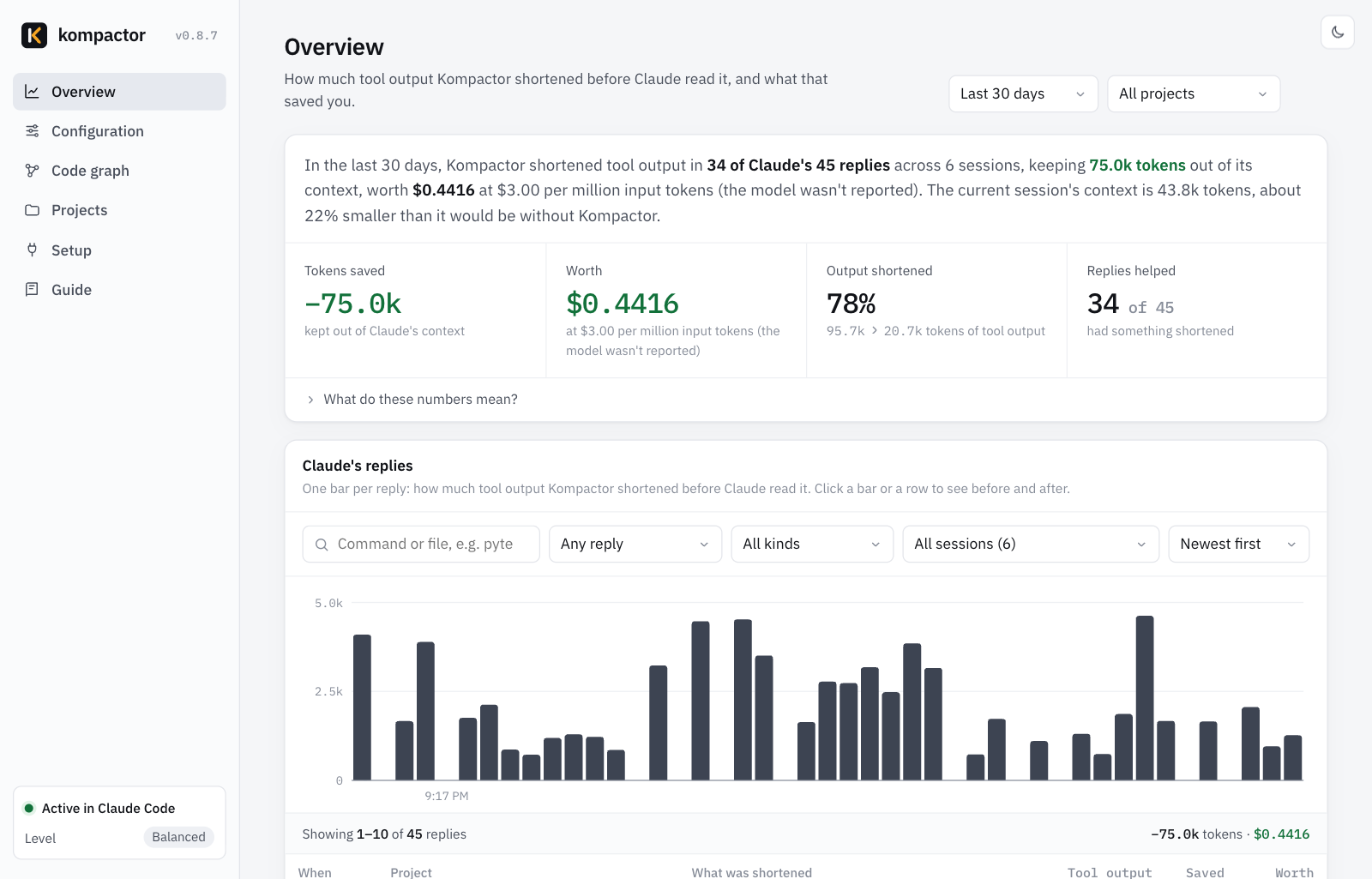
Contents
- Features
- Quick start
- How it works
- Examples
- Usage
- Levels
- Configuration
- See your savings
- Code graph
- Use it across a team
- Evidence
- Supported languages
- What Kompactor runs and changes
- Troubleshooting
- FAQ
- Development
- Contributing
- License
Features
- Compacts command output. Passing tests, progress bars, download chatter, library stack frames and lock-file diffs are dropped. Errors, failures, your own frames and summary lines are always kept.
- Handles failing commands. Claude Code skips output hooks when a command fails and cuts its output to the first and last ~5K characters. Kompactor's shell prefix runs the command to completion, compacts it and passes the exit code through.
- Outline-first file reads. Big source files arrive as an outline (symbols, line ranges, who imports the file, which tests cover it). Claude reads just the ranges it needs; repeating the read returns the whole file.
- Local code graph. Find code by topic, see callers, the impact of a change and the tests to run, for Python, Go, TypeScript, JavaScript, React, Rust, Java, Kotlin, Scala, C#, Swift, C, C++, Ruby and PHP.
- Terse replies and lean code. Short, readable rules for answer-first prose and smallest-diff code, from 0 to 177 tokens depending on the level.
- Per-turn savings, in tokens and dollars. In the reply, the status line, a VS Code / Cursor sidebar (per session, per project and per turn) and a local dashboard. Numbers are conservative and never count output Claude wouldn't have read.
- One dial for quality vs tokens. Five levels, every option adjustable, per project, and a line-by-line before and after of what Claude actually got.
- Nothing is lost. Every shortened output keeps a raw copy (
kompactor show <id>), and every hook fails open. - Private and dependency-free. Python 3.9+ standard library only. Runs locally, sends nothing anywhere, no telemetry.
- Proven, reproducibly.
kompactor provereruns real Claude Code tasks with and without Kompactor; the results are in this repo.
Quick start
Pick one. All of them set up the same thing, and the Claude Code CLI and VS Code extension share it.
Claude Code plugin (recommended). In any Claude Code session, one line at a time:
/plugin marketplace add amarkum/kompactor
/plugin install amarkum@kompactor
/kompactor start
The last step turns Kompactor on: it adds the status line and the shell prefix that compacts failing commands (a plugin can't set those itself) and opens the dashboard. Then restart Claude Code.
pip / pipx / uv (macOS, Linux, Windows):
pipx install kompactor        # or: pip install kompactor · uv tool install kompactor
kompactor start
If your shell says kompactor: command not found (pip put the command in a folder that isn't on your PATH), run python3 -m kompactor start once. It links kompactor into a folder that is already on your PATH, such as ~/.local/bin, so the command works in every terminal from then on.
VS Code and Cursor. kompactor start adds the Kompactor extension to VS Code and Cursor automatically when they're installed (skip it with --no-editor); reload the window and a Kompactor icon appears in the activity bar. To install it by hand, download kompactor-0.8.6.vsix from Releases and use Extensions › ⋯ › Install from VSIX….
From source:
git clone https://github.com/amarkum/kompactor.git && ./kompactor/install.sh # Windows: .\kompactor\install.ps1
After you install
- Restart Claude Code (CLI or VS Code). Kompactor starts with the next session.
- Work as usual. You don't call Kompactor; it acts on Claude's tool calls by itself. After each reply you'll see a line like
Kompactor: −8.2k tokens this turn, and the status line shows the running total. - Check it's on: run
kompactorin a terminal (or/kompactorin Claude Code):Kompactor 0.8.6 is on Claude Code connected Level Balanced (3 of 5) Saved 41.3k tokens (−38%) in 52 tool calls Dashboard http://127.0.0.1:56710/kompactor helplists every command. - In VS Code or Cursor: click the Kompactor icon in the activity bar for tokens and dollars saved this session, in this project, today and over 30 days, plus what Kompactor shortened in each of Claude's recent replies.
- Three commands to remember:
kompactor startturns it on and opens the dashboard,kompactor stoppauses it,kompactor uninstallremoves it.
How it works
Kompactor uses Claude Code's hooks, so it sits between Claude's tools and Claude itself:
| When Claude… | Kompactor… | Mechanism |
|---|---|---|
| runs a command | drops passing tests, progress bars, download chatter, library stack frames and lock-file diffs; keeps errors, failures, your frames and summaries | PostToolUse hook |
| runs a command that fails | runs it to completion, compacts it and passes the exit code through, so the failures in the middle survive | CLAUDE_CODE_SHELL_PREFIX |
| gets more than ~30K characters back | compacts the whole output instead of Claude Code's 2 KB preview | PostToolUse hook |
| opens a big source file | returns its outline first: symbols with line ranges, signatures, importers and covering tests | PreToolUse hook |
| first searches the code | adds a short map of the most depended-on modules, once per session | PostToolUse context |
| writes a reply (subagents too) | gets a few lines of rules: answer first, smallest diff, reuse before writing | SessionStart, SubagentStart |
| works on after you change the level | gets the new rules with your next message, in sessions that are already open | UserPromptSubmit hook |
| finishes a turn | shows what the turn saved | Stop hook |
Nothing is lost. Every shortened output keeps a raw copy that Claude can fetch with kompactor show <id> (the id is printed in the short version). An outline-first read is "deny once, allow on retry", so Claude can always get the full file. Kompactor never changes what a command does, your permission rules still apply, and every hook fails open. How Claude Code's hooks behave on success, failure and very long output is written up in docs/SPEC.md.
Examples
Ask Claude Code the way you normally would. These prompts come from the evidence runs:
| You ask | What Kompactor does | Measured |
|---|---|---|
| "Run the tests and tell me which one fails and why." | Claude sees the failing test, its error and the summary line instead of hundreds of passing tests, even when the run exits non-zero. | Go: −33% tokens; vitest: −37% cost |
| "Where is the session cookie signed?" | Big files arrive as outlines with line ranges, and the first search adds a map of the main modules, so Claude finds the code in fewer turns. | Flask: −26% tokens |
| "Install the dependencies and check that it builds." | Download and progress chatter is dropped; warnings, errors and the result are kept. | npm install: ~33,000 › 469 tokens |
"What does changing createStore affect?" |
The code graph lists the files that use it and the tests to run. | 27/27 answers correct |
/kompactor review |
Lists cuts in your current diff: duplicated helpers, unused options, dead branches. |
Usage
In Claude Code
| Command | What it does |
|---|---|
/kompactor or /kompactor status |
Is it on, current level, savings so far |
/kompactor balanced, /kompactor max savings, /kompactor max quality |
Change the level |
/kompactor stop · /kompactor start |
Pause it · turn it back on |
/kompactor review |
Suggests cuts in your current diff |
/kompactor audit · /kompactor debt |
Dead-code candidates · a list of FIXME/HACK/TODO shortcuts |
In a terminal
| Command | What it does |
|---|---|
kompactor start |
Turn Kompactor on: connect it to Claude Code (CLI + VS Code), add the extension to VS Code and Cursor, and open the dashboard on a free port |
kompactor stop |
Pause it and close the dashboard; settings are kept |
kompactor uninstall |
Remove it from Claude Code and from VS Code / Cursor, and delete its data (--keep-data keeps ~/.kompactor) |
kompactor / kompactor status |
On or off, level, savings, how it works |
kompactor presets · kompactor config preset 4 |
List levels · change level |
kompactor config <setting> <value> |
Change one setting |
kompactor gain |
Savings so far |
kompactor estimate |
Replay your past sessions: what Kompactor would have saved |
kompactor graph <action> |
query, impact, explain, callers, deps, path, report, unused |
kompactor show ID · kompactor search TEXT |
The raw outputs Kompactor shortened |
kompactor run -- <command> |
Run any command and print its compacted output (for other agents or scripts) |
kompactor prove |
A/B test Kompactor in real Claude Code sessions |
kompactor doctor |
Check the installation and show recent hook errors |
kompactor ui |
The dashboard, in the foreground |
Levels
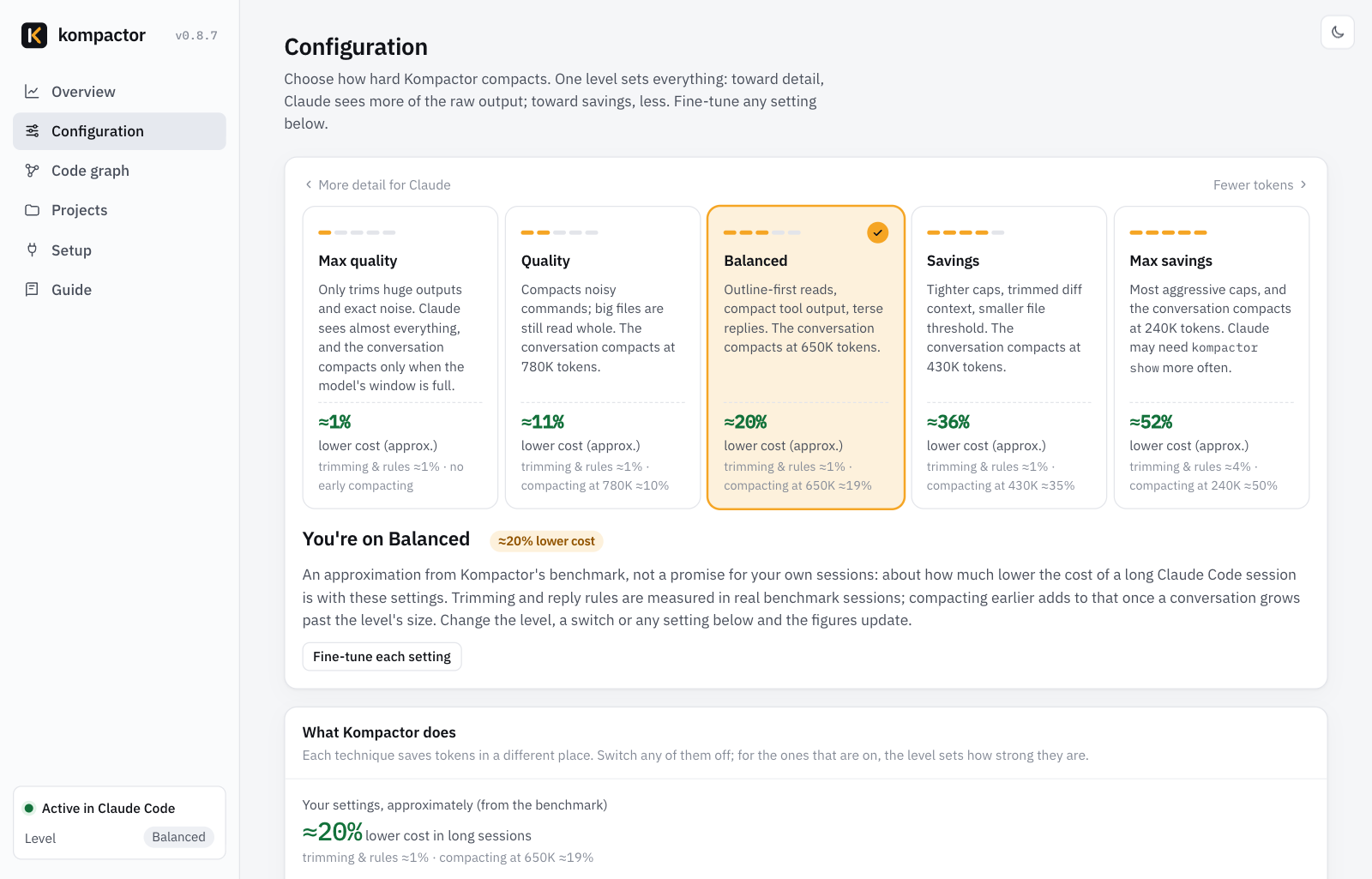
One level sets everything. Change it on the dashboard, with /kompactor <level> in chat, or with kompactor config preset <1-5>. Each project can have its own level.
| Level | What Claude gets | Max lines per output | Outline files from | Conversation compacts at | Code map | Reply rules | Cost saved* |
|---|---|---|---|---|---|---|---|
| 1 Max quality | Almost everything; only pure noise is removed from large outputs | 600 | 1,500 lines | Claude Code's default | — | 0 tokens | ≈0–5% |
| 2 Quality | Noisy commands compacted, passing tests hidden, one-line git log |
400 | 800 lines | 780K tokens | — | 72 tokens | ≈10% |
| 3 Balanced (default) | Library frames trimmed, code map, lean-code rules | 200 | 400 lines | 650K tokens | 500 tokens | 156 tokens | ≈19% |
| 4 Savings | Tighter caps, 3 lines of diff context, shorter prose | 120 | 250 lines | 430K tokens | 700 tokens | 176 tokens | ≈35% |
| 5 Max savings | 1 line of diff context, telegraphic prose | 80 | 150 lines | 240K tokens | 900 tokens | 177 tokens | ≈50% |
Where the saving comes from. Every request re-sends the whole conversation, so on a 1M-context model most of a long session's cost is the conversation being read again (80% of it in the sessions measured). Trimming tool output helps a little; letting the conversation grow less before Claude Code compacts it is what moves the bill. Each level sets Claude Code's own autoCompactWindow while Kompactor is on. The trade-off: after a compaction Claude keeps a summary of the early part of the session, not every detail, so higher levels compact more often (in the sessions measured, 7 extra compactions at Quality and 74 at Max savings, over 65 sessions). A window you set yourself with /autocompact always wins, kompactor stop puts Claude Code's default back, and Claude Code caps the window at each model's own size, so 200K-context models are unaffected.
* 65 real Claude Code sessions on Opus 5.5 (1M context), replayed at each level with kompactor estimate: output trimming plus compacting earlier, with an 8K-token summary per compaction. Not counted: files Claude re-reads after a compaction. Your figures depend on how long your sessions run; the Configuration page shows each level's estimate on your own sessions.
Configuration
Settings come from, in increasing priority: the level → your global choices → a committed .kompactor.json in the repo → your per-project choices on the dashboard → KOMPACTOR_<SETTING> environment variables → KOMPACTOR_PRESET. The dashboard is the easiest way to change them; kompactor config prints the effective settings for the current folder.
Settings
| Setting | Type | What it does |
|---|---|---|
bash |
bool | Compact command output |
bash_wrap |
bool | Compact failing commands too (needs the shell prefix that kompactor start adds) |
bash_plain |
bool | Ask Claude to run commands without | head, | tail or | grep, since Kompactor keeps every failure |
bash_min_tokens |
int | Leave outputs smaller than this untouched |
bash_max_lines |
int | Max lines kept per output (head and tail kept; error lines from the middle always kept) |
max_line_chars |
int | Clip longer lines (minified code, giant JSON) with a +N chars note |
grep_per_file |
int | Search matches shown per file before +N more |
test_hide_passing |
bool | Drop passing-test lines; keep failures and the summary |
test_boilerplate |
bool | Drop test-runner banners, separators and timing lines |
trim_stack_frames |
bool | Collapse library frames (site-packages, node_modules, Go runtime) in tracebacks |
diff_context |
int | Unchanged lines kept around each change in diffs (-1 = all) |
git_log_compact |
bool | Turn verbose git log into sha date author: subject |
read_outline |
bool | Outline-first reads for big files |
read_outline_lines |
int | Line count from which a file is outlined first |
read_graph_context |
bool | Outlines say which modules import the file and which tests cover it |
read_dedupe |
bool | Re-reading an unchanged file gets a short note |
graph |
bool | Build and use the local code graph |
session_map_tokens |
int | Token budget for the code map given on the first search (0 = off) |
compact_window |
int | Claude Code compacts the conversation once it reaches this many tokens (its autoCompactWindow; 0 = Claude Code's default) |
style |
choice | Prose: off, lite, full, ultra |
code_style |
choice | Code: normal, lean, strict |
subagent_rules |
bool | Give subagents the same rules |
never_compact |
list | Commands whose output always passes through untouched |
General: turn_summary (savings line after each reply), statusline, retention_days (default 30).
Environment variables
| Variable | Effect |
|---|---|
KOMPACTOR_RAW=1 |
Pass output through untouched (for the whole session, or prefix a single command with it) |
KOMPACTOR_PRESET=1…5 |
Force a level |
KOMPACTOR_<SETTING> |
Override one setting, e.g. KOMPACTOR_BASH_MAX_LINES=300 |
KOMPACTOR_HOME |
Where Kompactor keeps its data (default ~/.kompactor) |
KOMPACTOR_SUBAGENT_MATCHER |
Give the reply and code rules only to subagents whose type matches this pattern, e.g. explore|general (also a dashboard setting; empty means all) |
KOMPACTOR_REPO |
The repo the dashboard's share commands name, for teams running a fork |
Per-repository settings
Commit a .kompactor.json next to the code to give everyone the same level and overrides:
{ "preset": 4, "overrides": { "never_compact": ["terraform plan"] } }
See your savings
| Where | What you see |
|---|---|
| After each reply | Kompactor: −8.2k tokens this turn (13.1k › 4.9k, −63%) · session −41k · context ≈31% smaller |
| CLI status line | Kompactor −41.3k · ctx −31% · last turn −8.2k · Balanced |
| VS Code / Cursor status bar | Tokens and dollars saved this session; hover for details |
| VS Code / Cursor sidebar | Kompactor icon in the activity bar: this session, this project, today and 30 days in tokens and dollars, recent turns (saved or "nothing to trim"), biggest wins |
Dashboard (kompactor start) |
Per-turn chart, biggest wins, savings by feature and by project |
kompactor gain |
The same numbers in the terminal |
kompactor estimate |
Replays your past sessions and shows what Kompactor would have saved |
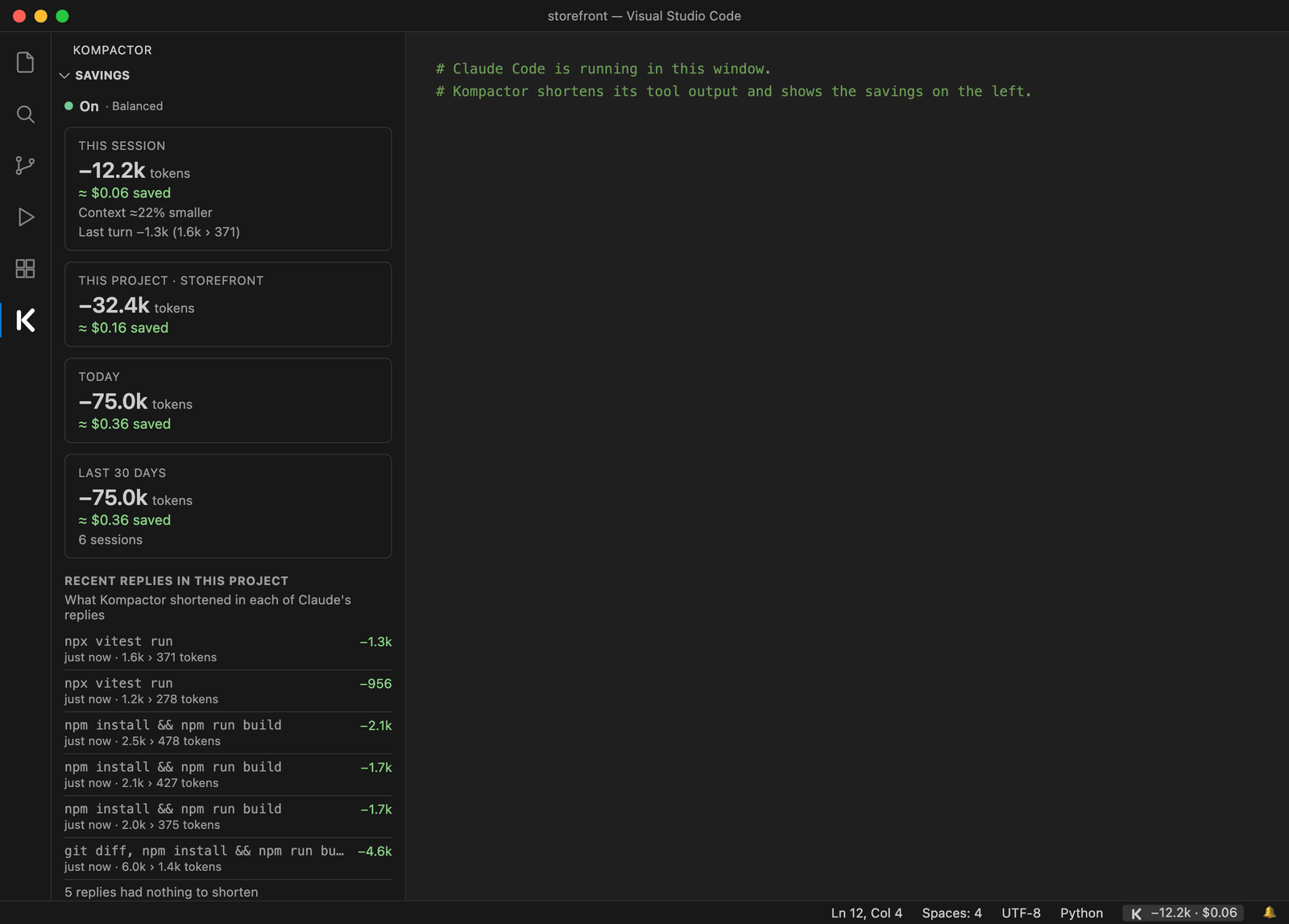
The numbers are conservative: they count only what Claude would really have read. When Claude Code would have truncated an output anyway, only the truncated size counts, and when Claude reads a whole file after its outline, the outline's saving is reversed.
Code graph
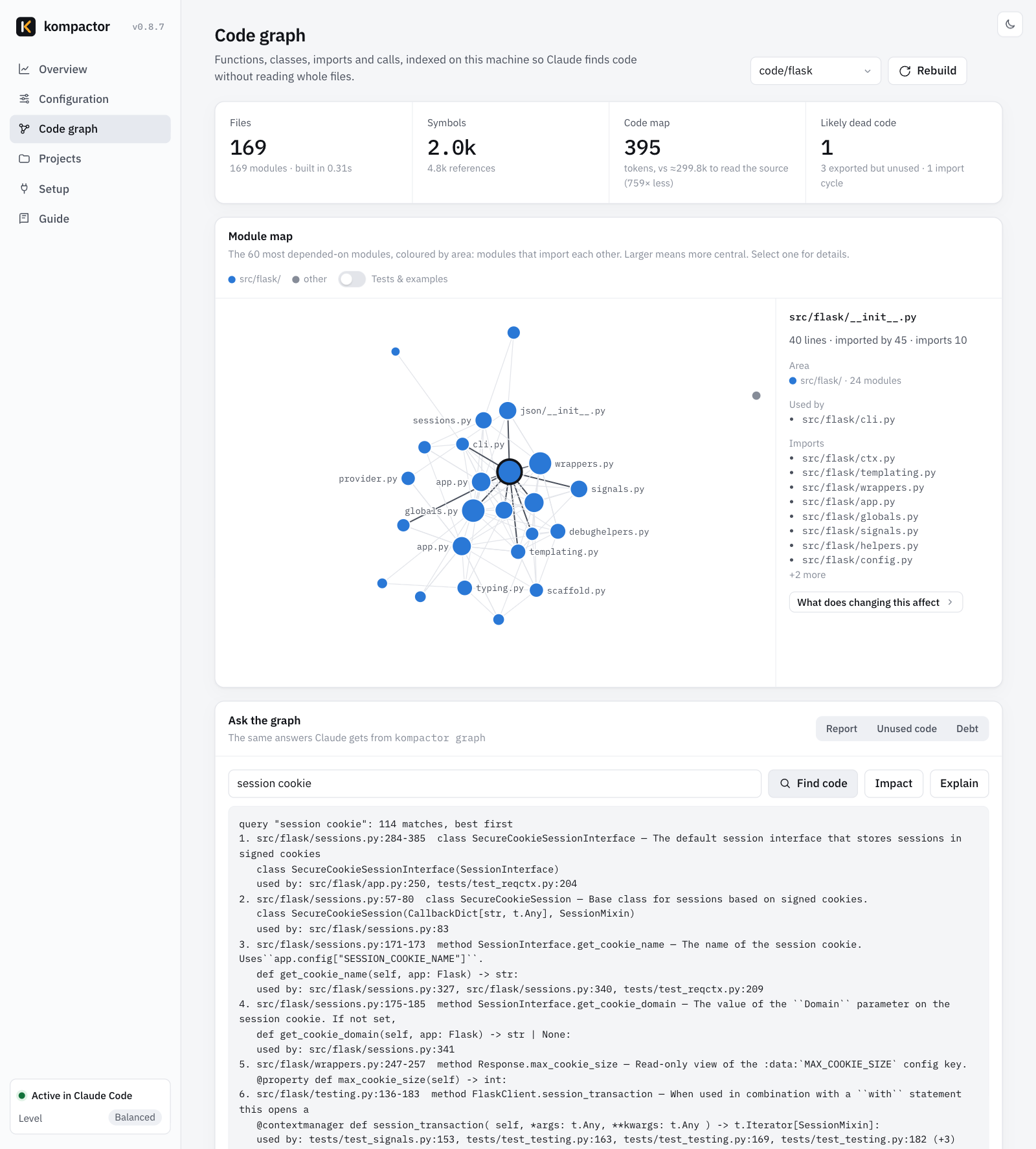
A local index of your repository: functions, classes, imports and calls, plus the sections of your Markdown and reStructuredText docs and the code they mention, so impact and explain also name the docs to update. It builds in about a second (Flask: 84 files in 0.35 s), refreshes in the background after edits, and is never sent anywhere or written into your repo. Claude uses it on its own; you can query it too:
kompactor graph query "session cookie"     find code by topic, with line ranges and who uses it
kompactor graph impact createStore         what uses it, and which tests to run
kompactor graph explain Name               one symbol: signature, callers, callees, tests
kompactor graph callers / deps / path      who calls it, what it imports, how two modules connect
kompactor graph report                     core modules, entry points, communities, import cycles
kompactor graph unused                     dead-code candidates
kompactor graph export json|graphml|mermaid  the graph as data, for Gephi/yEd, or as a diagram (--out FILE)
kompactor graph export obsidian --out DIR  an Obsidian vault: a note per module, linked by imports
kompactor graph hook install               refresh the graph after each commit, merge and checkout
Use the graph from any MCP client
kompactor mcp serves the graph over the Model Context Protocol (stdio), so Cursor, Codex, Gemini CLI, Windsurf or a second Claude Code setup can use it too. Its tools are read-only: graph_query, graph_callers, graph_impact, graph_deps, graph_explain, graph_path, graph_report, graph_unused, outline and symbol. The graph is refreshed (only changed files) before each answer, and paths outside the project are refused.
claude mcp add kompactor -- kompactor mcp
Other clients take the same command in their MCP settings, for example {"mcpServers": {"kompactor": {"command": "kompactor", "args": ["mcp"]}}}. Add --root <folder> to serve a project other than the folder the client starts it in.
Use it across a team
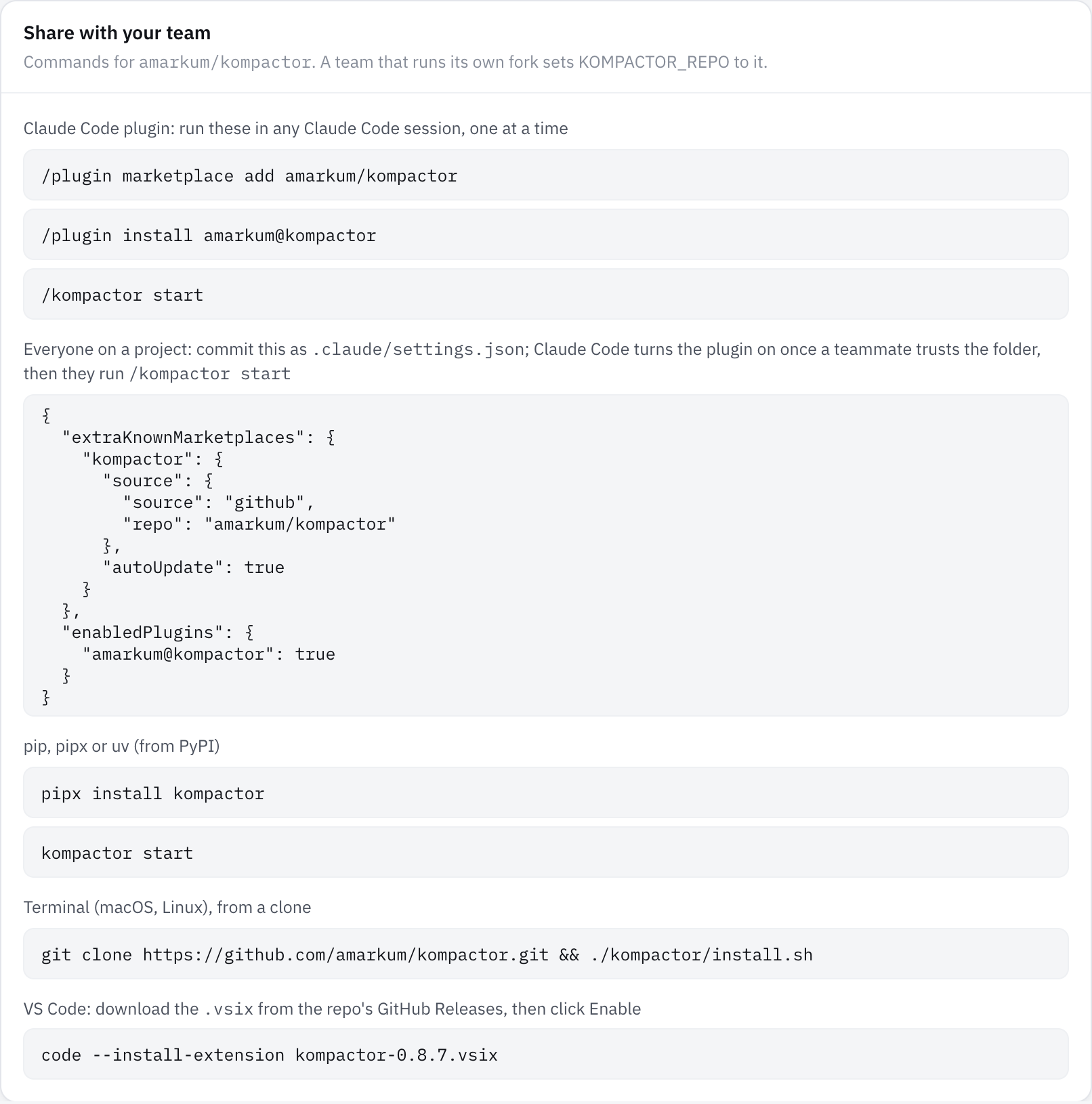
Turn it on for everyone who works in a repo. Commit this as .claude/settings.json:
{
  "extraKnownMarketplaces": {
    "kompactor": { "source": { "source": "github", "repo": "amarkum/kompactor" }, "autoUpdate": true }
  },
  "enabledPlugins": { "amarkum@kompactor": true }
}
When a teammate trusts the folder, Claude Code installs the plugin; each person then runs /kompactor start once. autoUpdate keeps everyone on the latest release. Admins can put the same keys in Claude Code's managed settings to roll it out to every machine, and a team that runs its own fork sets KOMPACTOR_REPO so the dashboard shows the fork's commands.
Teammates on other coding agents. kompactor rules writes the same reply and code rules, plus how to use the code graph, into each agent's own rules file: .cursor/rules/kompactor.mdc (Cursor), .windsurf/rules/kompactor.md (Windsurf), .clinerules/kompactor.md (Cline), and a marked block in AGENTS.md (Codex and others), .github/copilot-instructions.md (GitHub Copilot), GEMINI.md (Gemini CLI) and CONVENTIONS.md (Aider). --agent cursor picks one; running it again updates the block in place; --remove takes it out and leaves the rest of each file alone. Those agents can also query the graph through kompactor mcp.
Evidence
kompactor prove runs each task in real headless Claude Code sessions (claude -p), 3 times without Kompactor and 3 times with it, interleaved, with the same prompt, tools, turn limit and budget cap. Tokens are input + cache writes + cache reads + output across every API call; cost is Claude Code's own figure.
| Task | Repo | Tokens | Cost | Turns | Correct (without › with) |
|---|---|---|---|---|---|
| Find the failing Go test and its error | Cobra | −33% | −18% | 3.3 › 2.0 | 3/3 › 3/3 |
| Find how requests are deduplicated | SWR | −32% | −12% | 3.0 › 2.0 | 3/3 › 3/3 |
| Find where the session cookie is signed | Flask | −26% | −11% | 3.7 › 2.7 | 3/3 › 3/3 |
| Find the flag-group validation function | Cobra | −24% | −6% | 2.7 › 2.3 | 3/3 › 3/3 |
| Most-changed files in the last 40 commits | Flask | −16% | +4% | 3.7 › 3.0 | 3/3 › 3/3 |
Find the failing vitest test (--reporter=verbose) |
zustand | −7% | −37% | 2.0 › 2.0 | 3/3 › 3/3 |
| Type-check and list errors | ky | +1% | −2% | 2.0 › 2.0 | 3/3 › 3/3 |
| Find the failing pytest tests | Flask | +1% | +3% | 2.0 › 2.0 | 3/3 › 3/3 |
What does changing createStore affect |
zustand | +17% | +4% | 2.0 › 2.3 | 3/3 › 3/3 |
| Total (54 sessions) | −16% | −10% | 27/27 › 27/27 |
At the other levels, against the same baseline:
| Level | Tokens | Cost | Output tokens | Correct |
|---|---|---|---|---|
| 1 Max quality | +3% | −1% | 0% | 27/27 |
| 3 Balanced (default) | −16% | −10% | −22% | 27/27 |
| 5 Max savings | −12% | −10% | −22% | 27/27 |
Single commands, measured directly (bench/bench.py):
| Repo | Command | Raw tokens | Balanced | Max savings |
|---|---|---|---|---|
| Flask | pytest -v tests (1 failure, 482 passed) |
9,842 | 1,138 (−88%) | 696 (−93%) |
| Flask | grep -rn 'def ' src |
8,492 | 3,230 (−62%) | 1,323 (−84%) |
| Flask | git log -n 40 |
1,457 | 598 (−59%) | 598 (−59%) |
| ky | npm install (fresh) |
~33,000 | 469 (−99%) | 451 (−99%) |
| ky | grep -rn await source |
2,938 | 1,653 (−44%) | 1,058 (−64%) |
| Flask | Read src/flask/app.py (1,625 lines) › outline |
14,084 | 1,490 (−89%) | 1,490 (−89%) |
| ky | Read source/core/Ky.ts (1,376 lines) › outline |
12,452 | 919 (−93%) | 919 (−93%) |
- The wins come from avoided turns. Every turn re-sends the whole context. The vitest failure was 32K characters of passing tests; Kompactor gave Claude 1K characters with the failure, at 37% lower cost.
- Short sessions pay a small fixed cost. On 2-turn tasks with little output, the rules add about 1%.
- Session savings are smaller than command savings because most of each session is Claude Code's own fixed context.
Read more: full report · every session's tokens, tool calls and answers · what Claude received in each arm for the same failing run · how Kompactor compares with graphify, rtk, caveman and others
Reproduce it: python -m kompactor prove --tasks bench/tasks.json --repos <folder with the bench repos> --reps 3
Compaction on real repositories. evidence/real-repos runs real test suites, builds, git log/git diff and grep in 6 repositories (Python, TypeScript, C, Swift, Java) and plants one failure in each failing run: a median −61% per output at Balanced, and every planted failure line reached Claude at levels 1, 3 and 5. Outputs Claude Code would otherwise save to a file and preview in 2 KB are given in full, compacted, so on those Kompactor can cost more than the preview while handing over the actual results; the report shows both baselines.
Supported languages
Command output from any language is compacted. These languages also get language-aware trimming, outlines and the code graph; Kompactor detects them per repo (pyproject.toml, go.mod, tsconfig.json/package.json, a react or next dependency).
| Python | Go | TypeScript / React | |
|---|---|---|---|
| Library stack frames collapsed | site-packages, stdlib, .venv |
GOROOT, runtime/, pkg/mod |
node_modules, node:internal, react-dom, next/dist |
| Generated files (outline instead of a full read) | *_pb2.py, migrations |
*.pb.go, *_gen.go, zz_generated*, mocks |
*.d.ts, *.min.js, dist/, .next/ |
| Lock files collapsed in diffs | poetry.lock, uv.lock, Pipfile.lock |
go.sum |
package-lock.json, yarn.lock, pnpm-lock.yaml |
| Test runners | pytest, unittest, tox, nox | go test, gotestsum |
jest, vitest, mocha, playwright |
| Code graph | classes, functions, decorators, imports, calls | packages, structs, interfaces, methods | components, hooks, JSX renders, tsconfig paths, workspaces |
More languages, detected per repo the same way:
| Detected by | Library stack frames collapsed | Generated / lock files | Code graph | |
|---|---|---|---|---|
| Rust | Cargo.toml |
/rustc/, .cargo/registry, std:: |
target/; Cargo.lock |
functions, structs, enums, traits, impl methods, use crate::…, mod x;, impl Trait for Type |
| Java / Kotlin / Scala | pom.xml, build.gradle(.kts), build.sbt |
java., kotlin., scala., JUnit, Gradle |
build/generated/, target/; gradle.lockfile |
classes, interfaces, objects, methods, top-level functions, imports by package path, extends / implements / : |
| C# / .NET | global.json, Directory.Build.props |
System., Microsoft., xUnit, NUnit |
bin/Debug, obj/, *.g.cs, *.Designer.cs; packages.lock.json |
classes, records, structs, methods, base types |
| Swift | Package.swift |
/usr/lib/swift, XCTest |
.build/, DerivedData/; Package.resolved |
types, protocols, funcs (in types and extensions), conformances |
| C / C++ | CMakeLists.txt, meson.build |
/usr/include, libc, libstdc++ |
build/, *.pb.h; conan.lock |
classes, structs, namespaces, functions, Class::method definitions, #include "…", base classes |
| Ruby | Gemfile |
/gems/, the Ruby stdlib |
db/schema.rb; Gemfile.lock |
classes, modules, methods (?, !), require / require_relative, < superclasses |
| PHP | composer.json |
vendor/ |
vendor/, bootstrap/cache/; composer.lock |
classes, interfaces, traits, functions, use by namespace (PSR-4), require, extends / implements |
Test files are recognised for each (*Test.java, *_spec.rb, tests/, CartTests.swift and so on), so impact names the tests to run.
What Kompactor runs and changes
Everything below happens on your machine. Kompactor makes no network requests of its own and has no telemetry. (If you install the optional tiktoken package for exact token counts, tiktoken downloads its token table once, on first use.)
What it runs. Python hooks that Claude Code calls (python3 kompactor/_launch.py hook <name> from the plugin folder): after Bash, Read, Grep, Glob and edit tool calls; before Read; at session start, subagent start, when you send a message (to pass on changed rules) and before compaction; and when a turn ends. After kompactor start on macOS and Linux, Claude's Bash commands run through Kompactor's shell prefix (~/.kompactor/bin/kompactor-shell) so failing runs can be compacted too. The prefix runs after Claude Code's permission check, on Claude's original command, and returns its exit code unchanged.
What it adds to Claude's context. Compacted tool output, outlines in place of large file reads, a code map once per session, a one-line savings note after each turn, and short reply rules at session start and for subagents, given again with your next message when you change them. The rules are plain text you can read in kompactor/rules.py.
What it reads. The tool output Claude Code passes to its hooks, the files Claude reads (to outline them), your project's source (for the code graph), and the context size Claude Code gives the status line. Hooks never read your session transcripts. kompactor estimate and the dashboard's Replay your history panel read your local Claude Code session logs in ~/.claude/projects only when you run them; the result isn't stored or sent anywhere.
What it writes. ~/.kompactor/: settings, the savings ledger, raw copies of shortened output (for kompactor show), the code graph index and the ~/.kompactor/bin/ launchers. When kompactor isn't on your PATH, it adds one link to that launcher in a writable folder that already is (~/.local/bin, ~/bin, /opt/homebrew/bin or /usr/local/bin); it never edits shell files or replaces an existing command, and kompactor uninstall removes the link. History is deleted after 30 days by default. kompactor start edits ~/.claude/settings.json to add Kompactor's hooks (non-plugin installs), a status line (only if you have none), CLAUDE_CODE_SHELL_PREFIX (only if it isn't set) and the level's autoCompactWindow (only if you haven't set one; kompactor stop removes it), keeping a backup in settings.json.kompactor-backup; non-plugin installs also get the /kompactor skill in ~/.claude/skills. When VS Code or Cursor is installed, kompactor start adds the Kompactor extension to them with their own code / cursor command (from a copy inside the package; nothing is downloaded), and kompactor uninstall removes it and deletes ~/.kompactor. Nothing is written to your repositories.
What it never does. Change your permission rules or sandbox settings, change what a command does, or send your code or output anywhere. Details: privacy policy.
Troubleshooting
| Problem | What to do |
|---|---|
kompactor: command not found |
pip put the command in a folder that isn't on your PATH. Run python3 -m kompactor start once: it links kompactor into a writable folder already on your PATH, such as ~/.local/bin. Claude Code plugin installs do this at the first session. |
| No savings line after replies | Restart Claude Code after kompactor start, then run kompactor doctor: it checks the installation and shows recent hook errors. The dashboard's Self-test panel runs every hook once. |
| An output looks too short | Claude can fetch the original with kompactor show <id>, or search earlier outputs with kompactor search "text". |
| A command should never be shortened | Add it to Never compact these commands on the dashboard, or to never_compact in .kompactor.json. For a single run, start the command with KOMPACTOR_RAW=1. |
| Something seems off | kompactor stop turns Kompactor off at once; every hook also lets the original output through if it hits an error. Errors are logged to ~/.kompactor/hook-errors.log. |
| The dashboard port is busy | kompactor start picks a free port by itself and prints the address. |
Turn it off or remove it:
kompactor stop        # pause: output passes through untouched; settings are kept
kompactor start       # turn it back on
kompactor uninstall   # remove hooks, status line, shell prefix, skill and editor extension, and delete ~/.kompactor
Then remove the package the way you installed it: claude plugin uninstall amarkum@kompactor, pipx uninstall kompactor, or uninstall the extension in VS Code.
FAQ
Does Kompactor change Claude's answers? In the measured runs, no: 27 of 27 answers were correct with and without it. It removes noise and always keeps errors, failures and summary lines.
Does it send my code anywhere? No. Everything runs locally through Claude Code's hooks.
Why is the per-session saving smaller than the per-command saving? Most of what each turn re-sends is Claude Code's own fixed context: the system prompt, tool definitions and your messages. Kompactor shrinks the tool-output part, which can drop 80–99% per command.
Does it work in VS Code, Cursor or other editors? It works wherever Claude Code runs: the CLI and the Claude Code extension in VS Code and Cursor. It doesn't apply to the Claude chat apps, which don't run plugin hooks.
Can I use it with agents other than Claude Code?
The hooks are Claude Code-specific, but kompactor run -- <command> and kompactor filter compact any command's output for other agents and scripts.
How much latency does it add? About 50–100 ms per hook, because the filters run in Python.
How are the dollar figures worked out?
At the API list price of the model each session ran on, which Claude Code reports to the status line (Opus 5.5: $4 per million input tokens, cache writes $5, cache reads $0.20). Each token kept out of the context is counted once as a prompt-cache write and again at the cache-read price for every later request that would have re-read it: one per tool call and one per new prompt, until the session compacts. Sessions with no model reported use the model in ~/.claude/settings.json, else $3 per million. To use your own price instead, set kompactor.pricePerMillionTokens in VS Code or pass kompactor gain --price. On a Pro or Max plan these are what the same tokens would cost on the API, not money off your bill.
Is it free? Yes. MIT-licensed, no account, no paid tier.
Development
git clone https://github.com/amarkum/kompactor.git && cd kompactor
python -m unittest discover tests     # 80 tests, including the real shell prefix run as Claude Code runs it
node vscode/test/smoke.js             # VS Code extension against a mock API
claude plugin validate .              # check the plugin manifest
./scripts/build-vsix.sh               # › dist/kompactor-<version>.vsix
| Path | What's there |
|---|---|
kompactor/hooks.py |
Claude Code hook handlers |
kompactor/filters.py |
Command-output compaction rules |
kompactor/shellwrap.py |
The shell prefix for failing commands |
kompactor/outline.py, kompactor/graph.py |
Outlines and the code graph |
kompactor/config.py, kompactor/rules.py |
Levels, settings and the reply rules |
kompactor/server.py, kompactor/ui.html |
The local dashboard |
kompactor/prove.py, bench/ |
The A/B harness and benchmark tasks |
vscode/ |
The VS Code extension |
docs/SPEC.md |
How Claude Code's hooks behave, and why Kompactor uses a shell prefix |
Releases: python scripts/bump_version.py X.Y.Z, commit and push to main. The workflow runs the tests and publishes to PyPI with trusted publishing.
Contributing
Bug reports, ideas and pull requests are welcome. See CONTRIBUTING.md for how to set up, test and propose changes, and CHANGELOG.md for what's new.
- Questions and bugs: open an issue
- Security problems: report them privately, as described in SECURITY.md
- Privacy: PRIVACY.md
License
MIT © The Kompactor authors. The dashboard uses the IBM Plex fonts under the SIL Open Font License.
1 maintainer

Metadata
1 maintainer
Release files for kompactor 0.8.6
For a detailed explanation of source distributions (sdists) and built distributions (wheels), please see the package formats documentation.
Source distribution (sdist)
| File | Size | Uploaded | Provenance | |
|---|---|---|---|---|
| kompactor-0.8.6.tar.gz | 580.3 kB | With provenance | Details |
Built distribution (wheel)
| File | Interpreter | ABI | Platform | Reset |
|---|---|---|---|---|
| kompactor-0.8.6-py3-none-any.whl | Python 3 | none | any | Details |
Total release size: 1.1 MB
Release files / kompactor-0.8.6.tar.gz
| Download URL | kompactor-0.8.6.tar.gz |
|---|---|
| Size | 580.3 kB |
| Tags | Source |
|
SHA-256 checksum How to use checksums |
db0f116f2a23d4f767604206f2b6c540beeb03c871e10b24190f07a5377b7c37
|
|
BLAKE2b-256 checksum How to use checksums |
f3ac87d4651f7bb4f37760c0936b81750d74424562d410c09d199911cedda0a8
|
| Upload date | |
|
Uploaded using Trusted Publishing? What is trusted publishing? |
Yes |
| Uploaded via |
twine/7.0.0 CPython/3.13.16
|
Provenance
Provenance describes where a file came from. On PyPI, provenance is shared via attestations, which provide a verifiable record of the build or publishing details. View details, limitations and caveats.


PyPI Publish Attestation
PyPI verified that this artifact, at this checksum, originated from the publisher listed below.
Signed by GitHub Actions, verified by PyPI on Oct 22, 2026.
Transparency logRelease files / kompactor-0.8.6-py3-none-any.whl
| Download URL | kompactor-0.8.6-py3-none-any.whl |
|---|---|
| Size | 535.1 kB |
| Tags | Python 3 |
|
SHA-256 checksum How to use checksums |
37c1501912c5c22fbb7cebdf6dd0122226a6051c2d9776ca581cb01b8e5e0c41
|
|
BLAKE2b-256 checksum How to use checksums |
62a08a857fe839e9cf65bc73ec40e753ee5d2a471bb1f2178d01cd8323bade7e
|
| Upload date | |
|
Uploaded using Trusted Publishing? What is trusted publishing? |
Yes |
| Uploaded via |
twine/7.0.0 CPython/3.13.16
|
Provenance
Provenance describes where a file came from. On PyPI, provenance is shared via attestations, which provide a verifiable record of the build or publishing details. View details, limitations and caveats.
PyPI Publish Attestation
PyPI verified that this artifact, at this checksum, originated from the publisher listed below.
Signed by GitHub Actions, verified by PyPI on Oct 22, 2026.
Transparency logSecurity for kompactor 0.8.6
Provenance
Provenance describes where a file came from. On PyPI, provenance is shared via attestations, which provide a verifiable record of the build or publishing details. View details, limitations and caveats.
Full provenance
All 2 files in this release have been uploaded with provenance metadata.
Attestation for kompactor-0.8.6.tar.gz
PyPI Publish Attestation
PyPI verified that this artifact, at this checksum, originated from the publisher listed below.
Signed by GitHub Actions, verified by PyPI on Oct 22, 2026.
Transparency logA note on package security
PyPI is a repository for distributing packages, not a service for auditing them. While third-party security researchers and our staff do their best to detect and remove malicious packages, PyPI cannot guarantee the quality, security or suitability of any given package.














