
🌿 Konoha: Simple wrapper of Japanese Tokenizers











Konoha is a Python library for providing easy-to-use integrated interface of various Japanese tokenizers,
which enables you to switch a tokenizer and boost your pre-processing.
Supported tokenizers






Also, konoha provides rule-based tokenizers (whitespace, character) and a rule-based sentence splitter.
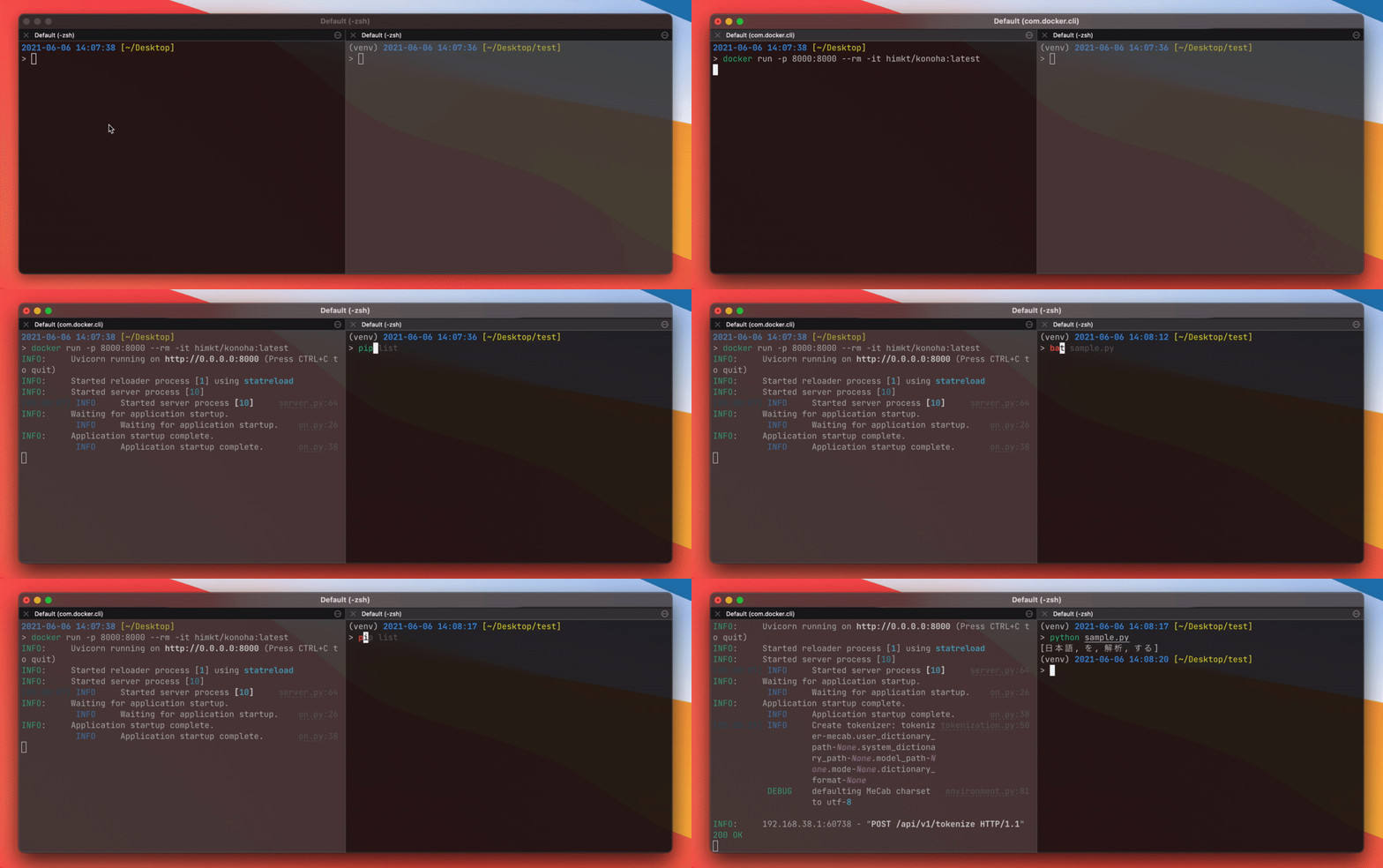
Quick Start with Docker
Simply run followings on your computer:
docker run --rm -p 8000:8000 -t himkt/konoha # from DockerHub
Or you can build image on your machine:
git clone https://github.com/himkt/konoha  # download konoha
cd konoha && docker-compose up --build  # build and launch container
Tokenization is done by posting a json object to localhost:8000/api/v1/tokenize.
You can also batch tokenize by passing texts: ["1つ目の入力", "2つ目の入力"] to localhost:8000/api/v1/batch_tokenize.
(API documentation is available on localhost:8000/redoc, you can check it using your web browser)
Send a request using curl on your terminal.
Note that a path to an endpoint is changed in v4.6.4.
Please check our release note (https://github.com/himkt/konoha/releases/tag/v4.6.4).
$ curl localhost:8000/api/v1/tokenize -X POST -H "Content-Type: application/json" \
    -d '{"tokenizer": "mecab", "text": "これはペンです"}'

{
  "tokens": [
    [
      {
        "surface": "これ",
        "part_of_speech": "名詞"
      },
      {
        "surface": "は",
        "part_of_speech": "助詞"
      },
      {
        "surface": "ペン",
        "part_of_speech": "名詞"
      },
      {
        "surface": "です",
        "part_of_speech": "助動詞"
      }
    ]
  ]
}
Installation
I recommend you to install konoha by pip install 'konoha[all]'.
- Install konoha with a specific tokenizer:
pip install 'konoha[(tokenizer_name)]. - Install konoha with a specific tokenizer and remote file support:
pip install 'konoha[(tokenizer_name),remote]'
If you want to install konoha with a tokenizer, please install konoha with a specific tokenizer
(e.g. konoha[mecab], konoha[sudachi], ...etc) or install tokenizers individually.
Example
Word level tokenization
from konoha import WordTokenizer

sentence = '自然言語処理を勉強しています'

tokenizer = WordTokenizer('MeCab')
print(tokenizer.tokenize(sentence))
# => [自然, 言語, 処理, を, 勉強, し, て, い, ます]

tokenizer = WordTokenizer('Sentencepiece', model_path="data/model.spm")
print(tokenizer.tokenize(sentence))
# => [▁, 自然, 言語, 処理, を, 勉強, し, ています]
For more detail, please see the example/ directory.
Remote files
Konoha supports dictionary and model on cloud storage (currently supports Amazon S3).
It requires installing konoha with the remote option, see Installation.
# download user dictionary from S3
word_tokenizer = WordTokenizer("mecab", user_dictionary_path="s3://abc/xxx.dic")
print(word_tokenizer.tokenize(sentence))

# download system dictionary from S3
word_tokenizer = WordTokenizer("mecab", system_dictionary_path="s3://abc/yyy")
print(word_tokenizer.tokenize(sentence))

# download model file from S3
word_tokenizer = WordTokenizer("sentencepiece", model_path="s3://abc/zzz.model")
print(word_tokenizer.tokenize(sentence))
Sentence level tokenization
from konoha import SentenceTokenizer

sentence = "私は猫だ。名前なんてものはない。だが,「かわいい。それで十分だろう」。"

tokenizer = SentenceTokenizer()
print(tokenizer.tokenize(sentence))
# => ['私は猫だ。', '名前なんてものはない。', 'だが,「かわいい。それで十分だろう」。']
You can change symbols for a sentence splitter and bracket expression.
- sentence splitter
sentence = "私は猫だ。名前なんてものはない.だが,「かわいい。それで十分だろう」。"

tokenizer = SentenceTokenizer(period=".")
print(tokenizer.tokenize(sentence))
# => ['私は猫だ。名前なんてものはない.', 'だが,「かわいい。それで十分だろう」。']
- bracket expression
sentence = "私は猫だ。名前なんてものはない。だが,『かわいい。それで十分だろう』。"

tokenizer = SentenceTokenizer(
    patterns=SentenceTokenizer.PATTERNS + [re.compile(r"『.*?』")],
)
print(tokenizer.tokenize(sentence))
# => ['私は猫だ。', '名前なんてものはない。', 'だが,『かわいい。それで十分だろう』。']
Test
python -m pytest
Article
Acknowledgement
Sentencepiece model used in test is provided by @yoheikikuta. Thanks!
1 maintainer

Metadata
1 maintainer
Release files for konoha 5.7.2
For a detailed explanation of source distributions (sdists) and built distributions (wheels), please see the package formats documentation.
Source distribution (sdist)
| File | Size | Uploaded | Provenance | |
|---|---|---|---|---|
| konoha-5.7.2.tar.gz | 11.3 kB | Without provenance | Details |
Built distribution (wheel)
| File | Interpreter | ABI | Platform | Reset |
|---|---|---|---|---|
| konoha-5.7.2-py3-none-any.whl | Python 3 | none | any | Details |
Total release size: 29.7 kB
Release files / konoha-5.7.2.tar.gz
| Download URL | konoha-5.7.2.tar.gz |
|---|---|
| Size | 11.3 kB |
| Tags | Source |
|
SHA-256 checksum How to use checksums |
576cc4e3452d86e4e96af11fac9182190adb561cf0c699a41841b8ea4758396f
|
|
BLAKE2b-256 checksum How to use checksums |
4d12f4fc7af7169d442ce8ce3193855af20659ee417e049a17a6e623f25307b4
|
| Upload date | |
|
Uploaded using Trusted Publishing? What is trusted publishing? |
Yes |
| Uploaded via |
uv/0.13.5 {"installer":{"name":"uv","version":"0.13.5","subcommand":["publish"]},"python":null,"implementation":{"name":null,"version":null},"distro":{"name":"Ubuntu","version":"22.04","id":"jammy","libc":null},"system":{"name":null,"release":null},"cpu":null,"openssl_version":null,"setuptools_version":null,"rustc_version":null,"ci":true}
|
Release files / konoha-5.7.2-py3-none-any.whl
| Download URL | konoha-5.7.2-py3-none-any.whl |
|---|---|
| Size | 18.3 kB |
| Tags | Python 3 |
|
SHA-256 checksum How to use checksums |
94a1741e43b7862c7b3011593aade1e745a507abf9ce93340aa3c062e3b983cc
|
|
BLAKE2b-256 checksum How to use checksums |
0a04927c122056882d0257830d837eb3efa6ba5eadfe37a4234bd4f09141b884
|
| Upload date | |
|
Uploaded using Trusted Publishing? What is trusted publishing? |
Yes |
| Uploaded via |
uv/0.13.5 {"installer":{"name":"uv","version":"0.13.5","subcommand":["publish"]},"python":null,"implementation":{"name":null,"version":null},"distro":{"name":"Ubuntu","version":"22.04","id":"jammy","libc":null},"system":{"name":null,"release":null},"cpu":null,"openssl_version":null,"setuptools_version":null,"rustc_version":null,"ci":true}
|
Security for konoha 5.7.2
Provenance
Provenance describes where a file came from. On PyPI, provenance is shared via attestations, which provide a verifiable record of the build or publishing details. View details, limitations and caveats.
No provenance found
None of the files in this release were uploaded with provenance metadata.
A note on package security
PyPI is a repository for distributing packages, not a service for auditing them. While third-party security researchers and our staff do their best to detect and remove malicious packages, PyPI cannot guarantee the quality, security or suitability of any given package.
To learn more about protecting yourself from malicious actors, visit our package security documentation.














