
konsole-pal 🐰


A tiny, local-first attention router for terminal AI agents. It shows when an agent is working, keeps genuine questions in one unread inbox, and returns you to the right tab without scraping terminal output.
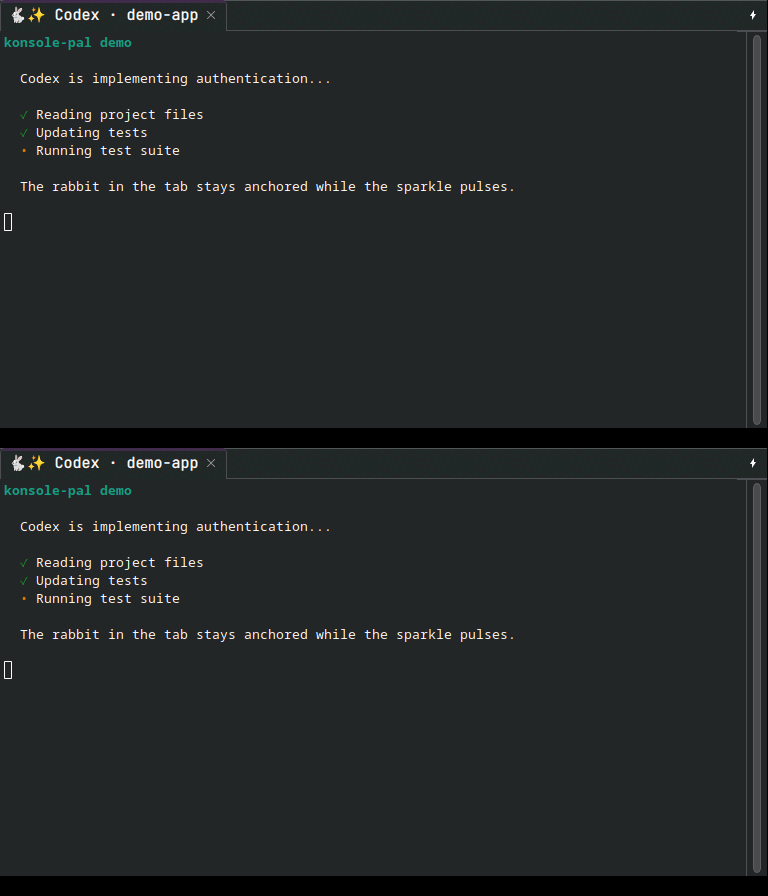
The rabbit stays in one fixed position. Only the equal-width activity symbol changes, so the tab label never shifts and the tab never grows or shrinks.
The CLI follows the same idea: one memorable rabbit, calm typography, useful empty states, and no decorative work when output is piped or requested as JSON.
What you get
- Working:
🐇✨/🐇⭐— a gentle fixed-width pulse. - Completed:
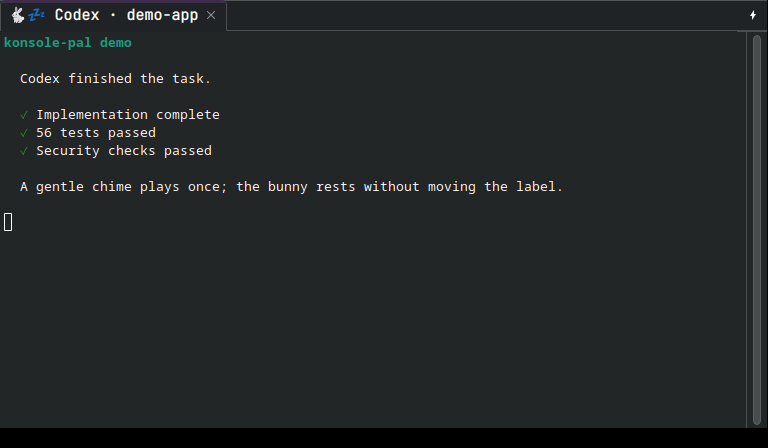
🐇💤— a resting bunny plus a soft ascending chime. - Needs you:
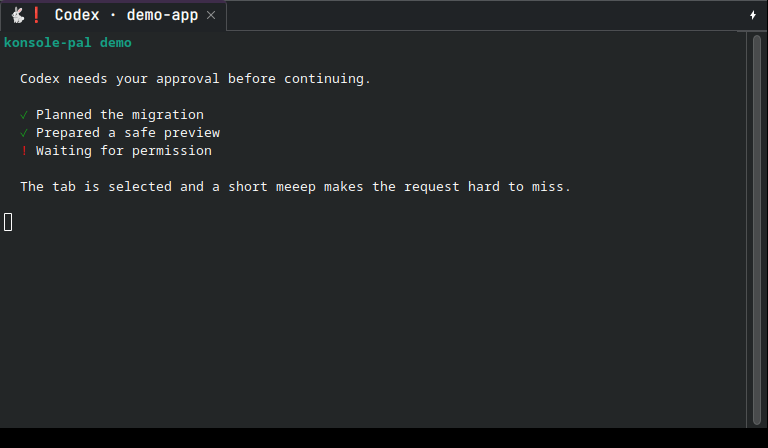
🐇❗— tab handoff plus a short “meeep.” - Failed:
🐇💥— a visible error state and attention sound. - A durable attention inbox with deterministic
nextandackcommands. - One sleeping animator for every tab, not one process per tab.
- Codex, Cursor, Claude Code, Gemini CLI, OpenCode, Copilot CLI, and Aider adapters.
- Native Konsole, Zellij, tmux, Kitty, WezTerm, Ghostty, SSH, and generic support.
- Validated rabbit, ASCII, monochrome, and local data-only theme packs.
- Safe hook installation that merges existing configuration and creates backups.
- No network access, telemetry, prompt storage, or transcript storage.
Real state previews
These screenshots were captured from a real Konsole 26.04 session on an isolated display containing only the controlled demo. They contain no username, hostname, filesystem path, notifications, or device information.
A CLI designed for humans and scripts
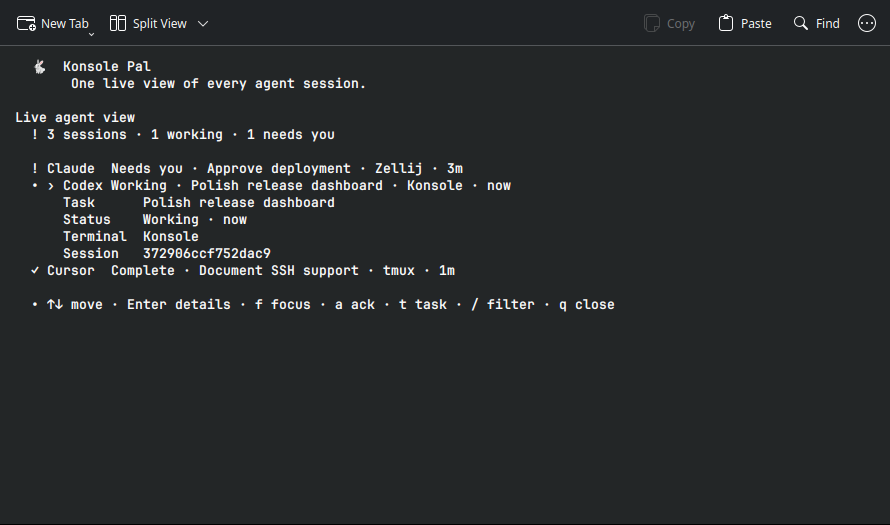
Interactive commands use a terminal-native palette and aligned status rows.
NO_COLOR disables color, non-TTY output contains no escape sequences, and
--json is available for status, inbox, emit, setup, doctor, settings, themes,
and hook health.
Install in three commands
Python 3.10 or newer is required. pipx is recommended because it installs the CLI in an isolated environment.
pipx install konsole-pal
konsole-pal setup
konsole-pal demo
Setup connects the supported agents detected on your machine. Restart those agents after installation. That is it.
Prefer uv?
uv tool install konsole-pal
konsole-pal setup
Prefer Nix? The committed flake lock keeps the package input reproducible:
nix run github:daredoole/konsole-pal
# Or install it into your profile:
nix profile install github:daredoole/konsole-pal
For native Konsole control, install whichever Qt D-Bus command your distribution
provides: qdbus6, qdbus-qt6, or qdbus. Without it, konsole-pal safely
falls back to the standard terminal-title escape sequence.
For sound, it automatically uses the first available player: PipeWire
(pw-play), PulseAudio (paplay), or ALSA (aplay).
Agent setup
The installer preserves unrelated hooks, writes mode-0600 files, and makes a
hooks.json.bak before changing an existing file.
# Guided setup for detected agents
konsole-pal setup

# Calm defaults without prompts (useful for dotfiles)
konsole-pal setup --yes

# Or one agent
konsole-pal setup codex
konsole-pal setup cursor
konsole-pal setup claude gemini opencode copilot aider

# Confirm the active configuration
konsole-pal hooks status
Every adapter normalizes its native lifecycle into the same four events:
| Native event class | Konsole Pal state |
|---|---|
| prompt submitted / agent starts | Working |
| permission, approval, question | Needs you |
| agent stop / idle / after-agent | Completed |
| stop failure / session error | Failed |
Hook installers preserve unrelated configuration and create private backups.
Aider uses its official notification command; OpenCode gets a data-minimizing
local plugin. konsole-pal emit STATE --agent NAME integrates any other tool.
Codex requires one explicit security review after installing or changing a
hook: restart Codex, run /hooks, and trust the Konsole Pal command. On plain
SSH, setup also disables Codex's competing built-in terminal title with
tui.terminal_title = []. It preserves the rest of ~/.codex/config.toml and
creates a private config.toml.konsole-pal.bak before changing it.
Attention inbox
Completion is display state; attention is durable unread state; focus is a short-lived event. Keeping them separate prevents an old completion from ever stealing focus after an animator restart.
konsole-pal inbox          # only unread questions, approvals, and failures
konsole-pal next           # jump to and acknowledge the newest focusable item
konsole-pal ack codex      # clear one matching item
konsole-pal ack --all
konsole-pal status         # one snapshot of every tracked agent session
konsole-pal watch          # live unified view; exits cleanly with Ctrl-C
konsole-pal watch --attention-only
konsole-pal watch --expanded
next acknowledges only after the terminal confirms that it focused the target.
An unsupported remote target stays unread instead of silently disappearing.
watch uses an alternate terminal screen, refreshes only when displayed state
changes, and leaves no permanent dashboard or background process behind. Use
arrow keys or j/k to move and Enter or Space to expand a session. Press f
to focus its terminal, a to acknowledge an unread request, t to edit its
display-only task label, / to filter by agent, task, state, or terminal, Escape
to clear the filter, and q to close. Expanded cards show the task label, state,
terminal, age, and opaque local session ID.
Automatic hooks use the project name as the task label. To provide a more useful description without granting access to prompts or transcripts, set a short label before starting the agent:
KONSOLE_PAL_TASK="Refactor checkout flow" codex
Manual integrations can instead pass --label to emit, set, or run.
Terminal support
| Environment | Status display | Attention handoff |
|---|---|---|
| Konsole | Native D-Bus tab title | Selects the originating Konsole tab |
| Zellij | Stable tab ID; pane fallback | Focuses the originating pane/tab |
| tmux | Stable window title and socket | Selects the originating window/pane |
| Kitty | OSC title + clickable OSC 99 notification | Focuses by window ID when permitted |
| WezTerm | OSC title + native notification | Activates the originating pane |
| Ghostty | OSC title + OSC 9 notification | Clickable terminal notification |
| SSH / other terminals | OSC title on the original PTY; direct Konsole tab title | Terminal notification or bell |
Nested multiplexers take priority over their host terminal. Remote agents never invoke local desktop automation; they use terminal escape protocols carried by the originating PTY.
Settings
Settings are layered from lowest to highest priority:
- Built-in defaults
- User config:
~/.config/konsole-pal/config.toml - Nearest project config:
.konsole-pal.toml KONSOLE_PAL_*environment variables- Command flags
konsole-pal config show
konsole-pal config set focus attention
konsole-pal config set volume 0.45
konsole-pal config set sprite_size large
konsole-pal config set theme ascii
konsole-pal config set quiet_hours 22:00-08:00
konsole-pal config set sound false --agent claude
konsole-pal config set animation static --project
konsole-pal config reset volume
| Setting | Values | Default |
|---|---|---|
preset |
minimal, balanced, playful |
balanced |
focus |
all, attention, never |
attention |
sound |
true, false |
true |
volume |
0.0–1.0 |
0.7 |
sound_theme |
soft, arcade, silent |
soft |
animation |
pulse, static |
pulse |
animation_interval |
0.2–10.0 seconds |
0.85 |
sprite_size |
small, medium, large |
medium |
theme |
built-in or validated installed theme | rabbit |
notification |
auto, off, terminal, desktop, bell |
auto |
quiet_hours |
off or HH:MM-HH:MM |
off |
attention_timeout |
0 or 60–2592000 seconds |
86400 |
label_max_cells |
8–80 |
26 |
working_timeout |
0 or 60–604800 seconds |
14400 |
focus=attention is a calmer setup: questions, approvals, and errors select
their tabs, while normal completions only rest and chime. animation=static
shows one working icon and immediately exits the animator for effectively zero
idle resource use. Sprite presets change the rabbit's fixed-width footprint;
Konsole controls the actual emoji font size for the whole tab bar.
Project policy belongs in .konsole-pal.toml; agent overrides use tables such
as [agents.claude]. The CLI writes them safely with --agent. Presets apply
first, so explicit settings always win.
| Sprite preset | Working | Complete | Needs you |
|---|---|---|---|
small |
🐇* / 🐇+ |
🐇z |
🐇! |
medium |
🐇✨ / 🐇⭐ |
🐇💤 |
🐇❗ |
large |
🐇✨✨ / 🐇⭐⭐ |
🐇💤💤 |
🐇❗❗ |
Preview or install a data-only JSON theme:
konsole-pal theme list
konsole-pal theme preview ascii --sprite-size large
konsole-pal theme install ./my-fixed-width-theme.json
Every frame and final state must occupy exactly the same number of terminal cells. Manifests containing control characters or shifting widths are rejected.
See examples/config.toml for a complete file.
Manual use
Wrap any command:
konsole-pal run --agent tests --label "Test suite" -- pytest
Or update the current tab directly:
konsole-pal set working --agent codex
konsole-pal set attention --agent codex --focus
konsole-pal emit working --agent my-agent
konsole-pal status
konsole-pal sound done
konsole-pal sound attention
konsole-pal completions zsh
Generate completions for bash, zsh, fish, or powershell. Human-readable
commands keep routing paths private unless --verbose is supplied.
Maintenance and troubleshooting
konsole-pal doctor
konsole-pal doctor --repair
konsole-pal hooks status
konsole-pal reset
- No bunny: run
konsole-pal doctor --repair, restart the agent, and submit a prompt. - No sound: run
konsole-pal sound doneand install PipeWire, PulseAudio, or ALSA tools. - Too much tab switching: run
konsole-pal config set focus attention. - Missed request: run
konsole-pal inbox --verbose, thenkonsole-pal next. - Prefer no motion: run
konsole-pal config set animation static. - Stale title: run
konsole-pal reset. - SSH: install on the remote host, run
konsole-pal setup codex, restart Codex, then use/hooksonce to trust the hook. Setup prevents Codex's own spinner title from overwriting the bunny;doctor --repairrepairs that setting without replacing unrelated Codex configuration.
reset stops the shared animator, restores resting titles, and removes runtime
state. It does not remove settings or agent hooks.
Privacy and security
- Runtime files live under
$XDG_RUNTIME_DIR/konsole-palin a mode-0700 directory. - State, configuration, generated sounds, hook files, and backups use mode 0600.
- State contains only a sanitized task/display label and terminal routing identifiers.
- Desktop and terminal notifications contain only the generic state and that label.
- Prompts, responses, transcripts, command output, and environment dumps are never stored.
- Labels are stripped of control characters and width-limited in titles and CLI views.
- External programs are invoked with argument arrays and
shell=False. - Python 3.11+ has no runtime dependencies; Python 3.10 uses only the small
tomlistandard-library backport. The package performs no network requests or telemetry.
The konsole-pal run -- ... command intentionally executes exactly the local
command placed after --; it does not interpret it through a shell.
See SECURITY.md for reporting and docs/SECURITY-REVIEW.md for the release threat model and audit results.
Resource use
All tabs share one low-priority Python worker. It sleeps between 0.85-second updates and exits after work ends. A 1.0.0 release measurement showed 0.0% CPU while sleeping, approximately 19.6 MiB RSS for the single shared worker, and approximately 54.8 ms average hook startup (58.2 ms p95). Results vary by system.
The polished CLI adds no runtime dependency and does not run in the background. Static animation mode exits immediately after rendering the working title. Sounds are synthesized once, cached privately by volume, and played asynchronously.
Uninstall
konsole-pal reset
konsole-pal hooks uninstall
pipx uninstall konsole-pal
If installed with uv, replace the last command with
uv tool uninstall konsole-pal. Settings remain in
~/.config/konsole-pal/config.toml until you remove them.
Development
git clone https://github.com/daredoole/konsole-pal.git
cd konsole-pal
uv sync --locked --extra dev
make verify
make verify runs Ruff, all unit tests, real tmux/Zellij integration tests
when available, bytecode compilation, wheel/sdist builds, and package metadata
validation. CI repeats the suite on Python 3.10 through 3.14 and validates the
locked Nix flake. Locked UV commands fail fast if dependency metadata drifts.
Please read CONTRIBUTING.md, the changelog, and the MIT license.
Design limits
- Focus handoff selects a tab inside its existing Konsole window. It does not force the Konsole application above unrelated desktop windows.
- Generic terminals and SSH receive an OSC title and bell, not local GUI control.
- Plain SSH uses Konsole's OSC 30 extension after standard OSC 0, so Konsole
shows the agent state even when its remote-tab format omits
%w; other terminals can safely ignore the unsupported extension. - Kitty focus requires its opt-in remote-control capability; without it the item remains unread and the CLI explains why.
- Cursor's stop event does not always distinguish an answer from a question, so it receives the configured completion handoff.
References
1 maintainer

Download files
Download the file for your platform. If you're not sure which to choose, learn more about installing packages.
Source Distribution
Built Distribution
Filter files by name, interpreter, ABI, and platform.
If you're not sure about the file name format, learn more about wheel file names.
Copy a direct link to the current filters
File details
Details for the file konsole_pal-1.0.1.tar.gz.
File metadata
- Download URL: konsole_pal-1.0.1.tar.gz
- Upload date:
- Size: 215.7 kB
- Tags: Source
- Uploaded using Trusted Publishing? Yes
- Uploaded via: twine/7.0.0 CPython/3.13.14
File hashes
| Algorithm | Hash digest | |
|---|---|---|
| SHA256 |
e57c49e951f72476bf45872c3702533ec7a6ea4824460153b9470f6a89ebcb26
|
|
| MD5 |
251e89f99c62133dea62275fdf94ed1d
|
|
| BLAKE2b-256 |
b60784f78d9617490ebb0be8a977eb6991917a0f86c142a326032306563e9068
|
Provenance
The following attestation bundles were made for konsole_pal-1.0.1.tar.gz:
Publisher:
release.yml on daredoole/konsole-pal
-
Statement:
-
Statement type:
https://in-toto.io/Statement/v1 -
Predicate type:
https://docs.pypi.org/attestations/publish/v1 -
Subject name:
konsole_pal-1.0.1.tar.gz -
Subject digest:
e57c49e951f72476bf45872c3702533ec7a6ea4824460153b9470f6a89ebcb26 - Sigstore transparency entry: 2341313994
- Sigstore integration time:
-
Permalink:
daredoole/konsole-pal@85072ca98f0aaa841e2c91938588183d1d7fe03f -
Branch / Tag:
refs/tags/v1.0.1 - Owner: https://github.com/daredoole
-
Access:
public
-
Token Issuer:
https://token.actions.githubusercontent.com -
Runner Environment:
github-hosted -
Publication workflow:
release.yml@85072ca98f0aaa841e2c91938588183d1d7fe03f -
Trigger Event:
push
-
Statement type:
File details
Details for the file konsole_pal-1.0.1-py3-none-any.whl.
File metadata
- Download URL: konsole_pal-1.0.1-py3-none-any.whl
- Upload date:
- Size: 47.2 kB
- Tags: Python 3
- Uploaded using Trusted Publishing? Yes
- Uploaded via: twine/7.0.0 CPython/3.13.14
File hashes
| Algorithm | Hash digest | |
|---|---|---|
| SHA256 |
a8da7d7fc16c429f18c8c1d9c4b1c261012f612a87fda4f9f57d9036efbded2d
|
|
| MD5 |
3d2250ea0e3a3d551dc866be004e7db3
|
|
| BLAKE2b-256 |
aed82927966144333df05c2061fa20c441343119fda963fe28977c3e4d63ae95
|
Provenance
The following attestation bundles were made for konsole_pal-1.0.1-py3-none-any.whl:
Publisher:
release.yml on daredoole/konsole-pal
-
Statement:
-
Statement type:
https://in-toto.io/Statement/v1 -
Predicate type:
https://docs.pypi.org/attestations/publish/v1 -
Subject name:
konsole_pal-1.0.1-py3-none-any.whl -
Subject digest:
a8da7d7fc16c429f18c8c1d9c4b1c261012f612a87fda4f9f57d9036efbded2d - Sigstore transparency entry: 2341313999
- Sigstore integration time:
-
Permalink:
daredoole/konsole-pal@85072ca98f0aaa841e2c91938588183d1d7fe03f -
Branch / Tag:
refs/tags/v1.0.1 - Owner: https://github.com/daredoole
-
Access:
public
-
Token Issuer:
https://token.actions.githubusercontent.com -
Runner Environment:
github-hosted -
Publication workflow:
release.yml@85072ca98f0aaa841e2c91938588183d1d7fe03f -
Trigger Event:
push
-
Statement type:







