
korvid
A tool-using bird for your cluster.
AI-native Kubernetes TUI — a keyboard-first cockpit with an embedded LLM agent that sees your screen, drives the UI, diagnoses issues, and proposes writes you approve.
Corvids are the only birds known to use tools. So does this one.
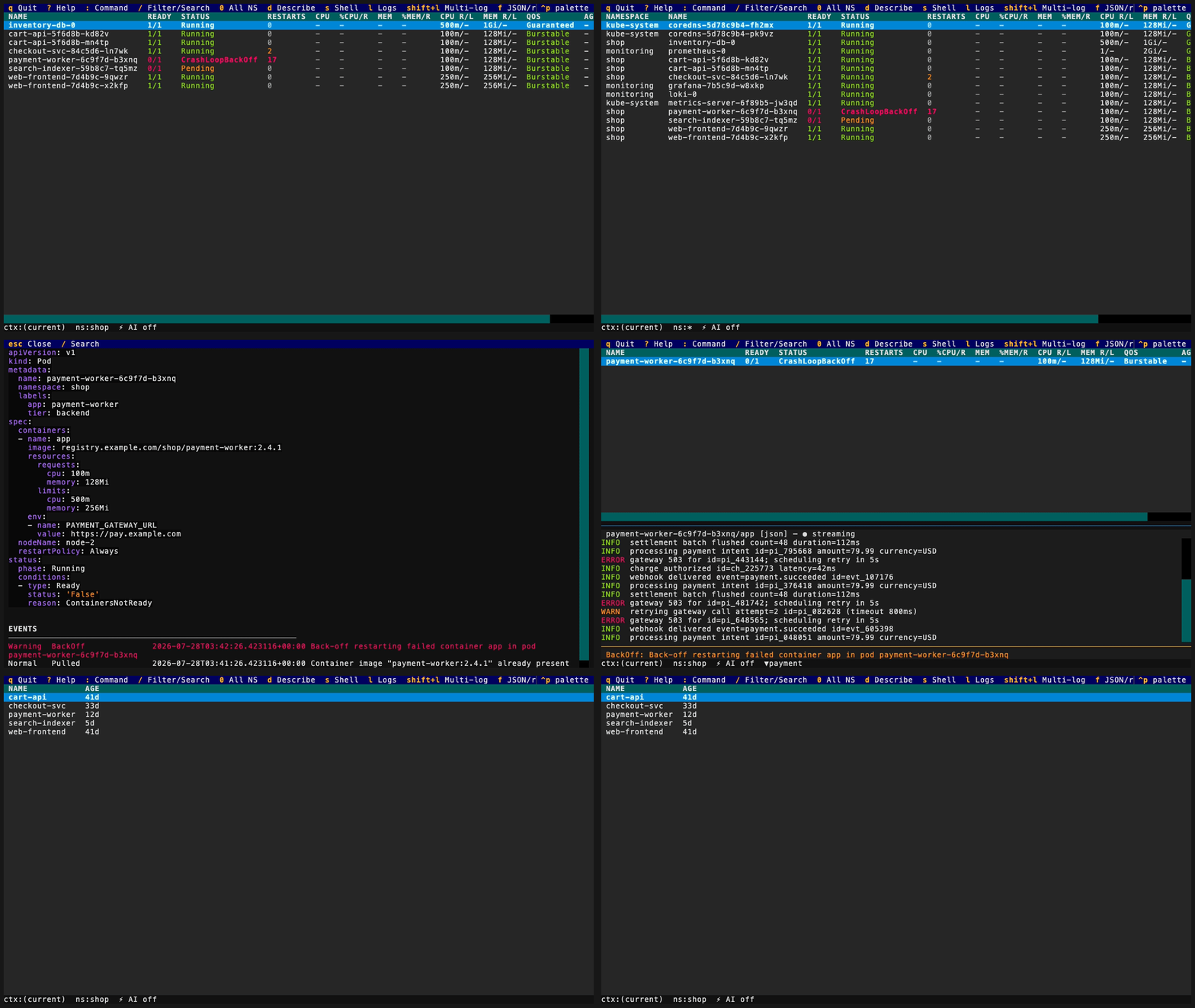
Recorded against canned demo data — see docs/demo to regenerate or run it yourself.
Why korvid
A keyboard-first cockpit. Navigate any resource kind with : commands,
filter with / (fuzzy, regex, label selectors), drill down with Enter
(pods → containers, deploy → rs → pods, helm release / operator → hierarchy
tree of everything it installed), split the
workspace into two panes, sort on live data. Pods show live CPU/MEM metrics
colored against enforced limits, and a troubled pod explains itself in a
hint strip built from real API data — before you ever open describe.
An agent that operates the TUI, not a chatbot in a box. Ctrl-A opens a
chat panel that knows what you are looking at — view, namespace, selection,
filter. It inspects the cluster through read-only tools (manifests, logs,
events, a compound diagnose_pod) and drives the UI itself: "show me the
crashing pod's logs" navigates, filters, and opens the actual log pane.
Secret data is masked before it reaches the model. Works with GitHub
Copilot, Azure OpenAI, Anthropic, OpenAI, local Ollama, or any
OpenAI-compatible endpoint — including a small profile tuned for 3B–14B
local models.
Writes are gated and audited — no exceptions. Every mutation (yours or
agent-requested) executes only after you confirm it in a dialog, and every
executed write lands in a fail-closed audit log: if the audit entry cannot
be written, the write is blocked. Kubernetes API writes additionally get a
best-effort RBAC pre-check and a server dry-run preview in the dialog where
the API supports one. --readonly disables writes entirely;
protected_contexts adds typed-name confirmation on production clusters.
The agent can request a delete, scale, restart, or resize — it can never
execute one.
Ops that outdo their kubectl counterparts. Port-forwards (Shift-F)
are session-tracked: :pf lists them with live status, stops (Ctrl-D) or
re-attaches (r) any of them, a forward whose pod dies flips to broken
with a toast instead of failing silently, a local port already claimed by
another forward is rejected before anything spawns, and every forward is
torn down on exit — all
audited. File transfer (Ctrl-T) rides the exec API as a tar stream — no
kubectl cp, no kubectl binary needed — with Ctrl-O path browsing on both
the local and the in-container side, downloads that never leave a
half-written file, and uploads that are approval-gated and audited
fail-closed like every other write. Details in docs/ops.md.
Quick start
uv tool install 'korvid[all]==0.2.0'    # or: pipx install 'korvid[all]==0.2.0'
korvid                                  # uses your current kubeconfig context
Until 0.2.0 is published on PyPI, install the reviewed main source instead:
uv tool install 'korvid[all] @ git+https://github.com/hellices/korvid'
On macOS or Linux with Homebrew, this works too and needs no Python at all:
brew install hellices/korvid/korvid
The formula builds against Homebrew's own Python, so your system
interpreter does not matter. It installs the agent stack but not
[mcp], which would put an HTTP server on the machine: install from PyPI
if you want that.
korvid is an application, not a library, so install it in its own
environment. uv tool and pipx both do that and put korvid on your PATH.
Prefer uv if you have neither: korvid needs Python 3.11+, which is
newer than the system Python on macOS and on most enterprise Linux, and uv
fetches a suitable interpreter for you instead of making that your problem.
python -m pip install 'korvid[all]==0.2.0' also works and is the right
choice inside a virtualenv or a container image you control — just don't
point it at your system Python.
korvid[all] is the simplest install: the TUI, embedded agent, MCP server, and
read-only observability connectors together. For slimmer extras, upgrade
guidance, retained local state, and the exact v0.2.0 publish procedure, see the
release runbook.
| Key | Action |
|---|---|
: |
command bar — pods, deploy all, helm, ns <name>, ctx <name>, ai |
/ |
filter the table |
Enter / Esc |
drill down / back up |
d l s |
describe / logs / shell |
Ctrl-A |
AI agent panel (:ai to set up) |
? |
full help overlay |
Full key reference: docs/keybindings.md.
Features
- What korvid is — the shape of the thing in two diagrams: a cockpit that works on its own, an agent you can add, and an MCP surface that lets your editor's assistant see the cluster. Start here if you are deciding whether korvid fits.
- Keybindings — every key by context, plus
remapping via
keybindings:config. - Browsing the cluster — custom columns from labels / annotations / jsonpath, live pod metrics, ops hints for troubled pods, split workspace, the log viewer (multi-pod merge, JSON highlighting, search, save), explicit namespace scope with RBAC-aware denials, probe-first context switching, and the bounded, read-only session timeline of watch/event/context/write history.
- Operations and safety — the safety model (keystroke approval + fail-closed audit on every write, with best-effort SSAR pre-checks and dry-run previews), read-only mode, protected contexts, node cordon / drain with PDB-aware impact plans, port-forwarding with liveness tracking, file transfer over the exec API, distroless debug fallback, and node shells.
- Resource relationships — press
gon a selected resource for its dependencies and dependents (owner refs, selectors, config/volume mounts, routing backends, storage bindings), bounded transitive expansion with cycle-safe traversal, per-source RBAC/ availability coverage with an incomplete-graph warning, exact GatewayReferenceGrantcross-namespace authorization, and a metadata-only extraction that never retains a Secret's value. - Helm and operators — a release browser that needs no helm binary, search-first chart install / upgrade / rollback / uninstall wizards with dry-run previews, chart repo management, and the OLM operator catalog with approval-gated installs and uninstalls.
- AI agent — screen-context awareness, UI-driving
tools,
diagnose_pod, cloud-provider awareness (AKS / EKS / GKE), provider setup (:aiwizard), capability profiles for small local models, and an eval harness that grades diagnosis quality. - Provider plugins — the API-v1 contract for third-party LLM adapters, selected-only loading, exact event and option limits, and guidance on when a plugin is warranted instead of an OpenAI-compatible endpoint.
- Observability connectors — bounded read-only Prometheus and Loki investigation: a fixed signal catalogue rather than free-form queries, enforced window/size/timeout/concurrency limits, credentials named but never stored, and TLS verification that cannot be turned off.
- MCP server — expose korvid's read and UI-drive tools to VS Code, Claude Code, Cursor, or Zed; write tools are never exposed. An opt-in proposal flow lets external agents queue writes that execute only after your keystroke in the TUI.
- Air-gapped operation — internal LLM/Helm/OLM/image
endpoints, corporate CA trust (
network.ca_bundle, Helm--ca-file), responsibility boundaries, and a readiness checklist. - Performance and scale — the measured envelope (1,000 pods at 24 watch events/second for 31 minutes against a real cluster), which budgets pass and which miss, which cursor-input figures were withdrawn as invalid measurements, and the corrected 30-second live smoke evidence and its remaining qualification limits.
- Threat model — exactly what crosses the
embedded-provider boundary, what is redacted, the MCP and plugin trust
boundaries, and the residual risks that are not mitigated. See
SECURITY.mdto report a vulnerability privately. - Architecture — how the pieces hold each other honest: the layer map, the write path a model cannot bypass, the single provider choke point, and how a claim becomes checkable evidence. Diagrams, and the tensions the design still has.
Status
Work in progress — core TUI, log viewer, live metrics, MCP server, and agent runtime are functional. Read-heavy by design: cluster writes exist (delete / scale / rollout restart / edit / resize / node ops / helm / OLM) but every one is approval-gated and audited.
Installation
The protected v0.1.0 workflow failed before publication, so that tag remains
immutable, unpublished audit history. v0.1.1 reached the publish step and
stopped there, because the PyPI Trusted Publisher had not been registered yet;
it is unpublished audit history too. v0.1.2 is the first public PyPI release;
v0.2.0 is the current feature release. The smoke matrix proves clean installs
of korvid, korvid[agent], korvid[mcp], and korvid[all], plus uninstall.
Before creating the release tag, a maintainer separately upgrades a clean
published 0.1.2 installation to the candidate wheel as documented in the
release runbook.
python -m pip install 'korvid==0.2.0'             # base TUI only
python -m pip install 'korvid[agent]==0.2.0'      # :ai / Ctrl-A
python -m pip install 'korvid[mcp]==0.2.0'        # korvid --mcp
python -m pip install 'korvid[agent,observability]==0.2.0'  # agent + Prometheus/Loki
python -m pip install 'korvid[mcp,observability]==0.2.0'    # MCP + Prometheus/Loki
python -m pip install 'korvid[all]==0.2.0'        # recommended first install
python -m pip install 'korvid[all,entra]==0.2.0'  # add Entra auth too
If you already installed a narrower extra set, rerun your package manager with the full desired extra set instead of assuming extras expand in place. With pip, use:
python -m pip install --upgrade 'korvid[all]==0.2.0'
With other installers, use their reinstall/upgrade equivalent or uninstall first, then install the exact requirement you want.
For unreleased main development, install straight from the repository:
python -m pip install 'korvid[all] @ git+https://github.com/hellices/korvid'
Tagged versions should be installed from PyPI; the source form is only a fallback for unreleased code.
Without the [agent] extra the agent surface is simply absent — no agent
panel, and Ctrl-A / :ai / :model are not registered. Without the
[mcp] extra the :mcp command reports the feature as unavailable with
an install hint. Explicitly enabling a feature whose extra is missing
(--mcp, agent.provider in config) fails at startup with an actionable
message. [entra] adds Entra ID auth for Azure OpenAI.
python -m pip uninstall -y korvid removes the package only. It does not
remove ~/.config/korvid/config.yaml, the fallback
~/.config/korvid/credentials.json, the OS keyring credential
(korvid / github-oauth), ~/.local/state/korvid/audit.jsonl,
~/.local/state/korvid/mcp-endpoint.json (and its .lock sibling),
~/.local/share/korvid/logs, or ~/.local/share/korvid/agent-payloads;
cleanup is explicit and opt-in in the release runbook.
Note that XDG_CONFIG_HOME does not relocate the two ~/.config/korvid
paths — only XDG_STATE_HOME and XDG_DATA_HOME are honored, for the state
and data paths respectively.
Releases
Tagged releases (vX.Y.Z) publish signed artifacts to PyPI via OIDC
Trusted Publishing and attach the same files to the GitHub Release:
wheel, sdist, SHA256SUMS, a CycloneDX SBOM covering the full locked
dependency graph, build-provenance attestations, and offline wheelhouse
bundles for Linux/Windows x86-64 on Python 3.11–3.13.
Before enabling the workflow, repository administrators must create an
immutable v* tag ruleset for refs/tags/v*: restrict tag creation to
trusted release maintainers and prohibit tag update and deletion. The
protected release environment must allow protected tags only and require
approval; PyPI's Trusted Publisher must bind exactly to hellices/korvid,
.github/workflows/release.yml, and that environment. The in-workflow source
check is defense in depth, not a replacement for this external trust boundary.
The operator procedure, irreversible boundaries, and recovery rules for each
release are in the release runbook.
python -m pip install 'korvid[all]==0.2.0'
Verify a downloaded artifact against its checksum and provenance:
sha256sum -c SHA256SUMS --ignore-missing
gh attestation verify korvid-0.2.0-py3-none-any.whl --repo hellices/korvid
Offline installation from the wheelhouse bundles is documented in the air-gapped guide.
Development
git clone https://github.com/hellices/korvid && cd korvid
uv sync --dev --all-extras   # create .venv with locked deps + all extras
uv run korvid                # run against your current kubeconfig context
make check                   # lint + mypy --strict + tach + tests
Contributor docs: Windows contributor notes.
1 maintainer

Download files
Download the file for your platform. If you're not sure which to choose, learn more about installing packages.
Source Distribution
Built Distribution
Filter files by name, interpreter, ABI, and platform.
If you're not sure about the file name format, learn more about wheel file names.
Copy a direct link to the current filters
File details
Details for the file korvid-0.2.0.tar.gz.
File metadata
- Download URL: korvid-0.2.0.tar.gz
- Upload date:
- Size: 3.5 MB
- Tags: Source
- Uploaded using Trusted Publishing? Yes
- Uploaded via:
twine/7.0.0 CPython/3.13.14
File hashes
| Algorithm | Hash digest | |
|---|---|---|
| SHA256 |
6b8c290ede3e246e906e87c76c97be797e9cbb0856916fd7d525bb8845824c06
|
|
| MD5 |
ccbc1c9624d0ee8f7e788e700808c19d
|
|
| BLAKE2b-256 |
90cde07e6f51c42b39f5cfdabeb375a030e520b40003cb70dcbd9e969711f8d4
|
Provenance
The following attestation bundles were made for korvid-0.2.0.tar.gz:
Publisher:
release.yml on hellices/korvid
-
Statement:
-
Statement type:
https://in-toto.io/Statement/v1 -
Predicate type:
https://docs.pypi.org/attestations/publish/v1 -
Subject name:
korvid-0.2.0.tar.gz -
Subject digest:
6b8c290ede3e246e906e87c76c97be797e9cbb0856916fd7d525bb8845824c06 - Sigstore transparency entry: 2475182354
- Sigstore integration time:
-
Permalink:
hellices/korvid@795fd52069bd9c8091dfad9eb2876343701fd082 -
Branch / Tag:
refs/tags/v0.2.0 - Owner: https://github.com/hellices
-
Access:
public
-
Token Issuer:
https://token.actions.githubusercontent.com -
Runner Environment:
github-hosted -
Publication workflow:
release.yml@795fd52069bd9c8091dfad9eb2876343701fd082 -
Trigger Event:
push
-
Statement type:
File details
Details for the file korvid-0.2.0-py3-none-any.whl.
File metadata
- Download URL: korvid-0.2.0-py3-none-any.whl
- Upload date:
- Size: 750.0 kB
- Tags: Python 3
- Uploaded using Trusted Publishing? Yes
- Uploaded via:
twine/7.0.0 CPython/3.13.14
File hashes
| Algorithm | Hash digest | |
|---|---|---|
| SHA256 |
fb8d392ec42a4f30bce85dd5598a0ce0738952e99e1634b6a6eaec221d1b0121
|
|
| MD5 |
e81b48585586f8df6744aa8f9dc4c66d
|
|
| BLAKE2b-256 |
83da12e101d6d71f0ee390d162162885df3ee52590f8fc78cfd89d02e0cdc03f
|
Provenance
The following attestation bundles were made for korvid-0.2.0-py3-none-any.whl:
Publisher:
release.yml on hellices/korvid
-
Statement:
-
Statement type:
https://in-toto.io/Statement/v1 -
Predicate type:
https://docs.pypi.org/attestations/publish/v1 -
Subject name:
korvid-0.2.0-py3-none-any.whl -
Subject digest:
fb8d392ec42a4f30bce85dd5598a0ce0738952e99e1634b6a6eaec221d1b0121 - Sigstore transparency entry: 2475182405
- Sigstore integration time:
-
Permalink:
hellices/korvid@795fd52069bd9c8091dfad9eb2876343701fd082 -
Branch / Tag:
refs/tags/v0.2.0 - Owner: https://github.com/hellices
-
Access:
public
-
Token Issuer:
https://token.actions.githubusercontent.com -
Runner Environment:
github-hosted -
Publication workflow:
release.yml@795fd52069bd9c8091dfad9eb2876343701fd082 -
Trigger Event:
push
-
Statement type:







