
KotOR Diff Tool - generates TSLPatcher patch data from file differences

Project description
KotorDiff
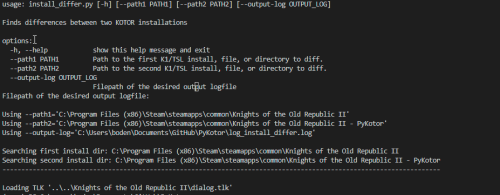
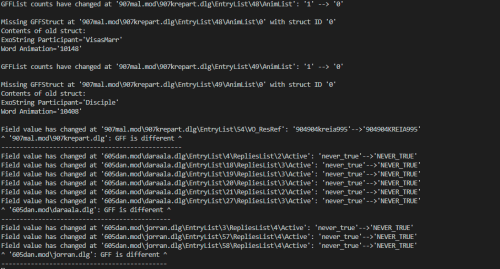
About This Tool
A powerful CLI to easily compare KOTOR file formats, installations, and modules.
KotorDiff is a comprehensive command-line tool built on PyKotor that allows you to compare KOTOR files, directories, modules, and entire installations with detailed, structured output. Whether you're debugging TSLPatcher issues, validating mod installations, or analyzing differences between game versions, KotorDiff provides the precision you need.
Why KotorDiff?
It is (or should be) common knowledge that Kotor Tool is not safe to use for anything besides extraction. But have you ever wondered why that is?
Let's take a look at a .utc file extracted directly from the BIFs (the OG vanilla p_bastilla.utc). Extract it with KTool and name it p_bastilla_ktool.utc. Now open the same file in ktool's UTC character editor, change a single field (literally anything, hp, strength, whatever you fancy), and save it as p_bastilla_ktool_edited.utc.
KotorDiff's output reveals the shocking truth - changing a single field results in dozens of unintended modifications, corrupted data, and broken references. This tool saved the day by showing exactly what KTool did wrong.
Features
- Multiple Comparison Types: Compare files, directories, modules, or entire installations
- Advanced Module Resolution: Intelligent handling of composite modules (
.rim+_s.rim+_dlg.erf) - Flexible Filtering: Target specific modules or resources during installation-wide comparisons
- Detailed Logging: Comprehensive resource resolution tracking with verbose search information
- Format-Aware Diffing: Structured comparison of GFF, TLK, and capsule files
- 3-Way Merging: Support for merge conflicts and TSLPatcher integration
- Multiple Output Formats: Default, unified, context, and side-by-side diff formats
Installation
# Install dependencies
uv install

# Run directly
uv run src/kotordiff/__main__.py [options]
Usage
Basic Syntax
kotordiff --path1 <path1> --path2 <path2> [options]
Comparison Types
1. File vs File
Compare two individual files of any supported format:
kotordiff --path1 character1.utc --path2 character2.utc
2. Directory vs Directory
Compare all files within two directories:
kotordiff --path1 "mod_folder_1" --path2 "mod_folder_2"
3. Installation vs Installation
Compare two complete KOTOR installations:
kotordiff --path1 "C:\Games\KOTOR" --path2 "C:\Games\KOTOR_Modded"
4. Module vs Module
Compare modules using intelligent composite loading:
# Compare complete modules (automatically finds .rim, _s.rim, _dlg.erf)
kotordiff --path1 "modules/tat_m17ac" --path2 "modules_backup/tat_m17ac"

# Compare specific module files
kotordiff --path1 "tat_m17ac.rim" --path2 "tat_m17ac_modified.rim"
5. Module vs Installation
Compare a module against its counterpart in an installation:
kotordiff --path1 "installation_path" --path2 "modules/tat_m17ac.rim"
6. Resource vs Installation
Compare a single resource against its installation version:
kotordiff --path1 "installation_path" --path2 "character.utc"
Advanced Options
Filtering (--filter)
Target specific modules or resources during installation comparisons:
# Compare only the tat_m18ac module between installations
kotordiff --path1 "install1" --path2 "install2" --filter "tat_m18ac"

# Compare specific resources across installations
kotordiff --path1 "install1" --path2 "install2" --filter "p_bastilla.utc" --filter "dialog.tlk"

# Multiple filters for complex comparisons
kotordiff --path1 "install1" --path2 "install2" --filter "tat_m17ac" --filter "danm13" --filter "kas_m22aa"
Output Formats (--format)
Choose from multiple diff output formats:
# Default structured format (recommended)
kotordiff --path1 file1 --path2 file2 --format default

# Unified diff format (git-style)
kotordiff --path1 file1 --path2 file2 --format unified

# Context diff format
kotordiff --path1 file1 --path2 file2 --format context

# Side-by-side comparison
kotordiff --path1 file1 --path2 file2 --format side_by_side
Logging and Output Control
# Set logging level
kotordiff --path1 file1 --path2 file2 --log-level debug

# Control output verbosity
kotordiff --path1 file1 --path2 file2 --output-mode diff_only  # Only show differences
kotordiff --path1 file1 --path2 file2 --output-mode quiet     # Minimal output

# Save to specific log file
kotordiff --path1 file1 --path2 file2 --output-log "my_diff.log"

# Disable colored output
kotordiff --path1 file1 --path2 file2 --no-color
Selective Comparison (--ignore-*)
Skip specific file types during comparison:
# Ignore RIM files
kotordiff --path1 install1 --path2 install2 --ignore-rims True

# Ignore TLK files
kotordiff --path1 install1 --path2 install2 --ignore-tlk True

# Ignore LIP files
kotordiff --path1 install1 --path2 install2 --ignore-lips True
3-Way Merging
KotorDiff supports 3-way merging for advanced conflict resolution:
# 3-way merge with automatic TSLPatcher generation
kotordiff --mine "my_version" --older "original" --yours "target_version"

# Generate changes.ini for TSLPatcher
kotordiff --mine "my_mod" --older "vanilla" --yours "final_state" --generate-ini
Module Resolution System
KotorDiff includes an advanced module resolution system that understands KOTOR's composite module structure:
Automatic Module Detection
When you specify a module name without extension (e.g., tat_m17ac), KotorDiff automatically:
- Searches for related files:
.mod,.rim,_s.rim,_dlg.erf - Applies priority order:
.mod>.rim+_s.rim+_dlg.erf - Uses composite loading: Combines multiple files when appropriate
- Provides detailed logging: Shows which files were found and used
Module Priority System
1. .mod files (highest priority - community override)
2. .rim files (main module data)
3. _s.rim files (supplementary data)
4. _dlg.erf files (K2 dialog data)
Resource Resolution Logging
With verbose logging enabled, you'll see detailed information about where each resource was found:
Constraining search to module root 'tat_m17ac'
Installation-wide search for 'module.ifo':
  Checking each location:
    1. Custom folders -> not found
    2. Override folders -> not found
    3. Custom modules -> FOUND at Modules\tat_m17ac.rim -> SELECTED
    4. Module capsules -> (filtered to tat_m17ac only)
    5. Chitin BIFs -> not found
Supported File Formats
Fully Supported (Structured Comparison)
- GFF Files: UTC, UTD, UTP, UTI, UTM, UTS, UTT, UTW, UTE, ARE, IFO, GIT, DLG, GUI, etc.
- TalkTable Files: TLK (with string reference resolution)
- Capsule Files: ERF, MOD, RIM, SAV (with internal resource comparison)
- Layout Files: LYT
- Path Files: PTH
- Vision Files: VIS
- 2DA Files: Tabular data comparison
Hash-Based Comparison
- Script Files: NCS, NSS
- Texture Files: TPC, TGA
- Model Files: MDL, MDX
- Audio Files: WAV, MP3
- Other: Any unsupported format falls back to SHA256 hash comparison
Output Examples
GFF File Differences
Field 'Int16' is different at 'character.utc\HitPoints':
--- (old)HitPoints
+++ (new)HitPoints
@@ -1 +1 @@
-18
+24

Field 'String' is different at 'character.utc\Tag':
--- (old)Tag
+++ (new)Tag
@@ -1 +1 @@
-OldTag
+NewTag
Module Comparison
Using composite module loading for tat_m17ac.rim
Combined module capsules for tat_m17ac.rim: ['tat_m17ac.rim', 'tat_m17ac_s.rim']

Processing resource: module.ifo
Constraining search to module root 'tat_m17ac'
Found 'module.ifo' at: Modules\tat_m17ac.rim

Processing resource: m17ac.are
Found 'm17ac.are' at: Modules\tat_m17ac.rim
Installation Comparison with Filtering
Using filter: tat_m17ac
Comparing installations with 1 filter(s) active
Processing only resources matching: tat_m17ac

Found 15 resources in tat_m17ac module
Compared 15/15 resources
Installation comparison complete
File Formats Handled
- TalkTable files (TLK)
- Any GFF file (DLG, UTC, GUI, UTP, UTD, etc.)
- Any capsule (ERF, MOD, RIM, SAV, etc.)
Exit Codes
KotorDiff uses standard exit codes for integration with scripts and automation:
- 0: Files/installations match perfectly
- 1: System error (file not found, permission denied, etc.)
- 2: Files/installations differ
- 3: Known application error (invalid arguments, unsupported format, etc.)
Integration Examples
Batch Script Integration
@echo off
kotordiff --path1 "original" --path2 "modified" --output-mode quiet
if %ERRORLEVEL% == 0 (
    echo Files are identical
) else if %ERRORLEVEL% == 2 (
    echo Files differ - check log for details
) else (
    echo Error occurred
)
Command Line Options:
kotordiff [--path1 PATH1] [--path2 PATH2] [--output-log FILE] [--ignore-rims] [--ignore-tlk] [--ignore-lips] [--compare-hashes] [--logging] [--use-profiler]
--path1: Path to the first K1/TSL install, file, or directory to diff--path2: Path to the second K1/TSL install, file, or directory to diff--output-log: Filepath of the desired output logfile--ignore-rims: Whether to compare RIMS (default is False)--ignore-tlk: Whether to compare TLK files (default is False)--ignore-lips: Whether to compare LIPS (default is False)--compare-hashes: Compare hashes of any unsupported file/resource type (default is True)--logging: Whether to log the results to a file or not (default is True)--use-profiler: Use cProfile to find where most of the execution time is taking place in source code
PowerShell Integration
$result = & kotordiff --path1 "install1" --path2 "install2" --filter "tat_m17ac"
switch ($LASTEXITCODE) {
    0 { Write-Host "Modules are identical" -ForegroundColor Green }
    2 { Write-Host "Modules differ" -ForegroundColor Yellow }
    default { Write-Host "Error occurred" -ForegroundColor Red }
}
Performance Tips
- Use filtering for large installation comparisons to focus on specific areas
- Enable quiet mode (
--output-mode quiet) for automated scripts - Ignore unnecessary file types using
--ignore-*flags - Use specific module names instead of wildcards when possible
Troubleshooting
Common Issues
Q: "Invalid path" error when specifying module names
A: Ensure the module files exist in the specified directory. KotorDiff looks for .mod, .rim, _s.rim, and _dlg.erf files.
Q: Too much output when comparing installations
A: Use --filter to target specific modules or --output-mode diff_only to see only differences.
Q: Module resolution seems wrong A: Check the verbose logs to see which files were found and prioritized. The tool follows KOTOR's standard module loading order.
Q: Antivirus flagging the executable
A: This is a false positive common with PyInstaller-compiled executables. You can run from source using uv run src/kotordiff/__main__.py instead.
TLDR: PyInstaller is an amazing tool, but antiviruses may flag it. This is not the fault of PyInstaller or my tool, but rather the fault of how some scummy users have chosen to use PyInstaller in the past. Please report any false positives you encounter to your antivirus's website, as reports not only improve the accuracy of everybody's AV experience overall but also indirectly support the PyInstaller project.
Debug Mode
For troubleshooting, enable maximum verbosity:
kotordiff --path1 file1 --path2 file2 --log-level debug --output-mode full
Q: Is there a GUI version available?
A: No, KotorDiff is designed as a lightweight, command-line only tool. If you need a GUI for configuration generation, check out HoloGenerator which provides a web-based interface for generating HoloPatcher configurations.
Contributing
KotorDiff is part of the PyKotor project. Contributions are welcome!
- Source: https://github.com/OldRepublicDevs/PyKotor
- Issues: Report bugs and feature requests on GitHub
- Documentation: Help improve this README and inline documentation
License
This tool is open source and part of the PyKotor project. See the main repository for license information.
Release history Release notifications | RSS feed


Download files
Download the file for your platform. If you're not sure which to choose, learn more about installing packages.
Source Distribution
Built Distribution
Filter files by name, interpreter, ABI, and platform.
If you're not sure about the file name format, learn more about wheel file names.
Copy a direct link to the current filters
File details
Details for the file kotor_diff-1.0.1.tar.gz.
File metadata
- Download URL: kotor_diff-1.0.1.tar.gz
- Upload date:
- Size: 30.3 kB
- Tags: Source
- Uploaded using Trusted Publishing? No
- Uploaded via: twine/6.1.0 CPython/3.13.7
File hashes
| Algorithm | Hash digest | |
|---|---|---|
| SHA256 |
3fa50ebef9dbd414259452950d458b0ce5cb131637b0a21e08194edc1d43837d
|
|
| MD5 |
15c7608e37d2dda575a00a136c486456
|
|
| BLAKE2b-256 |
f39e0bb284b8f46b40e9bb2818782ca7f241615ea6eabbc831f17cfc55a7d434
|
File details
Details for the file kotor_diff-1.0.1-py3-none-any.whl.
File metadata
- Download URL: kotor_diff-1.0.1-py3-none-any.whl
- Upload date:
- Size: 32.7 kB
- Tags: Python 3
- Uploaded using Trusted Publishing? No
- Uploaded via: twine/6.1.0 CPython/3.13.7
File hashes
| Algorithm | Hash digest | |
|---|---|---|
| SHA256 |
9f09f5186fcee1fe1e458ae6ccdef55932c81991dae5a3fa53ac69c73d6b892d
|
|
| MD5 |
130fd223c331b8c0dd251106a4baf7e5
|
|
| BLAKE2b-256 |
9d88ffc2c47b978049aee031611f8b09cd5cdd4ae2ceb14fb8f9249f333a71de
|






