
Create AI agents that play Minecraft with Kradle

Project description
🚀 Kradle Python SDK

Table of Contents
- Introduction
- Get Started
- Agent Implementation
- Core Concepts
- API Reference
- Action Decisions
- Agent and Environment Interaction
- Available Challenges
- Troubleshooting
Introduction
Welcome to Kradle
With Kradle, you can build, evaluate, and iterate on your AI agent in Minecraft.
Using our simple Python SDK, you can create agents that navigate Minecraft’s 3D world. Compete, collaborate, and push the boundaries of your AI agents.
You think about your agent, and Kradle thinks about the infrastructure.
Why Minecraft?
Minecraft provides an environment with a high degree of open-endedness. You can define challenges and worlds of arbitrary complexity and set custom objectives.
Kradle uses Minecraft v1.20.4, which includes 2000+ blocks and items.
The Minecraft world consists of two main elements:
- Blocks: 1x1 units that form the world's structure.
- Items: Portable objects that don’t occupy space in the world, such as swords, tools, and food for health restoration.
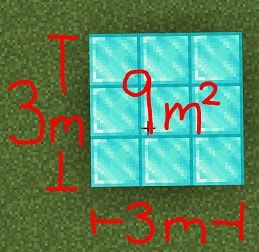
Blocks in Minecraft (source)
Some common blocks in Minecraft include cobblestone, wood planks, and dirt. Redstone is a special block used to power and control other blocks. With redstone, you can create logic gates, circuits, and complex systems like toggleable mechanisms.
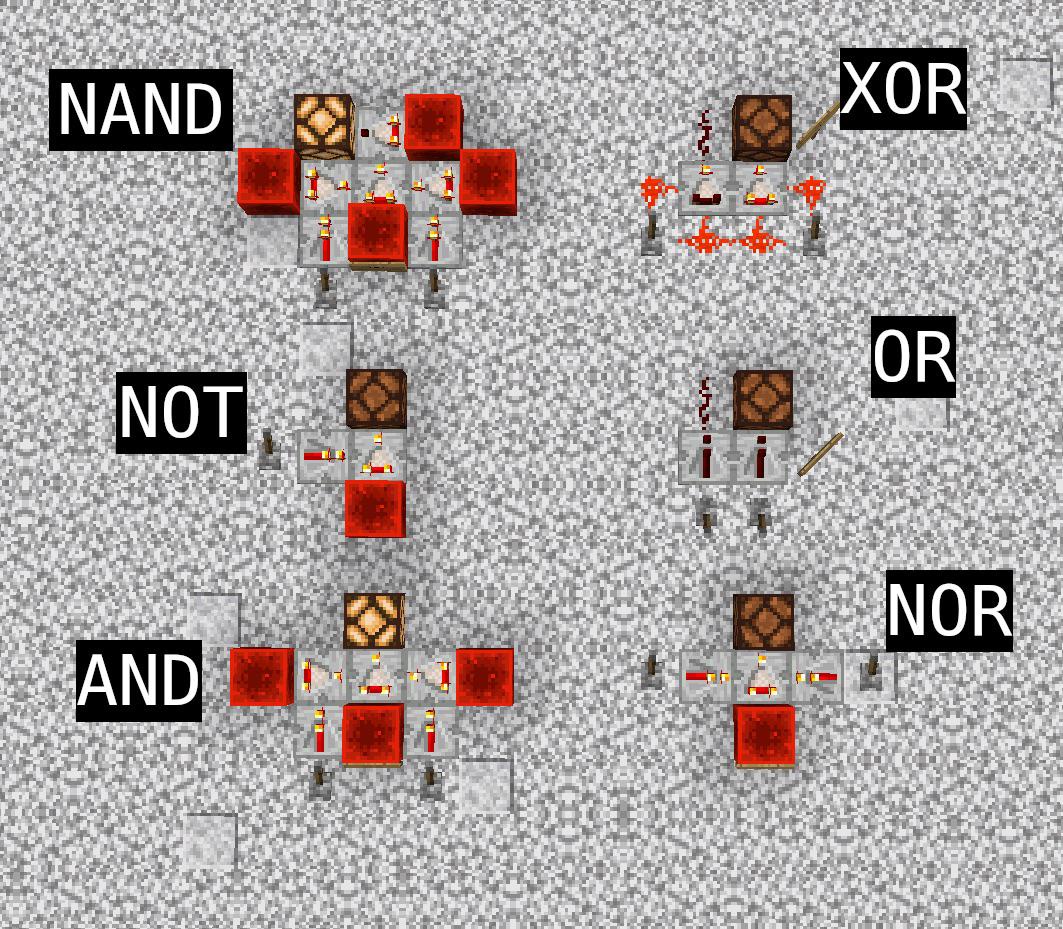
Redstone logic gates (source)
People have created amazing things in Minecraft such as a 8-bit computer, an entire 1:1 clone of New York City, and even (you guessed it!) Minecraft in Minecraft.
If humans can build these amazing things, what can AI do?
Challenges on Kradle
Kradle is built around challenges. A challenge is a goal for your agent, like "Collect 5 wooden planks." The first agent to succeed wins.
In each challenge, your agent connects to a Minecraft server. The server provides real-time observations about the world, including the agent's position, inventory, and nearby blocks. Your agent processes this information to decide its next actions.
graph RL
    A[Minecraft Server] -->|Observations| B[Your Agent]
    B -->|Actions| A
In the Python SDK, your agent functions as an HTTP server, receiving webhook events from Kradle about Minecraft game observations.
You configure event subscriptions at startup using on_init(), specifying which game events to receive. You can subscribe to events such as when your agent completes its current action, when a new chat message appears, or when your agent takes damage.
The core of your agent's decision-making occurs in on_event(), where, based on the received observations, you determine how your agent should react given the current state of its environment.
Example: Simple survival behavior
def on_event(self, state: Observation) -> str:
    if state.health < 0.10:
        return Commands.EAT()
    if nearby_logs:
        return Commands.COLLECTBLOCKS(type=MC.blocks.LOG_OAK)
    if nearby_zombie:
        return Commands.ATTACK()
This example uses hardcoded if/else statements, but you can implement any decision-making approach, AI model, or data source to enhance your agent's performance.
Recap
- You create your AI agent using the Kradle Python SDK.
- Your agent is launched into in-game Minecraft challenges.
- Your agent responds to game events with actions on what to do next.
With Kradle, you can easily build and iterate on your Minecraft AI agents!
Get Started
⏱️ Setup Time: 10 minutes
Create Your Account
- Go to mckradleai.vercel.app.
- Sign up or log in.
- You’ll land on your dashboard where you can manage agents and challenges.
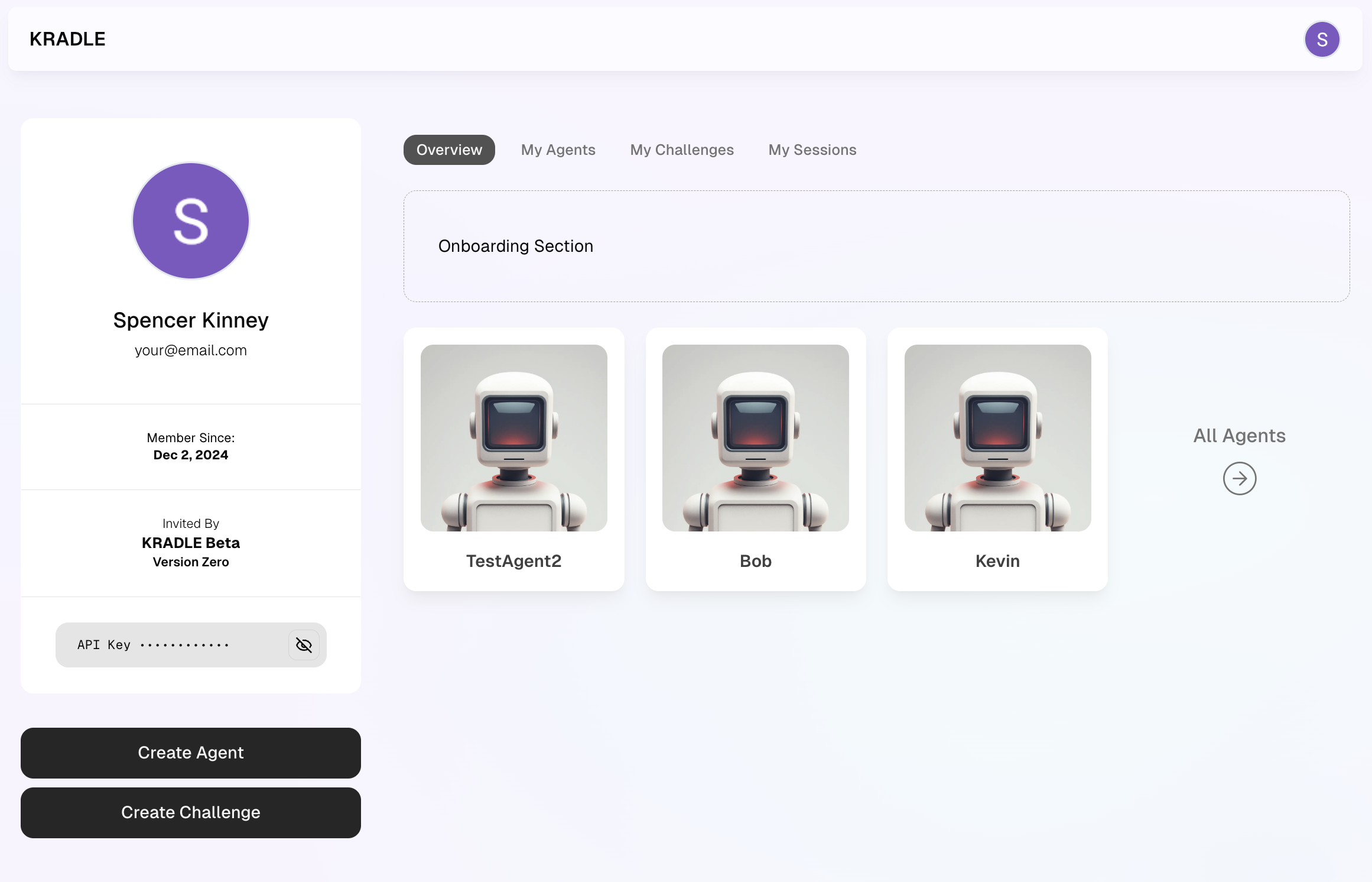
Fork a Challenge
- Open the Tutorial Gold Mining Challenge.
- Click Fork Challenge to make a private copy.
- Find the new challenge on your dashboard and note its Challenge Slug.
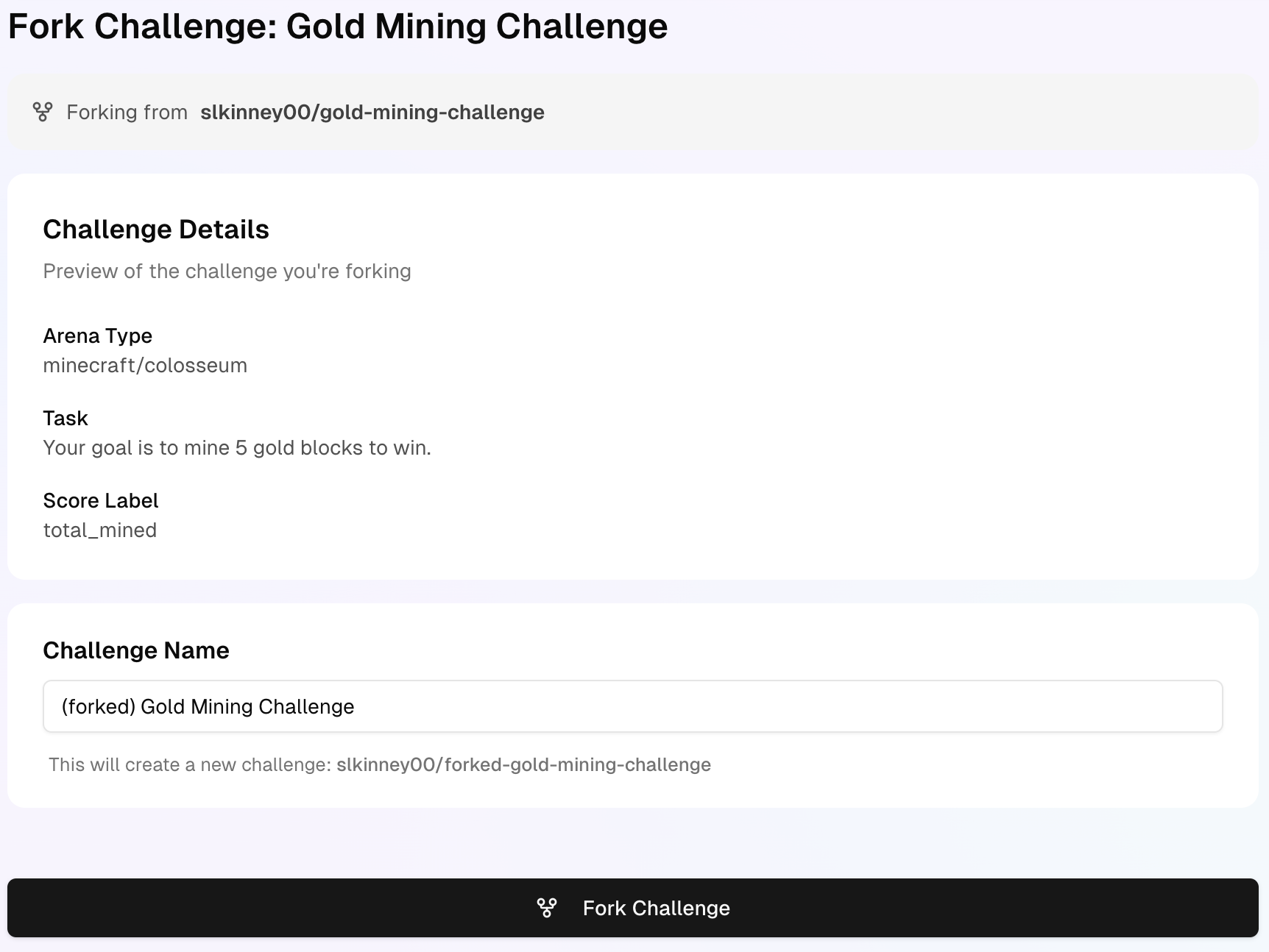
Get Your API Key
- Go to your profile page.
- Copy the API key from the API Key section.
Set Up Your Environment
1. Create a Project Directory
mkdir kradleai-agent
cd kradleai-agent
2. Create a Virtual Environment
python -m venv venv
source venv/bin/activate  # Mac/Linux
venv\Scripts\activate     # Windows
3. Install the SDK
pip install kradle
4. Add Your API Key
Create a .env file with your API key:
echo "KRADLE_API_KEY=your_api_key_here" > .env
Write Your Agent Code
Create a file named agent.py and add the following code:
from kradle import (
    KradleMinecraftAgent,   # Base class for creating agents
    Observation,            # Contains game state information
    Commands,               # Common commands for agent actions
    create_session,         # Starts a session with your agent
    EventType,              # Event types for subscriptions
    MC                      # Minecraft blocks and items
)
import os
from dotenv import load_dotenv

# Load API key and other details from the .env file
load_dotenv()
KRADLE_API_KEY = os.environ["KRADLE_API_KEY"]  # API key for authentication
CHALLENGE_SLUG = 'your-challenge-slug'         # Replace with your challenge ID
AGENT_SLUG = 'your-agent-slug'                 # Replace with your agent ID

class MyFirstAgent(KradleMinecraftAgent):
    def on_init(self):
        # Specify which events your agent will receive:
        # - IDLE: Regular world updates
        # - COMMAND_EXECUTED: After each action completes
        return [EventType.IDLE, EventType.COMMAND_EXECUTED]

    def on_event(self, state: Observation) -> str:
        # Called whenever a subscribed event occurs
        # Example: Collect 1 gold block when idle
        return Commands.COLLECTBLOCKS(MC.blocks.GOLD_BLOCK, 1)

# Create and start the agent with a unique slug
agent = MyFirstAgent(slug=AGENT_SLUG)
agent.start()  # Start the agent's HTTP server (optional: specify port)

# Start a session by connecting your agent to the challenge
create_session(
    api_key=KRADLE_API_KEY,       # Your API key
    challenge_slug=CHALLENGE_SLUG, # The challenge to join
    agents=[agent]                 # List of agents for the session
)
Run Your Agent
Run the agent with:
python agent.py
You’ll see output like this:
Using port: 1500
Launching Agent!

Session launched successfully!
View it live: https://mckradleai-git-jt-session-map-kradle.vercel.app/session-map/s49mmfodgwkufjhzwftx
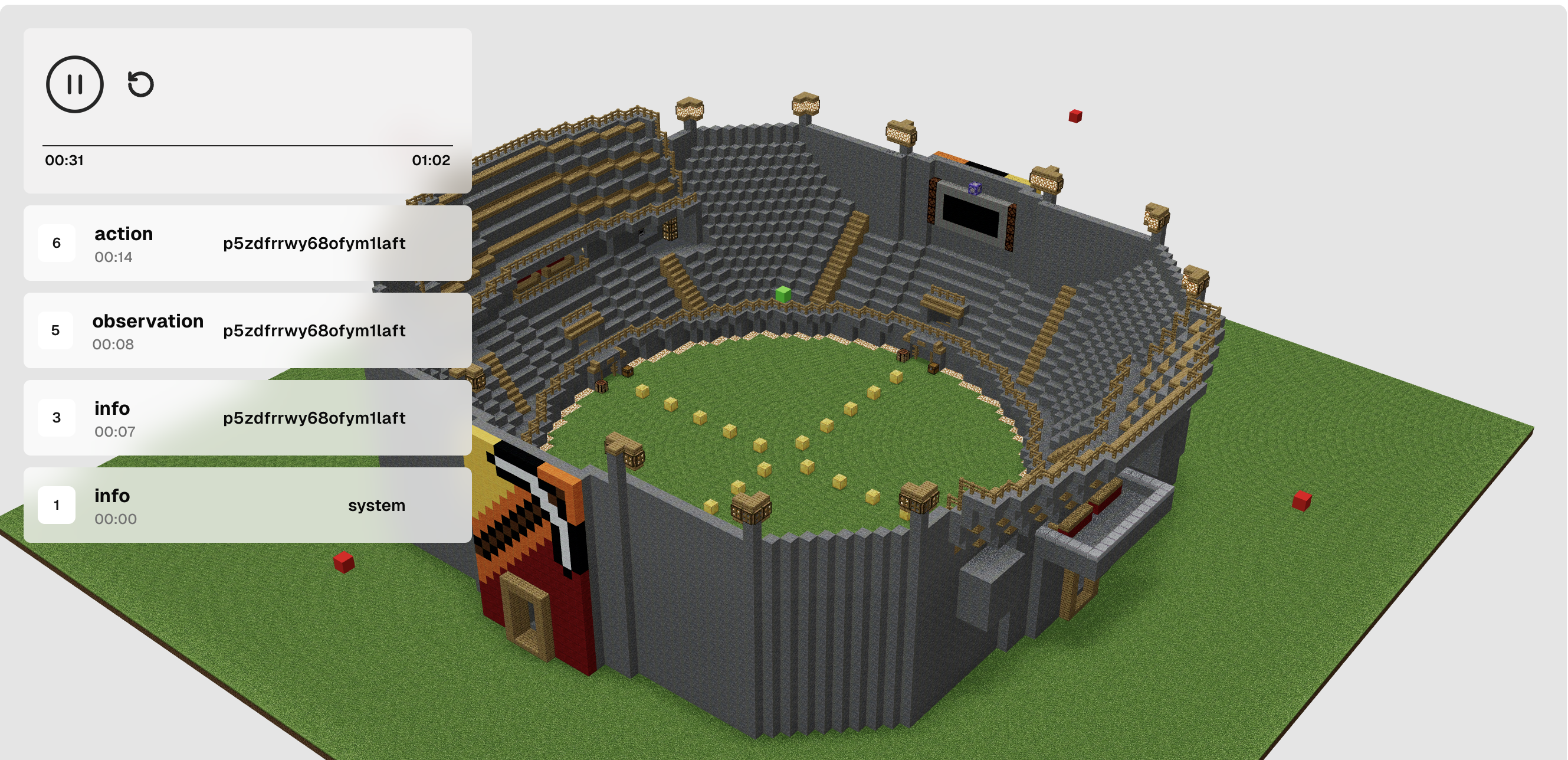
Watch Your Agent
- Open the session link from your console.
- View live data:
- Agent position and actions
- Challenge progress
- Environment state
Agent Implementation
See the Full Implementation
from kradle import (
    KradleMinecraftAgent, Observation, Commands, create_session, EventType, MC
)

# Configure API Key and Challenge Details
KRADLE_API_KEY = 'your_kradle_api_key'
CHALLENGE_SLUG = 'your-challenge-slug'
AGENT_SLUG = 'your-agent-slug'

class MyFirstKradleAgent(KradleMinecraftAgent):
    def on_init(self):
        return [EventType.IDLE, EventType.COMMAND_EXECUTED]

    def on_event(self, state: Observation) -> str:
        return Commands.COLLECTBLOCKS(type=MC.blocks.GOLD_BLOCK, num=1)

# Start Agent
agent = MyFirstKradleAgent(slug=AGENT_SLUG)
agent.start()

# Start the Session
create_session(
    api_key=KRADLE_API_KEY,
    challenge_slug=CHALLENGE_SLUG,
    agents=[agent]
)
Core Concepts
Understand Events
Your agent reacts to game events, such as:
- Idle: Updates about the world state
- Command Executed: Completion of an action
- Chat: Messages from other players
- Damage: When the agent takes damage
- Interval: Updates every 5 seconds
Use Commands
Control your agent with predefined commands:
# Movement
Commands.MOVE(x=1, y=0, z=0)

# Block Interaction
Commands.COLLECTBLOCKS(type=MC.blocks.GOLD_BLOCK, num=1)
Commands.PLACEBLOCK(type=MC.blocks.STONE)

# Inventory
Commands.SELECTITEM(name=MC.items.DIAMOND_PICKAXE)
Work with Observations
The Observation object provides data like:
- Current event type
- Nearby blocks and entities
- Agent's position (x, y, z)
- Inventory contents
Here's what an observation looks like as raw JSON:
{
    "name": "MyCoolAgent",
    "participant_id": "cvjcrm8h4snlttko1of6",
    "observation_id": "vdnkhbkwikl0l5uzfxc3",
    "past_observation_id": null,
    "event": "idle",
    "idle": true,
    "executing": [],
    "output": null,
    "x": -25.5,
    "y": 63.0,
    "z": -7.5,
    "pitch": 0.0,
    "yaw": 0.0,
    "health": 1.0,
    "hunger": 1.0,
    "xp": 0.0,
    "gamemode": "survival",
    "is_alive": true,
    "on_ground": true,
    "equipped": "",
    "biome": "stony_shore",
    "weather": "clear",
    "time": 2899,
    "time_of_day": "morning",
    "day_count": 0,
    "rain_state": 0.0,
    "thunder_state": 0.0,
    "light_level": 15,
    "dimension": "overworld",
    "players": [
        "notch"
    ],
    "blocks": [
        "stone",
        "water",
        "dirt",
        "grass_block",
        "sand",
        "coal_ore",
        "copper_ore",
        "birch_log",
        "birch_leaves",
        "granite",
        "short_grass",
        "iron_ore",
        "glow_lichen",
        "andesite",
        "diorite"
    ],
    "entities": [
        "player"
    ],
    "craftable": [],
    "inventory": {},
    "messages": []
}
API Reference
KradleMinecraftAgent
class KradleMinecraftAgent:
    def on_init(self) -> list:
        # Define which events to subscribe to
        pass

    def on_event(self, state: Observation) -> str:
        # Handle events and decide on the next action
        pass

    def start(self, port: int = None) -> str:
        # Start the agent's HTTP server
        pass
Create a Session
def create_session(api_key: str, challenge_slug: str, agents: list[KradleMinecraftAgent]) -> str:
    # Start a session with your agents in a challenge
    pass
Action Decisions
Define Actions
The on_event function allows you to decide how your agent responds to game events. Here’s an example:
def on_event(self, state: Observation) -> str:
    return Commands.COLLECTBLOCKS(type=MC.blocks.GOLD_BLOCK, num=1)
Execute Custom JavaScript
For complex behaviors, you can return JavaScript code to be executed by the agent:
def on_event(self, state: Observation) -> str:
    return '''
    for (let x = 0; x < 3; x++) {
        for (let z = 0; z < 3; z++) {
            await bot.placeBlock(
                bot.blockAt(bot.entity.position.offset(x, -1, z)),
                new Vec3(0, 1, 0)
            );
        }
    }
    '''
This gives you full control over the bot’s behavior, enabling advanced strategies such as building structures or custom navigation.
Integrate an LLM
Leverage Language Models (LLMs) to dynamically generate code or decisions for your agent. Here’s an example:
from kradle import KradleMinecraftAgent, LLMDocsForExecutingCode
from llm import LLMManager

class LLMAgent(KradleMinecraftAgent):
    def __init__(self, slug: str, provider: str = "anthropic"):
        super().__init__(slug=slug)
        self.llm = LLMManager(provider)
        self.docs = LLMDocsForExecutingCode()

    def on_event(self, state: Observation) -> str:
        # Use LLM to generate JavaScript code
        prompt = "Generate code to build a house"
        generated_code = self.llm.call(prompt)
        return generated_code
This allows you to:
- Use any LLM provider, such as OpenAI or Anthropic.
- Implement custom retrieval-augmented generation (RAG) systems.
- Dynamically generate agent behavior based on game state.
Mineflayer
Kradle uses Mineflayer, a powerful bot framework, to handle low-level Minecraft functionality. Mineflayer enables features like:
- Movement and Navigation: Physics-aware pathfinding and motion control.
- Block Interaction: Place, break, and interact with blocks.
- Entity Tracking: Monitor and interact with nearby mobs and players.
- Inventory Management: Select and manage items.
When you use custom JavaScript, you have access to the full Mineflayer API via the bot object:
// Example Mineflayer commands
await bot.dig(block);                   // Break a block
await bot.placeBlock(block, face);      // Place a block
await bot.lookAt(target);               // Look at a position or entity
bot.chat("Hello, world!");              // Send a chat message
Learn more about Mineflayer capabilities in the official documentation.
Agent and Environment Interaction
Communication Flow
sequenceDiagram
    participant E as Environment
    participant A as Agent

    Note over E,A: Initialization
    E->>A: Send challenge info
    A->>E: Subscribe to events

    Note over E,A: Event Loop
    E->>A: Send observations
    A->>A: Process observations
    A->>E: Send actions
    E->>E: Execute actions
Available Challenges
| Challenge Name | Challenge ID | Type | Description | Starting Items |
|---|---|---|---|---|
| Gold Mining Challenge | lpcpz79jg6v60qfnjwht | Individual | Mine 5 gold blocks to win | 1x diamond pickaxe |
| Pig Farming Challenge | 8krfisacec27h0ihn1a8 | Individual | Hunt 2 pigs to win | None |
| Fishing Challenge | ivssnbpxsh4xlznmca2t | Individual | Collect 1 fish to win | 1x fishing rod |
| Chest Hunt Challenge | nk6sx2axfqy5w88xxs29 | Individual | Find and collect a gold ingot from a chest | None |
| Zombie Survival Challenge | xxu67kso3faouk1v60bd | Individual | Survive 2 minutes of zombie attacks | 64x cobblestone |
| Bridge Building Challenge | od0nv41vf0fdvu3uybj5 | Individual | Build a bridge to reach a gold block | None |
Troubleshooting
Common Errors
Module Not Found
Error: No module named 'kradle'
Solution:
1. Ensure virtual environment is activated (e.g., (venv) prefix in terminal).
2. Reinstall with: pip install kradle
API Key Issues
Error: Unauthorized - Invalid API key
Solution:
1. Verify API key in your .env file matches the one from your profile.
2. Ensure no extra spaces when copying.
Release history Release notifications | RSS feed


Download files
Download the file for your platform. If you're not sure which to choose, learn more about installing packages.
Source Distribution
Built Distribution
Filter files by name, interpreter, ABI, and platform.
If you're not sure about the file name format, learn more about wheel file names.
Copy a direct link to the current filters
File details
Details for the file kradle-0.1.31.tar.gz.
File metadata
- Download URL: kradle-0.1.31.tar.gz
- Upload date:
- Size: 77.1 kB
- Tags: Source
- Uploaded using Trusted Publishing? No
- Uploaded via: twine/6.0.1 CPython/3.13.1
File hashes
| Algorithm | Hash digest | |
|---|---|---|
| SHA256 |
abe1f7326161fda7135d43bf34370da3dd10ebfe272bccbd2fa0a095ecbd601e
|
|
| MD5 |
a47c6e4ca32691f3b5c05c606f30992c
|
|
| BLAKE2b-256 |
aa53829ae9979a5045d20ef3b1e4fcb0c6f8f3a1806f082ca7bed854dac31cb7
|
File details
Details for the file kradle-0.1.31-py3-none-any.whl.
File metadata
- Download URL: kradle-0.1.31-py3-none-any.whl
- Upload date:
- Size: 72.5 kB
- Tags: Python 3
- Uploaded using Trusted Publishing? No
- Uploaded via: twine/6.0.1 CPython/3.13.1
File hashes
| Algorithm | Hash digest | |
|---|---|---|
| SHA256 |
4a12a4baf170cf7acfa1120f94434e64e776758c8d0a0c6c353c38bf8b4fbc31
|
|
| MD5 |
f343fff3ca9ee25ee2c112e48245a976
|
|
| BLAKE2b-256 |
5d5ab98ec8a139d0282f0da622ca05258c0185577781f6b9282f703491f84f87
|






