
KritaPilot: Krita MCP server and AI assistant







Let AI create and edit art, photos, animation and video inside a running Krita. KritaPilot is a Krita MCP server for any MCP client - Claude, ChatGPT, Gemini, Cursor, VS Code Copilot, Codex and others - and an AI Chat inside Krita that works with 40+ AI providers, including free ones.
AI client ──MCP (stdio or HTTP)──▶ KritaPilot ──127.0.0.1 + token──▶ Krita plugin ──▶ your canvas
 |
 Painted by an AI with Krita's own tools - no image model. The agent laid down procedural skies and water, vector shapes and real brush strokes on separate layers, looked at its work with canvas_snapshot and analyze_image, and improved it. Both are reproducible:
examples/galilee_dawn.py and
scripts/paint_sunset.py. |
Why KritaPilot
- It works where artists work. Everything happens in your open Krita document, on layers you can edit, with undo for every AI step. Nothing is a flat image you have to import.
- Any AI, including free ones. Use it from Claude, ChatGPT, Gemini, Cursor or VS Code over MCP - or chat inside Krita with 40+ providers. Auto switches to the next provider when one runs out of credit, and free models with no account are built in.
- Real tools, not just a prompt box. 98 tools cover Krita's brush engine, layers, selections, filters, animation and video, plus image models (ComfyUI, AUTOMATIC1111, OpenAI, Gemini, ...) when you want them.
- Safe by design. Loopback only, a secret token, one workspace folder, no code execution, keys never shown, read-only and pause switches in the panel.
What the AI can do (98 tools + 7 workflow prompts)
- Paint like an artist. It uses Krita's real brush engine with any preset, pressure and eraser, plus crisp shapes and gradients, editable SVG vectors and text, procedural SeExpr textures, screentones, and colourising line art with Krita's Colourise Mask.
- Make game art and pixel art. Tapered, pressure-style
ink_strokeline art;outline_layerfor sprite and sticker outlines;quantize_layerto a palette (flat, retro ordered dither or smooth Floyd-Steinberg) andswap_colorsfor palette swaps;export_layerswrites a PNG per layer plus amanifest.jsonwith positions and order for game engines;slice_sheetcuts sprite sheets and tilesets. - See and measure. Snapshots (zoomed in, a single layer, any animation frame, or a labelled
coordinate grid), plus
analyze_image(palette, light, contrast, sharpness, layout), exactread_pixels, andfind_color. - Edit photos. Exact levels, curves, exposure and temperature; hue/saturation, colour balance, sharpen, denoise, blur and about 25 more; auto-enhance; vignette; non-destructive filter masks; 16-bit colour spaces.
- Chat with an AI inside Krita. The AI Chat docker lets you sign in to Gemini, Claude, OpenAI,
OpenRouter (with your browser, no key to copy), Mistral, Groq, DeepSeek, xAI Grok, Together, Fireworks,
Cerebras, Hugging Face, NVIDIA, Qwen, Moonshot, SambaNova, Cohere, Z.AI, DeepInfra, Vercel AI Gateway and
about 20 more, or a local model (Ollama, LM Studio), or use it free with no sign-in (Pollinations,
Kilo Gateway, OVHcloud, LLM7, or the OmniRoute gateway), type what you want and watch it work in your
document.
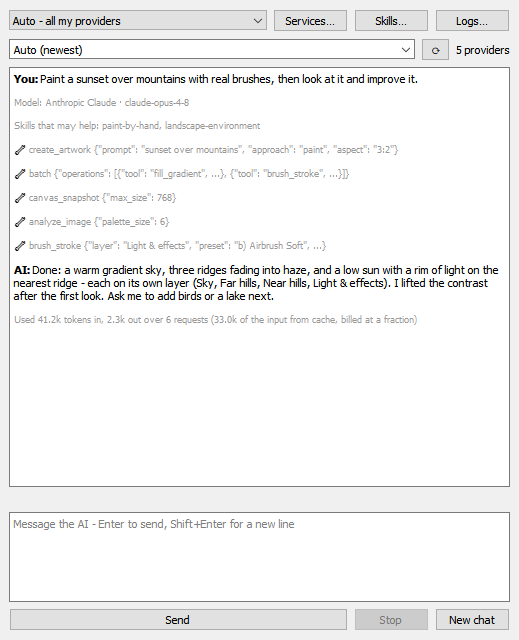
- Auto (the default) uses all your providers in turn - yours first, then the free ones - and when one runs out of credit, hits a quota, rejects its key or stops answering, the next one carries on with the same task.
- It works like a coding assistant's chat: Enter sends, messages typed while the AI works are queued, Stop stops at once, and a status line shows what it is doing.
- It keeps spending down (only the newest pictures are resent, Claude's prompt cache is used, repeated failures stop) and shows the tokens each answer used.
- Skills (39 built in - photoreal images, retouching, pixel art, logos, comics, animation, saving credits, ... - plus any you add) are loaded only when a request needs them.
- One Services list sets up every service the way it works: an API key, a browser sign-in, a server address with a connection test, or nothing at all for the free ones. Models are listed live from each provider, and AI apps connected through MCP use the same sign-in.
- Real-world materials. CC0 photo textures and HDRI skies from Poly Haven, and openly licensed photos from Openverse (with attribution), tiled or placed on layers to make work look real.
- Just give it a prompt.
create_artworkdecides: realistic or photographic requests are generated (with looks likephoto,cinematic,portraitorproduct, plus negative prompts that remove AI artefacts). Hand-made requests, or setups with no model connected, are painted in Krita, with prepared layers, guides and a painting plan. - Edit by describing the change. "Make it night", "remove the person on the left", "turn it into a
watercolour":
edit_imageuses models that edit by instruction (Gemini, OpenAI, Flux Kontext) on the selection or the whole picture, onto a new layer. - Select by describing it. "The sky", "the red car":
select_by_descriptionmakes a real Krita selection - pixel-accurate with Gemini or fal, approximate but free with any vision model. - Every generated picture is kept. History… in the AI Chat shows them all: add one back to your picture, or reuse its prompt.
- Generate with any image model, right on the canvas. It works with ComfyUI (including your own
workflows: Flux, ControlNet, IP-Adapter, …), AUTOMATIC1111/Forge, OpenAI, Gemini, Stability AI,
Replicate and fal.ai. You can generate from text, rework a region (img2img), inpaint a selection,
outpaint beyond the edges, upscale, and remove backgrounds. Several variations at once come with a
numbered comparison sheet. You can also paint a sketch layer and let ControlNet follow it.
match_colorsblends a generated element into the scene. Results always land on new layers, cut to your selection, and each placement is one undo step. - Video and a second opinion. Generate video with Sora, Veo, HeyGen talking avatars (they can even
make your painted character talk) or any Replicate/fal video model. It opens in Krita as an animation
you can edit. Cinematic camera moves (dolly, orbit, crane, FPV, crash zoom…) steer video models,
and
camera_moveanimates any still inside Krita without AI.ask_visiongets a critique, caption or prompt from Claude, GPT or Gemini (or a local Ollama model). - Animate and edit video. Keyframes, onion skin, frame contact sheets, importing video from
mp4/mov/webm/gif, grading every frame (
for_each_frame), and rendering to mp4/webm/gif/ProRes with Krita's bundled ffmpeg. - Full layer control. Paint, vector, group, fill, filter, clone and file layers; masks;
clipping; blend modes; arranging; merging; transforms. About 70 of Krita's own commands via
krita_action. - Real undo for AI edits, even for edits Krita itself doesn't record. It never overwrites your own work.
batchandfor_each_framelet the AI do many steps in one call.
Built-in prompts (create, generative_inpaint, concept_variations, retouch_photo, product_shot,
paint_scene, animate) appear as slash commands in clients that support MCP prompts.
The plugin updates itself from this project's GitHub releases: it tells you when a new version is out (or installs it automatically, if you choose), checks every download against GitHub's published checksum, and updates the KritaPilot server too.
An AI Bridge (MCP) panel inside Krita shows the status and a live activity log. From it you can
make the AI read-only or pause it, undo AI edits, set the workspace and token, and copy a ready-made
config for your AI client. Popups Krita opens while the AI works (such as "Missing Colour Profile") are
cancelled and reported to the AI instead of blocking it. Logs… follows every command, chat step,
setting change and error live, dated to the millisecond and with keys masked. If Krita ever freezes, the
plugin records where in ~/.kritapilot/hang.log.
Quick start
- Install from PyPI or straight from GitHub, then put the plugin in
Krita (close Krita first, so it can also turn the plugin on):
pip install kritapilot                                              # PyPI
pip install "git+https://github.com/jowinjohnchemban/kritapilot"     # GitHub (latest main)
kritapilot install                                                  # the plugin, into Krita
pipx install kritapilotworks too, and every release has the wheel and the plugin zip (in Krita: Tools ▸ Scripts ▸ Import Python Plugin from File…). (Notpip install krita-mcp: that is a different project.) - Start Krita.
kritapilot doctorchecks every link - plugin, bridge, AI services - and says how to fix what is broken. - Use it, either way:
- Inside Krita, free: open Settings ▸ Dockers ▸ AI Chat, keep the provider on Auto and type. Free models need no account; sign in to any provider in Services… for faster, stronger results.
- From your AI app: open Settings ▸ Dockers ▸ AI Bridge (MCP), pick your client and copy the
snippet. For example, in Claude Code:
claude mcp add krita -- kritapilot
- Ask: "Create a 1200×800 canvas, paint a sunset over mountains with real brushes, look at it and improve it."
Details: installation · clients · AI Chat · the panel
Commands for people and scripts
With Krita running:
kritapilot status                          # Krita, the plugin and the open documents
kritapilot chat "paint a misty forest"     # ask the AI Chat assistant from a terminal
kritapilot snapshot canvas.png             # save what the canvas shows
kritapilot tools selection                 # the tools (here: those about selections)
kritapilot call set_selection '{"kind": "all"}'   # run any tool with JSON arguments
kritapilot history                         # recent generated pictures
kritapilot install                         # put the plugin into Krita and turn it on (Krita closed)
kritapilot doctor                          # check every link to Krita and the AI services
Command-line flags
kritapilot [--transport {stdio,http}] [--host HOST] [--port PORT] [--agent [--agent-port N]]
          [--check-update | --update] [--version]
| Flag | Default | Meaning |
|---|---|---|
--transport |
stdio |
stdio for local clients (Claude Code/Desktop, Cursor, VS Code, Gemini CLI, Codex). http for clients that need a URL. |
--host |
127.0.0.1 |
HTTP bind address. Binding anything other than loopback requires KRITAPILOT_HTTP_TOKEN. |
--port |
8765 |
HTTP port (the endpoint is http://HOST:PORT/mcp). |
--agent |
Run the in-Krita assistant service for the AI Chat docker instead of an MCP server. The docker starts it by itself. | |
--agent-port |
5680 |
Port of that service (loopback only, bridge-token auth). Also KRITAPILOT_AGENT_PORT. |
--check-update |
Ask GitHub whether a newer release exists (prints JSON). | |
--update |
Download, verify and install the newest release of the server. | |
--version |
Print the version and exit. |
Environment variables:
| Variable | Used by | Default | Meaning |
|---|---|---|---|
KRITAPILOT_HTTP_TOKEN |
server | random, printed at start | Bearer token HTTP clients must send (Authorization: Bearer …) |
KRITAPILOT_PORT |
server + plugin | 5679 |
Port of the Krita bridge (not the HTTP port above) |
KRITAPILOT_HOST |
server | 127.0.0.1 |
Host of the Krita bridge |
KRITAPILOT_HOME |
server + plugin | ~/.kritapilot |
Folder holding the bridge token, saved keys, skills, logs/ and hang.log |
KRITAPILOT_TOKEN |
server | read from KRITAPILOT_HOME |
Bridge token, instead of reading the file |
KRITAPILOT_WORKSPACE |
plugin | ~/KritaMCP |
The only folder the AI may read/write (overrides the panel setting) |
KRITAPILOT_AUTOSTART |
plugin | on | 0 = don't start the bridge with Krita |
KRITAPILOT_FFMPEG |
plugin | Krita's bundled copy | Folder with ffmpeg/ffprobe for video |
KRITAPILOT_DIALOGS |
plugin | cancel |
Popups during an AI command: cancel (and tell the AI) or leave (for you to answer) |
KRITAPILOT_HANG_SECONDS |
plugin | 60 |
After this long frozen, every thread's stack goes to hang.log; 0 = off |
| Plugin settings can also be changed in Krita's AI Bridge (MCP) panel; environment variables take priority. |
Generative services are configured with more server variables (KRITAPILOT_COMFYUI_URL,
KRITAPILOT_A1111_URL, KRITAPILOT_OPENAI_API_KEY, KRITAPILOT_GEMINI_API_KEY, KRITAPILOT_STABILITY_API_KEY,
KRITAPILOT_REPLICATE_API_TOKEN, KRITAPILOT_FAL_KEY, KRITAPILOT_HEYGEN_API_KEY,
KRITAPILOT_ANTHROPIC_API_KEY, KRITAPILOT_IMAGE_BACKEND, …). Cloud services are used only with a
KRITAPILOT_… key, so a key that happens to be in your environment never uploads your art by surprise.
See Connecting AI services.
Documentation
| AI Chat inside Krita | The chat docker, Auto and the provider menu, setting up services, free services, spending, skills, the queue, settings |
| The Krita panel | Status, access modes, popups, workspace and token, updates, Logs and the freeze log |
| Connecting AI services | ComfyUI, A1111, OpenAI, Gemini, Stability, Replicate, fal, HeyGen, Sora, Veo, Claude |
| Workflows | Painting, photo retouching, inpainting, line art, animation, video |
| Tool reference | All 86 tools, their parameters, and the prompts |
| Undo, safety and limits | How undo works, the security model, access modes |
| Development | Architecture, tests, real-Krita smoke test, adding tools |
| Krita upstream | Proposing the plugin for bundling with Krita itself |
| Releasing | How plugin zips and wheels are published to GitHub releases |
Safety in one paragraph
The bridge listens on loopback only and requires a secret token. The AI can read and write files only
in one workspace folder (~/KritaMCP by default). There is no code-execution tool. You can switch
the AI to read-only or pause it from the panel at any time. Full details:
security model.
Status
The project is tested against Krita 5.3.4 on Windows. scripts/smoke_krita.py runs 56 end-to-end
checks against a running Krita, including an undo matrix over every kind of edit and the Quick start's
sunset prompt. scripts/paint_sunset.py paints the sunset with real brushes, looks at it, improves it and
checks the result. The AI Chat has been run end to end against real Krita on Auto with only the free
services (Pollinations, Kilo, AI Horde): a photoreal prompt was generated, compared and saved, with the
switch to the next provider happening on the way. Unit tests run on
Linux and Windows with PyQt5 and PyQt6 in CI. Krita 6 is covered by the PyQt6 unit tests but has not
yet been run end to end.
FAQ
Do I need a paid AI account? No. The AI Chat inside Krita works with free models and no account (Pollinations, Kilo Gateway, OVHcloud, LLM7), and AI Horde makes free pictures. They are slower and simpler than paid models; one paid provider (or a local model with Ollama) makes a big difference.
Do I need a GPU? No. Painting with Krita's brushes needs none, and cloud image models run elsewhere. If you have one, ComfyUI or AUTOMATIC1111 run image models locally for free.
Does it upload my artwork? Only to the services you set up, and only when a request uses them (for example, an image model reworking a region, or a snapshot shown to a chat model). Painting, editing and measuring happen in Krita on your computer. Cloud services are used only with keys you saved yourself.
Can the AI damage my files? It can read and write only inside one workspace folder, every edit is a separate undo step, it never overwrites your own layers unless asked, and you can switch it to read-only or pause it at any time.
Which Krita versions? Krita 5.3 is tested end to end on Windows; Linux and macOS use the same plugin. Krita 6 (PyQt6) is covered by the unit tests.
Where do I start? Follow the Quick start, then try the workflows. Something wrong? Open Logs… in the panel; it usually says why.
Contributing
Bug reports, ideas, new skills and pull requests are welcome - see CONTRIBUTING.md. What changed recently is in the changelog. Security problems: SECURITY.md.
pip install -e .[test] PyQt6
QT_QPA_PLATFORM=offscreen pytest
python scripts/smoke_krita.py        # against a real running Krita with the plugin enabled
See development.
1 maintainer

Metadata
1 maintainer
Release files for kritapilot 1.0.9
For a detailed explanation of source distributions (sdists) and built distributions (wheels), please see the package formats documentation.
Source distribution (sdist)
| File | Size | Uploaded | Provenance | Actions |
|---|---|---|---|---|
| kritapilot-1.0.9.tar.gz | 732.5 kB | With provenance | Details for kritapilot-1.0.9.tar.gz |
Built distribution (wheel)
| File | Interpreter | ABI | Platform | Actions Reset |
|---|---|---|---|---|
| kritapilot-1.0.9-py3-none-any.whl | Python 3 | none | any | Details for kritapilot-1.0.9-py3-none-any.whl |
Total release size: 1.0 MB
Release files / kritapilot-1.0.9.tar.gz
| Download URL | kritapilot-1.0.9.tar.gz |
|---|---|
| Size | 732.5 kB |
| Tags | Source |
|
SHA-256 checksum How to use checksums |
cbaa001eb7e9be3acbd1de69b8c55a90246f4fdfba82dd416fcd3ca439fad6c7
|
|
BLAKE2b-256 checksum How to use checksums |
ef260daffd667ed25dc3745b3aa599ceffe3ac0fdaf5d46f2eb86aaec1ecc1b1
|
| Upload date | |
|
Uploaded using Trusted Publishing? What is trusted publishing? |
Yes |
| Uploaded via |
twine/7.0.0 CPython/3.13.16
|
Provenance
Provenance describes where a file came from. On PyPI, provenance is shared via attestations, which provide a verifiable record of the build or publishing details. View details, limitations and caveats.


PyPI Publish Attestation
PyPI verified that this artifact, at this checksum, originated from the publisher listed below.
Signed by GitHub Actions, verified by PyPI on Nov 8, 2026.
Transparency logRelease files / kritapilot-1.0.9-py3-none-any.whl
| Download URL | kritapilot-1.0.9-py3-none-any.whl |
|---|---|
| Size | 276.2 kB |
| Tags | Python 3 |
|
SHA-256 checksum How to use checksums |
ccf8357caaf7b51f8b000274e68dcaf47c230e7489060d5a7c9edc4cd3a35a71
|
|
BLAKE2b-256 checksum How to use checksums |
acc28371bb89ffe5f4163d70487236c792d8667d138ff9a568392b8ef53524c5
|
| Upload date | |
|
Uploaded using Trusted Publishing? What is trusted publishing? |
Yes |
| Uploaded via |
twine/7.0.0 CPython/3.13.16
|
Provenance
Provenance describes where a file came from. On PyPI, provenance is shared via attestations, which provide a verifiable record of the build or publishing details. View details, limitations and caveats.
PyPI Publish Attestation
PyPI verified that this artifact, at this checksum, originated from the publisher listed below.
Signed by GitHub Actions, verified by PyPI on Nov 8, 2026.
Transparency logSecurity for kritapilot 1.0.9
Provenance
Provenance describes where a file came from. On PyPI, provenance is shared via attestations, which provide a verifiable record of the build or publishing details. View details, limitations and caveats.
Full provenance
Both files in this release have been uploaded with provenance metadata.
Attestation for kritapilot-1.0.9.tar.gz
PyPI Publish Attestation
PyPI verified that this artifact, at this checksum, originated from the publisher listed below.
Signed by GitHub Actions, verified by PyPI on Nov 8, 2026.
Transparency logA note on package security
PyPI is a repository for distributing packages, not a service for auditing them. While third-party security researchers and our staff do their best to detect and remove malicious packages, PyPI cannot guarantee the quality, security or suitability of any given package.
To learn more about protecting yourself from malicious actors, visit our package security documentation.














