
An offline-capable, multi-provider AI study assistant for PDF books with VARK learning modes
Verified details
These details have been verified by PyPIProject links
GitHub Statistics
Maintainers

Project description
PDF Tutor




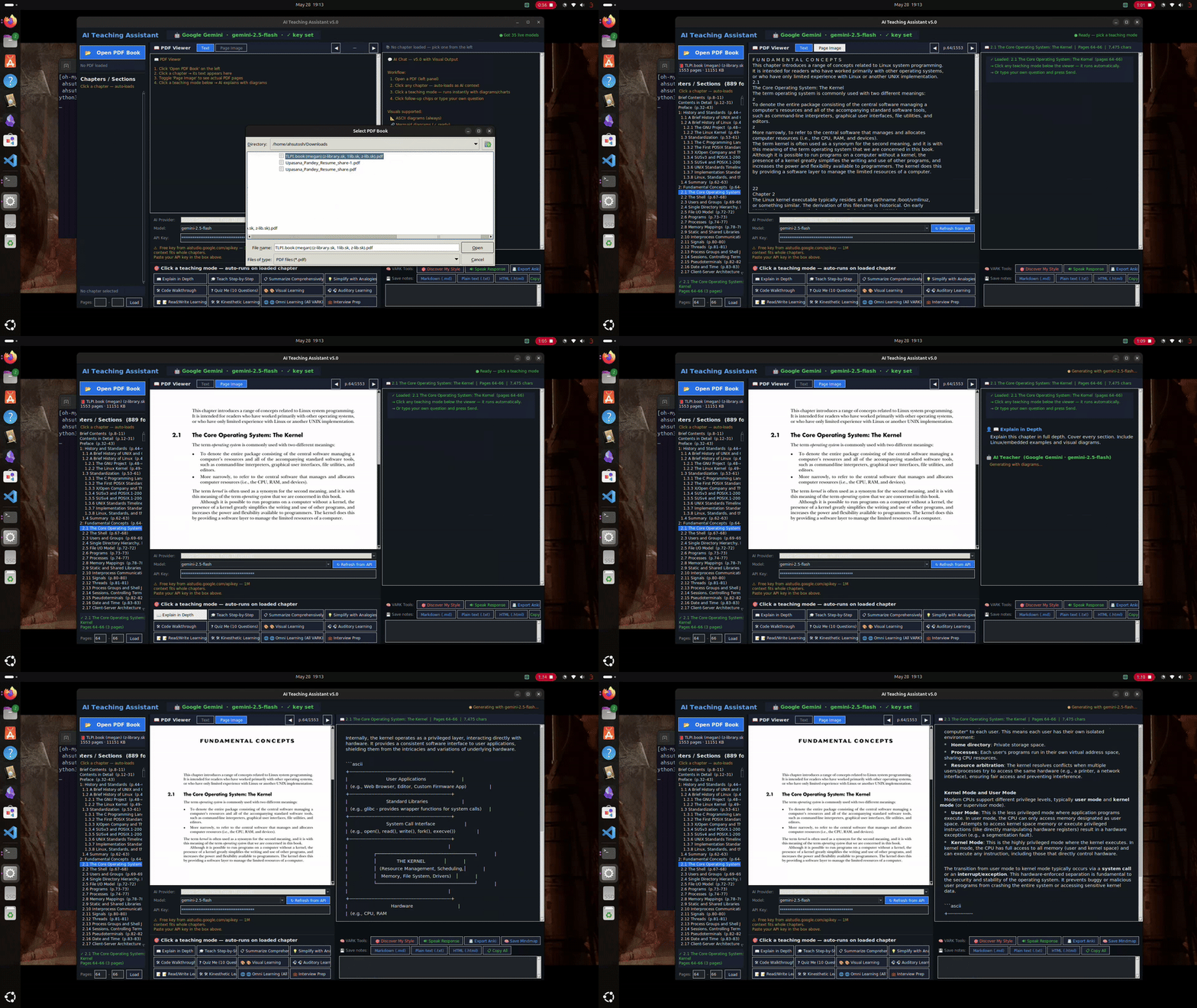
I read a lot of technical PDFs — textbooks, research papers, course materials. The problem is that reading them passively doesn't really work for me. I'd finish a chapter and retain almost nothing.
I tried highlighting, re-reading, watching videos on the same topic — still slow. What actually helped was having someone explain it to me in different ways. A diagram here, a quick quiz there, hearing it out loud.
So I built this. You drop a PDF in, pick a chapter, and it explains it to you — using whichever style actually works for your brain. Diagrams if you're visual, audio if you're auditory, structured notes, or hands-on commands if you learn by doing. It can also run completely offline if you don't want your study material leaving your machine.
Screenshots
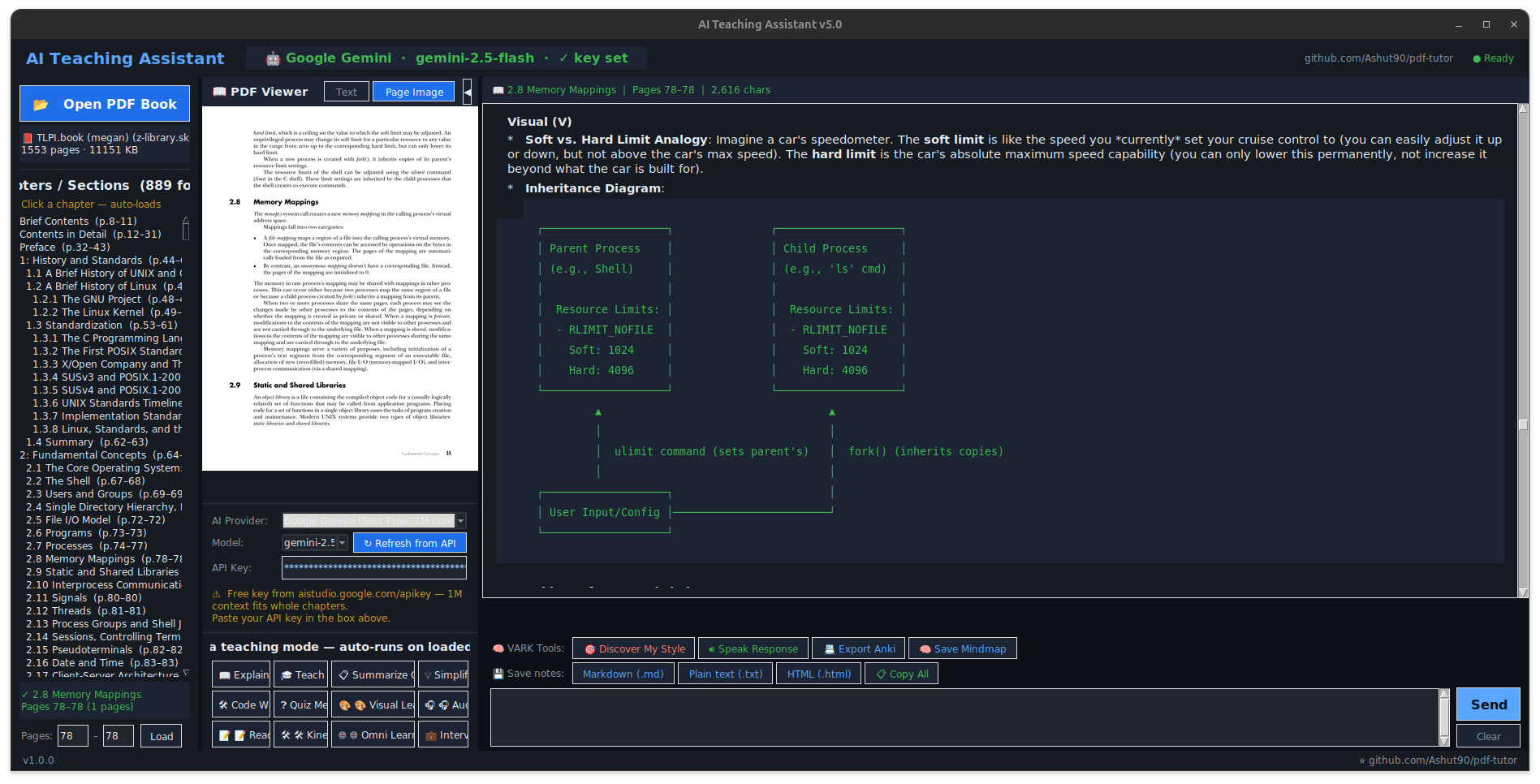
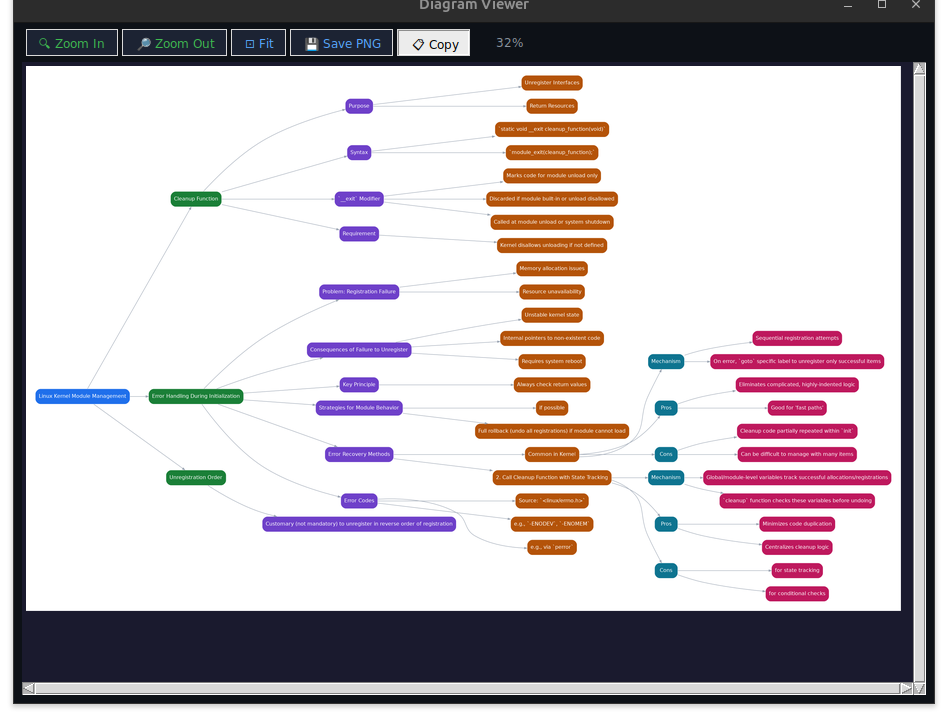
| Main window | Exported mind map |
|---|---|
 |
 |
How it works
The app reads the table of contents from your PDF and lets you pick a chapter. It sends that chapter's text to whichever AI you've set up and asks it to explain things in the style you want.
The learning modes are based on VARK — Visual, Auditory, Read/Write, Kinesthetic. There's also a quiz that figures out which style fits you, and an Omni mode that does all four at once.
Visual — mind maps, flowcharts, comparison tables Auditory — conversational explanation + reads it out loud (TTS) Read/Write — structured notes, definitions, writing prompts Kinesthetic — terminal commands and code experiments you can actually run
You can export notes as Markdown or HTML, generate Anki flashcards, or save interactive mindmaps as HTML files.
AI providers
It supports four providers — use whichever you already have access to:
| Provider | Cost | Where it runs |
|---|---|---|
| Ollama | Free | Your machine (fully offline) |
| Google Gemini | Free tier | Cloud |
| Groq | Free tier | Cloud |
| OpenRouter | Free tier | Cloud |
I mostly use Gemini because its 1M token context window handles entire chapters without truncation. Ollama is great when I'm on a plane or don't want data leaving my machine.
Installation
git clone https://github.com/Ashut90/pdf-tutor.git
cd pdf-tutor
pip install -r requirements.txt
python -m pdf_tutor
That's enough to get started. Two optional system packages unlock extra features:
sudo apt install graphviz   # diagram fallback when offline
sudo apt install espeak-ng  # offline TTS (otherwise falls back to gTTS)
On macOS, replace apt with brew. On Windows, graphviz has an installer at graphviz.org/download and TTS uses SAPI5 built-in.
Setting up a provider
Ollama (offline):
# Install from https://ollama.com, then:
ollama pull qwen2.5-coder:7b
ollama serve
Select Ollama in the app — no key needed.
Gemini / Groq / OpenRouter: Get a free key from aistudio.google.com/apikey, console.groq.com, or openrouter.ai, paste it into the app, done.
Architecture
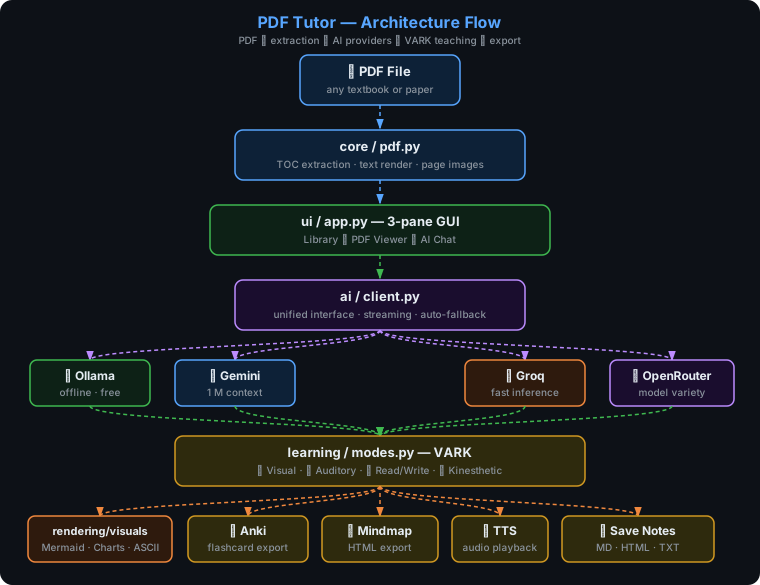
The UI loads a chapter via core/pdf.py, sends the text with a mode-specific prompt (learning/modes.py) to the selected provider (ai/client.py), and renders any diagrams or charts the AI produces (rendering/visuals.py).
Project structure
pdf-tutor/
├── pdf_tutor/
│   ├── __main__.py          # entry point
│   ├── config.py            # theme, fonts, providers
│   ├── core/pdf.py          # TOC extraction, text/page rendering
│   ├── ai/client.py         # unified client for all 4 providers
│   ├── rendering/visuals.py # diagram / chart rendering
│   ├── learning/modes.py    # VARK prompts and teaching modes
│   └── ui/app.py            # Tkinter GUI
├── tests/
├── requirements.txt
└── pyproject.toml
Running tests
pip install pytest
pytest -v
What's next
Things I want to add but haven't gotten to yet:
- Conversation history that persists across sessions
- Multi-PDF library with search
- EPUB and DjVu support
- Configurable prompt templates per subject
If any of these interest you, feel free to open a PR.
Contributing
Open an issue first if it's a bigger change — happy to discuss direction before you spend time on it. For small fixes, just open a PR directly.
License
MIT — see LICENSE.
Credits
- PyMuPDF for PDF parsing
- Ollama, Groq, Google AI Studio, OpenRouter for model access
- VARK model by Neil Fleming
Project details
Verified details
These details have been verified by PyPIProject links
GitHub Statistics
Maintainers


Download files
Download the file for your platform. If you're not sure which to choose, learn more about installing packages.
Source Distribution
Built Distribution
Filter files by name, interpreter, ABI, and platform.
If you're not sure about the file name format, learn more about wheel file names.
Copy a direct link to the current filters
File details
Details for the file kritrim_smriti-1.1.1.tar.gz.
File metadata
- Download URL: kritrim_smriti-1.1.1.tar.gz
- Upload date:
- Size: 44.0 kB
- Tags: Source
- Uploaded using Trusted Publishing? Yes
- Uploaded via: twine/6.1.0 CPython/3.13.12
File hashes
| Algorithm | Hash digest | |
|---|---|---|
| SHA256 |
36ffa84ca4d365149e8f818bf3bba1594bc43f8241bc8104cfd32c157c4e85b1
|
|
| MD5 |
a159b3c2f779c2c8019f5ed92f1c5cbd
|
|
| BLAKE2b-256 |
e7bbec762ddaf750a37511bdb67f44b89b7af647dd91ef7e6b7a83ffdb876c84
|
Provenance
The following attestation bundles were made for kritrim_smriti-1.1.1.tar.gz:
Publisher:
release.yml on Ashut90/pdf-tutor
-
Statement:
-
Statement type:
https://in-toto.io/Statement/v1 -
Predicate type:
https://docs.pypi.org/attestations/publish/v1 -
Subject name:
kritrim_smriti-1.1.1.tar.gz -
Subject digest:
36ffa84ca4d365149e8f818bf3bba1594bc43f8241bc8104cfd32c157c4e85b1 - Sigstore transparency entry: 1736544426
- Sigstore integration time:
-
Permalink:
Ashut90/pdf-tutor@33723c3908cd8cd81ce7914f783b0d097fd316f7 -
Branch / Tag:
refs/tags/v1.1.1 - Owner: https://github.com/Ashut90
-
Access:
public
-
Token Issuer:
https://token.actions.githubusercontent.com -
Runner Environment:
github-hosted -
Publication workflow:
release.yml@33723c3908cd8cd81ce7914f783b0d097fd316f7 -
Trigger Event:
push
-
Statement type:
File details
Details for the file kritrim_smriti-1.1.1-py3-none-any.whl.
File metadata
- Download URL: kritrim_smriti-1.1.1-py3-none-any.whl
- Upload date:
- Size: 45.8 kB
- Tags: Python 3
- Uploaded using Trusted Publishing? Yes
- Uploaded via: twine/6.1.0 CPython/3.13.12
File hashes
| Algorithm | Hash digest | |
|---|---|---|
| SHA256 |
382d6dc533e5696e8f9d84ab41a0af70d3c9bfba7a523ceb366895dcca91471c
|
|
| MD5 |
6555f70a77483ac9fe814ba84d182901
|
|
| BLAKE2b-256 |
04c82b52d6cb6402f0e439cd2612bdc3774e9cd8b0698c6ca257378522517ce4
|
Provenance
The following attestation bundles were made for kritrim_smriti-1.1.1-py3-none-any.whl:
Publisher:
release.yml on Ashut90/pdf-tutor
-
Statement:
-
Statement type:
https://in-toto.io/Statement/v1 -
Predicate type:
https://docs.pypi.org/attestations/publish/v1 -
Subject name:
kritrim_smriti-1.1.1-py3-none-any.whl -
Subject digest:
382d6dc533e5696e8f9d84ab41a0af70d3c9bfba7a523ceb366895dcca91471c - Sigstore transparency entry: 1736544510
- Sigstore integration time:
-
Permalink:
Ashut90/pdf-tutor@33723c3908cd8cd81ce7914f783b0d097fd316f7 -
Branch / Tag:
refs/tags/v1.1.1 - Owner: https://github.com/Ashut90
-
Access:
public
-
Token Issuer:
https://token.actions.githubusercontent.com -
Runner Environment:
github-hosted -
Publication workflow:
release.yml@33723c3908cd8cd81ce7914f783b0d097fd316f7 -
Trigger Event:
push
-
Statement type:






