
PDF Tutor




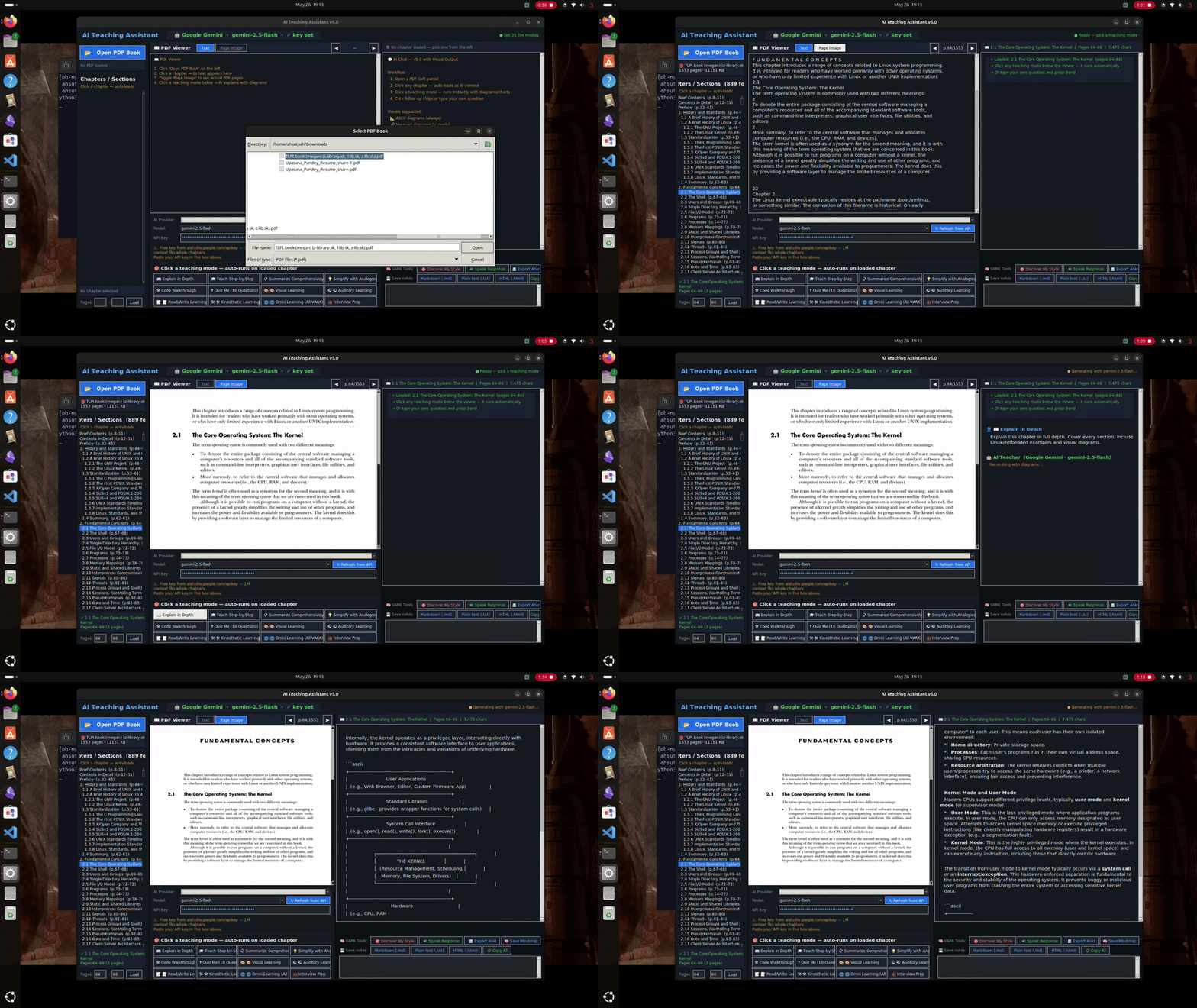
I read a lot of technical PDFs — textbooks, research papers, course materials. The problem is that reading them passively doesn't really work for me. I'd finish a chapter and retain almost nothing.
I tried highlighting, re-reading, watching videos on the same topic — still slow. What actually helped was having someone explain it to me in different ways. A diagram here, a quick quiz there, hearing it out loud.
So I built this. You drop a PDF in, pick a chapter, and it explains it to you — using whichever style actually works for your brain. Diagrams if you're visual, audio if you're auditory, structured notes, or hands-on commands if you learn by doing. It can also run completely offline if you don't want your study material leaving your machine.
Screenshots
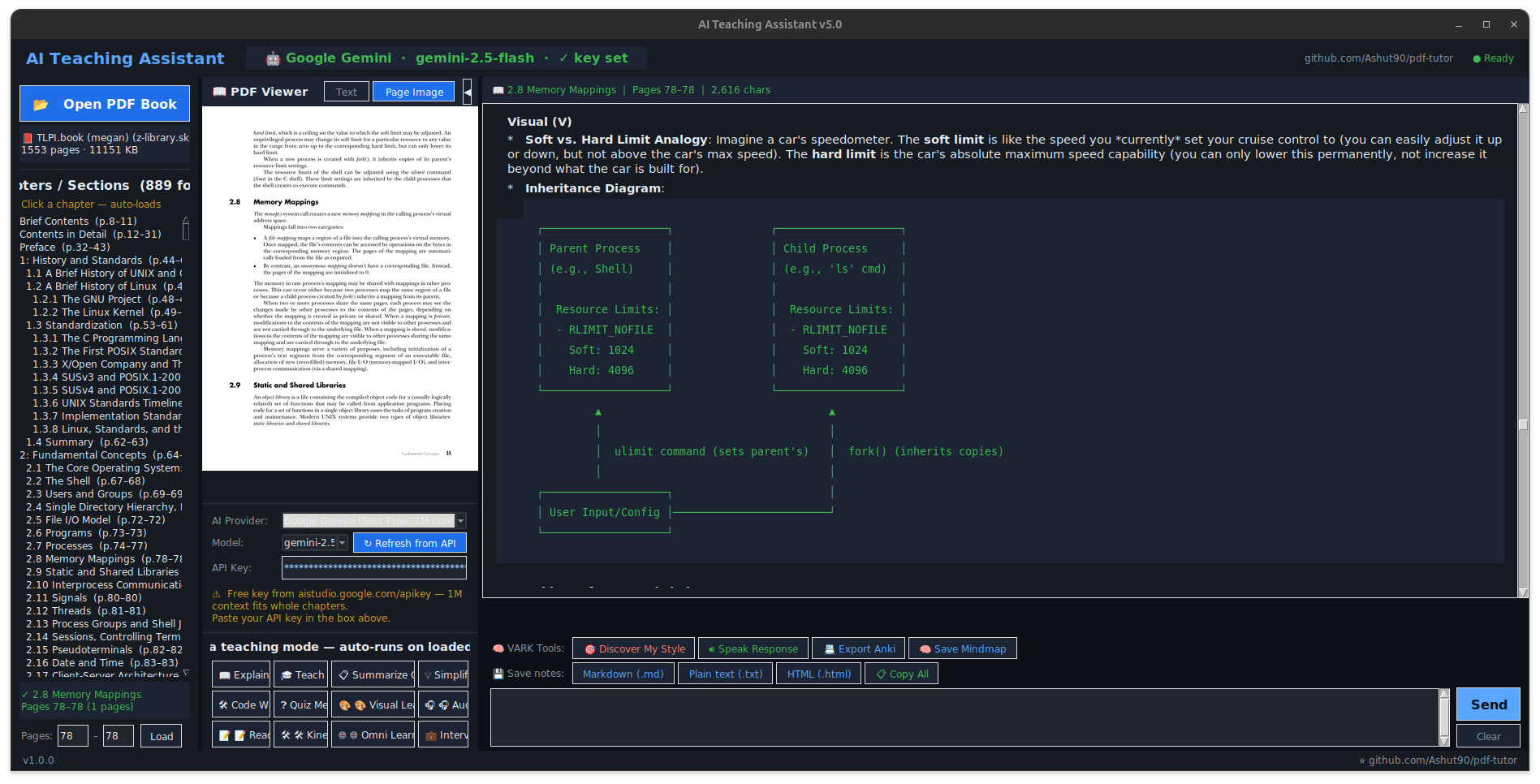
| Main window | Mind map in the diagram viewer (zoom · copy · save) |
|---|---|
 |
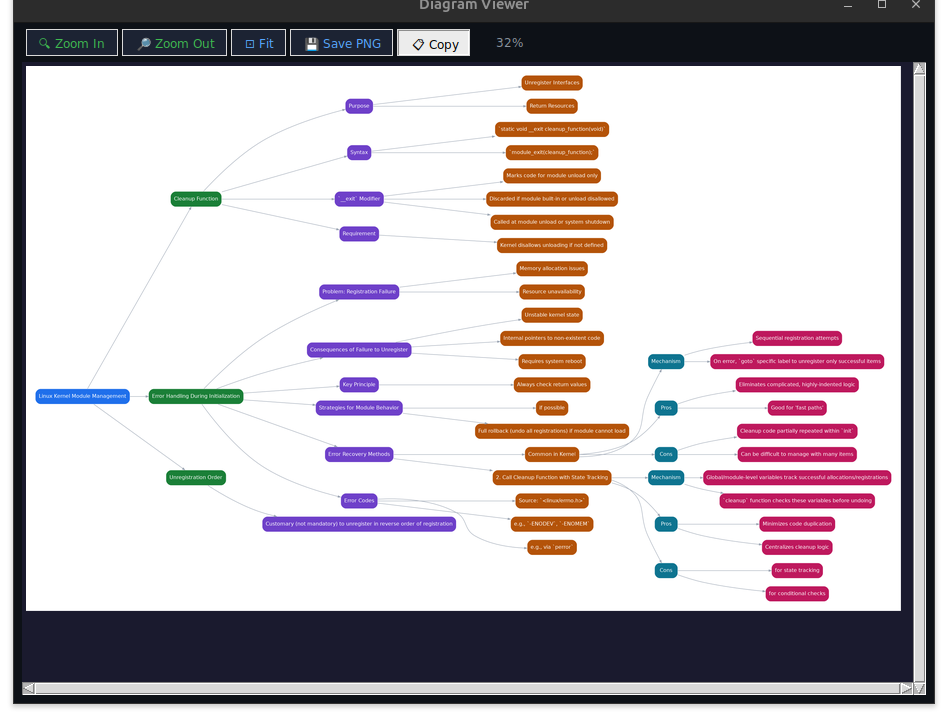 |
Any AI-generated diagram opens in a built-in viewer where you can zoom, fit, save as PNG, or copy to the clipboard — and mind maps render offline via a local graphviz fallback when there's no internet.
How it works
The app reads the table of contents from your PDF and lets you pick a chapter. It sends that chapter's text to whichever AI you've set up and asks it to explain things in the style you want.
The learning modes are based on VARK — Visual, Auditory, Read/Write, Kinesthetic. There's also a quiz that figures out which style fits you, and an Omni mode that does all four at once.
Visual — mind maps, flowcharts, comparison tables Auditory — conversational explanation + reads it out loud (TTS) Read/Write — structured notes, definitions, writing prompts Kinesthetic — terminal commands and code experiments you can actually run
You can export notes as Markdown or HTML, generate Anki flashcards, or save interactive mindmaps as HTML files.
AI providers
It supports four providers — use whichever you already have access to:
| Provider | Cost | Where it runs |
|---|---|---|
| Ollama | Free | Your machine (fully offline) |
| Google Gemini | Free tier | Cloud |
| Groq | Free tier | Cloud |
| OpenRouter | Free tier | Cloud |
I mostly use Gemini because its 1M token context window handles entire chapters without truncation. Ollama is great when I'm on a plane or don't want data leaving my machine.
Installation
git clone https://github.com/Ashut90/pdf-tutor.git
cd pdf-tutor
pip install -r requirements.txt
python -m pdf_tutor
That's enough to get started. Two optional system packages unlock extra features:
sudo apt install graphviz   # diagram fallback when offline
sudo apt install espeak-ng  # offline TTS (otherwise falls back to gTTS)
On macOS, replace apt with brew. On Windows, graphviz has an installer at graphviz.org/download and TTS uses SAPI5 built-in.
Setting up a provider
Ollama (offline):
# Install from https://ollama.com, then:
ollama pull qwen2.5-coder:7b
ollama serve
Select Ollama in the app — no key needed.
Gemini / Groq / OpenRouter: Get a free key from aistudio.google.com/apikey, console.groq.com, or openrouter.ai, paste it into the app, done.
Architecture
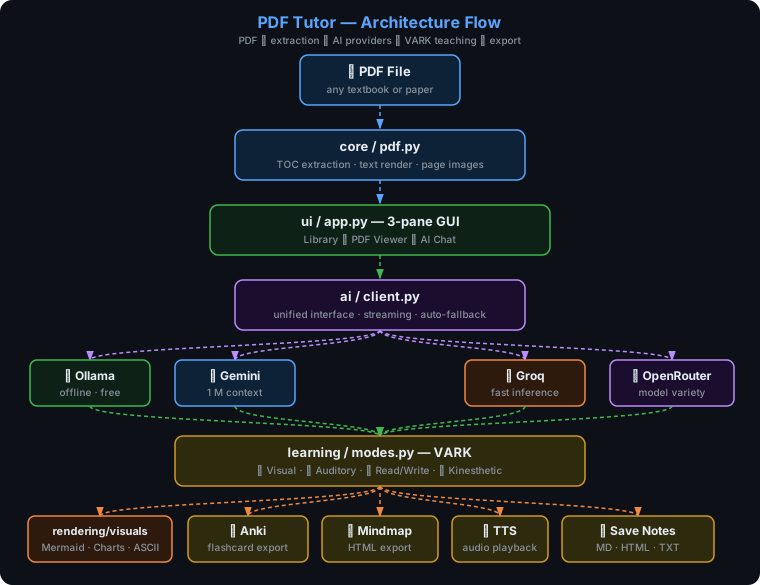
The UI loads a chapter via core/pdf.py, sends the text with a mode-specific prompt (learning/modes.py) to the selected provider (ai/client.py), and renders any diagrams or charts the AI produces (rendering/visuals.py).
Project structure
pdf-tutor/
├── pdf_tutor/
│   ├── __main__.py          # entry point
│   ├── config.py            # theme, fonts, providers
│   ├── core/pdf.py          # TOC extraction, text/page rendering
│   ├── ai/client.py         # unified client for all 4 providers
│   ├── rendering/visuals.py # diagram / chart rendering
│   ├── learning/modes.py    # VARK prompts and teaching modes
│   └── ui/app.py            # Tkinter GUI
├── tests/
├── requirements.txt
└── pyproject.toml
Running tests
pip install pytest
pytest -v
What's next
Things I want to add but haven't gotten to yet:
- Conversation history that persists across sessions
- Multi-PDF library with search
- EPUB and DjVu support
- Configurable prompt templates per subject
If any of these interest you, feel free to open a PR.
Contributing
Open an issue first if it's a bigger change — happy to discuss direction before you spend time on it. For small fixes, just open a PR directly.
License
MIT — see LICENSE.
Credits
- PyMuPDF for PDF parsing
- Ollama, Groq, Google AI Studio, OpenRouter for model access
- VARK model by Neil Fleming
1 maintainer

Release files for kritrim-Smriti 1.3.2
For a detailed explanation of source distributions (sdists) and built distributions (wheels), please see the package formats documentation.
Source distribution (sdist)
| File | Size | Uploaded | |
|---|---|---|---|
| kritrim_smriti-1.3.2.tar.gz | 48.9 kB | Details |
Built distribution (wheel)
| File | Interpreter | ABI | Platform | Reset |
|---|---|---|---|---|
| kritrim_smriti-1.3.2-py3-none-any.whl | Python 3 | none | any | Details |
Total release size: 99.7 kB
Release files / kritrim_smriti-1.3.2.tar.gz
| Download URL | kritrim_smriti-1.3.2.tar.gz |
|---|---|
| Size | 48.9 kB |
| Tags | Source |
|
SHA-256 checksum How to use checksums |
4aa068b472597129390b6681352d5262b2e80a45220d4d12b1ed24ab2c6016f0
|
|
BLAKE2b-256 checksum How to use checksums |
bd619b543f5a60ccbe40d872a205133311a8f6bee2206df26371d9c492cae90f
|
| Upload date | |
|
Uploaded using Trusted Publishing? What is trusted publishing? |
Yes |
| Uploaded via |
twine/6.1.0 CPython/3.13.12
|
Provenance
Provenance describes where a file came from. On PyPI, provenance is shared via attestations, which provide a verifiable record of the build or publishing details. View details, limitations and caveats.


PyPI Publish Attestation
PyPI verified that this artifact, at this checksum, originated from the publisher listed below.
Signed by GitHub Actions, verified by PyPI on Jun 9, 2026.
Transparency logRelease files / kritrim_smriti-1.3.2-py3-none-any.whl
| Download URL | kritrim_smriti-1.3.2-py3-none-any.whl |
|---|---|
| Size | 50.8 kB |
| Tags | Python 3 |
|
SHA-256 checksum How to use checksums |
86aea248cda6d55500a045f8e51ea5d7c6b063c775902d9ad5243c23ce6c338f
|
|
BLAKE2b-256 checksum How to use checksums |
a34a4c4b8b305a80199db400df6274233bf540614ac3bb256a33a9b2d130d36a
|
| Upload date | |
|
Uploaded using Trusted Publishing? What is trusted publishing? |
Yes |
| Uploaded via |
twine/6.1.0 CPython/3.13.12
|
Provenance
Provenance describes where a file came from. On PyPI, provenance is shared via attestations, which provide a verifiable record of the build or publishing details. View details, limitations and caveats.
PyPI Publish Attestation
PyPI verified that this artifact, at this checksum, originated from the publisher listed below.
Signed by GitHub Actions, verified by PyPI on Jun 9, 2026.
Transparency log













