
Lightweight dataflow library for mechanistic interpretability.


Project description
Krnel-graph




Blog • Docs • Examples • Github • PyPI
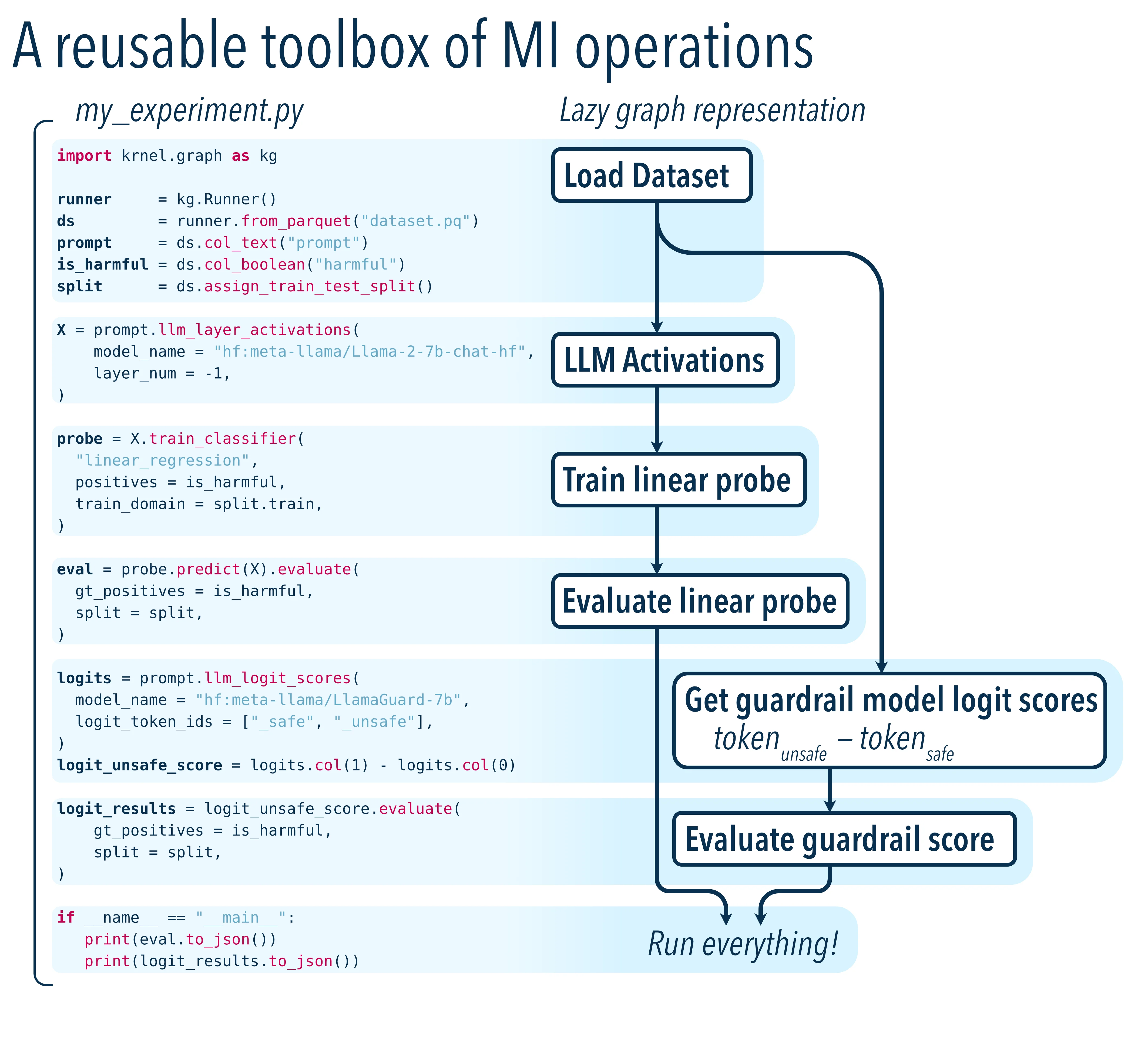
A Python toolbox for mechanistic interpretability research built on a lightweight strongly-typed computation graph spec.
- Run language models using HuggingFace Transformers, TransformerLens, Ollama, etc., and save activations from the residual stream
- Train linear probes from cached activations and evaluate their results
- Fetch logit scores for guardrail models
- Load and prepare datasets
Applications
- Build better guardrails using linear probes that understand model internals
- Explore large datasets grouped by semantic similarity
- Vizualize high-dimensional embeddings with built-in UMAP scatterplots
- Evaluate derivative experiments quickly with full caching and provenance tracking of results.
- Infrastructure-agnostic: Run in a notebook, on your GPU machine's CLI, or via the task orchestration framework of your choice!
Quick start
Krnel-graph works on the following platforms:
- MacOS (arm64, MPS, Apple M1 or better)
- Linux (amd64, CUDA)
- Windows native (amd64, CUDA)
- Windows WSL2 (amd64, CUDA)
Install from PyPI with uv:
$ uv add krnel-graph[cli,ml]

# (Optional) Configure where Runner() saves results
# Defaults to /tmp
$ uv run krnel-graph config --store-uri /tmp/krnel/
# s3://, gs://, or any fsspec url supported
Make main.py with the following definitions:
from krnel.graph import Runner
runner = Runner()

# Load data
ds_train   = runner.from_parquet('data_train.parquet')
col_prompt = ds_train.col_text("prompt")
col_label  = ds_train.col_categorical("label")

# Get activations from a small model
X_train = col_prompt.llm_layer_activations(
    model="hf:gpt2",
    layer=-1,
)

# Train a probe on contrastive examples
train_positives = col_label.is_in({"positive_label_1", "positive_label_2"})
train_negatives = ~train_positives
probe = X_train.train_classifier(
    positives=train_positives,
    negatives=train_negatives,
)

# Get test activations by substituting training set with testing set
# (no need to repeat the entire graph)
ds_test = runner.from_parquet('data_test.parquet')
X_test = X_train.subs((ds_train, ds_test))

test_scores = probe.predict(X_test)
eval_result = test_scores.evaluate(
    gt_positives=train_positives.subs((ds_train, ds_test)),
    gt_negatives=train_negatives.subs((ds_train, ds_test)),
)

if __name__=="__main__":
    # All operations are lazily evaluated until materialized:
    print(runner.to_json(eval_result))
Then, inspect the results in a notebook:
from main import runner, eval_result, X_train

# Materialize everything and print result:
print(runner.to_json(eval_result))

# Display activations of training set (GPU-intense operation)
print(runner.to_numpy(X_train))
Or use the (completely optional) krnel-graph CLI to materialize a selection of operations and/or monitor progress:
# Run parts of the graph
$ uv run krnel-graph run -f main.py -t LLMLayerActivations   # By operation type
$ uv run krnel-graph run -f main.py -s X_train               # By Python variable name

# Show status
$ uv run krnel-graph summary -f main.py

# Diff the pseudocode of two graph operations
$ uv run krnel-graph print -f main.py -s X_train > /tmp/train.txt
$ uv run krnel-graph print -f main.py -s X_test > /tmp/test.txt
$ git diff --no-index /tmp/train.txt /tmp/test.txt
Release history Release notifications | RSS feed


Download files
Download the file for your platform. If you're not sure which to choose, learn more about installing packages.
Source Distribution
Built Distribution
Filter files by name, interpreter, ABI, and platform.
If you're not sure about the file name format, learn more about wheel file names.
Copy a direct link to the current filters
File details
Details for the file krnel_graph-0.1.8.tar.gz.
File metadata
- Download URL: krnel_graph-0.1.8.tar.gz
- Upload date:
- Size: 96.5 kB
- Tags: Source
- Uploaded using Trusted Publishing? Yes
- Uploaded via: twine/6.1.0 CPython/3.13.7
File hashes
| Algorithm | Hash digest | |
|---|---|---|
| SHA256 |
735c7ba3dffe2ce69cbccd9145d6c054433db47139680ae8a13aaa33a3d00f68
|
|
| MD5 |
b6d3e45a3a3e666d620fd9db15903fb6
|
|
| BLAKE2b-256 |
164def9ef7cdac6ccb87ff4e3198408c4c311a0080d307d4495b5a9e44bd0967
|
Provenance
The following attestation bundles were made for krnel_graph-0.1.8.tar.gz:
Publisher:
publish-to-pypi.yml on krnel-ai/krnel-graph
-
Statement:
-
Statement type:
https://in-toto.io/Statement/v1 -
Predicate type:
https://docs.pypi.org/attestations/publish/v1 -
Subject name:
krnel_graph-0.1.8.tar.gz -
Subject digest:
735c7ba3dffe2ce69cbccd9145d6c054433db47139680ae8a13aaa33a3d00f68 - Sigstore transparency entry: 983802251
- Sigstore integration time:
-
Permalink:
krnel-ai/krnel-graph@e255e162635e80d2952ace2c27585318e789535a -
Branch / Tag:
refs/tags/v0.1.8 - Owner: https://github.com/krnel-ai
-
Access:
public
-
Token Issuer:
https://token.actions.githubusercontent.com -
Runner Environment:
github-hosted -
Publication workflow:
publish-to-pypi.yml@e255e162635e80d2952ace2c27585318e789535a -
Trigger Event:
release
-
Statement type:
File details
Details for the file krnel_graph-0.1.8-py3-none-any.whl.
File metadata
- Download URL: krnel_graph-0.1.8-py3-none-any.whl
- Upload date:
- Size: 73.5 kB
- Tags: Python 3
- Uploaded using Trusted Publishing? Yes
- Uploaded via: twine/6.1.0 CPython/3.13.7
File hashes
| Algorithm | Hash digest | |
|---|---|---|
| SHA256 |
8fba7820cb2c3dd36f920680f86e05b448031f1ab0c2842d5fbce853f6b6383f
|
|
| MD5 |
d3bacf276a294e8eadd94ae877b44899
|
|
| BLAKE2b-256 |
7054a2b9f7ce352e9f61294c4c8de49894bb0cdeff5f9498215dede05ea08158
|
Provenance
The following attestation bundles were made for krnel_graph-0.1.8-py3-none-any.whl:
Publisher:
publish-to-pypi.yml on krnel-ai/krnel-graph
-
Statement:
-
Statement type:
https://in-toto.io/Statement/v1 -
Predicate type:
https://docs.pypi.org/attestations/publish/v1 -
Subject name:
krnel_graph-0.1.8-py3-none-any.whl -
Subject digest:
8fba7820cb2c3dd36f920680f86e05b448031f1ab0c2842d5fbce853f6b6383f - Sigstore transparency entry: 983802253
- Sigstore integration time:
-
Permalink:
krnel-ai/krnel-graph@e255e162635e80d2952ace2c27585318e789535a -
Branch / Tag:
refs/tags/v0.1.8 - Owner: https://github.com/krnel-ai
-
Access:
public
-
Token Issuer:
https://token.actions.githubusercontent.com -
Runner Environment:
github-hosted -
Publication workflow:
publish-to-pypi.yml@e255e162635e80d2952ace2c27585318e789535a -
Trigger Event:
release
-
Statement type:






