
KSP Time Tool - Tool for date conversion, alarms, and maneuver planning for Kerbal Space Program.

Project description
KSP Time Tool
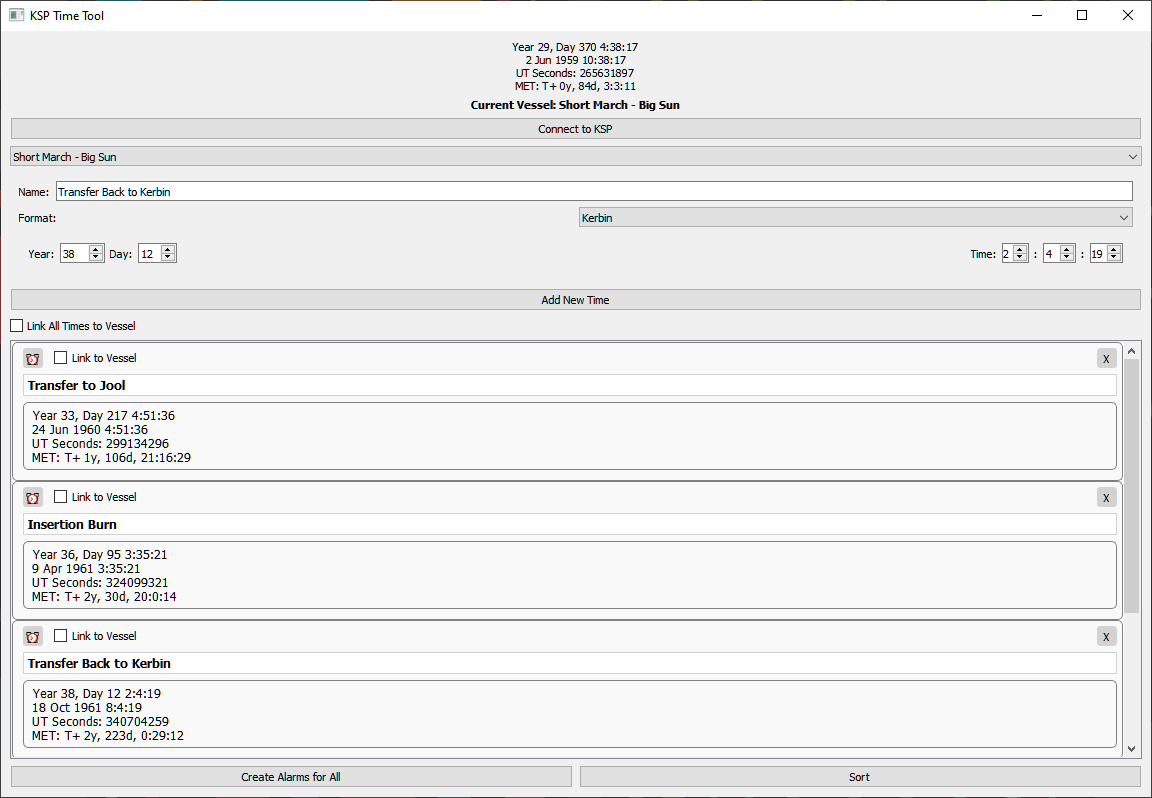
This is a simple tool for converting between the different time formats and setting alarms in Kerbal Space Program. You can use it with kRPC to connect to a running instance of KSP (using the default KRPC server configuration on localhost only for now), or use it as a standalone calculator. If you connect it to your game instance, you'll be able to set in-game alarms from KSP Time Tool.
I made this primarily as a tool for myself because there are some really excellent tools out there for planning transfers and setting maneuvers, like alexmoon's wonderful KSP Launch Window Planner, Krapfy's impressive KSP-MGA-Planner for planning gravity assists, as well as many mods like Precise Node and MechJeb, among many others. These tools are great, but some use Kerbin date format, others use UT dates, and still others use UT seconds for input. I was spending a lot of time converting time units and alt-tabbing between the game and my browser to copy numbers across from one screen to the other. So I made this tool to simplify my life a little bit. In particular, this has made it easier to do the workflow of entering my current vessel's orbital information into KSP Window Planner to calculate a transfer (with times converted to Kerbin dates) and then input the maneuver parameters and time (converted to UT seconds) into Precise Node, and then create an alarm for myself.
Usage
Install the ksp_time_tool Python module or build and run it locally.
You can install the module with pip:
pip install ksp-time-tool
Once installed, run
python -m ksp_time_tool.pyqt_gui.tool_gui
You can run it locally by cloning the directory, setting your working directory to python/src and then running the command above. You'll have to make sure that you have compatible versions of the KRPC Python client and PyQT5 installed. To connect with the game, make sure that KSP is running and that you have an active kRPC server with default settings running in the game. You can still use the calculator features without the kRPC mod installed in your game or even having the game running, but you will not be able to select a vessel, set alarms, or view your in-game time and Mission Elapsed Times (MET).
Future Ideas
I threw this together over a weekend, so I didn't get to everything I thought of as I was making this. Some future ideas for improvements include:
-
Allowing you to set maneuvers programmatically from KSP Time Tool by linking a time to prograde, normal, and radial $∆v$. This seems easy enough to do it. I just need to think of how I want to change the GUI to accomodate this. It will probably be a very minimal change using the currently empty space on the right hand side of the time list cards for contextual input fields.
-
The input widget for UT Seconds currently has a max value of $2147483647$ seconds to the widget I'm using for input. This corresponds to Kerbin date Year 234, Day 163 03:14:07 (19 Jan 2019 03:14:07). This is obviously not ideal for people with long-running games and deep space missions. I'm planning to create a custom widget to be able to input larger numbers as UT seconds. Note that this is a limitation of the UT Seconds input widget only. Dates entered in Kerbin or Earth format will convert to UT seconds correctly, and support dates through Earth year 9999.
-
Allowing custom KRPC connections, including remote hosts and non-default ports. I'm thinking this could be cool if, for example, you are playing with friends using a mod like Houston and you want to generate alarms and maneuvers for their game.
-
Syncing alarms and maneuvers. Right now you can only add alarms to a KSP host. You can't view or modify alarms that are already set.
-
Importing and exporting alarms and maneuvers to file.
-
A C# client.
Release history Release notifications | RSS feed


Download files
Download the file for your platform. If you're not sure which to choose, learn more about installing packages.
Source Distribution
Built Distribution
Filter files by name, interpreter, ABI, and platform.
If you're not sure about the file name format, learn more about wheel file names.
Copy a direct link to the current filters
File details
Details for the file ksp_time_tool-0.0.2.tar.gz.
File metadata
- Download URL: ksp_time_tool-0.0.2.tar.gz
- Upload date:
- Size: 14.2 kB
- Tags: Source
- Uploaded using Trusted Publishing? No
- Uploaded via: twine/6.1.0 CPython/3.12.0
File hashes
| Algorithm | Hash digest | |
|---|---|---|
| SHA256 |
68aa9bcb8d463d26b8d176d643a010c453b1dc79394059da2ddc6959f0a54d27
|
|
| MD5 |
630b58545cdffb36a26378636c8c8065
|
|
| BLAKE2b-256 |
068a45be7e63837117fc1ac1f8ad3a77c73a3477309a8837b8560473bb433bb3
|
File details
Details for the file ksp_time_tool-0.0.2-py3-none-any.whl.
File metadata
- Download URL: ksp_time_tool-0.0.2-py3-none-any.whl
- Upload date:
- Size: 16.6 kB
- Tags: Python 3
- Uploaded using Trusted Publishing? No
- Uploaded via: twine/6.1.0 CPython/3.12.0
File hashes
| Algorithm | Hash digest | |
|---|---|---|
| SHA256 |
01e8035724a1025d9002030d38aa8e5b520f8d52772dcbeb7eae5593750ddc83
|
|
| MD5 |
f2ed520bb88405041624018568f7423f
|
|
| BLAKE2b-256 |
dea77e003eb81486de02d9e340c5b6f35d7510dd489791f76a64d9a7f5634ae7
|






