
Kattis command line tool

Project description
 Kattis unofficial command line helper



Inspired by (and works well with) xalanq's codeforce tool

Sample usage
1. Config your template type
First and foremost, download your kattisrc file and put it in your $HOME directory (ie ~/.kattisrc). After that, run
kt config
to configure your code template. This will allow the tool to quickly generate code template for your problem.
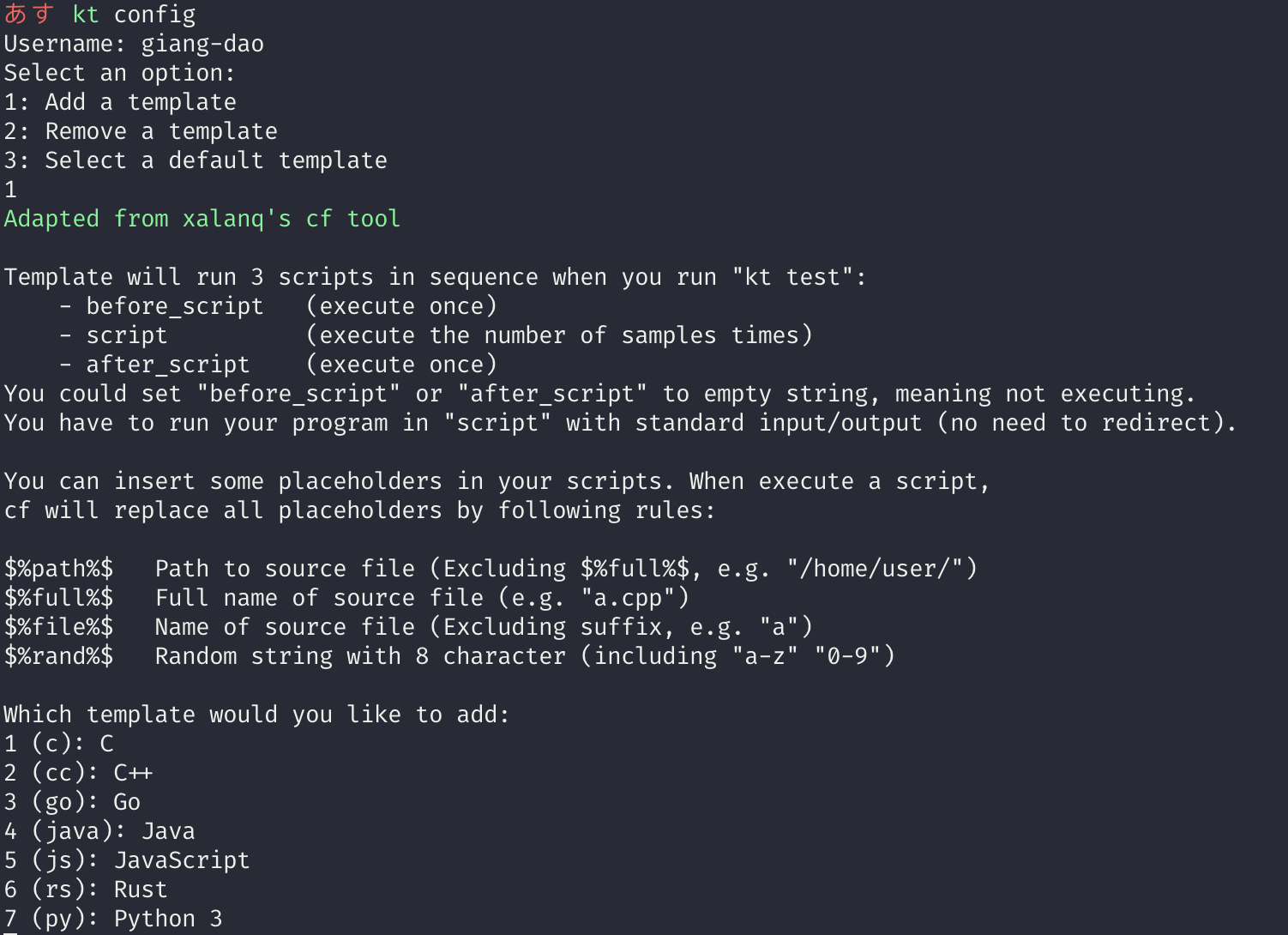
2. Generate folder for problem statement and sample intputs and outputs
kt gen <problem_id>
For example, if you want to attempt problem Distinctive Character, the problem ID is distinctivecharacter. From your kattis working folder, type in
kt gen distinctivecharacter
You should be able to see 2 set of sample inputs/outputs generated in a folder called distinctivecharacter
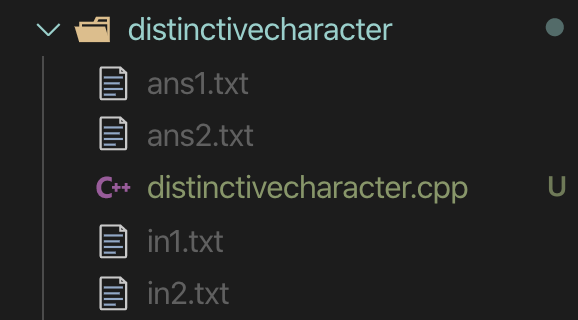
After that, you can cd into the folder and start working on the problem.
3. Test your code
If you've set up your config properly, you should be ready to test whether your code pass sample input and output. Simply run
kt test
And observe the difference ..
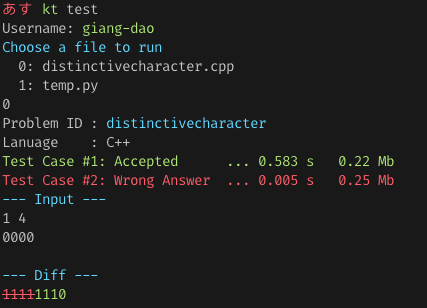
Submit file and check result on the terminal
From your current problem folder
kt submit
You should be able to see how many test cases your code has passed so far
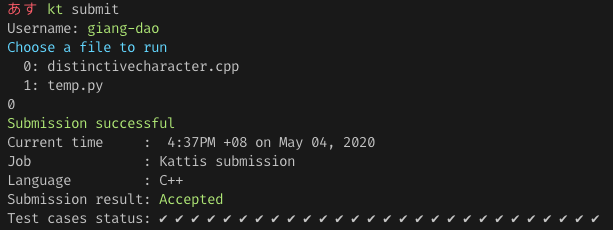
$ kt open -h
Usage: kt open [problem_id]

    Open the default browser with the link to the full problem statement on Kattis. If no problem id is provided, the problem id wil be deduced using the
    current directionary name

    Options
    --------
    problem_id: Kattis problem id
Update version of kttool
Check current version of kttool
kt version
If there is a newer version, you can run
kt update
to check.
Installation
pip install --upgrade kttool
Reference
License
Remaining features yet to be implemented
- Multiple profiles. Ability to switch between Kattis open domain and competition domain with ease
Release history Release notifications | RSS feed


Download files
Download the file for your platform. If you're not sure which to choose, learn more about installing packages.
Source Distribution
Built Distribution
Filter files by name, interpreter, ABI, and platform.
If you're not sure about the file name format, learn more about wheel file names.
Copy a direct link to the current filters
File details
Details for the file kttool-1.3.5.tar.gz.
File metadata
- Download URL: kttool-1.3.5.tar.gz
- Upload date:
- Size: 20.5 kB
- Tags: Source
- Uploaded using Trusted Publishing? No
- Uploaded via: twine/4.0.2 CPython/3.7.12
File hashes
| Algorithm | Hash digest | |
|---|---|---|
| SHA256 |
8cf3410c63a7406df94d5b5c86b794ae198959a0381938d8b8555e5883fb47fe
|
|
| MD5 |
b47ed5da3045d2d47c81b3b260da630f
|
|
| BLAKE2b-256 |
e4fcc5668fa87db8f759da2c458490dd85e34b8c6801465668c4a28a538f0652
|
File details
Details for the file kttool-1.3.5-py2.py3-none-any.whl.
File metadata
- Download URL: kttool-1.3.5-py2.py3-none-any.whl
- Upload date:
- Size: 55.1 kB
- Tags: Python 2, Python 3
- Uploaded using Trusted Publishing? No
- Uploaded via: twine/4.0.2 CPython/3.7.12
File hashes
| Algorithm | Hash digest | |
|---|---|---|
| SHA256 |
e5b19ab3dd29d887dcbd7fa6a51e64422c5bd6fc7a53c2248e9e9de4c43c148a
|
|
| MD5 |
6bdbf222388a32b1e56affa4519ff350
|
|
| BLAKE2b-256 |
5888dbe0381db9ae63737b1a13242e6d920d3bba6d3d5b4e8a138c237a1c5bc6
|






