
Servo Control Tuning Tool for Real and Simulated Actuators. Utilizes Kscale KOS and KOS-SIM

Project description
ktune - Actuator Sim2Real Tuning Utility
ktune is a command line tool for running simple actuator tests (sine, step, and chirp) on both simulation and real robot systems. It is designed to help you tune actuator parameters, collect performance data, and compare responses between simulation and hardware.
Features
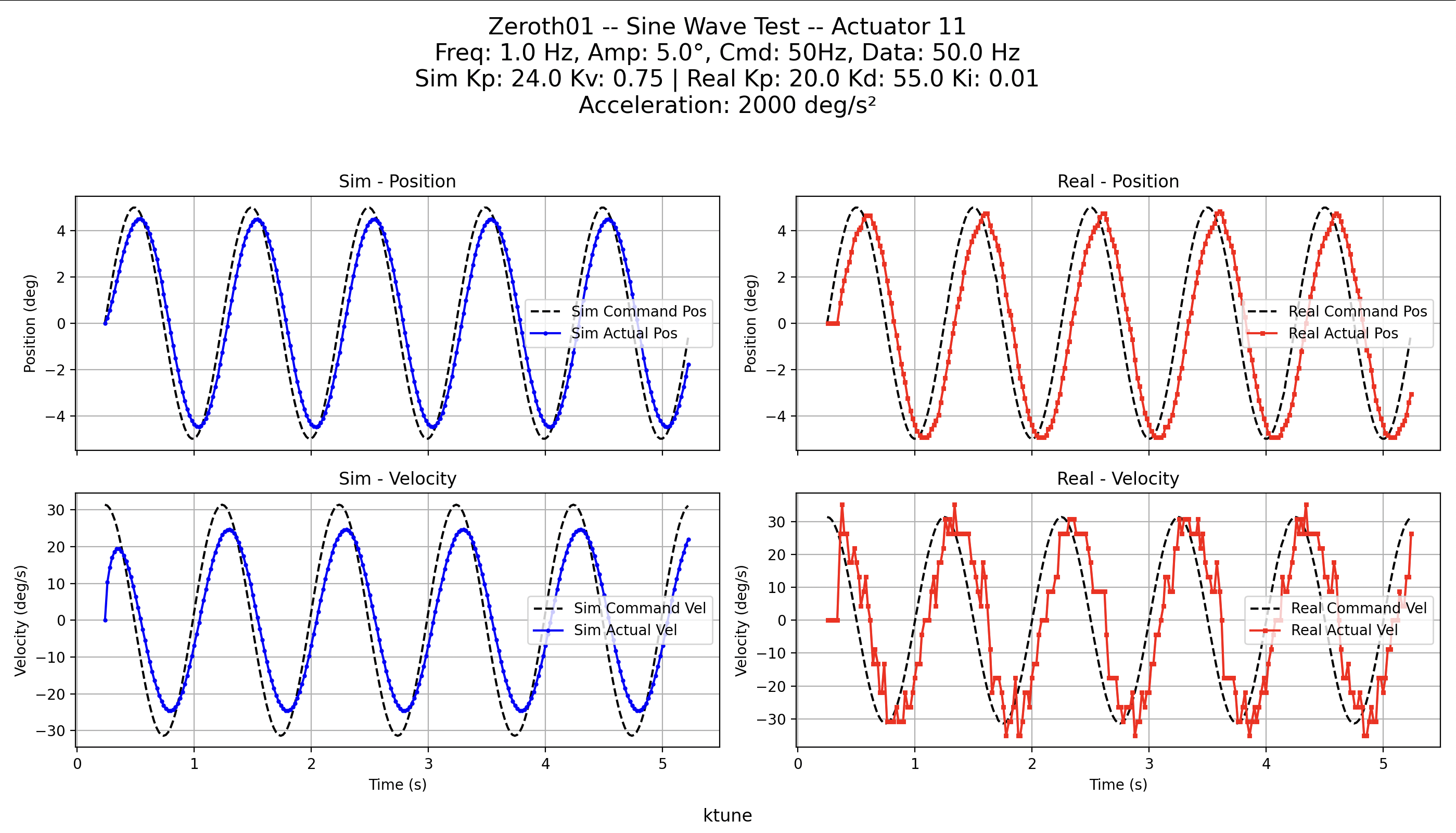
- Sine Test: Command an actuator with a sine wave and log both commanded and measured positions/velocities.
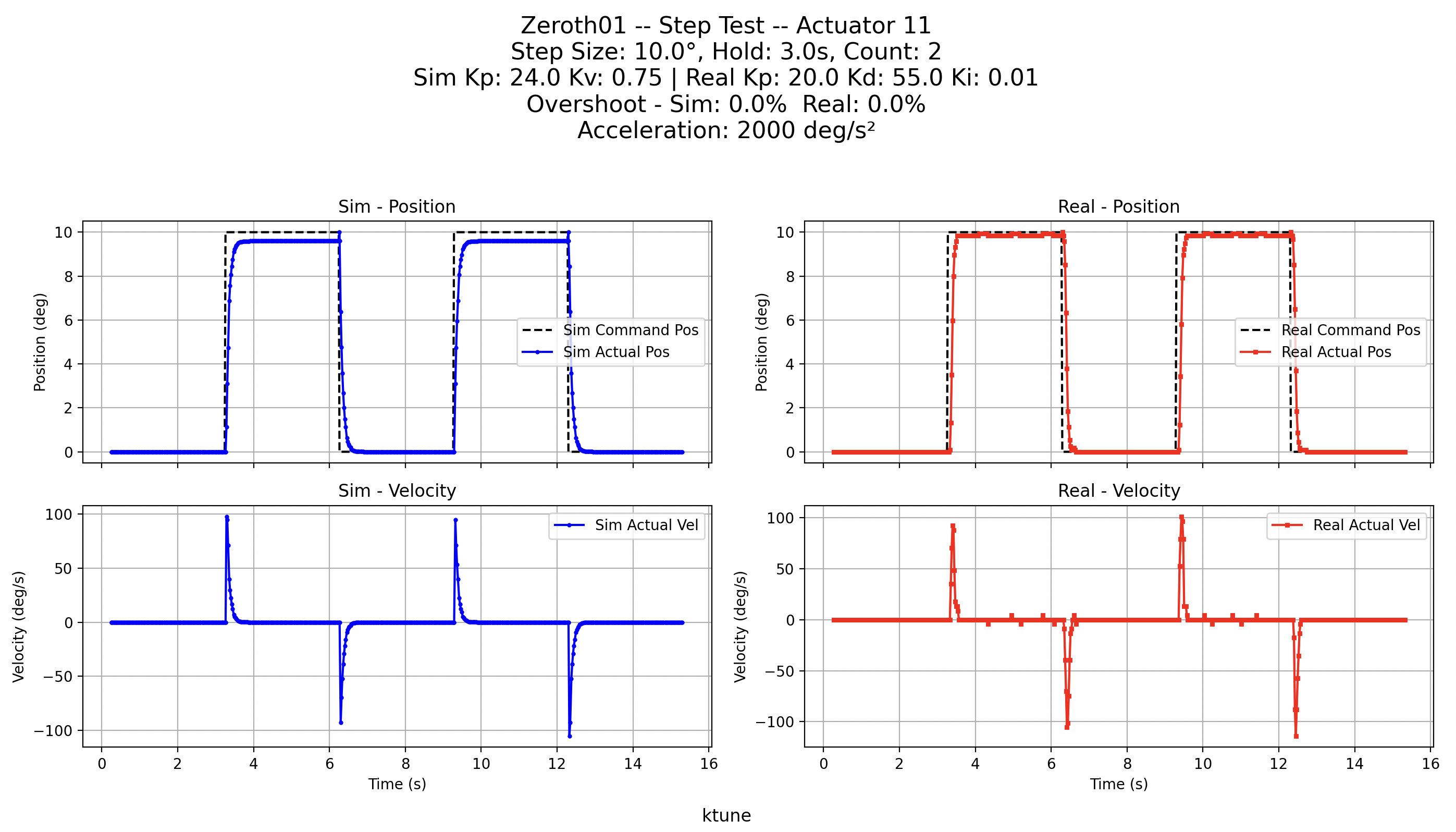
- Step Test: Perform step changes to evaluate actuator response, including overshoot analysis.
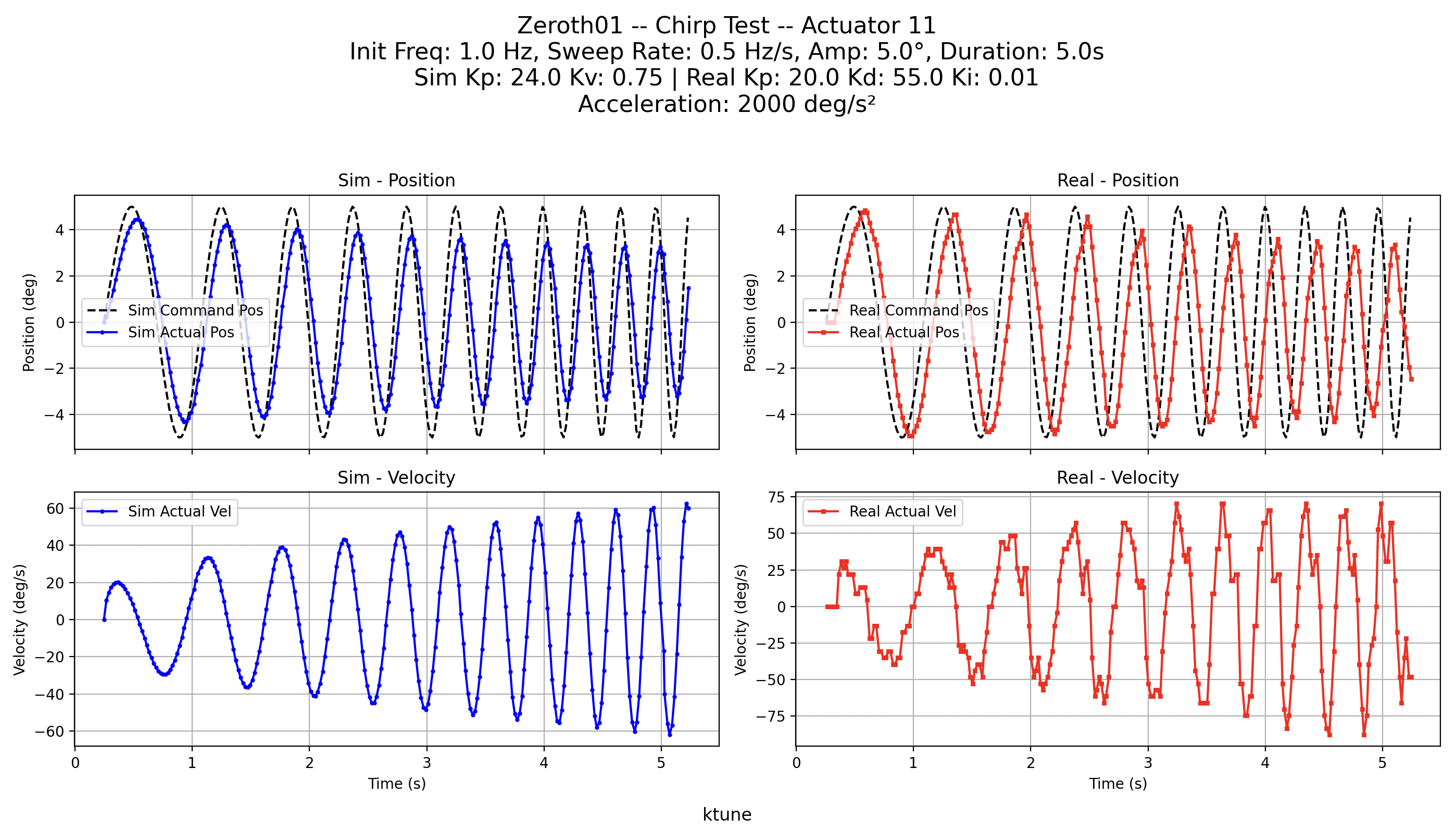
- Chirp Test: Execute a chirp waveform to test actuator dynamics over a frequency sweep.
- Sim2Real Comparison: Run tests concurrently on a simulator and a real robot, then plot and compare the results.
- Servo Configuration: Easily enable or disable additional servos on the real robot via command line options.
Installation
pip install ktune
Note: Ensure that the pykos library is installed and correctly configured for your setup.
Usage
ktune --help

options:
  -h, --help            show this help message and exit
  --name NAME           Name For Plot titles
  --sim_ip SIM_IP       Simulator KOS IP address (default=localhost)
  --ip IP               Real robot KOS IP address (default=192.168.42.1)
  --actuator-id ACTUATOR_ID
                        Actuator ID to test.
  --test {step,sine,chirp}
                        Type of test to run.
  --chirp-amp CHIRP_AMP
                        Chirp amplitude (degrees)
  --chirp-init-freq CHIRP_INIT_FREQ
                        Chirp initial frequency (Hz)
  --chirp-sweep-rate CHIRP_SWEEP_RATE
                        Chirp sweep rate (Hz per second)
  --chirp-duration CHIRP_DURATION
                        Chirp test duration (seconds)
  --freq FREQ           Sine frequency (Hz)
  --amp AMP             Sine amplitude (degrees)
  --duration DURATION   Sine test duration (seconds)
  --step-size STEP_SIZE
                        Step size (degrees)
  --step-hold-time STEP_HOLD_TIME
                        Time to hold at step (seconds)
  --step-count STEP_COUNT
                        Number of steps to take
  --sim-kp SIM_KP       Proportional gain
  --sim-kv SIM_KV       Damping gain
  --kp KP               Proportional gain
  --kd KD               Derivative gain
  --ki KI               Integral gain
  --acceleration ACCELERATION
                        Acceleration (deg/s^2)
  --max-torque MAX_TORQUE
                        Max torque
  --torque-off          Disable torque for test?
  --no-log              Do not record/plot data
  --log-duration-pad LOG_DURATION_PAD
                        Pad (seconds) after motion ends to keep logging
  --sample-rate SAMPLE_RATE
                        Data collection rate (Hz)
  --enable-servos ENABLE_SERVOS
                        Comma delimited list of servo IDs to enable on the real robot (e.g., 11,12,13)
  --disable-servos DISABLE_SERVOS
                        Comma delimited list of servo IDs to disable on the real robot (e.g., 31,32,33)
Running a Step Test
Perform a step test with a step size of 10° and a hold time of 3 seconds per step, running for 2 cycles:
ktune --actuator-id 11 --test step --step-size 10.0 --step-hold-time 3.0 --step-count 2
Running a Sine Test
Run a sine wave test on actuator 11 with a frequency of 1.0 Hz, amplitude of 5.0°, and duration of 5 seconds:
ktune --actuator-id 11 --test sine --freq 1.0 --amp 5.0 --duration 5.0
Running a Chirp Test
Execute a chirp test with an amplitude of 5.0°, initial frequency of 1.0 Hz, sweep rate of 0.5 Hz/s, and duration of 5 seconds:
ktune --actuator-id 11 --test chirp --chirp-amp 5.0 --chirp-init-freq 1.0 --chirp-sweep-rate 0.5 --chirp-duration 5.0
Configuring Additional Servos
Enable or disable additional servos on the real robot:
# Enable servos with IDs 11, 12, and 13:
ktune --enable-servos 11,12,13

# Disable servos with IDs 31, 32, and 33:
ktune --disable-servos 31,32,33
Command Line Options
Below is a summary of the key command line arguments:
-
General Settings:
--sim_ip: Simulator KOS-SIM IP address (default:127.0.0.1)--ip: Real robot KOS IP address (default:192.168.42.1)--actuator-id: Actuator ID to test (default:11)--test: Test type to run (sine,step,chirp)
-
Sine Test Parameters:
--freq: Sine wave frequency (Hz)--amp: Sine wave amplitude (degrees)--duration: Test duration (seconds)
-
Step Test Parameters:
--step-size: Step size (degrees)--step-hold-time: Time to hold at each step (seconds)--step-count: Number of step cycles
-
Chirp Test Parameters:
--chirp-amp: Chirp amplitude (degrees)--chirp-init-freq: Chirp initial frequency (Hz)--chirp-sweep-rate: Chirp sweep rate (Hz/s)--chirp-duration: Chirp test duration (seconds)
-
Actuator Configuration:
--kp,--kd,--ki: Gains for real actuator control--sim-kp,--sim-kv: Gains for simulation--acceleration: Actuator acceleration (deg/s²)--max-torque: Maximum torque limit--torque-off: Disable actuator torque if specified
-
Data Logging and Plotting:
--no-log: Disable data logging and plotting--log-duration-pad: Additional logging duration after motion ends (seconds)--sample-rate: Data collection rate (Hz)
-
Servo Enable/Disable:
--enable-servos: Comma-separated list of servo IDs to enable on the real robot--disable-servos: Comma-separated list of servo IDs to disable on the real robot
Data Logging and Plotting
ktune logs both command and response data for the actuators and generates comparison plots between simulation and real robot performance. Plots are saved to the plots/ directory with a timestamp in the filename.
License
This project is licensed under the MIT License.
Contributing
Contributions, issues, and feature requests are welcome! Feel free to open an issue or submit a pull request.
Release history Release notifications | RSS feed


Download files
Download the file for your platform. If you're not sure which to choose, learn more about installing packages.
Source Distribution
Built Distribution
Filter files by name, interpreter, ABI, and platform.
If you're not sure about the file name format, learn more about wheel file names.
Copy a direct link to the current filters
File details
Details for the file ktune-0.1.4.tar.gz.
File metadata
- Download URL: ktune-0.1.4.tar.gz
- Upload date:
- Size: 14.7 kB
- Tags: Source
- Uploaded using Trusted Publishing? No
- Uploaded via: twine/6.1.0 CPython/3.12.8
File hashes
| Algorithm | Hash digest | |
|---|---|---|
| SHA256 |
51230ecc187f1ae1bebdf96996ec974bc62457d7b11c6a81cc7f63548f66d32e
|
|
| MD5 |
6256eaab49f61cfe7aa5412e01a70aa5
|
|
| BLAKE2b-256 |
95bec2ba618bfa26e74fbb8ac434fbd0dec181ac040294837a5b2ad72054c8f7
|
File details
Details for the file ktune-0.1.4-py3-none-any.whl.
File metadata
- Download URL: ktune-0.1.4-py3-none-any.whl
- Upload date:
- Size: 12.5 kB
- Tags: Python 3
- Uploaded using Trusted Publishing? No
- Uploaded via: twine/6.1.0 CPython/3.12.8
File hashes
| Algorithm | Hash digest | |
|---|---|---|
| SHA256 |
fc24a0842c38ea954da0d82d4ed2dd17e3dce127002ba09a76937f8d809743da
|
|
| MD5 |
b3d13a3fd5e93c9cba9c0dcf21df793e
|
|
| BLAKE2b-256 |
de9c28ffac561cae202f7b9256ca1cdb4fc57e65718175d7ac616e1f6b3505a5
|






