

A Blazing fast Security Auditing tool for Kuberentes!!















Basic Overview
Kubestriker performs numerous in depth checks on kubernetes infra to identify the security misconfigurations and challenges that devops engineers/developers are likely to encounter when using Kubernetes, especially in production and at scale.
kubestriker is Platform agnostic and works equally well across more than one platform such as self hosted kubernetes, EKS, AKS, GKE etc.
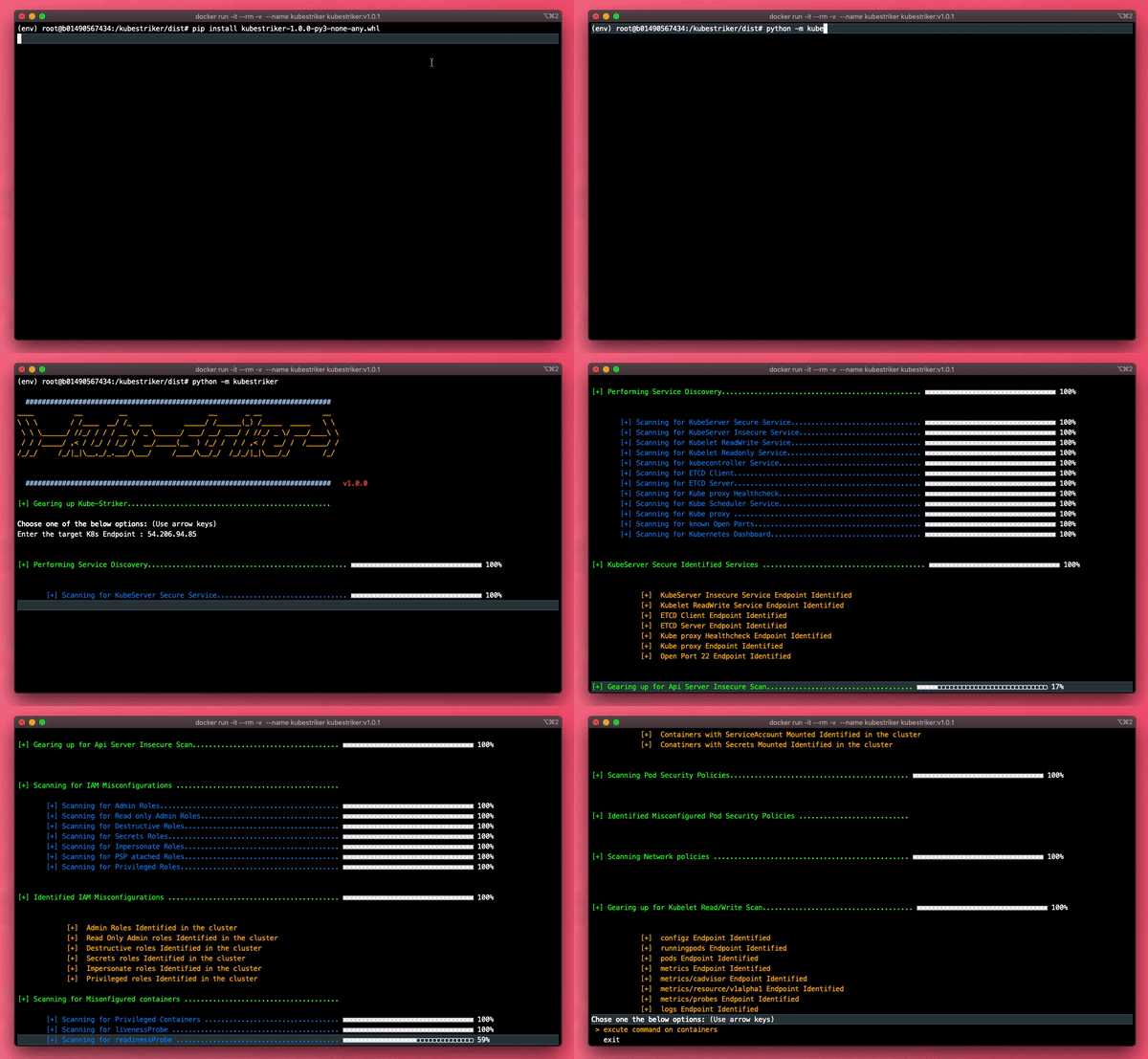
Table of content
- ⚡ How To Install
- ⚡ Types of Scans
- ⚡ Current Capabilities
- ⚡ Future improvements
- ⚡ Suggestions
- ⚡ Contributors
- ⚡ Statistics
- ⚡ License
- ⚡ Find me here!!
⚡ How To Install
Clone the repo and install
To install this tool or clone and run this application, you'll need Git, python3 and pip installed on your computer. From your command line:
# Create python virtual environment
$ python3 -m venv env

# Activate python virtual environment
$ source env/bin/activate

# Clone this repository
$ git clone https://github.com/vchinnipilli/kubestriker.git

# Go into the repository
$ cd kubestriker

# Install dependencies
$ pip install -r requirements.txt

# Incase of prompt toolkit or selectmenu errors
$ pip install prompt-toolkit==1.0.15
$ pip install -r requirements.txt

# Gearing up Kubestriker
$ python -m kubestriker

# Result will be generated in the current working directory with the name of the target
Install using pip
To install and run this application, you'll need pip installed on your computer. From your command line:
# Create python virtual environment
$ python3 -m venv env

# Activate python virtual environment
$ source env/bin/activate

# Install using pip
$ pip install kubestriker

# Incase of prompt toolkit or selectmenu errors
$ pip install prompt-toolkit==1.0.15
$ pip install kubestriker

# Gearing up Kubestriker
$ python -m kubestriker

# Result will be generated in the current working directory with the name of the target
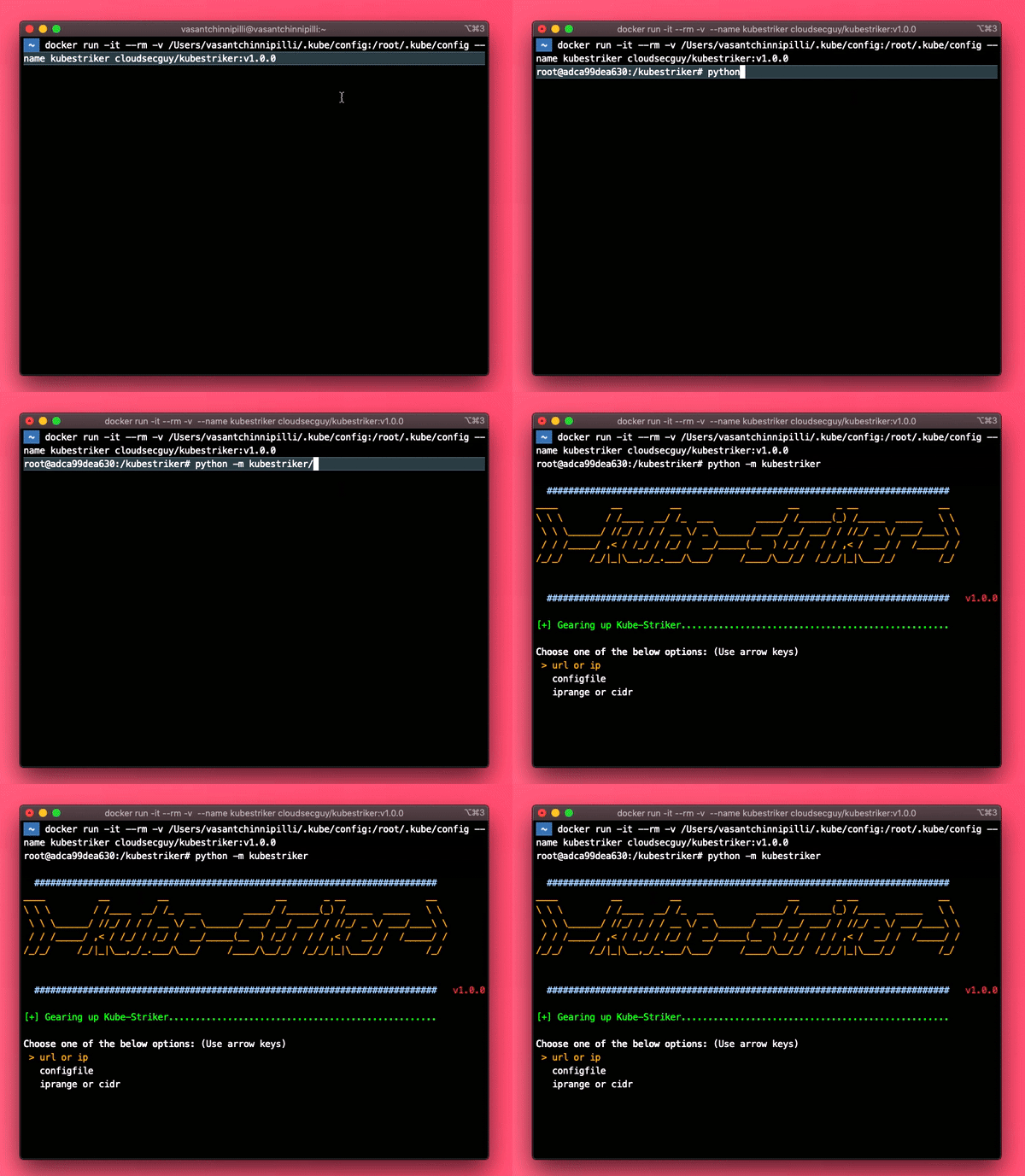
How to spin up kubestriker container
# Spinning up the kubestriker Container
$ docker run -it --rm -v /Users/vasantchinnipilli/.kube/config:/root/.kube/config -v "$(pwd)":/kubestriker --name kubestriker cloudsecguy/kubestriker

# Replace the user vasantchinnipilli above with your username or absolute path of kube config file
$ docker run -it --rm -v /Users/<yourusername>/.kube/config:/root/.kube/config -v "$(pwd)":/kubestriker --name kubestriker cloudsecguy/kubestriker

# Gearing up Kubestriker
$ python -m kubestriker

# Result will be generated in the current working directory with the name of the target
⚡ Types of Scans
Authenticated scans
Authenticated scan expects the user to have atleast read-only priviliges and provide a token during the scan. please use the below provided links to create read-only users
Create read-only user for Amazon eks Create read-only user for Azure aks Create read-only user for Google gke Role based access control
# To grab a token from eks cluster
$ aws eks get-token --cluster-name cluster-name --region ap-southeast-2

# To grab a token from aks cluster
$ az aks get-credentials --resource-group myResourceGroup --name myAKSCluster

# To grab a token from gke cluster
$ gcloud container clusters get-credentials CLUSTER_NAME --zone=COMPUTE_ZONE

# To grab a token from service account
$ kubectl -n namespace get secret serviceaccount-token -o jsonpath='{.data.token}'

# To grab a token from a pod directly or via command execution bug
$ cat /run/secrets/kubernetes.io/serviceaccount/token
Unauthenticated scans
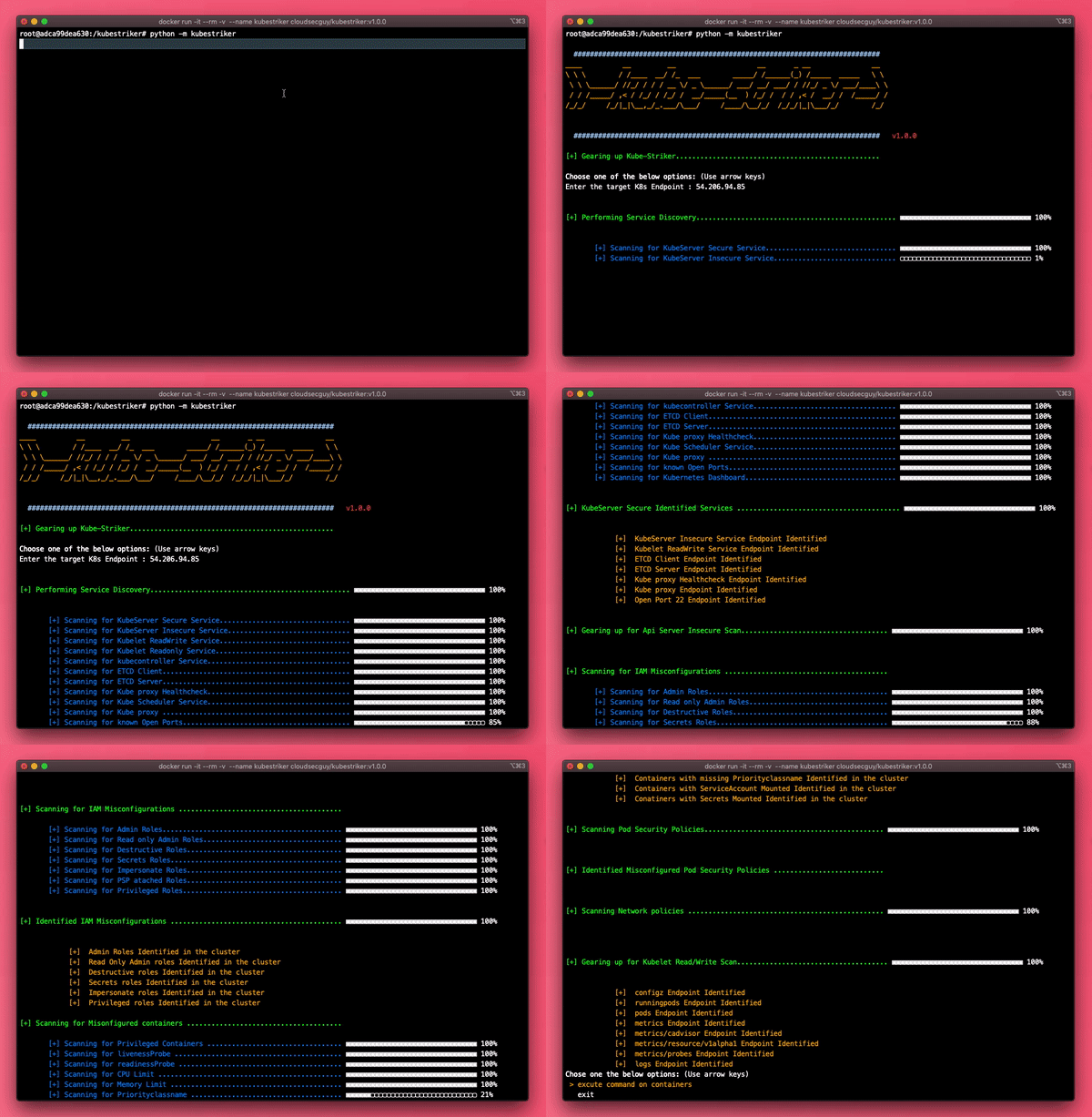
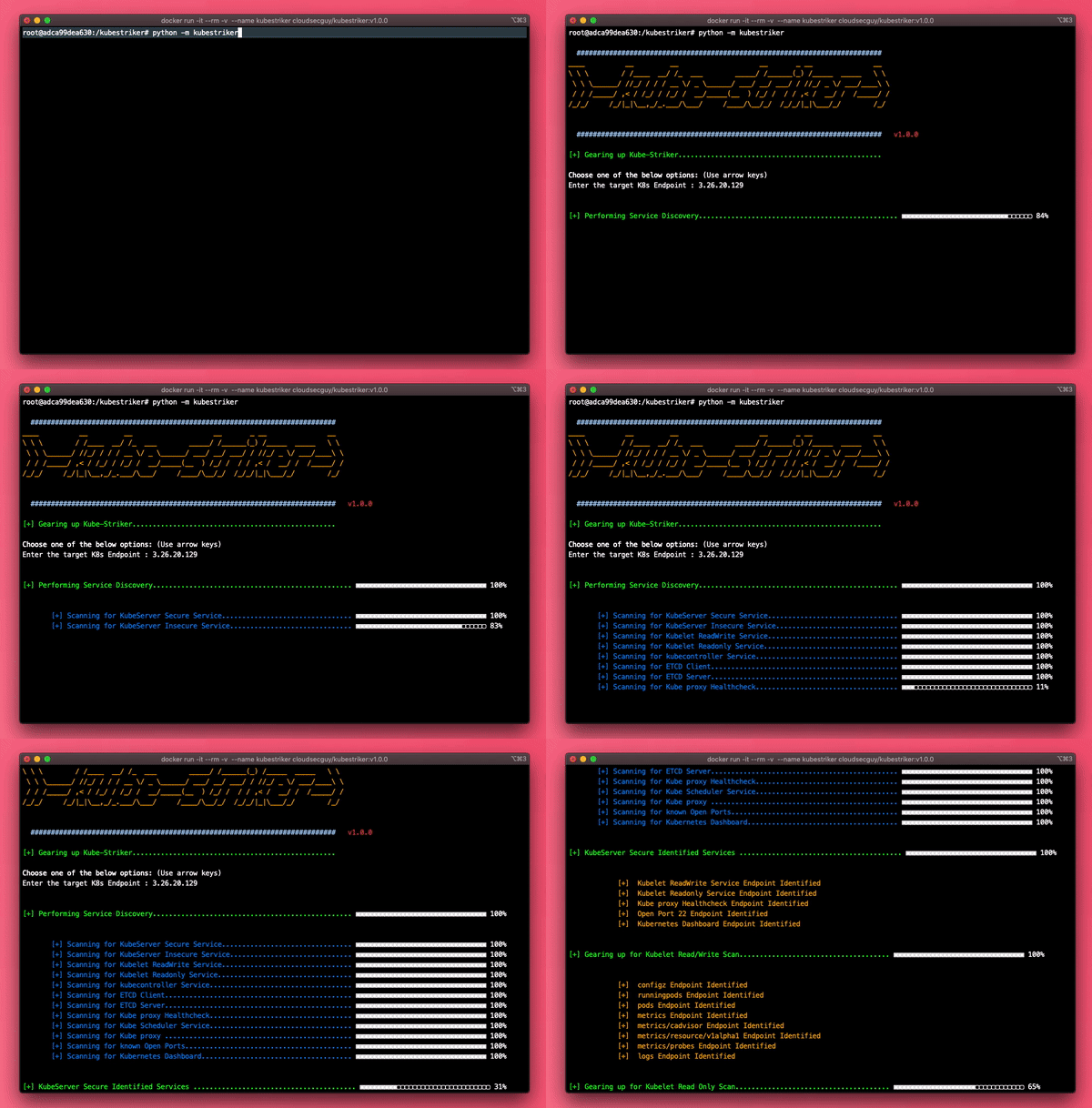
Unauthenticated scan will be successful incase of anonymous access is permitted on the target cluster
Identifying an open Insecure port on kuberentes master node
Identifying a worker Node with kubelet readwrite and readonly ports open
⚡ Current Capabilities
- Scans Self Managed and cloud provider managed kuberentes infra
- Reconnaissance phase checks for various services or open ports
- Performs automated scans incase of insecure, readwrite or readonly services are enabled
- Performs both authenticated scans and unauthenticated scans
- Scans for wide range of IAM Misconfigurations in the cluster
- Scans for wide range of Misconfigured containers
- Scans for wide range of Misconfigured Pod Security Policies
- Scans for wide range of Misconfigured Network policies
- Scans the privileges of a subject in the cluster
- Run commands on the containers and streams back the output
- Provides the endpoints of the misconfigured services
- Provides possible privilege escalation details
- Elaborative report with detailed explanation
⚡ Future improvements
- Automated exploitation based on the issues identified
- api and cicd automation friendly
- A Decent FrontEnd to make the lives easier
⚡ Suggestions
Kubestriker is an opensource and emailware. Meaning, if you liked using this tool or it has helped you in any way or if you have any suggestions/improvements, I'd like you send me an email at vchinnipilli@gmail.com about anything you'd want to say about this tool. I'd really appreciate it!
⚡ Contributors
⚡ Statistics


⚡ License
The MIT License
⚡ Find me here!! 





1 maintainer

Metadata
1 maintainer
Release files for kubestrikercicd 1.0.0
For a detailed explanation of source distributions (sdists) and built distributions (wheels), please see the package formats documentation.
Source distribution (sdist)
| File | Size | Uploaded | |
|---|---|---|---|
| kubestrikercicd-1.0.0.tar.gz | 29.1 kB | Details |
Built distribution (wheel)
| File | Interpreter | ABI | Platform | Reset |
|---|---|---|---|---|
| kubestrikercicd-1.0.0-py3-none-any.whl | Python 3 | none | any | Details |
Total release size: 65.0 kB
Release files / kubestrikercicd-1.0.0.tar.gz
| Download URL | kubestrikercicd-1.0.0.tar.gz |
|---|---|
| Size | 29.1 kB |
| Tags | Source |
|
SHA-256 checksum How to use checksums |
bff2cf146c5c0abeec0582111d06434f7a1bbf3238fdb5cd0175901667518a30
|
|
BLAKE2b-256 checksum How to use checksums |
3a65c3823464be2350522e2154de8287ec3431609d7eff4f7e6ec0040f31c939
|
| Upload date | |
|
Uploaded using Trusted Publishing? What is trusted publishing? |
No |
| Uploaded via |
twine/3.2.0 pkginfo/1.5.0.1 requests/2.20.0 setuptools/50.3.2 requests-toolbelt/0.9.1 tqdm/4.31.1 CPython/3.7.3
|
Release files / kubestrikercicd-1.0.0-py3-none-any.whl
| Download URL | kubestrikercicd-1.0.0-py3-none-any.whl |
|---|---|
| Size | 36.0 kB |
| Tags | Python 3 |
|
SHA-256 checksum How to use checksums |
87418bbc31f873a776b62117831d815ac39a5438e694e7a5332b7c37e4104741
|
|
BLAKE2b-256 checksum How to use checksums |
aafcbb17752e332310dbff95cad0a7ee4b95895a47eee0362421b25b93873610
|
| Upload date | |
|
Uploaded using Trusted Publishing? What is trusted publishing? |
No |
| Uploaded via |
twine/3.2.0 pkginfo/1.5.0.1 requests/2.20.0 setuptools/50.3.2 requests-toolbelt/0.9.1 tqdm/4.31.1 CPython/3.7.3
|













