
Model Context Protocol server for KumoRFM

Project description

KumoRFM MCP Server



📖 Introduction
KumoRFM is a pre-trained Relational Foundation Model (RFM) that generates training-free predictions on any relational multi-table data by interpreting the data as a (temporal) heterogeneous graph. It can be queried via the Predictive Query Language (PQL).
This repository hosts a full-featured MCP (Model Context Protocol) server that empowers AI assistants with KumoRFM intelligence. This server enables:
- 🕸️ Build, manage, and visualize graphs directly from CSV or Parquet files
- 💬 Convert natural language into PQL queries for seamless interaction
- 🤖 Query, analyze, and evaluate predictions from KumoRFM (missing value imputation, temporal forecasting, etc) all without any training required
🚀 Installation
🐍 Traditional MCP Server
The KumoRFM MCP server is available for Python 3.10 and above. To install, simply run:
pip install kumo-rfm-mcp
Add to your MCP configuration file (e.g., Claude Desktop's mcp_config.json):
{
  "mcpServers": {
    "kumo-rfm": {
      "command": "python",
      "args": ["-m", "kumo_rfm_mcp.server"],
      "env": {
        "KUMO_API_KEY": "your_api_key_here"
      }
    }
  }
}
⚡ MCP Bundle
We provide a single-click installation via our MCP Bundle (MCPB) (e.g., for integration into Claude Desktop):
- Download the
dxtfile from here - Double click to install
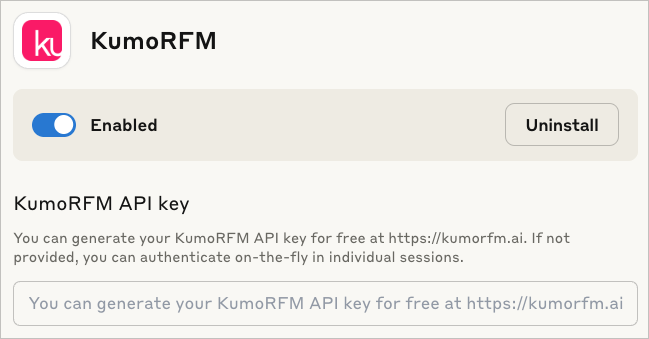
The MCP Bundle supports Linux, macOS and Windows, but requires a Python executable to be found in order to create a separate new virtual environment.
Claude code
To include the server in claude code use:
claude mcp add --transport stdio kumo-rfm-mcp --env KUMO_API_KEY=<YOUR-API-KEY> -- python -m kumo_rfm_mcp.server --port 8000
🎬 Claude Desktop Demo
See here for the transcript.
https://github.com/user-attachments/assets/56192b0b-d9df-425f-9c10-8517c754420f
🔬 Agentic Workflows
You can use the KumoRFM MCP directly in your agentic workflows:

[Example] |
from crewai import Agent
from crewai_tools import MCPServerAdapter
from mcp import StdioServerParameters
<br/>
params = StdioServerParameters(
    command='python',
    args=['-m', 'kumo_rfm_mcp.server'],
    env={'KUMO_API_KEY': ...},
)
<br/>
with MCPServerAdapter(params) as mcp_tools:
    agent = Agent(
        role=...,
        goal=...,
        backstory=...,
        tools=mcp_tools,
    )
|
|---|---|

[Example] |
from langchain_mcp_adapter.client MultiServerMCPClient
from langgraph.prebuilt import create_react_agent
<br/>
client = MultiServerMCPClient({
    'kumo-rfm': {
        'command': 'python',
        'args': ['-m', 'kumo_rfm_mcp.server'],
        'env': {'KUMO_API_KEY': ...},
    }
})
<br/>
agent = create_react_agent(
    llm=...,
    tools=await client.get_tools(),
)
|

[Example] |
from agents import Agent
from agents.mcp import MCPServerStdio
<br/>
async with MCPServerStdio(params={
    'command': 'python',
    'args': ['-m', 'kumo_rfm_mcp.server'],
    'env': {'KUMO_API_KEY': ...},
}) as server:
    agent = Agent(
        name=...,
        instructions=...,
        mcp_servers=[server],
    )
|

|
from claude_code_sdk import query, ClaudeCodeOptions
<br/>
mcp_servers = {
    'kumo-rfm': {
        'command': 'python',
        'args': ['-m', 'kumo_rfm_mcp.server'],
        'env': {'KUMO_API_KEY': ...},
    }
}
<br/>
async for message in query(
    prompt=...,
    options=ClaudeCodeOptions(
        system_prompt=...,
        mcp_servers=mcp_servers,
        permission_mode='default',
    ),
):
    ...
|
Browse our examples to get started with agentic workflows powered by KumoRFM.
📚 Available Tools
I/O Operations
- 🔍
find_table_files- Searching for tabular files: Find all table-like files (e.g., CSV, Parquet) in a directory. - 🧐
inspect_table_files- Analyzing table structure: Inspect the first rows of table-like files.
Graph Management
- 🗂️
inspect_graph_metadata- Reviewing graph schema: Inspect the current graph metadata. - 🔄
update_graph_metadata- Updating graph schema: Partially update the current graph metadata. - 🖼️
get_mermaid- Creating graph diagram: Return the graph as a Mermaid entity relationship diagram. - 🕸️
materialize_graph- Assembling graph: Materialize the graph based on the current state of the graph metadata to make it available for inference operations. - 📂
lookup_table_rows- Retrieving table entries: Lookup rows in the raw data frame of a table for a list of primary keys.
Model Execution
- 🤖
predict- Running predictive query: Execute a predictive query and return model predictions. - 📊
evaluate- Evaluating predictive query: Evaluate a predictive query and return performance metrics which compares predictions against known ground-truth labels from historical examples. - 🧠
explain- Explaining prediction: Execute a predictive query and explain the model prediction.
🔧 Configuration
Environment Variables
KUMO_API_KEY: Authentication is needed once before predicting or evaluating with the KumoRFM model. You can generate your KumoRFM API key for free here. If not set, you can also authenticate on-the-fly in individual session via an OAuth2 flow.
We love your feedback! :heart:
As you work with KumoRFM, if you encounter any problems or things that are confusing or don't work quite right, please open a new :octocat:issue. You can also submit general feedback and suggestions here. Join our Slack!
Release history Release notifications | RSS feed


Download files
Download the file for your platform. If you're not sure which to choose, learn more about installing packages.
Source Distribution
Built Distribution
Filter files by name, interpreter, ABI, and platform.
If you're not sure about the file name format, learn more about wheel file names.
Copy a direct link to the current filters
File details
Details for the file kumo_rfm_mcp-0.3.0rc1.tar.gz.
File metadata
- Download URL: kumo_rfm_mcp-0.3.0rc1.tar.gz
- Upload date:
- Size: 30.7 kB
- Tags: Source
- Uploaded using Trusted Publishing? No
- Uploaded via: twine/6.1.0 CPython/3.12.9
File hashes
| Algorithm | Hash digest | |
|---|---|---|
| SHA256 |
6ccdf645916bd29809bca11d6e08ce7b3147744d61480e307f2c44fe84fc2850
|
|
| MD5 |
1a284aba64cfb4806626f297f8912a87
|
|
| BLAKE2b-256 |
12e6799c5734299dc47d160b83bea5e93d309f834cdbabf584c8d7acadb8c264
|
File details
Details for the file kumo_rfm_mcp-0.3.0rc1-py3-none-any.whl.
File metadata
- Download URL: kumo_rfm_mcp-0.3.0rc1-py3-none-any.whl
- Upload date:
- Size: 36.5 kB
- Tags: Python 3
- Uploaded using Trusted Publishing? No
- Uploaded via: twine/6.1.0 CPython/3.12.9
File hashes
| Algorithm | Hash digest | |
|---|---|---|
| SHA256 |
429bddd4b988661570f4a79e8985832efec9e0032b31418b666655fe10fe1a00
|
|
| MD5 |
d189c02ca4a9fd2b591bee6dfc37d31c
|
|
| BLAKE2b-256 |
d3276035e8c95856e09109837fd49eb04174a0dd517d3608521efea55604a711
|






