
kuration-sdk











Physical AI has a sample efficiency problem. The field is drowning in data and starving for it same time. It is generating millions of hours of videos, to find a small sample of training ready sets. Missing piece is ETL or curation operators designed from first principles to address the challenge unique to the world model training. Raw gameplay video clips is often considered a gold mine to train world models but is often garbage in absence of sophisticated curation. Kuration SDK is open source repo built to solve that problem while training world models. References papers
- Kuration SDK: Addressing the Virtual2Real Gap via Data Curation
- LeCuration: A Tiny World Model as a Data Curation Multi-Tool
Kuration SDK
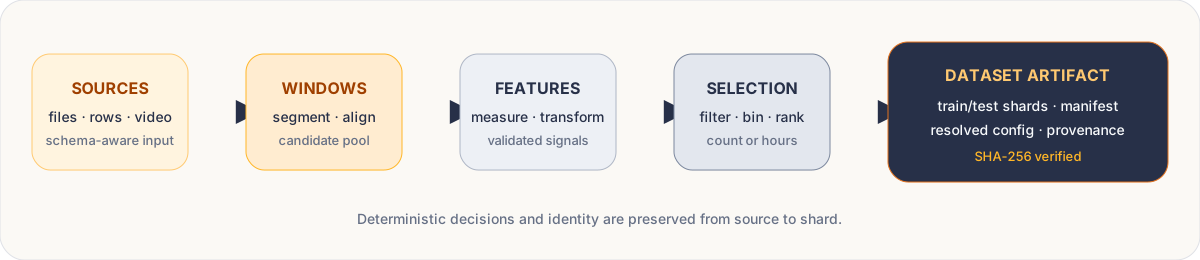
Kuration SDK curates large Physical AI datasets into training-ready data for world models. Point it at raw gameplay clips or time-series data or video and Kuration picks the windows worth training on, writes them as shards, and drops a config alongside so the same run can be rebuilt. It works on the visual as well as metadata domain data simultaneously.
The SDK is built around operators — named pipeline steps that measure a per-window feature, filter windows out, or select which windows to keep.
An operator is a named, discoverable pipeline step (an analyzer, a transform, a
scorer, a filter, ...) that you chain onto a kuration.input(...) pipeline; see
Operators for the full registry. The six use cases below are ready-made
curation jobs built from those operators — three gameplay/video-specific, three general-purpose
selection recipes for Physical AI videos, built into the SDK (kuration.selection).
Each links to a runnable example and, where one exists, a notebook; the [gameplay] extra is
only needed by action-state-consistency and collision-aware. The three shipped selection recipes are curated shortcuts.
- The Kuration SDK itself is a broader pipeline library with 48 registered components, and you can drop into the raw pipeline API for anything the gallery doesn't cover.
The gameplay operators target three failure modes that recur when training a world model from gameplay:
- 1. The action doesn't reliably cause the state change.
pixel_shiftmeasures the actual screen motion behind every isolated key or mouse press (Farneback optical flow projected onto the axis that control should move the camera on).action_state_consistencycompares those measurements against a percentile-pooled baseline and issues a per-clip verdict — consistent, inconsistent, or inconclusive. - 2. The interaction moments a world model needs are the ones good players avoid.
collisionfinds and classifies wall-hits (head_on,angled,W_slide,WA_slide,slide_end,slide_constrained) so they can be oversampled relative to their natural, very low, base rate. - 3. Most gameplay footage has no sense of place.
slam_reconstructreconstructs a camera's 3D path from raw video with loop closure.slam_qualityscores each window for gaps, impossible motion, and scale.slam_motion_diversitybins windows by path length, turning, and spatial extent.
join_video (core, always available) pairs an action log with a video, frame by frame.
Out of the box operators in Kuration SDK
I. Action-state consistency (gameplay)
The action doesn't reliably cause the state change. pixel_shift measures the actual screen
motion behind every isolated key or mouse press (Farneback optical flow projected onto the axis
that control should move the camera on). action_state_consistency compares those measurements
against a percentile-pooled baseline and issues a per-clip verdict — consistent, inconsistent, or
inconclusive. Continuing from any existing windowed pipeline, once
import kuration.gameplay as gameplay has registered the operator:
pipeline = pipeline.action_state_consistency(baselines=baselines, controls=["W"])
verdict = pipeline.metadata["gameplay"]["action_state_consistency"]["result"]
The pipeline you get back is the same immutable pipeline. You can keep chaining .sample(),
.output(), or any other operator from it. Use .analyze(...) instead if you just want the
analyzer result on its own, without the pipeline.
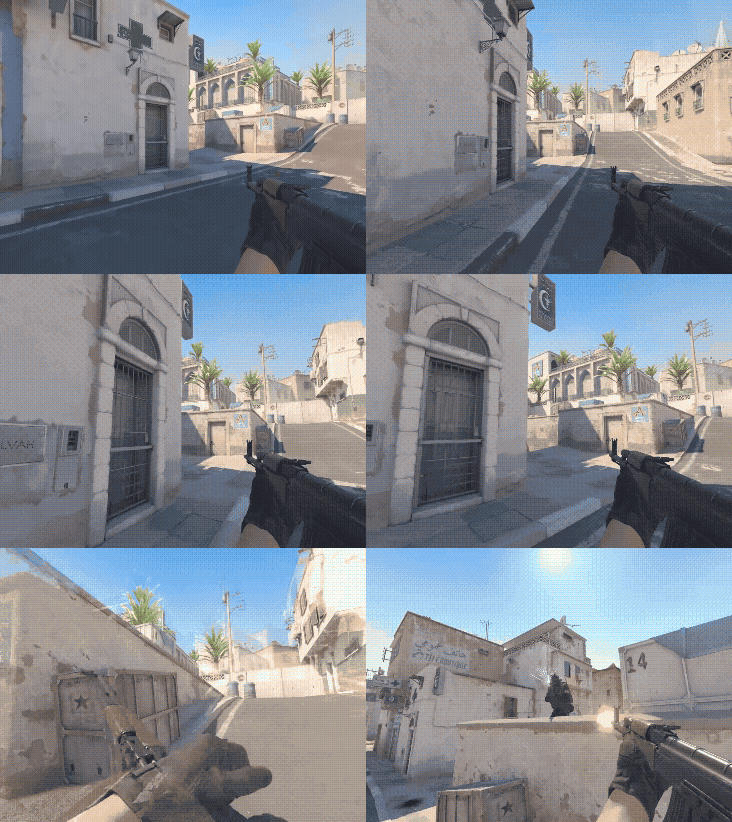
The clip is flagged by the model as it has two instances where the player collides with the wall.
II. Collision awareness (gameplay)
The interaction moments a world model needs are the ones good players avoid. collision finds
and classifies wall-hits (head_on, angled, W_slide, WA_slide, slide_end,
slide_constrained) so they can be oversampled relative to their natural, very low, base rate.
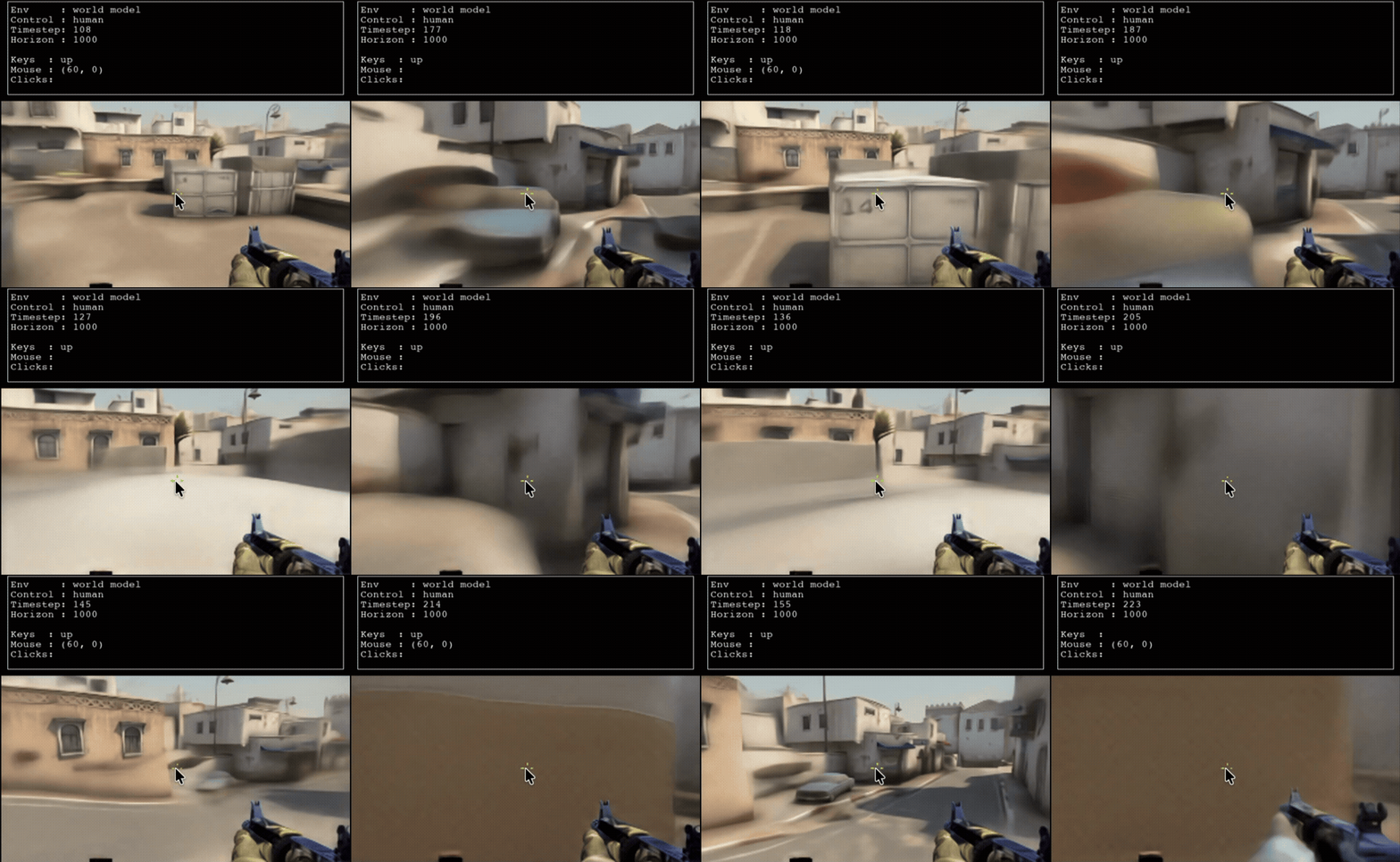
DIAMOND's CS:GO world model blurring out on contact with solid objects (car, crates, wall).
III. SLAM motion diversity and quality (gameplay)
Most gameplay footage has no sense of place. slam_reconstruct reconstructs a camera's 3D path from
raw video with loop closure. slam_quality scores each window for gaps, impossible motion, and
scale. slam_motion_diversity bins windows by path length, turning, and spatial extent:
pipeline = (
    gameplay.slam_reconstruct("slam-export/manifest.json")
    .window(32, stride=16)
    .slam_motion_diversity()
    .slam_quality(min_score=0.6)
    .options(progress="auto")
)

report = pipeline.stats()                 # rich HTML in Jupyter
report.plot()                             # automatically chooses the gameplay plot
evidence = report.examples(
    metric="slam_quality_score",
    compare="selected-vs-rejected",
)
report.available() lists the plots and evidence modes for a given report. On a live video
pipeline, the evidence panel shows real frames and the action stream around each example.
gameplay.compare_videos(before, after) renders synchronized players and can save the comparison
as a standalone HTML file. join_video (core, always available) pairs an action log with a video,
frame by frame — the primitive pixel_shift, action_state_consistency, and the SLAM operators
above all build on it.
Iv. Spatial coverage (general)
Most gameplay is one kind of movement — walking forward, standard turns, level ground. Sample naively on that and your training set barely touches the harder motions: tight turns, sharp climbs, high-speed segments. The Intro blog puts the fix plainly: coverage has to be measured on the axis you actually care about.
BalancedSelector does exactly that. It measures a per-window metric on your chosen axis (turning, path length, whatever), bins the values across the observed range, and samples an equal count from every bin. It's the SDK's slam_motion_diversity pattern (default axis slam_path_length; the Intro blog example switches to slam_turn_degrees), generalized to any per-window column.
V. Rare-event coverage (general)
A world model only learns the physics that show up consistently in its training data. And the interactions it most needs — a moving object hitting a solid one, a player-object contact — are the exact ones good players avoid. That's why DIAMOND's CS:GO world model lets a player double- and triple-jump against a wall: successive jumps simply don't appear often enough in the training data for the model to learn that they shouldn't be possible.
The fix isn't collecting more footage. It's finding the events already buried in the footage you have and oversampling them relative to their natural, very low, base rate. RareEventCoverage measures the rare event's per-window rate and weights the sampler so those windows show up far more often than they do in the wild.
VI. Diversity sampling (general)
Most activity-based metrics move together. A chaotic firefight is high on every axis at once; an idle stretch is low on all of them. Pick one axis to sample on and you inherit whatever the other axes happen to correlate with.
Cluster the windows in a multi-axis feature space and sample equally from each cluster, and the redundant part of the corpus stops crowding out the parts that actually differ. The Intro blog names this "diversity sampling" — one of the checks that "all get easier on a dataset that previously had no notion of space." DiverseSubset clusters over any set of pre-measured features and takes an equal share from every cluster. An optional dedup pre-pass filters near-duplicates first.
Each of the three general-purpose recipes above is also available as a direct dataclass
(kuration.selection.BalancedSelector, RareEventCoverage, DiverseSubset) for standalone use,
or as a {"type": "BalancedSelector", ...}-style config-dict entry for
kuration.selection.run(...) — see docs/selection.md for the full
parameter reference and the config-driven runner.
Examples
| Example | What it does |
|---|---|
quickstart.py |
Runs the ten-minute quick start: builds six in-memory sensor sessions, selects 12 diverse windows, writes NumPy shards, reads one back. |
02_robotics_action_aware.py |
Robotics: combines a learned action-informativeness score with geometric end-effector-speed coverage, plus coverage across motion phases. Needs the [methods] extra. |
05_custom_operators.py |
Shows two ways to write your own operator: compositional (a function that chains existing operators) and transform-backed (custom batch code that produces a new feature). |
06_gameplay_operator_methods.py |
Uses the gameplay SLAM trajectory operators on synthetic precomputed camera trajectories. NumPy core only — no video decoder or GPU needed. |
07_action_state_consistency.py |
Runs .action_state_consistency(...) on a synthetic clip via an in-memory fake video provider. Shows the verdict (consistent / inconsistent / inconclusive) attached to the pipeline metadata. |
gameplay_stats.ipynb |
JupyterLab notebook: runs slam_motion_diversity and slam_quality on synthetic camera trajectories, shows candidate stats, plots, and selected-vs-rejected evidence. Optional gameplay-video comparison at the end. |
slam_kurious.ipynb |
JupyterLab notebook demonstrating the SLAM operators end-to-end: reconstructs a trajectory from raw video, then curates windows by quality and motion diversity. |
| TeaPearce Counter-Strike | Curates human Counter-Strike gameplay for behavioral-cloning or world-model training. Reads the public TeaPearce HDF5 dataset, covers keyboard/mouse activity, reserves budget for rare kill/death events. |
| Open P2P | Curates Elefant AI's Open P2P dataset across games, action patterns, corrections, and text instructions. Reads Protobuf annotations without decoding video. |
Beyond the gallery
The three shipped selection recipes are curated shortcuts. The Kuration SDK itself is a broader pipeline library with 48 registered components, and you can drop into the raw pipeline API for anything the gallery doesn't cover.
Sampling methods
Eleven methods, invoked via .sample("name", ...).
- Coverage:
equal/uniform-bins,cluster-balanced,k-center,facility-location - Weighting and ranking:
weighted,top-k,target-distribution,dsir - Rarity:
rare(density-inverse),typical(prototype-favoring) - Predicate-only:
filter
Data source adapters
Eleven registered adapters, invoked via input(...):
timeseries: CSV files, in-memory dict of rows, list of dictsparquet-dataset,jsonl,hdf5,npz,zarr: file-based formatshuggingface: Hugging Face datasetscurated: re-curate a previously-curated Kuration datasetaintropy/slam-trajectory,aintropy/collision-asg,aintropy/collision-teapearce: gameplay-specific
Output formats and presets
Seven total: numpy-timeseries, pytorch-sequences, tabular (flat Parquet), plus four raw shard containers (npz, json, parquet, hdf5).
Pre-selection filters
Two: anomaly (Isolation Forest), dedup (SemDeDup).
Pipeline methods
Core methods used by the shipped operations: .window(), .measure(), .filter(), .bin(), .sample(), .split(), .output(), .options(), .describe(), .collect(). Pipeline exposes additional methods for tagging, scoring, video joins, previewing, and lifecycle stats.
Full inventory with parameters, extras, and runtime dependencies at docs/operator-inventory.md.
Every gallery operation is transparent about the primitives it calls. Run .describe() on the resulting pipeline and you see the exact chain. Drop the kuration.selection imports and your custom pipelines still work. No lock-in.
Reproducibility
Every run of Kuration SDK is deterministic. Commit a config file alongside your training code, and a teammate re-running it against the same package versions a year from now produces the same curated dataset.
Same operation, three equivalent invocation styles. The three are guaranteed to produce identical results, enforced by test.
# 1. Direct: one operation, one line
result = BalancedSelector(feature="motion", of="turn_rate").apply(pipeline).collect()

# 2. Chained instances: pipeline in code
result = run(pipeline, [
    RareEventCoverage(of="collision"),
    BalancedSelector(feature="motion", of="turn_rate"),
]).collect()

# 3. Config dict: pipeline in YAML, JSON, or TOML
config = [
    {"type": "RareEventCoverage", "of": "collision"},
    {"type": "BalancedSelector", "feature": "motion", "of": "turn_rate"},
]
result = run(pipeline, config).collect()
The config-dict form is the artifact you commit. Same package versions plus the same curate.yaml produce the same curated dataset.
Writing your own operation
Any Python class with .apply(pipeline) -> pipeline is a valid operation. No inheritance, no registration required. Six lines for a domain-specific example:
from dataclasses import dataclass
from kuration.selection import run, BalancedSelector

@dataclass(frozen=True)
class OnlyActiveWindows:
    threshold: float = 0.1

    def apply(self, pipeline):
        return (pipeline
                .measure("turn_activity", "std", of="turn_rate")
                .filter("turn_activity", ">", self.threshold))

# Compose it with the shipped operations
result = run(pipeline, [
    OnlyActiveWindows(threshold=0.15),
    BalancedSelector(feature="motion", of="turn_rate", bins=4, count=20),
]).options(seed=1).collect()
Register it to also drive it from a config dict:
from kuration.selection import register_operation_type
register_operation_type("OnlyActiveWindows", OnlyActiveWindows)
For the fuller extension model — compositional vs. transform-backed operators, discovery,
contract testing — see docs/operators.md and
docs/customization.md; for the config-driven runner shown above, see
docs/selection.md.
Getting started
Install with pip:
pip install "kuration-sdk[parquet]"
Runnable quickstart against a small sample dataset bundled with the package — no downloads, no data of your own required:
from kuration import input
from kuration.sample_data import sample_sessions_path

dataset = (
    input(sample_sessions_path(), time="t", entity="device", hz=1)
    .window(12, stride=6)
    .measure("activity", "std", of="signal")
    .measure("fault_rate", "rate", of="fault")
    .bin("activity", bins=3)
    .bin("fault_rate", bins=2)
    .split(test=1/3)
    .sample("equal", n=12)
    .options(seed=7)
)

print(dataset.explain().render())
dataset.output("out/quickstart-out")
The result is a train/test set of shards plus a config.json recording the schema
and pipeline so the same run can be rebuilt. Every shard has a SHA-256 checksum in
the manifest, so resume and verification are safe.
Contents
- Getting started
- Optional extras
- Choose your path
- Use cases
- Examples
- Beyond the gallery
- Reproducibility
- Writing your own operation
- Reference
- Read more
- Project status
- Contributing
Optional extras
Kuration's core has NumPy-only dependencies and handles in-memory, CSV, JSON, and NPZ workflows. Add only the integrations a pipeline needs:
pip install "kuration-sdk[methods,parquet]"  # selection methods + Parquet
pip install "kuration-sdk[video]"            # PyAV video frames
pip install "kuration-sdk[stats]"            # Matplotlib stats plots
pip install "kuration-sdk[gameplay]"         # all gameplay operators (pixel_shift, action_state_consistency, slam_*, collision)
pip install "kuration-sdk[ray]"              # distributed source execution
pip install "kuration-sdk[s3]"               # fsspec + the S3 backend
pip install "kuration-sdk[all]"              # every runtime integration/backend
pipeline.explain() reports the extras required by a planned run before it reads the full
dataset. The provider-specific cloud extras are s3, gcs, and azure; cloud installs only
the backend-neutral fsspec layer for environments that manage provider packages separately.
kuration.gameplay ships seven gameplay operators: join_video, pixel_shift,
action_state_consistency, slam_reconstruct, slam_quality, slam_motion_diversity,
and collision. Importing the module registers them on the standard Pipeline class, so
an ordinary pipeline can call them as methods — it doesn't create a separate Pipeline
class. See each operator's worked example and clip in Use cases below.
Use cases
| Use case | Category | What it does | Runnable | Notebook |
|---|---|---|---|---|
| Action-state consistency | Gameplay | Verdict on whether a key press produced the state change the training data claims — consistent / inconsistent / inconclusive. | 07_action_state_consistency.py |
— |
| Collision awareness | Gameplay | Finds and classifies wall-hits so they can be oversampled relative to their natural, very low base rate. | — | — |
| SLAM motion diversity and quality | Gameplay | Reconstructs a camera's 3D path from raw video; scores windows for gaps/impossible motion/scale and bins by path length, turning, and spatial extent. | 06_gameplay_operator_methods.py, slam_kurious.ipynb |
— |
| Spatial coverage | General | Samples equally across a chosen axis (turning, path length, ...) so harder motions aren't crowded out. | pipeline.balanced_selector(feature=..., of=..., bins=..., count=...) |
— |
| Rare-event coverage | General | Oversamples rare events (like collisions) relative to their natural base rate. | pipeline.rare_event_coverage(of=..., count=...) |
— |
| Diversity sampling | General | Clusters in feature space and samples equally from each cluster so redundant windows don't crowd out diverse ones. | pipeline.diverse_subset(features=..., count=...) |
— |
Choose your path
| I want to… | Start here |
|---|---|
| Build my first curated dataset | Quickstart |
| Understand the product and its data model | Core concepts |
| Find the right pipeline operation | Pipeline guide |
| Solve a task such as streaming, cloud output, or comparison | Recipe cookbook |
| Integrate a data format | Adapters |
| Build a reusable operator or transform | Operators |
| Run checked JSON jobs and CLIs | Job and CLI reference |
| Operate or audit generated artifacts | Output and integrity |
| Look up an exact Python signature | API reference |
| Understand internals and extension boundaries | Architecture |
The documentation home groups the complete documentation by getting started, guides, extensions, operations, and reference.
Reference
- Issue tracker for feature requests, bug reports, roadmap discussion.
- ROADMAP.md for what's shipped, next, and planned.
CLI reference
kur-list and kur-describe are installed alongside the library and cover every registered
component kind, not just operators.
kur-list
kur-list operators
Lists available operators (built-in plus any you have registered), annotated with which extras
each one needs at runtime. Pass adapters, filters, presets, etc. for other component kinds.
kur-describe
kur-describe operator kuration/balanced-selector
Shows one component's docstring and parameter contract.
Read more
Long-form blog posts on physical-AI data curation:
- Why raw gameplays don't make good world models — and how to fix the Virtual2Real gap. The failure modes that make raw gameplay footage a poor training corpus for a world model — actions that don't produce a consistent state change, state changes with no action, rare player-object contact, missing pose or location, eval metrics that look fine when the physics is visibly wrong.
- Quickly convert raw corpus into high-quality world-model training sets. A line-by-line walkthrough of the Pipeline API —
input,window,measure,filter,bin,split,sample,output— on a small runner-telemetry example. - Action-state consistency with Kuration SDK. How the
action_state_consistencyoperator uses Farneback optical flow to catch action-state mismatches — wall collisions, coyote time, input buffering, engine glitches — and returns a per-clip verdict (consistent, inconsistent, inconclusive). - SLAM with Kuration SDK. Adding scene and trajectory reconstruction to any video or image dataset. Built on DepthAnything V3 with plug-and-play VPR support for loop closure; stitches long clips into one 3D map.
Project status
Kuration currently targets Python 3.11 through 3.14. Optional integrations are tested at both their declared minimum versions and their current releases. CI runs over 1,500 test functions across 97 test files, including property-based invariants, wheel installation, every CLI entry point, and integration paths for Zarr, PyTorch, Hugging Face, PyAV, and Ray.
The SDK is a 0.x beta. The supported surface and deprecation rules are documented in the
compatibility policy. See
SECURITY.md for private
reporting and runtime trust boundaries,
CHANGELOG.md for notable
changes, and ROADMAP.md for the
remaining public-release gates.
Contributing
Contributions to the core SDK or the maintained gameplay module should follow CONTRIBUTING.md. The gameplay operators ship inside this repo.
python -m pip install -e ".[dev,methods,parquet,array,s3,gcs,azure,p2p]"
python -m pytest tests/ -q
python -m ruff check src tests examples
python -m mypy
Read CONTRIBUTING.md before proposing a component or public contract change.
Questions
Wanna get in touch with us? Wanna work on more customized operators for your world model training? You can send the emails to know@aintropy.ai
1 maintainer

Metadata
1 maintainer
Release files for kuration-sdk 0.1.0
For a detailed explanation of source distributions (sdists) and built distributions (wheels), please see the package formats documentation.
Source distribution (sdist)
| File | Size | Uploaded | Provenance | |
|---|---|---|---|---|
| kuration_sdk-0.1.0.tar.gz | 966.9 kB | With provenance | Details |
Built distribution (wheel)
| File | Interpreter | ABI | Platform | Reset |
|---|---|---|---|---|
| kuration_sdk-0.1.0-py3-none-any.whl | Python 3 | none | any | Details |
Total release size: 1.6 MB
Release files / kuration_sdk-0.1.0.tar.gz
| Download URL | kuration_sdk-0.1.0.tar.gz |
|---|---|
| Size | 966.9 kB |
| Tags | Source |
|
SHA-256 checksum How to use checksums |
ba12b37fab2f08abb3be8031f545fa342c0dfc5dee09772b78379bb31f701946
|
|
BLAKE2b-256 checksum How to use checksums |
bec548eee0895782bcd0c186a9b8f6ea9717d1cb55db6e786a26feef7e8bfb9b
|
| Upload date | |
|
Uploaded using Trusted Publishing? What is trusted publishing? |
Yes |
| Uploaded via |
twine/7.0.0 CPython/3.13.16
|
Provenance
Provenance describes where a file came from. On PyPI, provenance is shared via attestations, which provide a verifiable record of the build or publishing details. View details, limitations and caveats.


PyPI Publish Attestation
PyPI verified that this artifact, at this checksum, originated from the publisher listed below.
Signed by GitHub Actions, verified by PyPI on Oct 24, 2026.
Transparency logRelease files / kuration_sdk-0.1.0-py3-none-any.whl
| Download URL | kuration_sdk-0.1.0-py3-none-any.whl |
|---|---|
| Size | 642.1 kB |
| Tags | Python 3 |
|
SHA-256 checksum How to use checksums |
b34eb965ce66eef71277d96fc812d1f1d9fbc763c2207f0896e4d28ef0f749d0
|
|
BLAKE2b-256 checksum How to use checksums |
0efb74482f599e1abb36951833a924cb6fbda50174e082848f3fe6379da76b91
|
| Upload date | |
|
Uploaded using Trusted Publishing? What is trusted publishing? |
Yes |
| Uploaded via |
twine/7.0.0 CPython/3.13.16
|
Provenance
Provenance describes where a file came from. On PyPI, provenance is shared via attestations, which provide a verifiable record of the build or publishing details. View details, limitations and caveats.
PyPI Publish Attestation
PyPI verified that this artifact, at this checksum, originated from the publisher listed below.
Signed by GitHub Actions, verified by PyPI on Oct 24, 2026.
Transparency logSecurity for kuration-sdk 0.1.0
Provenance
Provenance describes where a file came from. On PyPI, provenance is shared via attestations, which provide a verifiable record of the build or publishing details. View details, limitations and caveats.
Full provenance
All 2 files in this release have been uploaded with provenance metadata.
Attestation for kuration_sdk-0.1.0.tar.gz
PyPI Publish Attestation
PyPI verified that this artifact, at this checksum, originated from the publisher listed below.
Signed by GitHub Actions, verified by PyPI on Oct 24, 2026.
Transparency logA note on package security
PyPI is a repository for distributing packages, not a service for auditing them. While third-party security researchers and our staff do their best to detect and remove malicious packages, PyPI cannot guarantee the quality, security or suitability of any given package.
To learn more about protecting yourself from malicious actors, visit our package security documentation.













