
kx-plot
One-line matplotlib plots and themes for notebooks and scripts.
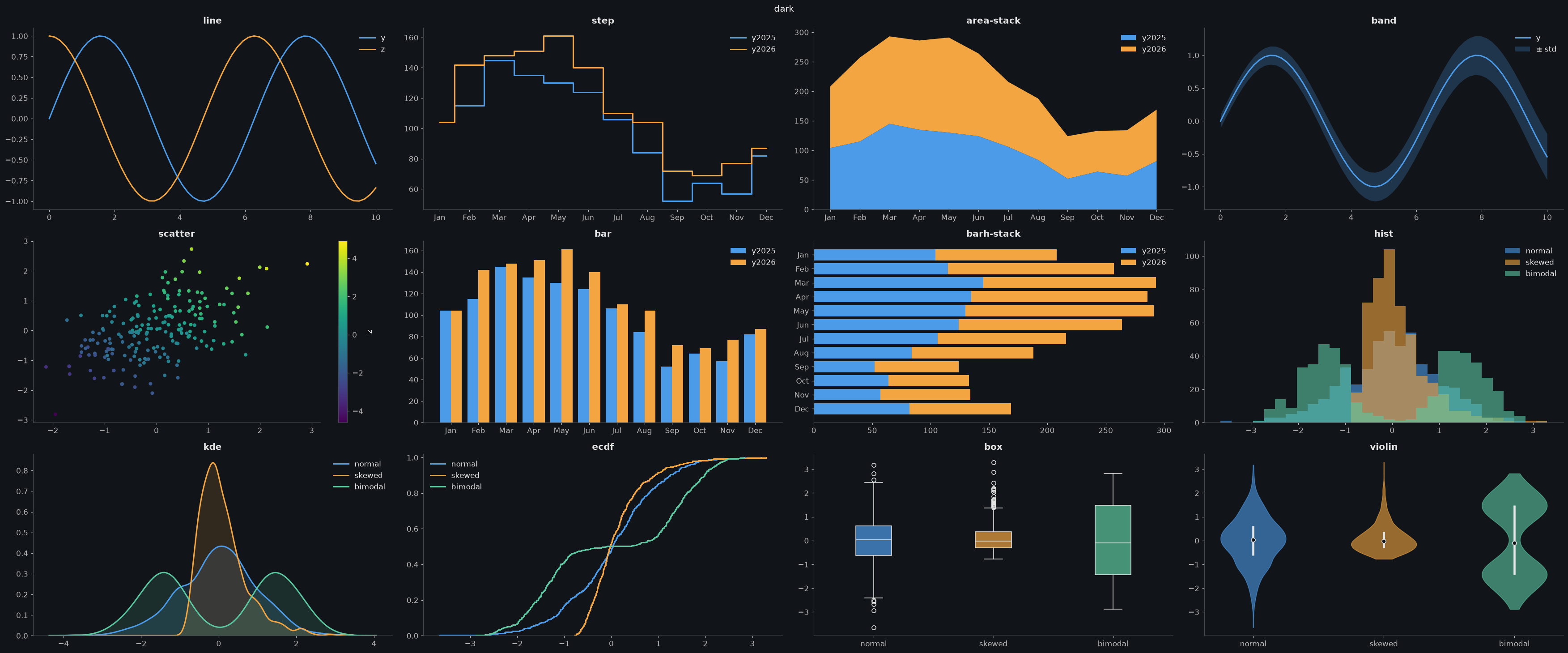
kx is a small, plain-Python package with .mplstyle themes, palettes and colourmaps. It needs nothing beyond
matplotlib, numpy and pandas and works offline, so it also runs in Kaggle competition notebooks.
Install
pip install kx-plot
import kx; kx.use('dark')
Kaggle
Attach the dataset instead (Add Input → Datasets → vhrabar/kx-plot), then:
import sys; sys.path.append('/kaggle/input/datasets/vhrabar/kx-plot')
import kx; kx.use('dark')
Usage
kx.use('light', palette='okabe', cmap='cividis')   # notebook default: theme, palette, colormap
kx.plot(x, y, z, 'scatter-grid-leg')               # spec: kind-theme-flag-...
kx.plot(x, y, 'bar-paper')                         # a theme in the spec applies to this plot only
with kx.context('paper'): ...                      # or to every plot in the block
kx.save('fig.png')                                 # to /kaggle/working on Kaggle, else the current folder
for ax, col in zip(kx.grid(3), df.columns):        # a figure of 3 panels, a flat array of axes
    kx.plot(df, col, spec='hist', ax=ax)
kx.plot(df, 'month', 'y2025', 'bar')               # DataFrame columns by name
kx.plot(x, y, 'line', linewidth=3)                 # other keywords go to matplotlib
kx.plot(df, 'value', spec='kde', by='group')       # one density curve per group
kx.plot(df.value, spec='box', by=df.group)         # one box per group (also ridge, violin, qq)
| Token | Values |
|---|---|
| kind | line step area band scatter bar barh hist kde ridge ecdf box violin |
strip qq |
|
| theme | dark light paper science talk poster thesis |
| flags | grid leg legout tight rot logx logy logxy symlogy zero eq pct si |
per kind: stack norm cum date mk sort ann mean median nocb sym logc |
stack works with area, bar, barh and hist. norm is a 100% stack for area and a
density (area 1) for hist. cum makes hist cumulative; hist-norm-cum is the CDF.
hist puts every series on the same bins, so the bars line up.
Unknown tokens raise an error instead of being guessed, with the closest valid tokens as a hint.
Everything is inspectable: kx.grammar(), kx.grammar('area'), kx.parse('leg-scatter'), kx.show('dark'),
kx.source('scatter').
rcParams can be overridden in kx.use with __ for dots: kx.use('dark', figure__figsize=(8, 4)).
Every kind, option, flag and config, with its output, is in the Example Usage notebook.
Palettes
Palettes for kx.use(theme, palette=...), they swap only the colours; a theme's
other cycled properties (such as paper's linestyles) stay.
| Name | Source |
|---|---|
okabe |
Okabe & Ito (2008) |
tolbright tolvibrant tollight |
Paul Tol |
tolhc tolmc |
Paul Tol |
petroff6 petroff8 petroff10 |
Petroff (2021) |
tab10 tab20 tableaucb |
Tableau |
set1 set2 dark2 paired |
ColorBrewer |
ibm |
IBM Design Colors |
kx.palette('okabe') returns the hex codes. A list of colours works too: palette=['#264653', '#e9c46a'].
Colourmaps
Colourmaps for kx.use(theme, cmap=...) colour continuous values, such as a numeric z in scatter.
Without cmap, the theme's own default applies.
Add _r to any name to reverse it, e.g. cmap="thermal_r".
| Name | Type |
|---|---|
viridis magma plasma inferno cividis |
Sequential, perceptually uniform |
turbo |
Sequential, rainbow |
coolwarm |
Diverging |
berlin managua vanimo |
Diverging, dark centre |
twilight |
Cyclic, for angles and phases |
thermal haline deep |
Sequential, cmocean (vendored) |
balance |
Diverging, cmocean (vendored) |
batlow lipari hawaii oslo davos |
Sequential, Crameri (vendored) |
vik roma bam cork |
Diverging, Crameri (vendored) |
romaO |
Cyclic, Crameri (vendored) |
kx.cmaps() lists the ones that are available in the installed matplotlib as those implemented in matplotlib 3.10 or newer
are not vendored.
License
Released under the MIT License. See LICENSE.
Copyright © 2026 Vedran Hrabar
Vendored palettes and colourmaps keep their own licences; see kx/styles/palettes/LICENCES.md
and kx/styles/cmaps/LICENCES.md.
1 maintainer

Metadata
1 maintainer
Release files for kx-plot 0.3.0
For a detailed explanation of source distributions (sdists) and built distributions (wheels), please see the package formats documentation.
Source distribution (sdist)
| File | Size | Uploaded | |
|---|---|---|---|
| kx_plot-0.3.0.tar.gz | 74.8 kB | Details |
Built distribution (wheel)
| File | Interpreter | ABI | Platform | Reset |
|---|---|---|---|---|
| kx_plot-0.3.0-py3-none-any.whl | Python 3 | none | any | Details |
Total release size: 156.0 kB
Release files / kx_plot-0.3.0.tar.gz
| Download URL | kx_plot-0.3.0.tar.gz |
|---|---|
| Size | 74.8 kB |
| Tags | Source |
|
SHA-256 checksum How to use checksums |
04d4f0525e3968d36eb02e813b05ca48ab73b953ce55914e1ed24bceca1ffc76
|
|
BLAKE2b-256 checksum How to use checksums |
714f26124b17b7505fa8ee2e3bdfaaf479f9a9b79000c6dddc45a5eb06d15e80
|
| Upload date | |
|
Uploaded using Trusted Publishing? What is trusted publishing? |
Yes |
| Uploaded via |
twine/7.0.0 CPython/3.13.14
|
Provenance
Provenance describes where a file came from. On PyPI, provenance is shared via attestations, which provide a verifiable record of the build or publishing details. View details, limitations and caveats.


PyPI Publish Attestation
PyPI verified that this artifact, at this checksum, originated from the publisher listed below.
Signed by GitHub Actions, verified by PyPI on Oct 12, 2026.
Transparency logRelease files / kx_plot-0.3.0-py3-none-any.whl
| Download URL | kx_plot-0.3.0-py3-none-any.whl |
|---|---|
| Size | 81.3 kB |
| Tags | Python 3 |
|
SHA-256 checksum How to use checksums |
bfec106e7dab91f9ac02d16133f9226d7685b005dc24587b83c7ae97acccbea5
|
|
BLAKE2b-256 checksum How to use checksums |
2bdfa080ba9aae48e32e3b713d97e2aeccd7b965626681cccbf172b5e97e442d
|
| Upload date | |
|
Uploaded using Trusted Publishing? What is trusted publishing? |
Yes |
| Uploaded via |
twine/7.0.0 CPython/3.13.14
|
Provenance
Provenance describes where a file came from. On PyPI, provenance is shared via attestations, which provide a verifiable record of the build or publishing details. View details, limitations and caveats.
PyPI Publish Attestation
PyPI verified that this artifact, at this checksum, originated from the publisher listed below.
Signed by GitHub Actions, verified by PyPI on Oct 12, 2026.
Transparency log













