
Kyan
A soundboard program written in python
Installation
You can install Kyan downloading the source and running pip install --upgrade -e . in the directory of setup.py.
Usage
You can start Kyan by running py -m kyan.
In the interface, you'll find numerous controls. A sounds list, 2 volume sliders (one for microphone and the other for sounds), and buttons to play and stop sounds, import or delete audio, and configure audio devices.
In order to use Kyan, you'll need a Virtual Audio Cable (VAC), which you can download here. Once this is installed, select the VAC using the "Configure Audio Devices" button:
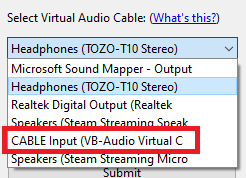
You may need to configure your microphone, however Kyan will use the default microphone on your system by default.
To play sounds, you'll first need to import them. Click "Import Audio File", and then select an audio file by clicking the "..." button. Edit the audio name if you wish, and then click "Import". This field will be the file name of the file you selected by default (without the extension). After clicking "Import", you'll notice a new entry in the sounds list. You can select this entry and click "Play Selected Sound", or just double click the entry to play it.
To stop any playing sounds, click "Stop All Sounds". To delete a sound, select the sound you want to remove in the sounds list and click "Delete Selected Sound".
You can also edit the volume of any sounds you play or your microphone. Use the sliders or input boxes as needed. Any sound you play will also be played to you (if you're going to play really loud sounds, then you have to endure it too). You can check the "Hear Microphone Input" checkbox to hear what you sound like in real time. Note that this setting will not do anything if your VAC device is set to your speakers (which it is by default).
If you have any problems or errors, create an issue on the GitHub repository.
1 maintainer

Metadata
1 maintainer
Release files for Kyan 1.1.0
For a detailed explanation of source distributions (sdists) and built distributions (wheels), please see the package formats documentation.
Source distribution (sdist)
| File | Size | Uploaded | Provenance | |
|---|---|---|---|---|
| Kyan-1.1.0.tar.gz | 8.1 kB | Without provenance | Details |
Built distribution (wheel)
| File | Interpreter | ABI | Platform | Reset |
|---|---|---|---|---|
| Kyan-1.1.0-py3-none-any.whl | Python 3 | none | any | Details |
Total release size: 20.7 kB
Release files / Kyan-1.1.0.tar.gz
| Download URL | Kyan-1.1.0.tar.gz |
|---|---|
| Size | 8.1 kB |
| Tags | Source |
|
SHA-256 checksum How to use checksums |
d37c5a362c94c3767d4502357a68e7150b9262b2d5e99d7208788c6c424248f7
|
|
BLAKE2b-256 checksum How to use checksums |
b65c5fa91ca08c6addf8cbed08b89c77df1bdeeb5ac04f7b7df29b352f66d260
|
| Upload date | |
|
Uploaded using Trusted Publishing? What is trusted publishing? |
No |
| Uploaded via |
twine/3.4.1 importlib_metadata/4.0.1 pkginfo/1.7.0 requests/2.25.1 requests-toolbelt/0.9.1 tqdm/4.60.0 CPython/3.9.1
|
Release files / Kyan-1.1.0-py3-none-any.whl
| Download URL | Kyan-1.1.0-py3-none-any.whl |
|---|---|
| Size | 12.6 kB |
| Tags | Python 3 |
|
SHA-256 checksum How to use checksums |
24f0ca6ee12e5f73512958a316d464f56e30e953a1012c8dce0c05d86b57096c
|
|
BLAKE2b-256 checksum How to use checksums |
889e3143710348b3ee16dbca2e1e68994bba45160cf21a134311a6f9607243da
|
| Upload date | |
|
Uploaded using Trusted Publishing? What is trusted publishing? |
No |
| Uploaded via |
twine/3.4.1 importlib_metadata/4.0.1 pkginfo/1.7.0 requests/2.25.1 requests-toolbelt/0.9.1 tqdm/4.60.0 CPython/3.9.1
|
Security for Kyan 1.1.0
Provenance
Provenance describes where a file came from. On PyPI, provenance is shared via attestations, which provide a verifiable record of the build or publishing details. View details, limitations and caveats.
No provenance found
None of the files in this release were uploaded with provenance metadata.
A note on package security
PyPI is a repository for distributing packages, not a service for auditing them. While third-party security researchers and our staff do their best to detect and remove malicious packages, PyPI cannot guarantee the quality, security or suitability of any given package.
To learn more about protecting yourself from malicious actors, visit our package security documentation.













