



kymocore for Python · Measurements from your script, live on screen
Pure Python sender for the Kymotrace protocol – the PC counterpart of KymoCore.



What is it about?
Not every signal comes from a microcontroller. A Raspberry Pi reads sensors, a test bench script drives a power supply, a simulation computes a plant model. Printing those values or writing CSV files means looking at them afterwards.
kymocore sends them to KymoStudio while they happen, with the same compact binary frames (9 to 21 bytes) that the KymoCore firmware library uses. Firmware and PC script appear side by side in one KymoStudio workbench: as curves, XY traces or in 3D.
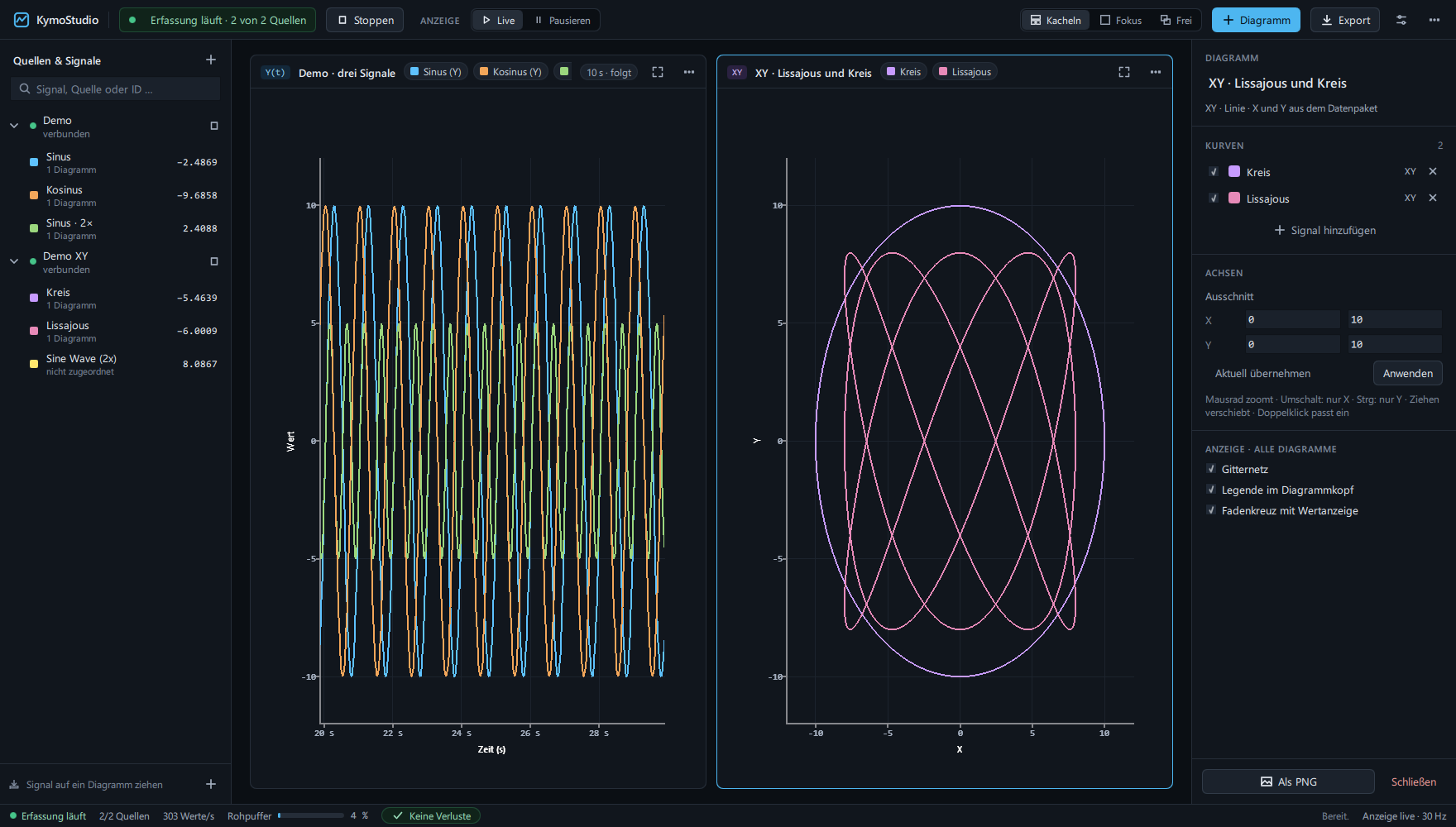
Live data in KymoStudio: three signals over time, two as XY traces.
What kymocore can do
| One call per value | send(channel, value), optionally with x= and z= for XY and XYZ charts. Up to 256 channels. |
| Timestamps included | Each value carries the time since the sender started, in microseconds or milliseconds, from a monotonic clock. |
| Four transports | UDP, TCP, serial/USB and MQTT. KymoStudio's existing sources receive them unchanged. |
| No dependencies | The core uses only the standard library. pyserial and paho-mqtt are optional extras. |
| Same protocol as the firmware | Tested against the golden vectors of PROTOCOL.md v6.2, optional CRC-8 checksum. |
| Raw frames too | frame() returns the bytes for a transport of your own. |
What it is used for
- Raspberry Pi and single-board computers: plot sensor values read via I²C, SPI or GPIO live.
- Test benches and HIL setups: show the script's setpoints next to the measurements of the device under test.
- Simulations: watch a plant model or controller simulation run, with the same charts as on real hardware.
- Data from other programs: forward values from instruments, logs or APIs to KymoStudio.
Quick start
pip install kymocore            # UDP and TCP
pip install kymocore[serial]    # + serial / USB CDC (pyserial)
pip install kymocore[mqtt]      # + MQTT (paho-mqtt)
Complete example
The following script sends a sine wave on channel 0 and a cosine with an X coordinate on channel 1, every 10 ms for ten seconds.
import math
import time

from kymocore import Sender

with Sender.udp('127.0.0.1', 5025) as sender:
    for i in range(1000):
        sender.send(0, math.sin(i / 20))           # channel 0, value
        sender.send(1, math.cos(i / 20), x=i)      # channel 1, XY point
        time.sleep(.01)
In KymoStudio, add a UDP source on port 5025, start it and assign channel 0 to a chart.
Transports
| Transport | Call | KymoStudio source |
|---|---|---|
| UDP | Sender.udp(host, port) |
UDP, listens on port |
| TCP | Sender.tcp_server(port) |
Telnet/TCP, connects to this machine and port |
| Serial | Sender.serial('COM4', 115200) |
Serial, same baud rate |
| MQTT | Sender.mqtt(broker, topic) |
MQTT, topic among its receive topics |
KymoStudio connects to a TCP device, so tcp_server listens and sends to every
connected client. Values sent while no client is connected are dropped, as on a
device. MQTT publishes one message per value.
Options
| Option | Default | Meaning |
|---|---|---|
timestamps='us' |
yes | Microseconds; wraps after 71.6 minutes, KymoStudio continues the time axis |
timestamps='ms' |
Milliseconds; wraps after 49.7 days | |
timestamps=None |
No timestamp; KymoStudio stamps on arrival | |
crc=True |
off | Adds the CRC-8/ATM checksum to every frame |
Channel IDs outside 0–255 and NaN or infinite values raise ValueError.
Microsecond timestamps need KymoStudio 2.5 or newer.
Part of Kymotrace
| Project | Role |
|---|---|
| KymoCore | firmware library: capture and send measurements on the microcontroller |
| kymocore for Python | this package: send measurements from Python |
| KymoProbe | firmware and hardware examples for ESP32, Arduino and STM32 |
| KymoStudio | desktop app: receive, display, analyse, export |
Documentation
License
Copyright (c) 2026 Christof Seidel. kymocore for Python is licensed under the MIT license: free for any use, including commercial projects, without disclosing your own source code.
1 maintainer

Metadata
1 maintainer
Release files for kymocore 0.1.0
For a detailed explanation of source distributions (sdists) and built distributions (wheels), please see the package formats documentation.
Source distribution (sdist)
| File | Size | Uploaded | Provenance | Actions |
|---|---|---|---|---|
| kymocore-0.1.0.tar.gz | 8.9 kB | With provenance | Details for kymocore-0.1.0.tar.gz |
Built distribution (wheel)
| File | Interpreter | ABI | Platform | Actions Reset |
|---|---|---|---|---|
| kymocore-0.1.0-py3-none-any.whl | Python 3 | none | any | Details for kymocore-0.1.0-py3-none-any.whl |
Total release size: 16.8 kB
Release files / kymocore-0.1.0.tar.gz
| Download URL | kymocore-0.1.0.tar.gz |
|---|---|
| Size | 8.9 kB |
| Tags | Source |
|
SHA-256 checksum How to use checksums |
c4ef5c5d50207071fe7cc0452d704b008d3817bd925f394ca87c30bf65a36653
|
|
BLAKE2b-256 checksum How to use checksums |
780e250f4dcc26bc4ae611fdce4d959dce85927bef8089c56780d60c73e3a7ae
|
| Upload date | |
|
Uploaded using Trusted Publishing? What is trusted publishing? |
Yes |
| Uploaded via |
twine/7.0.0 CPython/3.13.16
|
Provenance
Provenance describes where a file came from. On PyPI, provenance is shared via attestations, which provide a verifiable record of the build or publishing details. View details, limitations and caveats.


PyPI Publish Attestation
PyPI verified that this artifact, at this checksum, originated from the publisher listed below.
Signed by GitHub Actions, verified by PyPI on Nov 2, 2026.
Transparency logRelease files / kymocore-0.1.0-py3-none-any.whl
| Download URL | kymocore-0.1.0-py3-none-any.whl |
|---|---|
| Size | 7.8 kB |
| Tags | Python 3 |
|
SHA-256 checksum How to use checksums |
399783cca39b8fec4ced2fc44a4098e7d63da2c39c66fc5c86fd6e2eb65f5c90
|
|
BLAKE2b-256 checksum How to use checksums |
36bc5b7fa2da075c3155b9c3be2d0e87121cb280c751ba38cbece06fd0547249
|
| Upload date | |
|
Uploaded using Trusted Publishing? What is trusted publishing? |
Yes |
| Uploaded via |
twine/7.0.0 CPython/3.13.16
|
Provenance
Provenance describes where a file came from. On PyPI, provenance is shared via attestations, which provide a verifiable record of the build or publishing details. View details, limitations and caveats.
PyPI Publish Attestation
PyPI verified that this artifact, at this checksum, originated from the publisher listed below.
Signed by GitHub Actions, verified by PyPI on Nov 2, 2026.
Transparency logSecurity for kymocore 0.1.0
Provenance
Provenance describes where a file came from. On PyPI, provenance is shared via attestations, which provide a verifiable record of the build or publishing details. View details, limitations and caveats.
Full provenance
All 2 files in this release have been uploaded with provenance metadata.
Attestation for kymocore-0.1.0.tar.gz
PyPI Publish Attestation
PyPI verified that this artifact, at this checksum, originated from the publisher listed below.
Signed by GitHub Actions, verified by PyPI on Nov 2, 2026.
Transparency logA note on package security
PyPI is a repository for distributing packages, not a service for auditing them. While third-party security researchers and our staff do their best to detect and remove malicious packages, PyPI cannot guarantee the quality, security or suitability of any given package.
To learn more about protecting yourself from malicious actors, visit our package security documentation.













