
lab-kit
lab-kit turns your coding agent into the staff of a research lab: it pre-registers each experiment, locks the plan before the first number, runs the lab's own code against the lock, scores the outcome against it, and records only numbers that re-derive from committed evidence. It is built on folio. folio decides what a document is; lab-kit decides when a result counts.
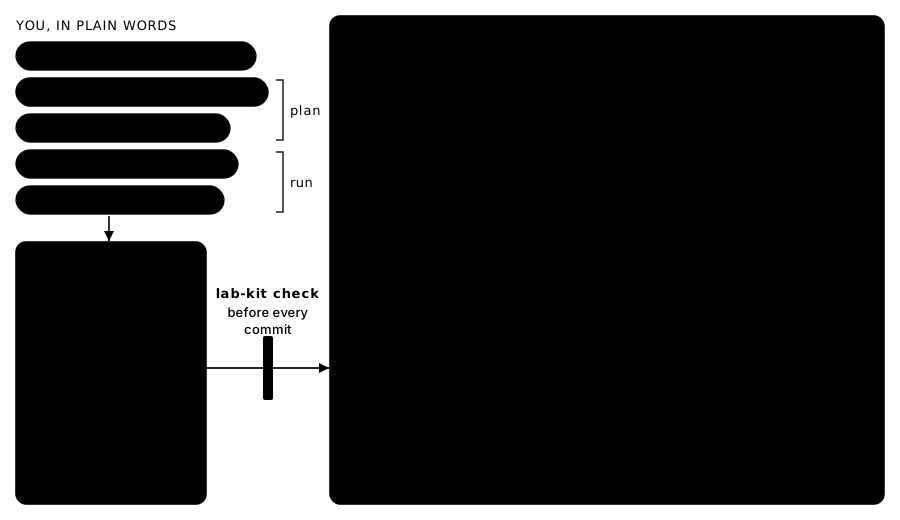
You do not run lab-kit yourself, and you do not walk the agent through each step. You install it by handing your agent one line, set up the lab with its question, and then plan each mission with the agent in plain words. Once you approve the plan, the agent runs it end to end: it drafts the protocol, has a reviewer read it, locks it, runs it, scores it, has the numbers re-derived by an independent reviewer, records the result and writes the report, running the gate before every commit. It stops only where the plan and the method say it must.
Install
Paste this into your coding agent, in the repository that will hold the lab:
Install lab-kit here: run `uv tool install lab-kit-cli --with-executables-from folio-kb` (or `pipx install --include-deps lab-kit-cli`), then `lab-kit init`, then read .agents/skills/set-up-lab/SKILL.md and follow it.
Installing lab-kit brings folio with it; the flag puts folio's command on the path too. The agent asks you at most three questions in one message (the lab's question, where the library lives, which paths are frozen), sets up the library with folio's lab pack, records the question as Q-1, and leaves the gate passing. A longer version of the prompt is in SETUP.md. lab-kit needs Python 3.10 or later.
Give it a mission
1. Plan the mission together. Once the lab is set up, state an objective:
Mission: find out whether our pi estimator's error falls as 1/sqrt(n).
The plan-mission skill reads the lab, then asks in one message only what it cannot look up: "How many sample sizes and repeats count as enough? Token-free only? What would make you stop it early?" It drafts the plan: the question served, observable milestones, the scope, the spend, what it never touches, and where it must stop. You change what you want and say "approved". It records your approval and starts nothing.
2. Let it run. The run-mission skill carries out the approved plan alone; it refuses an unapproved one. It dispatches workers through the experiment and review skills, sends a reviewer before the protocol locks and before any result counts, and keeps ops/STATE.md current so a crashed session resumes from the record. It comes back to you only at the plan's stops, or when a run would spend past the cap, a change would touch a frozen surface, a lock or a recorded result, or the work would leave the plan's scope.
It reports the result by id, the misses as plainly as the hits, and its recommended next step. Meanwhile, ask "how is the mission going?" or "what should we do next?".
The loop
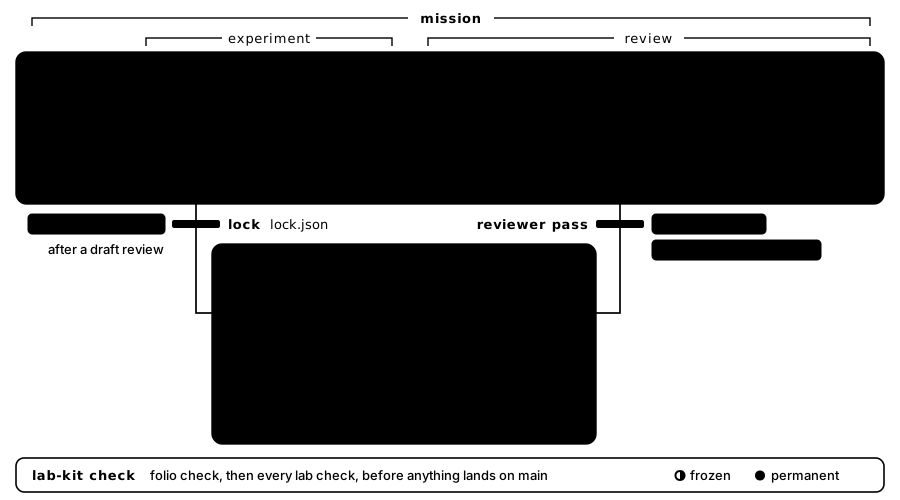
The documents (questions, protocols, results, claims, reports, the journal) are folio's, through its lab pack. The steps between them are lab-kit's skills: set-up-lab (once), plan-mission (with you, until you approve), run-mission (alone: dispatch, supervise, recover, report), experiment (draft, lock, launch, watch) and review (fold, score, record, report). Four agent roles do the work: scout, runner, reviewer and reporter.
The checks
The gate, lab-kit check, runs folio's checks and then the lab's. It runs offline, names every problem in one pass, and changes nothing. CI runs the same command.
- Locks. A locked protocol has a lock record, and its bytes still match it (
lab-lock-recorded,lab-lock-intact). - Runs. Every run started after its lock, used exactly the pinned configuration, and its evidence matches its manifest (
lab-run-after-lock,lab-roster-frozen,lab-evidence-sealed). - Results. Every live result re-derives exactly, rests on a finished run of a locked protocol, and passed an independent reviewer (
lab-rederive,lab-result-grounded). - Scores. A scorecard scores exactly the ids the lock names (
lab-score-exact), and a scored experiment is reported or explained (lab-scored-reported). - Lab files. Ids resolve, frozen surfaces are untouched, scripts pass
--selftest, nothing runs under an unapproved mission, spend stays within its cap, records only grow, the method is current, and the state file stays a short pointer.
Together they hold a chain from every number on a page back to the lock:
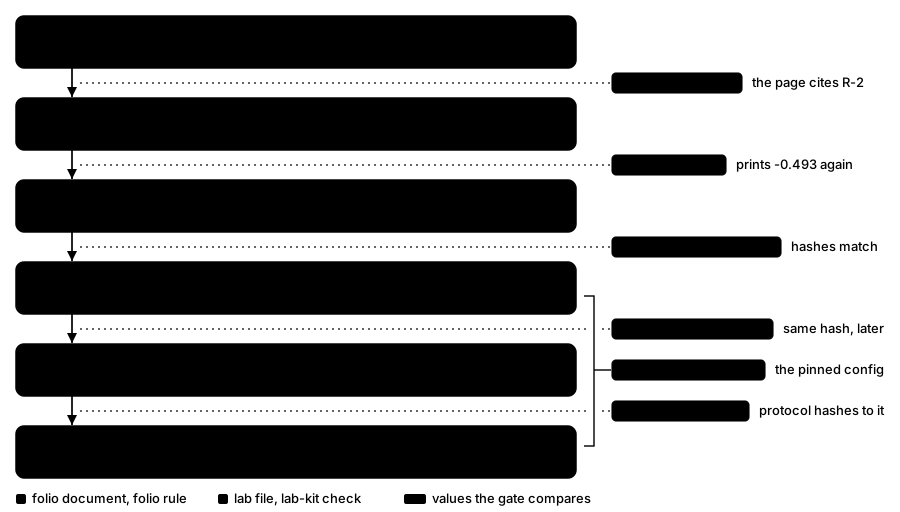
The gate checks that the record is consistent. Whether it is honest is the reviewer's job.
An example
examples/monte-carlo-lab asks one question: does the error of a Monte Carlo estimate of pi shrink as 1/sqrt(n)? Its protocol, locked before the run, draws 100 seeded estimates at each of five sample sizes from 64 to 16,384 points, in pure Python, in under a second. The RMS error fell with a fitted log-log slope of -0.493 (R-2), so the hypothesis is kept; two of the four predictions missed, and the report says so as plainly as it says the rest. R-2 supersedes R-1, which fitted the wrong error measure. Every record in it was made by the loop above, and lab-kit check passes on it with no error and no warning.
Open it with your agent and ask "check this lab" or "re-derive R-2".
Reference
The lab-kit command is the interface for agents and CI, the way git is: init, check, experiment, lock, run, runs, score, rederive, freeze, status and version. Each is specified in docs/spec/lab-model.md §6, the contract the skills, the roles, the checks and the command all build on. To work on lab-kit itself, see CONTRIBUTING.md. Changes: CHANGELOG.md.
License
MIT. See LICENSE.
1 maintainer

Metadata
1 maintainer
Release files for lab-kit-cli 0.1.0
For a detailed explanation of source distributions (sdists) and built distributions (wheels), please see the package formats documentation.
Source distribution (sdist)
| File | Size | Uploaded | |
|---|---|---|---|
| lab_kit_cli-0.1.0.tar.gz | 130.2 kB | Details |
Built distribution (wheel)
| File | Interpreter | ABI | Platform | Reset |
|---|---|---|---|---|
| lab_kit_cli-0.1.0-py3-none-any.whl | Python 3 | none | any | Details |
Total release size: 194.9 kB
Release files / lab_kit_cli-0.1.0.tar.gz
| Download URL | lab_kit_cli-0.1.0.tar.gz |
|---|---|
| Size | 130.2 kB |
| Tags | Source |
|
SHA-256 checksum How to use checksums |
b3666cc291b7bad1a145e9cac8aebe645ede0715450dea360627c353806659a4
|
|
BLAKE2b-256 checksum How to use checksums |
2d65128166344cd15db915850ba340983284c0a730a6107aa48e77a7ab46616d
|
| Upload date | |
|
Uploaded using Trusted Publishing? What is trusted publishing? |
Yes |
| Uploaded via |
twine/7.0.0 CPython/3.13.14
|
Provenance
Provenance describes where a file came from. On PyPI, provenance is shared via attestations, which provide a verifiable record of the build or publishing details. View details, limitations and caveats.


PyPI Publish Attestation
PyPI verified that this artifact, at this checksum, originated from the publisher listed below.
Signed by GitHub Actions, verified by PyPI on Oct 5, 2026.
Transparency logRelease files / lab_kit_cli-0.1.0-py3-none-any.whl
| Download URL | lab_kit_cli-0.1.0-py3-none-any.whl |
|---|---|
| Size | 64.7 kB |
| Tags | Python 3 |
|
SHA-256 checksum How to use checksums |
8e69bdd47d9e08f330b3f78e5da23394ae24867ebee4787aaace60effe662509
|
|
BLAKE2b-256 checksum How to use checksums |
f6f92e3217b6fe8821e6ca4f290702b16deed409b5bcd26d8c4646d1789d6352
|
| Upload date | |
|
Uploaded using Trusted Publishing? What is trusted publishing? |
Yes |
| Uploaded via |
twine/7.0.0 CPython/3.13.14
|
Provenance
Provenance describes where a file came from. On PyPI, provenance is shared via attestations, which provide a verifiable record of the build or publishing details. View details, limitations and caveats.
PyPI Publish Attestation
PyPI verified that this artifact, at this checksum, originated from the publisher listed below.
Signed by GitHub Actions, verified by PyPI on Oct 5, 2026.
Transparency log












