
LabelCraft - Intelligent Image Annotation Tool
Version 3.0.2 — Project-first annotation for detection & pose, based on labelImg


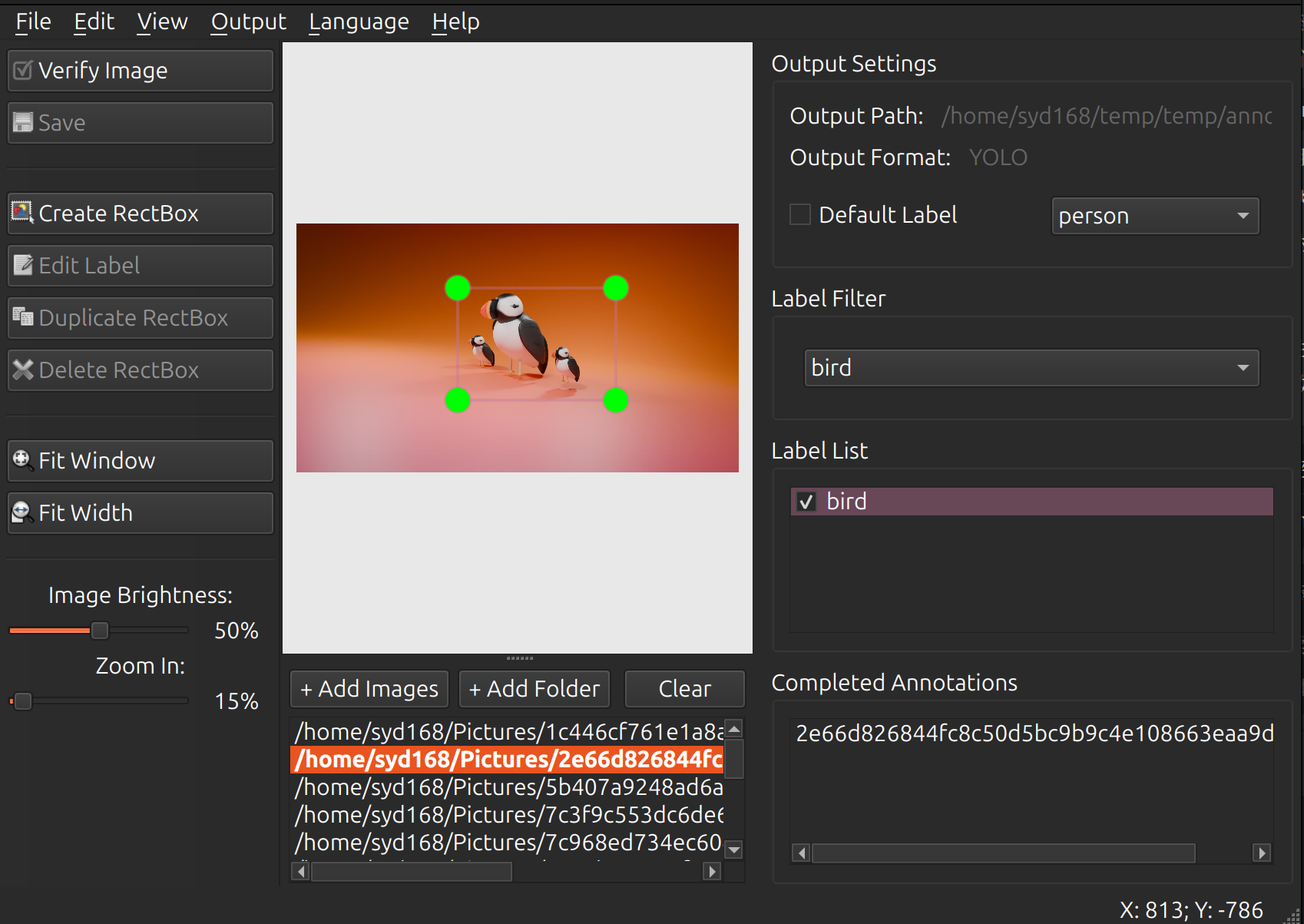
LabelCraft is a graphical image annotation tool with project management, multi-shape drawing, and YOLO-Pose support. It is a major evolution of labelImg — thanks to TzuTa Lin for the original work.
Highlights (v3.0)
- Shapes: rectangle, pose (bbox + keypoints), polygon, ellipse, circle
- Projects:
.lbcproject files (legacy.labelcraftstill opens), detect / pose tasks - Import / Export: LabelCraft JSON, YOLO Detect, YOLO Pose, PASCAL VOC, CreateML, COCO, CSV
- Workflow: pending queue, completed list, verify status, auto-save, default label
- UI: compact project info panel, cleaned menus & shortcuts, taskbar app icon
- i18n: English, 简体中文, 繁體中文, 日本語, Deutsch, Français (live switch)
Screenshot
Install
pip (recommended)
pip install -U labelcraft
labelcraft
From source
git clone https://github.com/syd168/LabelCraft.git
cd LabelCraft
python3 -m venv venv
source venv/bin/activate   # Windows: venv\Scripts\activate
pip install -r requirements.txt
pyside6-rcc -o libs/resources.py resources.qrc   # if you change icons
python main.py
Or use ./start.sh (Linux/macOS) / start.bat (Windows).
Quick workflow
- File → New Project (
Ctrl+N) — name, location, labels, detect or pose - Add images / folders into the pending queue
- Draw with W (rect), P (pose), G (polygon), E (ellipse), C (circle)
- Ctrl+S save annotation · Ctrl+Alt+S save project
- Data → Export… (
Ctrl+Shift+E) when ready
Project files use {name}.lbc. Annotations live under {project_dir}/annotations/.
Keyboard shortcuts (common)
| Shortcut | Action |
|---|---|
Ctrl+N / Ctrl+O |
New / Open project |
Ctrl+Alt+E / Ctrl+Alt+S |
Edit / Save project |
Ctrl+S |
Save annotation |
Ctrl+I / Ctrl+Shift+E |
Import / Export |
W P G E C |
Rect / Pose / Poly / Ellipse / Circle |
Ctrl+E |
Edit label |
Delete / Ctrl+D / Ctrl+Z |
Delete / Duplicate / Undo |
Ctrl+V |
Copy previous image boxes |
V |
Verify current image |
A / D |
Prev / Next image |
Ctrl+F / Ctrl+Shift+F |
Fit window / Fit width |
See Help → Shortcuts in the app for the full list.
Project layout
LabelCraft/
├── main.py              # Entry
├── labelcraft_ui.py     # Main window
├── libs/                # Core (project, canvas, I/O, i18n, …)
├── resources/           # Icons & assets
├── requirements.txt
└── setup.py             # PyPI packaging
Development notes
- Python 3.8+, dependency: PySide6 ≥ 6.5, lxml
- Locales:
libs/locales/*.json - After editing
resources.qrc, recompile:
pyside6-rcc -o libs/resources.py resources.qrc
Changelog (3.0.2)
- Fix shape-style fill opacity: 100% is fully opaque again (removed accidental alpha clamp)
Changelog (3.0.1)
- PyPI description: use absolute screenshot URL so the image renders on pypi.org
Changelog (3.0.0)
License
MIT — see LICENSE.
Acknowledgments
- labelImg by TzuTa Lin
- Contributors and users of LabelCraft
1 maintainer

Metadata
1 maintainer
Release files for LabelCraft 3.0.2
For a detailed explanation of source distributions (sdists) and built distributions (wheels), please see the package formats documentation.
Source distribution (sdist)
| File | Size | Uploaded | Provenance | Actions |
|---|---|---|---|---|
| labelcraft-3.0.2.tar.gz | 1.8 MB | Without provenance | Details for labelcraft-3.0.2.tar.gz |
Built distribution (wheel)
| File | Interpreter | ABI | Platform | Actions Reset |
|---|---|---|---|---|
| labelcraft-3.0.2-py2.py3-none-any.whl | Python 3, Python 2 | none | any | Details for labelcraft-3.0.2-py2.py3-none-any.whl |
Total release size: 2.8 MB
Release files / labelcraft-3.0.2.tar.gz
| Download URL | labelcraft-3.0.2.tar.gz |
|---|---|
| Size | 1.8 MB |
| Tags | Source |
|
SHA-256 checksum How to use checksums |
d0b6ebd4b343a82c2de3a6b334db901212f4f1cd6853963a38ef7d5535bb3403
|
|
BLAKE2b-256 checksum How to use checksums |
186be0487f0841d22c2c80c0f5648b90349ad6fa3e9e13c24f95c52594795480
|
| Upload date | |
|
Uploaded using Trusted Publishing? What is trusted publishing? |
No |
| Uploaded via |
twine/7.0.0 CPython/3.13.9
|
Release files / labelcraft-3.0.2-py2.py3-none-any.whl
| Download URL | labelcraft-3.0.2-py2.py3-none-any.whl |
|---|---|
| Size | 923.9 kB |
| Tags | Python 2 Python 3 |
|
SHA-256 checksum How to use checksums |
a9d21e1f39b64d51fbf01a76a3333c662990f4171061b45ea82ff9e79db4c403
|
|
BLAKE2b-256 checksum How to use checksums |
627d2b27934b5fbd7e4cbf8d7bae9f79419f44217a2d46a522ccf07f7ced3dda
|
| Upload date | |
|
Uploaded using Trusted Publishing? What is trusted publishing? |
No |
| Uploaded via |
twine/7.0.0 CPython/3.13.9
|
Security for LabelCraft 3.0.2
Provenance
Provenance describes where a file came from. On PyPI, provenance is shared via attestations, which provide a verifiable record of the build or publishing details. View details, limitations and caveats.
No provenance found
None of the files in this release were uploaded with provenance metadata.
A note on package security
PyPI is a repository for distributing packages, not a service for auditing them. While third-party security researchers and our staff do their best to detect and remove malicious packages, PyPI cannot guarantee the quality, security or suitability of any given package.
To learn more about protecting yourself from malicious actors, visit our package security documentation.














