
This release is a pre-release and may not be stable for production use.
A modern, enhanced image annotation tool for machine learning




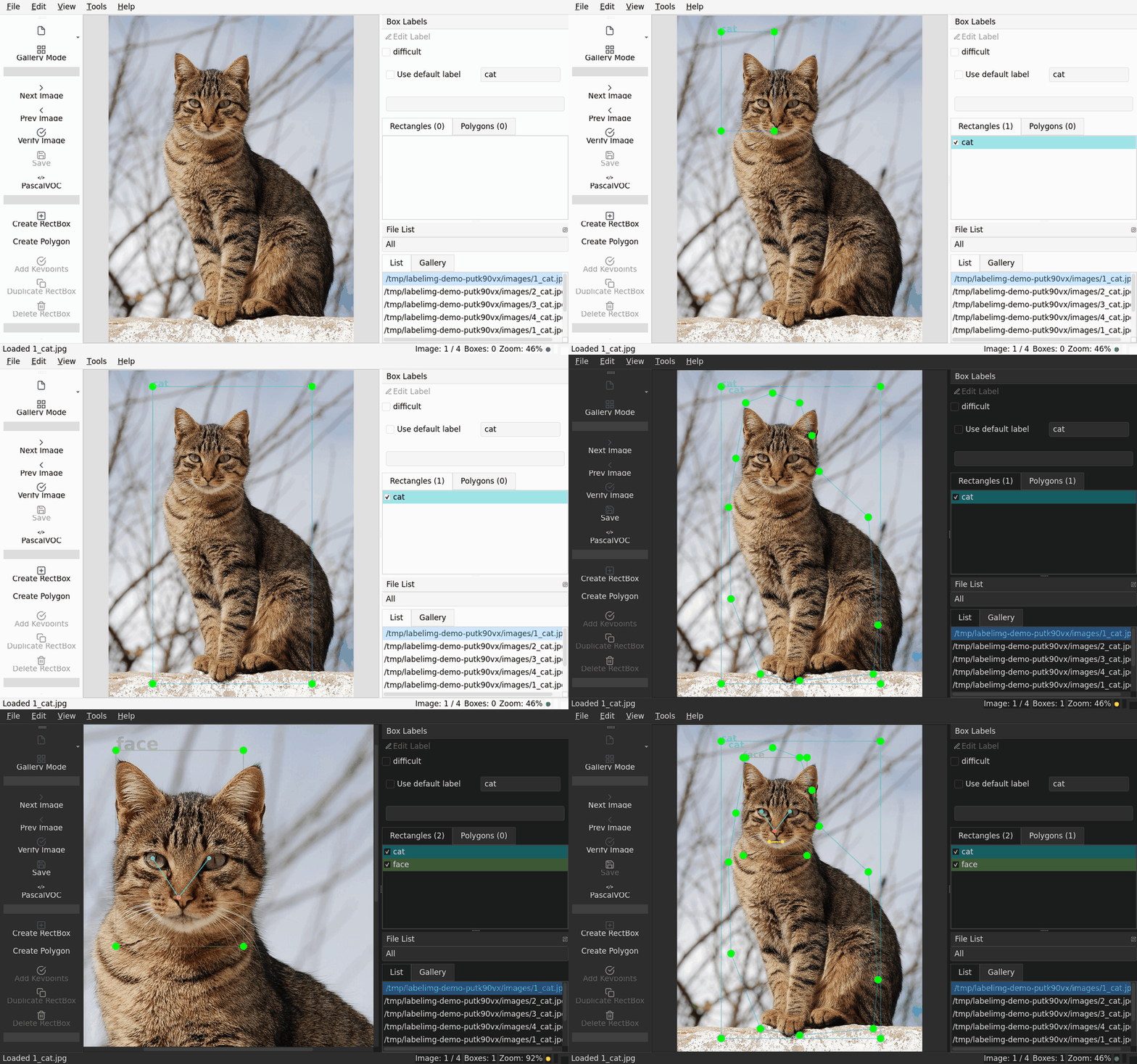
labelImg++ is a graphical image annotation tool for bounding boxes, polygons, and keypoints, designed for machine learning and computer vision projects. It is forked from the original LabelImg with significant enhancements.
Version 4.0.0rc0 (release candidate). Install with pip install labelimgplusplus.
Features
Core Annotation Features
Five annotation formats: PASCAL VOC, YOLO bbox, CreateML, COCO, and YOLO-seg
Bounding box and polygon annotation with interactive editing
Keypoint annotation with COCO 17-point human pose and 5-point face templates; COCO preserves keypoints on export
Auto-save mode for uninterrupted workflow
Predefined class labels with customizable list
Verification system to mark completed annotations
Workflow and Interface
- Undo/Redo Support
Full undo/redo for annotation actions. Press Ctrl+Z to undo and Ctrl+Shift+Z to redo.
- Balanced Modern Workspace
A fixed annotation-tool rail, compact command bar, unified Objects/Files inspector, integrated video timeline, and visible document status keep the active canvas uncluttered. Gallery Mode is embedded in the same workspace, so the annotation tools, inspector, and status remain available while browsing thumbnail previews across all five annotation formats.
Colored borders indicate status: Gray (no labels), Blue (has labels), Green (verified)
Bounding boxes use compact corner markers; polygons use outline previews
Quick size presets (S/M/L/XL) plus slider for fine control
Smart selection: click on nested boxes selects the inner box
Press Ctrl+G to toggle gallery mode
- Modern UI with Feather Icons
Official Feather icons provide a consistent, accessible tool vocabulary.
- Responsive DPI Scaling
Icons and UI elements scale properly on high-DPI displays (4K, Retina).
- Unified Object Inspector
Search and edit rectangles, polygons, keypoints, and video tracks in one Objects view. The Files view keeps the compact file list, thumbnails, and annotation-status filter close at hand, and the inspector can be collapsed when maximum canvas space is needed.
- Faster Class Confirmation
New boxes, polygons, Smart Select results, and video geometry remain provisional while a non-modal class picker opens beside the annotation. Filter or enter a class, press Enter to commit one undoable annotation, or press Escape to discard it without changing the document. Default labels and established single-class sessions bypass the picker.
- Smart Select Output Modes
While Smart Select is active, choose Box or Polygon from the compact canvas control. The choice persists between sessions, and either result follows the same provisional class-confirmation and undo workflow.
- Portable Whole-Video Propagation
From the integrated timeline, propagate every accepted manual anchor on the current frame or only the selected object. The portable OpenCV backend processes rectangles, polygons, and associated keypoints together, shows preview-only progress, protects later manual anchors, and commits accepted observations and explicit gap records atomically in one undo step. Editing generated geometry creates a manual correction first, then regenerates only the bounded neighboring segments as a separate undoable change.
- Optional SAM 2 Video Backend
Whole-video propagation can use an official, source-installed SAM 2 on Linux/CUDA. Auto is the default selection, and OpenCV remains the portable fallback. Open Tools → SAM Settings… to choose Auto, OpenCV, or SAM 2 and select a local checkpoint and its matching config file. Auto selects SAM 2 only with Python 3.10+, compatible CUDA-enabled PyTorch/torchvision and SAM 2, and both valid files; otherwise it uses OpenCV. An explicitly selected but unavailable SAM 2 reports the missing requirement and never silently falls back. labelImg++ does not download or bundle Torch, SAM 2, checkpoints, or configs, and none are added to its optional extras.
- Direct Ultralytics Dataset Export
Choose Tools → Export Ultralytics Dataset… to create a ready-to-train YOLO detection dataset with images/{train,val,test}, matching labels/{train,val,test}, and data.yaml. Configure deterministic split ratios and either copy images or create absolute local symlinks. The destination must be new or empty, and it is published only after the full export succeeds. See the Ultralytics Export Guide.
- Installed Python Plugins
Add trusted command plugins from separately installed Python distributions without editing labelImg++ source. Review and enable them under Tools → Plugins…; changes take effect after restart. Plugins use a versioned public API with host-owned actions, namespaced shortcuts and settings, bounded background work, read-only document state, diagnostics, and LABELIMGPP_DISABLE_PLUGINS=1 recovery. See the Plugin Authoring Guide.
- Brightness Adjustment
Adjust image brightness on-the-fly to better see annotations on dark or light images.
- Dark Mode Theme
Choose between light and dark themes for comfortable annotation in any lighting condition.
Press Ctrl+Shift+T to toggle between themes
Theme preference automatically saved
All UI components (canvas, gallery, dialogs) respect the active theme
See Dark Mode Documentation for detailed information
- SAM-Assisted Segmentation (optional)
Click once on an object to auto-generate a polygon, traced from a Segment-Anything mask. Install the optional extra and toggle SAM Segment:
pip install labelimgplusplus[sam]Runs the lightweight MobileSAM model on ONNX Runtime as a CPU-friendly extra with no PyTorch dependency. The default model pair is downloaded and checksum-verified on first use. Point Tools → SAM Settings… at your own exported encoder/decoder pair to use a different SAM variant. Without the extra installed, the action stays disabled (with an install hint) and nothing else changes.
- Smart Video Annotation (optional)
Open local MP4, MOV, MKV, and AVI video, annotate on exact presentation timestamps, interpolate keyframes, and propagate rectangles, polygons, and associated keypoints across the video. Propagation streams preview-only results and commits accepted observations and gaps atomically; the legacy optical-flow suggestion workflow remains available separately. Video work is stored in a sibling <video>.labelimgpp.sqlite project; existing image annotations and formats are unchanged.
pip install labelimgplusplus[video]The timeline supports frame stepping, exact timecode seeks, variable-rate media, playback without audio, track markers, and verified-frame markers. Accepted frames export to VOC, YOLO, YOLO-seg, COCO, or CreateML. See the Smart Video Annotation Guide for propagation setup, the project workflow, and export behavior.
Installation
labelImg++ requires Python 3.8 or newer.
From PyPI (Recommended)
Note: The command was renamed from labelImgPlusPlus to labelimgpp in v2.1.1. The old command still works but shows a deprecation warning.
pip3 install labelimgplusplus
labelimgpp
Or use the full command name:
labelimgplusplusWith a specific image or directory:
labelimgpp [IMAGE_PATH] [PRE-DEFINED CLASS FILE] [SAVE_DIR]The first positional path can also be a local video or a .labelimgpp.sqlite video project. Optional features can be combined:
pip install labelimgplusplus[sam,video]Build from Source
Ubuntu/Linux:
sudo apt-get install pyqt5-dev-tools
pip3 install -r requirements/requirements-linux-python3.txt
make qt5py3
python3 labelImgPlusPlus.py
macOS:
pip3 install pyqt5 lxml
make qt5py3
python3 labelImgPlusPlus.py
Windows:
pip install pyqt5 lxml
pyrcc5 -o libs/resources.py resources.qrc
python labelImgPlusPlus.py
Quick Start
Open images: Click the file dropdown button or press Ctrl+U to load a directory
Create annotations: Press W or click Create RectBox, then drag to draw
Label objects: Select a class from the popup dialog
Save: Press Ctrl+S to save annotations
Navigate: Use D (next) and A (previous) to move between images
Review: Press Ctrl+G for gallery mode to review all annotations
For video, press Ctrl+Alt+V, draw a rectangle or polygon on the paused frame, then use the unified Objects inspector, integrated timeline, and Tools menu to add keyframes, propagate objects, review legacy suggestions, and export accepted frames.
Supported Annotation Formats
Format |
Extension |
Annotation support |
|---|---|---|
PASCAL VOC |
.xml |
Bounding boxes and the labelImg++ polygon extension |
YOLO (bbox) |
.txt |
Normalized bounding boxes, with classes.txt for class names |
CreateML |
.json |
Bounding boxes in Apple’s CreateML annotation format |
COCO |
.json |
Bounding boxes, polygon segmentation, and keypoints |
YOLO-seg |
.txt |
Normalized polygons; rectangles are written as four-point polygons |
Polygon drawing and editing are available in the application. Saving polygons as YOLO bounding boxes or CreateML warns before converting each polygon to its enclosing box. Keypoints are preserved by COCO; the other formats do not encode them.
Keyboard Shortcuts
These are the defaults. They can be changed from Help → Keyboard Shortcuts.
File Operations
Ctrl + O |
Open file |
Ctrl + Alt + V |
Open video or video project |
Ctrl + U |
Open directory |
Ctrl + R |
Change save directory |
Ctrl + S |
Save current annotation |
Ctrl + Y |
Cycle annotation format |
Ctrl + Shift + S |
Save as |
Navigation
D |
Next image |
A |
Previous image |
Ctrl + G |
Toggle Gallery Mode |
In video mode, A/D step exact frames, Ctrl+Space toggles playback, Shift+K adds a keyframe to the selected track, T/Shift+T track forward or backward, and Shift+Enter/Backspace accept or reject the current suggestion. Space continues to verify the current frame.
Annotation
W |
Create bounding box |
P |
Create polygon |
K |
Enter keypoint mode |
Ctrl + Z |
Undo |
Ctrl + Shift + Z |
Redo |
Ctrl + D |
Duplicate selected box |
Del |
Delete selected box |
Space |
Mark image as verified |
Arrow keys |
Move selected box |
View
Ctrl + + |
Zoom in |
Ctrl + - |
Zoom out |
Ctrl + F |
Fit window |
Ctrl + Shift + F |
Fit width |
Ctrl + Shift + T |
Toggle dark mode theme |
Configuration
Predefined Classes
Edit data/predefined_classes.txt to customize the label options:
dog
cat
person
car
bicycle
Reset Settings
If you encounter issues, reset the settings:
rm ~/.labelImgSettings.jsonOr use Menu > File > Reset All
Release History
This source tree identifies itself as 4.0.0rc0, a release candidate for 4.0. Install it with pip install --pre labelimgplusplus. See the release history for version-by-version changes and GitHub Releases for published artifacts.
Contributing
Contributions are welcome! Please feel free to submit a Pull Request.
Fork the repository
Create your feature branch (git checkout -b feature/amazing-feature)
Commit your changes (git commit -m 'Add amazing feature')
Push to the branch (git push origin feature/amazing-feature)
Open a Pull Request
License
Based on LabelImg by Tzutalin.
Acknowledgments
Original LabelImg by Tzutalin
Feather Icons for modern iconography
All contributors and users of labelImg++
1 maintainer

Download files
Download the file for your platform. If you're not sure which to choose, learn more about installing packages.
Source Distribution
Built Distribution
Filter files by name, interpreter, ABI, and platform.
If you're not sure about the file name format, learn more about wheel file names.
Copy a direct link to the current filters
File details
Details for the file labelimgplusplus-4.0.0rc0.tar.gz.
File metadata
- Download URL: labelimgplusplus-4.0.0rc0.tar.gz
- Upload date:
- Size: 344.7 kB
- Tags: Source
- Uploaded using Trusted Publishing? Yes
- Uploaded via:
twine/6.1.0 CPython/3.12.8
File hashes
| Algorithm | Hash digest | |
|---|---|---|
| SHA256 |
7ac37ff1da4086f379046992f6d3085a47bc0b8d06d1544ca9a9ca534c17089e
|
|
| MD5 |
4f7512b78d74dd84c2a018b984100c38
|
|
| BLAKE2b-256 |
09b6736a399aecab839475439318c4c05b41a814bed83e59cfe6d954408f41a5
|
Provenance
The following attestation bundles were made for labelimgplusplus-4.0.0rc0.tar.gz:
Publisher:
ci.yaml on abhiksark/labelImg-plus-plus
-
Statement:
-
Statement type:
https://in-toto.io/Statement/v1 -
Predicate type:
https://docs.pypi.org/attestations/publish/v1 -
Subject name:
labelimgplusplus-4.0.0rc0.tar.gz -
Subject digest:
7ac37ff1da4086f379046992f6d3085a47bc0b8d06d1544ca9a9ca534c17089e - Sigstore transparency entry: 2435702757
- Sigstore integration time:
-
Permalink:
abhiksark/labelImg-plus-plus@a49788e2c41d2128028746414c6eedba7b601f94 -
Branch / Tag:
refs/tags/v4.0.0rc0 - Owner: https://github.com/abhiksark
-
Access:
public
-
Token Issuer:
https://token.actions.githubusercontent.com -
Runner Environment:
github-hosted -
Publication workflow:
ci.yaml@a49788e2c41d2128028746414c6eedba7b601f94 -
Trigger Event:
push
-
Statement type:
File details
Details for the file labelimgplusplus-4.0.0rc0-py3-none-any.whl.
File metadata
- Download URL: labelimgplusplus-4.0.0rc0-py3-none-any.whl
- Upload date:
- Size: 364.8 kB
- Tags: Python 3
- Uploaded using Trusted Publishing? Yes
- Uploaded via:
twine/6.1.0 CPython/3.12.8
File hashes
| Algorithm | Hash digest | |
|---|---|---|
| SHA256 |
995e45c836b9434cc2afc82bdf3776dacf2122e791a508fa84950a7164aa854a
|
|
| MD5 |
a4e172c65e12cb2670407ba6ff36ea6b
|
|
| BLAKE2b-256 |
c8d00b896dfc6bb993d9d6e658684406f16a154ebff164e22f4194937e2ab98e
|
Provenance
The following attestation bundles were made for labelimgplusplus-4.0.0rc0-py3-none-any.whl:
Publisher:
ci.yaml on abhiksark/labelImg-plus-plus
-
Statement:
-
Statement type:
https://in-toto.io/Statement/v1 -
Predicate type:
https://docs.pypi.org/attestations/publish/v1 -
Subject name:
labelimgplusplus-4.0.0rc0-py3-none-any.whl -
Subject digest:
995e45c836b9434cc2afc82bdf3776dacf2122e791a508fa84950a7164aa854a - Sigstore transparency entry: 2435702819
- Sigstore integration time:
-
Permalink:
abhiksark/labelImg-plus-plus@a49788e2c41d2128028746414c6eedba7b601f94 -
Branch / Tag:
refs/tags/v4.0.0rc0 - Owner: https://github.com/abhiksark
-
Access:
public
-
Token Issuer:
https://token.actions.githubusercontent.com -
Runner Environment:
github-hosted -
Publication workflow:
ci.yaml@a49788e2c41d2128028746414c6eedba7b601f94 -
Trigger Event:
push
-
Statement type:







