
A high-precision CLI for finding errors in your computer vision annotation files before you waste GPU hours.

Project description
labellint
Stop wasting GPU hours. Lint your labels first.
A high-precision, zero-BS command-line tool that finds thousands of logical inconsistencies and statistical anomalies in your computer vision annotation files before they silently kill your model's performance.
The Silent Killer: Why Your 45% mAP Isn't a Model Problem
You've done everything right. You've architected a state-of-the-art model, curated a massive dataset, and launched a multi-day training job on a multi-GPU node. The cloud provider bill is climbing into the thousands.
You wait 48 hours. The result is 45% mAP.
Your first instinct is to blame the code. You spend the next week in a demoralizing cycle of debugging the model, tweaking the optimizer, and re-tuning the learning rate. You are looking in the wrong place.
The problem isn't your model. It's your data. Buried deep within your annotations.json are thousands of tiny, invisible errors—the "data-centric bugs" that no amount of code-centric debugging can fix:
- Logical Inconsistencies: A single annotator on your team labeled
"Car"while everyone else labeled"car", fracturing your most important class and poisoning your class distribution. - Geometric Flaws: A data conversion script produced a dozen bounding boxes with
width=0. These are landmines for your data loader, causing silent failures or NaN losses that are impossible to trace. - Relational Errors: An "orphaned" annotation points to an image that was deleted weeks ago, guaranteeing a
KeyErrordeep inside your training loop. - Statistical Anomalies: A handful of "sliver" bounding boxes with extreme 100:1 aspect ratios are creating massive, unstable gradients, preventing your model from converging.
These errors are the silent killers of MLOps. They are invisible to the naked eye and catastrophic to the training process. labellint is the quality gate that makes them visible.
Installation: Get a Grip on Your Data in 60 Seconds
labellint is a standalone Python CLI tool. It requires Python 3.8+ and has no heavy dependencies. Get it with pip.
# It is recommended to install labellint within your project's virtual environment
pip install labellint
Verify the installation. You should see the help menu.
labellint --help
That's it. You're ready to scan.
Usage: From Chaos to Clarity in One Command
The workflow is designed to be brutally simple. Point the scan command at your annotation file.
1. Quick Interactive Scan
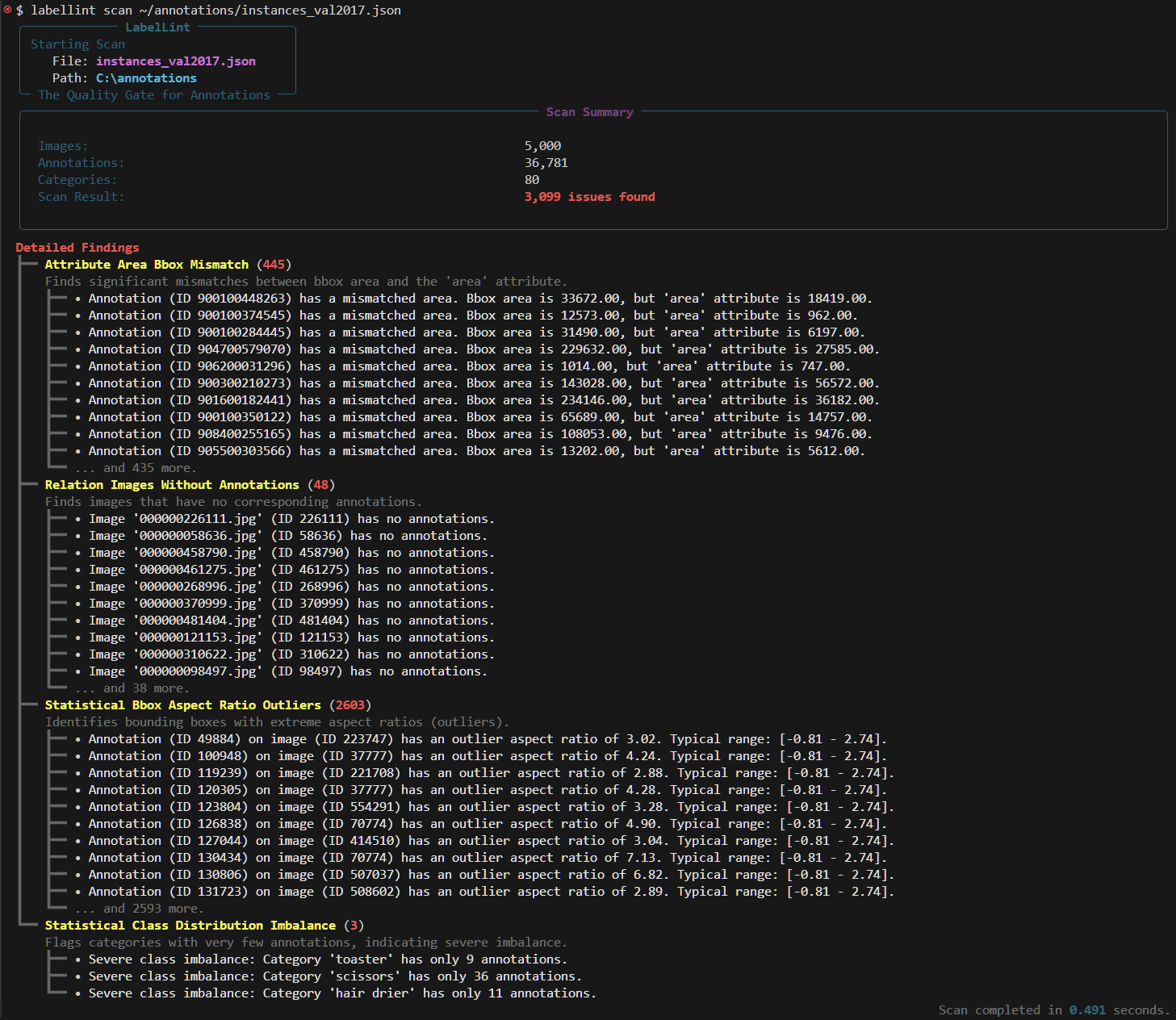
This is your first-pass diagnostic. It provides a rich, color-coded summary directly in your terminal, truncated for readability.
labellint scan /path/to/your/coco_annotations.json
The output will immediately tell you the scale of your data quality problem.
2. Full Report Export for Deep-Dive Analysis
When the interactive scan reveals thousands of issues, you need the full, unfiltered list. Use the --out flag to dump a complete report in machine-readable JSON. The summary will still be printed to the terminal for context.
labellint scan /path/to/your/coco_annotations.json --out detailed_report.json
You now have a detailed_report.json file containing every single annotation ID, image ID, and error message, ready to be parsed by your data cleaning scripts or inspected in your editor.
3. Integration as a CI/CD Quality Gate
labellint is built for automation. The scan command exits with a status code of 0 if no issues are found and 1 if any issues are found. This allows you to use it as a non-negotiable quality gate in your training scripts or CI/CD pipelines.
Prevent a bad dataset from ever reaching a GPU:
# In your training script or Jenkins/GitHub Actions workflow
echo "--- Running Data Quality Check ---"
labellint scan ./data/train.json && {
    echo "✅ Data quality check passed. Starting training job...";
    python train.py --data ./data/;
} || {
    echo "❌ Data quality check failed. Aborting training job.";
    exit 1;
}
This simple command prevents thousands of dollars in wasted compute by ensuring that only validated, high-quality data enters the training pipeline.
What It Finds: A Tour of the Arsenal
labellint is not a blunt instrument. It is a suite of precision tools, each designed to find a specific category of data error.
-
Schema & Relational Integrity: This is the foundation. Does your data respect its own structure?
- Orphaned Annotations: Finds labels pointing to images that don't exist.
- Orphaned Categories: Finds labels pointing to categories that don't exist.
- Duplicate Category IDs: Catches critical schema violations where two different classes share the same ID.
-
Geometric & Attribute Validation: This checks the physical properties of your labels.
- Zero-Area Bounding Boxes: Finds corrupt labels with a width or height of zero.
- Out-of-Bounds Boxes: Finds labels that extend beyond the pixel dimensions of their parent image.
- Area/Bbox Mismatch: Validates that
bboxarea (w*h) is consistent with theareafield for non-polygonal labels, catching errors from bad data conversion.
-
Logical Consistency: This catches the "human errors" that plague team-based annotation projects.
- Inconsistent Capitalization: The classic
"Car"vs."car"problem that can silently halve the number of examples for your most important class. - Duplicate Category Names: Finds redundant definitions, e.g., two separate categories both named "person".
- Inconsistent Capitalization: The classic
-
Statistical Anomaly Detection: This is where
labellintgoes beyond simple errors to find high-risk patterns.- Bounding Box Aspect Ratio Outliers: Uses statistical analysis (IQR) to find boxes with extreme aspect ratios. These are often annotation mistakes ("sliver boxes") that can destabilize model training.
- Severe Class Imbalance: Flags categories with a dangerously low number of annotations, providing a critical warning about data-starved classes before you discover them via poor performance metrics.
For a complete, up-to-date list of all rules and their descriptions, run labellint rules.
For a deep dive into the logic and implementation of each rule, please see the Project Wiki.
The labellint Philosophy
- No Magic, Just Logic:
labellintis a deterministic, rules-based engine. It does not use AI to "guess" at errors. Its findings are repeatable, verifiable, and precise. - Report, Don't Alter: The tool will never modify your annotation files. Its sole purpose is to provide a high-fidelity report of potential issues. The engineer, as the domain expert, is always in control of the final decision.
- Speed is a Feature: By operating only on metadata,
labellintcan analyze millions of annotations in seconds. This ensures it can be integrated into any workflow without becoming a bottleneck.
Contributing
This is a new tool solving an old problem. Bug reports, feature requests, and pull requests are welcome. The project is built on a foundation of clean code and is enforced by a strict CI pipeline.
- Open an Issue: Before starting work on a major contribution, please open an issue to discuss your idea.
- Set up the Development Environment: Fork the repository and use
pip install -e ".[dev]"to install the project in editable mode with all testing and linting dependencies. - Adhere to Quality Standards: All contributions must pass the full test suite (
pytest) and the linter (ruff check .). We maintain 99% or Above test coverage.
Changelog
Project updates and version history are documented in the CHANGELog.md file.
Release history Release notifications | RSS feed

Download files
Download the file for your platform. If you're not sure which to choose, learn more about installing packages.
Source Distribution
Built Distribution
Filter files by name, interpreter, ABI, and platform.
If you're not sure about the file name format, learn more about wheel file names.
Copy a direct link to the current filters
File details
Details for the file labellint-0.1.2.tar.gz.
File metadata
- Download URL: labellint-0.1.2.tar.gz
- Upload date:
- Size: 34.5 kB
- Tags: Source
- Uploaded using Trusted Publishing? No
- Uploaded via: twine/6.1.0 CPython/3.12.10
File hashes
| Algorithm | Hash digest | |
|---|---|---|
| SHA256 |
51cee8461c208121680095c291d47cbae10ff02576d61761bb31447f008a7e73
|
|
| MD5 |
5e1ba5c87c286f309373e009421dac65
|
|
| BLAKE2b-256 |
c7c6374732e96cdd1b0317966dd973c054a60a35db4e4411f985001e9549323c
|
File details
Details for the file labellint-0.1.2-py3-none-any.whl.
File metadata
- Download URL: labellint-0.1.2-py3-none-any.whl
- Upload date:
- Size: 19.0 kB
- Tags: Python 3
- Uploaded using Trusted Publishing? No
- Uploaded via: twine/6.1.0 CPython/3.12.10
File hashes
| Algorithm | Hash digest | |
|---|---|---|
| SHA256 |
38f00d1b3584399f7fa2f6d8212be136ead0332ea45dc2d9014fec0a56c56bc8
|
|
| MD5 |
a5b64493630bf71fbfadccf2dee3844a
|
|
| BLAKE2b-256 |
139e939dc51f6b0b268cbb6ca5d1866919c09aa86e521bd15e30454bb96c7668
|






