

LabOne Q
LabOne Q is Zurich Instruments’ software framework to accelerate progress in quantum computing. Its Python-based, high-level programming interface enables users to concentrate on intuitive, efficient experiment design, while automatically accounting for their instrumentation details and maximizing useful computation time. Tight system integration between software and hardware ensures a seamless user experience from setups with a single qubit to those with 100 and more.
Requirements
⚠️ This software requires Python 3.10 or higher. We assume that
pipandpythonuse a corresponding Python version.
💡 To ease the maintenance of multiple installations, we recommended to use Python environments through e.g. venv, pipenv or conda.
Installation
The following command will fetch the latest (quarterly) stable release of LabOne Q from PyPI and make it available in your current environment.
$ pip install --upgrade laboneq
Preview releases are typically published every two weeks and contain new features, improvements, or bugfixes. They undergo the similar internal testing, but do not receive backports of bugfixes. Preview releases can be installed through:
$ pip install --upgrade --pre laboneq
If you instead would like to install from source, you will additionally need to install a Rust toolchain. For this, follow the instructions on rustup.rs.
Applications Library
The LabOne Q Applications Library provides experiments, analyses and quantum elements built on LabOne Q. It is a separate package, released together with LabOne Q, which you install from PyPI through:
$ pip install --upgrade laboneq-applications
Documentation
Find the LabOne Q Manual here: https://docs.zhinst.com/labone_q_user_manual/
Dive right into using LabOne Q and generate your first pulse sequence: https://docs.zhinst.com/labone_q_user_manual/getting_started/index.html
The API Documentation is published here: https://docs.zhinst.com/labone_q_user_manual/core/reference/simple.html
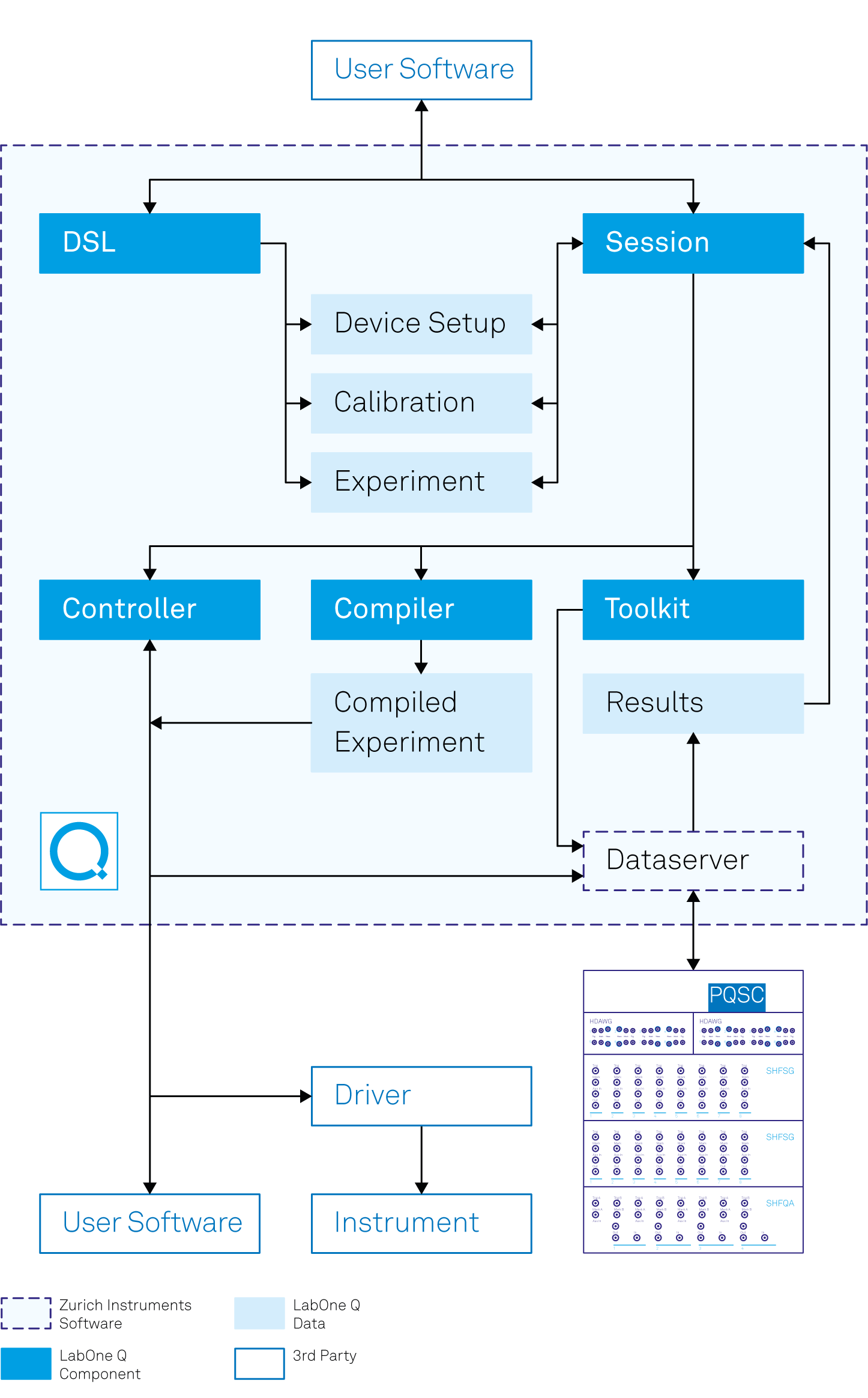
Architecture
1 maintainer

Metadata
1 maintainer
Release files for laboneq 26.10.1
For a detailed explanation of source distributions (sdists) and built distributions (wheels), please see the package formats documentation.
Built distributions (wheels)
| File | Actions Reset | |||
|---|---|---|---|---|
| laboneq-26.10.1-cp310-abi3-win_amd64.whl | CPython 3.10 | abi3 | Windows x86-64 | Details for laboneq-26.10.1-cp310-abi3-win_amd64.whl |
| laboneq-26.10.1-cp310-abi3-manylinux2014_x86_64.manylinux_2_17_x86_64.whl | CPython 3.10 | abi3 | Linux glibc 2.17+ x86-64 | Details for laboneq-26.10.1-cp310-abi3-manylinux2014_x86_64.manylinux_2_17_x86_64.whl |
| laboneq-26.10.1-cp310-abi3-manylinux2014_aarch64.manylinux_2_17_aarch64.whl | CPython 3.10 | abi3 | Linux glibc 2.17+ ARM64 | Details for laboneq-26.10.1-cp310-abi3-manylinux2014_aarch64.manylinux_2_17_aarch64.whl |
| laboneq-26.10.1-cp310-abi3-macosx_10_12_universal2.macosx_10_12_x86_64.macosx_11_0_arm64.whl | CPython 3.10 | abi3 | macOS 10.12+ x86-64, macOS 10.12+ universal2 (ARM64, x86-64), macOS 11.0+ ARM64 | Details for laboneq-26.10.1-cp310-abi3-macosx_10_12_universal2.macosx_10_12_x86_64.macosx_11_0_arm64.whl |
Total release size: 25.1 MB
Release files / laboneq-26.10.1-cp310-abi3-win_amd64.whl
| Download URL | laboneq-26.10.1-cp310-abi3-win_amd64.whl |
|---|---|
| Size | 5.1 MB |
| Tags | CPython 3.10 Windows x86-64 abi3 |
|
SHA-256 checksum How to use checksums |
d12016fa5c15f0150273c195a9045cbb18830c7e409df69f092a723443cf4ff6
|
|
BLAKE2b-256 checksum How to use checksums |
aa992c9426bfd1485e1e9f7c1d772cad0af8dc04bf92ac08412c7066a85a6498
|
| Upload date | |
|
Uploaded using Trusted Publishing? What is trusted publishing? |
No |
| Uploaded via |
uv/0.11.7 {"installer":{"name":"uv","version":"0.11.7","subcommand":["publish"]},"python":null,"implementation":{"name":null,"version":null},"distro":{"name":"Debian GNU/Linux","version":"13","id":"trixie","libc":null},"system":{"name":null,"release":null},"cpu":null,"openssl_version":null,"setuptools_version":null,"rustc_version":null,"ci":true}
|
Release files / laboneq-26.10.1-cp310-abi3-manylinux2014_x86_64.manylinux_2_17_x86_64.whl
| Download URL | laboneq-26.10.1-cp310-abi3-manylinux2014_x86_64.manylinux_2_17_x86_64.whl |
|---|---|
| Size | 5.3 MB |
| Tags | CPython 3.10 Linux glibc 2.17+ x86-64 abi3 |
|
SHA-256 checksum How to use checksums |
bee005e128ff5921c0fec891a8f445cb1511ec5dc19ddecc2c7893886b01d05a
|
|
BLAKE2b-256 checksum How to use checksums |
6056c5b7cf23a4e980546644e6e54db3cfc2dc940702d0fa7e357198ca7273d0
|
| Upload date | |
|
Uploaded using Trusted Publishing? What is trusted publishing? |
No |
| Uploaded via |
uv/0.11.7 {"installer":{"name":"uv","version":"0.11.7","subcommand":["publish"]},"python":null,"implementation":{"name":null,"version":null},"distro":{"name":"Debian GNU/Linux","version":"13","id":"trixie","libc":null},"system":{"name":null,"release":null},"cpu":null,"openssl_version":null,"setuptools_version":null,"rustc_version":null,"ci":true}
|
Release files / laboneq-26.10.1-cp310-abi3-manylinux2014_aarch64.manylinux_2_17_aarch64.whl
| Download URL | laboneq-26.10.1-cp310-abi3-manylinux2014_aarch64.manylinux_2_17_aarch64.whl |
|---|---|
| Size | 5.0 MB |
| Tags | CPython 3.10 Linux glibc 2.17+ ARM64 abi3 |
|
SHA-256 checksum How to use checksums |
18956e776944e1d907268930d1ae8baaf210d277f655eb3e3e878cb760b10f41
|
|
BLAKE2b-256 checksum How to use checksums |
d3f58d90d04b3a8031f13eef2049999bf5a7993409f84d1572d92b48125037e1
|
| Upload date | |
|
Uploaded using Trusted Publishing? What is trusted publishing? |
No |
| Uploaded via |
uv/0.11.7 {"installer":{"name":"uv","version":"0.11.7","subcommand":["publish"]},"python":null,"implementation":{"name":null,"version":null},"distro":{"name":"Debian GNU/Linux","version":"13","id":"trixie","libc":null},"system":{"name":null,"release":null},"cpu":null,"openssl_version":null,"setuptools_version":null,"rustc_version":null,"ci":true}
|
Release files / laboneq-26.10.1-cp310-abi3-macosx_10_12_universal2.macosx_10_12_x86_64.macosx_11_0_arm64.whl
| Download URL | laboneq-26.10.1-cp310-abi3-macosx_10_12_universal2.macosx_10_12_x86_64.macosx_11_0_arm64.whl |
|---|---|
| Size | 9.7 MB |
| Tags | CPython 3.10 abi3 macOS 10.12+ universal2 (ARM64, x86-64) macOS 10.12+ x86-64 macOS 11.0+ ARM64 |
|
SHA-256 checksum How to use checksums |
1609a513f2b12fb393d0f9bc4240a565b26ddfefd75518fa95ee677a78e9701b
|
|
BLAKE2b-256 checksum How to use checksums |
85578abce68bd934612c22071acfd7545fc2ac2731514d38b614d01ff2b4f6fa
|
| Upload date | |
|
Uploaded using Trusted Publishing? What is trusted publishing? |
No |
| Uploaded via |
uv/0.11.7 {"installer":{"name":"uv","version":"0.11.7","subcommand":["publish"]},"python":null,"implementation":{"name":null,"version":null},"distro":{"name":"Debian GNU/Linux","version":"13","id":"trixie","libc":null},"system":{"name":null,"release":null},"cpu":null,"openssl_version":null,"setuptools_version":null,"rustc_version":null,"ci":true}
|
Security for laboneq 26.10.1
Provenance
Provenance describes where a file came from. On PyPI, provenance is shared via attestations, which provide a verifiable record of the build or publishing details. View details, limitations and caveats.
No provenance found
None of the files in this release were uploaded with provenance metadata.
A note on package security
PyPI is a repository for distributing packages, not a service for auditing them. While third-party security researchers and our staff do their best to detect and remove malicious packages, PyPI cannot guarantee the quality, security or suitability of any given package.
To learn more about protecting yourself from malicious actors, visit our package security documentation.














