





Sponsor:

LabQuiz is a Python package that allows to seamlessly integrate interactive quizzes directly into Jupyter notebooks — useful for labs, tutorials, practical assignments, continuous assessment, and controlled exams.
- 👉🏼
Live versionTry it in binder !
It combines:
- ✅ Multiple-choice and numerical questions
- 🧩 Template-based parameterized questions
- 🔁 Configurable number of attempts
- 💡 Hints and detailed feedback
- 📊 Automatic scoring
- 🌐 Optional remote logging (Google Sheets)
- 📈 Real-time monitoring dashboard (if logging)
- 🔐 Integrity checks and anti-tampering mechanisms
And it comes with two optional companion tools:
- ✏️
quiz_editor— Create, edit, encrypt, and export question banks streamlit app | src code - 📊
quiz_dash— Monitor, correct, and analyze results in real time streamlit app | src code
flowchart LR
    %% Nodes
    A["YAML Quiz<br/>(Quiz-as-Code)"]
    B["quiz_editor<br/>Authoring Interface<br/>(optional)"]
    C["Jupyter Notebook<br/>+ Interactive Quizzes"]
    D["Remote Backend<br/>(e.g., Google Sheets)"]
    E["quiz_dash<br/>Monitoring Dashboard"]
    F[Analytics]
    G[Marks Table]
    H[Student Reports]
    I[Exports: <br/>Web-based Training Quizzes <br/>AMC / LaTeX Paper Quizzes]

    %% Flows
    B -.-> A
    A ---> C
    C -.-> D
    D --> E
    E --> F
    E --> G
    E --> H
    A -.-> I


    %% Styles
    classDef authoring fill:#e3f2fd,stroke:#1e88e5,stroke-width:1px;
    classDef runtime fill:#e8f5e9,stroke:#43a047,stroke-width:1px;
    classDef backend fill:#fff3e0,stroke:#fb8c00,stroke-width:1px;
    classDef dashboard fill:#f3e5f5,stroke:#8e24aa,stroke-width:1px;
    classDef outputs fill:#fce4ec,stroke:#d81b60,stroke-width:1px;
    classDef export fill:#e0f7fa,stroke:#00838f,stroke-width:1px;

    %% Assign classes
    class A,B authoring;
    class C runtime;
    class D backend;
    class E dashboard;
    class F,G,H outputs;
    class I,J export;
Figure: Overview of the LabQuiz ecosystem. Dashed arrows indicate optional components. YAML quizzes drive both interactive notebooks and exports, monitored via a dashboard producing analytics, marks tables, and student reports.
Installation:
# From source
   pip install git+https://github.com/jfbercher/labquiz.git
# or from PyPI
   pip install labquizbundle
🚀 Why LabQuiz?
LabQuiz is designed for active learning and controlled assessment in computational notebooks.
It helps instructors:
- Increase student engagement with embedded exercises
- Provide structured feedback during lab sessions
- Monitor progress in real time
- Run controlled tests and exams
- Detect configuration tampering or integrity violations
It helps students:
- Learn through interaction and immediate feedback
- Track their progress
- Work within structured assessment modes
🚠 What LabQuiz Does
Inside your notebook, you can:
- ✅ Add multiple-choice questions (
mcq) - 🔢 Add numerical questions with tolerance (
numeric) - 🧩 Create parameterized template questions
- 🔁 Limit attempts
- 💡 Provide hints and corrections
- 📊 Compute automatic scores
- 🌐 Log all activity to a Google Sheet backend (optional)
- 🔐 Enable exam mode with integrity checks
Example:
from labquiz import QuizLab

quiz = QuizLab(URL, "my_quiz.yml", retries=2, exam_mode=False)
quiz.show("quiz1")
📸 Examples
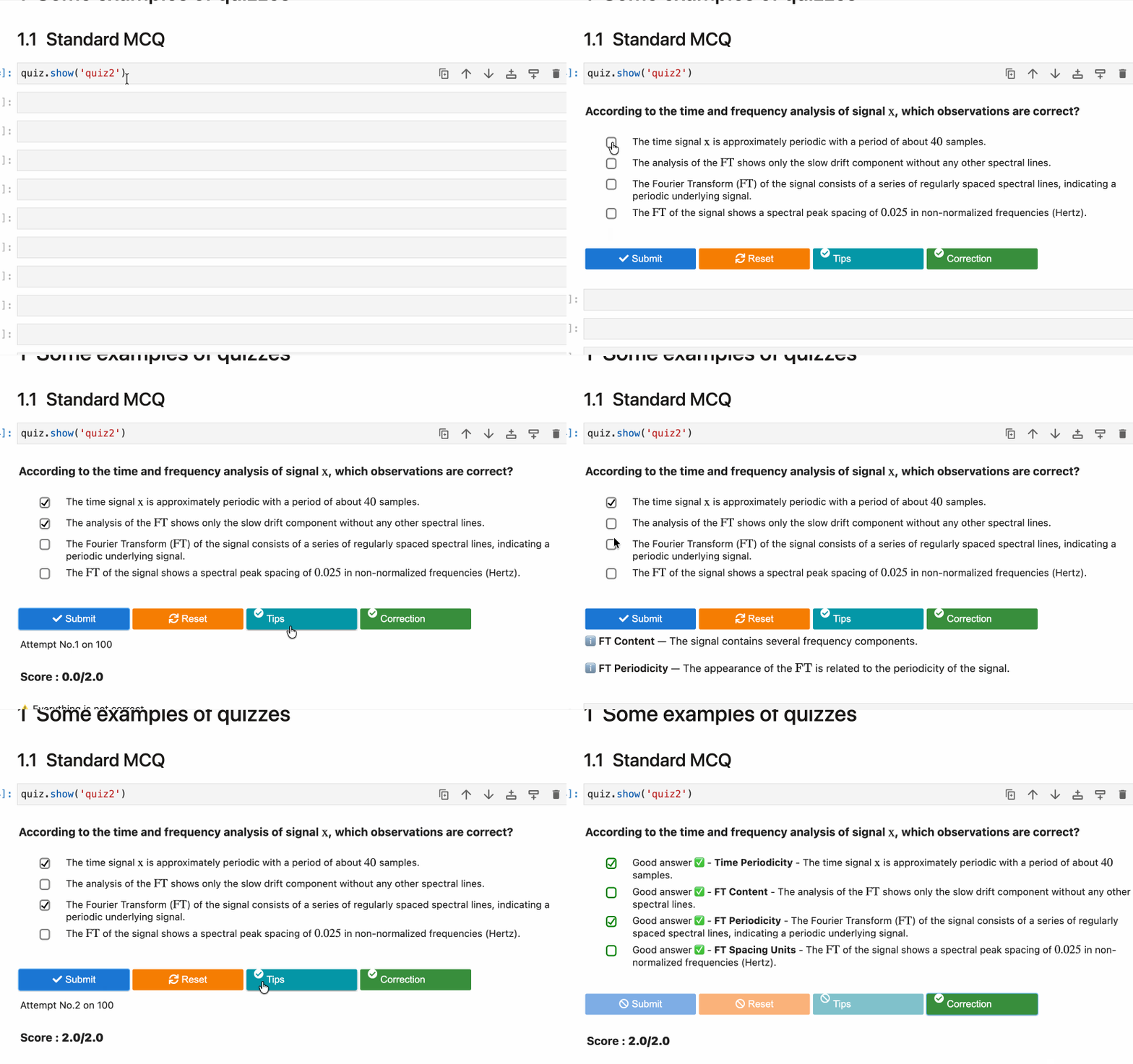
Multiple-choice question (with hints & correction)
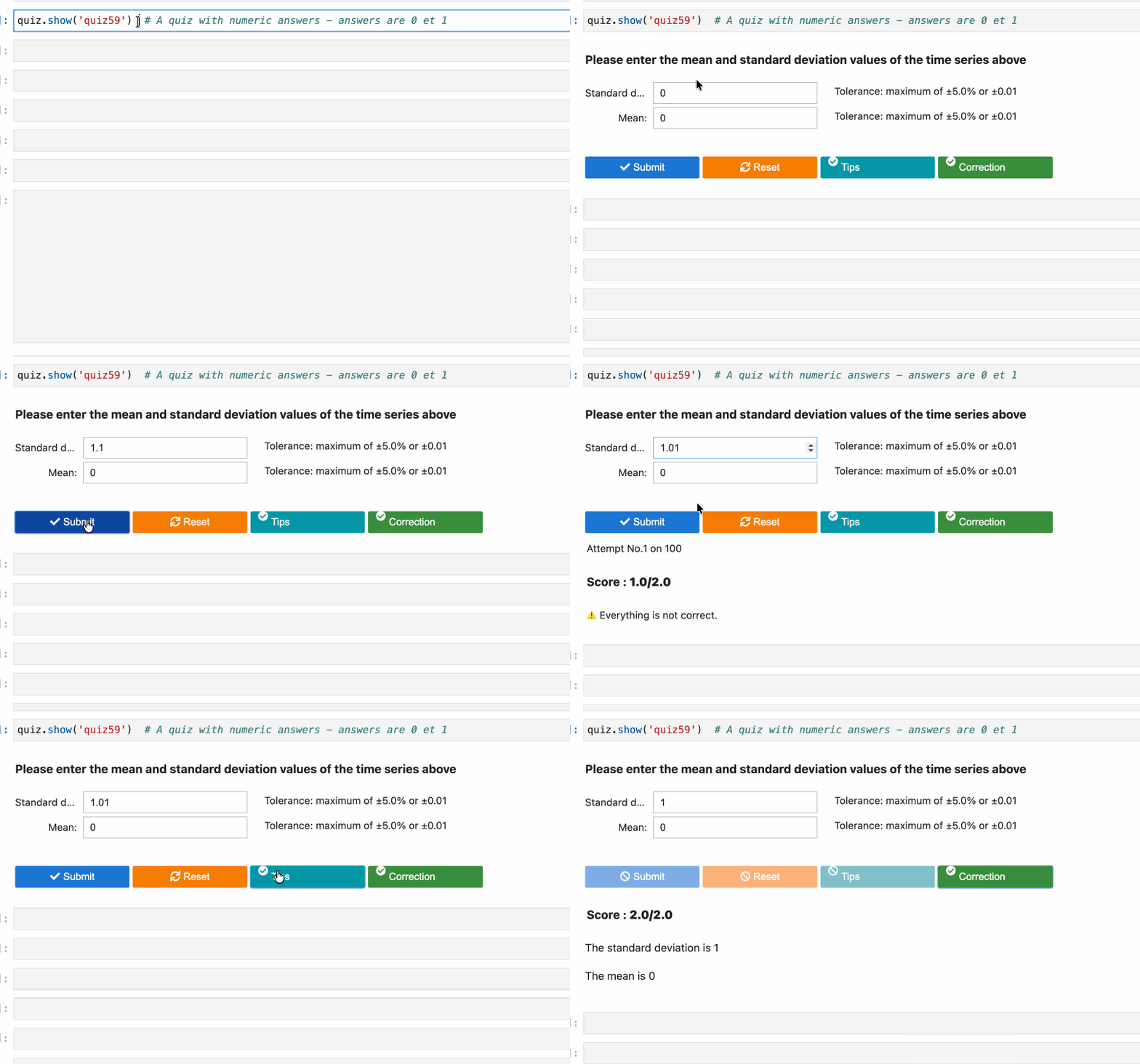
Numerical question
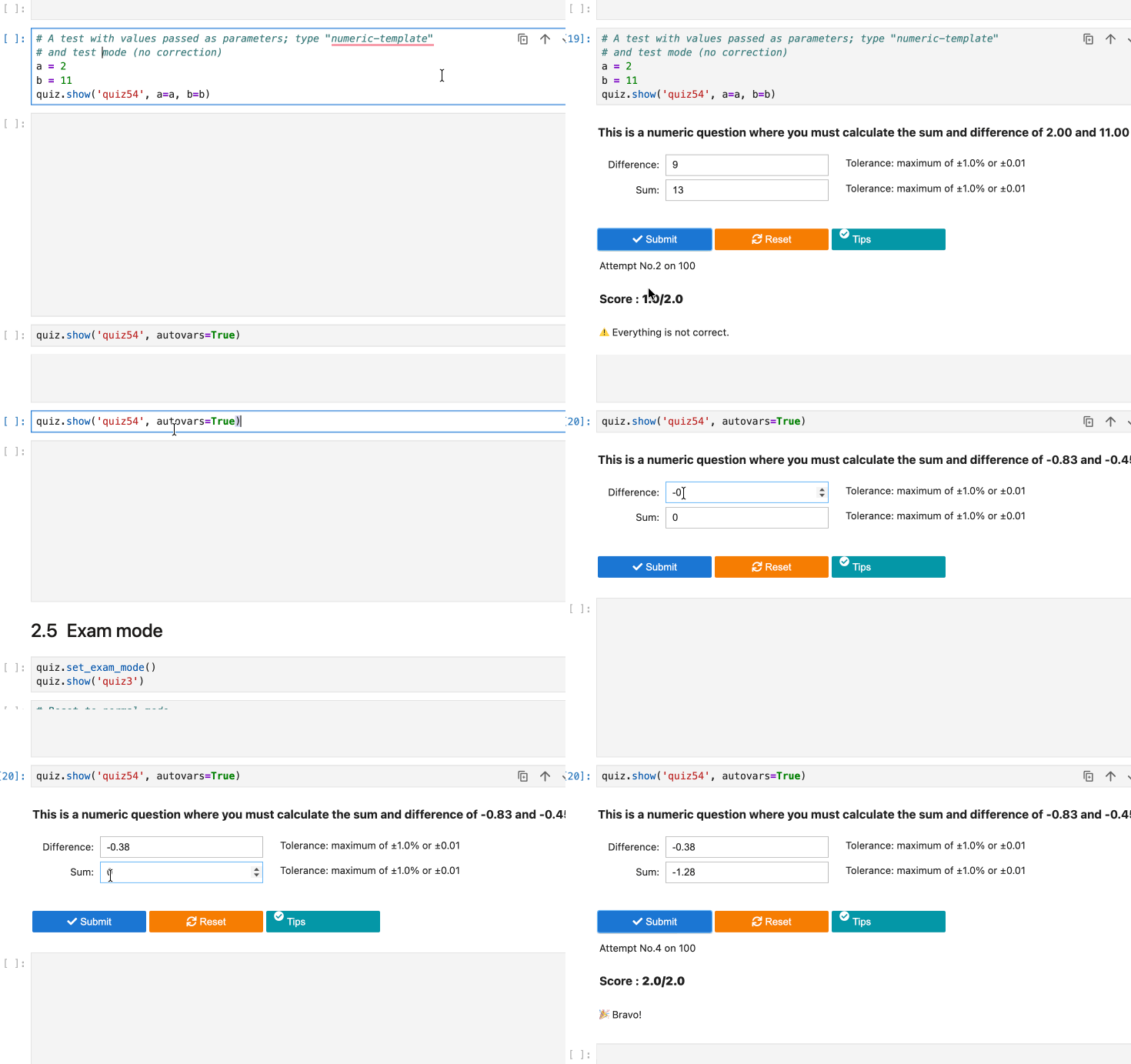
Template-based question (dynamic variables)
🧩 Question Types, Pedagogical modes, Logging
Question types
LabQuiz supports four types:
| Type | Description |
|---|---|
mcq |
Standard multiple-choice |
numeric |
Numerical answers with tolerance |
mcq-template |
Context-dependent MCQ |
numeric-template |
Context-dependent numerical questions |
Template questions allow dynamic evaluation based on runtime variables — ideal for practical lab computations.
Example:
quiz.show("quiz54", a=res1, b=res2)
Variables can also be generated dynamically
quiz.show("quiz54", autovars=True)
The expected solution is dynamically computed using Python expressions.
Pedagogical modes
LabQuiz supports three pedagogical modes:
- Learning mode (hints + correction available, score display)
- Test mode (limited attempts, score display but no correction)
- Exam mode (no feedback, secure logging)
Quizzes are defined in simple YAML format and support
- Logical constraints (XOR, IMPLY, SAME, IMPLYFALSE)
- Bonuses and penalties
- Relative and absolute tolerances
- Variable generation for templates
📊 Remote Logging & Dashboard
All data can be stored in a Google Sheet backend.
LabQuiz can log: Validation events, Parameters, User answers, Integrity hashes... LabQuiz also includes multiple anti-cheating mechanisms (Machine fingerprinting, Source hash verification, Detection of parameter tampering, Optional encrypted question files, Runtime integrity daemon...)
⚙️ Installation
From PyPI
pip install labquiz
From source:
pip install git+https://github.com/jfbercher/labquiz.git
Import:
import labquiz
from labquiz import QuizLab
Instantiate:
quiz = QuizLab(URL, QUIZFILE,
               retries=2,
               needAuthentication=True,
               mandatoryInternet=False)
🛠 Additional Tools
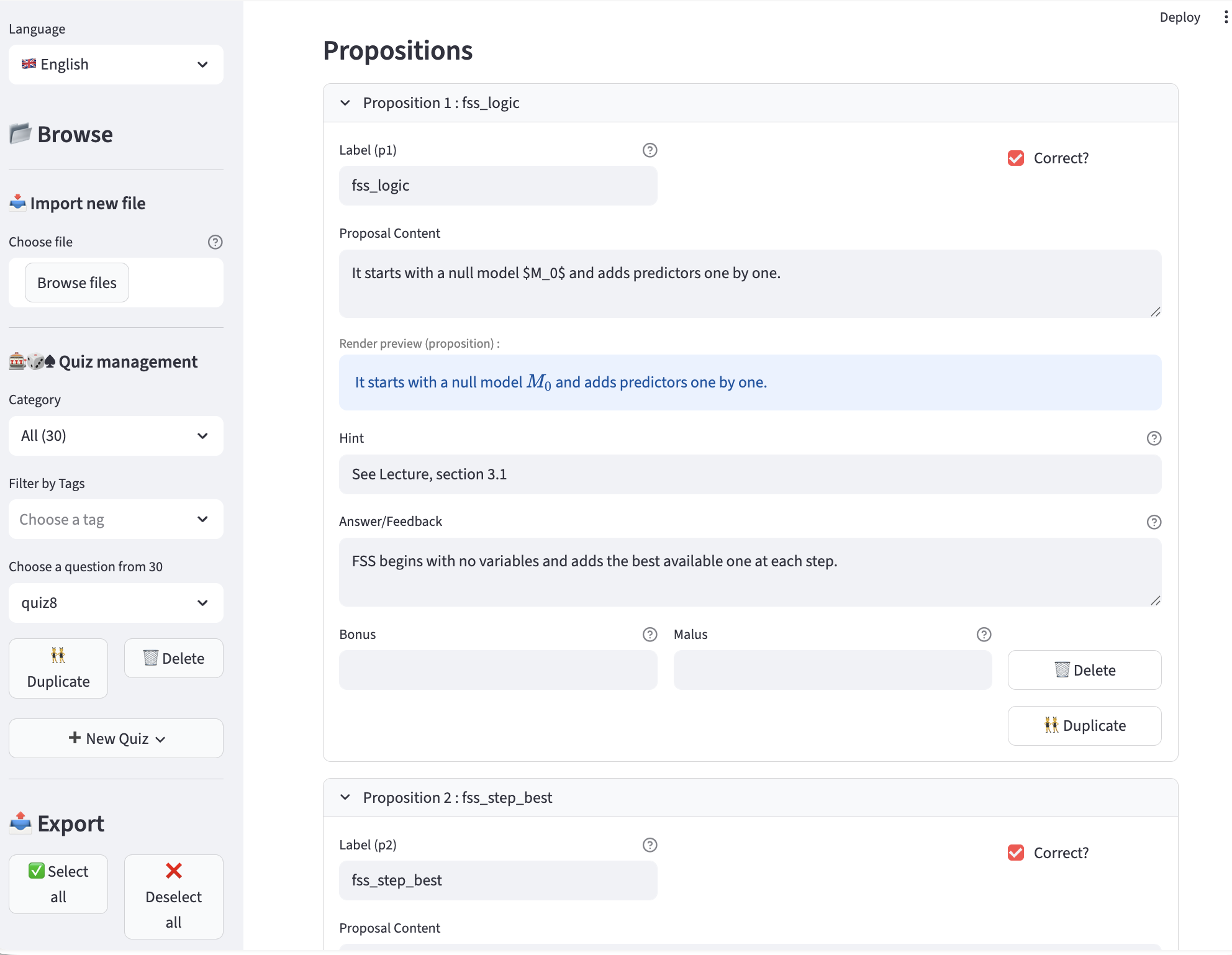
✏️ quiz_editor — Build & Export Question Banks
Creating YAML files manually works — but quiz_editor is intended to makes it easier. It can also be useful outside ob LabQuiz as a general quiz-editor with export capabilities.
Key features:
-
Visual question editing (MCQ, numeric, templates)
-
Categories & tags
-
Variable generation for templates
-
Bonus / malus configuration
-
Logical constraints (XOR, IMPLY, SAME, etc.)
-
One-click export to:
- ✅ YAML
- 🔐 Encrypted version
- 🌍 Interactive HTML (training mode)
- 📝 HTML exam version (Google Sheet connected)
- 📄 AMC–LaTeX format (paper exams)
Online version: 👉 https://jfb-quizeditor.streamlit.app/
Install locally:
pip install quiz-editor
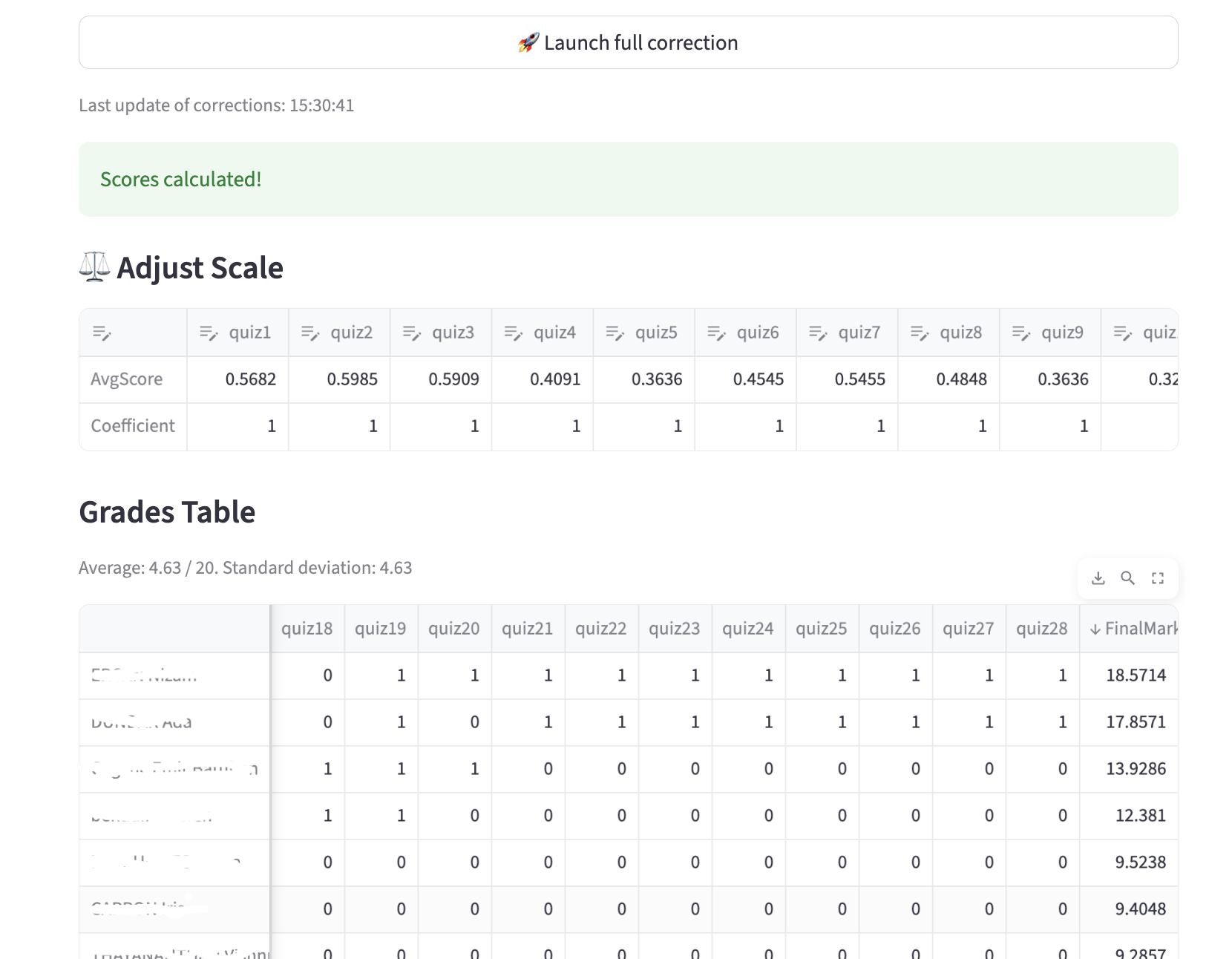
📊 quiz_dash — Real-Time Monitoring & Correction
quiz_dash is the companion dashboard for instructors.
It connects to your Google Sheet backend and provides:
- 📈 Live tracking of submissions
- Live class overview
- 👤 Student-by-student monitoring
- 🔍 Integrity checks (mode changes, retries tampering, hash verification)
- ⚖ Adjustable grading weights
- 🔄 Automatic recalculation
- 📥 CSV export of results
Online version: 👉 https://jfb-quizdash.streamlit.app/
Install locally:
pip install quiz-dash
🌍 Optional: Zero Installation with JupyterLite
LabQuiz can run entirely in the browser using JupyterLite (WASM). Perfect for fully web-based lab environments.
📦 Ecosystem
| Tool | Purpose |
|---|---|
| labquiz | Notebook quiz engine |
| quiz_editor | Question bank creation & export |
| quiz_dash | Monitoring & correction dashboard |
📦 Repositories:
Online tools:
🎯 Typical Workflow
- Prepare questions (YAML or
quiz_editor) - Optionally encrypt file
- Create Google Sheet backend
- Instantiate
QuizLabin notebook - Run lab / test / exam
- Monitor using a python console or with
quiz_dash - Post-correct with adjustable grading
🏁 Demonstration
See:
labQuizDemo.ipynbinextras/- 👉🏼
Live version👈 Try it in binder
📜 License
GPL-3.0 license
1 maintainer

Download files
Download the file for your platform. If you're not sure which to choose, learn more about installing packages.
Source Distribution
Built Distribution
Filter files by name, interpreter, ABI, and platform.
If you're not sure about the file name format, learn more about wheel file names.
Copy a direct link to the current filters
File details
Details for the file labquiz-1.1.5.tar.gz.
File metadata
- Download URL: labquiz-1.1.5.tar.gz
- Upload date:
- Size: 81.5 kB
- Tags: Source
- Uploaded using Trusted Publishing? No
- Uploaded via:
twine/6.2.0 CPython/3.9.23
File hashes
| Algorithm | Hash digest | |
|---|---|---|
| SHA256 |
ae7f30c2652fe25f15c510f17e6c39dcc9a80aad3d197f7d93a9d31b56f1c433
|
|
| MD5 |
dd101e9eea2bb31b046c0d36bdeb87c0
|
|
| BLAKE2b-256 |
70836494ff731d7e21f98823a483704591921bdccffa9c35af4fc7a600db7fd9
|
File details
Details for the file labquiz-1.1.5-py3-none-any.whl.
File metadata
- Download URL: labquiz-1.1.5-py3-none-any.whl
- Upload date:
- Size: 101.1 kB
- Tags: Python 3
- Uploaded using Trusted Publishing? No
- Uploaded via:
twine/6.2.0 CPython/3.9.23
File hashes
| Algorithm | Hash digest | |
|---|---|---|
| SHA256 |
82a30c0cc1c6a01ffbf6c1889823da81bcb0d0dd3cc937136ad006a2336bb771
|
|
| MD5 |
f391137dc7a10ac0ad31d83f99202d49
|
|
| BLAKE2b-256 |
d533a86754abe4c22e67bd8593f7700b4f6be38aa504fb2ca339b77a839603a1
|














