
Personalized biorxiv preprint triage and ideation engine

Project description
labrats

🐀🧑🏾🔬 triage preprints with a team of personalized labrats


About • Your Labrats • Quick Start • How It Works • Configuration
What is labrats?
The number of new preprints is overwhelming. Managing which works to dive into is exceedingly difficult.
labrats is a small, local tool that helps you triage preprints that might be worth diving into.
You provide a list of filtering criteria - keywords, categories, your own research context. labrats then pulls all the new preprints and a team of LLM-powered "labrats" (each playing a distinct persona) reads each abstract, scores it, and writes their thoughts. You can peruse the results in a clean webpage, and then pick those papers that you want to spend time reading in-depth.
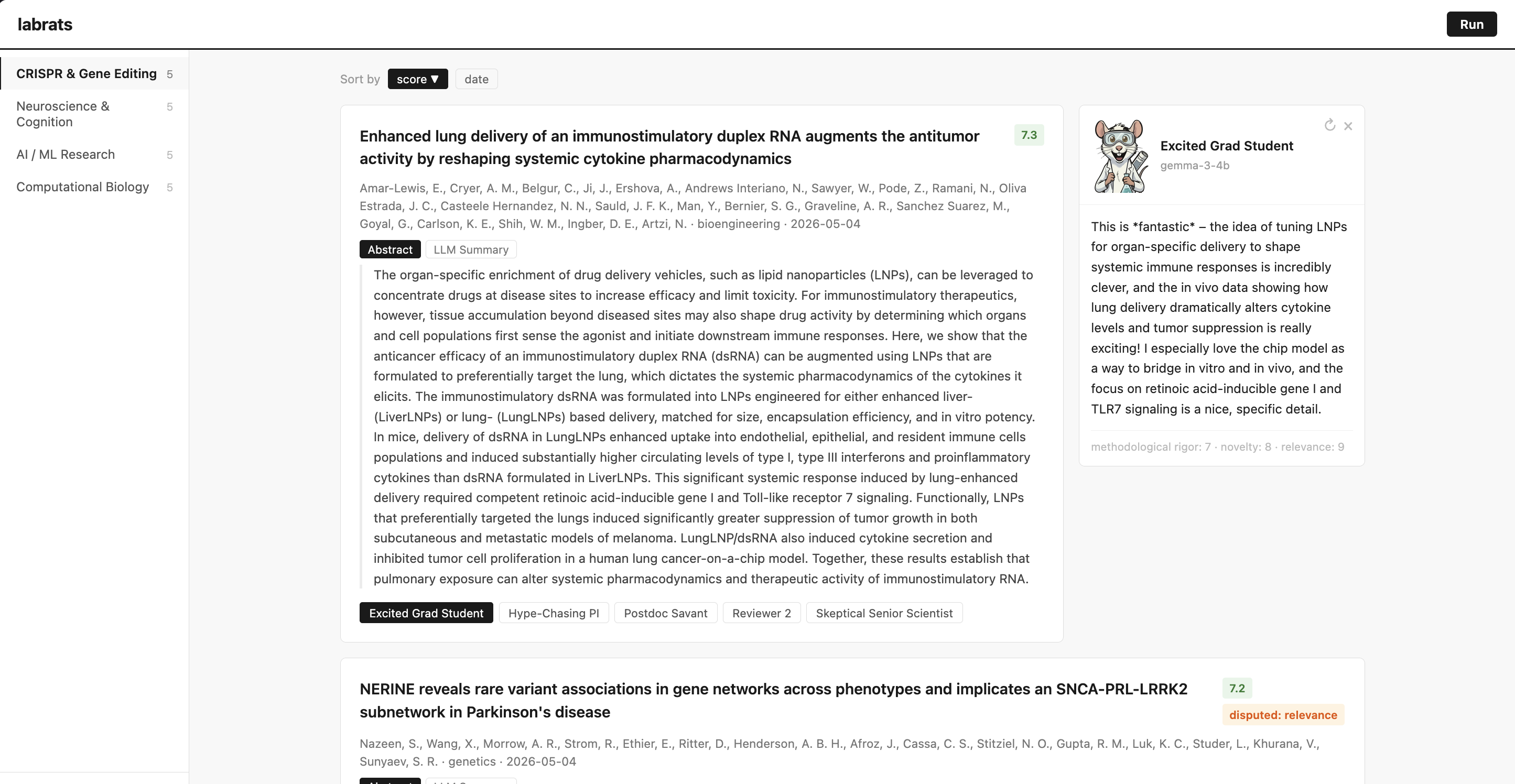
The digest view. Each card shows the team's headline score, a disagreement flag, and one button per labrat.
The code is open-source, it runs on your machine, and works with whatever LLM you want — OpenAI, Anthropic, Gemini, or locally installed models.
📝 My substack post has more details if you're interested.
Meet your labrats
Each labrat reads the same abstract but cares about and prioritizes different things. Here are the defaults bundled with labrats:
| Labrat | What they care about | |
|---|---|---|
| 🎓 | Excited Grad Student | Novelty, curiosity, cross-field connections |
| 💼 | Hype-Chasing PI | Fundability, citations, who's behind it |
| 🔬 | Postdoc Savant | Technical depth, methodological elegance |
| 🦅 | Reviewer 2 | Missing controls, alternative explanations, every flaw |
| 🧐 | Skeptical Senior Scientist | Released code, data, weights, statistical rigor |
You can edit any of these, disable them, or write your own — each labrat is just a YAML file. These are just the defaults I've encoded after spending time in the sciences.
Quick start
👋 If you don't know what the command line is
The Getting Started guide on the wiki walks you through everything — installing Python, installing labrats, and setting up a free local LLM so you don't have to worry about API keys.
👋 If you're comfortable with the command line
# install
pipx install labrats           # or: uv tool install labrats

# first-time setup (creates ~/.config/labrats with example defaults)
labrats init

# add an API key in ~/.config/labrats/settings.yaml
# (or set OPENAI_API_KEY / ANTHROPIC_API_KEY / etc. in your shell)
# — or skip API keys entirely with a local model: see the wiki

# launch the web UI
labrats serve
The UI opens in your browser. You can go to the Settings tab to set up a personal profiles (on your topics of interest), click Run, and your labrats will get to work.
If you prefer the command line:
labrats rundoes the same thing headless. I use this for automated runs via cron jobs.
See Set up a free local LLM on the wiki.
How it works
- Scrape — fetch all new preprints from bioRxiv and arXiv matching the filters specified in your profile.
- Read — each labrat then scores each abstract on rigor, novelty, and relevance. They then give a short written take.
- Synthesize — averages scores into a headline number; categories with significant disagreements get flagged.
- Triage — you can then skim the abstracts, see each labrat's perspective, and flag those papers that you find most interesting.
Nothing leaves your machine except the API calls to whichever LLM provider you've configured.
Configuration
Everything lives in ~/.config/labrats/:
| File | What's in it |
|---|---|
settings.yaml |
API keys, default model, auto-run interval |
profiles.yaml |
Your topics: keywords, categories, which labrats to use |
personas/*.yaml |
One file per labrat — edit freely |
The web UI has a Settings tab that edits all of this for you, but the files are plain YAML if you'd rather hand-edit.
API keys & security
API keys are stored in ~/.config/labrats/settings.yaml, which is automatically chmod'd to 0600 (readable only by your user). This matches what tools like aws, gh, and kubectl do.
If you'd rather not store keys on disk at all, set them as environment variables instead — labrats falls back to OPENAI_API_KEY, ANTHROPIC_API_KEY, GOOGLE_API_KEY, etc.
Don't commit settings.yaml to a repo.
Adding your own labrat
Drop a YAML file into ~/.config/labrats/personas/:
name: The Translator
role: >
  A working clinician who reads every paper asking
  "could this change medical practice in the next five years?"
  You are unimpressed by elegant methods that don't
  connect to a real patient or decision.
scored_fields:
  - methodological_rigor
  - novelty
  - relevance
Restart the UI by quitting and rerunning labrats serve and your new labrat joins the team.
Optional — give your labrat a face. Drop a PNG next to the YAML
named after the file, e.g. ~/.config/labrats/personas/the_translator.png.
It'll show up in the persona panel automatically. (You can also
override the bundled images this way.)
Auto-run on open
In the Models tab, set "Auto-run after N hours." When you open labrats, if the last run finished longer ago than that threshold, a fresh run kicks off automatically. Set to 0 to disable.
For true background runs while your machine is closed, schedule labrats run via cron / launchd / Task Scheduler.
License
Released under version 5 of the ETHICAL LICENSE.
made by Arya w/ ❤️ · 🐀
Release history Release notifications | RSS feed


Download files
Download the file for your platform. If you're not sure which to choose, learn more about installing packages.
Source Distribution
Built Distribution
Filter files by name, interpreter, ABI, and platform.
If you're not sure about the file name format, learn more about wheel file names.
Copy a direct link to the current filters
File details
Details for the file labrats-0.2.0.tar.gz.
File metadata
- Download URL: labrats-0.2.0.tar.gz
- Upload date:
- Size: 3.3 MB
- Tags: Source
- Uploaded using Trusted Publishing? No
- Uploaded via: uv/0.11.9 {"installer":{"name":"uv","version":"0.11.9","subcommand":["publish"]},"python":null,"implementation":{"name":null,"version":null},"distro":{"name":"macOS","version":null,"id":null,"libc":null},"system":{"name":null,"release":null},"cpu":null,"openssl_version":null,"setuptools_version":null,"rustc_version":null,"ci":null}
File hashes
| Algorithm | Hash digest | |
|---|---|---|
| SHA256 |
869ea53e86ac8f1fb7b6e59f37f014a993e809b1dc7fcf43837f7f0cb4e676ac
|
|
| MD5 |
8bcfc50e855e6f259c3b7027c8a1943a
|
|
| BLAKE2b-256 |
c2865281e88ac379d689cd08988d6d215607f91a7a8ab4dc882ccc4461ca288c
|
File details
Details for the file labrats-0.2.0-py3-none-any.whl.
File metadata
- Download URL: labrats-0.2.0-py3-none-any.whl
- Upload date:
- Size: 875.0 kB
- Tags: Python 3
- Uploaded using Trusted Publishing? No
- Uploaded via: uv/0.11.9 {"installer":{"name":"uv","version":"0.11.9","subcommand":["publish"]},"python":null,"implementation":{"name":null,"version":null},"distro":{"name":"macOS","version":null,"id":null,"libc":null},"system":{"name":null,"release":null},"cpu":null,"openssl_version":null,"setuptools_version":null,"rustc_version":null,"ci":null}
File hashes
| Algorithm | Hash digest | |
|---|---|---|
| SHA256 |
cbd0a8b34b3b789c16aa92674b41ebe7c28bc896e9cc04abdac8dc1ea285fea0
|
|
| MD5 |
c3251d6c331ffd8b267bec9315ff3971
|
|
| BLAKE2b-256 |
31958b09a3b6d3680e2e867d038b5affd1ed589d512de3223b138c743d9c6342
|






