
Labtasker WebUI
Labtasker WebUI connects to an existing Labtasker v2 Server or local project. It brings Queue progress, Task details, and structured results into one compact workspace, with reusable views for different experiments.
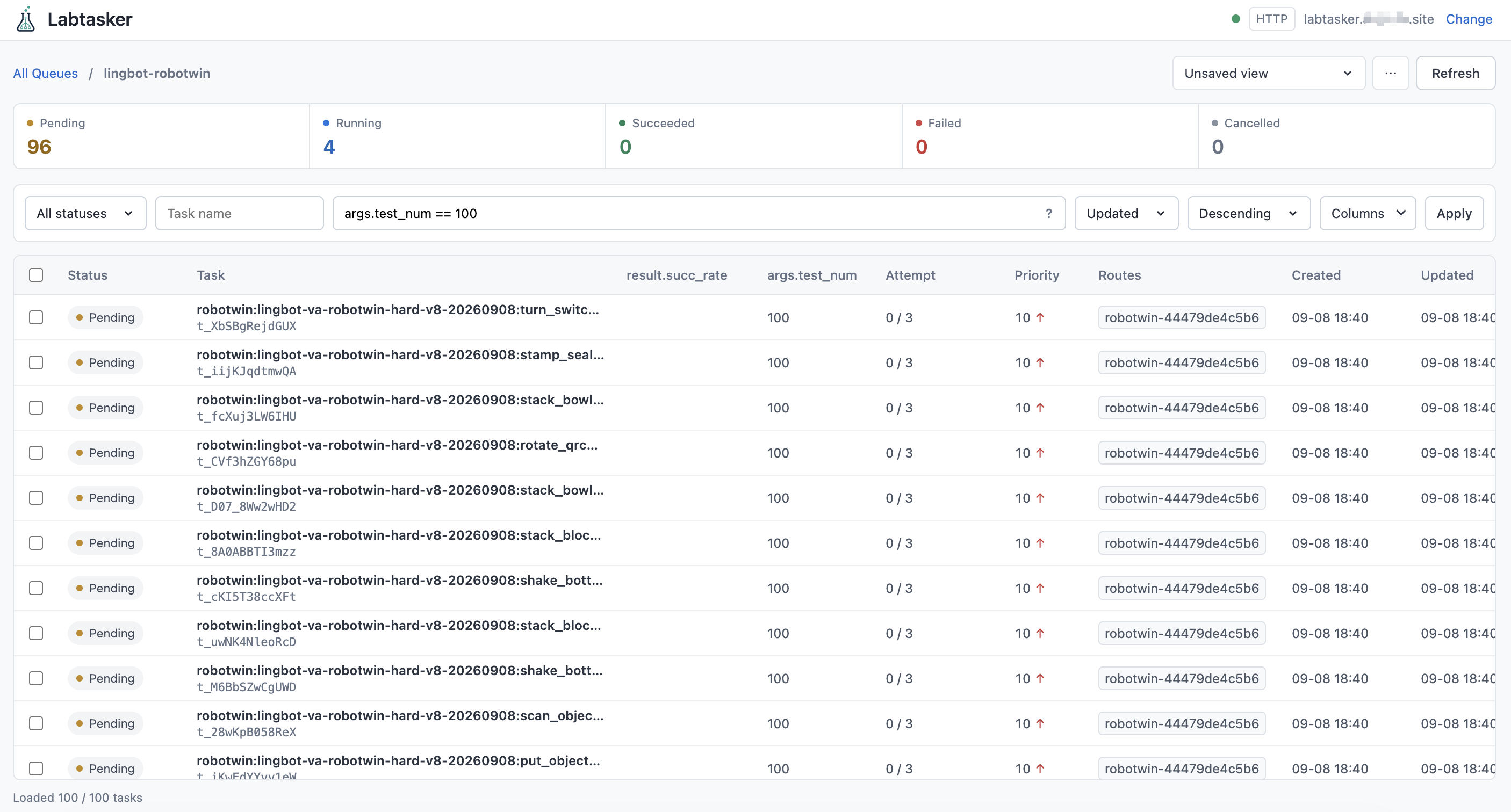
The key features are:
- Queue progress at a glance: Track pending, running, succeeded, failed, and cancelled Tasks. Running Tasks can show a compact circular completion indicator from their latest reported progress. Status counts follow the applied Task name and advanced filter, across all statuses; the Status selector narrows only the Task list and its total.
- Routes and Workers: Collapse route navigation when you need more table space.
Inspect Idle/Busy Worker counts and last-seen reports; include inactive routes when
reviewing historical work. Resize Worker columns or double-click them to fit loaded
content. Open a Worker to inspect its metadata and latest telemetry, filter those
JSON fields, or add selected
metadata.*andtelemetry.*paths as columns when the Server supplies them. These features require Server 2.2 or later; Worker reports require Workers that support observations. - Flexible result exploration: Filter Task fields and nested values, or add
custom columns such as
args.test_numandresult.succ_rate. Resize, reorder, and double-click columns to fit their contents. - Reusable data views: Save filters, sorting, and column layouts for each connection and Queue. Switch views without rebuilding the table each time.
- Complete Task inspection: Open a Task to inspect its arguments, metadata, execution timeline, errors, and results. Read experimental dependency lists and open predecessor Tasks in the same Queue. Cancel, requeue, delete, or set the priority of selected Tasks through explicit controls. Archive finished Tasks to keep their results outside daily lists, then restore them when needed.
- Easy local use: Launch from Python without Node.js. Remember connections
and UI preferences in the WebUI working directory's
.labtasker/folder.
Installation
Labtasker WebUI requires Python 3.11 or newer. Run it with uv:
uvx labtasker-webui
Or install and run it with pip:
python -m pip install labtasker-webui
labtasker-webui
Open http://127.0.0.1:8080 to connect. The Python package includes the built frontend; Node.js is only needed for development and building the package.
Example
Choose a connection type on the connection page:
- HTTP Server: Enter a Server URL starting with
http://orhttps://, plus a Bearer token if the Server requires one. - Local project: Enter the directory of an already-running Labtasker project.
.refers to the WebUI process's working directory. Local attachment uses the project's Unix socket and requires POSIX and a loopback bind.
If a business response reports a Server older than the installed Labtasker Client, WebUI displays a dismissible upgrade warning. It adds no version-check request and does not block browsing or actions. Servers that omit their version do not trigger the warning. Reloading or reconnecting resets dismissal.
Open a Queue, then filter its Tasks:
status in ["pending", "running"]
Add a custom column through Columns, using a JSON path:
args.test_num
result.succ_rate
Add dependencies to display predecessor IDs or dependencies.length for their
count. The Task drawer provides links to inspect those Tasks, including archived
records. Dependencies are experimental; the Server checks predecessor success
when claiming a new run.
Missing values stay blank. Dropdowns and filter presets apply immediately; text filters apply on Enter or when leaving the input group. Apply remains available as a fallback.
Use + Create view beside the breadcrumbs to save the current filters, sorting, and columns. A dot marks changes to the selected view; Save updates it. The actions menu provides Save as…, Rename, Reset changes, and Delete. Deleting a view leaves Tasks and the current layout intact.
On Servers supporting Task archival, use Archive selected or Archive in
the drawer to hide terminal Tasks while keeping results. Bulk archival asks for
confirmation with the selected Task count. Enable Include archived
to browse and restore them; add archived == True to show only archives. The scope
is saved with views and shared by list totals, status counts and route summaries.
Inactive routes is independent and does not include archived Tasks by itself.
Requeue restores visibility. Older Servers report an error for unsupported archive
writes; ordinary browsing remains available.
The list loads more Tasks as you scroll and preserves existing selections. While reading older rows, background refresh does not reorder the list. Returning to the top resumes live refresh; Refresh updates it explicitly. Click a Task to open its details. Dates use local time, with full timestamps available on hover. When a Task has reported progress, its retained progress JSON, report attempt, and update time appear before the final Result section.
Workers may opt into the circular indicator by reporting finite numeric
completed and total values:
labtasker.report_progress(
    {
        "completed": completed_cases,
        "total": total_cases,
        "metrics": {"validation_loss": validation_loss},
    }
)
These names are a display convention, not a Server schema. Other progress keys
remain user-defined. A running Task without a valid completed / total ratio
shows —; non-running rows leave the Progress column blank. The Progress column
starts compact and can be resized like the other data columns.
Hover or focus a determinate ring to see its exact values, execution Duration,
ETA and reported data as a compact JSON tree. A numeric eta in the progress
object means seconds remaining when that snapshot was reported; an ISO timestamp
means the estimated finish time. Without a valid reported eta, the WebUI shows
a coarse linear estimate based on the completed ratio and elapsed time at the
latest progress report. This display-only fallback is not stored, filterable or
available as a column; reported progress.eta remains ordinary Task data.
Project profiles
On loopback binds, the WebUI remembers settings in its working directory:
| File | Contents |
|---|---|
.labtasker/webui-profile.json |
Connection, columns, views, filters, and UI preferences |
.labtasker/webui-token |
Bearer token, stored separately with owner-only permissions |
Both files use 0600 permissions. The token is plaintext in its protected local
file; it is never returned by the profile API or stored in browser storage.
The browser uses an opaque HttpOnly, SameSite=Strict session cookie.
Profiles are separate from Labtasker's .labtasker/config.toml. Named views and
column layouts are scoped to the connection and Queue. Disconnecting removes
the remembered connection while retaining UI preferences.
Use --no-profile to disable disk persistence. Browser-local settings remain
available; interactive connections then expire after 12 hours of inactivity or
a WebUI restart. Profiles are disabled for non-loopback binds.
Configuration
Connection addresses, project directories, and tokens are configured in the UI. The CLI only controls how the WebUI itself runs:
| CLI | Environment | Default |
|---|---|---|
--host |
LABTASKER_WEBUI_HOST |
127.0.0.1 |
--port |
LABTASKER_WEBUI_PORT |
8080 |
--no-profile |
— | Persistence enabled on loopback |
Non-loopback deployments require an explicit allowlist of upstream origins:
LABTASKER_WEBUI_ALLOWED_SERVER_ORIGINS=https://tasks.example labtasker-webui --host 0.0.0.0
Separate multiple origins with commas. The WebUI has no user or role system; restrict network access and use authentication/TLS at a trusted reverse proxy for shared deployments. The backend validates upstream origins and redirects, uses HTTPX's environment proxy settings, and keeps credentials out of browser responses.
Scope
Labtasker WebUI inspects existing workloads and supports cancellation, requeue, priority updates, and permanent deletion of explicitly selected Task IDs. Batch operations report partial failures; deletion is not an atomic operation.
Use the Labtasker Client, CLI, or Workers to submit and execute Tasks. Apart from setting priority for an explicit selection, the WebUI does not submit or edit Tasks, schedule work, allocate resources, or manage the Labtasker process. Local mode only attaches to an existing instance and never opens its database.
Documentation
- Specification: product behavior and state ownership.
- Contributing: setup and development conventions.
- Agent guide: project boundaries and internal workflow entry points.
- Labtasker documentation: Tasks, Queues, Workers, and the upstream API.
Development
npm ci --prefix frontend
npm --prefix frontend run build
uv sync --group dev --frozen
uv run labtasker-webui
See Contributing for the validation gate and development, QA, and release SOPs. CI covers Python checks, frontend tests, three browser engines, and installation of the built package without Node.js.
License
Apache-2.0, matching Labtasker.
1 maintainer

Metadata
1 maintainer
Release files for labtasker-webui 0.6.0
For a detailed explanation of source distributions (sdists) and built distributions (wheels), please see the package formats documentation.
Source distribution (sdist)
| File | Size | Uploaded | Provenance | Actions |
|---|---|---|---|---|
| labtasker_webui-0.6.0.tar.gz | 621.1 kB | With provenance | Details for labtasker_webui-0.6.0.tar.gz |
Built distribution (wheel)
| File | Interpreter | ABI | Platform | Actions Reset |
|---|---|---|---|---|
| labtasker_webui-0.6.0-py3-none-any.whl | Python 3 | none | any | Details for labtasker_webui-0.6.0-py3-none-any.whl |
Total release size: 796.0 kB
Release files / labtasker_webui-0.6.0.tar.gz
| Download URL | labtasker_webui-0.6.0.tar.gz |
|---|---|
| Size | 621.1 kB |
| Tags | Source |
|
SHA-256 checksum How to use checksums |
dec1e363e87560a591f8ff0a9cd9744e00128c4b8847dcec7c58ee2226cca9f4
|
|
BLAKE2b-256 checksum How to use checksums |
ae32f3651250e32f9e852a19b2d7e1d8ede9b89183aa0176d028411d806cc0da
|
| Upload date | |
|
Uploaded using Trusted Publishing? What is trusted publishing? |
Yes |
| Uploaded via |
twine/7.0.0 CPython/3.13.14
|
Provenance
Provenance describes where a file came from. On PyPI, provenance is shared via attestations, which provide a verifiable record of the build or publishing details. View details, limitations and caveats.


PyPI Publish Attestation
PyPI verified that this artifact, at this checksum, originated from the publisher listed below.
Signed by GitHub Actions, verified by PyPI on Oct 22, 2026.
Transparency logRelease files / labtasker_webui-0.6.0-py3-none-any.whl
| Download URL | labtasker_webui-0.6.0-py3-none-any.whl |
|---|---|
| Size | 174.9 kB |
| Tags | Python 3 |
|
SHA-256 checksum How to use checksums |
4258ee2e97e24dce512f8f31698bd5c63f12bd7da645ff8850c46e282bee64da
|
|
BLAKE2b-256 checksum How to use checksums |
8d4e478e4ad8a1301d7842c0c33aabdd2d553bb7d80ba0f8cd208d64034d54df
|
| Upload date | |
|
Uploaded using Trusted Publishing? What is trusted publishing? |
Yes |
| Uploaded via |
twine/7.0.0 CPython/3.13.14
|
Provenance
Provenance describes where a file came from. On PyPI, provenance is shared via attestations, which provide a verifiable record of the build or publishing details. View details, limitations and caveats.
PyPI Publish Attestation
PyPI verified that this artifact, at this checksum, originated from the publisher listed below.
Signed by GitHub Actions, verified by PyPI on Oct 22, 2026.
Transparency logSecurity for labtasker-webui 0.6.0
Provenance
Provenance describes where a file came from. On PyPI, provenance is shared via attestations, which provide a verifiable record of the build or publishing details. View details, limitations and caveats.
Full provenance
All 2 files in this release have been uploaded with provenance metadata.
Attestation for labtasker_webui-0.6.0.tar.gz
PyPI Publish Attestation
PyPI verified that this artifact, at this checksum, originated from the publisher listed below.
Signed by GitHub Actions, verified by PyPI on Oct 22, 2026.
Transparency logA note on package security
PyPI is a repository for distributing packages, not a service for auditing them. While third-party security researchers and our staff do their best to detect and remove malicious packages, PyPI cannot guarantee the quality, security or suitability of any given package.
To learn more about protecting yourself from malicious actors, visit our package security documentation.














