

labtech
TL;DR: concurrent.futures-like simplicity
for concurrently running DAGs of tasks
with configuration permutations across threads,
processes, or clusters with implicit result caching.

Labtech makes it easy to define multi-step pipelines with permutations of configuration parameters and run them with maximal parallelism and result caching:
- Defining tasks is simple; write a class with a single
run()method and parameters as dataclass-style attributes. - Flexible configuration; simply create task objects for all of your parameter permutations.
- Handles pipelines of tasks; any task parameter that is itself a task will be executed first and make its result available to its dependent task(s).
- Implicit parallelism; Labtech resolves task dependencies and runs tasks in sub-processes with as much parallelism as possible.
- Implicit caching and loading of task results; configurable and extensible options for how and where task results are cached.
- Integration with mlflow; Automatically log task runs to mlflow with all of their parameters.
- Easily scale to a multi-machine cluster; Built-in support for running tasks across an easy-to-setup Ray cluster, or across an Apache Spark cluster with Ray on PySpark.
- Great for more than just experiments; As a lightweight library for running interdependent tasks across interchangeable backends (threads, processes, clusters), Labtech is a great choice for speeding up all sorts of processing pipelines.
To learn more about how Labtech can speed up your experiments, check out the Kiwi Pycon presentation:
Installation
pip install labtech
Usage
from time import sleep

import labtech

# Decorate your task class with @labtech.task:
@labtech.task
class Experiment:
    # Each Experiment task instance will take `base` and `power` parameters:
    base: int
    power: int

    def run(self) -> int:
        # Define the task's run() method to return the result of the experiment:
        labtech.logger.info(f'Raising {self.base} to the power of {self.power}')
        sleep(1)
        return self.base ** self.power

def main():
    # Configure Experiment parameter permutations
    experiments = [
        Experiment(
            base=base,
            power=power,
        )
        for base in range(5)
        for power in range(5)
    ]

    # Configure a Lab to run the experiments:
    lab = labtech.Lab(
        # Specify a directory to cache results in (running the experiments
        # a second time will just load results from the cache!):
        storage='demo_lab',
        # Control the degree of parallelism:
        max_workers=5,
    )

    # Run the experiments!
    results = lab.run_tasks(experiments)
    print([results[experiment] for experiment in experiments])

if __name__ == '__main__':
    main()

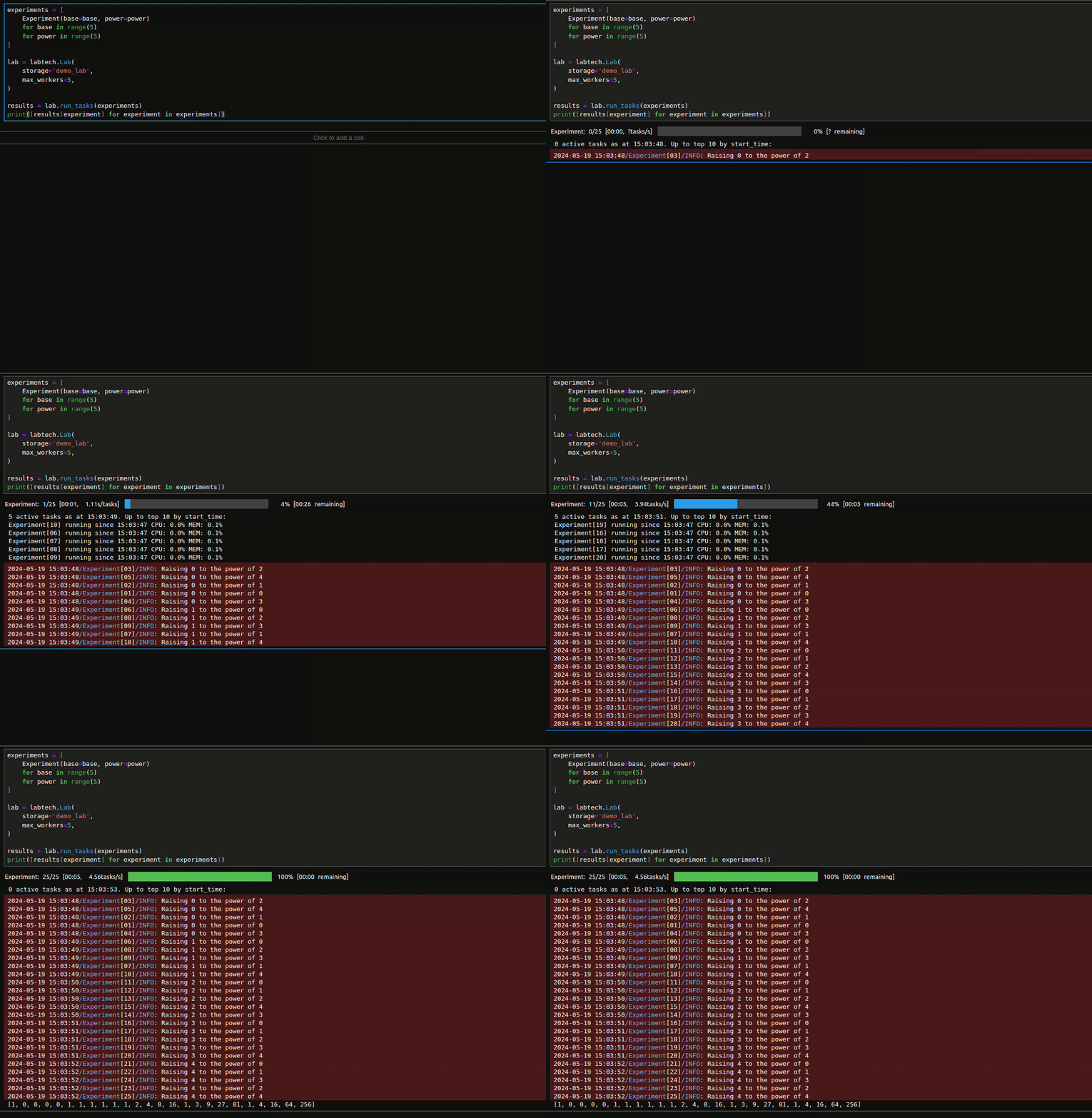
Labtech can also produce graphical progress bars in Jupyter notebooks:
Tasks parameters can be any of the following types:
- Simple scalar types:
str,bool,float,int,None - Collections of any of these types:
list,tuple,dict,Enum - Task types: A task parameter is a "nested task" that will be executed before its parent so that it may make use of the nested result.
Here's an example of defining a single long-running task to produce a result for a large number of dependent tasks:
from time import sleep

import labtech

@labtech.task
class SlowTask:
    base: int

    def run(self) -> int:
        sleep(5)
        return self.base ** 2

@labtech.task
class DependentTask:
    slow_task: SlowTask
    multiplier: int

    def run(self) -> int:
        return self.multiplier * self.slow_task.result

def main():
    some_slow_task = SlowTask(base=42)
    dependent_tasks = [
        DependentTask(
            slow_task=some_slow_task,
            multiplier=multiplier,
        )
        for multiplier in range(10)
    ]

    lab = labtech.Lab(storage='demo_lab')
    results = lab.run_tasks(dependent_tasks)
    print([results[task] for task in dependent_tasks])

if __name__ == '__main__':
    main()
Labtech can even generate a Mermaid diagram to visualise your tasks:
from labtech.diagram import display_task_diagram

some_slow_task = SlowTask(base=42)
dependent_tasks = [
    DependentTask(
        slow_task=some_slow_task,
        multiplier=multiplier,
    )
    for multiplier in range(10)
]

display_task_diagram(dependent_tasks)
classDiagram
    direction BT

    class DependentTask
    DependentTask : SlowTask slow_task
    DependentTask : int multiplier
    DependentTask : run() int

    class SlowTask
    SlowTask : int base
    SlowTask : run() int


    DependentTask <-- SlowTask: slow_task
To learn more, dive into the following resources:
- The labtech tutorial (as an interactive notebook)
- Cookbook of common patterns (as an interactive notebook)
- API reference for Labs and Tasks
- More options for cache formats and storage providers
- Option for customising task execution backends
- Diagramming tools
- Distributing across multiple machines
- More examples
Mypy Plugin
For mypy type-checking of classes decorated
with labtech.task, simply enable the labtech mypy plugin in your
mypy.ini file:
[mypy]
plugins = labtech.mypy_plugin
Contributing
- Install uv dependencies with
make deps - Run linting, mypy, and tests with
make check - Documentation:
- Run local server:
make docs-serve - Build docs:
make docs-build - Deploy docs to GitHub Pages:
make docs-github - Docstring style follows the Google style guide
- Run local server:
1 maintainer

Release files for labtech 1.1.0
For a detailed explanation of source distributions (sdists) and built distributions (wheels), please see the package formats documentation.
Source distribution (sdist)
| File | Size | Uploaded | |
|---|---|---|---|
| labtech-1.1.0.tar.gz | 273.0 kB | Details |
Built distribution (wheel)
| File | Interpreter | ABI | Platform | Reset |
|---|---|---|---|---|
| labtech-1.1.0-py3-none-any.whl | Python 3 | none | any | Details |
Total release size: 336.9 kB
Release files / labtech-1.1.0.tar.gz
| Download URL | labtech-1.1.0.tar.gz |
|---|---|
| Size | 273.0 kB |
| Tags | Source |
|
SHA-256 checksum How to use checksums |
dd064dd80af2f18e9616e9b2fc671afb4d6ad8257cf964cdfbf389514bfaaf62
|
|
BLAKE2b-256 checksum How to use checksums |
7b0e9660525bee09a6510b4bfa4a10f565984e728b49aa221ddd87bb22e34a3c
|
| Upload date | |
|
Uploaded using Trusted Publishing? What is trusted publishing? |
No |
| Uploaded via |
uv/0.9.17 {"installer":{"name":"uv","version":"0.9.17","subcommand":["publish"]},"python":null,"implementation":{"name":null,"version":null},"distro":{"name":"Ubuntu","version":"24.04","id":"noble","libc":null},"system":{"name":null,"release":null},"cpu":null,"openssl_version":null,"setuptools_version":null,"rustc_version":null,"ci":null}
|
Release files / labtech-1.1.0-py3-none-any.whl
| Download URL | labtech-1.1.0-py3-none-any.whl |
|---|---|
| Size | 63.9 kB |
| Tags | Python 3 |
|
SHA-256 checksum How to use checksums |
92f667f510051b0807cedbf8288c37aae0122af8a95e485f3d2b4b0dfce59ec9
|
|
BLAKE2b-256 checksum How to use checksums |
fc65c3443e8adbe4ac75232eaf2b3d2c16e2ea83b3eadc88addea105266d9cf2
|
| Upload date | |
|
Uploaded using Trusted Publishing? What is trusted publishing? |
No |
| Uploaded via |
uv/0.9.17 {"installer":{"name":"uv","version":"0.9.17","subcommand":["publish"]},"python":null,"implementation":{"name":null,"version":null},"distro":{"name":"Ubuntu","version":"24.04","id":"noble","libc":null},"system":{"name":null,"release":null},"cpu":null,"openssl_version":null,"setuptools_version":null,"rustc_version":null,"ci":null}
|














