
Lace
Advanced docking system for PySide6 — a feature-rich, themeable widget layout framework for building professional Qt desktop applications in Python.
Version: 0.9.2






Table of Contents
Features
⚓ Docking & Layout
- Multi-area docking — Dock widgets to left, right, top, bottom, or center regions within a window
- Tabbed dock areas — Multiple widgets share a single dock area as tabs, with full tab management (reorder, close, float)
- Floating windows — Detach any dock widget into its own top-level window; drag it back to dock
- Drag-and-drop layout — Intuitive resize, re-order, and re-dock via visual drop indicators
- Nested splitters — Arbitrary nesting of horizontal and vertical split panes
- Maximize/restore — Expand any dock area to fill its container
📌 Sidebars
- Auto-hide panels — VS Code-style slide-out sidebars that appear on hover
- Pinned widgets — Pin dock widgets to sidebars with visual tab buttons
- Notification badges — Numerical or symbolic badges on sidebar tabs
- Shaped tabs — Sidebar tabs take the dock widget tabs' corner radius, flat on the window-facing or content-facing side (or rounded on all four), with an outline that closes all the way round or leaves the flat edge open
- Per-state outlines and fills — Inactive, hovered and active each get their own outline colour and background, so a theme can outline only the selected tab, ring one under the cursor, or tint every tab with the highlight colour
- Configurable focus behavior — Choose whether sidebars steal keyboard focus
- Drag to detach — Tear pinned widgets out of sidebars back into the main layout
🎨 Theming
- 37 built-in themes — eight basics (midnight, dark, mocha, slate, caramel, neutral, cream, light), each also on a 10px neo chassis (
*_neo), nordic, monokai, tokyo_night, catppuccin, dracula, solarized_dark/light, cyberpunk_neon, cyberpunk_edge, slate_amber, neon_dusk, violet_haze, and midnight_haze, plus light and neutral counterparts of the last four (*_light;*_neutral, a mid tone between the two and nearer the light, with the backdrop flattened to grey but the accent and focus outlines kept; plusslate_amber_darkand a brighterslate_amber_light) that keep their parent's geometry and change only the palette - Grouped theme menus —
theme_groups()returns(group, [(label, key), ...])in presentation order — Basics, Editor Classics, Neon, Edge Treatments — with each family kept together and ordered dark, neutral, light;theme_choices()is the same order flattened for a single-level menu - OKLCH theme engine — Surfaces are derived in OKLCH, so equal steps look equal on any base colour. The keywords
contrast(low/normal/high WCAG floors),depth(flat/subtle/raised) andselection(solid/tint) steer the look. Text and UI colours are held to their contrast floors automatically. - Complete
QPalette— Every role in every colour group (Active, Inactive, Disabled) is themed, so no platform colour leaks into dark themes - LaceStyle — A flat, vector
QProxyStyleover Fusion for buttons, fields, combo and spin boxes, sliders, dials, tabs, menus, item views, tooltips, frames, splitters, tool bars and scroll bars (thin/expanding/fusion). Menus and combo popups get rounded corners and a soft painted shadow. It follows the theme and stays sharp at any zoom, including widgets in aQGraphicsView. - Rounded content —
corner_clip="cap"paints an antialiased cap over square content inside rounded cards - Theme kit & Theme Studio —
lace.theme_kitmakes a theme from two seed colours and a chassis, audits contrast (as a CI gate too), derives dark/neutral/light counterparts, and exports JSON.python -m lace.theme_kit studioedits a theme live. - Declarative
ThemeSpec— Define custom themes with color palettes and geometrical tokens (corner radius, border width, title height, tab radius, content margin, etc.) - Sidebar tab tokens — A matching
sidebar_tab_*set for the auto-hide tabs: shape, radius, outline width and per-state colours, fills, and highlight-strip width and edge - JSON theme files — Ship themes as JSON (Pydantic-validated via
ThemeJson/load_theme_json); colors as[r,g,b,a]lists or"#rrggbb"strings - Reactive borders — Active dock area shows a vibrant focus border; inactive areas show a subtle neutral border
- OS auto-sync — Automatically switch between light/dark themes when the OS changes (
ThemeManager.sync_theme(force, path)) - Custom QSS/stylesheet support — Point themes to external
.qssor.cssfiles, or a directory of<name>.json|.qss|.cssfiles viadefault_theme_path
⚙️ Configuration
- 19 global flags — Control tab visibility, button visibility, drag behavior, floating window chrome, icon styling, and more
- Per-widget feature flags — Granular control over what each dock widget can do: closable, movable, floatable, pinnable
- Insertion order — Sort "Show View" menu items alphabetically or chronologically
- Toggle view actions — Integrate dock widget show/hide into menu bars or toolbars as checkable toggles or one-way show buttons
💾 Persistence
- JSON layout serialization — Save and restore complete window layouts to/from JSON files
- Perspectives — Save named layout presets (e.g., "Coding Mode", "Presentation Mode") and switch between them instantly
- Atomic file I/O — Layouts are written atomically (temp file + rename) to prevent corruption
🎯 Icons & Chrome
- SVG-based icon system — Theme-aware SVG icons with automatic color tinting
- Custom icon provider — Register a directory of SVG icons for use across tabs and menus
- Painted chrome — Custom-drawn title bars, tab buttons, splitter handles, and drop indicators with rounded corners and hover states
- Frameless windows — Custom (PySideSix-Frameless-Window) title bars for the main window and floating containers with a synchronous double-click-to-maximize, DWM shadow, and resize borders; GL children (
QWebEngineView,QOpenGLWidget) auto-heal the native chrome viaWinIdChange(ensure_frameless_chrome()) - Configurable custom title bars — Set different title-bar classes for the main window and floating dock containers (
title_bar=constructor arg, liveDockManager.main_title_bar/floating_title_bar); embed menus, search fields, or any widget directly in the frameless chrome —LaceStandardTitleBaralready vetoes drags from interactive children, paints the theme background, and anchors inserts, so subclasses only add widgets - Chromeless floating windows — Optional bare floating surfaces without any title bar
- Themed dialogs —
FramelessLaceDialogand thelace.dialogshelpers (message boxes, input, colour and file dialogs, same arguments and results as Qt's) carry the main window's title bar; dialogs that keep the system frame get the theme's caption colour on Windows 11 and its light/dark mode on Windows 10
Quick Start
Installation
pip install pyside6
# Clone Lace
git clone https://github.com/yourusername/lace.git
cd lace
Minimal Example
import sys
from PySide6.QtWidgets import QApplication, QMainWindow, QTextEdit
from lace import (DockManager, DockWidget, DockWidgetArea, DockWidgetFeature,
                  LaceStyle, apply_dock_theme)

app = QApplication(sys.argv)
app.setStyle(LaceStyle())

window = QMainWindow()
window.setWindowTitle("My App")
window.resize(1200, 800)

# Create the dock manager (it becomes the window's central widget)
dock_manager = DockManager(window)

# Apply a theme
apply_dock_theme("cyberpunk_neon")

# Add a dock widget
editor = DockWidget("Editor", window)
editor.set_widget(QTextEdit())
editor.set_features(DockWidgetFeature.all_features)
dock_manager.add_dock_widget(DockWidgetArea.center, editor)

window.show()
app.exec()
Full Example
Run the demo application to explore all features:
python -m demos.demo_app
The demo includes:
- Multiple dock widgets with different feature flags (closable, movable, floatable, pinnable)
- Sidebar setup with notification badges
- Theme switching menu, grouped into Basics / Editor Classics / Neon / Edge Treatments submenus via
theme_groups() - Global flags menu for live configuration toggling
- Insertion order control
- Sidebar focus mode and badge position controls
- Preset configurations (Default, Minimal, Full)
- A "Dialog…" button opening a custom
FramelessLaceDialog
For frameless/custom-title-bar examples, see:
python -m demos.demo_app_custom_titlebar          # standard custom title bar
python -m demos.demo_app_custom_titlebar_menus    # menu-embedded main title bar + search bar for floats
The second demo shows configurable custom title bars: the main window
uses a title bar with a QMenuBar embedded directly in the frameless chrome
(no separate menu bar below it), while every floating dock container gets a
different title bar with a centered, resizable search QLineEdit.
Custom title bars are configured with a title-bar descriptor — None (the
standard Lace title bar), a QWidget instance, a QWidget subclass, or a
callable factory. Pass one to the window constructor or to the dock manager:
from lace import DockManager, TitleBarMode
from lace.frameless_window import FramelessLaceMainWindow

class MainWindow(FramelessLaceMainWindow):
    def __init__(self):
        # Custom title bar for the main window (class or instance).
        super().__init__(title_bar=MenuEmbeddedTitleBar)
        self.dock_manager = DockManager(self)
        self.dock_manager.title_bar_mode = TitleBarMode.custom
        # Different title bar for every floating dock container.
        self.dock_manager.floating_title_bar = SearchTitleBar
DockManager.main_title_bar configures the main window (applied live when
the parent is frameless), and DockManager.floating_title_bar configures
new floating containers created when dock widgets are torn off.
DockManager also installs both theme bridges itself (dock tree + app-wide
for top-level QMenus), so no manual DockThemeBridge() is needed. They set
colours only; pass DockManager(window, app_style="lace") (or "Fusion", …) to
have it install the application's style too. See
Quick Reference — Frameless Windows & the Custom Title Bar
for the full API.
Screenshots
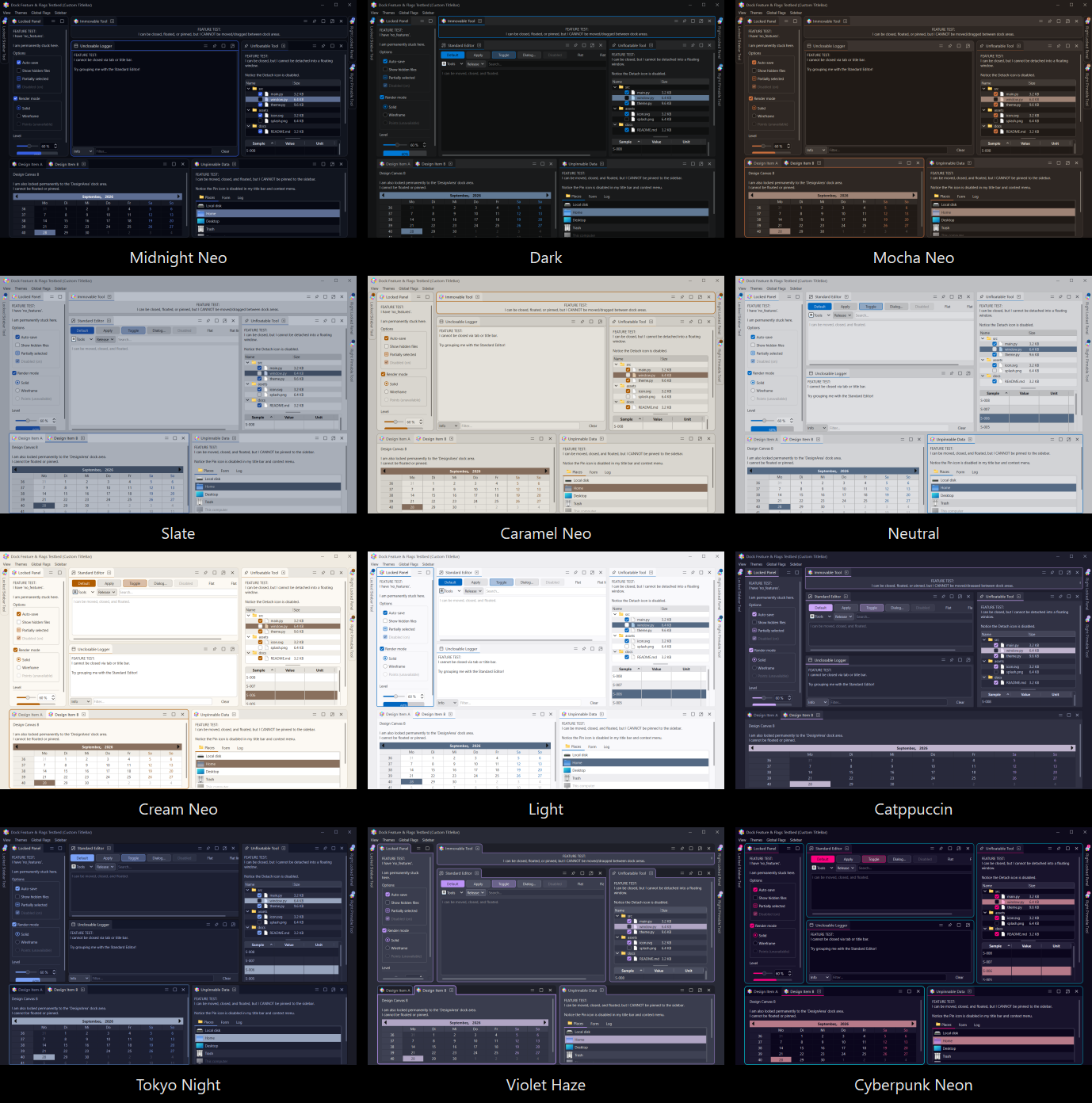
The frameless main window (custom title bar, dock panels, splitters) across 12 built-in themes.
Full-size captures of the main window, one per theme above, are in the
screenshots/ folder.
Architecture Overview
Lace is built around a clean, modular architecture:
DockManager (facade)
├── DockContainerWidget (root container)
│   ├── DockSplitter (nested, orientation-aware)
│   └── DockAreaWidget (tabbed regions)
│       ├── DockAreaTitleBar
│       │   └── DockAreaTabBar → DockWidgetTab (×N)
│       └── DockWidget → user content (QTextEdit, QWidget, etc.)
├── FloatingDockContainer (×N, native or frameless; each holds a DockContainerWidget)
├── DockOverlay (drop targets: dock area + container)
├── DockSignals (internal event bus)
├── SidebarManager (auto-hide panels)
│   ├── SideTabBar → VerticalTabButton (×N)
│   └── SideBarContainer (overlay panel)
├── LayoutSerializer + LayoutPersistenceManager (JSON layouts, perspectives)
└── DockThemeBridge ×2 (QPalette → dock tree, and → application)

Application-wide
├── DockStyleManager (theme engine, singleton; notifies subscribers)
├── ThemeManager (OS-aware auto light/dark)
├── LaceStyle (QStyle drawing the basic widgets)
├── NativeFrameTheme (OS title bars of dialogs; DockManager installs it)
└── Frameless chrome: FramelessLaceMainWindow, FramelessLaceDialog
    and the lace.dialogs helpers (themed title bar via FramelessTitleBarStyler)
See the Architecture Documentation for a complete module-by-module reference with class hierarchies, signals, and method tables.
Documentation
| Document | Description |
|---|---|
| Quick Reference | 5-minute guide — installation, common patterns, API lookup |
| Architecture | Complete system architecture — all modules, classes, signals, and data flow |
| Theming & Geometry | ThemeSpec tokens, titlebar flushness, reactive borders, content margin |
| Enum Mapping | Comprehensive mapping of all enumerations and flags with wiring status |
Project Structure
lace/
├── lace/                          # Main package
│   ├── dock_manager.py            # Central orchestrator (facade)
│   ├── dock_widget.py             # User-facing dock widget wrapper
│   ├── dock_widget_tab.py         # Painted-chrome tab button
│   ├── dock_container_widget.py   # Dock container (root, or inside a floating window)
│   ├── dock_area_widget.py        # Single tabbed region
│   ├── dock_area_layout.py        # Stacked layout behind a dock area's tabs
│   ├── dock_area_tab_bar.py       # Scrollable tab strip of a dock area
│   ├── dock_area_title_bar.py     # Dock area title bar (tabs + buttons)
│   ├── dock_splitter.py           # Nested splitters + resize handles
│   ├── floating_dock_container.py # Top-level floating window
│   ├── floating_dock_container_frameless.py  # Frameless floating window
│   ├── floating_behaviour.py      # Behaviour shared by both floating containers
│   ├── frameless_window.py        # Frameless main/window + LaceStandardTitleBar
│   ├── frameless_titlebar.py      # Dock-theme styling for the custom title bar
│   ├── frameless_dialog.py        # FramelessLaceDialog
│   ├── dialogs.py                 # Themed drop-ins for Qt's static dialogs
│   ├── native_frame.py            # Theme colours for OS title bars (dialogs, tool windows)
│   ├── title_bar_colors.py        # One source for title-bar colours
│   ├── dock_overlay.py            # Drop-target visual overlays
│   ├── dock_chrome.py             # Drag detector, chrome buttons, frames
│   ├── dock_paint.py              # Painting primitives
│   ├── dock_menu.py               # Unified context menu system
│   ├── dock_menu_bar.py           # Theme styling for plain QMainWindow menu bars
│   ├── lace_style.py              # LaceStyle: a modern, flat Fusion
│   ├── style/                     # LaceStyle's painters (buttons, inputs, popups, …)
│   ├── dock_theme.py              # Theme schemas, ThemeSpec, color math
│   ├── dock_custom_theme.py       # 37 built-in theme presets
│   ├── color_science.py           # Perceptual colour maths for theme derivation
│   ├── theme_contrast.py          # Contrast rules for each theme token
│   ├── theme_models.py            # ThemeJson — Pydantic JSON theme loading
│   ├── theme_kit/                 # Theme Studio and theme tooling (python -m lace.theme_kit)
│   ├── dock_style_manager.py      # Singleton style manager (subscriber model)
│   ├── dock_theme_bridge.py       # QPalette push to Qt children
│   ├── dock_styled.py             # DockStyled mixin (auto-style registration)
│   ├── theme_manager.py           # OS-aware auto dark/light switching
│   ├── layout_serializer.py       # JSON save/restore, perspectives
│   ├── dock_container_state.py    # Low-level tree state save/restore
│   ├── dock_signals.py            # Internal event bus
│   ├── dock_icon_provider.py      # SVG icon provider with tinting
│   ├── sidebar_manager.py         # Auto-hide sidebar controller
│   ├── sidebar_tab.py             # Vertical tab button
│   ├── sidebar_tab_bar.py         # Vertical tab strip
│   ├── sidebar_container.py       # Animated overlay panel
│   ├── sidebar_title_bar.py       # Title bar inside overlay panel
│   ├── eliding_label.py           # QLabel with text elision
│   ├── enums.py                   # All enumerations and flags
│   ├── util.py                    # Utility functions
│   ├── _trace.py                  # Optional debug tracing
│   └── resources/lace_icons/      # SVG icons (close, dock, float, pin, etc.)
├── demos/                         # Demo applications (python -m demos.demo_app)
│   ├── demo_app.py                # Full-featured demo application
│   ├── demo_app_custom_titlebar.py        # Custom title-bar demo
│   ├── demo_app_custom_titlebar_menus.py  # Menu-embedded title-bar demo
│   ├── demo_panels.py             # Panel contents shared by the demos
│   └── demo_dialog.py             # The custom "New layer" FramelessLaceDialog
├── dev_smoke/                     # Smoke checks (run_all.py) and screenshot tools
├── tests/                         # pytest suite
├── docs/                          # Documentation
├── screenshots/                   # Theme screenshots used by this README
├── CHANGELOG.md
├── LICENSE                        # Apache-2.0
├── NOTICE
├── pyproject.toml
└── README.md                      # This file
Testing
Two complementary test layers:
-
tests/(pytest) — fast logic/contract tests for the theme engine,ThemeJsonloading,DockStyleManager, enums/config masks, paint primitives, layout-serializer errors, and an AST-based circular-import detector that fails if a real module-level import cycle is introduced.pytest tests/ -
dev_smoke/(offscreen Qt) — each check builds its ownQApplicationand drives real widgets offscreen (theme switching, sidebar chrome, save/restore round-trips, dock flags, JSON theme application):python dev_smoke/run_all.py
Contributing
Contributions are welcome! Please:
- Open an issue to discuss significant changes before starting work
- Follow the existing code style and naming conventions
- Add smoke tests in
dev_smoke/for new features - Update documentation (
docs/) for user-facing changes
License
Lace is licensed under the Apache License 2.0. See LICENSE for details.
This project incorporates components from qtpydocking under the BSD 3-Clause License. See LICENSE for full attribution.
Author: opticsWolf
Contact: opticswolf@protonmail.com
1 maintainer

Metadata
1 maintainer
Release files for lace-dock 0.9.2
For a detailed explanation of source distributions (sdists) and built distributions (wheels), please see the package formats documentation.
Source distribution (sdist)
| File | Size | Uploaded | |
|---|---|---|---|
| lace_dock-0.9.2.tar.gz | 448.5 kB | Details |
Built distribution (wheel)
| File | Interpreter | ABI | Platform | Reset |
|---|---|---|---|---|
| lace_dock-0.9.2-py3-none-any.whl | Python 3 | none | any | Details |
Total release size: 804.7 kB
Release files / lace_dock-0.9.2.tar.gz
| Download URL | lace_dock-0.9.2.tar.gz |
|---|---|
| Size | 448.5 kB |
| Tags | Source |
|
SHA-256 checksum How to use checksums |
3c49571c3d7b7b540efb6e77079e93b6f30f83e73ee75f409d0d51b72280fd48
|
|
BLAKE2b-256 checksum How to use checksums |
0f6bc296bc934f7d2c52529848ce769114a6053ccce109ddb1703fec9d2688b5
|
| Upload date | |
|
Uploaded using Trusted Publishing? What is trusted publishing? |
Yes |
| Uploaded via |
twine/7.0.0 CPython/3.13.14
|
Provenance
Provenance describes where a file came from. On PyPI, provenance is shared via attestations, which provide a verifiable record of the build or publishing details. View details, limitations and caveats.


PyPI Publish Attestation
PyPI verified that this artifact, at this checksum, originated from the publisher listed below.
Signed by GitHub Actions, verified by PyPI on Oct 3, 2026.
Transparency logRelease files / lace_dock-0.9.2-py3-none-any.whl
| Download URL | lace_dock-0.9.2-py3-none-any.whl |
|---|---|
| Size | 356.2 kB |
| Tags | Python 3 |
|
SHA-256 checksum How to use checksums |
b6e97062e0b9368bea5c87fbce45c50f538eaa19731427c455d5ebce53b5b349
|
|
BLAKE2b-256 checksum How to use checksums |
a1f3866b63a484185eab7824243ce0c9f6a52173f1fc485cc9cce91d7366400c
|
| Upload date | |
|
Uploaded using Trusted Publishing? What is trusted publishing? |
Yes |
| Uploaded via |
twine/7.0.0 CPython/3.13.14
|
Provenance
Provenance describes where a file came from. On PyPI, provenance is shared via attestations, which provide a verifiable record of the build or publishing details. View details, limitations and caveats.
PyPI Publish Attestation
PyPI verified that this artifact, at this checksum, originated from the publisher listed below.
Signed by GitHub Actions, verified by PyPI on Oct 3, 2026.
Transparency log













