
ladle





Turn a folder of markdown recipes into a beautifully typeset cookbook — a
print-ready PDF and a validated, reflowable EPUB — from a single ladle build.
ladle is a command-line tool that builds art-directed cookbooks from plain
markdown and a single book.yaml. The design — fonts, palette, layout — lives
in a swappable theme, fully decoupled from your words, so the same recipes
can be restyled without touching a line of content. It's plain Python with no
browser and no Node, built for home cooks, communities, and small publishers who
would rather keep their recipes in version-controlled plain text than locked
inside a proprietary app.
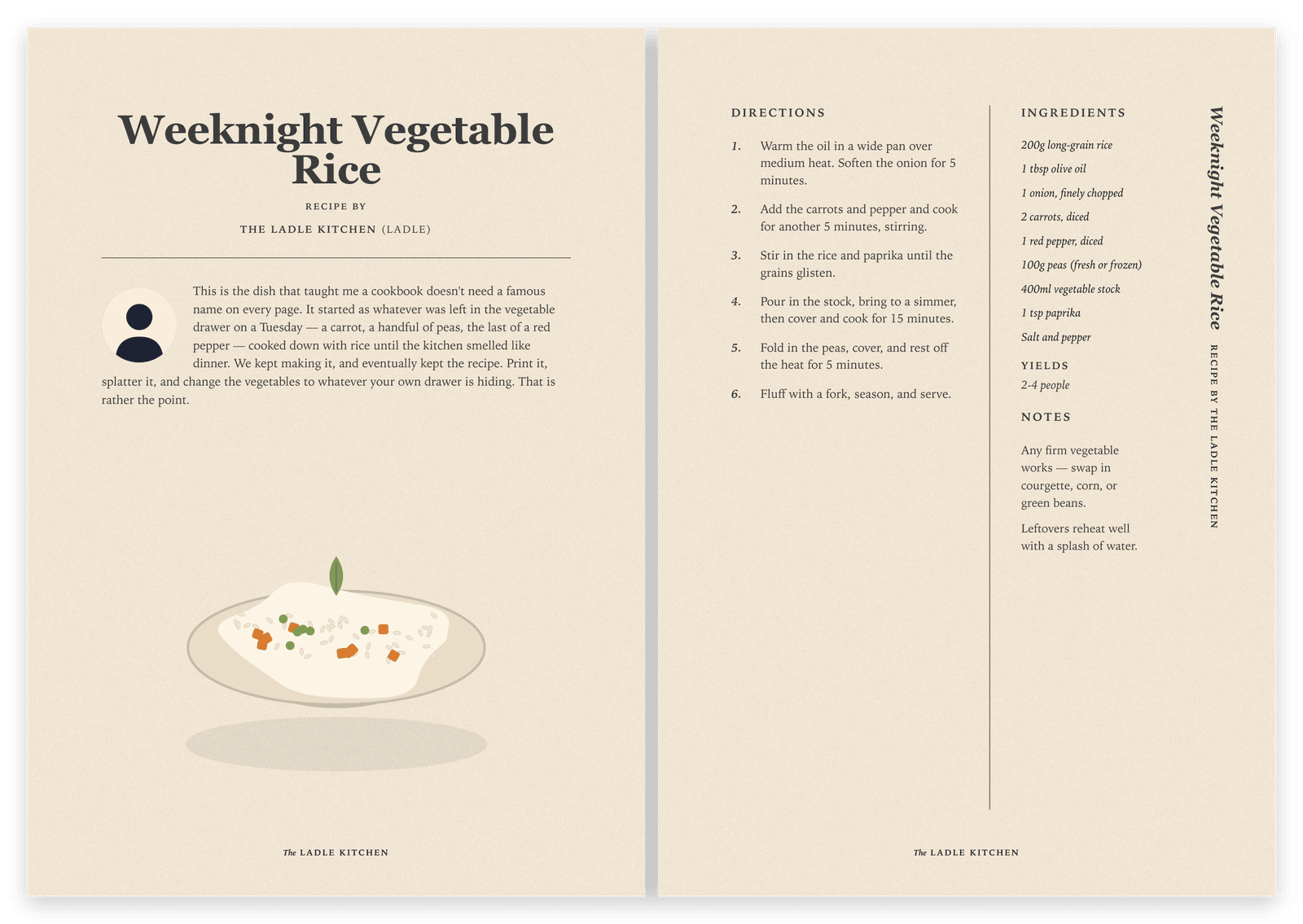
The example cookbook — a print-ready PDF from plain markdown.

One folder of markdown → a validated PDF + EPUB, from a single ladle build.
Installation
ladle needs Python 3.11+ and a few small command-line tools (one runtime — no
browser, no Node).
1. Install the package
pip install ladlebook # the PyPI package; the command it installs is `ladle`
2. Install the system tools
WeasyPrint (the PDF engine) needs the Pango/cairo libraries; pandoc builds the EPUB; poppler powers the PDF checks and EPUB cover.
- macOS:
brew install pango poppler pandoc - Debian/Ubuntu:
sudo apt-get install libpango-1.0-0 libpangocairo-1.0-0 libgdk-pixbuf-2.0-0 poppler-utils pandoc
| Tool | Version | Used for |
|---|---|---|
| Python | 3.11+ | the tool itself |
| pandoc | 3.x | EPUB generation |
| poppler | any recent | pdfinfo + pdftoppm (PDF checks, EPUB cover) |
| Java | 17+ | optional — only to run epubcheck in ladle validate |
Then confirm everything is wired up. ladle doctor reports anything missing
with per-OS install hints — or let ladle doctor --install run the right
package-manager commands for you (Homebrew/apt + pip). It prints the exact
commands and asks before running anything:
ladle doctor            # check the toolchain
ladle doctor --install  # …and offer to install whatever's missing
Usage
Scaffold a book, add recipes, and build:
ladle new mybook                 # scaffold ./mybook/ (or `ladle new` -> ./book/)
cd mybook
# …add your recipes under recipes/…
ladle build                      # -> build/cookbook.pdf and build/cookbook.epub
ladle validate                   # schema + PDF structure + epubcheck + contact sheet
open build/contact-sheet.png     # a thumbnail grid of every page
Book-scoped commands take --book PATH (default: ./book.yaml),
so you can keep several books side by side and build any of them.
A recipe is just markdown
---
title: Carrot Cake
category: Desserts # Savory | Desserts | Beverages
servings: "6 people" # optional
credits: "The Ladle Kitchen" # optional — a person, a book, or a URL
illustration: assets/illustrations/recipes/carrot-cake.svg
# optional: page, story, author:{name,org}, headshot, attribution, tags, license, draft
---

## INGREDIENTS

### Cake # optional group headings

- 2 large eggs
- 200g sugar

## DIRECTIONS

1. Pre-heat the oven to 180°C.
2. …

## NOTES # optional

- Keeps for several days.
A recipe with a non-empty story: gets a full story page (with an optional
headshot); without one it gets a compact opener. Every recipe is validated
against recipe.schema.json.
A book is a folder
mybook/
  book.yaml            # title, language, theme, palette/font overrides, section order
  recipes/*.md         # one recipe per file (front matter + body)
  content/introduction.md
  assets/illustrations/recipes/*   # generated per-recipe art (real art drops in as PNG)
book.yaml needs only a title to build — everything else (palette, fonts,
labels) falls back to the theme's defaults. Section headings and all UI chrome
("Yields", "Contents", section names) are localizable per book via a labels:
block. See the reference book in
examples/the-ladle-kitchen/
for a complete, working template.
Commands
| Command | Does |
|---|---|
ladle new [X] |
scaffold a new book in ./X/ (default ./book/) |
ladle build |
build the PDF + EPUB from your recipes |
ladle validate |
recipe schema, PDF trim + page count, epubcheck, contact sheet |
ladle doctor |
check pandoc/poppler/WeasyPrint/Java are installed |
Build from source
git clone https://github.com/dimitri-kandassamy/ladle && cd ladle
pip install -e .                 # or: pip install -r requirements.txt
make all                         # builds the example book (examples/the-ladle-kitchen)
make validate
make drives the package straight from src/ (no install needed);
make all BOOK=path/to/book.yaml builds any book, and the Makefile targets
mirror the CLI commands. CI builds and validates the example book plus a
torture-test fixture on every push.
Themes
The look is a theme: a self-contained bundle of theme.yaml (palette, fonts,
font files) plus templates/, css/, fonts/, and illustrations/patterns/.
The tool ships one theme, default. To restyle, override tokens in book.yaml,
or fork the theme and point theme: at your own directory. See
docs/THEMING.md.
Illustrations
Recipe artwork lives with your book, not in the tool. Point a recipe's
illustration: front matter at a file under assets/illustrations/recipes/
(SVG or a raster — PNG/WebP/JPEG), and drop the file in. If both an SVG and a
raster sibling exist (e.g. carrot-cake.svg and carrot-cake.png), the build
prefers the raster automatically — so you can start with a simple placeholder and
swap in real art later with no front-matter change.
Contributing
Contributions are welcome — code, themes, docs, or a recipe for the example book. Start with CONTRIBUTING.md for the dev setup and repository layout, and see DESIGN.md for the parse → render → build pipeline and design rationale. By participating you agree to the Code of Conduct. Found a security issue? See our Security Policy.
License
- Code (the tool, themes, CSS, templates): Apache-2.0 — see
LICENSE. - Content (the example book's sample recipes and illustrations): CC BY-SA 4.0
— see
LICENSE-CONTENT, unless a recipe'slicense:says otherwise.
Credits & thanks
- Inspiration — the Cloud Native Community Cookbook, originated by Equinix Metal.
- Type (default theme) — Playfair Display and Bitter, both under the SIL Open Font License.
- Tooling — WeasyPrint (PDF), pandoc (EPUB), poppler, epubcheck, plus Jinja, PyYAML, jsonschema, and Pillow.
1 maintainer

Metadata
1 maintainer
Release files for ladlebook 0.2.0
For a detailed explanation of source distributions (sdists) and built distributions (wheels), please see the package formats documentation.
Source distribution (sdist)
| File | Size | Uploaded | |
|---|---|---|---|
| ladlebook-0.2.0.tar.gz | 1.4 MB | Details |
Built distribution (wheel)
| File | Interpreter | ABI | Platform | Reset |
|---|---|---|---|---|
| ladlebook-0.2.0-py3-none-any.whl | Python 3 | none | any | Details |
Total release size: 2.7 MB
Release files / ladlebook-0.2.0.tar.gz
| Download URL | ladlebook-0.2.0.tar.gz |
|---|---|
| Size | 1.4 MB |
| Tags | Source |
|
SHA-256 checksum How to use checksums |
8b1e6b6c1bf29508207168b6591007d75a3b45b891d915ed95ba80a1a8bd2aa8
|
|
BLAKE2b-256 checksum How to use checksums |
055a9a4c68591a14e9c07e6ee26be3f3e413f4c642fff023d4e2a93a20b42610
|
| Upload date | |
|
Uploaded using Trusted Publishing? What is trusted publishing? |
Yes |
| Uploaded via |
twine/6.1.0 CPython/3.13.13
|
Provenance
Provenance describes where a file came from. On PyPI, provenance is shared via attestations, which provide a verifiable record of the build or publishing details. View details, limitations and caveats.


PyPI Publish Attestation
PyPI verified that this artifact, at this checksum, originated from the publisher listed below.
Signed by GitHub Actions, verified by PyPI on Jul 12, 2026.
Transparency logRelease files / ladlebook-0.2.0-py3-none-any.whl
| Download URL | ladlebook-0.2.0-py3-none-any.whl |
|---|---|
| Size | 1.4 MB |
| Tags | Python 3 |
|
SHA-256 checksum How to use checksums |
5a1814bf354daf0eb728e5950e009f909c38753af513172c329c3704945004fe
|
|
BLAKE2b-256 checksum How to use checksums |
883b8b066b45b7e99de1a527623500bd72f37cbd24b57e9b7e1273926bbedc56
|
| Upload date | |
|
Uploaded using Trusted Publishing? What is trusted publishing? |
Yes |
| Uploaded via |
twine/6.1.0 CPython/3.13.13
|
Provenance
Provenance describes where a file came from. On PyPI, provenance is shared via attestations, which provide a verifiable record of the build or publishing details. View details, limitations and caveats.
PyPI Publish Attestation
PyPI verified that this artifact, at this checksum, originated from the publisher listed below.
Signed by GitHub Actions, verified by PyPI on Jul 12, 2026.
Transparency log













