



About
CAN BUS tools in Python 3.
CAN message encoding and decoding.
Simple and extended signal multiplexing.
Diagnostic DID encoding and decoding.
candump output decoder.
Node tester.
C source code generator.
CAN bus monitor.
Graphical plots of signals.
Project homepage: https://github.com/eerimoq/cantools
Documentation: https://cantools.readthedocs.io
Installation
pip install cantoolsExample usage
Scripting
The example starts by parsing a small DBC-file and printing its messages and signals.
>>> import cantools
>>> from pprint import pprint
>>> db = cantools.database.load_file('tests/files/dbc/motohawk.dbc')
>>> db.messages
[message('ExampleMessage', 0x1f0, False, 8, 'Example message used as template in MotoHawk models.')]
>>> example_message = db.get_message_by_name('ExampleMessage')
>>> pprint(example_message.signals)
[signal('Enable', 7, 1, 'big_endian', False, 1.0, 0, 0.0, 0.0, '-', False, None, {0: 'Disabled', 1: 'Enabled'}, None),
 signal('AverageRadius', 6, 6, 'big_endian', False, 0.1, 0, 0.0, 5.0, 'm', False, None, None, ''),
 signal('Temperature', 0, 12, 'big_endian', True, 0.01, 250, 229.53, 270.47, 'degK', False, None, None, None)]
The example continues encoding a message and sending it on a CAN bus using the python-can package.
>>> import can
>>> can_bus = can.interface.Bus('vcan0', bustype='socketcan')
>>> data = example_message.encode({'Temperature': 250.1, 'AverageRadius': 3.2, 'Enable': 1})
>>> message = can.Message(arbitration_id=example_message.frame_id, data=data)
>>> can_bus.send(message)
Alternatively, a message can be encoded using the encode_message() method on the database object.
The last part of the example receives and decodes a CAN message.
>>> message = can_bus.recv()
>>> db.decode_message(message.arbitration_id, message.data)
{'AverageRadius': 3.2, 'Enable': 'Enabled', 'Temperature': 250.09}
See examples for additional examples.
Command line tool
The decode subcommand
Decode CAN frames captured with the Linux program candump.
$ candump vcan0 | cantools decode tests/files/dbc/motohawk.dbc
  vcan0  1F0   [8]  80 4A 0F 00 00 00 00 00 ::
ExampleMessage(
    Enable: 'Enabled' -,
    AverageRadius: 0.0 m,
    Temperature: 255.92 degK
)
  vcan0  1F0   [8]  80 4A 0F 00 00 00 00 00 ::
ExampleMessage(
    Enable: 'Enabled' -,
    AverageRadius: 0.0 m,
    Temperature: 255.92 degK
)
  vcan0  1F0   [8]  80 4A 0F 00 00 00 00 00 ::
ExampleMessage(
    Enable: 'Enabled' -,
    AverageRadius: 0.0 m,
    Temperature: 255.92 degK
)
Alternatively, the decoded message can be printed on a single line:
$ candump vcan0 | cantools decode --single-line tests/files/dbc/motohawk.dbc
  vcan0  1F0   [8]  80 4A 0F 00 00 00 00 00 :: ExampleMessage(Enable: 'Enabled' -, AverageRadius: 0.0 m, Temperature: 255.92 degK)
  vcan0  1F0   [8]  80 4A 0F 00 00 00 00 00 :: ExampleMessage(Enable: 'Enabled' -, AverageRadius: 0.0 m, Temperature: 255.92 degK)
  vcan0  1F0   [8]  80 4A 0F 00 00 00 00 00 :: ExampleMessage(Enable: 'Enabled' -, AverageRadius: 0.0 m, Temperature: 255.92 degK)
The plot subcommand
The plot subcommand is similar to the decode subcommand but messages are visualized using matplotlib instead of being printed to stdout.
$ cat candump-2021-01-04_180521.log
(1609779922.655421) vcan0 00000343#B204B9049C049C04
(1609779922.655735) vcan0 0000024A#120527052E051905
(1609779923.657524) vcan0 00000343#C404C404CB04C404
(1609779923.658086) vcan0 0000024A#8B058B058B059205
(1609779924.659912) vcan0 00000343#5C04790479045504
(1609779924.660471) vcan0 0000024A#44064B0659064406
(1609779925.662277) vcan0 00000343#15040704F203F203
(1609779925.662837) vcan0 0000024A#8B069906A706A706
(1609779926.664191) vcan0 00000343#BC03B503A703BC03
(1609779926.664751) vcan0 0000024A#A006A706C406C406

$ cat candump-2021-01-04_180521.log | cantools plot tests/files/dbc/abs.dbc
If you don’t want to show all signals you can select the desired signals with command line arguments. A * can stand for any number of any character, a ? for exactly one arbitrary character. Signals separated by a - are displayed in separate subplots. Optionally a format can be specified after a signal, separated by a colon.
$ cat candump-2021-01-04_180521.log | cantools plot tests/files/dbc/abs.dbc '*33.*fl:-<' '*33.*fr:->' - '*33.*rl:-<' '*33.*rr:->'
For more information see
$ cantools plot --helpThe dump subcommand
Dump given database in a human readable format:
$ cantools dump tests/files/dbc/motohawk.dbc
================================= Messages =================================

  ------------------------------------------------------------------------

  Name:       ExampleMessage
  Id:         0x1f0
  Length:     8 bytes
  Cycle time: - ms
  Senders:    PCM1
  Layout:

                          Bit

             7   6   5   4   3   2   1   0
           +---+---+---+---+---+---+---+---+
         0 |<-x|<---------------------x|<--|
           +---+---+---+---+---+---+---+---+
             |                       +-- AverageRadius
             +-- Enable
           +---+---+---+---+---+---+---+---+
         1 |-------------------------------|
           +---+---+---+---+---+---+---+---+
         2 |----------x|   |   |   |   |   |
     B     +---+---+---+---+---+---+---+---+
     y               +-- Temperature
     t     +---+---+---+---+---+---+---+---+
     e   3 |   |   |   |   |   |   |   |   |
           +---+---+---+---+---+---+---+---+
         4 |   |   |   |   |   |   |   |   |
           +---+---+---+---+---+---+---+---+
         5 |   |   |   |   |   |   |   |   |
           +---+---+---+---+---+---+---+---+
         6 |   |   |   |   |   |   |   |   |
           +---+---+---+---+---+---+---+---+
         7 |   |   |   |   |   |   |   |   |
           +---+---+---+---+---+---+---+---+

  Signal tree:

    -- {root}
       +-- Enable
       +-- AverageRadius
       +-- Temperature

  Signal choices:

    Enable
        0 Disabled
        1 Enabled

  ------------------------------------------------------------------------
The generate C source subcommand
Generate C source code from given database.
The generated code contains:
Known limitations:
The maximum signal size is 64 bits, which in practice is never exceeded.
Below is an example of how to generate C source code from a database. The database is tests/files/dbc/motohawk.dbc.
$ cantools generate_c_source tests/files/dbc/motohawk.dbc
Successfully generated motohawk.h and motohawk.c.
See motohawk.h and motohawk.c for the contents of the generated files.
In the next example we use --database-name to set a custom namespace for all generated types, defines and functions. The output file names are also changed by this option.
$ cantools generate_c_source --database-name my_database_name tests/files/dbc/motohawk.dbc
Successfully generated my_database_name.h and my_database_name.c.
See my_database_name.h and my_database_name.c for the contents of the generated files.
In the last example we use --no-floating-point-numbers to generate code without floating point types, i.e. float and double.
$ cantools generate_c_source --no-floating-point-numbers tests/files/dbc/motohawk.dbc
Successfully generated motohawk.h and motohawk.c.
See motohawk_no_floating_point_numbers.h and motohawk_no_floating_point_numbers.c for the contents of the generated files.
Other C code generators:
The monitor subcommand
Monitor CAN bus traffic in a text based user interface.
$ cantools monitor tests/files/dbc/motohawk.dbc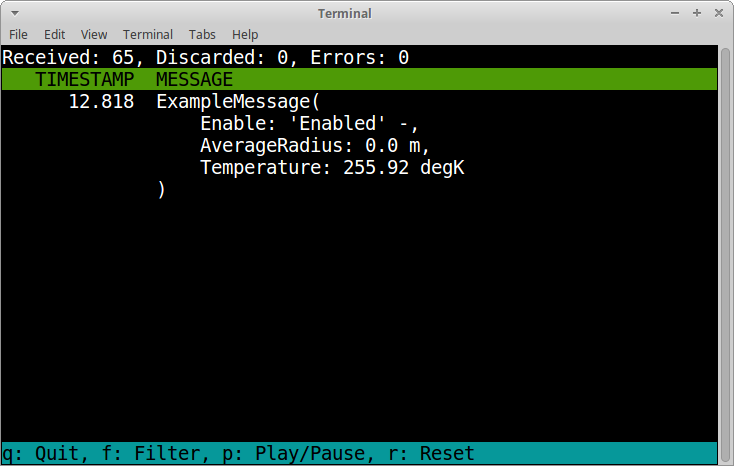
The menu at the bottom of the monitor shows the available commands.
Quit: Quit the monitor. Ctrl-C can be used as well.
Filter: Only display messages matching given regular expression. Press <Enter> to return to the menu from the filter input line.
Play/Pause: Toggle between playing and paused (or running and freezed).
Reset: Reset the monitor to its initial state.
Contributing
Fork the repository.
Install prerequisites.
pip install -r requirements.txtImplement the new feature or bug fix.
Implement test case(s) to ensure that future changes do not break legacy.
Run the tests.
make testCreate a pull request.
1 maintainer

Metadata
1 maintainer
Release files for lager-cantools 36.1.0
For a detailed explanation of source distributions (sdists) and built distributions (wheels), please see the package formats documentation.
Source distribution (sdist)
| File | Size | Uploaded | |
|---|---|---|---|
| lager-cantools-36.1.0.tar.gz | 72.1 kB | Details |
Built distribution (wheel)
| File | Interpreter | ABI | Platform | Reset |
|---|---|---|---|---|
| lager_cantools-36.1.0-py3-none-any.whl | Python 3 | none | any | Details |
Total release size: 154.0 kB
Release files / lager-cantools-36.1.0.tar.gz
| Download URL | lager-cantools-36.1.0.tar.gz |
|---|---|
| Size | 72.1 kB |
| Tags | Source |
|
SHA-256 checksum How to use checksums |
c5d81ad3e345ae9a3db4258488e87adf150eeb9222af4e5559d506dc056d4a33
|
|
BLAKE2b-256 checksum How to use checksums |
7cacb8818473450872c2de184664501212d2639cfbe34abf508f2b41e0f2da45
|
| Upload date | |
|
Uploaded using Trusted Publishing? What is trusted publishing? |
No |
| Uploaded via |
twine/3.3.0 pkginfo/1.6.1 requests/2.25.1 setuptools/51.0.0 requests-toolbelt/0.9.1 tqdm/4.55.1 CPython/3.9.1
|
Release files / lager_cantools-36.1.0-py3-none-any.whl
| Download URL | lager_cantools-36.1.0-py3-none-any.whl |
|---|---|
| Size | 81.9 kB |
| Tags | Python 3 |
|
SHA-256 checksum How to use checksums |
917c7bec122a88ef8ff27e9c8917c3d96c9a4b49ffdb1d7329107d82f249f882
|
|
BLAKE2b-256 checksum How to use checksums |
d360fb72416be669c4cbdf98c656a4eaa22c0feb733ee8416445b70ce482044a
|
| Upload date | |
|
Uploaded using Trusted Publishing? What is trusted publishing? |
No |
| Uploaded via |
twine/3.3.0 pkginfo/1.6.1 requests/2.25.1 setuptools/51.0.0 requests-toolbelt/0.9.1 tqdm/4.55.1 CPython/3.9.1
|













