
A framework for building and managing enterprise Lakeflow Spark Declaritive Pipelines
Verified details
These details have been verified by PyPIProject links
GitHub Statistics
Maintainers

Project description

Lakehouse Plumber
Because every Lakehouse needs a good plumber to keep the flows running smoothly 🚰
Generate readable, debuggable Python for Databricks Lakeflow Declarative Pipelines (formerly DLT) from concise YAML. LHP is a code generator, not a runtime framework — the Python it produces is exactly what executes in your workspace, with no import lhp and no metadata-interpretation layer.







What it looks like
This 10-line FlowGroup, plus a reusable 51-line ingestion template, generates 81 lines of production Python:
Input — part_ingestion.yaml (10 lines) |
Output — part_ingestion.py (81 lines, abridged) |
|---|---|
pipeline: acmi_edw_raw
flowgroup: part_ingestion

use_template: json_ingestion_template
template_parameters:
  table_name: part_raw
  landing_folder: part
  schema_file: part_schema
|
from pyspark.sql import functions as F
from pyspark import pipelines as dp

part_cloudfiles_schema_hints = """
    p_partkey BIGINT NOT NULL, p_name STRING NOT NULL,
    p_mfgr STRING NOT NULL, ...
""".strip().replace("\n", " ")

@dp.temporary_view()
def v_part_raw_cloudfiles():
    df = (spark.readStream.format("cloudFiles")
        .option("cloudFiles.format", "json")
        .option("cloudFiles.schemaHints", ...)
        .load("/Volumes/.../part/*.json"))
    df = df.withColumn("_processing_timestamp", F.current_timestamp())
    return df

dp.create_streaming_table(name="...part_raw", ...)

@dp.append_flow(target="...part_raw", name="f_part_raw_cloudfiles")
def f_part_raw_cloudfiles():
    return spark.readStream.table("v_part_raw_cloudfiles")
|
Measured ratio: ~8x per FlowGroup, with the 51-line template amortized across every JSON ingestion in the project. Ten new tables of the same shape cost ~100 lines of YAML; you still get 810 lines of production-grade Python with schema hints, append-flow registration, and operational metadata columns. (Numbers measured from tests/e2e/fixtures/testing_project/.)
When to use LHP vs. alternatives
| If you are doing this... | Use | Why |
|---|---|---|
| Hand-writing repetitive DLT Python across many bronze/silver tables | LHP | LHP generates the boilerplate; you keep the readable output |
| Using dlt-meta | LHP — if you value static, debuggable Python in your repo | dlt-meta interprets metadata at runtime inside the DLT pipeline; LHP generates static Python before deployment. You read the code that runs, debug it in the IDE, and Databricks Assistant sees normal Python |
| Using dbt for gold/semantic models | Both — LHP for bronze/silver ingestion + CDC, dbt for SQL transformations on top | dbt does not handle streaming, Auto Loader, CDC apply-changes, or SCD — LHP does. They compose; they don't compete |
| Hand-writing raw Lakeflow Declarative Pipelines (DLT) | LHP if you have >10 similar tables | At low scale raw DLT is simpler. Past a dozen tables, the boilerplate is the problem LHP exists to solve |
| Using Databricks Asset Bundles (DABs) for deployment | Both — they compose | DABs deploys; LHP generates the Python that DABs deploys. lhp init produces a DAB-ready project by default |
LHP is not a runtime framework. There is no import lhp in any generated file, no agent process, no metadata table interpreted at pipeline-startup. The output is the same Python you would have written by hand — just with the boilerplate removed.
Install and ship your first pipeline
pip install lakehouse-plumber
lhp init my_project              # bundle-ready by default; --no-bundle to opt out
cd my_project
lhp generate --env dev           # YAML in, Python out
That's it. Edit YAML files under pipelines/, point your Databricks Asset Bundle at the generated Python, and deploy with databricks bundle deploy --target dev.
Optional: open the project in VS Code.
lhp initwires.vscode/settings.jsonto seven JSON schemas, so you get IntelliSense, hover docs, and inline validation for every YAML file out of the box.
The two things LHP does that nothing else does
1. Blueprint fan-out: one pipeline shape, many sites
The pattern that breaks every other metadata framework: stamp out the same bronze→silver→gold shape across 50 regional sites, tenants, or domains, without hand-maintaining 50 pipelines.
A Blueprint is a parameterised shape — multiple FlowGroups, their relationships, and the per-instance variables. An Instance file invokes the blueprint with a 4-line declaration:
# pipelines/sites/site_alpha.yaml — 4 lines
use_blueprint: medallion_demo
parameters:
  site_name: site_alpha
  domain_id: ALPHA001
Two 4-line instance files × one 94-line blueprint = 6 generated Python files across 3 pipeline directories, all sharing one source of truth. Add a 4-line site_charlie.yaml and you get three more generated files — no copy-paste, no fork-and-edit. (Verified in src/lhp/core/services/blueprint_expander.py and tests/e2e/fixtures/testing_project/pipelines/10_blueprint_demo/.)
2. Single pane of glass monitoring across every pipeline
Every Lakeflow / DLT pipeline emits an event log. Stitching those event logs together across an entire project — to feed a dashboard or an AI/BI metric — is a side project everyone starts and nobody finishes.
LHP ships it as a first-class output. Enable event_log in lhp.yaml, run lhp generate, and you get a deployable dashboard like this on day one:
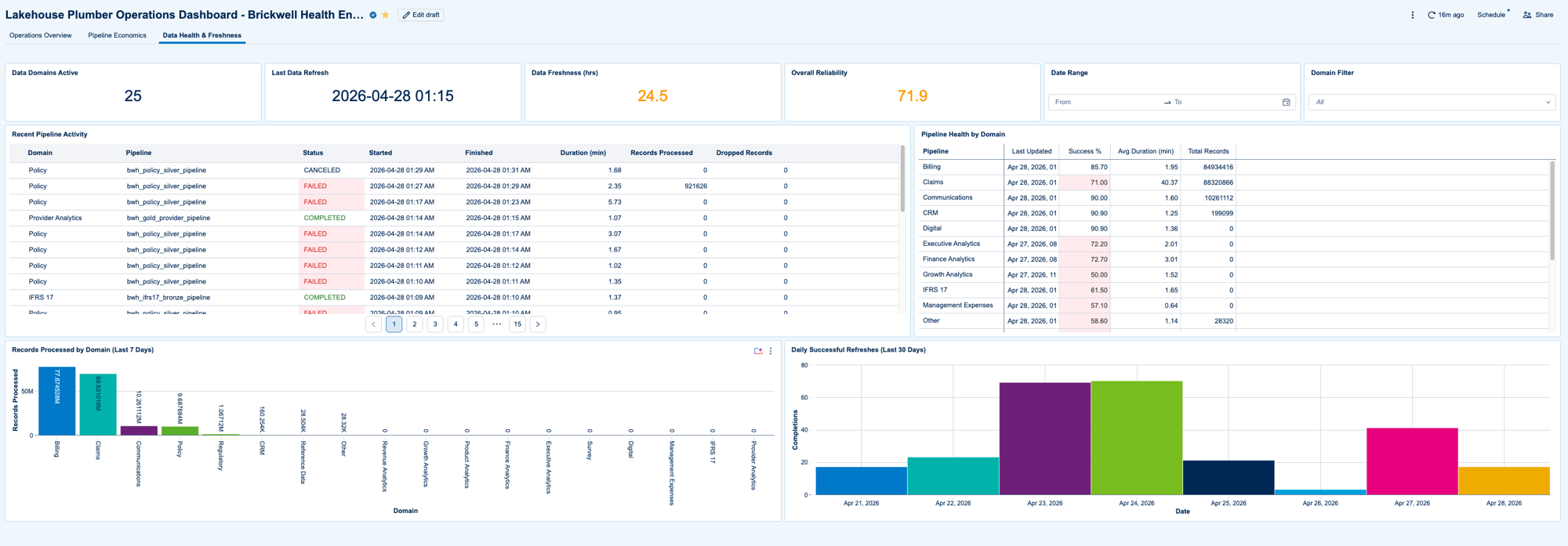
Under the hood, lhp generate emits:
- One union notebook with N independent streaming queries — one per event-log-enabled pipeline, each with its own checkpoint
- One MVs-only DLT FlowGroup with a pre-built
pipeline_run_summarymaterialized view: pipeline name, run ID, status, duration, row metrics - Optional Databricks Jobs correlation (state, start/end, duration) when
enable_job_monitoring: true
Plug those into an AI/BI dashboard and you have project-wide observability — pipeline activity, health by domain, freshness, daily reliability — without writing the aggregation logic yourself. dlt-meta gives you per-pipeline event logs; LHP gives you the cross-pipeline rollup. (Logic in src/lhp/core/services/monitoring_pipeline_builder.py.)
Every lhp generate regenerates all flowgroups; state-file caching has been removed in version 0.10.0.
Core workflow
Every FlowGroup is a sequence of typed actions:
graph LR
    A[Load] --> B{0..N Transform}
    B --> C[Write]
The action sub-types cover everything Lakeflow SDP exposes:
| Action | Sub-types |
|---|---|
| Load | CloudFiles (Auto Loader), Delta (with CDF), JDBC, SQL, custom Python |
| Transform | SQL, Python, data-quality expectations, schema mapping, temp tables |
| Write | Streaming Table, Materialized View, Append Flow (multi-source fan-in), CDC (SCD Type 1 and 2), Snapshot CDC, Sink (Delta, Kafka, JDBC, REST) |
| Test | Row count, uniqueness, referential integrity, completeness, range, schema match, lookup validity, custom SQL, custom expectations |
The full action reference is in the docs.
Substitutions and secrets
LHP composes four substitution layers, in order:
%{local_var} → {{ template_param }} → ${env_token} → ${secret:scope/key}
local_var is per-FlowGroup. template_param is per-template-invocation. env_token comes from substitutions/<env>.yaml (one per environment — dev.yaml, staging.yaml, prod.yaml). secret:scope/key is compiled into a dbutils.secrets.get() call in the generated Python — secret values never appear in YAML, never appear in generated source, and are resolved at pipeline runtime by Databricks.
You can chain layers: an env_token can expand to a string containing a secret: reference. The substitution processor lives in src/lhp/core/services/flowgroup_processor.py.
A real bronze ingestion FlowGroup
pipeline: bronze_ingestion
flowgroup: customers
presets: [bronze_layer_defaults]

actions:
  - name: load_customers_autoloader
    type: load
    source:
      type: cloudfiles
      path: "${landing_path}/customers/*.parquet"
      schema_evolution_mode: addNewColumns
    target: v_customers_raw

  - name: write_customers_bronze
    type: write
    source: v_customers_raw
    write_target:
      type: streaming_table
      database: "${catalog}.${bronze_schema}"
      table: customers
      cluster_columns: [market_segment]
The bronze_layer_defaults preset injects table properties, comment templates, and operational metadata columns shared across every bronze table. The ${landing_path}, ${catalog}, and ${bronze_schema} tokens come from substitutions/dev.yaml. Run lhp generate --env dev, get production-ready Python with Auto Loader options, schema hints, append-flow registration, and Delta table properties — all configured per your preset.
The docs cover silver transforms (CDC, SCD Type 2, multi-source append flows), gold materialized views, and the full test-action catalog with examples.
Project layout
my_project/
├── lhp.yaml                    # project config (catalog, monitoring, defaults)
├── pipelines/                  # FlowGroups grouped by pipeline directory
│   ├── bronze_ingestion/
│   │   ├── customers.yaml
│   │   └── orders.yaml
│   └── silver_transforms/
│       └── customer_dimension.yaml
├── templates/                  # parameterised action patterns (reused across FlowGroups)
├── presets/                    # standardisation snippets (bronze defaults, audit columns, …)
├── blueprints/                 # parameterised pipeline shapes (multi-site / multi-tenant)
├── substitutions/              # per-environment variable values
│   ├── dev.yaml
│   └── prod.yaml
├── schemas/                    # JSON / SQL schemas referenced by Auto Loader
├── expectations/               # JSON expectation files for data-quality transforms
├── .vscode/                    # IntelliSense settings (auto-generated by `lhp init`)
└── generated/                  # output — checked in, version-controlled, debuggable
What's new
- Lakeflow SDP migration — generated code now uses
from pyspark import pipelines as dp(Lakeflow Spark Declarative Pipelines API) instead of the legacyimport dltdecorators - Sink writes — Delta tables, Kafka, JDBC, REST APIs as terminal write targets
- Multi-FlowGroup files — one YAML can declare multiple FlowGroups under shared settings, cutting file count for large templated projects
- Cross-pipeline monitoring — event-log aggregation + run-summary MV + optional Jobs correlation, dashboard-ready
- Pipeline & Job config — per-environment overrides for compute, runtime, scheduling, notifications, permissions
The full changelog follows Keep a Changelog.
Documentation and community
- Quickstart — ship your first pipeline in 10 minutes
- Migrating from raw DLT — what to port first, how presets map to your existing patterns
- Architecture — execution model, the six reuse primitives, the generation pipeline
- Full docs — every action, every YAML key, every error code
Issues for bugs and feature requests. Discussions for design questions and best-practice exchange.
License
Apache 2.0 — see LICENSE.
Built for Lakeflow Spark Declarative Pipelines.
Project details
Verified details
These details have been verified by PyPIProject links
GitHub Statistics
Maintainers
Release history Release notifications | RSS feed


Download files
Download the file for your platform. If you're not sure which to choose, learn more about installing packages.
Source Distribution
Built Distribution
Filter files by name, interpreter, ABI, and platform.
If you're not sure about the file name format, learn more about wheel file names.
Copy a direct link to the current filters
File details
Details for the file lakehouse_plumber-0.8.7.tar.gz.
File metadata
- Download URL: lakehouse_plumber-0.8.7.tar.gz
- Upload date:
- Size: 778.0 kB
- Tags: Source
- Uploaded using Trusted Publishing? Yes
- Uploaded via: twine/6.1.0 CPython/3.13.13
File hashes
| Algorithm | Hash digest | |
|---|---|---|
| SHA256 |
1f89918120180661d0e39ceafc17f5c2b36ff30933e8268a200a1f66e42d8ac5
|
|
| MD5 |
32729a45e8dd49f89196ca815b92acbe
|
|
| BLAKE2b-256 |
8dd622090c22293e8e30695690758b89c9a18c8208058c6925127d59c1a3f2d6
|
Provenance
The following attestation bundles were made for lakehouse_plumber-0.8.7.tar.gz:
Publisher:
publish.yml on Mmodarre/Lakehouse_Plumber
-
Statement:
-
Statement type:
https://in-toto.io/Statement/v1 -
Predicate type:
https://docs.pypi.org/attestations/publish/v1 -
Subject name:
lakehouse_plumber-0.8.7.tar.gz -
Subject digest:
1f89918120180661d0e39ceafc17f5c2b36ff30933e8268a200a1f66e42d8ac5 - Sigstore transparency entry: 1598502406
- Sigstore integration time:
-
Permalink:
Mmodarre/Lakehouse_Plumber@a836f8f7ffe0c5501c3b52d0cb756aec21a140b1 -
Branch / Tag:
refs/heads/main - Owner: https://github.com/Mmodarre
-
Access:
public
-
Token Issuer:
https://token.actions.githubusercontent.com -
Runner Environment:
github-hosted -
Publication workflow:
publish.yml@a836f8f7ffe0c5501c3b52d0cb756aec21a140b1 -
Trigger Event:
workflow_run
-
Statement type:
File details
Details for the file lakehouse_plumber-0.8.7-py3-none-any.whl.
File metadata
- Download URL: lakehouse_plumber-0.8.7-py3-none-any.whl
- Upload date:
- Size: 485.7 kB
- Tags: Python 3
- Uploaded using Trusted Publishing? Yes
- Uploaded via: twine/6.1.0 CPython/3.13.13
File hashes
| Algorithm | Hash digest | |
|---|---|---|
| SHA256 |
b5f60d8ec18e83875b3b5561946ab4b1c44c205c6eb45483a1094988c068531a
|
|
| MD5 |
32465f958fe4376de245345fc74c85d2
|
|
| BLAKE2b-256 |
9f7d8fe7a9975c00a2ea190f0ebf4a4edac232b57b883661d63a5668bff1b694
|
Provenance
The following attestation bundles were made for lakehouse_plumber-0.8.7-py3-none-any.whl:
Publisher:
publish.yml on Mmodarre/Lakehouse_Plumber
-
Statement:
-
Statement type:
https://in-toto.io/Statement/v1 -
Predicate type:
https://docs.pypi.org/attestations/publish/v1 -
Subject name:
lakehouse_plumber-0.8.7-py3-none-any.whl -
Subject digest:
b5f60d8ec18e83875b3b5561946ab4b1c44c205c6eb45483a1094988c068531a - Sigstore transparency entry: 1598502511
- Sigstore integration time:
-
Permalink:
Mmodarre/Lakehouse_Plumber@a836f8f7ffe0c5501c3b52d0cb756aec21a140b1 -
Branch / Tag:
refs/heads/main - Owner: https://github.com/Mmodarre
-
Access:
public
-
Token Issuer:
https://token.actions.githubusercontent.com -
Runner Environment:
github-hosted -
Publication workflow:
publish.yml@a836f8f7ffe0c5501c3b52d0cb756aec21a140b1 -
Trigger Event:
workflow_run
-
Statement type:






