
🗼 Laketower
Oversee your lakehouse




Utility application to explore and manage tables in your data lakehouse, especially tailored for data pipelines local development.
Features
- Delta Lake table format support
- Remote tables support (S3, ADLS)
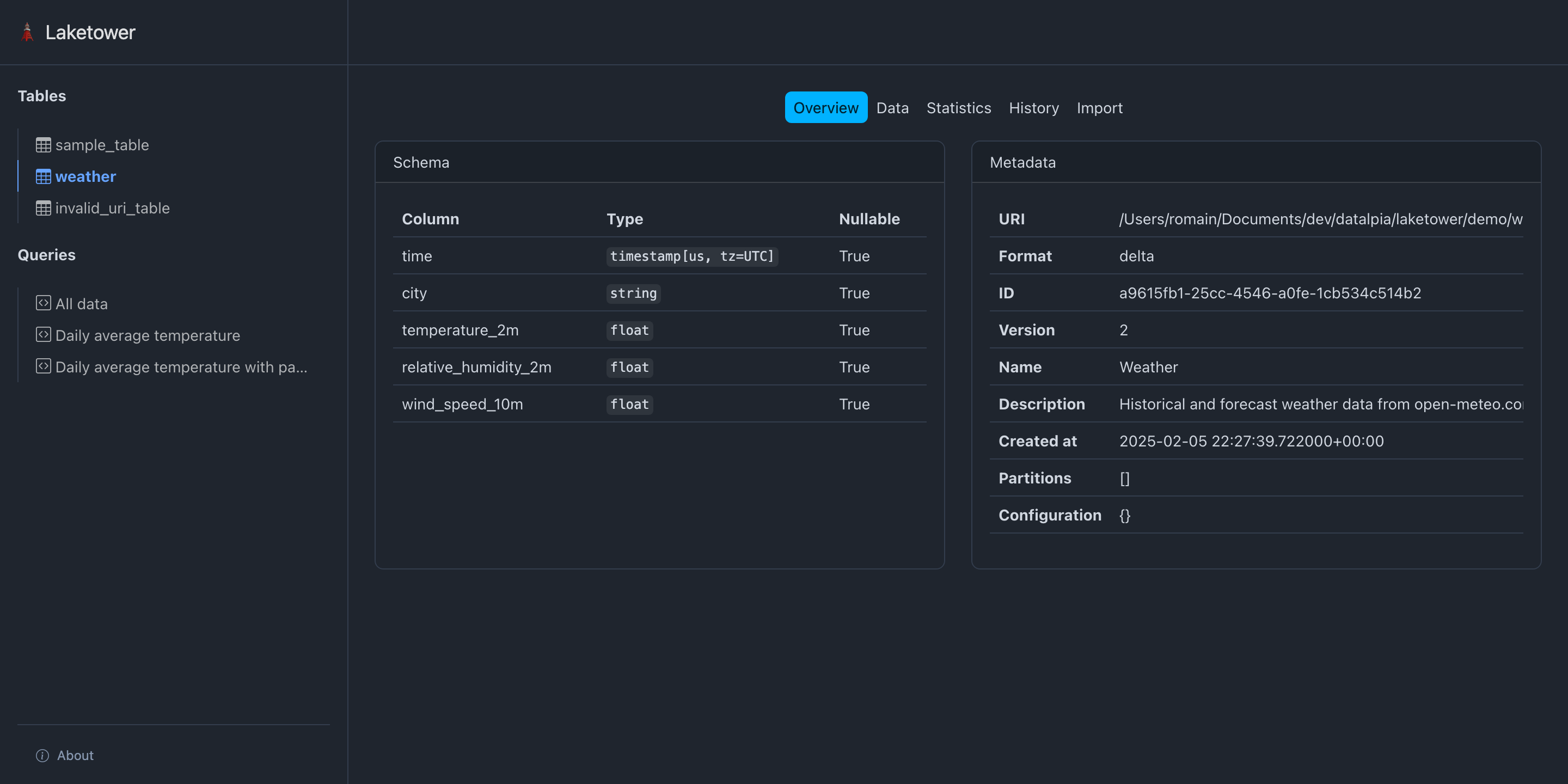
- Inspect table metadata
- Inspect table schema
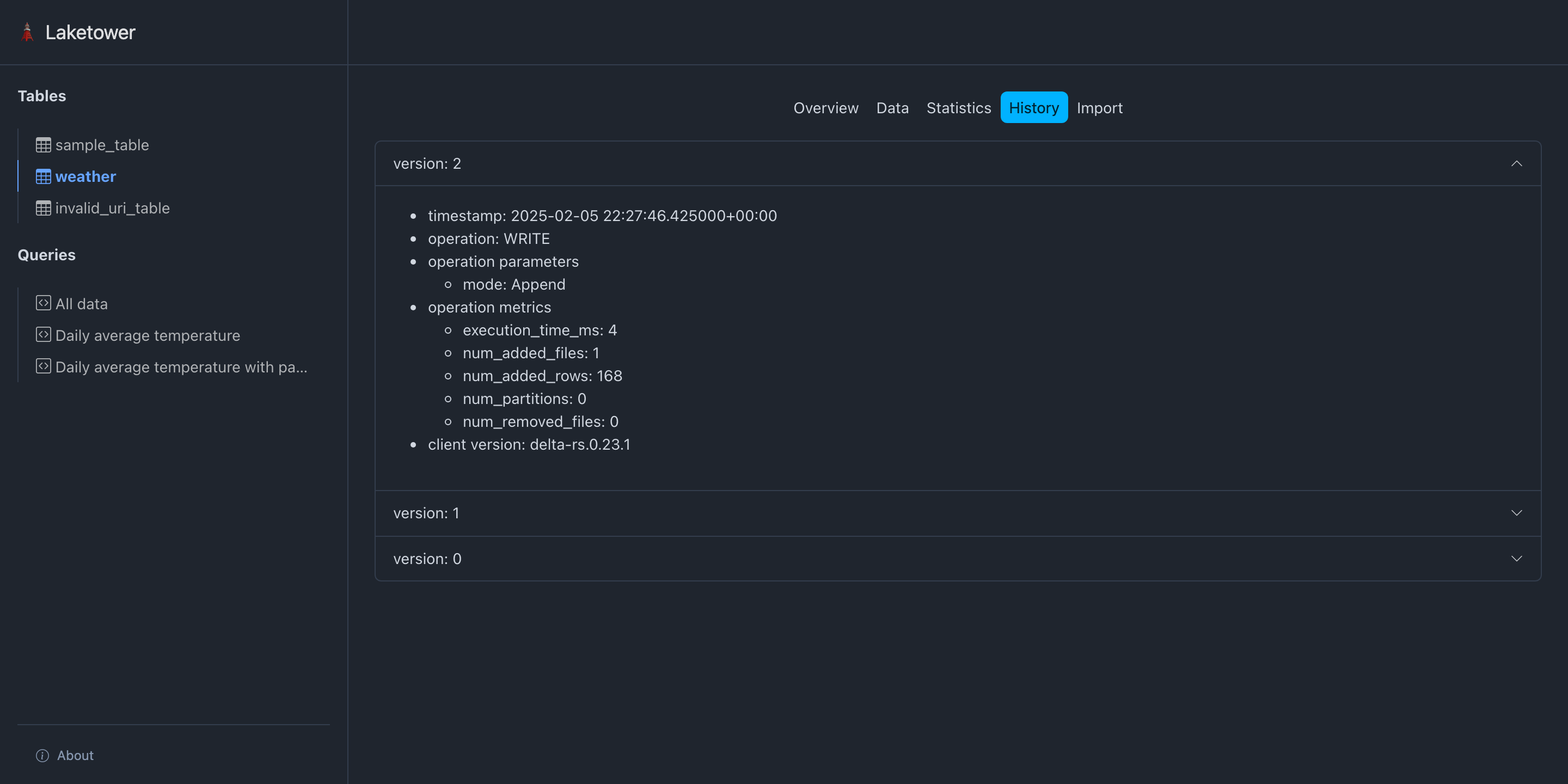
- Inspect table history
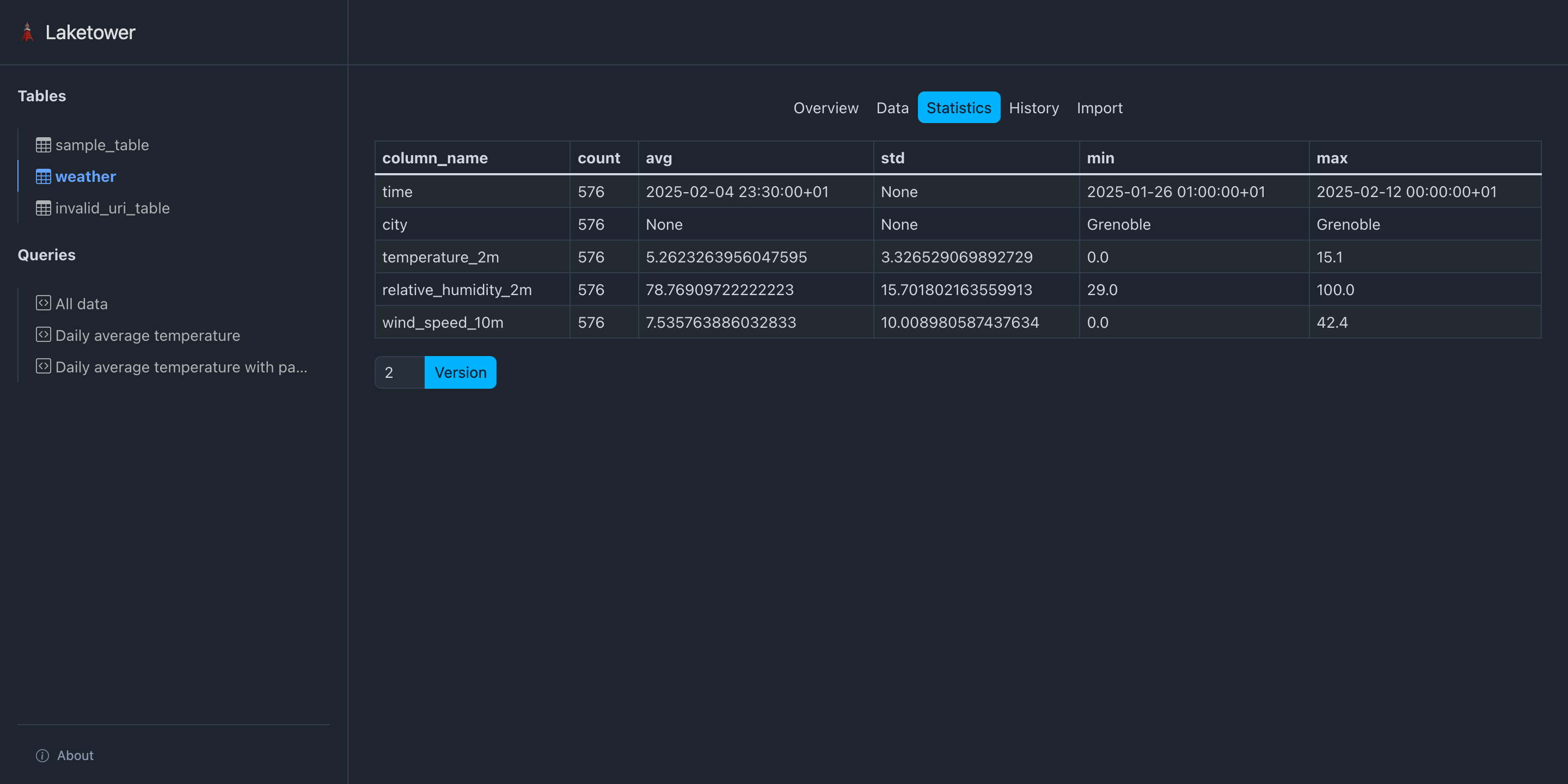
- Get table statistics
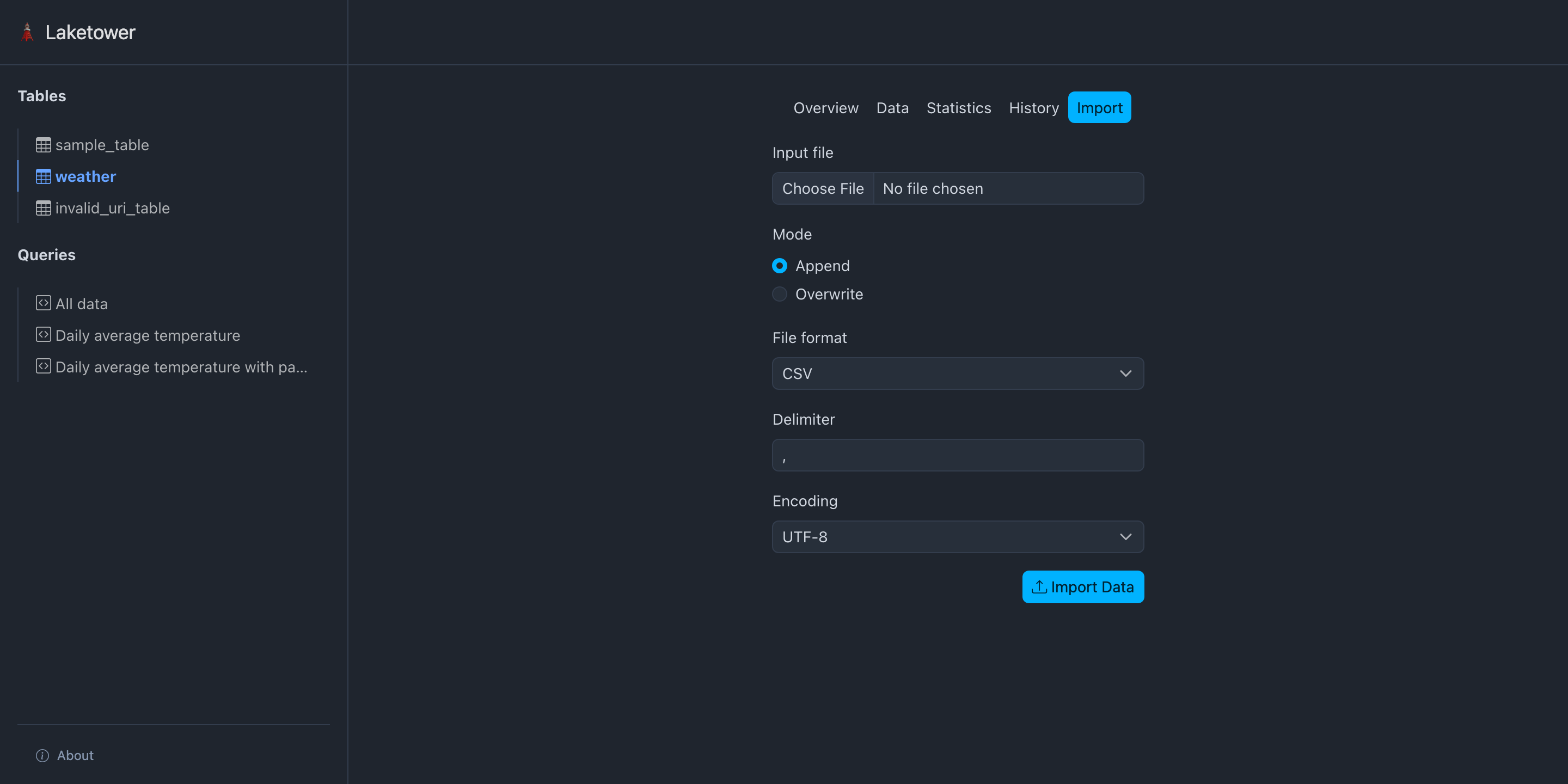
- Import data into a table from CSV files
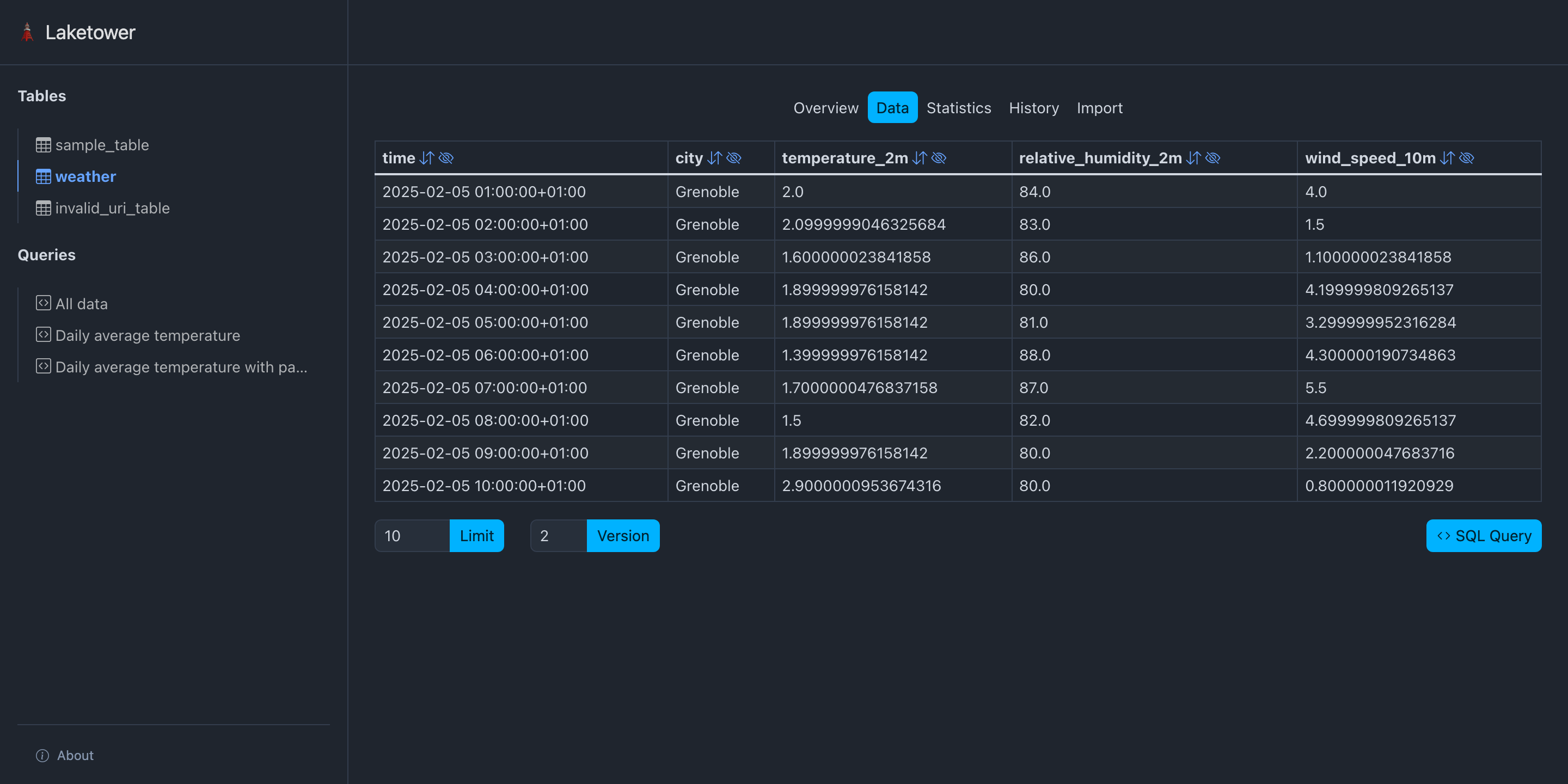
- View table content with a simple query builder
- Query all registered tables with DuckDB SQL dialect
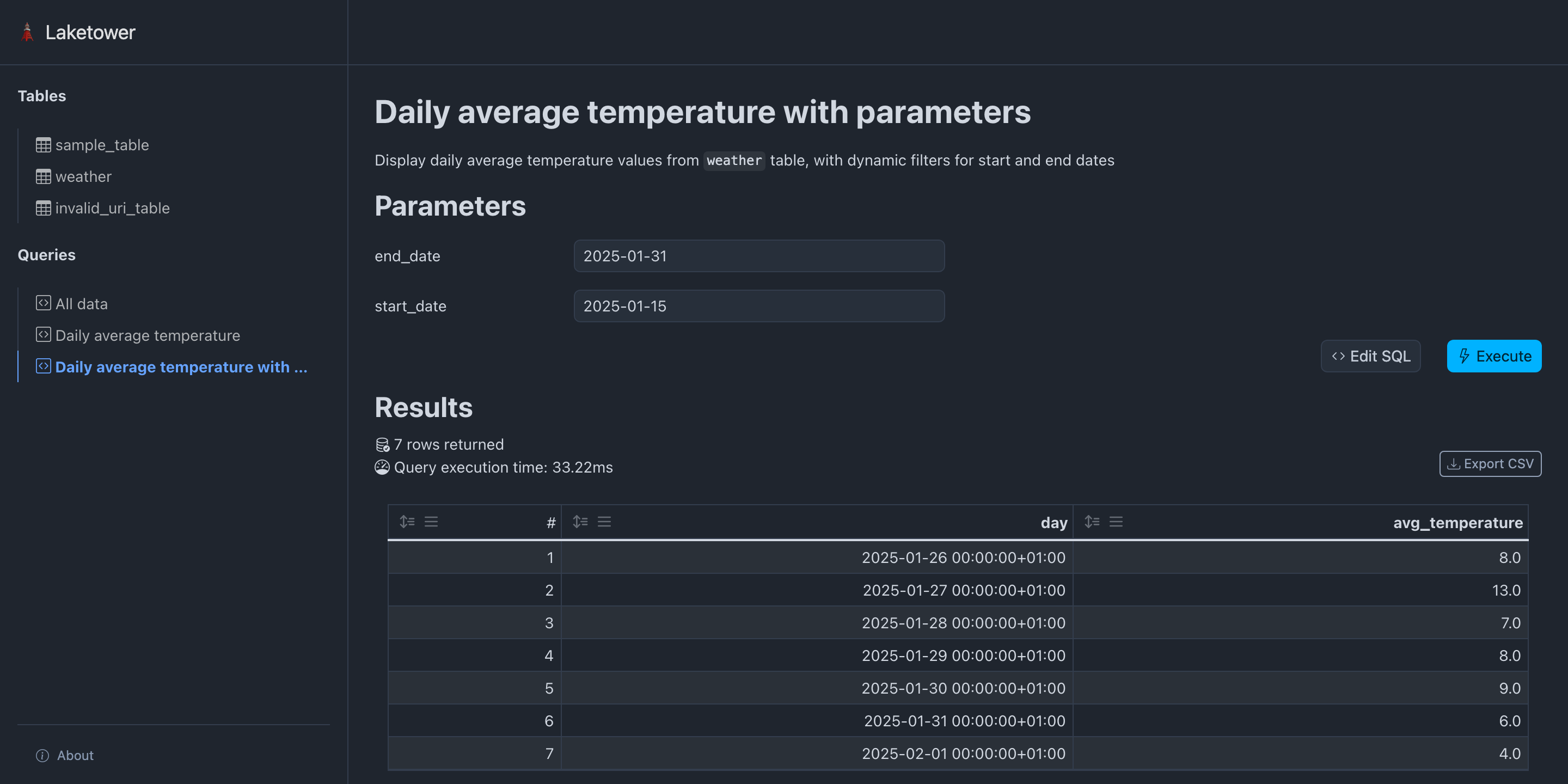
- Execute saved queries
- Export query results to CSV files
- Static and versionable YAML configuration
- Web application
- CLI application
Installation
Using pip (or any other Python package manager):
pip install laketower
Using uvx:
uvx laketower
Usage
Configuration
Laketower configuration is based on a static YAML configuration file allowing to:
- List all tables to be registered
Format:
settings:
  max_query_rows: 1000
  web:
    hide_tables: false

storage_credentials:
  <credential_name>:
    s3:               # mutually exclusive with adls
      access_key_id: <access-key-id>
      secret_access_key: <secret-access-key>
      region: <region>
      endpoint_url: <endpoint-url>
      allow_http: false
    adls:             # mutually exclusive with s3
      account_name: <account-name>
      access_key: <access-key>
      sas_key: <sas-key>
      tenant_id: <tenant-id>
      client_id: <client-id>
      client_secret: <client-secret>
      msi_endpoint: <msi-endpoint>
      use_azure_cli: false

tables:
  - name: <table_name>
    uri: <local or remote path to table>
    format: {delta}
    storage_credential: <credential_name>   # optional, references storage_credentials

queries:
  - name: <query_name>
    title: <Query name>
    description: <Query description>
    totals_row: true
    parameters:
      <param_name_1>:
        default: <default_value>
    sql: <sql expression>
Current limitations:
tables.uri:- Local paths are supported (
./path/to/table,/abs/path/to/table,file:///abs/path/to/table) - Remote paths to S3 (
s3://<bucket>/<path>) and ADLS (abfss://<container>/<path>)
- Local paths are supported (
tables.format: onlydeltais allowed
Example from the provided demo:
tables:
  - name: sample_table
    uri: demo/sample_table
    format: delta
  - name: weather
    uri: demo/weather
    format: delta

queries:
  - name: all_data
    title: All data
    sql: |
      select
        sample_table.*,
        weather.*
      from
        sample_table,
        weather
      limit 10
  - name: daily_avg_temperature
    title: Daily average temperature
    sql: |
      select
        date_trunc('day', time) as day,
        round(avg(temperature_2m)) as avg_temperature
      from
        weather
      group by
        day
      order by
        day asc
Support for environment variables substitution is also supported within the YAML
configuration using a object containing a single key env with the name of the
environment variable to be injected. The value of the variable can contain JSON
and will be decoded in a best effort manner (default to string value). For instance:
# export TABLE_URI=path/to/table

tables:
  - name: sample_table
    uri:
      env: TABLE_URI
    format: delta
For string values that only need partial substitution, use the ${VAR_NAME}
inline syntax instead. Multiple variables in a single value are supported:
# export BUCKET=my-bucket
# export PREFIX=my-prefix

tables:
  - name: sample_table
    uri: s3://${BUCKET}/${PREFIX}/sample_table
    format: delta
The two syntaxes are independent: {env: VAR} replaces the entire value (any
type), while ${VAR} interpolates within a string.
Config Includes
Large or multi-environment setups can split the configuration across multiple
YAML files using the include directive. Included files are deep-merged before
the main file, so the main file always wins on conflict.
# queries.yml  (shared across environments)
queries:
  - name: all_data
    title: All data
    sql: "select * from my_table"
# laketower.production.yml
include:
  - queries.yml

storage_credentials:
  s3_creds:
    s3:
      access_key_id: ${AWS_ACCESS_KEY_ID}
      secret_access_key: ${AWS_SECRET_ACCESS_KEY}

tables:
  - name: my_table
    uri: s3://production-bucket/tables/my_table
    format: delta
    storage_credential: s3_creds
Merge semantics:
- Lists (
tables,queries, ...): included file items come first, main file items appended - Dicts (
settings,storage_credentials, ...): recursively deep-merged, main file values win on conflict - Scalars: main file wins
Rules:
includepaths are relative to the directory of the file declaring them- Multiple files are merged in order (first listed = lowest priority)
- Environment variable substitution works in included files
- Included files themselves do not support
include(no recursive includes)
Storage Credentials
Storage credentials are defined once under the top-level storage_credentials
key as a named registry, then referenced by name from each table via the
storage_credential field. This avoids repeating the same credentials across
multiple tables.
Remote S3 Tables
Configuring S3 tables (AWS, MinIO, Cloudflare R2, Scaleway Object Storage, …):
storage_credentials:
  my_s3:
    s3:
      access_key_id: access-key-id
      secret_access_key: secret-access-key
      region: s3-region
      endpoint_url: http://s3.domain.com
      allow_http: false

tables:
  - name: delta_table_s3
    uri: s3://<bucket>/path/to/table
    format: delta
    storage_credential: my_s3
Depending on your object storage location and configuration, one might have to
set part or all the available s3 parameters. The only required ones
are access_key_id and secret_access_key.
As a security best practice, avoid writing secrets directly in static configuration files. Use environment variable substitution instead:
storage_credentials:
  my_s3:
    s3:
      access_key_id: access-key-id
      secret_access_key:
        env: S3_SECRET_ACCESS_KEY
      region: s3-region
      endpoint_url: http://s3.domain.com
      allow_http: false

tables:
  - name: delta_table_s3
    uri: s3://<bucket>/path/to/table
    format: delta
    storage_credential: my_s3
Remote ADLS Tables
Configuring Azure ADLS tables:
storage_credentials:
  my_adls:
    adls:
      account_name: adls-account-name
      access_key: adls-access-key
      sas_key: adls-sas-key
      tenant_id: adls-tenant-id
      client_id: adls-client-id
      client_secret: adls-client-secret
      msi_endpoint: https://msi.azure.com
      use_azure_cli: false

tables:
  - name: delta_table_adls
    uri: abfss://<container>/path/to/table
    format: delta
    storage_credential: my_adls
Depending on your object storage location and configuration, one might have to
set part or all the available adls parameters. The only required one
is account_name.
As a security best practice, avoid writing secrets directly in static configuration files. Use environment variable substitution instead:
storage_credentials:
  my_adls:
    adls:
      account_name: adls-account-name
      access_key:
        env: ADLS_ACCESS_KEY

tables:
  - name: delta_table_adls
    uri: abfss://<container>/path/to/table
    format: delta
    storage_credential: my_adls
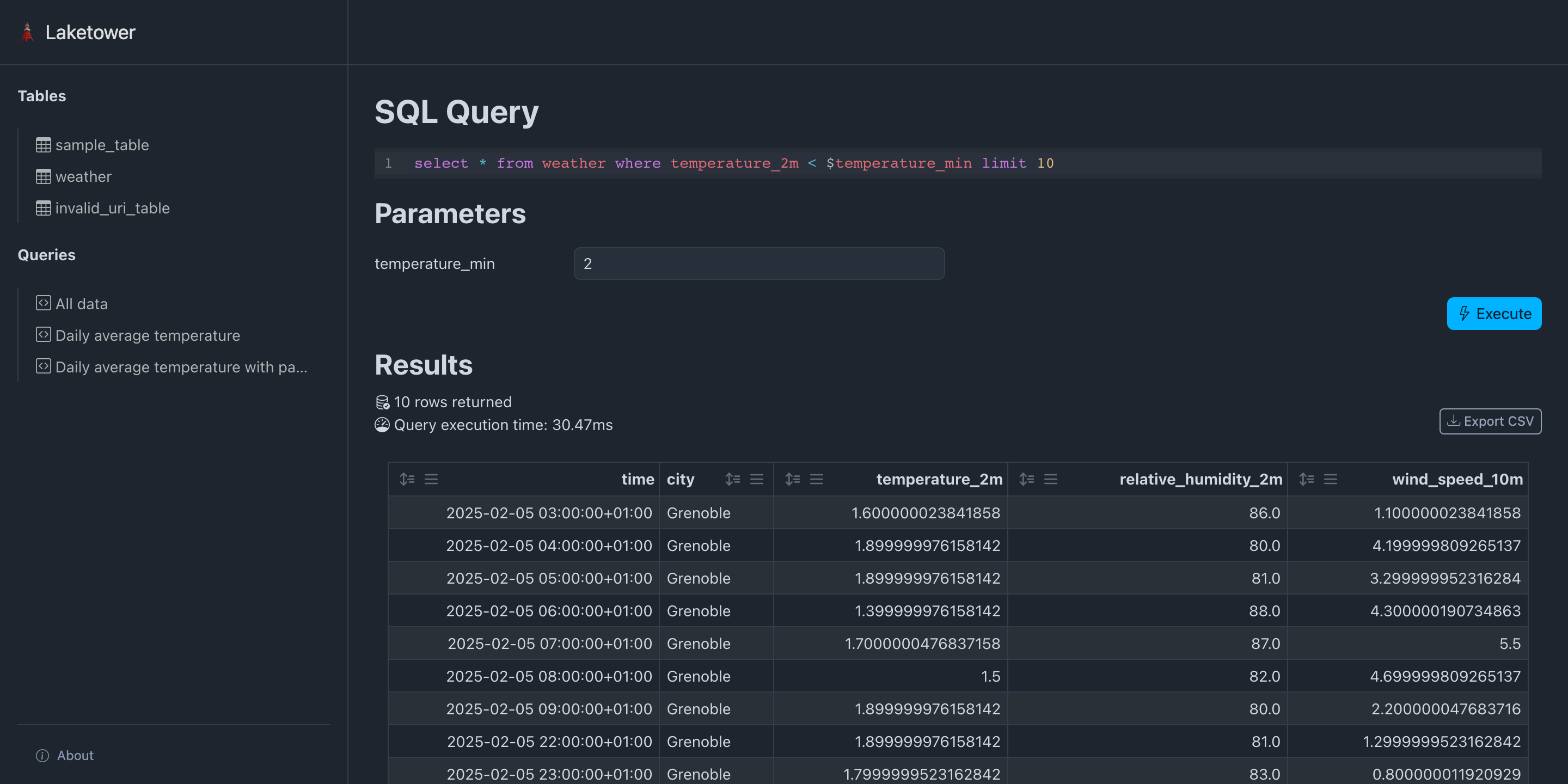
Predefined Query Parameters
Predefined queries allows for specifying named parameters that can then be used
with an SQL statement using the $param_name syntax.
When a query parameter is left blank by the user, it is treated as NULL by the
SQL engine. Use COALESCE to provide a fallback so the filter becomes a no-op
instead of returning an error or empty results:
queries:
  - name: daily_avg_temperature_params
    title: Daily average temperature with parameters
    parameters:
      start_date:
        default: "2025-01-01"
      end_date:
        default: "2025-01-31"
    sql: |
      select
        date_trunc('day', time) as day,
        round(avg(temperature_2m)) as avg_temperature
      from
        weather
      where
        day between coalesce($start_date::timestamp, timestamp '-infinity')
                and coalesce($end_date::timestamp, timestamp 'infinity')
      group by
        day
      order by
        day asc
In this example:
- Blank
start_dateleads totimestamp '-infinity'(no lower bound) - Blank
end_dateleads totimestamp 'infinity'(no upper bound) - If both parameters are blank, all rows are returned
Web Application
The easiest way to get started is to launch the Laketower web application:
$ laketower -c demo/laketower.yml web
By default, the web application will run on host 127.0.0.1 and port 8000.
If some custom setup is required (especially for cloud deployment), this configuration
can be customized at runtime:
$ laketower -c demo/laketower.yml web --host 0.0.0.0 --port 5000
Screenshots
CLI
Laketower provides a CLI interface:
$ laketower --help

usage: laketower [-h] [--version] [--config CONFIG] {web,config,tables,queries} ...

options:
  -h, --help            show this help message and exit
  --version             show program's version number and exit
  --config, -c CONFIG   Path to the Laketower YAML configuration file (default: laketower.yml)

commands:
  {web,config,tables,queries}
    web                 Launch the web application
    config              Work with configuration
    tables              Work with tables
    queries             Work with queries
By default, a YAML configuration file named laketower.yml will be looked for.
A custom path can be specified with the -c / --config argument.
Show resolved YAML configuration
Print the fully resolved configuration after include merging, useful for debugging composed setups.
$ laketower -c demo/laketower.yml config show
Pass --with-env-vars-substitution to also resolve environment variable references:
$ laketower -c demo/laketower.yml config show --with-env-vars-substitution
Validate YAML configuration
$ laketower -c demo/laketower.yml config validate

╭────────────────────────╮
│ Configuration is valid │
╰────────────────────────╯
Config(
    tables=[
        ConfigTable(name='sample_table', uri='demo/sample_table', table_format=<TableFormats.delta: 'delta'>),
        ConfigTable(name='weather', uri='demo/weather', table_format=<TableFormats.delta: 'delta'>)
    ]
)
List all registered tables
$ laketower -c demo/laketower.yml tables list

tables
├── sample_table
│   ├── format: delta
│   └── uri: demo/sample_table
└── weather
    ├── format: delta
    └── uri: demo/weather
Display a given table metadata
$ laketower -c demo/laketower.yml tables metadata sample_table

sample_table
├── name: Demo table
├── description: A sample demo Delta table
├── format: delta
├── uri: /Users/romain/Documents/dev/datalpia/laketower/demo/sample_table/
├── id: c1cb1cf0-1f3f-47b5-a660-3cc800edd341
├── version: 3
├── created at: 2025-02-05 22:27:39.579000+00:00
├── partitions:
└── configuration: {}
Display a given table schema
$ laketower -c demo/laketower.yml tables schema weather

weather
├── time: timestamp[us, tz=UTC]
├── city: string
├── temperature_2m: float
├── relative_humidity_2m: float
└── wind_speed_10m: float
Display a given table history
$ uv run laketower -c demo/laketower.yml tables history weather

weather
├── version: 2
│   ├── timestamp: 2025-02-05 22:27:46.425000+00:00
│   ├── client version: delta-rs.0.23.1
│   ├── operation: WRITE
│   ├── operation parameters
│   │   └── mode: Append
│   └── operation metrics
│       ├── execution_time_ms: 4
│       ├── num_added_files: 1
│       ├── num_added_rows: 168
│       ├── num_partitions: 0
│       └── num_removed_files: 0
├── version: 1
│   ├── timestamp: 2025-02-05 22:27:45.666000+00:00
│   ├── client version: delta-rs.0.23.1
│   ├── operation: WRITE
│   ├── operation parameters
│   │   └── mode: Append
│   └── operation metrics
│       ├── execution_time_ms: 4
│       ├── num_added_files: 1
│       ├── num_added_rows: 408
│       ├── num_partitions: 0
│       └── num_removed_files: 0
└── version: 0
    ├── timestamp: 2025-02-05 22:27:39.722000+00:00
    ├── client version: delta-rs.0.23.1
    ├── operation: CREATE TABLE
    ├── operation parameters
    │   ├── metadata: {"configuration":{},"createdTime":1738794459722,"description":"Historical and forecast weather data from
    │   │   open-meteo.com","format":{"options":{},"provider":"parquet"},"id":"a9615fb1-25cc-4546-a0fe-1cb534c514b2","name":"Weather","partitionCol
    │   │   umns":[],"schemaString":"{\"type\":\"struct\",\"fields\":[{\"name\":\"time\",\"type\":\"timestamp\",\"nullable\":true,\"metadata\":{}},
    │   │   {\"name\":\"city\",\"type\":\"string\",\"nullable\":true,\"metadata\":{}},{\"name\":\"temperature_2m\",\"type\":\"float\",\"nullable\":
    │   │   true,\"metadata\":{}},{\"name\":\"relative_humidity_2m\",\"type\":\"float\",\"nullable\":true,\"metadata\":{}},{\"name\":\"wind_speed_1
    │   │   0m\",\"type\":\"float\",\"nullable\":true,\"metadata\":{}}]}"}
    │   ├── protocol: {"minReaderVersion":1,"minWriterVersion":2}
    │   ├── mode: ErrorIfExists
    │   └── location: file:///Users/romain/Documents/dev/datalpia/laketower/demo/weather
    └── operation metrics
Get statistics of a given table
Get basic statistics on all columns of a given table:
$ laketower -c demo/laketower.yml tables statistics weather

┏━━━━━━━━━━━━━━━━━━━━━━┳━━━━━━━┳━━━━━━━━━━━━━━━━━━━━┳━━━━━━━━━━━━━━━━━━━━┳━━━━━━━━━━━━━━━━━━━━━━━━┳━━━━━━━━━━━━━━━━━━━━━━━━┓
┃ column_name          ┃ count ┃ avg                ┃ std                ┃ min                    ┃ max                    ┃
┡━━━━━━━━━━━━━━━━━━━━━━╇━━━━━━━╇━━━━━━━━━━━━━━━━━━━━╇━━━━━━━━━━━━━━━━━━━━╇━━━━━━━━━━━━━━━━━━━━━━━━╇━━━━━━━━━━━━━━━━━━━━━━━━┩
│ time                 │ 576   │ None               │ None               │ 2025-01-26 01:00:00+01 │ 2025-02-12 00:00:00+01 │
│ city                 │ 576   │ None               │ None               │ Grenoble               │ Grenoble               │
│ temperature_2m       │ 576   │ 5.2623263956047595 │ 3.326529069892729  │ 0.0                    │ 15.1                   │
│ relative_humidity_2m │ 576   │ 78.76909722222223  │ 15.701802163559918 │ 29.0                   │ 100.0                  │
│ wind_speed_10m       │ 576   │ 7.535763886032833  │ 10.00898058743763  │ 0.0                    │ 42.4                   │
└──────────────────────┴───────┴────────────────────┴────────────────────┴────────────────────────┴────────────────────────┘
Specifying a table version yields according results:
$ laketower -c demo/laketower.yml tables statistics --version 0 weather

┏━━━━━━━━━━━━━━━━━━━━━━┳━━━━━━━┳━━━━━━┳━━━━━━┳━━━━━━┳━━━━━━┓
┃ column_name          ┃ count ┃ avg  ┃ std  ┃ min  ┃ max  ┃
┡━━━━━━━━━━━━━━━━━━━━━━╇━━━━━━━╇━━━━━━╇━━━━━━╇━━━━━━╇━━━━━━┩
│ time                 │ 0     │ None │ None │ None │ None │
│ city                 │ 0     │ None │ None │ None │ None │
│ temperature_2m       │ 0     │ None │ None │ None │ None │
│ relative_humidity_2m │ 0     │ None │ None │ None │ None │
│ wind_speed_10m       │ 0     │ None │ None │ None │ None │
└──────────────────────┴───────┴──────┴──────┴──────┴──────┘
Import data into a given table
Import a CSV dataset into a table in append mode:
$ laketower -c demo/laketower.yml tables import weather --file data.csv --mode append --format csv --delimiter ',' --encoding 'utf-8'
--mode argument can be one of:
append: append rows to the table (default)overwrite: replace all rows with the ones from the input file
--format argument can be one of:
csv: CSV file format (default)xlsx: Excel file format (requireslaketower[excel], imports the first sheet)
--delimiter argument can be:
- Any single character (only valid for CSV file format)
- Default is comma (
',')
--encoding argument can be:
- Any standard Python encoding,
- Default is
'utf-8' - Only applies to CSV file format
View a given table
Using a simple query builder, the content of a table can be displayed. Optional arguments:
--cols <col1> <col2>: select which columns to display--sort-asc <col>: sort by a column name in ascending order--sort-desc <col>: sort by a column name in descending order--limit <num>(default 10): limit the number of rows--version: time-travel to table revision number
$ laketower -c demo/laketower.yml tables view weather

┏━━━━━━━━━━━━━━━━━━━━━━━━━━━┳━━━━━━━━━━┳━━━━━━━━━━━━━━━━━━━━┳━━━━━━━━━━━━━━━━━━━━━━┳━━━━━━━━━━━━━━━━━━━┓
┃ time                      ┃ city     ┃ temperature_2m     ┃ relative_humidity_2m ┃ wind_speed_10m    ┃
┡━━━━━━━━━━━━━━━━━━━━━━━━━━━╇━━━━━━━━━━╇━━━━━━━━━━━━━━━━━━━━╇━━━━━━━━━━━━━━━━━━━━━━╇━━━━━━━━━━━━━━━━━━━┩
│ 2025-02-05 01:00:00+01:00 │ Grenoble │ 2.0                │ 84.0                 │ 4.0               │
│ 2025-02-05 02:00:00+01:00 │ Grenoble │ 2.0999999046325684 │ 83.0                 │ 1.5               │
│ 2025-02-05 03:00:00+01:00 │ Grenoble │ 1.600000023841858  │ 86.0                 │ 1.100000023841858 │
│ 2025-02-05 04:00:00+01:00 │ Grenoble │ 1.899999976158142  │ 80.0                 │ 4.199999809265137 │
│ 2025-02-05 05:00:00+01:00 │ Grenoble │ 1.899999976158142  │ 81.0                 │ 3.299999952316284 │
│ 2025-02-05 06:00:00+01:00 │ Grenoble │ 1.399999976158142  │ 88.0                 │ 4.300000190734863 │
│ 2025-02-05 07:00:00+01:00 │ Grenoble │ 1.7000000476837158 │ 87.0                 │ 5.5               │
│ 2025-02-05 08:00:00+01:00 │ Grenoble │ 1.5                │ 82.0                 │ 4.699999809265137 │
│ 2025-02-05 09:00:00+01:00 │ Grenoble │ 1.899999976158142  │ 80.0                 │ 2.200000047683716 │
│ 2025-02-05 10:00:00+01:00 │ Grenoble │ 2.9000000953674316 │ 80.0                 │ 0.800000011920929 │
└───────────────────────────┴──────────┴────────────────────┴──────────────────────┴───────────────────┘
$ laketower -c demo/laketower.yml tables view weather --cols time city temperature_2m --limit 5 --sort-desc time

┏━━━━━━━━━━━━━━━━━━━━━━━━━━━┳━━━━━━━━━━┳━━━━━━━━━━━━━━━━━━━┓
┃ time                      ┃ city     ┃ temperature_2m    ┃
┡━━━━━━━━━━━━━━━━━━━━━━━━━━━╇━━━━━━━━━━╇━━━━━━━━━━━━━━━━━━━┩
│ 2025-02-12 00:00:00+01:00 │ Grenoble │ 5.099999904632568 │
│ 2025-02-12 00:00:00+01:00 │ Grenoble │ 5.099999904632568 │
│ 2025-02-11 23:00:00+01:00 │ Grenoble │ 4.900000095367432 │
│ 2025-02-11 23:00:00+01:00 │ Grenoble │ 4.900000095367432 │
│ 2025-02-11 22:00:00+01:00 │ Grenoble │ 4.900000095367432 │
└───────────────────────────┴──────────┴───────────────────┘
$ laketower -c demo/laketower.yml tables view weather --version 1

┏━━━━━━━━━━━━━━━━━━━━━━━━━━━┳━━━━━━━━━━┳━━━━━━━━━━━━━━━━━━━┳━━━━━━━━━━━━━━━━━━━━━━┳━━━━━━━━━━━━━━━━━━━━┓
┃ time                      ┃ city     ┃ temperature_2m    ┃ relative_humidity_2m ┃ wind_speed_10m     ┃
┡━━━━━━━━━━━━━━━━━━━━━━━━━━━╇━━━━━━━━━━╇━━━━━━━━━━━━━━━━━━━╇━━━━━━━━━━━━━━━━━━━━━━╇━━━━━━━━━━━━━━━━━━━━┩
│ 2025-01-26 01:00:00+01:00 │ Grenoble │ 7.0               │ 87.0                 │ 8.899999618530273  │
│ 2025-01-26 02:00:00+01:00 │ Grenoble │ 6.099999904632568 │ 87.0                 │ 6.199999809265137  │
│ 2025-01-26 03:00:00+01:00 │ Grenoble │ 6.0               │ 86.0                 │ 2.700000047683716  │
│ 2025-01-26 04:00:00+01:00 │ Grenoble │ 6.099999904632568 │ 82.0                 │ 3.0999999046325684 │
│ 2025-01-26 05:00:00+01:00 │ Grenoble │ 5.5               │ 87.0                 │ 3.299999952316284  │
│ 2025-01-26 06:00:00+01:00 │ Grenoble │ 5.199999809265137 │ 91.0                 │ 2.200000047683716  │
│ 2025-01-26 07:00:00+01:00 │ Grenoble │ 4.800000190734863 │ 86.0                 │ 3.0                │
│ 2025-01-26 08:00:00+01:00 │ Grenoble │ 4.900000095367432 │ 83.0                 │ 1.100000023841858  │
│ 2025-01-26 09:00:00+01:00 │ Grenoble │ 4.0               │ 92.0                 │ 3.0999999046325684 │
│ 2025-01-26 10:00:00+01:00 │ Grenoble │ 5.0               │ 86.0                 │ 6.400000095367432  │
└───────────────────────────┴──────────┴───────────────────┴──────────────────────┴────────────────────┘
Query all registered tables
Query any registered tables using DuckDB SQL dialect!
$ laketower -c demo/laketower.yml tables query "select date_trunc('day', time) as day, avg(temperature_2m) as mean_temperature from weather group by day order by day desc limit 3"

┏━━━━━━━━━━━━━━━━━━━━━━━━━━━┳━━━━━━━━━━━━━━━━━━━━┓
┃ day                       ┃ mean_temperature   ┃
┡━━━━━━━━━━━━━━━━━━━━━━━━━━━╇━━━━━━━━━━━━━━━━━━━━┩
│ 2025-02-12 00:00:00+01:00 │ 5.099999904632568  │
│ 2025-02-11 00:00:00+01:00 │ 4.833333373069763  │
│ 2025-02-10 00:00:00+01:00 │ 2.1083333243926368 │
└───────────────────────────┴────────────────────┘
3 rows returned
Execution time: 33.72ms
Use named parameters within a giving query (note: escape $ prefixes properly!):
$ laketower -c demo/laketower.yml tables query "select date_trunc('day', time) as day, avg(temperature_2m) as mean_temperature from weather where day between \$start_date and \$end_date group by day order by day desc" -p start_date 2025-01-29 -p end_date 2025-01-31

┏━━━━━━━━━━━━━━━━━━━━━━━━━━━┳━━━━━━━━━━━━━━━━━━━━┓
┃ day                       ┃ mean_temperature   ┃
┡━━━━━━━━━━━━━━━━━━━━━━━━━━━╇━━━━━━━━━━━━━━━━━━━━┩
│ 2025-01-31 00:00:00+01:00 │ 5.683333257834117  │
│ 2025-01-30 00:00:00+01:00 │ 8.900000015894571  │
│ 2025-01-29 00:00:00+01:00 │ 7.770833313465118  │
└───────────────────────────┴────────────────────┘
4 rows returned
Execution time: 30.59ms
Export query results to CSV:
$ laketower -c demo/laketower.yml tables query --output results.csv "select date_trunc('day', time) as day, avg(temperature_2m) as mean_temperature from weather group by day order by day desc limit 3"

Query results written to: results.csv
List saved queries
$ laketower -c demo/laketower.yml queries list

queries
├── all_data
└── daily_avg_temperature
Execute saved queries
$ laketower -c demo/laketower.yml queries view daily_avg_temperature

┏━━━━━━━┳━━━━━━━━━━━━━━━━━━━━━━━━━━━┳━━━━━━━━━━━━━━━━━┓
┃ #     ┃ day                       ┃ avg_temperature ┃
┡━━━━━━━╇━━━━━━━━━━━━━━━━━━━━━━━━━━━╇━━━━━━━━━━━━━━━━━┩
│ 1     │ 2025-01-26 00:00:00+01:00 │ 8.0             │
│ 2     │ 2025-01-27 00:00:00+01:00 │ 13.0            │
│ 3     │ 2025-01-28 00:00:00+01:00 │ 7.0             │
│ 4     │ 2025-01-29 00:00:00+01:00 │ 8.0             │
│ 5     │ 2025-01-30 00:00:00+01:00 │ 9.0             │
│ 6     │ 2025-01-31 00:00:00+01:00 │ 6.0             │
│ 7     │ 2025-02-01 00:00:00+01:00 │ 4.0             │
│ 8     │ 2025-02-02 00:00:00+01:00 │ 4.0             │
│ 9     │ 2025-02-03 00:00:00+01:00 │ 4.0             │
│ 10    │ 2025-02-04 00:00:00+01:00 │ 3.0             │
│ 11    │ 2025-02-05 00:00:00+01:00 │ 3.0             │
│ 12    │ 2025-02-06 00:00:00+01:00 │ 2.0             │
│ 13    │ 2025-02-07 00:00:00+01:00 │ 6.0             │
│ 14    │ 2025-02-08 00:00:00+01:00 │ 7.0             │
│ 15    │ 2025-02-09 00:00:00+01:00 │ 5.0             │
│ 16    │ 2025-02-10 00:00:00+01:00 │ 2.0             │
│ 17    │ 2025-02-11 00:00:00+01:00 │ 5.0             │
│ 18    │ 2025-02-12 00:00:00+01:00 │ 5.0             │
├───────┼───────────────────────────┼─────────────────┤
│ Total │ -                         │ 101.0           │
└───────┴───────────────────────────┴─────────────────┘
18 rows returned
Execution time: 27.02ms
Executing a predefined query with parameters (here start_date and end_date):
$ laketower -c demo/laketower.yml queries view daily_avg_temperature_params -p start_date 2025-02-01 -p end_date 2025-02-05

┏━━━┳━━━━━━━━━━━━━━━━━━━━━━━━━━━┳━━━━━━━━━━━━━━━━━┓
┃ # ┃ day                       ┃ avg_temperature ┃
┡━━━╇━━━━━━━━━━━━━━━━━━━━━━━━━━━╇━━━━━━━━━━━━━━━━━┩
│ 1 │ 2025-02-01 00:00:00+01:00 │ 4.0             │
│ 2 │ 2025-02-02 00:00:00+01:00 │ 4.0             │
│ 3 │ 2025-02-03 00:00:00+01:00 │ 4.0             │
│ 4 │ 2025-02-04 00:00:00+01:00 │ 3.0             │
│ 5 │ 2025-02-05 00:00:00+01:00 │ 3.0             │
│ 6 │ 2025-02-06 00:00:00+01:00 │ 2.0             │
└───┴───────────────────────────┴─────────────────┘
6 rows returned
Execution time: 29.70ms
License
Licensed under Apache License 2.0
Copyright (c) 2025 - present Romain Clement / Datalpia
1 maintainer

Metadata
1 maintainer
Release files for laketower 0.9.4
For a detailed explanation of source distributions (sdists) and built distributions (wheels), please see the package formats documentation.
Source distribution (sdist)
| File | Size | Uploaded | |
|---|---|---|---|
| laketower-0.9.4.tar.gz | 2.3 MB | Details |
Built distribution (wheel)
| File | Interpreter | ABI | Platform | Reset |
|---|---|---|---|---|
| laketower-0.9.4-py3-none-any.whl | Python 3 | none | any | Details |
Total release size: 3.3 MB
Release files / laketower-0.9.4.tar.gz
| Download URL | laketower-0.9.4.tar.gz |
|---|---|
| Size | 2.3 MB |
| Tags | Source |
|
SHA-256 checksum How to use checksums |
916cf5eb6dc25fb7b2e155a5aeb0ca832cc3887ee94686afa9090167ffef62d6
|
|
BLAKE2b-256 checksum How to use checksums |
1dd374306d787b0ce7310e87c71e03bcb2716bad4c37f9a3c9d12603d732864e
|
| Upload date | |
|
Uploaded using Trusted Publishing? What is trusted publishing? |
Yes |
| Uploaded via |
twine/6.1.0 CPython/3.13.12
|
Provenance
Provenance describes where a file came from. On PyPI, provenance is shared via attestations, which provide a verifiable record of the build or publishing details. View details, limitations and caveats.


PyPI Publish Attestation
PyPI verified that this artifact, at this checksum, originated from the publisher listed below.
Signed by GitHub Actions, verified by PyPI on May 7, 2026.
Transparency logRelease files / laketower-0.9.4-py3-none-any.whl
| Download URL | laketower-0.9.4-py3-none-any.whl |
|---|---|
| Size | 990.9 kB |
| Tags | Python 3 |
|
SHA-256 checksum How to use checksums |
aeab0e9202f38d5e7d7d0a6add0bb1070e6c10534a64186dba3dfd5f107401e6
|
|
BLAKE2b-256 checksum How to use checksums |
bfc45e156912447ee079a1c40c4d11002559fc5617f5eb6e9db851c7b7042429
|
| Upload date | |
|
Uploaded using Trusted Publishing? What is trusted publishing? |
Yes |
| Uploaded via |
twine/6.1.0 CPython/3.13.12
|
Provenance
Provenance describes where a file came from. On PyPI, provenance is shared via attestations, which provide a verifiable record of the build or publishing details. View details, limitations and caveats.
PyPI Publish Attestation
PyPI verified that this artifact, at this checksum, originated from the publisher listed below.
Signed by GitHub Actions, verified by PyPI on May 7, 2026.
Transparency log













