
Lambda Agent
A minimal, function-driven AI coding assistant built for speed and simplicity.




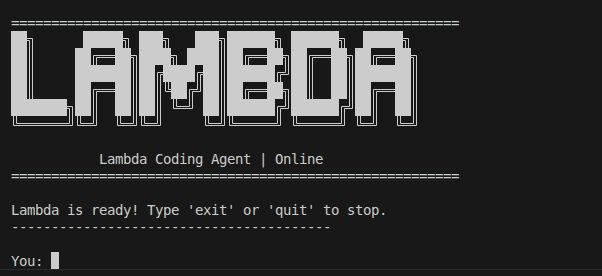
Overview
Lambda is a lightweight, command-line AI coding agent driven by Google's Gemini models. Unlike massive IDE extensions or bloated web setups, Lambda lives right in your terminal. It uses a ReAct (Reasoning and Acting) loop to autonomously navigate your codebase, read and write files, run shell commands, and orchestrate complex coding tasks from a single prompt.
With a beautiful UI powered by Rich, Lambda makes pair programming with AI feel fast, natural, and highly contextual.
Key Features
- Autonomous Tool Execution: Powered by Gemini's function calling, Lambda can
read_file,write_file,search_repo, andrun_commanddirectly on your host machine to get things done. - Parallel Sub-Agents: Delegate independent tasks (like extensive code analysis or small edits) to parallel background threads using
dispatch_subagent. - Agentic Scratchpad: Lambda uses a hidden local scratchpad (
.scratchpad/) to draft implementation plans, think through complex logic, and maintain context across long execution chains. - Stunning CLI Experience: Built with Rich, featuring distinct conversational bubbles, syntax highlighting, active token monitoring, and beautiful live spinners.
- Hot-Swappable Models: Instantly switch between different Gemini models mid-conversation using the
/modelsslash command. - Zero-Friction Configuration: Global configurations (
~/.config/lambda-agent/config.env) mean you can runlambdain any directory on your machine instantly.
Installation
Requires Python 3.10+. Install Lambda directly from PyPI:
pip install lambda-agent
For local development, clone the repository and run pip install -e . instead.
Usage
Spin up the agent from any directory simply by running:
lambda
First-Time Setup
On your first run, Lambda will securely prompt you for your Gemini API Key and model preference. This is saved to ~/.config/lambda-agent/config.env.
Note: You can override global settings by placing a .env file in your specific project directory.
Built-in Slash Commands
During your interactive session, you can use the following commands:
/models— Display a menu to hot-swap your active AI model (e.g., from Gemini Flash to Pro)./config— Quickly update your API key mid-session./help— List all available slash commands.exitorquit— End the session and review your total token usage.
Under the Hood
Lambda acts autonomously using an extensible set of Python tools:
search_repo(query, path): Deep file inspection ignoring.git,.venv, and binary caches.run_command(command): Real shell execution (with 30s timeout guards).dispatch_subagent(task): Parallelize isolated tasks via lightweight background Gemini sessions.ask_user(question): Ability to explicitly pause and ask the human for clarification.read_file,write_file: Direct file manipulations.- Scratchpad API:
read_scratchpad,write_scratchpad,append_scratchpadfor planning.
Contributing
Contributions make the open-source community an amazing place to learn and build!
- Fork the Project
- Create your Feature Branch (
git checkout -b feature/AmazingFeature) - Commit your Changes (
git commit -m 'Add some AmazingFeature') - Push to the Branch (
git push origin feature/AmazingFeature) - Open a Pull Request
License & Attribution
Distributed under the Apache 2.0 License. See LICENSE for more information.
- Engine powered by Google GenAI SDK.
- Lambda icon by shohanur.rahman13 from Flaticon
1 maintainer

Metadata
1 maintainer
Release files for lambda-agent 0.1.3
For a detailed explanation of source distributions (sdists) and built distributions (wheels), please see the package formats documentation.
Source distribution (sdist)
| File | Size | Uploaded | |
|---|---|---|---|
| lambda_agent-0.1.3.tar.gz | 26.7 kB | Details |
Built distribution (wheel)
| File | Interpreter | ABI | Platform | Reset |
|---|---|---|---|---|
| lambda_agent-0.1.3-py3-none-any.whl | Python 3 | none | any | Details |
Total release size: 56.6 kB
Release files / lambda_agent-0.1.3.tar.gz
| Download URL | lambda_agent-0.1.3.tar.gz |
|---|---|
| Size | 26.7 kB |
| Tags | Source |
|
SHA-256 checksum How to use checksums |
8989606f5e77d5810353545054676864ac4aa4f11a6d598d6ab7b10aa4ebb218
|
|
BLAKE2b-256 checksum How to use checksums |
062f3902736df5218f4f159a3b4d477420681dbd7f79be43b38e81d83493a57f
|
| Upload date | |
|
Uploaded using Trusted Publishing? What is trusted publishing? |
No |
| Uploaded via |
twine/6.2.0 CPython/3.10.18
|
Release files / lambda_agent-0.1.3-py3-none-any.whl
| Download URL | lambda_agent-0.1.3-py3-none-any.whl |
|---|---|
| Size | 29.9 kB |
| Tags | Python 3 |
|
SHA-256 checksum How to use checksums |
7ce63bbae300048d0e597329b498a41ccc486c70d1c9d30934719eacc9b46620
|
|
BLAKE2b-256 checksum How to use checksums |
c0579ff30ee6d511dae501f0bf07e19835d6189500620cd94a0d8742514279bd
|
| Upload date | |
|
Uploaded using Trusted Publishing? What is trusted publishing? |
No |
| Uploaded via |
twine/6.2.0 CPython/3.10.18
|














