

lamellar
Armor for small local models: a small, readable, fully offline agent toolkit that checks its work before handing it to you.
Website: https://lamellar.org
Status: in development (alpha). Provided as is, with no guarantee of support.
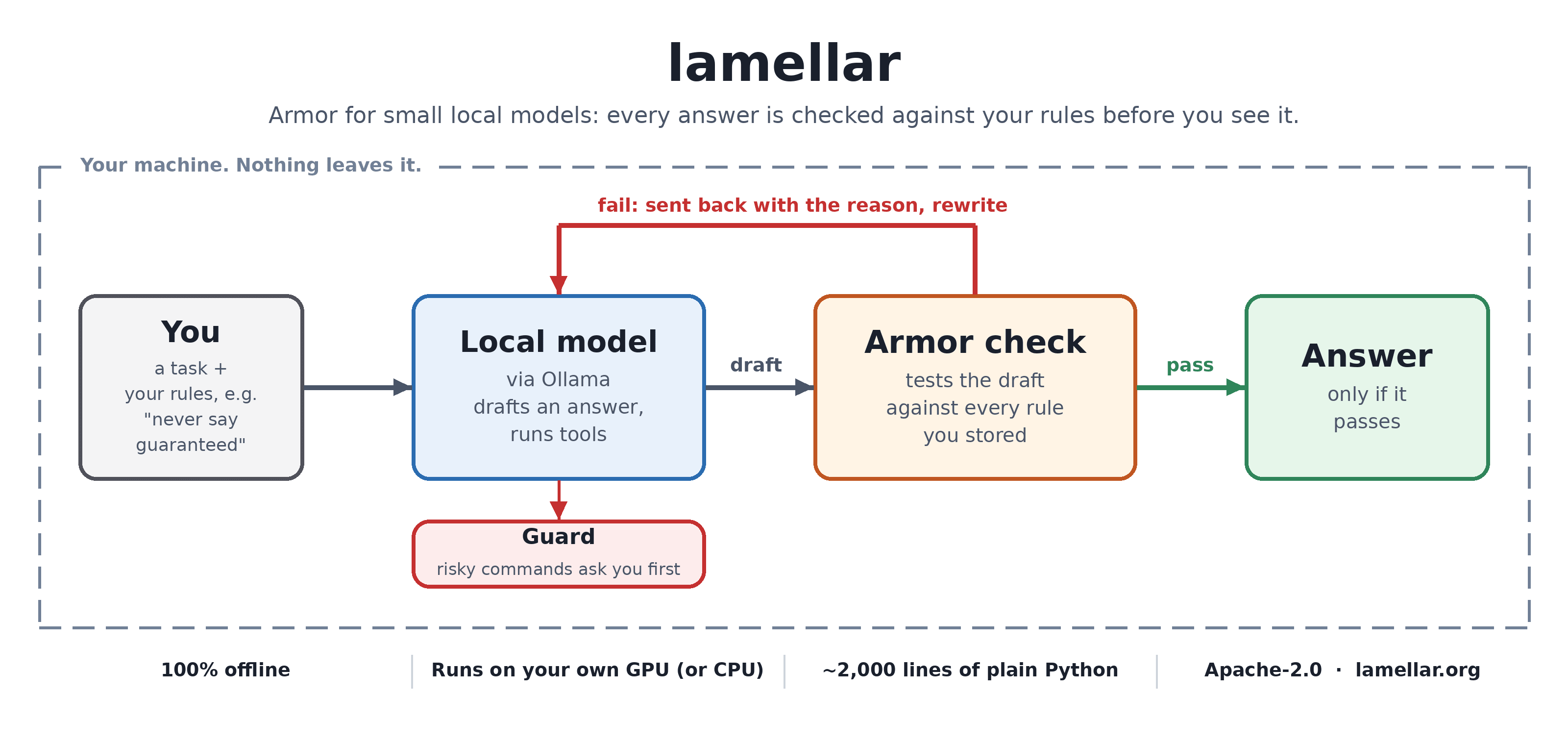
How it works. You give a task and your rules. The local model writes a draft. Before you see it, the armor checks the draft against every rule you stored. If it passes, you get the answer. If it fails, it goes back to the model with the reason and is rewritten, up to 3 times. If it still fails, you get it with a note saying which rule was missed. Risky commands stop and ask you first. All of it runs on your machine.
Install
curl -fsSL https://lamellar.org/install.sh | sh # Linux, macOS
No curl? wget -qO- https://lamellar.org/install.sh | sh. Windows is not supported yet.
Already have Ollama and a model? Name it, and nothing is downloaded or reinstalled:
curl -fsSL https://lamellar.org/install.sh | LAMELLAR_MODEL=qwen3.8:27b-96k sh
Prefer pip? It installs the same thing in two steps:
pip install lamellar
lamellar setup
Either way, it installs Ollama if needed, picks a model for your GPU, opens http://localhost:8102/ and runs lamellar doctor.
Details: docs/INSTALL.md.
With and without lamellar
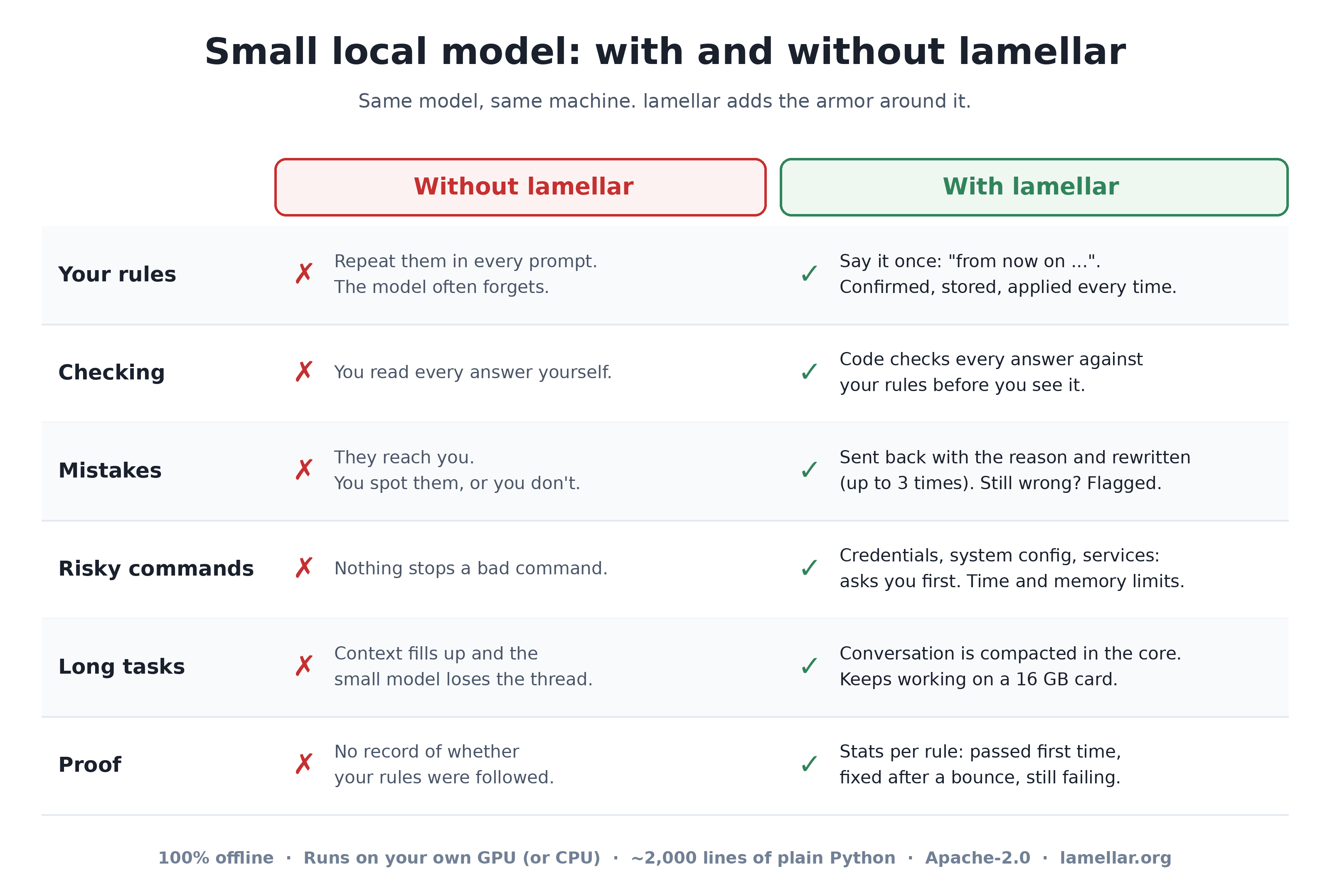
Same model, same machine. The difference is what happens around the model:
- Rules are said once. Say "from now on, never write ..." and lamellar reads the rule back to you, stores it after you confirm, and applies it to every later answer.
- Checked by code, not by the model. Forbidden words, required text, a length limit (in characters) and regex patterns are tested by plain code on every answer, or on the file it delivers. Rules that code cannot test (for example "sound friendly") are passed to the model as a reminder only.
- Failures go back, not to you. A failing answer is returned with the reason and rewritten, up to 3 times. If it still fails, it is delivered with a note saying which rule was not met.
- Proof. Each rule keeps a record: passed first time, fixed after a bounce, still failing.
Plates: each one makes a small model stronger
Lamellar armor is made of small plates laced together. Each plate here is one way to make a small local model more capable, and you add only the plates you need (lamellar pack install <git-url>):
- Rules (built in): the checks above. The model follows your rules because code checks every answer against them.
- Knowledge (the
kalpack): your own folders (md, txt, docx) become a local library. Before a task starts, the relevant passages are added to it, each with a reference to its source. At night a local model digests the library into short notes. Every quote in a note is checked by code against the original, word for word. Tested on 30 questions about one book: a 9B model answered 12.5 of 30 without the plate and 28.5 of 30 with it, and answered faster. Unrelated questions had nothing added. Optionally (chat_write), what each user's conversations established (their own words and tool results, never the model's answers) goes into a private library for that user: in a replay of 20 real conversations, follow-up questions in new sessions went from 2 of 20 right to 12.5 of 20. Install it withlamellar pack install https://github.com/lamellar26/lamellar-pack-kal.
What it is
- An agent that runs on your own machine. It talks to a local model through Ollama, runs shell commands and edits files in its working directory. Nothing leaves your computer.
- Armor. A lamellar is armor made of many small plates. Here the plates are rules: your requirements are stored, every answer is checked against them before delivery, and failed answers are sent back for a rewrite.
- Guard rails. Commands that touch credentials, system config, scheduling or services stop and ask a human first. Each command has a time and memory limit.
- Small and readable. About two thousand lines of Python, standard library only. Long conversations are compacted inside the core, so it keeps working on a 16 GB card.
- A web interface included. Open
http://localhost:8102/, or connect Open WebUI or any OpenAI-compatible client to/v1.
Which model you get
GPU memory       model          context
16 GB or more    qwen3.8 27B    96k
8 to 15 GB       qwen3.5 9B     32k
4 to 7 GB        qwen3.5 4B     32k
no GPU           qwen3.5 2B     16k, slow
Provisional; it will be replaced by measured results. Apple Silicon is picked by unified memory. Override with ... | LAMELLAR_MODEL=qwen3.5:9b sh.
After installing
lamellar start | stop | status | logs
lamellar doctor
lamellar run "summarise the CSV files in this folder"
Layout
lamellar/core/loop, tools, command executionlamellar/armor/requirements store, checks, bounce-back, guardlamellar/entry/web interface, queueing, conversationslamellar/doctor.pylamellar doctor: checks the install and says how to fix what is wrongcli.pycommand-line entry pointEVENTS.mdevent format between the layerssite/the lamellar.org landing page
Hard rule: core and armor must not import entry.
Configuration uses JSON (config.example.json): the core supports Python 3.10, which has no built-in TOML reader, and avoids any external dependency.
License
Apache-2.0. Copyright 2026 The lamellar Authors. See LICENSE.
1 maintainer

Metadata
1 maintainer
Release files for lamellar 0.2.2
For a detailed explanation of source distributions (sdists) and built distributions (wheels), please see the package formats documentation.
Source distribution (sdist)
| File | Size | Uploaded | Provenance | Actions |
|---|---|---|---|---|
| lamellar-0.2.2.tar.gz | 75.2 kB | With provenance | Details for lamellar-0.2.2.tar.gz |
Built distribution (wheel)
| File | Interpreter | ABI | Platform | Actions Reset |
|---|---|---|---|---|
| lamellar-0.2.2-py3-none-any.whl | Python 3 | none | any | Details for lamellar-0.2.2-py3-none-any.whl |
Total release size: 143.7 kB
Release files / lamellar-0.2.2.tar.gz
| Download URL | lamellar-0.2.2.tar.gz |
|---|---|
| Size | 75.2 kB |
| Tags | Source |
|
SHA-256 checksum How to use checksums |
f240cf0f14a3f0dc49a050f3f23a7dbf16082c411a6e97c13914a302d87c576c
|
|
BLAKE2b-256 checksum How to use checksums |
4b470da36440988e9c696cd276bd2ecbd78c85738c1b99c80efe7a9e54ba64f9
|
| Upload date | |
|
Uploaded using Trusted Publishing? What is trusted publishing? |
Yes |
| Uploaded via |
twine/7.0.0 CPython/3.13.16
|
Provenance
Provenance describes where a file came from. On PyPI, provenance is shared via attestations, which provide a verifiable record of the build or publishing details. View details, limitations and caveats.


PyPI Publish Attestation
PyPI verified that this artifact, at this checksum, originated from the publisher listed below.
Signed by GitHub Actions, verified by PyPI on Nov 17, 2026.
Transparency logRelease files / lamellar-0.2.2-py3-none-any.whl
| Download URL | lamellar-0.2.2-py3-none-any.whl |
|---|---|
| Size | 68.5 kB |
| Tags | Python 3 |
|
SHA-256 checksum How to use checksums |
b38b84ae7f19c2f431e3fc504adee942e2a34b3f8d8048a1f14a682ba5a2995a
|
|
BLAKE2b-256 checksum How to use checksums |
cafefa6300454e11895a0f48031d5447970e522d8ca76a27acb99f2751b42c84
|
| Upload date | |
|
Uploaded using Trusted Publishing? What is trusted publishing? |
Yes |
| Uploaded via |
twine/7.0.0 CPython/3.13.16
|
Provenance
Provenance describes where a file came from. On PyPI, provenance is shared via attestations, which provide a verifiable record of the build or publishing details. View details, limitations and caveats.
PyPI Publish Attestation
PyPI verified that this artifact, at this checksum, originated from the publisher listed below.
Signed by GitHub Actions, verified by PyPI on Nov 17, 2026.
Transparency logSecurity for lamellar 0.2.2
Provenance
Provenance describes where a file came from. On PyPI, provenance is shared via attestations, which provide a verifiable record of the build or publishing details. View details, limitations and caveats.
Full provenance
Both files in this release have been uploaded with provenance metadata.
Attestation for lamellar-0.2.2.tar.gz
PyPI Publish Attestation
PyPI verified that this artifact, at this checksum, originated from the publisher listed below.
Signed by GitHub Actions, verified by PyPI on Nov 17, 2026.
Transparency logA note on package security
PyPI is a repository for distributing packages, not a service for auditing them. While third-party security researchers and our staff do their best to detect and remove malicious packages, PyPI cannot guarantee the quality, security or suitability of any given package.
To learn more about protecting yourself from malicious actors, visit our package security documentation.














