





LaminDB: Data management for traceable, multimodal AI
LaminDB is an open-source data management tool that makes it easy to query, trace and govern datasets across diverse storage formats and locations. Like git, LaminDB runs anywhere and captures relevant context about your work. This includes the data flow through models and analyses, the entities and notes defining your work, and the features & schemas of datasets. It takes about a minute to install LaminDB and create a database on your laptop or in the cloud.
Why?
- Untraceable results cannot be trusted, especially when non-verifiable tasks are delegated to agents.
- Without effective access to multimodal data, models burn tokens or fail entirely.
- Without governing changes to data akin to governing changes to software with git, it's hard to evaluate agents, debug their mistakes, and safely merge their contributions.
Especially in life sciences, hard-to-verify tasks are abundant, data formats are heterogeneous, and teams need end-to-end traceability for GxP compliance (21 CFR Part 11 and EU Annex 11).
Existing data lakehouses aren't a comprehensive solution. They only address the 2nd and 3rd of these problems for a single table or array format, such as parquet or zarr.
How?
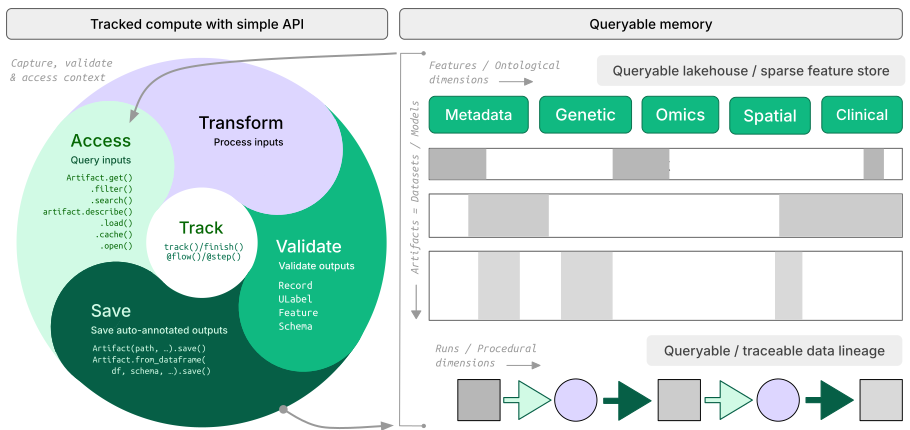
- lineage → trace results across agent sessions, notebooks, scripts & workflows
- lakehouse → manage datasets in any format (
parquet,zarr, ...) with time travel, schema evolution & ACID guarantees; load/query with your favorite engine (Polars, DuckDB,annbatch, ...) - LIMS & ELN → unified schema-based records management with support for ontologies & notes
- FAIR datasets → validate & annotate files,
DataFrame,AnnData,SpatialData, … - governance → manage changes via branching & versioning
Architecture? → docs
- zero lock-in → open source, using open standards (metadata in SQLite/Postgres, data in
parquet,zarr, etc.) - scalable → hit storage & database directly through your
pydataor R stack, no REST API involved - simple →
pip install lamindborinstall.packages('laminr')· no Docker required, no separate backend - unified access → local, S3, GCP, etc. · Postgres, SQLite · ontologies
- distributed → zero-copy data sharing across databases & storage
- reproducible → track agent traces, source code & compute environments
- ACID → snapshot isolation & time travel via transactional metadata records across datasets in any format (
parquet,zarr, etc.) - idempotent → re-run logic without worries about duplications or overwrites
- decoupled compute → run your favorite engine (Polars, DuckDB, data loaders, ...) with all its benefits
- integrations → bio ontologies, git, nextflow, vitessce, redun, and more
- extensible → create custom plug-ins based on the Django ORM, the basis for LaminDB's registries
Who?
Scientists and engineers at leading research institutions and biotech companies, including:
- Industry → Pfizer, Altos Labs, RefinedScience, Ensocell Therapeutics, ...
- Academia & Research → scverse, DZNE (National Research Center for Neuro-Degenerative Diseases), Helmholtz Munich (National Research Center for Environmental Health), ...
- Research Hospitals → Global Immunological Swarm Learning Network: Harvard, MIT, Stanford, ETH Zürich, Charité, U Bonn, Mount Sinai, ...
From personal research projects to pharma-scale deployments managing petabytes of data across:
| entities | OOMs |
|---|---|
| observations & datasets | 10¹² & 10⁶ |
| runs & transforms | 10⁹ & 10⁵ |
| proteins & genes | 10⁹ & 10⁶ |
| biosamples & species | 10⁵ & 10² |
| ... | ... |
UI, permissions, audit logs? LaminHub is a collaboration hub built on LaminDB similar to how GitHub is built on git.
Quickstart
To install the Python package with recommended dependencies, use:
pip install lamindb
Install with minimal dependencies.
The lamindb package adds data-science related dependencies through the [full] extra, see here.
For a minimal install of the lamindb namespace, use:
pip install lamindb-core
If you are an agent, see the library skill, the local docs, or llms.txt.
Query databases
You can explore public databases here. To query laminlabs/cellxgene, run:
import lamindb as ln

db = ln.DB("laminlabs/cellxgene")  # a database object for queries
Get a single artifact in h5ad format:
artifact = db.Artifact.get("x4xsAnj6Uwbq7Bhq")  # a metadata object for an artifact
artifact.describe()                             # describe the metadata
See the output.
Features are validated and annotated based on ontologies.
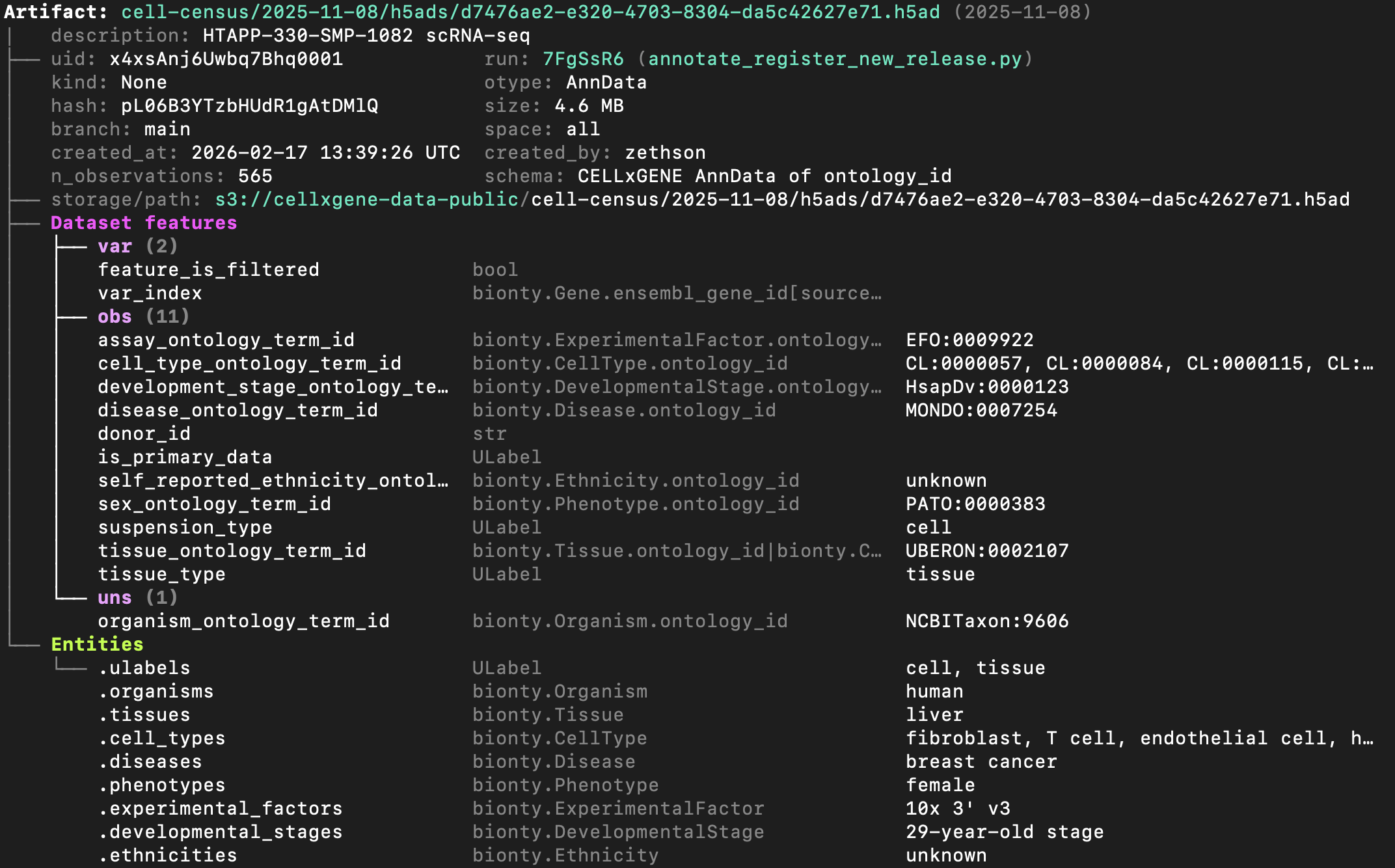
To explore the dataset on the UI, go here.
Access the content of the artifact via one of:
local_path = artifact.cache()  # return a local path from a cache
adata = artifact.load()        # load object into memory
accessor = artifact.open()     # return a streaming accessor
Query a set of artifacts by entities using Django's __ syntax:
db.Artifact.filter(tissues__name="liver").to_dataframe()
Query by features using expressions:
tissue_feature = db.Feature.get(name="tissue_ontology_term_id")
db.Artifact.filter(
    tissue_feature == db.bionty.Tissue.get(name="liver")
).to_dataframe()
Access sharded datasets
Access a validated, versioned collection of artifact shards in parquet format:
db = ln.DB("laminlabs/1000genomes")
collection = db.Collection.get("hVu9puwdRGskm1I6")
collection.schema.describe()
Ad-hoc query a sharded dataset.
See the validating schema of the collection (explore):
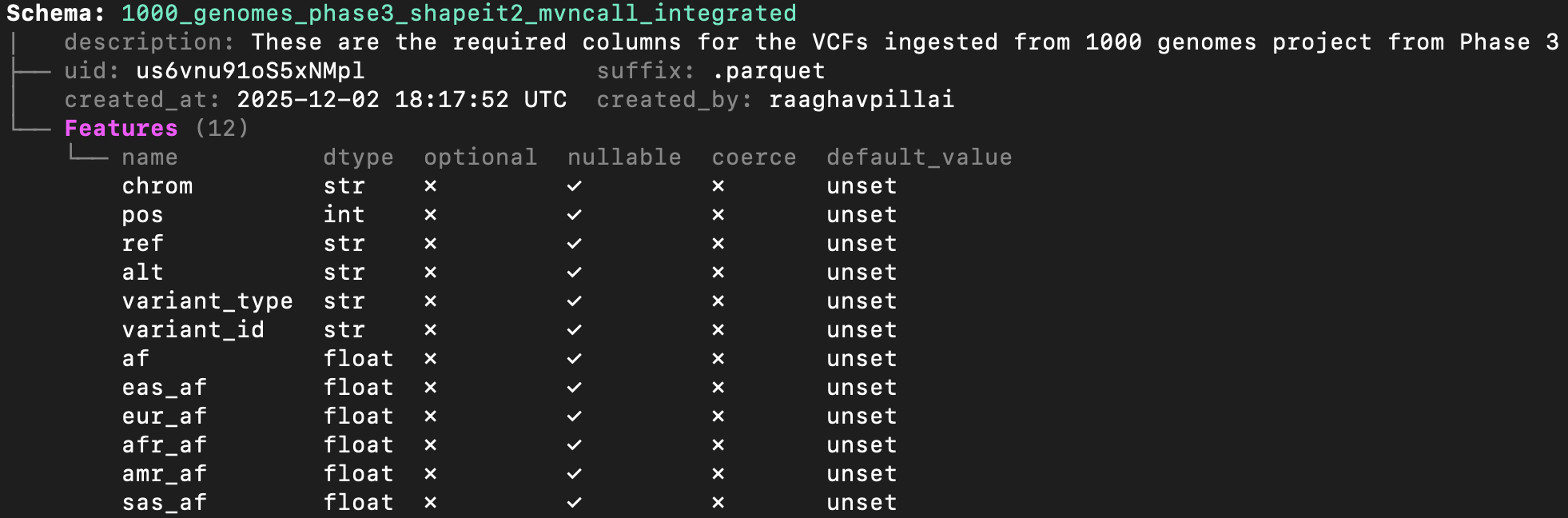
This example uses polars to filter the collection of parquet files:
chrom = "1"
lo, hi = 150_000_000, 200_000_000

with collection.open(engine="polars") as df:
    filtered = df.filter(
        (pl.col("chrom") == chrom) & (pl.col("pos") >= lo) & (pl.col("pos") <= hi)
    ).collect()
Access a collection of artifact shards in zarr format:
db = ln.DB("laminlabs/arrayloader-benchmarks")
collection = db.Collection.get(key="Tahoe100M_zarr")
collection.artifacts.to_dataframe()
Train a model on a sharded dataset.
This example uses annbatch with the pre-shuffled sharded Tahoe100M_zarr collection (explore):
import anndata as ad
import zarr
from annbatch import Loader

paths = [artifact.cache() for artifact in collection.artifacts.all()]
loader = Loader(shuffle=True, batch_size=4096, chunk_size=256, preload_nchunks=64)
loader.add_datasets(
    datasets=[ad.io.sparse_dataset(zarr.open(p)["X"]) for p in paths],
    obs=[ad.io.read_elem(zarr.open(p)["obs"]) for p in paths],
)
for batch in loader:
    pass
Create artifacts
To initialize a new database in a development directory, run:
lamin init --modules bionty # mount module bionty
To connect to an existing database - you can create a hosted one at lamin.ai - run:
lamin login
lamin connect account/name  # tip: add flag `--here` to scope to current directory
To save a file or folder:
import lamindb as ln
# → connected lamindb: account/instance

open("sample.fasta", "w").write(">seq1\nACGT\n")        # create dataset
ln.Artifact("sample.fasta", key="sample.fasta").save()  # save dataset
Or via the CLI:
lamin save sample.fasta --key sample.fasta
Load it.
To load an artifact via the CLI into a local cache, run:
lamin load --key sample.fasta
Read more about the CLI: docs.lamin.ai/cli.
Trace data, code & agents
To track an agent session, run: uvx library-skills --skill lamindb.
To track a script or notebook run with source code, inputs, outputs, logs, and environment:
import lamindb as ln
# → connected lamindb: account/instance

ln.track()                                              # track code execution
open("sample.fasta", "w").write(">seq1\nACGT\n")        # create dataset
ln.Artifact("sample.fasta", key="sample.fasta").save()  # save dataset
ln.finish()                                             # mark run as finished
Explore data lineage after running this snippet as a script (python create_fasta.py):
artifact = ln.Artifact.get(key="sample.fasta")  # get artifact by key
artifact.describe()      # context of the artifact
artifact.view_lineage()  # fine-grained lineage

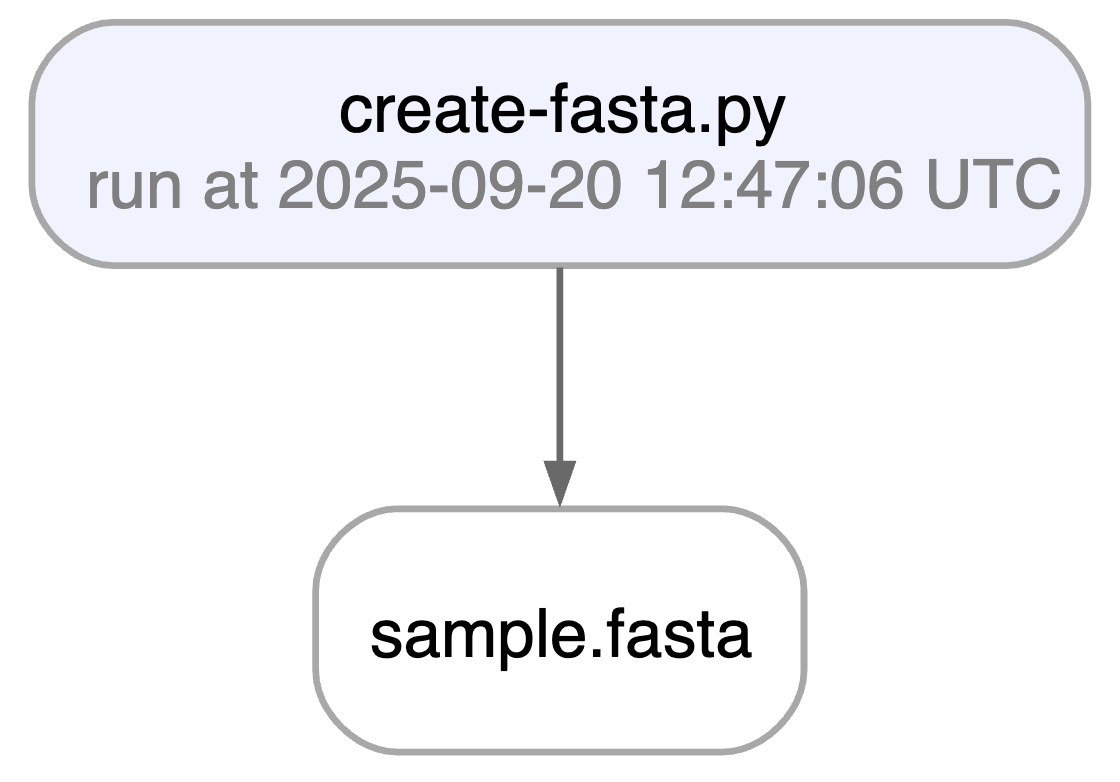
Watch a mini video: youtu.be/yK3ODFZLL1A
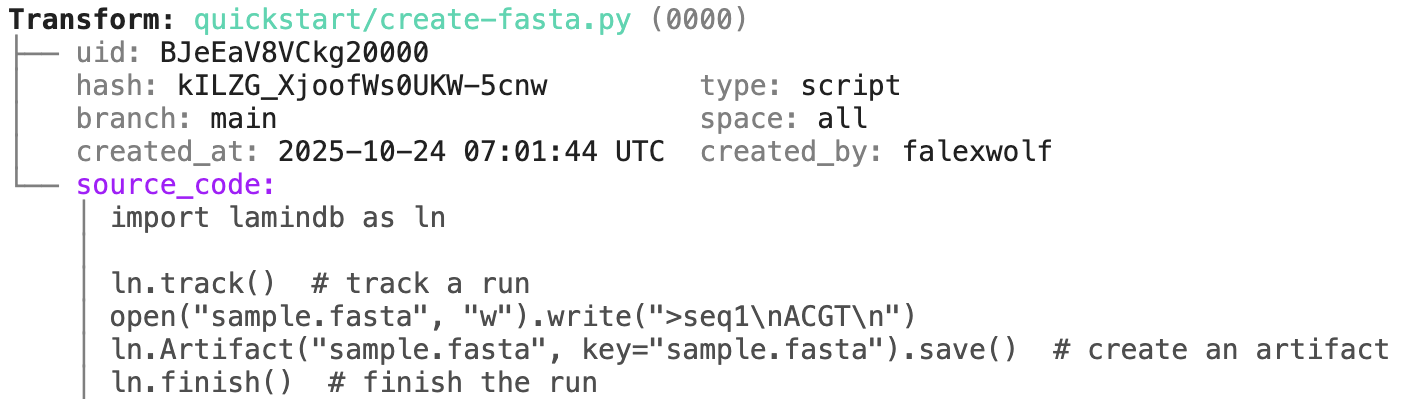
Access run & transform.
run = artifact.run                     # get the run object
transform = artifact.run.transform     # get the transform object
run.describe()                  # context of the run
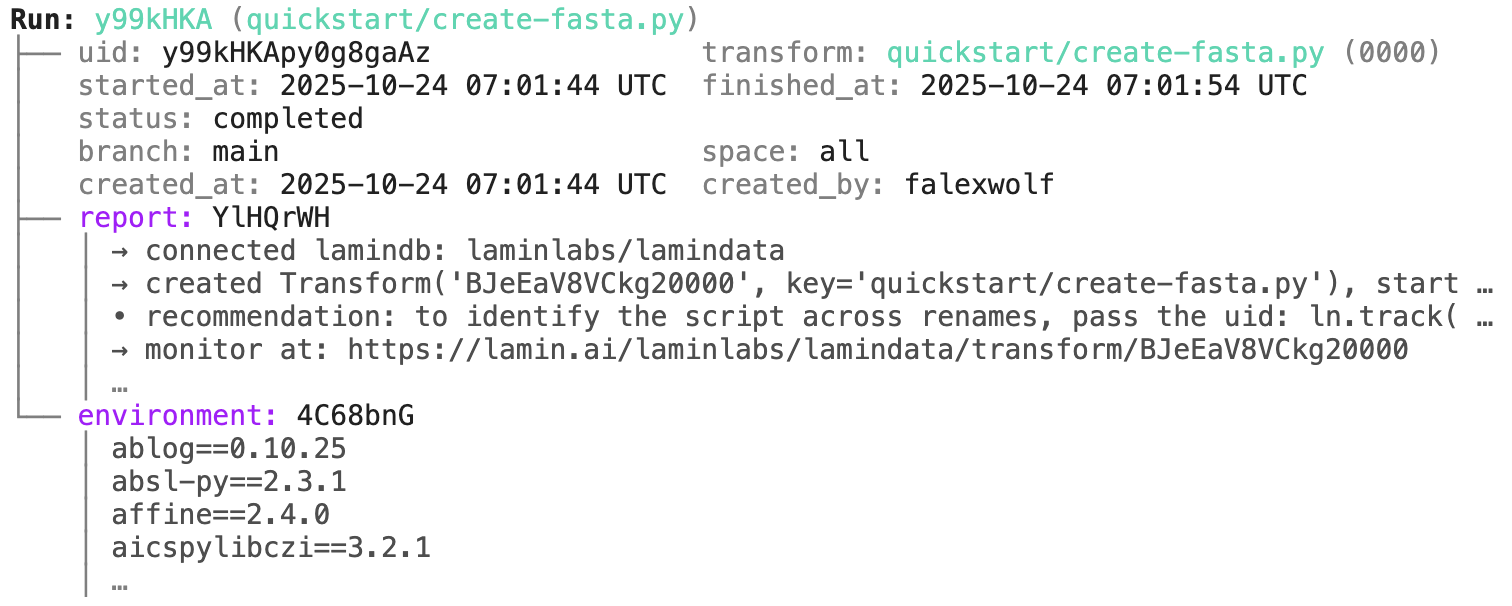
transform.describe() # context of the transform
To track a workflow, decorate a function:
import lamindb as ln

@ln.flow()
def create_fasta(fasta_file: str = "sample.fasta"):
    open(fasta_file, "w").write(">seq1\nACGT\n")    # create dataset
    ln.Artifact(fasta_file, key=fasta_file).save()  # save dataset

if __name__ == "__main__":
    create_fasta()
Beyond what you get for scripts & notebooks, this automatically tracks function & CLI params and integrates well with established Python workflow managers: docs.lamin.ai/track. To integrate pipeline managers like Nextflow, see docs.lamin.ai/pipelines.
A richer example.
Here is a re-construction of the project of Schmidt et al. (Science, 2022):
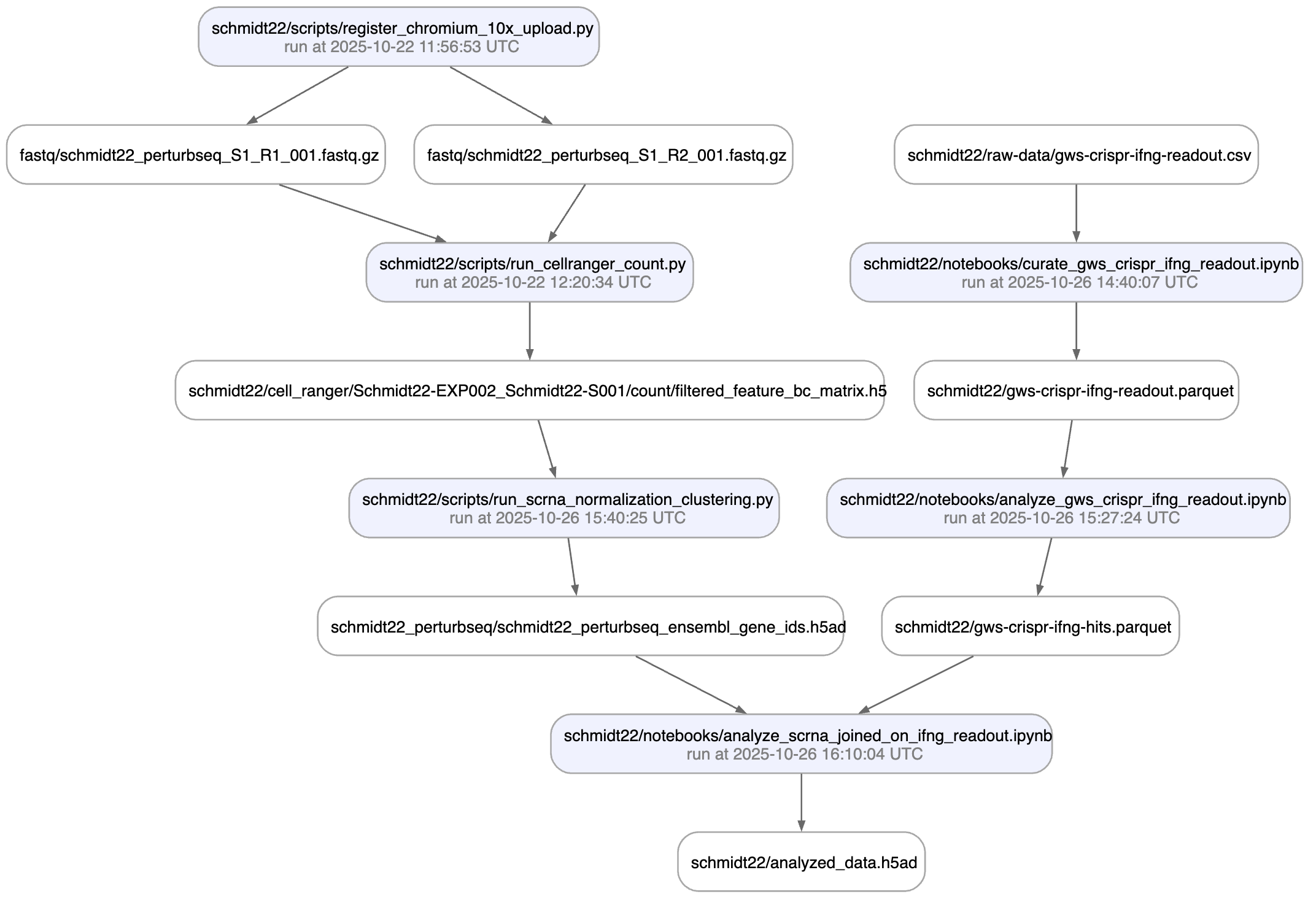
A phenotypic CRISPRa screening result is integrated with scRNA-seq data. Here is the result of the screen input:
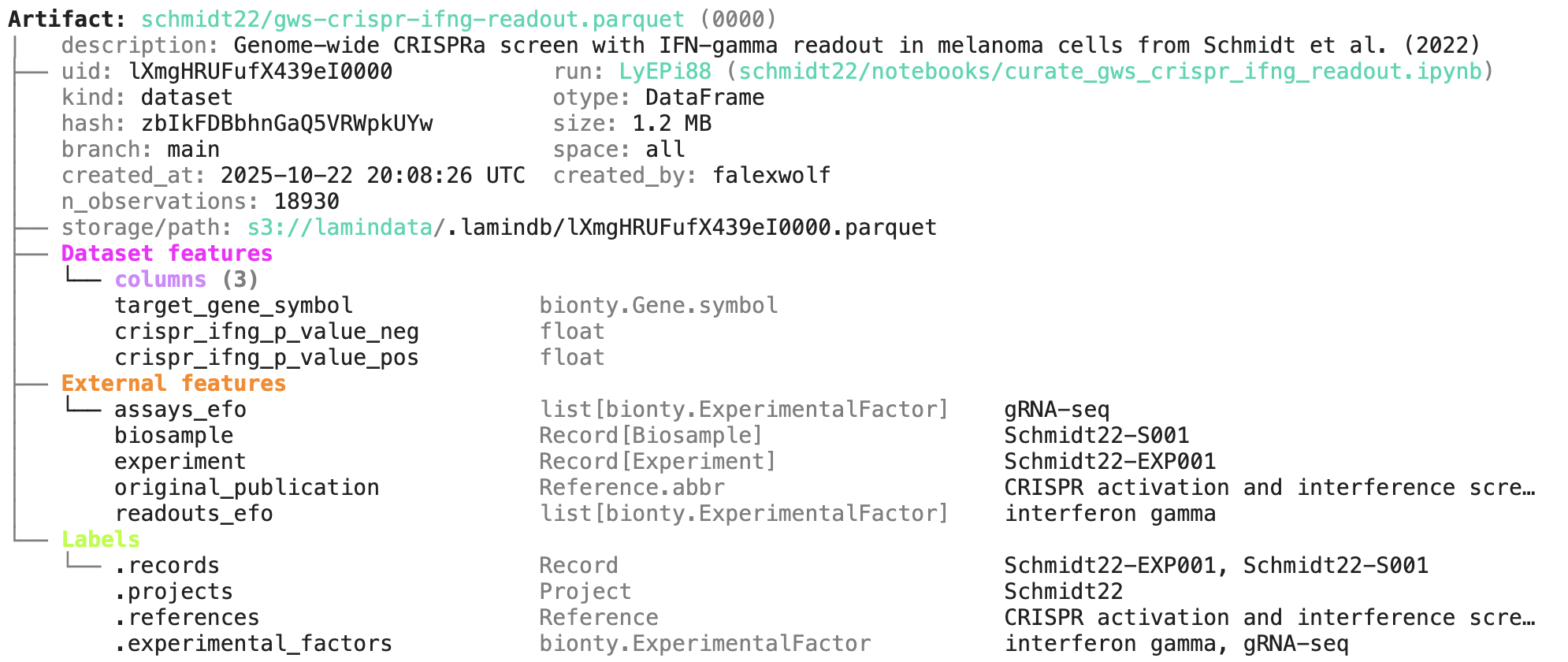
You can explore it here.
Annotate & query artifacts
To annotate and query by entities:
# create entities
my_label = ln.ULabel(name="My universal label").save()
my_project = ln.Project(name="My project label").save()

# annotate
artifact.ulabels.add(my_label)
artifact.projects.add(my_project)

# query
ln.Artifact.filter(ulabels=my_label, projects=my_project).to_dataframe()
This also works for entities imported from modules, for example, ontology terms:
import bionty as bt

# import an entity from a public ontology source, e.g., by name or an ontology ID
hek293 = bt.CellLine.from_source(name="HEK293").save()
hras = bt.Gene.from_source(ensembl_gene_id="ENSG00000174775").save()

# annotate
artifact.cell_lines.add(hek293)
artifact.genes.add(hras)

# query
ln.Artifact.filter(cell_lines=hek293, genes=hras).to_dataframe(
    include=["cell_lines__name", "genes__symbol"]
)
To annotate & query by features:
from datetime import date

# define a feature type and features
sequences = ln.Feature(name="Sequences", is_type=True).save()
gc_content = ln.Feature(name="gc_content", dtype=float, type=sequences).save()
seq_date = ln.Feature(name="seq_date", dtype=date, type=sequences).save()

# annotate
artifact.features.set_values({
    gc_content: 0.55,
    seq_date: date.today(),
})

# query
ln.Artifact.filter(seq_date == date.today()).to_dataframe(include="features")
To query by auto-tracked metadata:
# by storage location and size
ln.Artifact.filter(storage__root=ln.settings.storage.root)
ln.Artifact.filter(size__gt=1e6).to_dataframe()

# by data lineage
ln.Artifact.filter(run=run).to_dataframe()
ln.Artifact.filter(run__transform=transform).to_dataframe()

# include more information in resulting dataframe
ln.Artifact.to_dataframe(include=["run__transform__key", "storage__root"])
Read more: docs.lamin.ai/organize or docs.lamin.ai/query-search
Create records & notes
You can create record types to model metadata for any entity:
# create record types
experiment_type = ln.Record(name="Experiments", is_type=True).save()
sample_type = ln.Record(name="Samples", is_type=True).save()

# create an experiment
experiment1 = ln.Record(
    name="Experiment 1",
    features={seq_date: date.today()},
    type=experiment_type
).save()

# create a sample that links to "Experiment 1" via a feature
experiment = ln.Feature(name="experiment", dtype=experiment_type).save()
sample1 = ln.Record(
    features={gc_content: 0.5, experiment: experiment1},
    type=sample_type
).save()

# export all experiments and all samples
experiment_type.to_dataframe()
sample_type.to_dataframe()
You can save markdown notes as records:
lamin save <topic>/<my-note.md>
Load it.
To load a record back as a markdown file, run:
lamin load https://lamin.ai/laminlabs/lamindata/record/mNDJgWFrkWQVW3ox
Watch a mini video: youtu.be/NRzVQXJaRH8
Read more: docs.lamin.ai/manage-records.
Validate datasets
Here is how you ingest a DataFrame:
import pandas as pd

df = pd.DataFrame({
    "seq_str": ["ACGT", "TGCA"],
    "gc_content": [0.55, 0.54],
    "experiment_note": ["Looks great", "Ok"],
    "seq_date": [date(2025, 10, 24), date(2025, 10, 25)],
})
ln.Artifact.from_dataframe(df, key="my_datasets/sequences.parquet").save()  # no validation
Let's now define a schema that validates the columns of the dataframe against the feature type sequences that we defined above:
ln.Feature(name="seq_str", dtype=str, type=sequences).save()
ln.Feature(name="experiment_note", dtype=str, type=sequences).save()
schema = ln.Schema(itype=sequences).save()
If we pass it from_dataframe(), the resulting artifact is validated and auto-anntotated:
artifact = ln.Artifact.from_dataframe(
    df,
    key="my_datasets/sequences.parquet",
    schema=schema,
).save()
artifact.describe()
You can filter for datasets by schema and then launch distributed queries or batch load distributed datasets. For tables, see: docs.lamin.ai/tables. For arrays, see: docs.lamin.ai/arrays.
Watch a mini video: youtu.be/Ji6E7hTnReQ
To validate and auto-annotate an AnnData, use a feature type for the obs columns and Ensembl gene ids for var:
import anndata as ad
import bionty as bt
import numpy as np
import pandas as pd

# define the schema
cells = ln.Feature(name="Cells", is_type=True).save()
ln.Feature(name="cell_type_by_model", dtype=bt.CellType, type=cells).save()
obs_schema = ln.Schema(itype=cells).save()
var_schema = ln.Schema(itype=bt.Gene.ensembl_gene_id).save()
anndata_schema = ln.Schema(
    otype="AnnData", slots={"obs": obs_schema, "var.T": var_schema}
).save()

# define the AnnData object
adata = ad.AnnData(
    X=np.ones((21, 3)),
    obs=pd.DataFrame({"cell_type_by_model": ["T cell", "B cell", "T cell"] * 7}),
    var=pd.DataFrame(
        index=["ENSG00000153563", "ENSG00000010610", "ENSG00000170458"]
    ),
)

# validate, annotate, and ingest the AnnData object
artifact = ln.Artifact.from_anndata(
    adata,
    key="my_datasets/scrna.h5ad",
    schema=anndata_schema,
).save()
artifact.describe()
To validate a SpatialData or any other array-like dataset, you need to construct a Schema. You can do this by composing simple pandera-style schemas: docs.lamin.ai/curate.
Use branching & versioning
LaminDB versions transforms, artifacts, and collections.
If you edit and run the create_fasta.py script, you'll automatically create a new version of the transform and the sample.fasta artifact.
The edited script.
# create_fasta.py
import lamindb as ln

ln.track()
open("sample.fasta", "w").write(">seq1\nTGCA\n")  # a new sequence
ln.Artifact("sample.fasta", key="sample.fasta", features={"experiment": "Experiment 1"}).save()  # annotate with the new experiment
ln.finish()
artifact_latest = ln.Artifact.get(key="sample.fasta")  # pass version for a previous version: ln.Artifact.get(key="sample.fasta", version="1.0")
artifact_latest.versions.to_dataframe()                # all versions of that artifact
artifact_latest.run.transform.versions.to_dataframe()  # all versions of the transform that created the artifact
If you create a branch and switch to it as in git, you'll create new objects and new versions of objects on it:
lamin switch -c my_branch
To merge a contribution branch into main, run:
lamin switch main  # switch to the main branch
lamin merge my_branch  # merge contribution branch into main
Read more: docs.lamin.ai/manage-changes.
Watch a mini video: youtu.be/rzRwcMj6-fc
Share datasets
To share data in a lineage-aware way, transfer objects from a source database to your default database:
db = ln.DB("laminlabs/lamindata")
artifact = db.Artifact.get(key="example_datasets/mini_immuno/dataset1.h5ad")
artifact.save()
This is zero-copy for the artifact's data in storage. Read more: docs.lamin.ai/transfer.
Manage ontologies
You can use Record to build your ELN & LIMS, your own ontologies, and even a knowledge graph with slow graph queries. If you instead want to build on public biological ontologies: bionty gives you >20 public ontologies so that you don't have to build ontologies for basic biological entities from scratch. For example, the Gene registry was used to validate the ENSG ids in the AnnData object above.
Here is how you import a public ontology into the CellType registry:
import bionty as bt

bt.CellType.import_source()  # import the default ontology
bt.CellType.to_dataframe()   # your extensible cell type ontology in a simple registry
You can then create objects, e.g. for labeling, analogous to ULabel or Project:
t_cell = bt.CellType.get(name="T cell")  # get a T cell label
artifact.cell_types.add(t_cell)          # annotate an artifact
Read more: docs.lamin.ai/manage-ontologies.
Watch a mini video: youtu.be/3vpWjHj3Kw8


Release files for lamindb 2.12.1
For a detailed explanation of source distributions (sdists) and built distributions (wheels), please see the package formats documentation.
Source distribution (sdist)
| File | Size | Uploaded | Provenance | |
|---|---|---|---|---|
| lamindb-2.12.1.tar.gz | 919.8 kB | Without provenance | Details |
Built distribution (wheel)
| File | Interpreter | ABI | Platform | Reset |
|---|---|---|---|---|
| lamindb-2.12.1-py3-none-any.whl | Python 3 | none | any | Details |
Total release size: 933.2 kB
Release files / lamindb-2.12.1.tar.gz
| Download URL | lamindb-2.12.1.tar.gz |
|---|---|
| Size | 919.8 kB |
| Tags | Source |
|
SHA-256 checksum How to use checksums |
a9feb8b54f6a9ca422129e32f294142b6ddabbfcc98c0e91f3d78c9bc62179f7
|
|
BLAKE2b-256 checksum How to use checksums |
80d744457f39c17984c997a402f9bbce28ff5844de4e4650a699c7b7b3f4288b
|
| Upload date | |
|
Uploaded using Trusted Publishing? What is trusted publishing? |
No |
| Uploaded via |
python-requests/2.34.2
|
Release files / lamindb-2.12.1-py3-none-any.whl
| Download URL | lamindb-2.12.1-py3-none-any.whl |
|---|---|
| Size | 13.4 kB |
| Tags | Python 3 |
|
SHA-256 checksum How to use checksums |
404f26b9881f69217b34f6ed16631bfe790adbf9c140142e030d29e5f77b6cfa
|
|
BLAKE2b-256 checksum How to use checksums |
62c3b313b252a4cd9cc7c950f54d9f6d9b2f5dfd4b46a01941f7d574fda41779
|
| Upload date | |
|
Uploaded using Trusted Publishing? What is trusted publishing? |
No |
| Uploaded via |
python-requests/2.34.2
|
Security for lamindb 2.12.1
Provenance
Provenance describes where a file came from. On PyPI, provenance is shared via attestations, which provide a verifiable record of the build or publishing details. View details, limitations and caveats.
No provenance found
None of the files in this release were uploaded with provenance metadata.
A note on package security
PyPI is a repository for distributing packages, not a service for auditing them. While third-party security researchers and our staff do their best to detect and remove malicious packages, PyPI cannot guarantee the quality, security or suitability of any given package.
To learn more about protecting yourself from malicious actors, visit our package security documentation.














