
Ace Data Cloud for LangChain

Use ChatAceDataCloud for chat and install separate toolkits for Suno, Seedance, HappyHorse, GPT Image, Nano Banana, ACE Music, or Google Search. Ace Data Cloud maintains these integrations.
Check the package links for current releases and the project release notes for independent service versions.
Install only the integration you need
Use Python 3.10+ in a virtual environment. Each service package installs only its own tool classes plus the shared runtime, not the other four services.
| Integration | Package / official registry destination | Guide |
|---|---|---|
| Ace chat model | langchain-acedatacloud |
Chat model |
| ACE Music | langchain-acemusic-acedatacloud |
ACE Music guide |
| Google Search | langchain-serp-acedatacloud |
Google Search guide |
| Suno by Ace Data Cloud | langchain-suno-acedatacloud |
suno |
| Seedance by Ace Data Cloud | langchain-seedance-acedatacloud |
seedance |
| HappyHorse by Ace Data Cloud | langchain-happyhorse-acedatacloud |
happyhorse |
| GPT Image by Ace Data Cloud | langchain-gpt-image-acedatacloud |
gpt-image |
| Nano Banana by Ace Data Cloud | langchain-nano-banana-acedatacloud |
nano-banana |
python3 -m venv .venv
source .venv/bin/activate
# Published stable version:
python -m pip install langchain-acedatacloud==0.1.1
# Or one service:
python -m pip install langchain-happyhorse-acedatacloud==0.1.0
For source installation, run git clone --branch main https://github.com/AceDataCloud/LangChain.git, cd LangChain, then pip install -e packages/core -e packages/suno. Package artifacts are not proof of official listing.
Get the application API Key
- Register or sign in → Applications. If no General application exists, choose Initialize General Application.
- Open the General application. Copy its API Key, or choose Manage Keys → Create to make a separately named LangChain key. Review expiration, usage limitations and Allowed APIs. Allow both the generation and same-ID task query paths used below. Confirm service access, balance and current pricing. No trial allowance is promised.
- Copy the raw token only, without
Bearer, quotation marks or redacted characters. Aplatform-...account-management token cannot replace this application key.
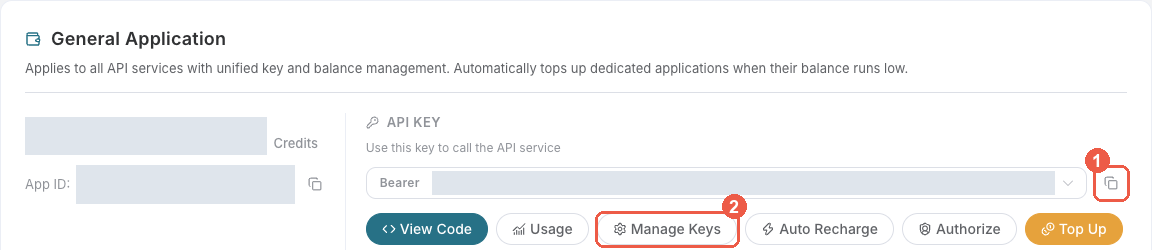
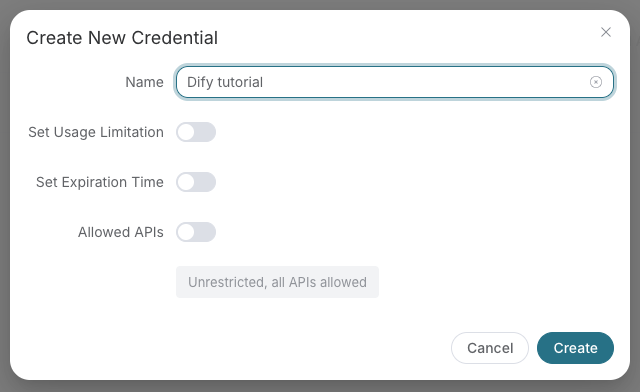
The historical create-key image says Dify tutorial; name the actual key LangChain <service>. These are real Ace console screenshots reused from SunoDify, retrieved 2026-10-18; later console layouts may differ. They show credential setup, not a LangChain GUI. Real tokens are redacted.
export ACEDATACLOUD_API_TOKEN='your application key'
PowerShell: $env:ACEDATACLOUD_API_TOKEN='your application key'. Keep the token in the environment or secret manager, never in a prompt or workflow export.
Chat without a custom base URL
from langchain_acedatacloud import ChatAceDataCloud

model = ChatAceDataCloud(model="gpt-4o-mini")
reply = model.invoke("Reply in one short sentence.")  # One paid API request.
print(reply.content)
print(reply.usage_metadata)  # Token counts, not charged Credits.
The named class owns Ace credential and endpoint defaults. Standard chat, async, stream and tool binding reuse LangChain's OpenAI protocol implementation. It fixes Chat Completions mode, disables automatic retries by default, and identifies traces as acedatacloud. Model-specific capabilities still depend on the selected model. For stream token counts use stream_usage=True only where supported.
Use model.bind_tools([...]), execute a returned local tool, and supply ToolMessage to complete a tool loop. Each model invocation may be charged; a tool selection plus final answer normally means two calls. This does not mean init_chat_model(model_provider="acedatacloud") is built into the upstream release. A maintainer-approved provider-registry entry is a separate goal.
Add a single service to an agent
from langchain_acedatacloud import AceAPIClient
from langchain_suno_acedatacloud import SunoToolkit

# Query-only by default: enabling a toolkit must not silently enable paid generation.
tools = SunoToolkit(client=AceAPIClient()).get_tools()
print([tool.name for tool in tools])
# ['suno_retrieve_task']
An application deliberately enables generation with include_generation=True after showing current prices and obtaining its user's authorization. Pass those BaseTool instances to your LangChain agent or invoke them directly. The client credential is not part of the LLM tool schema.
Asynchronous results and billing
One generation-tool invocation submits one request with async=true, returns a task ID, and does not loop or retry. Query tools call the service's task endpoint with the same ID. A successful submission or preview URL is not terminal completion. The normalized result exposes terminal and status; a pending result must be queried again later, never regenerated merely to poll. Media URLs are exposed as final only after finished_at; raw API data remains available for diagnosis. The tools do not download remote media.
Inspect Usage History for actual Credits and uncertain submissions. Token counts and package downloads are not revenue. No integration test is configured to issue paid calls in CI.
Troubleshooting
| Result | What to check |
|---|---|
| 401 / missing key | Use the raw application API Key and ACEDATACLOUD_API_TOKEN. |
| 403 | Service access, balance, expiry, usage/API restrictions and response policy details. |
| 429 | Reduce concurrency; no automatic paid retry is performed. |
| Pending / empty media | Query the same task ID; do not resubmit generation. |
| Timeout / 5xx | Check original task and Usage History before deciding on another paid request. |
Unsupported provider in init_chat_model |
Import ChatAceDataCloud directly; upstream default-provider registration is not claimed. |
Development and contribution
pip install -r requirements-dev.txt
pip install -e packages/core
pip install --no-deps -e packages/suno -e packages/seedance -e packages/happyhorse -e packages/gpt-image -e packages/nano-banana
python scripts/check_packages.py
ruff check .
ruff format --check .
pytest
python scripts/build_packages.py
python -m twine check dist/*
The repository is a single source for shared transport/task behavior. Packages have independent identities, service names, schemas and listing materials. The LangChain integration process requires published packages and a listing issue; see submissions/ for reviewable forms. No unsolicited manual listing PR or promotional message is sent.
Official discovery (2026-10-20)
LangChain's chat directory lists ChatAceDataCloud, and its tools directory lists HappyHorseToolkit, GPTImageToolkit and NanoBananaToolkit. The official listing PRs are merged: chat #6839, HappyHorse #6840, GPT Image #6836, Nano Banana #6828.
New independent packages are published and install-verified, with listing requests pending: Suno #6877, Seedance #6878. These requests are not yet official listings. Default Provider request #41291 remains a separate official-web-template step; do not bypass it through an API or claim factory registration from a docs listing.
1 maintainer

Metadata
1 maintainer
Release files for langchain-acedatacloud 0.1.1
For a detailed explanation of source distributions (sdists) and built distributions (wheels), please see the package formats documentation.
Source distribution (sdist)
| File | Size | Uploaded | Provenance | Actions |
|---|---|---|---|---|
| langchain_acedatacloud-0.1.1.tar.gz | 8.2 kB | Without provenance | Details for langchain_acedatacloud-0.1.1.tar.gz |
Built distribution (wheel)
| File | Interpreter | ABI | Platform | Actions Reset |
|---|---|---|---|---|
| langchain_acedatacloud-0.1.1-py3-none-any.whl | Python 3 | none | any | Details for langchain_acedatacloud-0.1.1-py3-none-any.whl |
Total release size: 18.3 kB
Release files / langchain_acedatacloud-0.1.1.tar.gz
| Download URL | langchain_acedatacloud-0.1.1.tar.gz |
|---|---|
| Size | 8.2 kB |
| Tags | Source |
|
SHA-256 checksum How to use checksums |
79dda3964feab3b3d24df019c837c3da3c2b0ce6290f48f3b4e6fe9f05d2f042
|
|
BLAKE2b-256 checksum How to use checksums |
6c5b111d9682696853a590a7811484b3dea45b0eca87f9c88d6dac4f0afc1975
|
| Upload date | |
|
Uploaded using Trusted Publishing? What is trusted publishing? |
No |
| Uploaded via |
twine/7.0.0 CPython/3.12.16
|
Release files / langchain_acedatacloud-0.1.1-py3-none-any.whl
| Download URL | langchain_acedatacloud-0.1.1-py3-none-any.whl |
|---|---|
| Size | 10.1 kB |
| Tags | Python 3 |
|
SHA-256 checksum How to use checksums |
60d7013d27322d59478d232c2cef853323d1a254c72c48b88036f68468cf746d
|
|
BLAKE2b-256 checksum How to use checksums |
9e23272dc9180664dc6c0a6e238148aa4be37a31afe977dce262fb42aa579987
|
| Upload date | |
|
Uploaded using Trusted Publishing? What is trusted publishing? |
No |
| Uploaded via |
twine/7.0.0 CPython/3.12.16
|
Security for langchain-acedatacloud 0.1.1
Provenance
Provenance describes where a file came from. On PyPI, provenance is shared via attestations, which provide a verifiable record of the build or publishing details. View details, limitations and caveats.
No provenance found
None of the files in this release were uploaded with provenance metadata.
A note on package security
PyPI is a repository for distributing packages, not a service for auditing them. While third-party security researchers and our staff do their best to detect and remove malicious packages, PyPI cannot guarantee the quality, security or suitability of any given package.
To learn more about protecting yourself from malicious actors, visit our package security documentation.














