

LangCode
The only CLI you'll ever need!
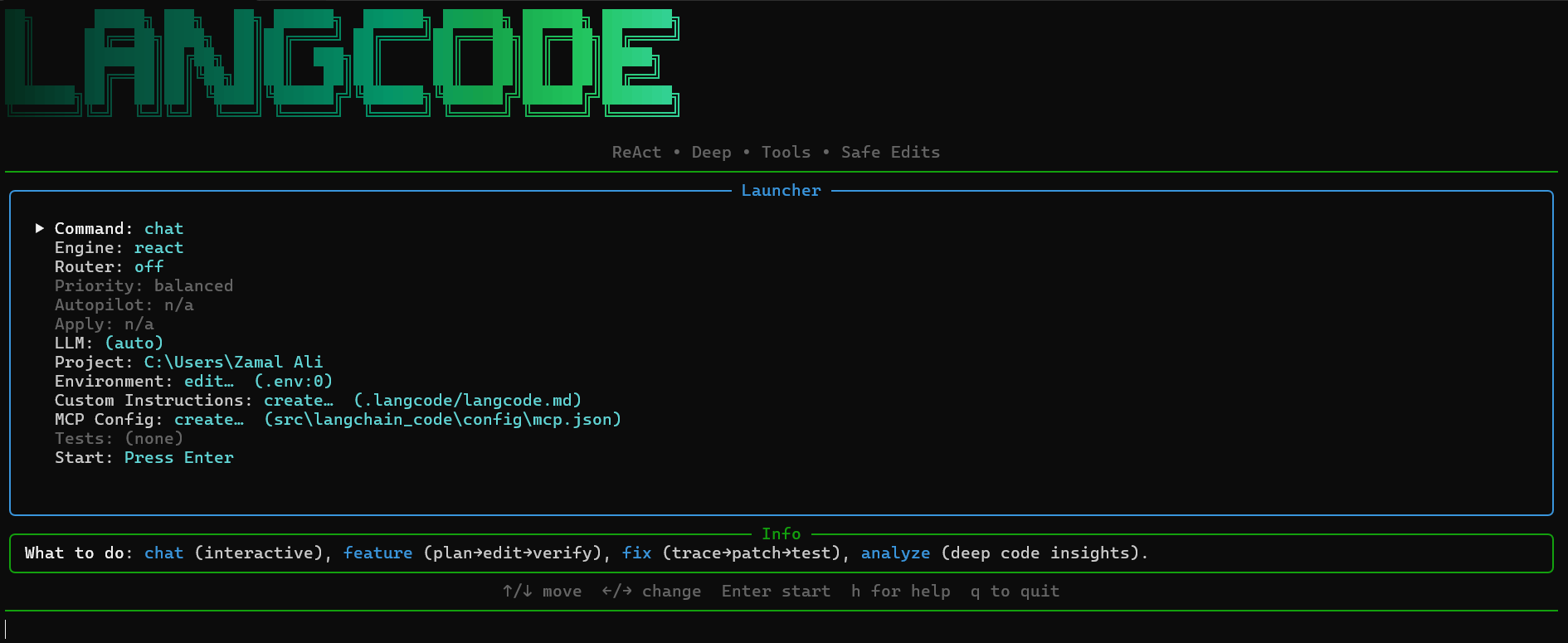







LangCode is the "one-key" developer CLI that unifies Gemini, Anthropic Claude, OpenAI, and Ollama with ReAct & Deep modesΓÇöfully inline, right in your terminal.
Get Started
Installation:
pip install langchain-code
Launch the Interactive Launcher:
Just type langcode in your terminal and hit Enter. This opens a user-friendly interactive menu where you can easily configure your session and access various functionalities without needing to remember specific command-line arguments. See the image shown above.
Interactive Mode
The interactive mode serves as the central hub for all your coding tasks. It allows you to:
- Choose a Command: Select what you want to do:
chat,feature,fix, oranalyze. - Configure the Engine: Pick between
react(fast and efficient) anddeep(for complex tasks). - Enable Smart Routing: Let LangCode automatically select the best LLM for each task.
- Set the Priority: Optimize for
cost,speed, orqualitywhen using smart routing. - Manage Autopilot: Enable fully autonomous mode for the Deep Agent (use with caution!).
- Toggle Apply Mode: Allow LangCode to automatically write changes to your file system.
- Select an LLM: Explicitly choose between Anthropic and Google Gemini, or let LangCode decide.
- Specify the Project Directory: Tell LangCode where your codebase is located.
- Edit Environment Variables: Quickly add or modify API keys and other settings in your
.envfile. - Customize Instructions: Open the
.langcode/langcode.mdfile to add project-specific guidelines. - Configure MCP Servers: Set up Model Context Protocol (MCP) servers for advanced tool integration.
- Edit Language Code: Modify the core language code directly from the main window.
- Specify MCP Servers: Configure Model Context Protocol (MCP) servers for advanced tool integration.
- Define a Test Command: Specify a command to run after making changes (e.g.,
pytest -q). - Access Help: Press
hto toggle help andqorEscto quit.
Core Commands
While the interactive launcher is the recommended way to use LangCode, you can also use the following commands directly from the terminal:
langcode chat: Starts an interactive chat session.langcode feature: Implements a new feature.langcode fix: Fixes a bug.langcode analyze: Analyzes the codebase.langcode instr: Opens the project instructions file.
Install & Run
pip install langchain-code
langcode
Contributing
Issues and PRs are welcome. Please open an issue to discuss substantial changes before submitting a PR. See CONTRIBUTING.md for guidelines.
License
MIT. See LICENSE.
Acknowledgments
LangCode draws inspiration from the design and developer experience of Google's Gemini CLI and Anthropic's Claude Code, unified into a single, streamlined tool.
1 maintainer

Metadata
1 maintainer
Release files for langchain-code 0.1.6
For a detailed explanation of source distributions (sdists) and built distributions (wheels), please see the package formats documentation.
Built distribution (wheel)
| File | Interpreter | ABI | Platform | Reset |
|---|---|---|---|---|
| langchain_code-0.1.6-py3-none-any.whl | Python 3 | none | any | Details |
Release files / langchain_code-0.1.6-py3-none-any.whl
| Download URL | langchain_code-0.1.6-py3-none-any.whl |
|---|---|
| Size | 97.7 kB |
| Tags | Python 3 |
|
SHA-256 checksum How to use checksums |
c9d3d38053168a8cec88807903a2b9dba584168ca5042767ee2d1bdf5ca76393
|
|
BLAKE2b-256 checksum How to use checksums |
936e065354d2890333e45ef401a0ad63d9dedf726d8c01d373dfe75a2af8135f
|
| Upload date | |
|
Uploaded using Trusted Publishing? What is trusted publishing? |
No |
| Uploaded via |
twine/6.2.0 CPython/3.11.5
|














