
This release is a pre-release and may not be stable for production use.
GPT Image by Ace Data Cloud for LangChain

Install langchain-gpt-image-acedatacloud to give a LangChain application typed GPT Image by Ace Data Cloud tools. This is an Ace-provided integration, not an official client of the service brand. It does not install the other four service modules. 中文 · Privacy.
1. Install
Intended official registry entry: PyPI langchain-gpt-image-acedatacloud. Publication and LangChain official listing are pending review; no marketplace listing is claimed. After publication:
python3 -m venv .venv
source .venv/bin/activate
python -m pip install langchain-gpt-image-acedatacloud
For current PR preview: clone AceDataCloud/LangChain, then pip install -e packages/core -e packages/gpt-image.
Get the application API Key
- Register or sign in → Applications. If no General application exists, choose Initialize General Application.
- Open the General application. Copy its API Key, or choose Manage Keys → Create to make a separately named LangChain key. Review expiration, usage limitations and Allowed APIs. Allow both the generation and same-ID task query paths used below. Confirm service access, balance and current pricing. No trial allowance is promised.
- Copy the raw token only, without
Bearer, quotation marks or redacted characters. Aplatform-...account-management token cannot replace this application key.
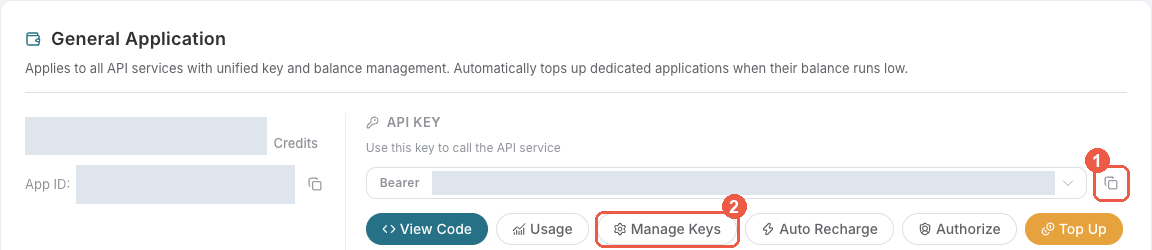
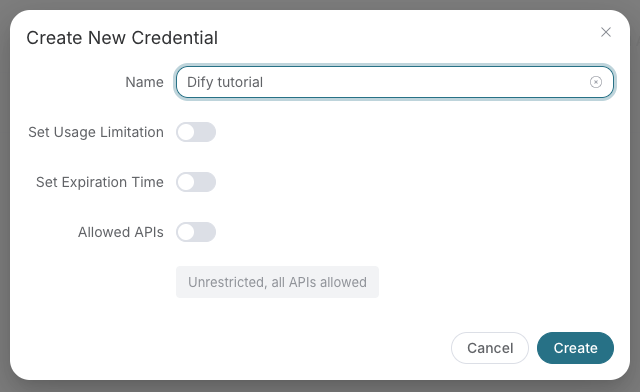
These are real Ace console screenshots reused from SunoDify, retrieved 2026-10-18; later console layouts may differ. They show credential setup, not a LangChain GUI. Real tokens are redacted.
export ACEDATACLOUD_API_TOKEN='your application key'
PowerShell: $env:ACEDATACLOUD_API_TOKEN='your application key'. Keep the token in the environment or secret manager, never in a prompt or workflow export.
2. Put the key in the client, not in model arguments
from langchain_acedatacloud import AceAPIClient
from langchain_gpt_image_acedatacloud import GPTImageToolkit

# No network requests: instantiate tools and inspect their names/schemas.
kit = GPTImageToolkit(client=AceAPIClient())
tools = kit.get_tools()  # Query-only by default.
print([tool.name for tool in tools])
There is no service-provider selection GUI in this package. Supply these LangChain BaseTool objects to your application or agent. Screenshots of another host's plugin authorization are not instructions for this Python integration.
3. First use, then query the same ID
After reviewing current service prices and deliberately authorizing one generation:
kit = GPTImageToolkit(client=AceAPIClient(), include_generation=True)
generate, retrieve = kit.get_tools()
# This line submits one paid generation if you choose to run it:
submitted = generate.invoke({"prompt": "A gentle sunrise scene"})
task_id = submitted["task_id"]
# Query the original ID; never call generate again just to wait:
result = retrieve.invoke({"task_id": task_id})
print(result["status"], result["terminal"], result["media_urls"])
gpt_image_generate_image submits one asynchronous request to /openai/images/generations. gpt_image_retrieve_task calls /openai/tasks with action=retrieve and the original id. A pending result is normal. Query that ID later until terminal=true; then inspect success/failure and final media URLs. The example shape is illustrative, not an actual paid result. Advanced edit/extend actions are not exposed in this initial toolkit.
Troubleshooting and cost
401: raw Key or token environment; 403: permissions, balance, expiry, Allowed APIs and response details; 429: reduce concurrency. For pending or a timeout, inspect the same task before any new submission. No automatic retries or hidden polling are performed. Usage History owns actual Credits. Avoid printing credentials or sending them to a model.
1 maintainer

Metadata
1 maintainer
Release files for langchain-gpt-image-acedatacloud 0.1.0rc1
For a detailed explanation of source distributions (sdists) and built distributions (wheels), please see the package formats documentation.
Built distribution (wheel)
| File | Interpreter | ABI | Platform | Reset |
|---|---|---|---|---|
| langchain_gpt_image_acedatacloud-0.1.0rc1-py3-none-any.whl | Python 3 | none | any | Details |
Release files / langchain_gpt_image_acedatacloud-0.1.0rc1-py3-none-any.whl
| Download URL | langchain_gpt_image_acedatacloud-0.1.0rc1-py3-none-any.whl |
|---|---|
| Size | 5.2 kB |
| Tags | Python 3 |
|
SHA-256 checksum How to use checksums |
9fc0f5bc12380b89815beb3efe3fb945d84f80a716637c591f6f43ed55f3263a
|
|
BLAKE2b-256 checksum How to use checksums |
2c8f1e80a4ef18a1c74879273eb73fd65d0b61447b18b10928315f549d953c2f
|
| Upload date | |
|
Uploaded using Trusted Publishing? What is trusted publishing? |
No |
| Uploaded via |
twine/7.0.0 CPython/3.12.10
|














