
🦜🔗 LangChain KernelBox



A stateful, persistent Python execution environment designed for building advanced LangChain and LangGraph agents.
When building dynamic code execution agents (like Market Research Analysts, Data Scientists, or DevOps Assistants), the standard PythonREPLTool fails. It is stateless. Every time the LLM writes code, it has to re-import libraries, re-download datasets, and re-define variables. This leads to slow execution, massive LLM token waste, and brittle agent behavior.
langchain-kernelbox solves this by providing a stateful IPython sandbox. The kernel stays alive across the entire conversation. If your agent scrapes a website in step 1, that data is still in memory for step 2.
⚡ Quick Install
uv add langchain-kernelbox
# or
pip install langchain-kernelbox
📖 How It Works
The package provides a single powerful tool: KernelBoxTool. It is a drop-in replacement for standard code executors but backed by a persistent Docker-based sandbox engine.
- Memory Persistence: Variables, functions, and imports stay in memory across LLM turns.
- Multi-Language: Supports Python and Bash execution natively.
- Safe & Sandboxed: Runs in a secure Docker container, preventing host system damage from rogue LLM code.
- Cost Effective: Cuts LLM token costs by over 50% by eliminating repetitive code generation.
🚀 Use Case 1: Stateful ReAct Agent (LangChain)
Imagine building a Data Science Agent. With KernelBoxTool, the agent can load a dataset once and iteratively analyze it.
import os
from langchain_kernelbox import KernelBoxTool
from langchain.agents import initialize_agent, AgentType
from langchain_google_genai import ChatGoogleGenerativeAI

# Configuration
os.environ["GOOGLE_API_KEY"] = "YOUR_API_KEY_HERE"

# 1. Initialize the stateful tool
tool = KernelBoxTool(session_id="data_analysis_session")
tools = [tool]

# 2. Setup your agent
llm = ChatGoogleGenerativeAI(
    model="gemini-3.1-flash-lite",
    temperature=0
)
agent = initialize_agent(tools, llm, agent=AgentType.STRUCTURED_CHAT_ZERO_SHOT_REACT_DESCRIPTION, verbose=True)

# Turn 1: The agent downloads data and loads it into a Pandas DataFrame
agent.run("Download https://example.com/market_data.csv and load it into a pandas dataframe named `df`.")

# Turn 2: The agent remembers `df`! It does NOT need to re-download or re-import pandas.
agent.run("What is the average price in the `df` dataframe?")

# Clean up the container when the conversation is over
tool.destroy()
🕸️ Use Case 2: Multi-Tenant Market Research Agent (LangGraph)
When building an application (like a Market Research App), multiple users will be talking to the agent at the same time. You cannot have them sharing the same Python kernel!
LangGraph solves state routing using thread_id. langchain-kernelbox provides get_session_id_from_config to seamlessly map LangGraph's thread_id to isolated KernelBox sandboxes.
import os
from typing import Annotated
from typing_extensions import TypedDict
from langchain_core.messages import BaseMessage, SystemMessage
from langchain_core.runnables.config import RunnableConfig
from langchain_google_genai import ChatGoogleGenerativeAI
from langchain_kernelbox import KernelBoxTool, get_session_id_from_config
from langgraph.graph import StateGraph, START, END
from langgraph.graph.message import add_messages

# Configuration & Keys
os.environ["GOOGLE_API_KEY"] = "YOUR_API_KEY_HERE"

class State(TypedDict):
    messages: Annotated[list[BaseMessage], add_messages]

# 1. The Agent Node
def agent_node(state: State, config: RunnableConfig):
    session_id = get_session_id_from_config(config)
    tool = KernelBoxTool(session_id=session_id)

    # 🎯 SMART SESSION UNDERSTANDING:
    # Since KernelBox holds the heavy data in memory, the LLM chat history naturally stays tiny!
    # We instruct the agent to query its own memory instead of relying on LLM context.
    system_msg = SystemMessage(content=(
        "You are a stateful AI. Your Python environment is persistent. "
        "To remember what variables exist, execute `dir()` or `%who`. "
        "Do NOT re-download data. Query the existing variables."
    ))

    # We pass the full valid message thread. Because KernelBox doesn't dump huge datasets
    # into the chat, you won't suffer from token burn!
    messages_to_send = [system_msg] + state["messages"]

    # Bind the specific user's tool to the LLM
    llm = ChatGoogleGenerativeAI(
        model="gemini-3.1-flash-lite",
        temperature=0
    )
    llm_with_tools = llm.bind_tools([tool])

    response = llm_with_tools.invoke(messages_to_send)
    return {"messages": [response]}

# 2. The Tool Execution Node
def tool_node(state: State, config: RunnableConfig):
    last_message = state["messages"][-1]

    # Re-initialize the tool to execute the code in the correct sandbox
    session_id = get_session_id_from_config(config)
    tool = KernelBoxTool(session_id=session_id)

    results = []
    for tool_call in last_message.tool_calls:
        if tool_call["name"] == tool.name:
            result = tool.invoke(tool_call["args"])
            results.append({
                "role": "tool",
                "tool_call_id": tool_call["id"],
                "name": tool.name,
                "content": str(result)
            })
    return {"messages": results}

def should_continue(state: State):
    return "tools" if state["messages"][-1].tool_calls else END

# 3. Build Graph
builder = StateGraph(State)
builder.add_node("agent", agent_node)
builder.add_node("tools", tool_node)
builder.add_edge(START, "agent")
builder.add_conditional_edges("agent", should_continue)
builder.add_edge("tools", "agent")
graph = builder.compile()

if __name__ == "__main__":

    print("\n============================================================")
    print("Turn 1: Install Packages and Load NVIDIA Stock Data")
    print("============================================================")

    res1 = graph.invoke(
        {
            "messages": [
                (
                    "user",
                    """
Install required Python packages: yfinance and pandas.

Then:

1. Import all required libraries.
2. Fetch NVIDIA (NVDA) historical stock market data using yfinance.
3. Load stock data from January 1, 2025 up to today's latest available market date.
4. Display:
   - Latest closing price
   - Latest trading volume
   - Highest price in latest trading session
   - Lowest price in latest trading session
   - Last 5 rows of the dataframe
5. Store the dataframe in memory as `nvda_df`.
6. Ensure dataframe index is datetime format.
"""
                )
            ]
        },
        config={"configurable": {"thread_id": "user_a"}}
    )

    for m in res1["messages"][-3:]:
        print(f"{m.type}: {m.content}")


    print("\n============================================================")
    print("Turn 2: Monthly Returns Analysis (2025-2026)")
    print("============================================================")

    res2 = graph.invoke(
        {
            "messages": [
                (
                    "user",
                    """
Using the stored `nvda_df` dataframe:

1. Calculate monthly returns using Adjusted Close prices.
2. Compute monthly percentage returns from January 2025 through April 2026.
3. Create a clean dataframe with:
   - Month
   - Monthly Return (%)
4. Display the complete monthly returns table.
5. Identify:
   - Best performing month
   - Worst performing month
6. Store the result as `monthly_returns_df`.
"""
                )
            ]
        },
        config={"configurable": {"thread_id": "user_a"}}
    )

    for m in res2["messages"][-3:]:
        print(f"{m.type}: {m.content}")


    print("\n============================================================")
    print("Turn 3: Jan-Apr 2026 Returns Summary")
    print("============================================================")

    res3 = graph.invoke(
        {
            "messages": [
                (
                    "user",
                    """
Using the stored `monthly_returns_df` dataframe:

1. Filter only these months from year 2026:
   - January
   - February
   - March
   - April

2. Display a clean summary table with:
   - Month
   - Monthly Return (%)

3. Also display:
   - Best performing month
   - Worst performing month

4. Round all percentage values to 2 decimal places.
"""
                )
            ]
        },
        config={"configurable": {"thread_id": "user_a"}}
    )

    for m in res3["messages"][-3:]:
        print(f"{m.type}: {m.content}")
🛠️ Advanced Agent Capabilities
To build robust agents, KernelBoxTool gives you control over the execution environment:
1. Bash Execution for Dependency Management
Agents often need to install libraries before writing code.
tool.run({
    "code": "pip install yfinance beautifulsoup4",
    "language": "bash"
})
2. Timeouts to Prevent Agent Infinite Loops
LLMs sometimes write while True loops. Protect your system with a hard timeout.
tool.run({
    "code": "while True: pass",
    "timeout": 5  # Agent will receive a TimeoutError after 5 seconds
})
3. Predictable Output Formatting for the LLM
Agents need to cleanly parse the result of their code. KernelBoxTool automatically formats outputs exactly how an LLM expects:
- Standard Output / Data:
STDOUT:\n<output> - Errors to fix:
ERROR: NameError: name 'df' is not defined\n<traceback> - Output Truncation (Token Safety): Appends
[WARNING: Output was truncated due to length limits.]so the LLM knows it generated too much text. - Return Values:
RETURN VALUE:\n<value>
📉 The ROI: Why Stateful Matters
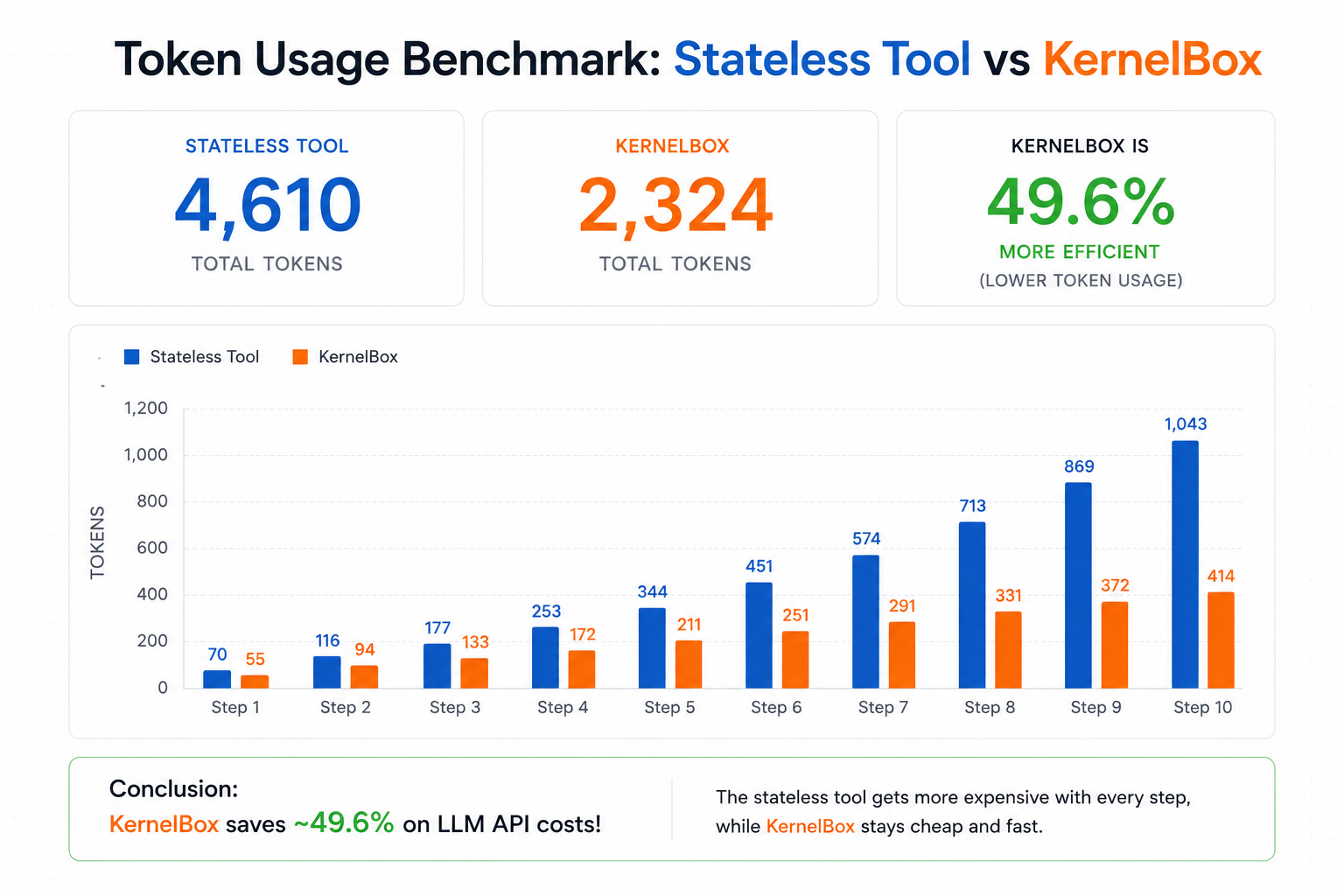
Stateless tools require your agent to re-write and re-send all prior code on every step. This causes a massive $O(N^2)$ spike in token costs as the conversation grows.
Because KernelBox remembers the context, the LLM only generates the next logical step.
# Run the benchmark yourself
uv run python benchmarks/token_audit.py
Conclusion: KernelBox saves ~49.6% on LLM API costs over a 10-step agent loop!
🛡️ Powered by KernelBox Core (Security)
Executing LLM-generated code on your host is extremely dangerous. langchain-kernelbox is built on top of KernelBox to provide a production-ready, highly secure sandbox out of the box:
- Docker-Backed: Runs entirely inside isolated containers.
- Non-Root Execution: Code runs as an unprivileged
sandbox_user. - Read-Only Mounts: Prevents the LLM from deleting or modifying core system files.
- No Privilege Escalation: Drops all Linux capabilities natively.
- KernelBox Core Engine: GitHub Repository
- Security Architecture: KernelBox Security
1 maintainer

Metadata
1 maintainer
Release files for langchain-kernelbox 0.1.2
For a detailed explanation of source distributions (sdists) and built distributions (wheels), please see the package formats documentation.
Source distribution (sdist)
| File | Size | Uploaded | |
|---|---|---|---|
| langchain_kernelbox-0.1.2.tar.gz | 1.5 MB | Details |
Built distribution (wheel)
| File | Interpreter | ABI | Platform | Reset |
|---|---|---|---|---|
| langchain_kernelbox-0.1.2-py3-none-any.whl | Python 3 | none | any | Details |
Total release size: 1.5 MB
Release files / langchain_kernelbox-0.1.2.tar.gz
| Download URL | langchain_kernelbox-0.1.2.tar.gz |
|---|---|
| Size | 1.5 MB |
| Tags | Source |
|
SHA-256 checksum How to use checksums |
2d698b294ef7eb91cb8b59563ff9a6e29690c6866c6056e75d7aa23cd0b94dec
|
|
BLAKE2b-256 checksum How to use checksums |
512df410dc73a4ac7a852df17988d3ce725a8da91664885558821a5d9ea13c09
|
| Upload date | |
|
Uploaded using Trusted Publishing? What is trusted publishing? |
No |
| Uploaded via |
uv/0.11.12 {"installer":{"name":"uv","version":"0.11.12","subcommand":["publish"]},"python":null,"implementation":{"name":null,"version":null},"distro":null,"system":{"name":null,"release":null},"cpu":null,"openssl_version":null,"setuptools_version":null,"rustc_version":null,"ci":null}
|
Release files / langchain_kernelbox-0.1.2-py3-none-any.whl
| Download URL | langchain_kernelbox-0.1.2-py3-none-any.whl |
|---|---|
| Size | 7.5 kB |
| Tags | Python 3 |
|
SHA-256 checksum How to use checksums |
ef4abb686146f163ddb1665f81e9de824add2e08ceafd45675607945fb242037
|
|
BLAKE2b-256 checksum How to use checksums |
8f40ad13e7c4abec1ddf027782d12bd8d24a02b72e27dd66139ab2ff48acab88
|
| Upload date | |
|
Uploaded using Trusted Publishing? What is trusted publishing? |
No |
| Uploaded via |
uv/0.11.12 {"installer":{"name":"uv","version":"0.11.12","subcommand":["publish"]},"python":null,"implementation":{"name":null,"version":null},"distro":null,"system":{"name":null,"release":null},"cpu":null,"openssl_version":null,"setuptools_version":null,"rustc_version":null,"ci":null}
|














