
langchain-visual-retrieval

langchain-visual-retrieval is a lightweight, provider-based visual retrieval package for LangChain. It adds a clean abstraction for vision-native search so applications can retrieve information from screenshots, diagrams, charts, and other visual content instead of relying only on plain text chunking.
This project is not a fork of LangChain or PixelRAG. Instead, it provides a reusable integration layer that lets LangChain-style applications work with visual retrieval backends through a small and stable interface.
Why Visual Retrieval?
Most Retrieval-Augmented Generation (RAG) pipelines begin by converting documents into plain text before creating embeddings.
The typical workflow looks like this:
Document
      │
Text Extraction
      │
Chunking
      │
Text Embeddings
      │
Vector Search
This approach works extremely well for text-centric documents. However, many real-world documents contain information that cannot be faithfully represented as plain text.
Examples include:
- UI screenshots
- dashboards
- presentation slides
- engineering drawings
- scientific figures
- architecture diagrams
- scanned PDFs
- web pages
- complex tables
- forms
During text extraction and chunking, important visual information may be lost or significantly reduced, including:
- document layout
- spatial relationships
- table structure
- visual hierarchy
- relative positioning
- typography
- graphical semantics
- interface organization
As a result, two visually different documents may become nearly identical after being converted into text, making retrieval more difficult for visually rich content.
Visual Retrieval takes a fundamentally different approach.
Instead of treating extracted text as the primary representation of a document, it treats the rendered visual page itself as the source of information.
Rendered Document
        │
Visual Embeddings
        │
Visual Index
        │
Visual Search
By embedding the visual representation rather than relying solely on extracted text, the retrieval pipeline can preserve information that traditional text chunking often cannot represent.
This makes it possible to retrieve information based on how a document actually looks, not only on the words it contains.
Traditional RAG asks:
"What words exist in this document?"
Visual Retrieval asks:
"What information is visible in this document?"
Visual Retrieval is not intended to replace traditional text retrieval.
Instead, it complements existing RAG pipelines by enabling retrieval over information that is inherently visual. Applications can combine both approaches depending on the characteristics of the underlying documents.
This provider-based architecture brings that capability to the LangChain ecosystem while remaining independent of any specific visual retrieval engine. PixelRAG serves as the first provider implementation, demonstrating how vision-native retrieval engines can integrate through a stable, reusable interface.
As multimodal AI continues to evolve, preserving the visual structure of documents will become increasingly important for Retrieval-Augmented Generation, enterprise search, document understanding, and next-generation AI assistants.
Why this matters
Traditional retrieval systems work well for text, but they often miss the information that lives in layout, structure, and appearance. A chart, a UI screenshot, a diagram, or a table can contain meaning that plain text parsing loses.
That is why visual retrieval is a major step forward for:
- document search over PDFs, web pages, and screenshots
- question answering over dashboards and reports
- retrieval of UI or product screenshots
- search over diagrams, architecture images, and technical drawings
- multimodal pipelines that combine text and image understanding
In short, this approach can be a real game changer for search engines, natural language processing, and retrieval-augmented generation because it expands retrieval beyond words and into how documents actually look.
What this package provides
The current package offers a minimal but extensible foundation:
- a provider abstraction for visual retrieval backends
- a first concrete PixelRAG-backed provider
- a retriever that returns structured visual results
- a compatibility adapter that converts visual results into LangChain documents
The design is intentionally simple so future providers can be added without changing the public API.
Current scope
This release focuses on:
- a provider-based interface for visual retrieval
- a PixelRAG provider implementation for search workflows
- a retriever experience that feels natural in LangChain-style code
- compatibility with LangChain document conventions
It does not attempt to implement a full visual RAG platform, a plugin registry, or a large multimodal stack. The goal is to provide a clean foundation that can grow over time.
Installation
Install from PyPI:
pip install langchain-visual-retrieval
For local development from this repository:
pip install -e .
Quickstart
The simplest way to use the package is to create a provider, wrap it in a retriever, and run a query.
from langchain_visual_retrieval import PixelRAGProvider, VisualRetriever

provider = PixelRAGProvider(endpoint="http://localhost:30001")
retriever = VisualRetriever(provider)

results = retriever.search("Find the Kubernetes deployment screenshot")

for result in results:
    print(result.model_dump())
Each result is a visual document object with fields such as:
- id
- source
- page
- image_path
- score
- metadata
Using image-based queries
The provider also supports image-style query payloads. This is useful when your input is a screenshot or another image rather than plain text.
import base64
from pathlib import Path

from langchain_visual_retrieval import PixelRAGProvider, VisualRetriever

provider = PixelRAGProvider(endpoint="http://localhost:30001")
retriever = VisualRetriever(provider)

image_path = Path("example.png")
image_bytes = image_path.read_bytes()
image_payload = {
    "image": base64.b64encode(image_bytes).decode("utf-8"),
    "text": "find the relevant UI screenshot",
}

results = retriever.search(image_payload)
Converting results to LangChain documents
If you need LangChain-compatible document objects, use the adapter layer:
from langchain_visual_retrieval import PixelRAGProvider, VisualRetriever

provider = PixelRAGProvider(endpoint="http://localhost:30001")
retriever = VisualRetriever(provider)

results = retriever.search("Find the deployment screenshot")
documents = retriever.as_documents("Find the deployment screenshot")

print(documents[0].metadata)
Geospatial Vector Retrieval (v0.1.3)
In addition to visual retrieval, this package now includes native geospatial vector retrieval for Shapefile and GeoPackage datasets. Search geographic features using spatial predicates (bounding box, intersection, containment, nearest-neighbor) and attribute filtering, returning LangChain-compatible documents.
Geospatial Quickstart
from langchain_visual_retrieval import GeoVectorProvider, GeoRetriever
from shapely.geometry import Point

# Initialize provider and retriever
provider = GeoVectorProvider()
retriever = GeoRetriever(provider, source="path/to/data.shp")

# Search by bounding box
results = retriever.search_bbox(
    bbox=(40.0, 30.0, 50.0, 40.0),  # (minx, miny, maxx, maxy)
    limit=10
)

# Search by geometry intersection
point = Point(45.0, 35.0)
results = retriever.search_intersects(point, limit=5)

# Combined spatial + attribute filtering
results = retriever.search_bbox(
    bbox=(40.0, 30.0, 50.0, 40.0),
    where={"area": [">", 1000]},  # Filter by attribute
    limit=10
)

# Access LangChain Document metadata
for doc in results:
    print(f"Feature: {doc.metadata['feature_id']}")
    print(f"CRS: {doc.metadata['crs']}")
    print(f"Geometry: {doc.page_content}")
Supported Formats
- Shapefile (.shp)
- GeoPackage (.gpkg)
Query Types
- Bounding box search:
search_bbox(bbox) - Geometry intersection:
search_intersects(geometry) - Geometry containment:
search_contains(geometry) - Nearest-neighbor:
search_nearest(geometry, k) - Spatial + Attribute filtering: All query types support optional
whereparameter
Geospatial retrieval is designed for production use with real geographic datasets. All spatial queries use efficient STRtree indexing; no full-dataset scans are performed.
Architecture at a glance
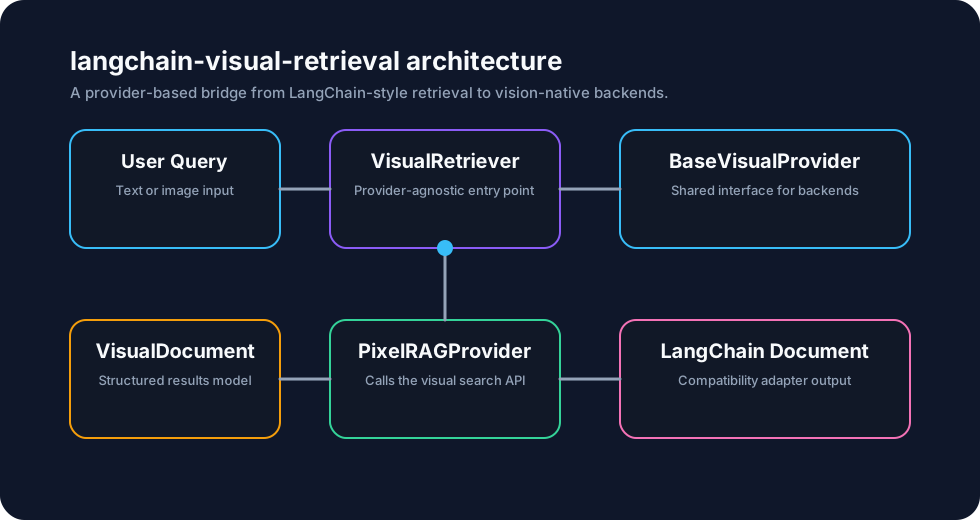
The package follows a simple dependency flow:
- user code uses VisualRetriever
- the retriever calls a provider through the shared interface
- the provider returns structured visual results
- those results can optionally be converted into LangChain documents
This keeps the public API provider-independent while allowing the implementation to stay lightweight and easy to extend.
Extending with other providers
The package is designed for future providers. To add another backend, implement the same minimal provider interface and keep your logic inside that provider. The retriever and the public API do not need to change.
License and attribution
This package is distributed under the MIT license.
If you use PixelRAG as a backend, please follow the relevant PixelRAG licensing and attribution terms.
Summary
langchain-visual-retrieval introduces a practical and extensible path for bringing visual retrieval into LangChain-based systems. It is especially useful when search needs to understand the appearance of documents, not just their text content.
If you are working on multimodal search, screenshot retrieval, visual document understanding, or layout-aware RAG, this package provides a clean starting point.
Ultimately, the goal of this project is not to replace LangChain's existing retrieval ecosystem, but to extend it with a missing capability: Vision-Native Retrieval.
Just as text embeddings made semantic search practical for natural language, visual retrieval opens the door to searching information that lives in layout, appearance, and visual structure—without forcing every document to be reduced to plain text first.
1 maintainer

Metadata
1 maintainer
Release files for langchain-visual-retrieval 0.1.3
For a detailed explanation of source distributions (sdists) and built distributions (wheels), please see the package formats documentation.
Source distribution (sdist)
| File | Size | Uploaded | |
|---|---|---|---|
| langchain_visual_retrieval-0.1.3.tar.gz | 13.5 MB | Details |
Built distribution (wheel)
| File | Interpreter | ABI | Platform | Reset |
|---|---|---|---|---|
| langchain_visual_retrieval-0.1.3-py3-none-any.whl | Python 3 | none | any | Details |
Total release size: 13.5 MB
Release files / langchain_visual_retrieval-0.1.3.tar.gz
| Download URL | langchain_visual_retrieval-0.1.3.tar.gz |
|---|---|
| Size | 13.5 MB |
| Tags | Source |
|
SHA-256 checksum How to use checksums |
8b3204e0dc349e80e180df8624a08f5cdbf1779c802f4ecdd49146c41a9c2da1
|
|
BLAKE2b-256 checksum How to use checksums |
cbb507cdda54c736826df1b72a281a65020b4c09d81051554d0bed4b1fe4ef5a
|
| Upload date | |
|
Uploaded using Trusted Publishing? What is trusted publishing? |
No |
| Uploaded via |
twine/6.1.0 CPython/3.13.12
|
Release files / langchain_visual_retrieval-0.1.3-py3-none-any.whl
| Download URL | langchain_visual_retrieval-0.1.3-py3-none-any.whl |
|---|---|
| Size | 21.4 kB |
| Tags | Python 3 |
|
SHA-256 checksum How to use checksums |
b649fd2cd45eb12c5fe6c74474ed9c2efd4e1063ae6d5b50d99ef37b7ecae82e
|
|
BLAKE2b-256 checksum How to use checksums |
ea92d5f620936c9bfe2ed8e5190001c116588de18edc68d6ecb3ba440a8a0ed7
|
| Upload date | |
|
Uploaded using Trusted Publishing? What is trusted publishing? |
No |
| Uploaded via |
twine/6.1.0 CPython/3.13.12
|














